Automate your Business Process
Assignment Rules
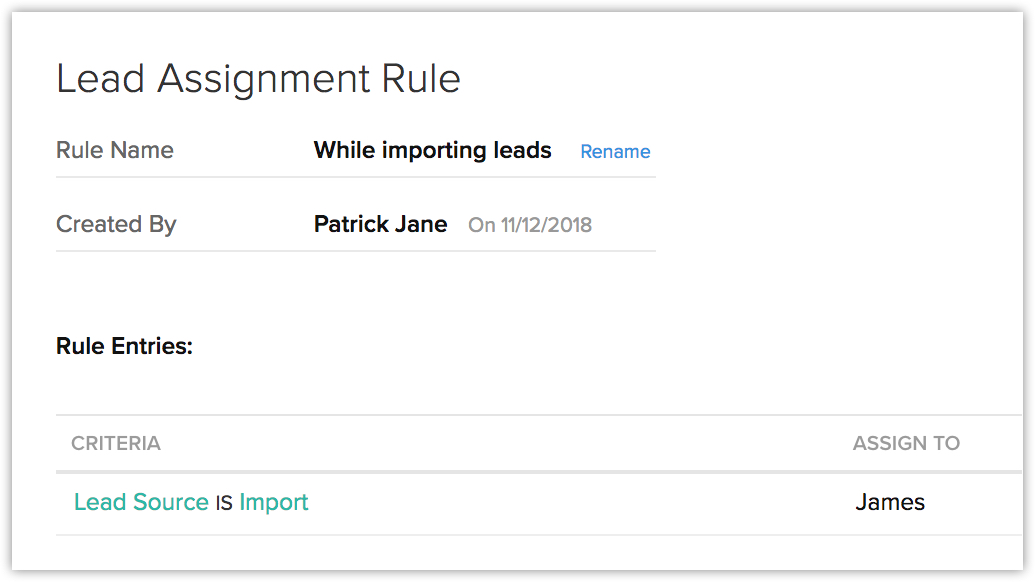
Assignment rules allow you to assign records to a user automatically. Let's say you have 2,500 leads to import and you want to assign them all to James, a user in your CRM account. You can do this easily using assignment rules.
Approval Process
Some business processes require approval from superiors before the action can be carried out. Getting their approval manually can take a lot of time. Zoho CRM makes things easy for you by automating this process.
Let's take a simple example: Developers at Zylker have to get their manager's approval before upgrading a device or getting a new device. Sending this request via email can be risky as it is easy for the manager to miss it in their inbox. To avoid this situation, create approval process, which allows the manager to approve the request with a simple click.
Workflow Rules
In any business process, certain actions like following up with a customer, updating lead status after a lead is contacted, and adding tasks for a lead are performed on a regular basis and take up a lot of time. You can use workflow rules to automate these processes and minimize manual work.
Let's look at the following scenario:
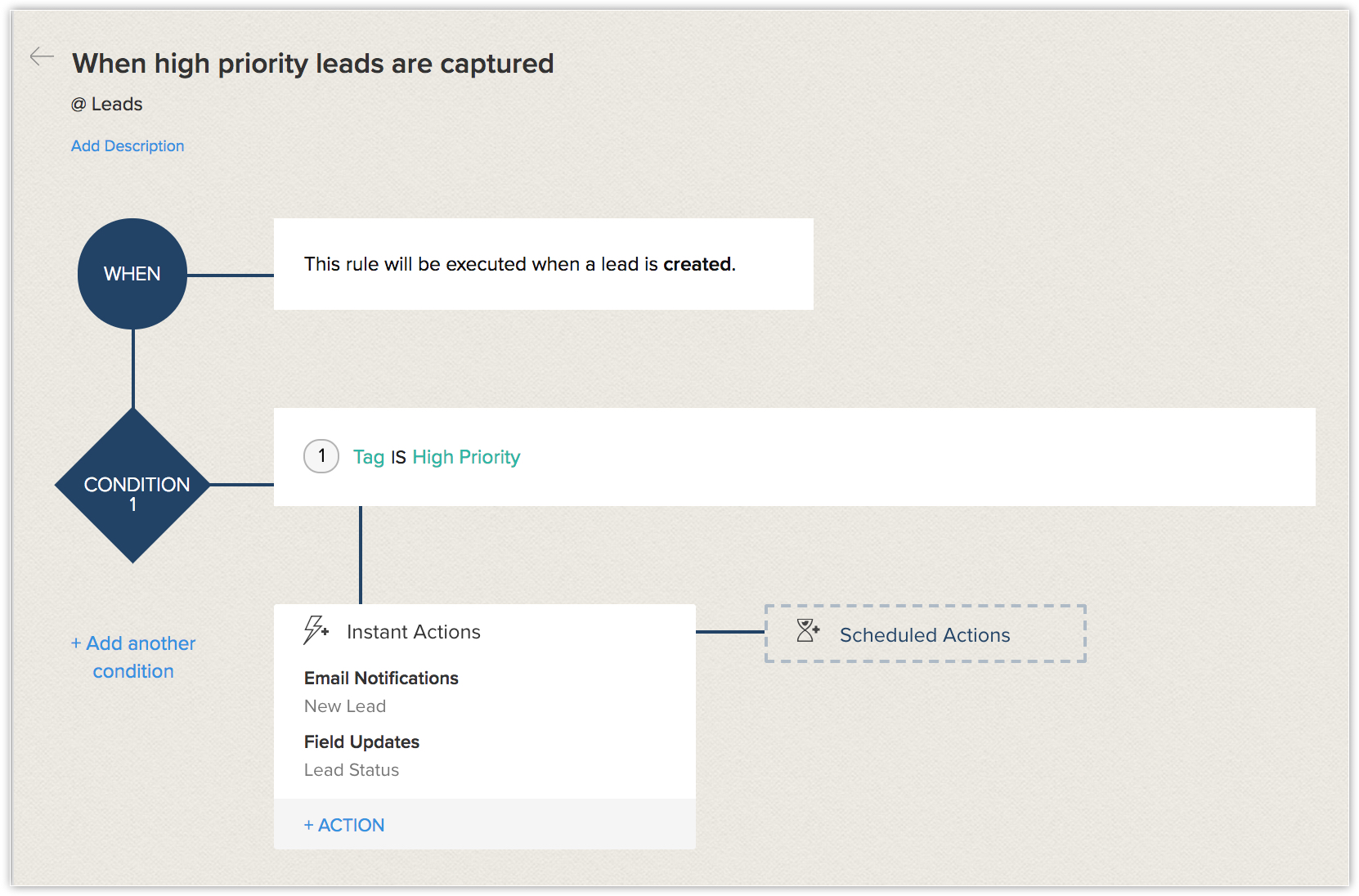
When high priority leads are captured in Zoho CRM, the Lead Owner wants to carry out the following actions:
- Send email notification to the relevant manager
- Update the Lead Status field to Contacted
This process might not take too long for a small number of high priority leads, but the more leads there are, the more work is required.
Here's how Workflow rules can solve the problem.
Create a workflow rule in Zoho CRM so that when a lead is created and tagged as High Priority, the associated manager will be notified immediately and the status field is updated to Contacted. This will happen automatically every time a high priority lead is added to the account.
Blueprint
A blueprint is a functional, visual representation of all the elements that are crucial to a successful sales process. Designing a blueprint for your process is like planning the most efficient route before you begin a journey: it helps you stay on track to your goals.
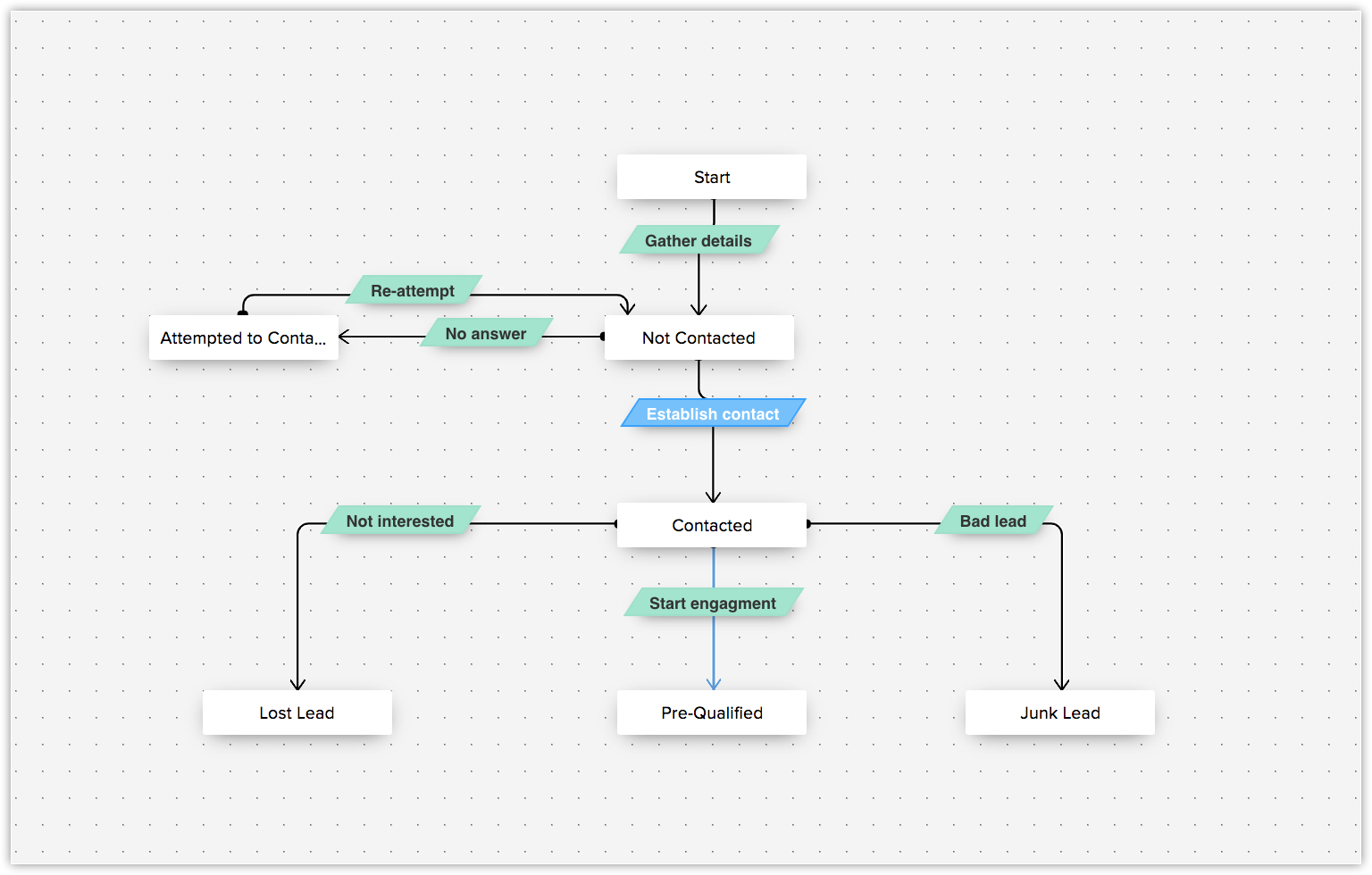
Let's look at lead nurturing. You need to first gather details about a lead to add them to your account, then establish contact. When you try to establish contact your lead might not answer your call, in which case you would need to try again the next day. Once you have successfully established communication with your lead, the possible outcomes can be:
- The lead is not interested
- It is a junk lead
- The lead is legitimate and you can start engaging
It's important to determine which of these applies to the lead so you can identify which leads are worth pursuing and how to follow up. Categorizing the lead in CRM ensures that the correct level of attention is given to the lead and that the sales rep understands the next steps to take.
Schedules
Schedules allow you to set up automated actions to be executed instantly or at a specified time. You can also choose to run these schedules daily, weekly, or monthly. Schedules also allow you to integrate with and sync data with third-party applications.
Actions
Various actions in your sales process can be automated with the help of actions. Zoho CRM allows you to perform five different actions. They are as follows:
- Email Notifications: Create email notifications to be sent to your leads or contacts. When the email notifications are associated with a workflow rule, they will be triggered automatically. For example, you could send a welcome email when a lead is added to your CRM account.
- Tasks: Create tasks for users in your CRM account. For example, if you want to assign tasks to a user once a lead is added to your CRM account, you can create the task and associate it with the workflow rule so that it is assigned automatically.
- Field Updates: Update CRM fields with appropriate values. For example, if you want to update the lead status field to Contacted once a task is completed, you can do so by creating a field update action and associating it with a workflow rule.
- Webhooks: Send web notifications to a third-party application when certain events occur in your CRM account.
- Custom Functions: Allows you to execute customized programming scripts to update records in CRM or a third-party application.
Case Escalation Rules
Some tasks may not be carried out by the person they are assigned to, for various reasons. You can set up case escalation rules, which escalates the task to the next member in your organizational hierarchy, to ensure that the task is still completed on time.
Scoring Rules
Scoring rules help you identify the records which are worth spending your time on so that you can concentrate on the records which require your attention. You can also determine appropriate actions for records which aren't progressing through your sales pipeline.
Zoho CRM Training Programs
Learn how to use the best tools for sales force automation and better customer engagement from Zoho's implementation specialists.
Zoho DataPrep Personalized Demo
If you'd like a personalized walk-through of our data preparation tool, please request a demo and we'll be happy to show you how to get the best out of Zoho DataPrep.
- Zoho Workerly Home
- Forums
- Connect With Us:


- Zoho Recruit Home
- Forums
- Connect With Us:
You are currently viewing the help pages of Qntrl’s earlier version. Click here to view our latest version—Qntrl 3.0's help articles.





Zoho Sheet Resources
Zoho Forms Resources
Zoho Sign Resources
Sign, Paperless!
Zoho TeamInbox Resources
Zoho DataPrep Resources
Design. Discuss. Deliver.
Related Articles
FAQs: Approval Process
What is an approval process? Approval processes allow organizations to streamline the approval of various business activities across Zoho CRM. For example, an organization may need a senior member to approve sales orders, budgets, capital expenses, ...Approval Process: an Overview
There may be several instances in your business when certain actions need approval from one or more senior decision-makers. For instance, sales reps offering product discounts to customers need the approval of their manager before they do so. ...Adding an Approval Process
Each approval process is associated to a rule that defines the process. You need to specify the rule criteria, the approval authority and also actions that need to be carried out on approval or rejection. Create approval processes for purchase ...Reorder Approval Processes and Process Rules
When there are multiple approval processes for a module, the system checks if a record matches the criteria in an approval process in the same order in which it is listed. By default, the approval processes are listed in a chronological order with ...Review Process
Why is review process required in business? It is always the best practice to analyse, and most importantly, verify the information that enters the organisation’s database. In the long run it helps in maintaining a clean database and saves a lot of ...