Managing Article List Views
Article List Views are beneficial for displaying articles that were published, drafted or pending review in your knowledge base. For example, you may be the KB owner interested in following-up on the articles that needs review or you may want to filter out the articles that were meant for your internal agents. The best way to handle these scenarios is to filter the articles using the list views. You can also use the article List Views for updating article permissions, adding tags, deleting articles in bulk and moving articles between sections.
Filter Articles
You can filter articles based on their visibility or expiry. The visibility filter allows you to narrow your articles according to whether articles are displayed to all users, registered users or agents. Likewise, the expiry filter allows you to restrict the list of displayed articles to those expiring in a month, next 7 days and today.
Set Display Preferences
By default, Zoho Desk will display only 10 articles per page. However, you can select the Preferences icon (  ) and then click the Records Per Page menu to choose the number of records to be displayed on a page. A maximum of 50 articles can be viewed per page. The system will remember your selection, the next time you access article list views.
Besides this, you can sort the articles based on 2 parameters, namely:
- Created Time and
- Modified Time
Select the Preferences icon ( ) and then click the Sort By menu to sort your knowledge base articles by one of the above parameters.
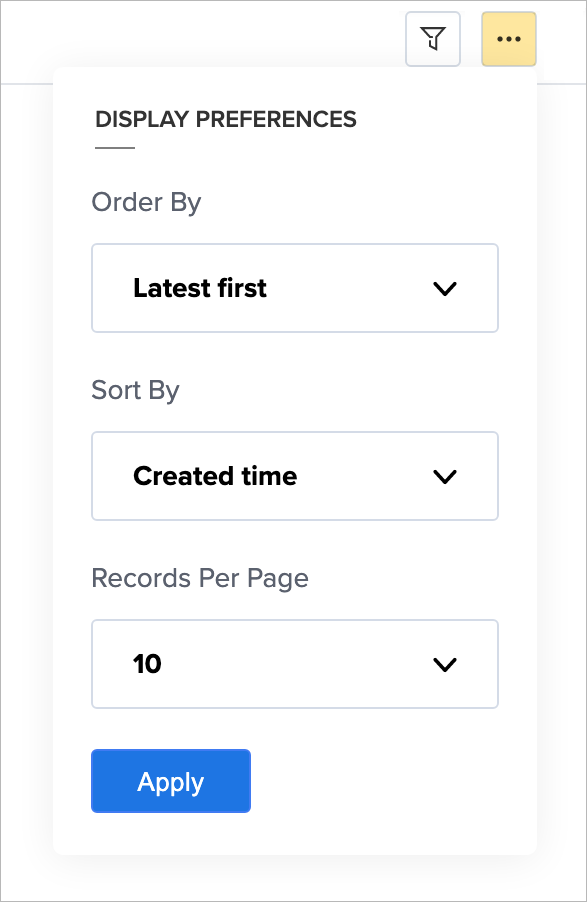
Sort Article Order
Articles in the list view can be sorted by the latest or oldest order. You can select the Preferences icon ( ) and then click the Order By menu to sort articles by age.
Mass Actions in Article List Views
Article List View allows you to perform certain updates to many articles at once. This way, you need not fiddle with each of your articles and can save a lot of your time. You can perform the following mass actions on articles:
- Update Articles
- Delete Articles
- Move Articles
You can perform the above said bulk actions even to a lone article.
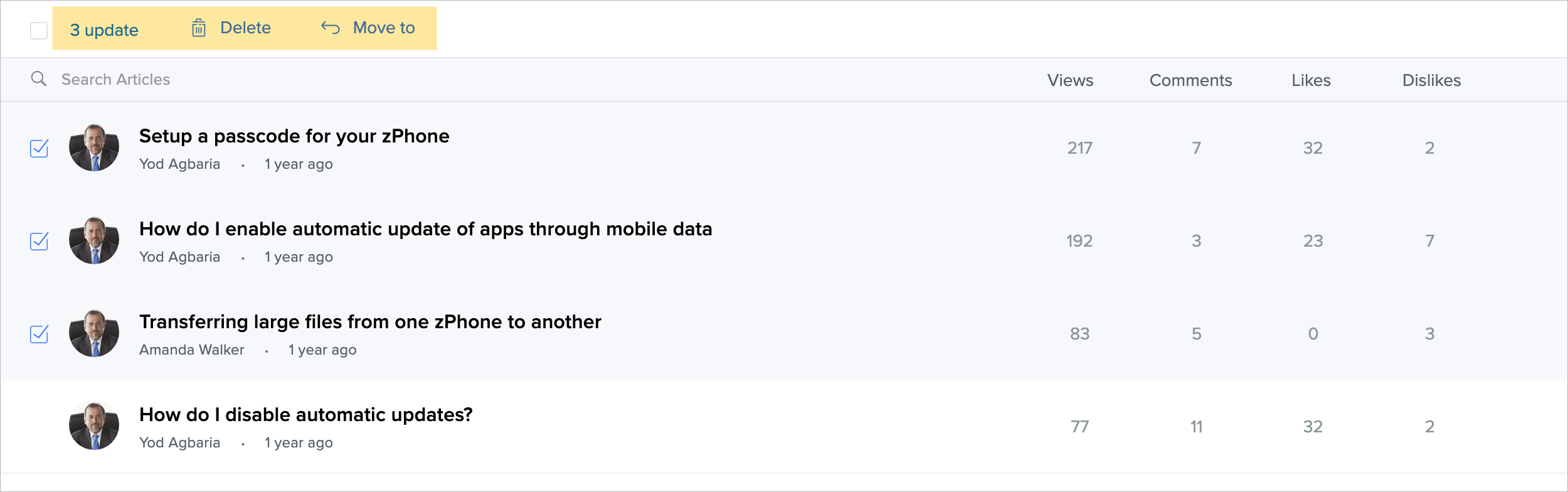
I. To update one or more article(s)-
- Select the article(s).
- Click Update from the mass actions list.
- Select the field to be updated and specify the new values for it.
You can update the display permission, add a tag, set status to publish (only for drafts), or set expiry date. - Click Save.
II. To delete one or more article(s)-
- Select the article(s).
- Click Delete from the mass actions list.
- In the confirmation dialog box, click Delete.
III. To move one or more article(s)-
- Select the article(s).
- Click Move To from the mass actions list.
You must specify a category, section and sub-sections to move the articles underneath it. - Click Move Articles.
Note:
- Moving articles between categories are not immediate. It might take from a few seconds to a couple of minutes, depending on the number of articles. Do not attempt to redo the action more than once.
- Administrators can move articles between categories, regardless of who owns the article; while other users can only move those owned by them.
- Only users with Profile permission to Manage Knowledge base can perform mass actions.
Zoho CRM Training Programs
Learn how to use the best tools for sales force automation and better customer engagement from Zoho's implementation specialists.
Zoho DataPrep Personalized Demo
If you'd like a personalized walk-through of our data preparation tool, please request a demo and we'll be happy to show you how to get the best out of Zoho DataPrep.
- Zoho Workerly Home
- Forums
- Connect With Us:


- Zoho Recruit Home
- Forums
- Connect With Us:
You are currently viewing the help pages of Qntrl’s earlier version. Click here to view our latest version—Qntrl 3.0's help articles.
New to Zoho Survey?





Zoho Sheet Resources
Zoho Forms Resources
New to Zoho Sign?
Zoho Sign Resources
Sign, Paperless!
New to Zoho TeamInbox?
Zoho TeamInbox Resources
New to Zoho ZeptoMail?
Zoho DataPrep Resources
Design. Discuss. Deliver.
New to Zoho Workerly?
New to Zoho Recruit?
New to Zoho CRM?
New to Zoho Projects?
New to Zoho Sprints?
New to Zoho Assist?
New to Bigin?
Related Articles
Knowledge Base Article Views
The Knowledge Base (KB) module in the Zoho Desk is the information center that acts as a self-service repository for your customers. Customers can refer to the articles in the KB and solve product-related issues on their own. Knowledge base profile ...Predefined and Custom Ticket List Views
List Views are used to group records based on a defined set of criteria. For example, you can view a list of Open tickets that are unassigned, a view for tickets that are overdue, or a view for tickets that are created in the last week. This way ...Add, Edit, Clone, Unpublish and Delete KBase Articles
The Knowledge Base is where your customers can access the solution articles you create for addressing various issues. You can create articles and group them under custom sections for ease of access. Before you get started with adding articles, please ...Predefined and Custom Call Views
Call List Views are used to group your calls based on a defined set of criteria. For example, you can see a list of the calls that were missed, completed or are due today. Besides these, you can use the call list views to change a call's owner, ...Allowing Public Comments on Knowledge Base Articles
Customer feedback plays an important role in improving products, as well as the instructional resources associated with them. With more organizations implementing self-service customer support models, it's imperative to give customers an opportunity ...
New to Zoho LandingPage?
Zoho LandingPage Resources