Working with Telephony
Making Calls
Outbound calls can be made from records available in Leads, Contacts and Accounts modules in Zoho CRM. Please note that, if you have configured Ringio, the option to use the keypad, mute and hold will not be available.
To make an outbound call
- Click a [Module] tab.
- Click on a record from the list.
- In the Record Details page, click the Telephone Icon next to the phone number.
The call will be initiated with a pop-up screen having a business card view of the record.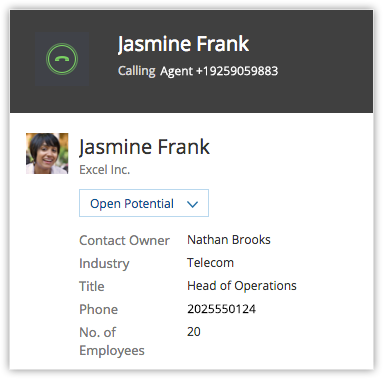
Options
Call Reminder
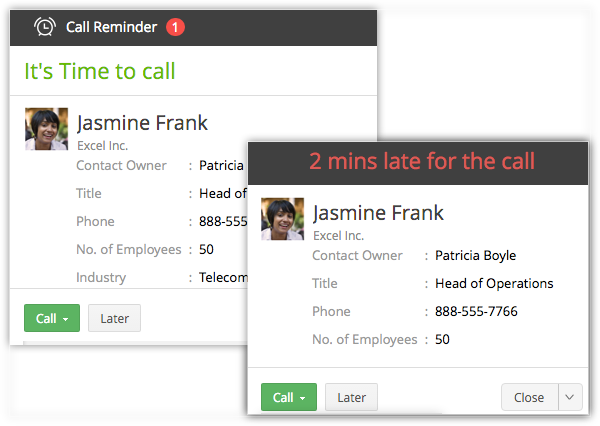
Get reminded of the call that you need to make. In the middle of something? Drafting an email or in a discussion or on another call that extented for a few more minutes? Snooze the reminder and call later.
Business Card View Details
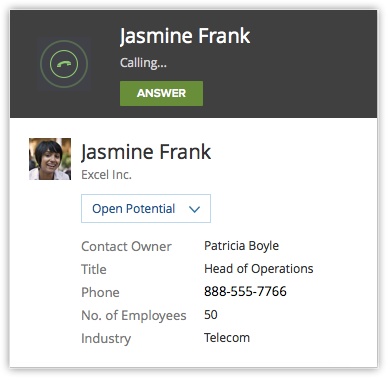
Take a quick glance at the essential details that are pulled from the business card view of the record.
Call Description and Follow-up Activity
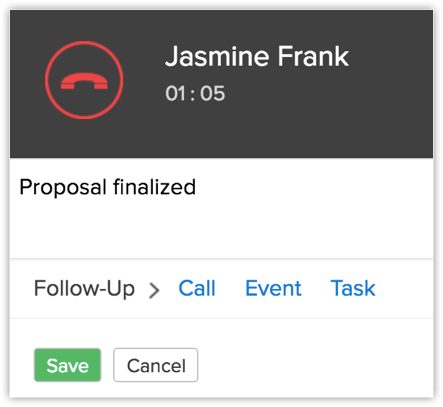
Enter a call description during the call and also after you hang up. The description entered will automatically be updated in the Description field of the Call under the Call Information section in the Calls module. Also, add a follow-up task, create an event, or call right after the call and assign it to the sales rep.
Log Calls
After inbound and outbound call, they are automatically logged.
Receive Calls
When you receive calls, Zoho CRM pulls out the details of the customer who is calling and displays details from the record's business card view.
Options
Business Card View Details
Take a quick glance at the essential details that are pulled from the Business Card View of the record. In case of callers whose details you do not have in the CRM database, you can always add them as a contact after the call.
Call Description and Follow-up Activity
Enter a call description during the call and also after you have completed the call. The description entered will automatically be updated in the Description field of the Call under the Call Information section in the Calls module. Also add a follow-up task, create an event or call right after the call and assign it to the sales rep.
Log Calls
All incoming and outgoing calls are automatically logged in the Calls module.
To view call logs
- Click the Calls module.
- Select the All Calls list view.
- Click on any desired record to view the call details.
Zoho CRM Training Programs
Learn how to use the best tools for sales force automation and better customer engagement from Zoho's implementation specialists.
Zoho DataPrep Personalized Demo
If you'd like a personalized walk-through of our data preparation tool, please request a demo and we'll be happy to show you how to get the best out of Zoho DataPrep.
- Zoho Workerly Home
- Forums
- Connect With Us:


- Zoho Recruit Home
- Forums
- Connect With Us:
You are currently viewing the help pages of Qntrl’s earlier version. Click here to view our latest version—Qntrl 3.0's help articles.





Zoho Sheet Resources
Zoho Forms Resources
Zoho Sign Resources
Sign, Paperless!
Zoho TeamInbox Resources
Zoho DataPrep Resources
Design. Discuss. Deliver.
Related Articles
Telephony - An Introduction
Many salespeople spend a significant portion of their day making and receiving calls. For example: SDRs place large numbers of calls to reach out to potential clients and source appointments for account executives. Account executives engage with ...Using Built-In Telephony
Once built-in telephony is set up, users can personalize their phone preferences, manage user availability, make outgoing calls, receive calls, view calls in conversation and calls in queue, and add follow-up activities in CRM. Set User Availability ...Working with Built-in Telephony
This guide will cover the information needed for a CRM admin to maintain the built-in Telephony feature in Zoho CRM. Please use the table of contents on the right hand side (under On this page) to navigate through this document. If you're accessing ...Configuring built-in telephony in Zoho CRM
This guide covers the information needed for a CRM admin to set up the built-in Telephony feature in Zoho CRM. Once you've identified your company's telephony needs, you can compare telephony providers based on key features, Zoho CRM integration, ...Logging Calls
Activities module is split up into Tasks, Calls and Meetings modules. This change will reflect for users who signed up after September 6, 2021. Existing users will have both the Activities module and the individual Tasks, Calls and Meetings modules ...