Understand describing fields using tooltip and help text

- Applicable to following field types: All except auto number, formula, and add notes.
- Learn how to set description for fields.
The Description field property enables you to provide some additional information or instruction to assist your users in entering an appropriate input in the fields. You can describe a field in your form using one of the following:
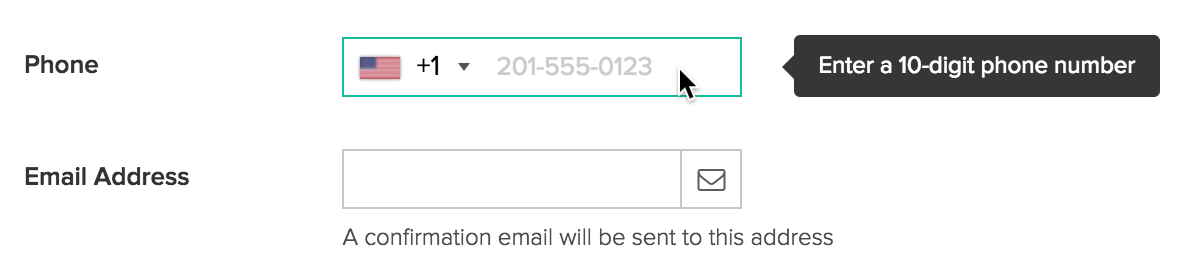
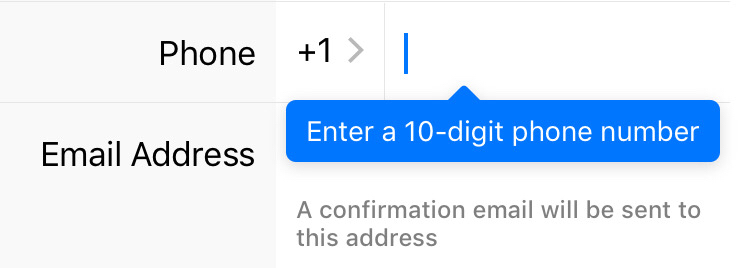
- Tooltip: It's displayed when users hover over fields.
- Help Text: It's displayed below the field's input area.
Below is how tooltips and help texts appear on a form:
- When a user accesses from a web browser:
- When a user accesses from a phone or tablet:
Character limits
- Description can contain letters from any language, numbers, and special characters
- Description can contain up to 255 characters
Other provisions to assist users in entering data
- You may choose to simply have a descriptive field label. Learn more about the field name property
- You may set an initial value for a field
- An initial value can speed up a user in filling your form — the field comes prefilled
- You may add an add notes field to your form:
- The Add Notes field can display rich text data, even render HTML and CSS code
- Unlike a tooltip, the add notes field will always be visible on the form
- Like any other field, you can dynamically show and hide the add notes field on your form.





