What's New
TIMELINE
2026
May
WhatsApp Integration
NewConnect your WhatsApp Business account with Zoho Projects to send real-time updates to your customers. This works across modules supported in workflow rules, including custom modules. Using approved message templates, notifications can be triggered automatically.
Read MoreUser Custom Fields and Revamped UI
Zoho Projects now supports user custom fields. These fields can be used to capture more information about a user and customize the user invite form as well. We have also provided easier access to the Users module from the left navigation panel.
Read MoreField Level Permission for Time Logs
EnhancementsField level permissions are available for time logs. Control access to minute details in time logs to maintain accuracy and security.
Read MoreApr
Historically, project management tools weren't designed for the real, messy, and rewarding ways that teams work. Rather, most teams adapted themselves to the tool with workarounds. Zoho Projects Infinity changes all that.
Read MoreCustom Modules Support in Zoho Projects Mobile Apps
Mobile AppCustom Modules in Zoho Projects are now available in both Android and iOS apps allowing users to capture specific data and tailor it to unique business processes while on the move. Please update to the latest version of the mobile app on the Google Play Store or Apple App Store to access this feature.
Read MoreTask List Flag Header
Mobile AppTask list flag information (Internal or External) is now available next to the heading in the iOS app. This allows users to distinguish task lists that can be accessed by clients and those that are only available to portal users.
Read MoreSummary Field
NewSummarize the values recorded in the child module to the parent module. Pull data from multiple entities and summarizes it into one value as per your requirement. Summary Field offers a collection of aggregate functions and can calculate sum, average, minimum, maximum, count, record count and unique count value of the selected module and field in the parent entity column.
Read MoreMar
Workflow Rules for Time Logs
EnhancementsFeb
AI Hub
NewAI Hub enables users to utilize AI-powered capabilities like Zia insights, translation, summaries, and task creation. With AI Bridge, users can connect and use AI tools like Zia, ChatGPT, Gemini, etc, across Zoho Projects.
Read MoreJan
Zoho DAP Integration
NewZoho DAP for Zoho Projects enables users to create Interactive Videos, Guides, Banners, and product walkthroughs within the portal. Once integrated, teams can deliver contextual guidance to users exactly when they need it.
Read MoreCustom Module Gallery
EnhancementsWe have introduced the Module Gallery, a collection of predefined modules that users can browse and add with a single click. This allows teams to get started quickly without building data structures from scratch.
2025
Dec
Custom Modules
NewWe have introduced custom modules, allowing users to tailor their projects in multiple ways. Custom Modules give you the flexibility to create workflows around how your business operates
Read MoreCustom Reports
NewUsers can customize the Key Performance Indicators (KPI) of reports and display metrics with custom units and decimal precision.
Read MoreZoho Sign Extension
NewThis extension allows users to send documents for signature directly from Zoho Projects without switching platforms.
Read MoreCodex Scripts
NewCodeX Scripts allows users define custom validations or restrictions using JavaScript for Projects and Tasks.
Read MoreConnect Module
NewConnect Module field allows users to link records across different modules in Zoho Projects, helping users establish relationships between related work items. Both default (phases, tasks and issues,) and user defined custom modules can be linked to projects, phases, tasks, issues, time logs, and custom modules. Users can choose to display a related list within the linked module and vice versa. Related list displays the related records from other modules in its details page.
Read MoreNov
Timesheets
NewWe have now introduced a new version of Timesheets. Timesheet is a collection of time logs grouped together for easier review and approval. This module is only available when the approval setting is enabled Based on Timesheet in the Portal Configuration.
Read MoreUser Automation
NewUser Workflow rules allow actions to be executed through criteria and conditions centered around users of the portal.
Read MoreRecycle Bin
EnhancementsWe have increased the retention window for the items in Recycle Bin to 60 days from the earlier 30 days.
Read MoreOct
Access Control for Time Logs
EnhancementsEnabling user hierarchy now also allows access control to time logs belonging to subordinates and direct reports via Profiles. This is supported for View, Add, Edit, & Delete operations. Additionally, users with permission to delete their own time logs can now delete them in bulk.
Read MoreOrganize Reports with Folders
EnhancementsReports can now be grouped into folders to maintain a clear and ordered structure. Users can create new folders for specific modules and edit existing ones as reports evolve.
Read MoreSep
Long URLs
EnhancementsZoho Projects now supports long URL field in Task Layouts. Users can now add URLs with up to 1000 characters.
Read MoreAdd Task List to a Project Template from another Project Template
EnhancementsUsers can now add a task list to a project template from an existing template.
Read MoreZoho Flow Integration
NewThe Zoho Flow integration allows users to connect Zoho Projects with other applications. The actions can be added to workflow rules and blueprints. This connects projects and tasks with third party applications.
Read MoreAug
Task Groups
EnhancementsTasks can now be grouped using custom or default fields for a more focused task management.
Read MoreReactions in Comments
NewUsers can now react to comments instead of replying with text. This will allows users to keep the conversations short and light.
Read MoreTimesheets are now Time Logs
EnhancementsTimesheets are now called Time Logs in Zoho Projects. This change aptly captures the individual time logs submitted by users for approval.
Read MorePhases Export
EnhancementsPhases can be scheduled for export either once or at a frequency set by users.
Read MoreIssue Export
EnhancementsSimilar to phases, even issues can now be scheduled for exports.
Read MoreVoice notes for Tasks and Issues module
Mobile AppIn the latest version(v3.9.37) of the Zoho Projects Android app update, we have introduced voice notes for the Tasks and Bugs module. The voice notes can be added as an attachment or can be transcribed into text.
Read MoreJul
User Based Calendar
NewZoho Projects now allows users to set different business hour schedules for people working across geographies, associate users with the schedules, and manage region/user specific holidays using holiday lists.
Read MoreLayout Rules for Issues
EnhancementsUsers can now change the property of issue fields based on matching conditions or view specific field values based on the value selected in another field configured in the issue layout.
Read MoreQuarter Day Time-Off
EnhancementsUsers can now apply for a quarter day's leave when applying for time-off.
Read MoreRecycle Bin
EnhancementsWe have enhanced the recycle bin to support more modules. Users can now trash and retrieve projects, tasks, issues, milestones, task list, & project templates from the recycle bin.
Read MoreTimesheet Filters
EnhancementsFilters in timesheet module now support the Work Item criteria. Users can select between tasks and issues to filter their timesheets.
Color Code for Modules
NewUsers can set colors for entity names which help with easy identification. Color coding is supported in Projects, Phases, Task lists, & Tasks.
Home Screen Dashboard Widget
Mobile AppWe are excited to introduce the 'Dashboard' widget in the latest version(v3.10.8) of the Zoho Projects iOS app. Dashboard widgets allow you to view the project progress visually without having to open the app.
Read MoreJun
Client Company Renamed to Customers
EnhancementsWe have renamed Client Company to Customers to better align with business scopes. Users can also designate customers as Individual or Business for better focus and understanding.
Read MoreSync Preferences for Zoho Books and Invoice integrations
EnhancementsWe have introduced sync preferences for Zoho Books and Zoho Invoice integrations. Users can view details of the fields that are synced for Projects, Tasks, Issues, Timesheets, & Users modules. Clicking on the Sync button will start the sync for the fields.
Read MoreAssociate Existing Tasks to Users from the Workload Report
EnhancementsExisting tasks can now be assigned to users directly from the Workload Report. The feature also allows replacing existing task owner with a new owner.
Read MoreColor Palette for Status
EnhancementsUsers can now use a full color palette to color-code the Status field across all modules (where applicable).
RTL Support for Arabic and Hebrew
Mobile AppWe have brought in support to access the app in RTL(Right to Left) languages (Arabic and Hebrew). Available in both iOS and Android.
Read MoreProject Attachments View
Mobile AppIn the latest Android version(v3.9.35) of the Zoho Projects app update, we have enhanced the documents module within the projects. Now, you can view all the attachments that you have added across the project in tasks, bugs, comments, etc, under the 'Project Attachments' section within the 'Documents' module of the respective project.
Read MoreMay
Relative Date Range in Custom Views
EnhancementsZoho Projects now supports a relative date range when using any date field for criteria. Users can select either start and end date or relative date range w.r.t default and custom date fields.
Profile Permissions New UI
EnhancementsWe have completely revamped the Profile permission UI. The easy-to-use interface now provides a comprehensive view and the checkboxes make it even more simpler to use.
Sandbox
NewSandbox in Zoho Projects is a secure testing environment designed for users to test configurations, customizations, and changes without impacting live production data.
Read MoreApr
Import from Jira
EnhancementsWe have enhanced the Jira import functionality to support importing bugs as tasks. The import also supports more fields.
Read MoreTask Scheduled Export
NewTasks can be scheduled for export with specific task views, formats, and filters. These exports can also be scheduled to repeat once, daily, weekly, or monthly.
Read MoreLookup Field for Task Layouts
NewLookup field in task layouts can be used to associate with fields from the projects module. This supports default as well as custom fields in the projects module.
Read MoreTime Log Activity Stream
EnhancementsTime log activity stream lets managers view and track all actions & changes related to a time log.
Read MoreMar
Introducing Zoho Projects Plus
Blogs
Zoho Projects Plus is an AI-powered work management platform that helps teams stay ahead of the curve with a hybrid project management experience, whether that is through automated workflows, predictive insights, or advanced collaboration.
Read MorePower BI Integration
NewMicrosoft Power BI is an advanced analytical tool that helps analyze trends, stats, and create detailed reports. Integrate Power BI with Zoho Projects to sync your project data, visualize it, create dashboards and reports, and share them with your project stakeholders.
Read MoreUser Invitation Templates
NewInvitation Templates allow you to invite users with a customized subject and email content. These templates can be used when inviting both portal users and client users to your Zoho Projects portal.
Read MoreAdd Tasks to Task Lists via Email
Users can add tasks to specific task lists in Zoho Projects using an email alias. This ensures that the task is grouped correctly with other relevant tasks.
Read MoreFeb
Accessibility Features in Zoho Projects
NewZoho Projects strives to provide an inclusive and accessible platform for all users irrespective of ability and circumstance. We have incorporated a variety of features that offer an optimal user experience for all users as part of our ongoing endeavors to promote accessibility.
Read MoreTime Log Entry Restrictions
EnhancementsTime logs can be restricted to start and end dates of tasks & issues. If enabled, users will restricted to add logs for these entities between their timeframe.
Read MoreJan
Profiles - View Baseline
EnhancementsUser and client profiles can now be granted permission to only view baselines on the task gantt.
Read MoreTask Custom View
EnhancementsUsers can now clone the task custom views, make changes, and save them as new custom views.
Read MoreTask Custom Views - Grouping
EnhancementsTask custom views are now grouped into custom views created by the user and views shared with the user for easier access.
Formula Field - Task & Timesheet Layouts
EnhancementsThe formula field used for tasks or timesheet layouts can now be associated with 20 layouts. The task formula field can be associated with 20 different task layouts and the timesheet formula field can be associated with 20 different timesheet layouts.
Read MorePhases Update
EnhancementsUsers can now update the ownership of phases in bulk by selecting all the affected phases and then selecting the new owner.
Read MoreOffline Support for Adding Time logs
Mobile AppIntroducing offline support to add time logs within the Zoho Projects mobile app. The time logs added in the offline mode will have an 'Yet to Sync' indication. Once you are online, the time logs will be synced automatically. This is available in both iOS and Android applications.
Read MoreDisabling Tasks Module sync with Web
Mobile AppTask modules disabled in the web application will now be disabled in the mobile apps as well. Available in Android(v3.9.19) and iOS(v3.9.6).
Read More2024
Dec
Phase Custom Views
NewCustom views for Phases allows users to display phases matching specific criteria. This helps users view only data that's most relevant to them.
Read MoreTimesheet Export
EnhancementsTimesheet exports allows users to share the data with client and other relevant stakeholders. Zoho Projects now allows users to schedule their export at predetermined frequency.
Read MoreSchedule Workflow Rules
EnhancementsWorkflow rules can now be created using date & time as triggers. Users can use this to schedule workflow rules to execute at specific times, giving them more control over when a rule is activated.
Read MoreZoho Sprints Integration Permissions
EnhancementsThe Zoho Sprints integration allows uses to sync projects, tasks, and issues between Zoho Projects and Sprints. Admins can now control who can sync work items when setting up this integration.
Read MoreNov
Task Custom Function
EnhancementsPhase Owners can be used as a parameter when adding arguments in a task custom function.
Read MoreTask List
EnhancementsTask lists flag can now be set by default. The default option will be selected whenever a new task list is added.
Read MoreIssue Custom Functions
EnhancementsGallery functions allow users to quickly create custom functions for some common actions in the Issues module. Users simply need to create a connection to Zoho Projects and replace the connection link name in the deluge code.
Read MoreGlobal Web Tab
EnhancementsGlobal web tabs now allow users to access third party applications and websites that support iframes at a portal level.
Read MoreOct
Bigin Integration
NewBigin, a small business-focused CRM, helps you manage your customer pipelines efficiently. Zoho Projects now integrates with Bigin. This allows users to create a project from Bigin and manage it from Zoho Projects. Users can also import clients and contacts from Bigin to Zoho Projects.
Read MoreUnused Fields in Task and Timesheet Layouts
EnhancementsWe have now made it easier to access all the unused fields in Task and Timesheet layouts.
Read MoreBaselines
EnhancementsCreate, Edit & Delete access for Baselines have been added as separate permissions.
Read MoreField Level Permissions
EnhancementsField level permissions are now available for phase and issue modules.
Read MoreSep
Tasks
EnhancementsTask module can now be renamed and disabled in the portal from the setup.
Read MoreTask Layouts & Fields
EnhancementsUsers can search for custom fields from the Search Fields box.
Read MoreTask Import
EnhancementsUsers can now import tasks with only Duration. Tasks will be imported without any start and end date.
Read MoreTime Log Notes
EnhancementsA fully-featured editor is now available in the Notes section of time logs, both when adding or editing.
Read MoreTask Completion Date
EnhancementsThe restriction on completing tasks before the scheduled start date is now removed. Tasks can be completed before their scheduled start date.
Timesheet Filters
EnhancementsUsers can filter timesheet data using Milestone as one of the criteria.
Read MoreAug
Project Budget
EnhancementsZoho Projects now supports tracking budget with both Cost Budget and Budgeted Hours simultaneously across all modules (Based on Project, Phase, Task, or User).
Read MoreTimesheet
EnhancementsWe have introduced custom views in the Timesheets module. Users can create a view based on specific criteria and save it as a default view.
Read MorePortal Users
EnhancementsA Cost Effective From date can now be set for user costs when editing them at the organization level.
Read MoreJul

Most project management teams juggle multiple projects, each with its own set of deadlines and priorities. The sheer volume of tasks and the need for constant updates makes it difficult to keep everything on track. While Zoho Projects can help significantly, it might feel like your project management team needs something more to keep the wheels turning.
If you feel the same way, we have something exciting in store just for you. From the existing Zia Bot, which will help you monitor and update your projects on the go, to an AI assistant that interprets all the reports that you'll ever need—this new update has it all.
Read More
Task Reminder
We have enhanced the task reminder with more options.
Read MoreJun
People Integration
EnhancementsWe have updated the integration with Zoho People to allow half-day leaves. Users can apply for half-day or full-day leaves from the Calendar module in Zoho Projects.
Read MoreUsers
EnhancementsZoho Projects now allows you to invite users from any screen by clicking on the Invite Users button on the left navigation panel.
Read MoreZoho Projects add-on for Google Workspace
EnhancementsThe Zoho Projects add-on for Google Workspace now supports Google Smart Chips. Simply enter the task or issue URL into Google Docs to view their information.
Read MoreMay
Profiles
EnhancementsPermissions for Archiving Projects, Trashing Projects, Project Groups, Project Templates, and Project Layouts have now been separated for better moderation and control.
Read MoreGantt
NewWe have enhanced the Task Gantt chart with a Timeline view. Using this option, users can view their tasks directly on the timeline. Users can also add tasks and reschedule them directly from the timeline.
Read MoreApr
Issue Custom Fields
EnhancementsZoho Projects supports additional field types in the Issue Layout. Users can customize their New Issue form to gather all the relevant information.
Read MoreMar
Workload Report
NewZoho Projects Resource Utilization has been upgraded to Workload Report.
Read MoreTask Dependency
EnhancementsAuto suggest feature makes it easier to set task dependencies from the list view.
Read MoreFeb
Schedule Functions
EnhancementsCustom functions can now be scheduled to run at a specific date and time. Users can also set a frequency to repeat the function.
Read MoreWhiteboard
NewWhiteboard allows visual collaboration among team members. It is available in the attachment pickers in Zoho Projects and can be added to Projects, Milestones, Task Lists, Tasks, Issues, and Feeds.
Read MoreIssue Resolution
EnhancementsWe have now introduced an HTML editor in the Issue Resolution section.
Jan
Introducing Zoho Projects 8.0
Blogs
The newest version of Zoho Projects is built with a mission to tighten the gaps between functionality and user experience, for a platform that's a joy to work on. And we firmly believe that Zoho Projects 8.0 can do just that!
Read MoreTask Invoicing
EnhancementsUsers can now generate invoices at a task level. The invoices can be accessed quickly from the task details page.
Read MoreCurrency
EnhancementsPortals with a base currency set can now view user rates and costs in the respective project currency.
2023
Jul
Timesheets
EnhancementsTime logs that overlap with other entries on any given date can now be restricted from the setup page.
Read MoreCustom Functions
EnhancementsWe have introduced gallery custom functions for projects to help you get started.
Read MoreMobile Updates
Mobile AppThe iOS and Android apps now support the following features and enhancements:
- Timesheets: Custom fields; Revamped detail page; Timeline view for time logs & timers; Filter by custom fields; Add notes when pausing timers; and Time log access control
Read MoreJun
Issue Tracker
EnhancementsIssues can now be moved from one project to another in bulk.
Read MoreMay
Timesheets
EnhancementsUsers can now import timsheets to their projects using XLS, XLSX, or CSV files.
Read MoreBudget
EnhancementsThe Cost Per Hour assigned to users can be changed for a selected effective date. This will reflect in tasks and timesheets added on or after this date.
Read MoreApr
Mobile Updates
Mobile AppThe iOS app now supports the following features and enhancements:
- Dashboard Widgets: Team status and Task progress
Read MoreMar
Workflow Rules
NewAutomate routine project updates using Workflow Rules. Associate custom functions or webhooks to achieve more customized automation.
Read MoreCustom Functions
NewCustom functions allow users to define the automation they want to achieve. The functions can be associated with Workflow Rules to automate project updates.
Read MoreEmail Alerts & Templates
NewSend out custom email alerts to users when specific project trigger or event occur. The alerts can be associated with Workflow Rules.
Read MoreWebhooks
NewWebhooks enable users to send automated HTTP notifications to third-party applications. Webhooks transmit real-time data when a project level event or trigger occurs.
Read MoreRead-Only Profiles
NewWe have introduced Read-Only profiles in the latest user based Enterprise plan. Users in this profile can only view the work items in Zoho Projects and cannot perform any actions.
Read MoreMobile Updates
Mobile AppThe iOS and Android apps now support the following features and enhancements:
- Notifications: Filters in notifications; Marking all notifications as read; and Flags for notifications
Read MoreFeb
Parallel Transition
EnhancementsUsers can set Parallel Transitions, i.e. two or more transitions that need to be executed before a task changes its state.
Read MoreMacro Rules
NewJan
Private Task Layouts
EnhancementsCreate a copy of existing layouts and mark them as Private layouts. A private layout can only be accessed by users who are part of the projects associated with it.
Read MoreProject Groups
EnhancementsProject groups can be assigned a prefix. The prefix is appended to all projects that are part of the group.
Read MoreTimesheets
EnhancementsUsers can select an approver when adding time logs. (Portal Owner and Project Owner can always approve time logs). For all subsequent time log requests, this user will be selected as an Approver by default.
Read MoreMobile Updates
Mobile AppThe iOS app now supports the following features and enhancements:
- Tags: Create, view, and add tags; Associate tags; and Filter based on tags
Read More2022
Dec
Change Blueprint Layout View to List View
EnhancementsBlueprints are grouped together and listed based on the layout that they are associated with.
User Log Summary
EnhancementsTime Log summary of the users can be viewed from the weekly add log page.
Read MoreFirst day of the week
EnhancementsUsers can now set Saturday as the first day of the week under the Date & Time Settings.
Read MoreUnused Fields in Task and Timesheet Layouts
EnhancementsUsers can now view and manage unused fields in Task and Timesheet layouts.
Read MoreNov
Notifications
EnhancementsEasily access and modify your preferences from the Notifications section. Choose the projects for which you want to receive notifications to reduce clutter.
Read MoreZoho Directory Integration
EnhancementsZoho Directory is an identity and access management software that allows you to authenticate and manage access provision to multiple products. By integrating with Zoho Projects, the users will be able to access Zoho Projects directly from their Identity Provider.
Read MoreUser and Multi-user Picklist in Layouts
EnhancementsIn project, Issues, and task layouts, users can now select role-based user picklists and multi-user picklist.
Sharepoint Extension
NewSharePoint is a web-based document management and storage platform that allows users to collaborate and work on documents with ease.
Read MoreOct
Task Lists
EnhancementsUsers can clone an existing task list. This will create a copy of the task list, with all of its tasks and associated fields.
Read MoreMilestones
EnhancementsA status timeline shows the progression of milestones. Users can also monitor the time taken by a milestone to go from one stage to the next.
Read MoreSep
Revenue Budget
EnhancementsWe have introduced Revenue Budget to track project revenue along with the project cost. Project Revenue is the amount expected to be paid by the client.
Read MoreIssues
The Issues module, under Work Overview, now supports custom views.
Read MoreProject Configuration
EnhancementsConfigure task dependency at the project level. The configuration will only apply to the project that is selected and will not affect the portal level setting.
Read MoreAug
Calendar
EnhancementsWe have added drag and drop functionality to the Week and Day views of the calendar, enabling users to schedule events or add other activities quickly.
Read MoreMobile & API Access
EnhancementsMobile and API access can now be controlled from the settings page.
Read MoreFont Family and Font Size
NewWe have included a small selection of fonts and sizes for users to select from.
Read MoreTags
EnhancementsTags can be imported using XLS, JSON, and CSV files when importing data to Projects.
Jul
Timesheets
EnhancementsTimesheet settings can now be configured to allow time logs for Tasks, Issues, and/or General logs. Access can also be given to permit use of timers and/or manual entries,
Read MoreImprove your efficiency with new ways of automating tasks and accessing apps in Zoho Projects
BlogsIn project management, a great deal of time is spent switching between tabs, updating task statuses, and notifying relevant teammates. Despite taking up a significant part of one’s work hours, these repetitive tasks often feel inconsequential when assessing one’s productivity. The latest Zoho Projects updates aim to reduce project delays caused by mundane yet unavoidable tasks and help teams stay on top of their schedules.
Read MoreJun
Task Custom View
EnhancementsUsers can choose which columns to display when creating or editing a custom view.
Read MoreReports
NewWe have introduced Issue Reports at the organisation level. The reports display the number of issues against various criteria.
May
Web Tab
NewCreate web tabs within the product and embed URLs from third-party applications.
Read MoreCustom Functions
EnhancementsWe've included a handful of gallery functions to help you get started with custom functions.
Read MoreTask Dependency
EnhancementsTask dependencies can now be viewed and set in the Classic and Plain task views.
Read MoreApr
Timesheet
EnhancementsSet a threshold for time log reminders. Users will receive a notification if their time logs are less than the set threshold.
Read MoreTask Layouts
EnhancementsWhen changing to a new task layout, all tasks having statuses that are absent in the destination layout should be mapped to a new status.
Read MoreMeeting Integration
EnhancementsThe Meet Now option in the Discuss section of Zoho Projects is available only if the portal is integrated with Zoho Meeting.
Custom functions and other updates that will elevate your project management
BlogsTeams work in different ways. They don’t all require the same project management software features, so we aim to make Zoho Projects as customizable as possible. To provide a great user experience for all teams, we have introduced Custom Functions to our Developer Space. In this article, we’ll cover this new addition, along with other major updates to Zoho Projects.
Read MoreMar
Timesheets
EnhancementsTimesheets now allow you to exporting data with filters applied. The entire data set will be exported for all criteria that are not selected in the filter.
Read MoreZoho Cliq
EnhancementsZoho Cliq can be disabled for the entire organization in Zoho Projects.
Read MoreImport Tasks
EnhancementsUsers can now sync their task status in the import file with the project status. Users can also create a new status and then map it to the status on the file during the import process.
Read MoreThe continued value of Zoho Projects: report from Nucleus Research
BlogsSoftware that adapts to changing business requirements will always stay relevant. A great project management tool helps teams stay organized and complete work on time. It optimizes processes that are otherwise inefficient so that team members can stay productive. With remote work, project management tools have become essential to maintaining open communication with stakeholders.
Read MoreFeb
Milestones
EnhancementsWe have introduced chart view for milestones. The charts can be accessed from the milestone details page.
Read MorePick Lists
EnhancementsUsers can edit or delete pick list values from the Pick List Field Properties form.This is applicable for single and multi-select pick lists.
Read MoreUsers
EnhancementsPortal and client users can now be filtered based on multiple criteria.
Profiles
EnhancementsProfiles can be created or customized with additional permissions to edit or delete comments.
Read MoreTasks
EnhancementsCreate a Deluge function and run it to automate the workflow of your tasks. These functions can be triggered by one or more task workflow rules and blueprints.
Read MoreJan
User Hierarchy
NewZoho Projects supports user hierarchy. Users can view the reporting details of a user in a tree structure. The hierarchy is based on roles.
Read MoreTimesheet
EnhancementsTimesheet module supports grid view. The grid view shows data by module (tasks and issues) or by users.
Read MoreProfiles and Roles
EnhancementsAdmins can set a role or profile as a primary. The primary role and profile will be selected by default when adding a user.
Read MoreIssues
EnhancementsStatus Timeline feature in the issue details page allows you to visually track the status of an issue. Depending on your preference, you can view the Issue status in either a timeline or a list view.
Read More2021
Dec
Custom Field
EnhancementsIntegration Field allows the users to update data from Zoho CRM. By enabling this field, users can establish a relationship between the data in Zoho Projects and the data in Zoho CRM.
Read MoreNov
Baseline
EnhancementsZoho Projects now supports comparison between two baselines.
Read MoreTime Logs
EnhancementsSet reminders to notify users to fill their time logs. Reminders can be sent daily or weekly.
Read MoreOct
Layouts & Fields
NewCreate unique Milestone layouts, sections, and fields to collect project-related data.
Read MoreGantt Chart
EnhancementsUse the the new colour picker to customise the Gantt task bar.
Read MoreTask Update
EnhancementsUsers can now select multiple tasks and update the task owners in a single action.
Read MoreSep
Disclaimers
NewCreate and display disclaimers to specify scope of the product to users.
Read MoreTask Layout Rules
NewConfigure the fields to be displayed using conditional layout rules. Create relational fields using dependent layout rules.
Users
Admins can now activate or deactivate users in bulk.
Read MoreAug
Flexible Invoicing for Milestones
EnhancementsUsers can now add individual milestones as separate line items in an invoice. This requires Zoho Invoice integration.
Read MoreTimers
EnhancementsUsers can add notes when they pause the task or issue timer.
Read MoreJul
Microsoft Teams Bot
EnhancementsTask field updates and comments are pushed to MS Teams bot and outlook email as action cards. Users can add comments, change task owner, or mark the task as complete from the action cards.
Read MoreResource Utilization Chart
EnhancementsThe Resource Utilization chart now supports assigning tasks to users. Existing task assignment can also be removed or modified.
Read MoreJun
Timesheet Layouts & Fields
EnhancementsTimesheet layouts now support a new field. Lookup fields can be used to associate existing fields with a timesheet. The value of the field can be used as a reference when adding time logs.
Read MoreZoho Sprints Integration
EnhancementsZoho Projects - Zoho Sprints integration supports issue sync. Issues added in Zoho Projects can be tracked from Zoho Sprints.
Read MoreProfles and Roles
EnhancementsZoho Projects Profiles feature allows admins to set project field level permissions. This function allows users to control permissions to edit, view, or hide default or custom project fields.
Read MoreMay

Now you can wish your team in Arabic too with Zoho Projects! That’s right, we’re launching the support for Arabic in our software, along with full RTL support. Be it with your teammates, clients, or other stakeholders, bridge the communication gap by conversing easily in your native language.
Read MoreTask Custom Views
EnhancementsUsers can now create custom views from Work Overview > Tasks section. These custom views will be applicable to tasks across projects.
Read MoreApr
Work smarter with these intelligent features in Zoho Projects
Blogs
In the 2020 edition of PMI’s Pulse of the Profession, one of the top three factors that executive leaders attributed to project success was investing in the right technology (32%). However, what’s the right technology for you? This can vary based on your industry, role, type of organization, and nature of work. But the one factor that wins uncontested is the ability of a tool to be adopted by people. In other words, how easily can software be adopted or implemented by your organization?
Read MoreWorkflow Rules
NewManage tasks efficiently with criteria and actions using workflow rules for tasks.
Read MoreWebhooks
NewConfigure webhooks for tasks and send real-time data between applications based on events.
Read MoreTimesheet
EnhancementsControl who can log time for tasks and bugs. Set it to Owned to allow only assigned users to log time or set it to All to allow anyone to log time.
Read MoreMar
Project Budget
EnhancementsZoho Projects now supports task level budget. Set a budget based on task hours or amount.
Read MoreTimelogs
EnhancementsRestrict users from logging time for weekends, holidays, or leaves.
Read MoreFeb
Flexible Work Hours
NewAllot different work hours on different days for a task using flexible work hours.
Read MoreTeams
EnhancementsTeams can now be assigned tasks and issues.
Read MoreJan
Introducing Zoho Projects 7
Blogs
First launched in 2006, Zoho Projects has evolved from a simple online project management tool to a comprehensive solution. As we step into our 15th year, we’re excited to introduce our latest version, Zoho Projects 7.
Read MoreCalendar
NewWe have introduced day and week view in the Calendar module. View milestones, tasks, issues, events, and meetings by week or by day.
Read MoreIssue Kanban
NewIssue Kanban board now supports custom views. Create custom Kanban views and set them as your default.
Read MoreTime Logs
EnhancementsWeekly time logs now support adding start and end time similar to the daily time logs.
2020
Jul
Third Party Integrations
Blogs
Last year, we asked our users what add-ons you’d like to see in the future for Zoho Projects. Many of you sent in your requests, and we heard you loud and clear! We’re pleased to announce the new third-party integrations we have coming up in our first release.
Read MoreMaintain Task Order
EnhancementsUsers can now maintain the order of tasks after marking them complete. The setting can be accessed and enabled from the global setup.
Read MoreJun
Outlook Adaptive Cards
EnhancementsMicrosoft Office 365 integration let's you perform actions using Outlook Adaptive Cards sent via email. Now you can also perform transitions from the Outlook Adaptive Cards.
Read MoreMay
The Project Management Guide for Remote Teams
Blogs
The global pandemic has been forced teams, workplaces, and entire organizations to adopt remote work, which set into motion a conversation on the workplaces of the future and working from home beyond the current crisis.
Read MoreTimesheets
NewCustomize your timesheets using layouts. Add sections and custom fields to layouts to capture relevant information.
Read MoreApr
A project management tool for every business
BlogsGone are the days when manufacturing industries, construction and software companies were the only major consumers of project management tools. Every industry has slowly evolved to understand the importance of using a project management methodology to handle all their tasks systemically.
Read MoreDependency Status
EnhancementsDependent tasks in the task details page are now hyperlinked. Click on the dependency status to view all the dependent tasks. Clicking on the task name will open the corresponding details page.
Read MoreMar
Introducing new and improved Gantt chart in Zoho Projects
Blogs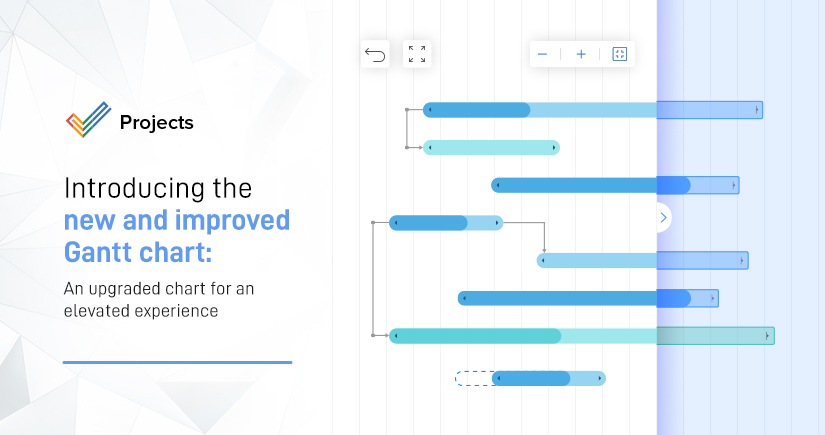
We’ve introduced a few cool upgrades to make your Gantt chart experience a whole lot better!
Read MoreZoho Expense
NewTrack and manage project related day-to-day expenses with the Zoho Expense integration.
Read MoreTime logs
EnhancementsTime logs can now be restricted based on the work hours allotted for the tasks.
Read MoreGantt Chart
EnhancementsWe have updated our Gantt chart. Zoom in or fit the Gantt to width. View more options (Dates, Assignee, Task Title, and Overdue tasks) on the Gantt now.
Read MoreTags
EnhancementsTags are now available for issues. Create tags and group related issues.
Feb
Currency
NewTrack and manage your projects in your home currency. Set exchange rates to determine project value in home currency.
Read MoreTask Layouts
EnhancementsAdd or remove priority, recurrence, and reminder fields from task layouts.
Jan
Create tags and associate them with modules in Zoho Projects. Use tags to get a consolidated view of all associated modules.
Read MoreCustom fields
EnhancementsWe have introduced 4 new custom fields in task layouts. Currency, Percentage, Checkbox, and Date & Time fields.
Custom views
NewCustom views are now available in the projects list view. Use filters and criteria to create a view and save it.
Read MoreUnified text editor
EnhancementsWe now have a unified text editor across comments, status, description, and forums for a better experience.