- HOME
- BI & Analytics
- Switching from Google Looker Studio to Zoho Analytics: The Complete Guide (2026)
Switching from Google Looker Studio to Zoho Analytics: The Complete Guide (2026)
- Last Updated : April 17, 2026
- 305 Views
- 2 Min Read
At some point, your dashboards stop helping and start slowing your team down.
What begins as a simple reporting setup in Google Looker Studio often turns into a patchwork of slow dashboards, connector costs, and workarounds that break under scale. Reports take time to load. Scheduled emails hit quotas. And pulling data from non-Google sources quietly becomes expensive.
That’s when teams realize a critical limitation:
Looker Studio is a reporting tool and not a full analytics platform.
This guide is built for analysts, BI leaders, and marketing teams evaluating a switch to Zoho Analytics. You’ll learn where Looker Studio breaks down, how Zoho Analytics compares, what the real costs look like, and exactly how to migrate - step by step.
Start analyzing your data smarter with Zoho Analytics

Why teams switch from Looker Studio
Looker Studio is a reporting layer, not a full analytics platform. It transforms data you bring to it into visuals. That's a useful distinction because the friction points teams hit aren't always about the charts. They're about what happens before and after them.
- Performance issues at scale
- Export limitations
- Email scheduling quotas
- No native AI or predictive analysis
- Hidden connector cost
Performance issues at scale
Looker Studio's dashboard performance declines measurably as datasets grow and as the number of charts per page increases. What once loaded instantly can take 5–10 seconds or more as data grows. Multiple charts querying different sources often freeze mid-use - especially during live presentations.
This isn’t just inconvenient - it directly impacts decision-making speed.

Source: G2
Export limitations
Looker Studio caps exported reports at 500 rows in PDF and PNG formats. For teams running operational reports with large transaction histories, this is a hard stop, not a workaround. Viewing in-browser extends the limit, but automated scheduled exports are still constrained.
Email scheduling quotas (2025 update)
In March 2025, Google introduced usage quotas on scheduled email delivery from Looker Studio, including for Pro users whose reports are stored in personal folders. The limit of 50 recipients per email, combined with daily send quotas, has disrupted agency reporting workflows that relied on high-volume automated distribution.
Hidden connector costs
Connecting HubSpot, Salesforce, LinkedIn Ads, Shopify, or most non-Google platforms requires paid third-party connectors. Often $15–$30/month per connector, per account. A mid-size marketing team pulling from four non-Google sources can spend $100–$120/month just on connectors, before any platform costs.
“Free” quickly becomes paid, without gaining advanced capabilities.
Key takeaway
Looker Studio helps you visualize data.
Zoho Analytics helps you analyze, predict, and act on it.
Looker Studio vs. Zoho Analytics: Feature comparison
| Capability | Google Looker Studio | Zoho Analytics |
| Data connectors | 800+ (many require paid 3rd-party connectors) | 500+ native connectors, built in |
| Dashboard performance | Slows with large datasets; 30 chart/page limit advised | Columnar in-memory engine; handles large datasets |
AI-powered insights | None natively; requires BigQuery ML | Zia AI: NLQ, automated insights, anomaly detection, predictive analytics |
Natural language querying | Not available | Ask Zia in plain English; no SQL required |
Advanced data modeling | Limited; complex modeling requires BigQuery | Built-in formula engine, query tables, join capabilities |
Custom reports & dashboards | Good drag-and-drop; limited outside standard templates | Rated 9.0 on G2 for custom reports (vs. Looker's 8.1) |
Export row limit | 500 rows (PDF/PNG) | No comparable row limit in exports |
Email scheduling | New quotas (March 2025); 50 recipients/email max | Flexible scheduled delivery; no comparable quota restrictions |
White labeling / embedded BI | Basic embed only; no white-label | Full white-label embedded analytics with SDK |
Multi-cloud / data residency | Google Cloud infrastructure | Multiple data center regions; GDPR-ready |
Customer support | Limited for free users; Pro requires Google Cloud | 24/7 email and chat support across plans |
Free plan | Yes (full base product) | Yes (limited); 15-day full-feature trial |
Key features of Zoho Analytics (That Looker Studio Lacks)
When teams move beyond basic reporting, they don’t just need better charts — they need a system that can handle data complexity, uncover insights automatically, and scale with business growth. This is where Zoho Analytics clearly separates itself from Google Looker Studio.
While Looker Studio focuses primarily on visualization, Zoho Analytics is designed as a full-stack business intelligence platform, covering everything from data ingestion to AI-driven insights. This means fewer tools, fewer dependencies, and significantly faster time to insight.
Below is a detailed breakdown of the capabilities that make Zoho Analytics a stronger alternative:
- AI-powered insights with Zia
- Advanced Data Blending Across Sources
- 500+ Native Data Connectors
- Built-in Data Preparation
- Automated Insights & Smart Alerts
- Self-Service BI for All Teams
- End-to-End Analytics Platform
- Collaboration & Sharing
- Flexible Deployment Options
AI-Powered Insights with Zia
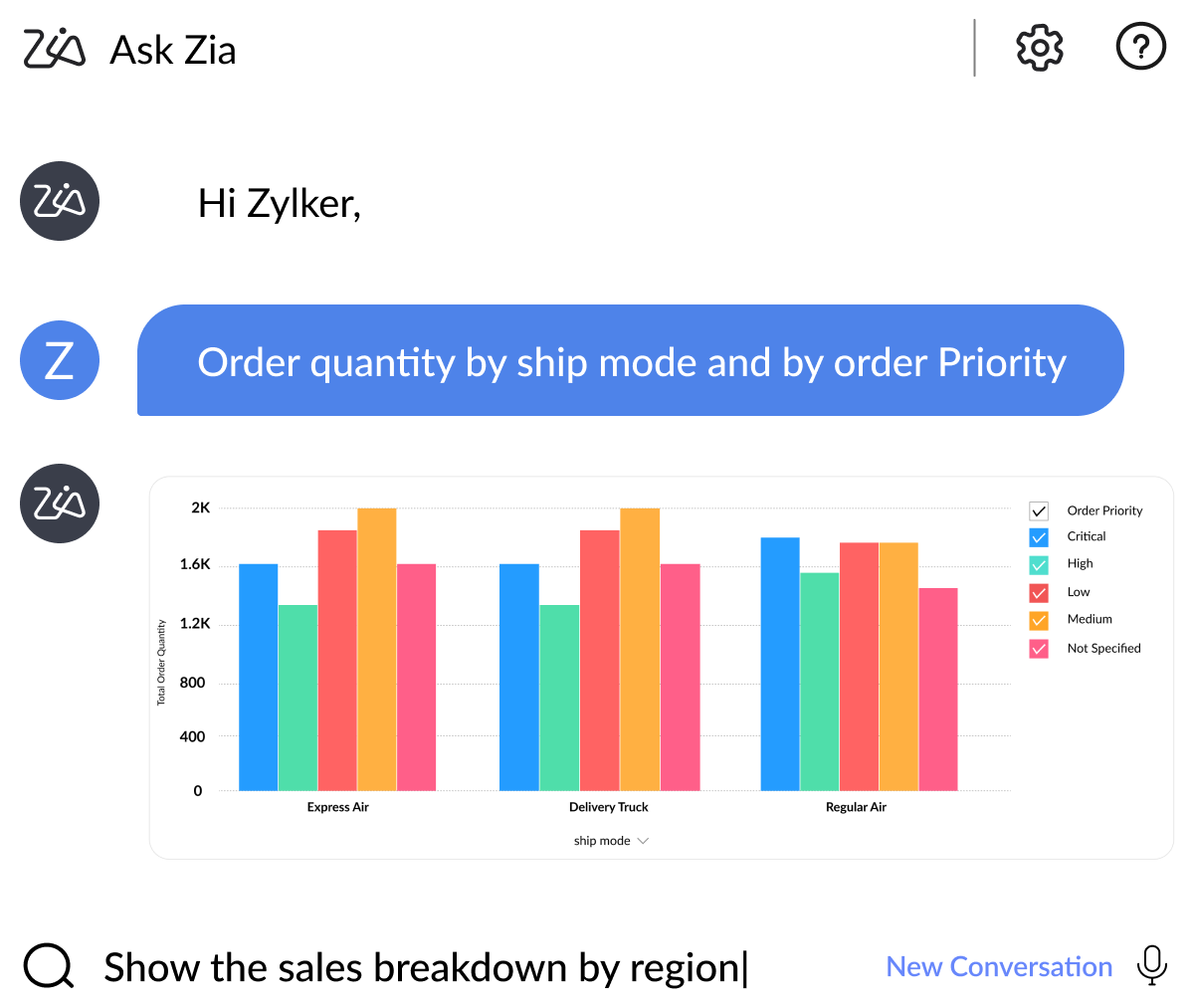
One of the biggest gaps in Looker Studio is the absence of built-in intelligence. Zoho Analytics is an AI-powered BI tool and addresses this with Zia, an AI-powered assistant that fundamentally changes how users interact with data.
Instead of manually building reports or writing queries, users can simply ask questions in natural language and receive contextual answers backed by data.
- Ask questions like: “Why did conversions drop last month?”
- Instantly generates charts, KPI summaries, and explanations
- Automatically detects anomalies, trends, and correlations
- Provides root-cause insights, not just surface-level metrics
This transforms analytics from a manual process into an interactive, insight-driven experience.
Where Looker Studio falls short:
- No native AI assistant
- No automated insight generation
- Requires manual exploration or external tools (like BigQuery ML)
Advanced Data Blending Across Sources
Modern businesses don’t operate on a single data source. Marketing, sales, finance, and support data all live in different systems, and meaningful insights come from combining them.
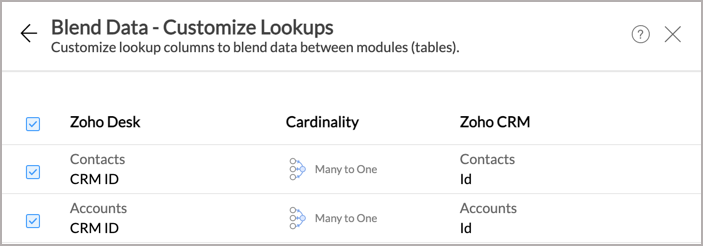
Zoho Analytics enables seamless cross-source data blending, allowing teams to build a unified view of their business.
- Combine data from CRM, ads platforms, finance tools, and databases
- Automatic relationship detection between datasets
- Create unified dashboards across departments
- Perform cross-functional analysis without writing SQL
Example: Track the full funnel - from ad spend → leads → conversions → revenue → retention — in one place.
Where Looker Studio falls short:
- Limited blending capabilities
- Complex joins often require BigQuery
- Heavy reliance on third-party connectors
500+ Native Data Connectors
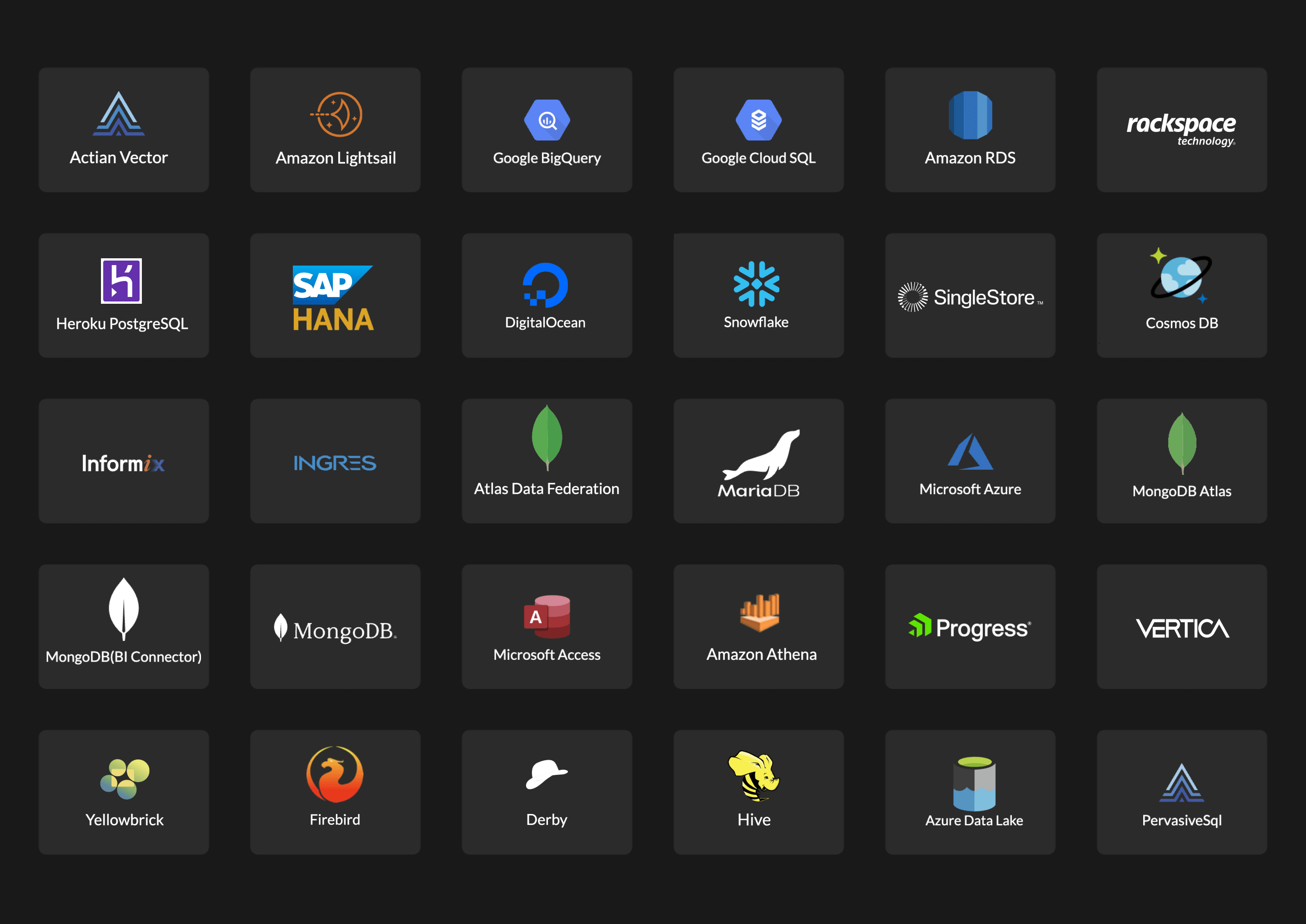
Data connectivity is where many teams underestimate total cost. Zoho Analytics simplifies this with 500+ built-in connectors, covering a wide range of business applications.
- Marketing platforms (Google Ads, Facebook Ads, LinkedIn Ads)
- CRM systems (Salesforce, HubSpot, Zoho CRM)
- E-commerce (Shopify, Amazon)
- Databases, spreadsheets, and cloud storage
- Real-time and scheduled data sync
Everything connects natively. No additional tools required.
Where Looker Studio falls short:
- Many non-Google integrations require paid connectors
- Costs can scale quickly ($60–$120/month or more)
- Connector reliability varies across vendors
Built-in Data Preparation
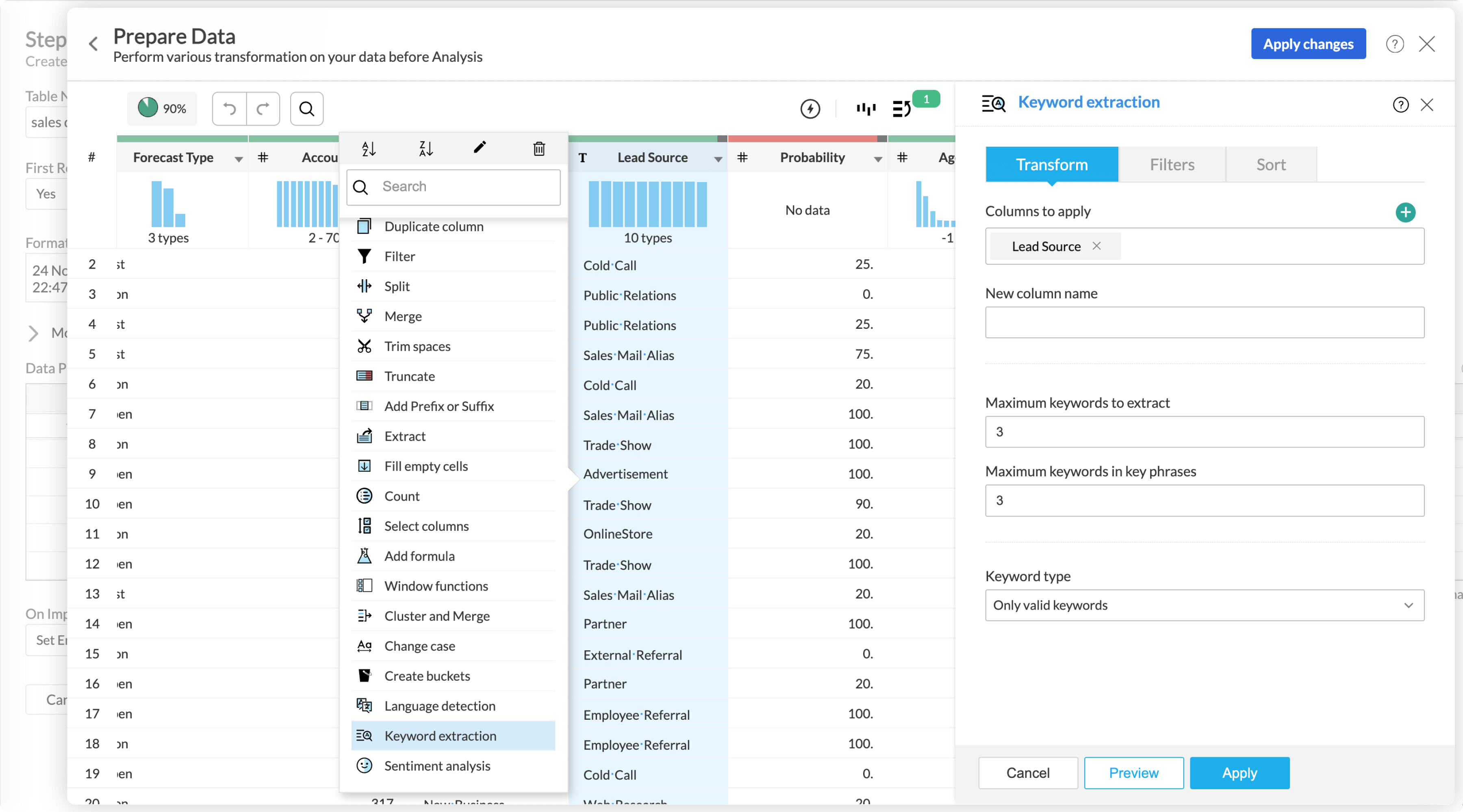
Raw data is rarely analysis-ready. Cleaning, transforming, and structuring data is often the most time-consuming part of analytics. Zoho Analytics includes a comprehensive data preparation layer, eliminating the need for separate ETL tools.
- 250+ transformation functions (merge, pivot, aggregate, filter)
- Identify and fix missing or inconsistent data
- Create calculated fields and derived metrics
- AI-assisted data enrichment (e.g., sentiment, categorization)
This allows analysts to go from raw data to dashboards within a single platform.
Where Looker Studio falls short:
- No native data preparation capabilities
- Requires external tools like Google Sheets or BigQuery
- Adds operational overhead and complexity
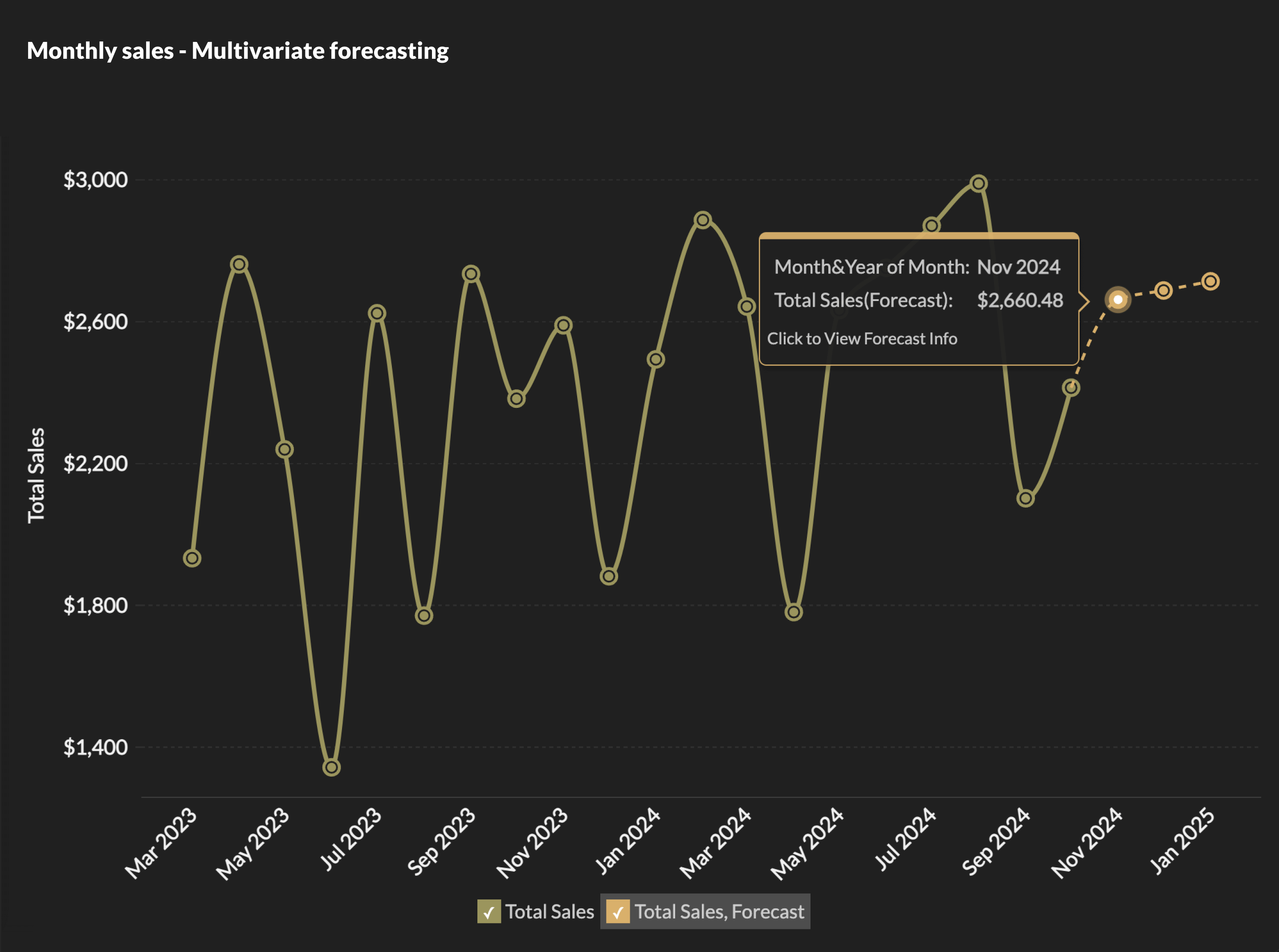
Predictive Analytics & Forecasting
Most reporting tools stop at showing what happened. Zoho Analytics goes further by enabling users to predict what will happen next.
- Sales and revenue forecasting
- Trend projection and seasonality analysis
- Scenario modeling for business planning
- AI-driven predictive insights
This helps teams move from reactive reporting → proactive decision-making.
Where Looker Studio falls short:
- No built-in predictive analytics
- Requires BigQuery ML or external ML tools
Automated Insights & Smart Alerts
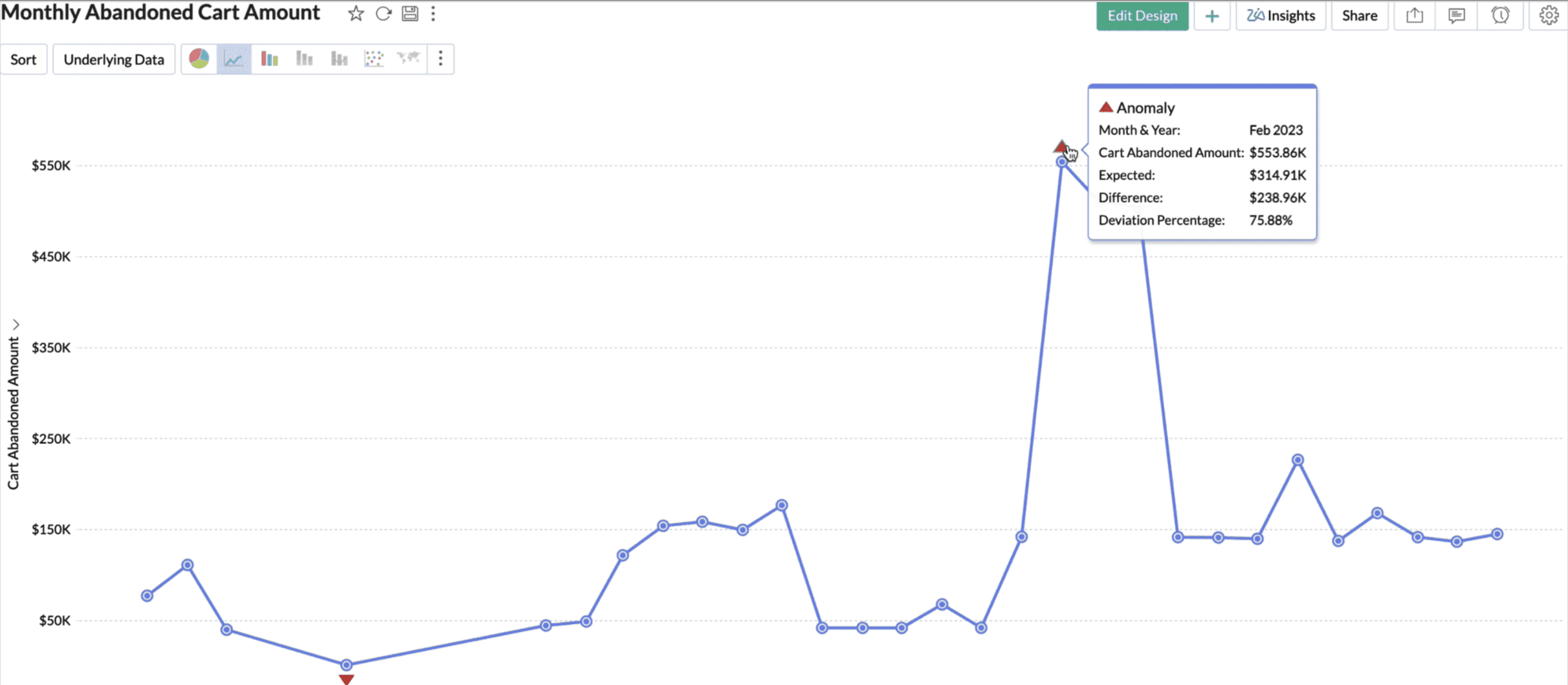
Zoho Analytics doesn’t just display data, it actively monitors it.
- Detects anomalies (e.g., sudden drop in revenue or spike in churn)
- Sends real-time alerts via email or app notifications
- Highlights key insights without user intervention
- Tracks KPI deviations automatically
This ensures teams never miss critical changes in performance.
Where Looker Studio falls short:
- No automated insights
- No proactive alerting system
- Requires manual monitoring
Self-service BI for All Teams
Zoho Analytics is designed to empower both technical and non-technical users.
- Drag-and-drop dashboard builder
- Pre-built templates for common use cases
- Natural language querying (via Zia)
- Optional SQL support for advanced users
Teams can explore data independently without relying on engineering resources.
"The best BI platform available on the market is Zoho Analytics, given its value for money, and integration with Zoho apps, Social Media app, Google Big Query and AWS. This made it easy for us to commit to this platform."
Glide Invest
Head of Product
Where Looker Studio falls short:
- Becomes difficult to manage as complexity grows
- Limited modeling capabilities
- Often requires technical intervention
Designed for both technical and non-technical users, Zoho Analytics enables teams to analyze data independently.
- Drag-and-drop dashboard builder
- Pre-built reports and templates
- No coding required (optional SQL for advanced users)
Looker Studio becomes limiting as complexity increases and often requires technical support.
End-to-End Analytics Platform
One of the biggest advantages of Zoho Analytics is that it consolidates the entire analytics workflow into a single platform.
- Data ingestion
- Data preparation
- Visualization and dashboards
- AI-powered insights
- Collaboration and sharing
This eliminates the need to stitch together multiple tools.
Where Looker Studio falls short:
- Only handles visualization
- Relies on external tools for everything else
Collaboration & Sharing
Zoho Analytics makes it easy to share insights and collaborate across teams and stakeholders.
- Role-based access control
- Secure dashboard sharing
- In-context commenting and discussions
- White-label embedding for customer-facing apps
Ideal for agencies, SaaS companies, and enterprises.
Where Looker Studio falls short:
- Limited collaboration features
- No true white-label embedding
Flexible Deployment Options
For organizations with strict data policies, deployment flexibility is critical.
Zoho Analytics supports:
- Cloud deployment
- On-premise hosting
- Hybrid environments
This ensures compliance with data governance and regulatory requirements.
Where Looker Studio falls short:
- Cloud-only deployment
- Limited flexibility for enterprise environments
Final Takeaway
The difference between Zoho Analytics and Looker Studio isn’t just about features. It’s about what kind of analytics maturity your team is aiming for.

Looker Studio is ideal for basic reporting and visualization
Zoho Analytics is built for deep analysis, automation, and scalable decision-making
As your data grows, the need shifts from “seeing data” to “understanding and acting on it.”
And that’s exactly where Zoho Analytics delivers the most value.
Pricing comparison: what you're actually paying
Side-by-side pricing comparisons between Looker Studio and Zoho Analytics can mislead because Looker Studio's base product is technically free. The complete picture accounts for connector costs, BigQuery fees, and what's actually included at each tier.
| Google Looker Studio (Free tier) |
|
Zoho Analytics (Basic plan) |
|
Google Looker Studio Pro (Pro tier) |
|
Zoho Analytics (Standard plan) |
|
For example, a 10-person marketing team connecting Google Analytics, HubSpot, Salesforce, and LinkedIn Ads via Looker Studio would typically pay $60 - $90/month in third-party connector fees alone, with no AI features and no advanced analytics. Zoho Analytics Basic covers all four sources natively at $30/month, with AI capabilites included.
Who should (and shouldn't) switch
Switch to Zoho Analytics if you…
Pull data from non-Google sources and pay for 3rd-party connectors
Need AI-powered insights, anomaly detection, or predictive analytics
Run into performance issues with large datasets
Need white-label or embedded BI for external users or clients
Already use other Zoho products (CRM, Desk, Books, etc.)
Need GDPR data residency outside the Google Cloud
Hit the March 2025 email scheduling quota limits
Need more than basic data modeling without BigQuery overhead
Stick with Looker Studio if you…
Use exclusively Google data sources (GA4, Ads, Search Console, Sheets)
Need only basic dashboards with a small team
Have strong BigQuery investment and technical resources to leverage it
Have budget constraints that make any paid BI tool impractical
Run a single-person or very small reporting operation
Your situation | Best choice |
Only Google data, basic dashboards | Looker Studio |
Multiple data sources (CRM, Ads, etc) | Zoho Analytics |
Need AI insights or forecasting | Zoho Analytics |
Small team, no budget | Looker Studio |
Scaling team with complex reporting | Zoho Analytics |
Need embedded dashboards for clients | Zoho Analytics |
STILL EVALUATING? EXPLORE ZOHO ANALYTICS IN ACTION
Step-by-step migration guide
Most teams complete this migration in one to two weeks, running Zoho Analytics in parallel with Looker Studio during validation. Here's how.
Step 1: Audit your existing reports
Step 2: Start your Zoho Analytics free trial
Step 3: Connect your data sources natively
Step 4: Rebuild key dashboards first
Step 5: Validate data accuracy
Step 6: Migrate remaining reports
Step 7: Run parallel for 2 weeks
Step 1: Audit your existing reports
List every active report and dashboard. For each, note: the data source(s), refresh frequency, who uses it, and which metrics are business-critical. This catalog will drive your migration priority order and prevent orphaned reports from being missed.
Step 2: Start your Zoho Analytics free trial
The trial unlocks all premium features including Zia AI, advanced connectors, and unlimited dashboards. Use this period to run both platforms side by side, you're not committing to anything yet.
Step 3: Connect your data sources natively
Search Zoho Analytics' connector library for your sources (Google Analytics, Salesforce, HubSpot, Shopify, etc.). Most will connect in minutes with OAuth authentication. For sources that feed Looker Studio via Google Sheets, you can keep that intermediary or replace it with a direct connector. For BigQuery datasets, use Zoho's BigQuery connector.
Step 4: Rebuild key dashboards first
Don't try to migrate everything at once. Start with your highest-traffic reports and use Zoho's drag-and-drop builder to reconstruct them. This surfaces any data modeling gaps early, and gives stakeholders something concrete to validate before full cutover.
Step 5: Validate data accuracy
For each rebuilt dashboard, run Zoho Analytics and Looker Studio reports for the same time period and compare key metrics. Minor discrepancies often trace back to timezone handling or session vs. event metric differences, not data errors. Document and resolve these before presenting to stakeholders.
Step 6: Migrate remaining reports
Once your critical dashboards are validated, migrate the remaining reports. Set up user roles and access permissions in Zoho Analytics (viewer, analyst, admin). Configure scheduled email reports to replace your existing Looker Studio distribution workflows.
Step 7: Run parallel for 2 weeks
Keep your Looker Studio dashboards live for two weeks after cutover as a fallback. Once stakeholders confirm the Zoho Analytics versions are accurate and usable, archive or delete the Looker Studio counterparts to avoid data confusion.
Pro tip: Use Zia's "Ask a question" feature early in your migration. Asking Zia to surface insights from your newly connected data is one of the fastest ways to demonstrate value to stakeholders who are skeptical about switching platforms.
"Whenever I have a new client meeting, I demonstrate the Ask Zia feature of Zoho Analytics with a question like "what was my income last month?" It's quick reply or a visual fascinates my clients and they say, 'This is what we want'. It allows me to show them that we are a forward thinking company partnered with a global company like Zoho."
Craig Roxby
Managing Director, Magnifi
Migration checklist
- Catalog all active Looker Studio reports and dashboards
- Identify all data sources and their connection methods
- Sign up for Zoho Analytics 15-day trial
- Connect all data sources via native Zoho connectors
- Rebuild top 3–5 critical dashboards
- Run data validation comparison for each rebuilt dashboard
- Set up user roles and permissions
- Configure scheduled email reports
- Brief stakeholders on the new dashboards
- Run 2-week parallel period
- Decommission Looker Studio reports
- Explore Zia AI for automated insights on your data
Conclusion
At the early stages, tools like Looker Studio work well. They’re simple, accessible, and get dashboards up and running quickly. But as your data grows, your business questions become more complex, and that’s where the cracks begin to show.
What starts as a reporting setup often turns into a system held together by connectors, workarounds, and manual effort. Performance slows down. Costs creep in. And most importantly, insights take longer to surface.
That’s the real shift:
From visualizing data → to actually understanding and acting on it.
Zoho Analytics is built for that next stage.
It doesn’t just help you create dashboards. It helps you:
- Combine data across your entire business
- Automatically surface insights and anomalies
- Predict future trends with built-in AI
- Scale without adding complexity or hidden costs
If your team is spending more time maintaining reports than making decisions, it’s a clear signal. It’s time to move beyond basic reporting.
Switching isn’t just about replacing a tool. It’s about upgrading how your team thinks about data.
Switch to Zoho Analytics now. Start your 15-day free trial. No credit card required.
Frequently Asked Questions
Can I migrate my Looker Studio dashboards to Zoho Analytics?
Yes. You can export your data from Looker Studio (via Google Sheets, CSV, or BigQuery) and import it into Zoho Analytics using its built-in data connectors. In most cases, the data sources that feed your Looker Studio dashboards like Google Analytics, Salesforce, HubSpot, Shopify, and others can connect directly to Zoho Analytics without a manual export step, because Zoho supports 500+ native connectors. Dashboard layouts need to be rebuilt in Zoho's dashboard builder, which most users complete in under a week for their core reports.
Is Zoho Analytics cheaper than Looker Studio?
It depends on your data sources. Looker Studio's base product is free, but teams using non-Google data sources typically pay $15–$30/month per third-party connector. A team pulling from four non-Google sources could spend $60–$120/month on connectors alone, before analytics features. Zoho Analytics Basic starts at $30/month and includes 500+ native connectors, AI-powered insights, and no export row limits. For teams needing advanced analytics, Zoho Analytics almost always delivers more capability per dollar than Looker Studio Pro plus third-party connectors.
What are the biggest limitations of Google Looker Studio?
The most frequently cited limitations from verified user reviews include: slow dashboard performance with large datasets (G2 reviewers), a 500-row limit in PDF/PNG exports, no native AI-powered analytics or predictive modeling, dependency on paid third-party connectors for non-Google sources, new email scheduling quotas introduced in March 2025, limited advanced data modeling without BigQuery, and poor customization flexibility for complex or specialized visualizations.
Does Zoho Analytics have AI features that Looker Studio doesn't?
Yes, significantly. Zoho Analytics includes Zia, an AI-powered assistant that supports natural language querying (ask questions in plain English and get charts back), automated insight generation that surfaces trends without you having to build the query, anomaly detection that flags unusual patterns in your data, and predictive analytics using built-in ML models. Looker Studio has no comparable native AI capabilities. Teams that want machine learning in Looker Studio's workflow must use BigQuery ML, a separate product requiring SQL knowledge and additional infrastructure cost.
How long does it take to switch from Looker Studio to Zoho Analytics?
Most teams complete the migration in one to two weeks. The process has four phases: (1) audit your existing reports and data sources, (2) connect your data to Zoho Analytics using native connectors, (3) rebuild your critical dashboards using Zoho's drag-and-drop builder, and (4) run a parallel validation period where both platforms are live. Zoho's 15-day free trial gives you full access to all features during this period. Teams with fewer than 10 dashboards can often complete the entire process in 3–5 days.
Can Zoho Analytics connect to Google data sources like GA4 and Google Ads?
Yes. Zoho Analytics has native connectors for Google Analytics 4, Google Ads, Google Search Console, Google Sheets, and BigQuery. If you're currently using Looker Studio primarily for Google source reporting and want to add non-Google sources or AI analytics without paying for connectors, Zoho Analytics can handle both sides from a single platform.
Is Zoho Analytics suitable for enterprises?
Yes. Zoho Analytics is recognized in the 2025 Gartner Magic Quadrant for Analytics and Business Intelligence Platforms. It supports enterprise requirements including role-based access control, GDPR-compliant data residency, on-premise deployment options, white-label embedded analytics, SSO integration, and 99.9% uptime SLAs. It's also rated as a Leader for both customer experience and vendor credibility by Dresner Advisory Services.
 Vinisha
Vinisha is a Marketing Analyst at Zoho Analytics with a strong passion for both marketing and data. She’s naturally curious about trends and loves diving into data to uncover what drives effective campaigns. She has a knack for simplifying complex information and presents insights in a relatable and engaging way that connects with audiences. Outside of work, she enjoys exploring the creative side of digital marketing.