- HOME
- BI & Analytics
- Build an automated ETL RevOps pipeline with Zoho DataPrep
Build an automated ETL RevOps pipeline with Zoho DataPrep
- Last Updated : August 11, 2026
- 84 Views
- 6 Min Read

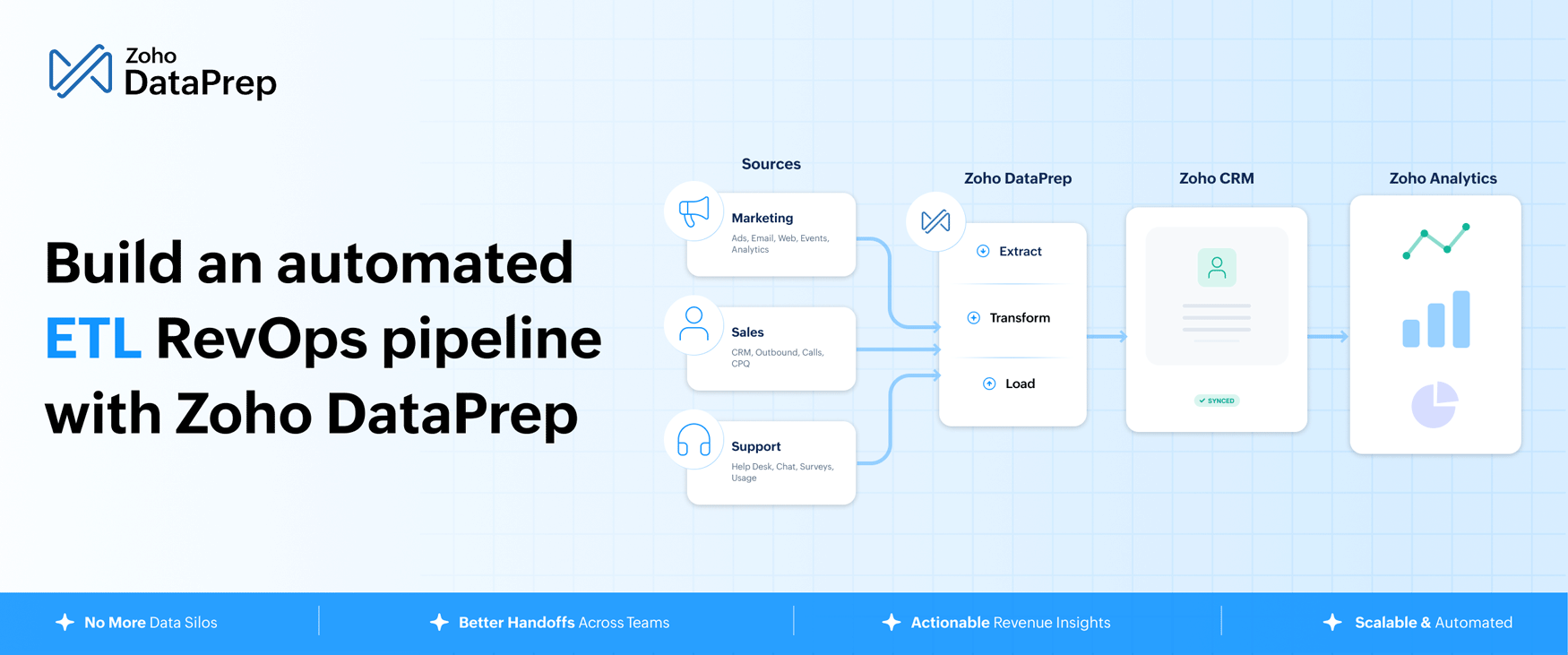
Revenue operations teams are swimming in data but drowning in disconnection. Your sales team lives in a CRM. Marketing runs campaigns from three different platforms. Support resolves tickets in a help desk that never talks to either. The result is no shared truth, no clean handoffs, and no reliable way to answer the questions that matter most: Where is revenue leaking? Which campaigns are actually driving pipeline? Who is about to churn?
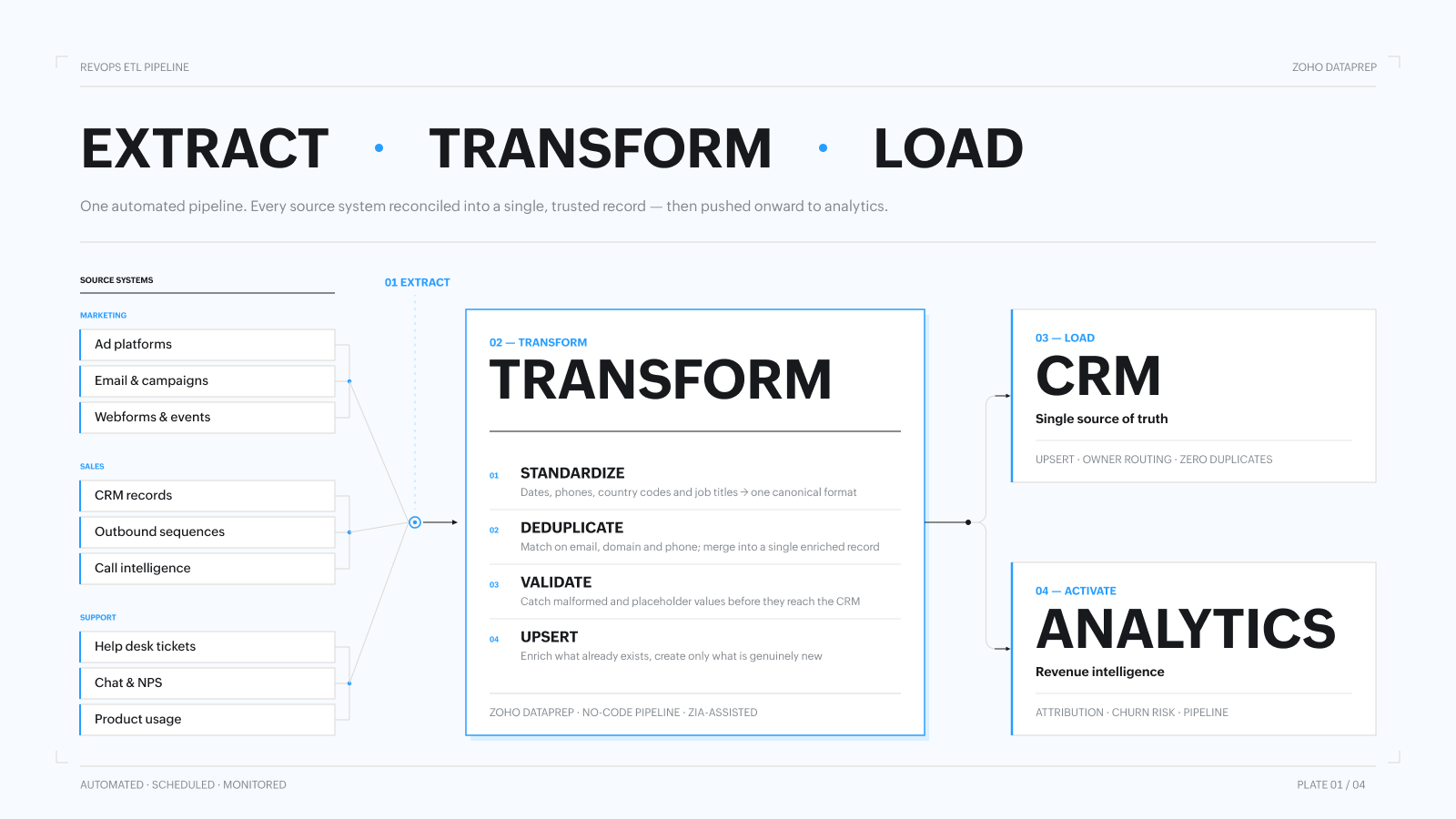
The fix is a clean, automated ETL pipeline that extracts data from every system, transforms it into a consistent format, loads it into a single source of truth, and pushes the right signals to your analytics layer.
This guide walks you through how to build one step by step.
Step 1: Map your data landscape before considering an ETL tool
The biggest mistake RevOps teams make is jumping straight into an ETL tool selection before they understand what data they actually have, where it lives, and who owns it. That leads to half-built pipelines, missed sources, and integrations that break the moment someone changes a field name in the CRM.
Start here instead.
Identify every source of sales, marketing, and support data
Walk through the full customer journey and list every system that captures data at each stage. A typical RevOps data landscape looks something like this:
- Marketing sources: Ad platforms (Google Ads and Meta), email tools (Klaviyo and Zoho Campaigns), webforms (Typeform and native Zoho CRM forms), event platforms, SEO and web analytics (Google Analytics and Mixpanel)
- Sales sources: CRM (Zoho CRM, Salesforce, and HubSpot), outbound tools (Apollo, Outreach, and Salesloft), call intelligence platforms (Gong and Chorus), CPQ or proposal tools
- Support sources: Help desk (Zoho Desk, Zendesk, and Freshdesk), live chat tools, NPS and survey platforms, product usage data
For each source, document what data it holds, how frequently it updates, and what format it exports in (API, CSV, webhook, or native connector).
Assign data ownership
Every source needs an accountable owner: someone who has access to the data. Without this, pipelines break when a field is renamed or a new campaign source is added and nobody updates the pipeline.
Create a simple data ownership register:
Source | Owner | Access method | Update frequency |
|---|---|---|---|
Zoho CRM | RevOps Lead | Direct integration | Scheduled batch |
Google Ads | Marketing Manager | API | Daily |
Fresh Desk | Support Lead | Direct integration | Hourly |
Webforms | Marketing Ops | Webhook | Scheduled batch |
Zoho Analytics | Data Analyst | Direct integration | Daily |
Choose your single source of truth
All roads need to lead somewhere. For most RevOps teams, that destination is the CRM; it's the most secured place to store and access customer data.
The key decision here is which CRM fields define the canonical version of a record. When your marketing automation platform says a lead’s job title is “VP Marketing” and your outbound tool says “VP of Marketing,” which one wins? Define these rules before you build anything, or your pipeline will inherit the inconsistency rather than resolving it.
Step 2: Choose an ETL tool that can reach every source and destination
Once your data landscape is mapped, you need an ETL tool that has the ability to connect with all the systems that hold your data and where you want to send your data.
What to look for:
Connector breadth: Your ETL tool needs prebuilt connectors for every source in your data register. Evaluate coverage specifically for your stack, including Zoho CRM, Google Ads, your outbound tools, your help desk, any webforms, and any custom internal systems.
- No-code pipeline builder: RevOps teams shouldn’t need to file an IT ticket every time they want to add a new data source or adjust a transformation. Look for a visual, drag-and-drop interface that lets your team build and modify pipelines independently.
- Transformation capability: Raw data from different systems will never align out of the box. Your ETL tool needs to handle field mapping, deduplication, formatting standardization, and enrichment logic without requiring SQL or Python skills from your team.
- CRM writeback: The tool needs to push clean, transformed data back to your CRM reliably, updating existing records without creating duplicates and routing new records correctly based on ownership or territory rules.
- Analytics connectivity: Beyond the CRM, your ETL tool should be able to push data directly to your BI and analytics tools so revenue insights are always working from the same clean, unified dataset.
Zoho DataPrep is built for exactly this purpose. It connects natively to Zoho CRM and the broader Zoho ecosystem while also pulling from third-party sources across marketing, sales, and support. Its no-code pipeline builder and AI-powered transformation layer powered by Zia mean your RevOps team can build and manage pipelines without depending on engineering.
Step 3: Transform your data so it’s actually usable
Extracting data from multiple sources is the easy part. The hard part is making data from seven different systems consistent enough to be trusted. This is where most RevOps data projects stall and where the right transformation layer makes all the difference.
Standardize formats across every source
Different tools format the same data differently. Dates come in as MM/DD/YYYY from one system and YYYY-MM-DD from another. Phone numbers are formatted inconsistently or not at all. Country names are written in full in one system and as two-letter codes in another. Job titles are free-text fields with hundreds of variations of the same role.
Your transformation layer needs to normalize all of this before data touches the CRM. Define a canonical format for every field type and build transformation rules that convert all incoming data to match regardless of source.
Deduplicate and merge records
Leads arrive from multiple sources and often create duplicate records. A prospect who filled in a webform, got added to an outbound sequence, and then clicked a paid ad might exist as three separate records in your CRM, each with a different piece of the story.
Your pipeline needs deduplication logic that matches records based on a combination of identifiers (email, company domain, and phone number) and merges them into a single enriched record, preserving the most accurate version of each field.
Validate and flag bad data
Not all incoming data is trustworthy. Email addresses with obvious formatting errors, phone numbers with the wrong digit count, and company names that are placeholder text degrade data quality downstream.
Build validation rules into your pipeline that catch bad data before it enters the CRM. Flag records that fail validation for manual review rather than letting them through unchecked.
Enrich existing records and add new ones correctly
One of the most important behaviors in a RevOps ETL pipeline is the upsert logic: when a record already exists in your CRM, enrich it with new data rather than creating a duplicate. When a record is genuinely new, create it cleanly with all available fields populated.
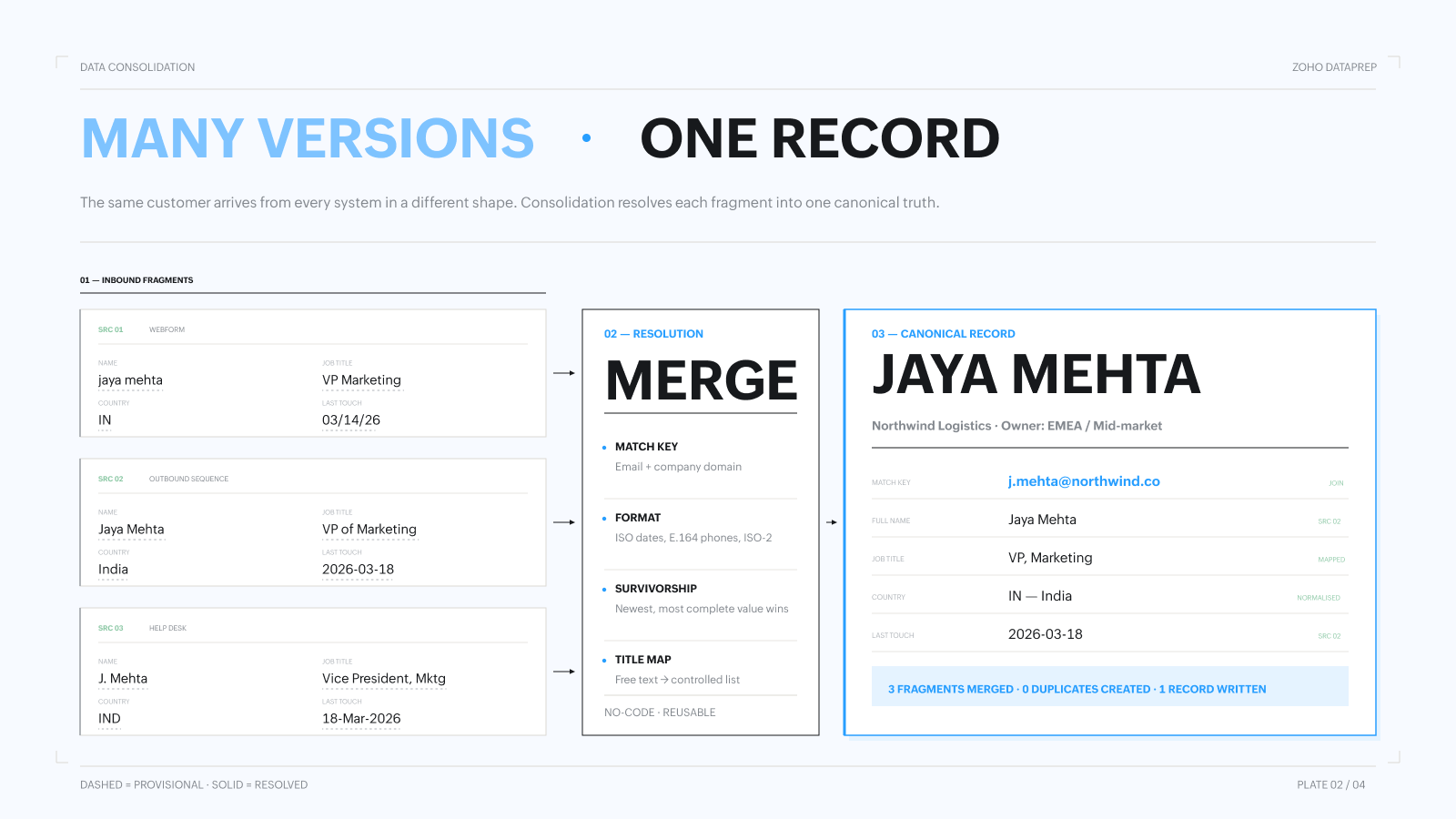
Zoho DataPrep handles this natively, matching incoming records against existing CRM data, updating fields where new information is more complete or recent, and routing net-new records through the correct creation workflow.
Step 4: Push clean data to analytics for revenue intelligence
A clean CRM is valuable, but the real payoff of a well-built ETL pipeline is what happens when that clean, unified data flows into your analytics layer. This is where RevOps moves from reporting on what happened to predicting what will happen next.
Identify sales opportunities
When your CRM holds complete, accurate engagement data from every touchpoint—including marketing, support, and product usage—your analytics tools can surface patterns that individual reps can’t see.
- Which combination of activities correlates with closed-won deals?
- Which accounts are showing buying signals but haven’t been contacted recently?
- Which segments respond best to which outreach sequences?
These insights are only possible when the underlying data is clean and connected. A fragmented data pipeline produces fragmented answers.
Predict churn before it happens
Support ticket frequency, declining product usage, unanswered outreach, and contract renewal timelines are all signals that a customer is at risk. When this data lives in separate systems that don’t talk to each other, churn often goes undetected until it’s too late.
A unified data pipeline brings all of these signals together in one place. Your analytics layer can then apply scoring models that identify at-risk accounts early, giving your customer success team enough time to intervene.
Measure marketing ROI accurately
Marketing attribution is only accurate when campaign data and CRM data are connected. Without a clean pipeline that links ad spend, email engagement, and form submissions to actual pipeline and revenue, marketing’s contribution to the business is invisible or, worse, misreported.
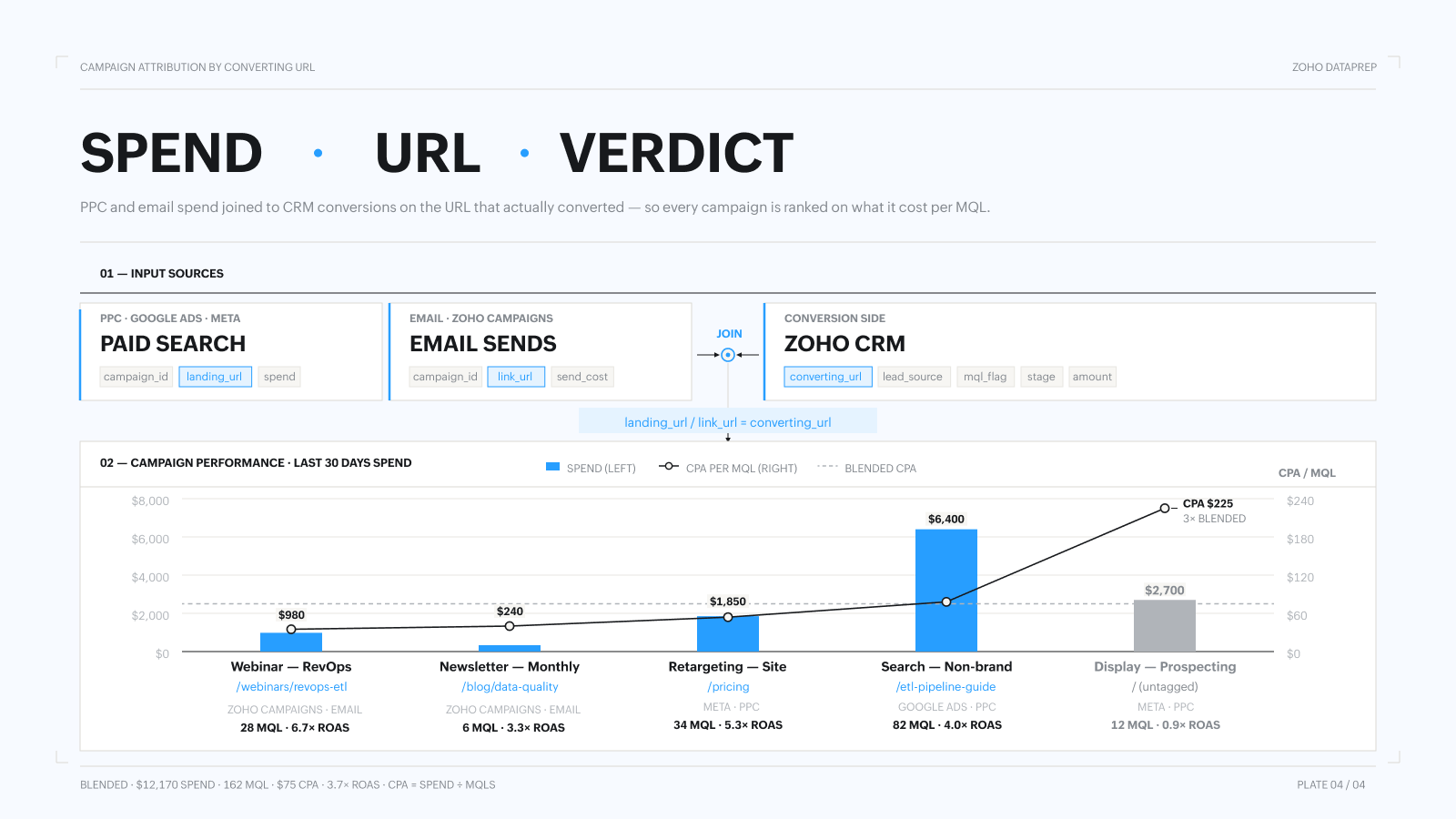
With Zoho DataPrep connecting your marketing sources to your CRM and analytics tools, you can build attribution models that show which campaigns, channels, and touchpoints are actually driving revenue and where to invest more.
Putting it all together
An automated ETL pipeline is an ongoing infrastructure investment that compounds in value as your data grows cleaner and your team’s confidence in it increases.
Start with the four steps above: map your sources and assign ownership, select a tool that covers your full stack, build transformation rules that enforce consistency, and connect the output to your analytics layer. Each step removes a layer of noise from your data and adds a layer of clarity to your revenue decisions.
Zoho DataPrep is designed to make this buildable for RevOps teams without deep technical resources using no-code pipelines, AI-assisted data preparation, and native CRM integration that keeps your data clean, connected, and actionable from day one.