- HOME
- Know Your Tech
- 6 best approval workflow software solutions for 2026
6 best approval workflow software solutions for 2026
- Last Updated : July 2, 2026
- 481 Views
- 13 Min Read
Highlights:
- Approval workflow apps automate request routing, notifications, and sign-offs, helping teams spend less time waiting for decisions.
- The best approval workflow apps for 2026 include Zoho Creator, Jotform, Lark, Nintex, Wrike, and Process Street.
- Key features to evaluate include customizable workflows, real-time tracking, mobile access, and integration with existing tools.
- Choosing the right app depends on your team size, workflow complexity, budget, and existing tech stack.
- A structured approval process improves accountability, compliance, and decision-making speed across departments.
Approvals that take days instead of hours can push back timelines, budgets, and team morale. When your process runs through scattered emails and shared spreadsheets, things slip through unnoticed.
An approval workflow app gives you a structured path for every request. Routing, notifications, tracking, and audit trails all happen in one place, so no approval gets lost or forgotten.
This blog post breaks down the top six approval workflow apps for 2026. Each platform is evaluated thoroughly based on its approval workflow features, pricing, and integrations, so that you can pick the solution that best fits your needs.
What is an approval workflow?
An approval workflow is a structured process that guides how requests, documents, or tasks move through different stages of review before receiving final approval. The process typically starts when someone submits a request or document, triggering a series of reviews from designated approvers. Each approver checks the request and signs off before it moves to the next step.
Without automation, approval workflows can become slow and inefficient. Documents may get stuck in inboxes or forgotten. However, using an approval workflow app automates the process. Notifications are sent to the right people, tasks are assigned automatically, and every action is logged for accountability. This process reduces delays, errors, and confusion.
Key features to look for in an approval workflow app
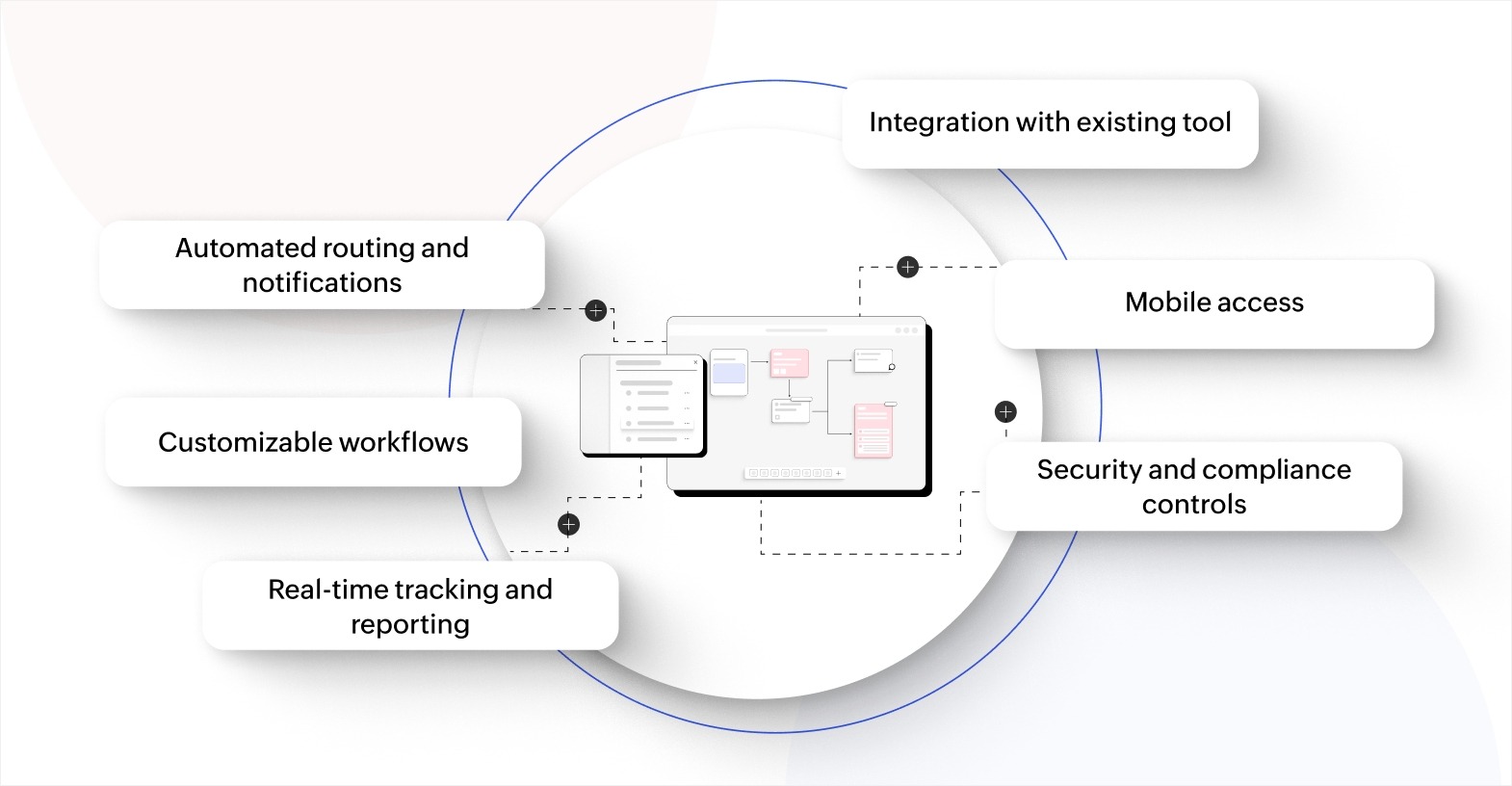
When selecting an approval workflow app, it's important to focus on features that improve the overall process. These key features will help your team manage approvals more effectively, increase transparency, and maintain security and compliance.
- Automated routing and notifications: Sends each request to the correct reviewer based on rules you set, keeping approvals moving without manual follow-up.
- Customizable workflows: Lets you design approval steps with conditional logic and adjust review stages by department or request type, giving you a process that fits your actual operations.
- Real-time tracking and reporting: Shows where every request stands and how long each step takes, making it easy to spot delays and hold the right people accountable.
- Integration with existing tools: Connects with your CRM, ERP, document storage, or project management software, reducing duplicate data entry and keeping information accurate across systems.
- Mobile access: Allows approvers to review and act on requests from their phone, keeping the process moving even when team members are away from their desk.
- Security and compliance controls: Protects important data with role-based access, encrypted storage, and audit trails, helping your organization meet regulatory requirements confidently.
These features work together to create a process that's fast, visible, and accountable. Prioritizing these capabilities helps you select the right solution for your organization.
6 best approval workflow apps for 2026
Here’s a complete breakdown of the top approval workflow software solutions, evaluated based on their key features, unique strengths, pricing, and integrations, so you can compare and find the right platform for your needs.
1. Zoho Creator
Zoho Creator is an AI-powered low-code application development platform that lets you build fully custom approval workflows without heavy coding. Instead of adapting your process to fit a rigid tool, you design the exact workflow your team needs, from simple one-step sign-offs to complex multi-tier approval chains with conditional logic.
Key features:
- Visual workflow builder: Maps out approval steps with drag-and-drop elements and conditional routing, letting you design processes that match your actual operations without writing code.
- Automated notifications: Alerts approvers instantly through email, SMS, or in-app messages when a request needs attention, keeping sign-offs on schedule without manual reminders.
- Cross-platform access: Runs natively on web, iOS, and Android, giving approvers the flexibility to act on requests from any location or device.
- 1,000+ integrations: Connects with CRMs, ERPs, payment gateways, and other business tools, ensuring approval data stays synced across your entire tech stack.
Best suited for:
- Businesses that need custom approval logic: Teams with unique, multi-step processes that off-the-shelf tools can't handle well.
- Growing organizations: Companies that need a platform capable of scaling from simple workflows to full enterprise applications over time.
Unique strengths:
- Full app development capability: Goes beyond standalone approval tools by letting you build entire business applications around your workflows, including portals, dashboards, and reporting.
- AI-powered assistance: Uses Zia, the built-in AI, to speed up development by suggesting fields, generating workflows, and automating repetitive configuration tasks.
- Flexible deployment: Supports hosting on Zoho's cloud, on-premise deployment, or publishing as standalone mobile apps through the App Store or Google Play.
Pricing:
- Free plan: Available for individuals or small teams to explore the platform with one app.
- Standard: $8/user/month (billed annually) for building and launching a first business app.
- Professional: $20/user/month (billed annually) for running scalable apps across teams.
- Enterprise: $25/user/month (billed annually) for organization-wide apps with advanced integrations and analytics.
Integrations: Zoho CRM, Zoho Books, Zoho People, Zoho Desk, Salesforce, PayPal, Twilio, Google Workspace, Google Calendar, QuickBooks, Zapier, Zoho Flow, SAP, Microsoft Dynamics, SharePoint
2. Jotform
Jotform is a no-code online form builder that includes a built-in approval workflow feature called Jotform Approvals. It turns form submissions into automated approval flows, making it a practical choice for teams that already collect requests through online forms and need a simple way to route them for review.
Key features:
- Drag-and-drop approval builder: Creates multi-step approval flows visually by adding approvers, email notifications, and conditional branches, removing the need for any coding.
- Group approvals: Allows multiple team members to review and approve the same request independently, giving managers full visibility into each person's decision.
- Form-to-flow conversion: Turns any existing Jotform submission into an automated approval workflow in a few clicks, saving time on setup for teams already using Jotform forms.
- Mobile app support: Lets approvers manage and act on submissions from anywhere using the Jotform Mobile Forms app, keeping reviews on track even outside the office.
Best suited for:
- Teams with form-heavy processes: HR departments, event coordinators, and admin teams that collect structured requests through online forms.
- Small-to-mid-sized businesses: Organizations looking for a quick, affordable way to add approvals without adopting a full workflow platform.
Unique strengths:
- 20,000+ form templates: Offers pre-built templates for common approval use cases like leave requests, purchase orders, and IT tickets, helping teams get started in minutes.
- Built-in payment collection: Accepts payments directly within approval forms through PayPal, Stripe, Square, and other processors, making it useful for order and invoice approvals.
Pricing:
- Starter (free): 5 forms, 100 monthly submissions, Jotform branding included.
- Bronze: $19.50/month (billed annually) with 25 forms and 1,000 monthly submissions.
- Silver: $24.50/month (billed annually) with 50 forms and 2,500 monthly submissions.
- Gold: $64.50/month (billed annually) with 100 forms, 10,000 monthly submissions, and HIPAA compliance.
Integrations: Google Sheets, Google Drive, Google Calendar, Salesforce, HubSpot, Slack, Trello, Airtable, Asana, monday.com, Dropbox, OneDrive, Mailchimp, ActiveCampaign, Stripe, PayPal, Square, Zoom, Zoho CRM
3. Lark
Lark is an all-in-one workspace that includes built-in approval workflows alongside messaging, docs, calendar, and video meetings. Approvals happen directly inside the same platform your team already uses to communicate, so reviewers don't need to switch between tools to act on requests.
Key features:
- In-chat approvals: Submits, reviews, and approves requests directly within Lark Messenger, letting your team handle sign-offs without leaving the conversation.
- Multi-step conditional workflows: Sets up approval chains with logical conditions, deadlines, and auto-escalation rules, ensuring requests move forward even when an approver is unavailable.
- Ready-to-use templates: Provides pre-built templates for common workflows like leave requests, expense reimbursements, and procurement approvals, helping teams launch quickly.
- Real-time notifications: Delivers instant alerts for new or urgent requests on desktop and mobile, keeping response times short and approvals on schedule.
Best suited for:
- Teams that want a unified workspace: Organizations looking to consolidate messaging, documents, and approvals into a single platform.
- Global or distributed teams: Companies with employees across time zones who need mobile-first approvals with built-in translation support.
Unique strengths:
- No-code workflow automation through Base: Builds custom dashboards and automates tasks without IT involvement, giving non-technical users the ability to create their own approval processes.
- Free tier for up to 20 users: Provides small teams access to the full suite, including approvals, messaging, and docs, at no cost.
Pricing:
- Starter (free): Up to 20 users, 100GB storage, 1,000 automated workflow executions per month.
- Pro: $12/user/month (billed annually) with up to 500 users, 15TB storage, and 50,000 workflow executions per month.
- Enterprise: Custom pricing with unlimited users, SSO, and advanced security controls.
Integrations: Dropbox, Splunk, Cal.com, Travis CI, and custom integrations through Lark's open platform and developer APIs
4. Nintex
Nintex is a process automation platform built for enterprises that need to automate complex, multi-system workflows. It goes beyond simple approvals with features like document generation, e-signatures, robotic process automation (RPA), and AI-powered workflow creation, making it a strong fit for organizations with high-volume or compliance-heavy approval requirements.
Key features:
- AI workflow generator: Converts plain-language descriptions into workflow frameworks you can refine and deploy, reducing the time it takes to go from idea to live automation.
- Drag-and-drop process designer: Creates approval workflows visually with built-in connectors to Microsoft, Salesforce, SAP, and other enterprise systems, keeping your approval data synced across platforms.
- Document automation and e-signatures: Generates customized documents during the approval process and collects e-signatures in the same flow, removing the need for separate signing tools.
- Robotic process automation (RPA): Handles repetitive tasks like data entry and record updates that often accompany approval workflows, freeing your team from manual busywork.
Best suited for:
- Large enterprises with complex processes: Organizations that need to automate multi-department, multi-system approval workflows at scale.
- Microsoft and Salesforce-heavy environments: Teams that rely on SharePoint, Dynamics 365, or Salesforce and want deep, native integrations.
Unique strengths:
- Process mapping and documentation: Includes process management tools that let you map, document, and improve workflows before automating them, giving you clarity on the full process before you build.
- FedRAMP-authorized cloud option: Enables government agencies and defense contractors to run approval workflows in a FedRAMP-certified environment for compliance-sensitive operations.
Pricing:
- Nintex uses custom pricing based on platform (cloud, self-hosted, or Salesforce), features, and volume. Contact their sales team for a quote.
Integrations: Microsoft SharePoint, Microsoft Teams, Microsoft Dynamics 365, Salesforce, SAP, DocuSign, Adobe Sign, ServiceNow, Box, Dropbox, Google Drive, Oracle, K2, Power BI
5. Wrike
Wrike is an AI-powered work management platform that includes built-in approval workflows as part of its broader project and task management capabilities. It's a good fit for teams that want to manage approvals within the same tool they use to plan projects, assign tasks, and track deadlines.
Key features:
- Built-in approval workflows: Adds approval steps directly to tasks, folders, or projects, letting reviewers approve or reject work without leaving the project context.
- Custom request forms: Captures the right information upfront through dynamic forms with conditional logic, reducing back-and-forth before the approval even starts.
- Proofing and markup tools: Enables reviewers to leave comments and annotations directly on images, PDFs, and creative assets, speeding up feedback cycles on visual content.
- Real-time dashboards: Tracks approval status, project timelines, and team workload from one view, giving managers instant visibility into what's moving and what's stalled.
Best suited for:
- Marketing and creative teams: Teams that need to review and approve creative assets, campaign materials, or content before publication.
- Project-driven organizations: Companies where approvals are part of a larger project workflow and need to be tracked alongside tasks and deadlines.
Unique strengths:
- AI agents and Copilot: Automates routine project management tasks and surfaces insights from project data, helping teams focus on high-value work instead of manual coordination.
- Visual collaboration with Klaxoon: Connects brainstorming and planning sessions directly to Wrike tasks through an integrated whiteboard, keeping ideas and execution in the same place.
Pricing:
- Free: Basic task management for small teams.
- Team: $10/user/month for up to 15 users with AI essentials, Gantt charts, and custom workflows.
- Business: $25/user/month for up to 200 users with resource planning, workflow customizations, and standard integrations.
- Pinnacle and Apex: Custom pricing for enterprise features including advanced reporting, SSO, and budgeting.
Integrations: Slack, Microsoft Teams, Google Drive, Google Sheets, Salesforce, Tableau, Adobe Creative Cloud, Zoom, SharePoint, OneDrive, Dropbox, Jira, HubSpot, GitHub, Gmail, Outlook, Okta, NetSuite, Power BI
6. Process Street
Process Street is a compliance operations platform that turns policies and standard operating procedures (SOPs) into automated, trackable workflows. It's designed for teams that need to enforce consistent approval processes and maintain audit-ready records, making it particularly useful in regulated industries.
Key features:
- AI-powered workflow creation: Generates a workflow template with tasks, approval steps, and conditional logic from a simple description, cutting setup time from hours to minutes.
- Enforced task order: Requires approvals to be completed in a specific sequence, preventing steps from being skipped and keeping the process compliant every time.
- Conditional logic and dynamic due dates: Adjusts workflow paths and deadlines automatically based on form responses or approval outcomes, adapting the process to each request without manual changes.
- Native integrations: Connects with Slack, Salesforce, DocuSign, Jira, and Google Sheets through built-in automations, Zapier, or API, keeping your approval data flowing across tools.
Best suited for:
- Compliance-focused organizations: Businesses in financial services, healthcare, or property management that need audit trails and enforced procedures.
- Operations and HR teams: Teams running recurring processes like employee onboarding, client onboarding, or quality checks that require documented approvals.
Unique strengths:
- Cora AI compliance agent: Monitors regulations, automates compliance tasks, and flags risks before they become audit findings, giving compliance teams proactive control.
- Policy-to-workflow conversion: Centralizes your SOPs and policies and turns them directly into enforceable, trackable approval workflows, closing the distance between what's documented and what's actually followed.
Pricing:
- Startup: For small teams of up to five users with unlimited workflows and up to 5,000 data set records. Contact sales for pricing.
- Pro: Custom pricing with expanded automation limits, integrations, and reporting.
- Enterprise: Custom pricing with SAML SSO, SCIM provisioning, dedicated success manager, and advanced security controls.
Integrations: Slack, Salesforce, DocuSign, Jira, Google Sheets, Microsoft Power Automate, Zapier, Make, Tray.io, and custom connections through API and webhooks
How to choose the right approval workflow app
The right choice comes down to how your team works and what your process actually needs. Here are the key factors to weigh before committing to a platform.
- Workflow complexity: If your approvals follow a simple linear path, a lightweight tool with pre-built templates may be enough. For multi-tier approvals with conditional routing across departments, look for platforms that support custom logic and branching.
- Team size and growth plans: Some platforms cap user counts or charge per user, which adds up fast as your team grows. Check whether pricing scales reasonably and whether the platform can handle more users and workflows without performance issues.
- Existing tech stack: The app should connect with the tools your team already relies on, whether that's a CRM, ERP, cloud storage, or communication platform. Native integrations save setup time and reduce errors from manual data transfers.
- Mobile requirements: If your approvers are frequently away from their desks or work across time zones, prioritize platforms with full-featured mobile apps that let them review, comment, and approve on the go.
- Compliance and audit needs: Teams in regulated industries should look for built-in audit trails, role-based access controls, and encrypted data storage. If your organization requires certifications like Service Organization Control 2 (SOC 2) or the Health Insurance Portability and Accountability Act (HIPAA), confirm the platform meets those standards.
Matching the platform to your workflow complexity, team size, and integration needs helps you avoid paying for features you don't use or outgrowing a tool within a year.
Benefits of using an approval workflow app
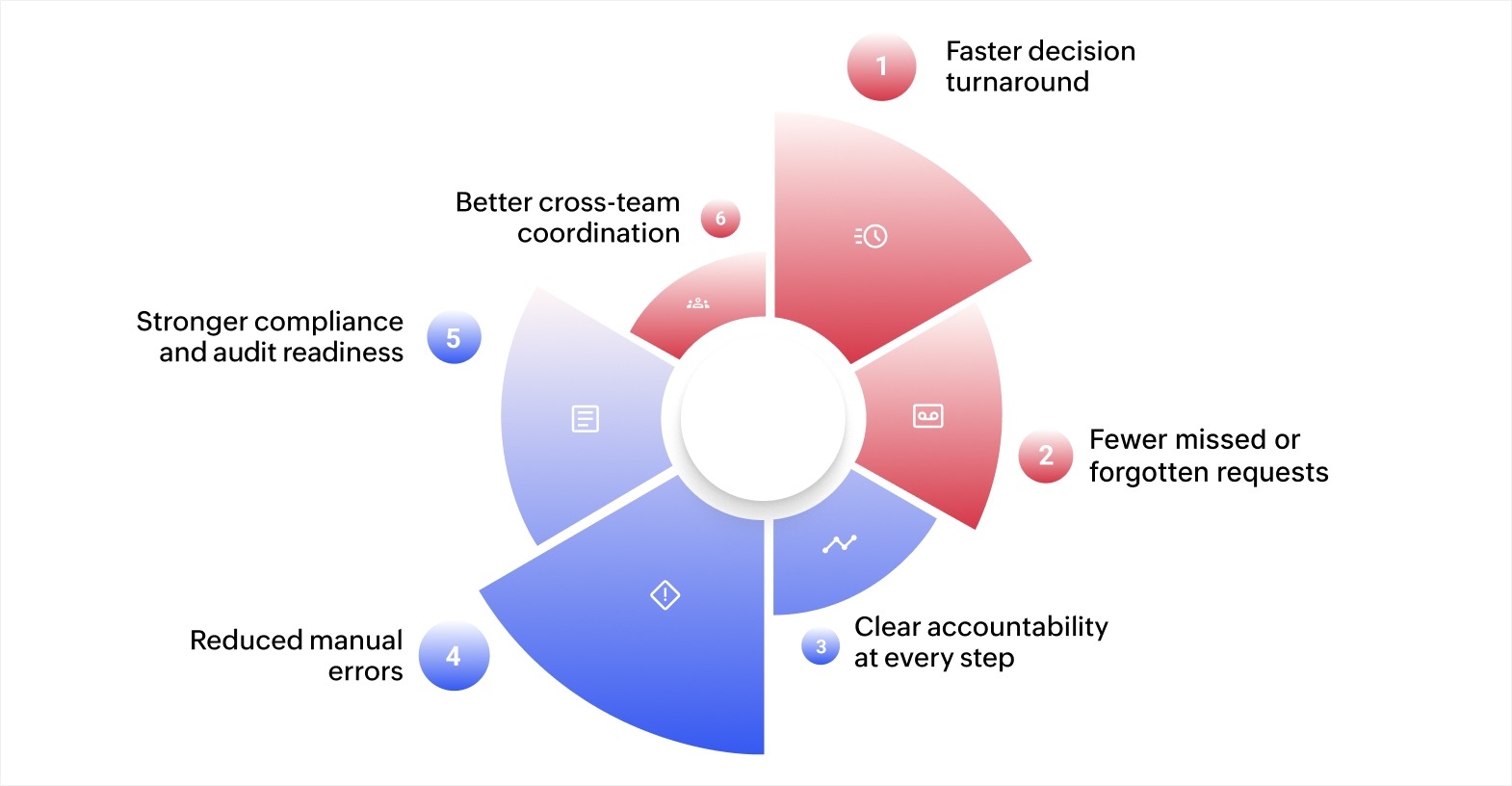
Approval workflow apps improve how your team communicates, stays accountable, and handles compliance across departments. Here's what changes when you move from manual to automated approvals.
- Faster decision turnaround: Automated routing sends requests to the right reviewer immediately, reducing the wait time between submission and sign-off.
- Fewer missed or forgotten requests: Built-in reminders and escalation rules keep approvals moving even when reviewers are busy or unavailable.
- Clear accountability at every step: Real-time tracking shows who has reviewed, approved, or held up a request, making it easy to follow up with the right person.
- Reduced manual errors: Automated validation checks flag incomplete forms or missing information before a request enters the review stage.
- Stronger compliance and audit readiness: Every action is logged with timestamps, approver names, and decision records, creating a reliable trail for audits and regulatory reviews.
- Better cross-team coordination: Centralized approval data keeps departments aligned, so finance, HR, procurement, and operations all work from the same information.
These benefits add up over time. As your team builds more workflows and refines approval logic, the process becomes faster, more consistent, and easier to audit across the organization.
Common approval workflow uses
Approval workflows apply across departments and industries. Here are some of the most common scenarios where a dedicated app makes a measurable difference.
- Expense and reimbursement approvals: Routes expense reports to the right manager based on amount or department, with automatic escalation for high-value requests.
- Purchase order approvals: Sends procurement requests through a defined review chain before vendor payment, keeping spending visible and controlled.
- Time-off and leave requests: Lets employees submit requests that automatically reach their manager and HR, with real-time status updates for everyone involved.
- Contract and document reviews: Moves contracts through review stages with version tracking and sign-off records, creating a clear audit trail for compliance.
- New hire and onboarding approvals: Coordinates offer letters, background checks, and equipment provisioning across HR, IT, and hiring managers in a single workflow.
- Budget and project approvals: Routes budget requests or project proposals to department heads and finance teams based on predefined thresholds and conditions.
Automating these workflows reduces the time between submission and decision, and gives your team a reliable record of every approval.
Build custom approval workflows with Zoho Creator
Most pre-built approval tools offer fixed templates and standard routing rules. That works for simple processes, but falls short when your workflow involves conditional logic, department-specific steps, or data from across your tech stack.
Zoho Creator lets you build approval workflows designed around your exact requirements. You can set up multi-level approval processes with conditional routing, role-based access, and automated alerts, all without writing complex code.
The platform also connects with 1,000+ business tools and Zoho's own suite of products, keeping approval data synced across your CRM, ERP, and other systems. Sign up for free today and start building approval workflows that fit the way your business runs.
FAQ
1. What types of approval processes can an approval workflow app manage?
Approval workflow apps can handle various types of approval processes, including financial approvals, HR requests (like leave or promotions), project management approvals, procurement approvals, and more. These apps can be tailored to accommodate any process that requires multiple levels of review and authorization.
2. How much does an approval workflow app typically cost?
The cost of an approval workflow app varies based on features, scalability, and the number of users. Small businesses can expect to pay a lower monthly fee, while larger organizations with more complex needs may need a custom plan. Many platforms offer tiered pricing based on the number of users or workflow complexity.
3. Can approval workflow apps help with compliance and regulatory requirements?
Yes, approval workflow apps help businesses stay compliant by providing an audit trail that records every step of the approval process. These apps ensure that all required approvals are documented, and they often include features like secure data storage and access controls to meet regulatory standards.
4. Can an approval workflow app be integrated with email systems?
Yes, most approval workflow apps can be integrated with email systems to automatically send notifications and reminders to approvers. This ensures that stakeholders are alerted to pending tasks and can approve or reject requests directly through email, making the process faster and more efficient.
 Ann Elizabeth Sam
Hey! I'm Ann, and I work as a content writer at Zoho Creator. I'm exploring the SaaS world through various forms of content creation. Outside of work, I love dancing and would give up anything to read a good murder mystery.