- HOME
- Best practices
- A solopreneur’s guide: Struggling to manage customer support alone?
A solopreneur’s guide: Struggling to manage customer support alone?
- Published : April 2, 2026
- Last Updated : April 2, 2026
- 225 Views
- 7 Min Read
As a solopreneur, you’re responsible for every part of your business.
On a typical day, you may start by replying to a new lead on email, resolve a customer issue on WhatsApp, and end with responding to comments generated by your latest post on LinkedIn.
This also means that much of this communication happens across channels, including email, social media, contact forms, live chat, and messaging apps, which can become quite difficult to manage over time as a one-person operation.
In this article, you’ll learn three practical ways to organize customer conversations across channels so you can quickly identify which messages require immediate attention, which ones are in progress, and which ones haven’t received a response yet.
We’ll also explore how a shared inbox system like Zoho TeamInbox can support this by bringing everything into one place. But before we get into that, let’s take a closer look at what running a business solo actually involves.
Who is a solopreneur?
A solopreneur is an individual who builds and runs their business independently, handling both growth and delivery without a formal team.
Unlike companies that divide work by roles, there’s no task delegation, backup coverage, or hand-off for a solopreneur. Every incoming conversation, follow-up, and decision depends on the same person.
This isn’t uncommon.
In fact, many operate this way, with owner-staffed firms accounting for roughly 82% of small businesses in the U.S. You’ll see this model adopted in freelance consulting, virtual assistance, photography, online courses, and niche e-commerce businesses.
Three jobs you do as a solopreneur
Typically, your conversations stem from three primary types of work:
Role | What you handle |
Sales | Capture leads, qualify interest, follow up, close deals, and retain customers |
Support | Acknowledge requests, resolve issues, document outcomes, and prevent repeat problems |
Marketing | Create demand, nurture attention, and convert interest into new inquiries |
Each of these areas demands quick responses and consistent follow-through. Over time, a few patterns start to appear.
1. Follow-up debt
A prospect emails you for pricing details. But newer messages quickly push it down your inbox. You plan to reply later, and by the time you do, they’ve already moved on to another business.
2. Thread confusion
A customer shares details over email, confirms something in chat, and then asks another question elsewhere. Now you’re left piecing information together across multiple threads just so you can respond appropriately.
3. False urgency
A routine support query pops up on your live chat while you still owe a reply to a high-intent lead. Without a proper way to prioritize communication, every message starts to feel equally urgent.
The good news is, although these gaps can show up at any stage of your solopreneur journey, you can address them with a few simple steps.
Build a simple customer communication flow
When you’re talking to prospects or clients on your own, every conversation needs two things: a clear status and a next step. Without that, follow-ups rely on memory. Here’s a simple process to stay on top of it.
1. Categorize all conversations into key stages
Instead of digging through messages on different channels to figure out where you stand with each lead or customer, define a few stages you can assign quickly.
Stage | What it means |
New lead | Needs an initial response |
In progress | Details are being discussed |
Ready to close | Close to a decision |
With Zoho TeamInbox, you can apply shared tags directly to conversations to mark them by stage, and use inbox views to pull up only those threads that match a specific status.
Next, decide how often you’ll review each stage. For example, you can schedule checking new inquiries twice a day and revisiting ongoing discussions every couple of days.
To speed things up, create a few short pre-defined templates you can reuse:
A quick acknowledgment.
A nudge when there’s no response.
A message that outlines pricing or next steps.This exercise will help you standardize your responses.
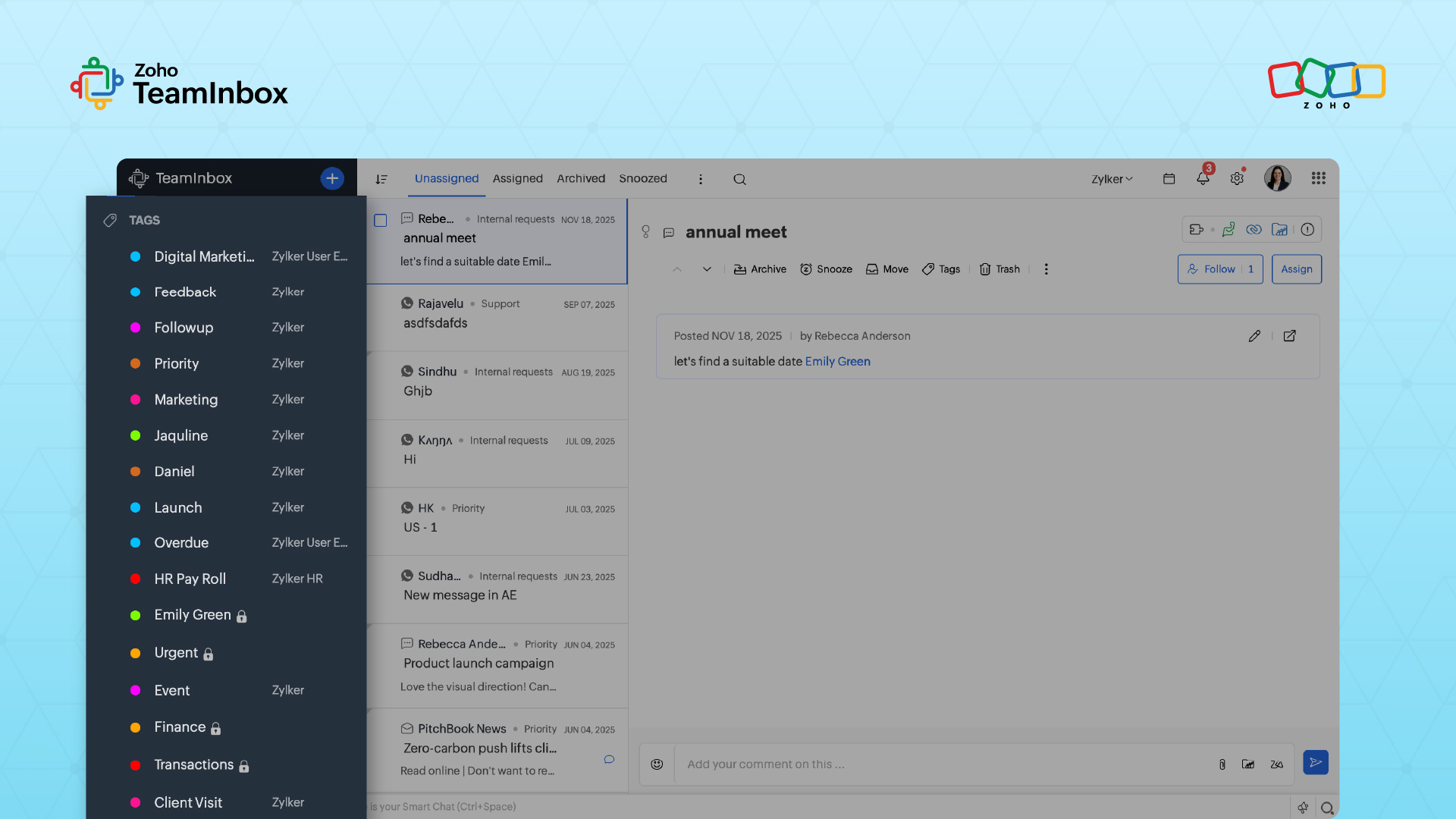
2. Use thread-level control to keep next steps visible
Every conversation should have a clear “what happens next.” If you don’t need to reply right away, mark it for when you do.
Action | Example |
Snooze messages until the next action date. | Mute a WhatsApp lead until tomorrow morning when you plan to reply. |
Mark anything that needs attention. | Star an important email with pricing discussion. |
Separate active conversations from waiting ones. | Move a LinkedIn DM to “waiting” after you’ve replied so you don’t keep reopening it. |
Zoho TeamInbox enables you to manage conversations using thread-level actions like snooze, follow, assign, and archive. A snoozed thread disappears from your active inbox and resurfaces at the exact time you set, so you don’t have to remember to come back to it.
Following a thread keeps you notified of updates, assigning it makes ownership explicit, and archiving removes completed conversations from your working view
Maintain support consistency without an extended help desk team
Aim to deliver robust solopreneur support in a way that feels reliable without taking over your entire day. Here’s how you can do that:
1. Publish response windows for all support channels
Let your customers know when they’ll hear back from you, whether they reach you through email, WhatsApp, or social media DM.
For example, you can add a note to your contact form that says you’ll respond within one business day. You can also trigger an automatic reply that confirms an incoming request and explains the next step.
Channel | When you check | Expected response time |
Twice daily | Within 1 business day | |
Two to three set time slots | Within a few hours | |
Social DMs | Once daily | Within 24 hours |
Contact forms | Twice daily | Within 1 business day |
Now that you’ve set expectations, the next step is ensuring they’re always met.
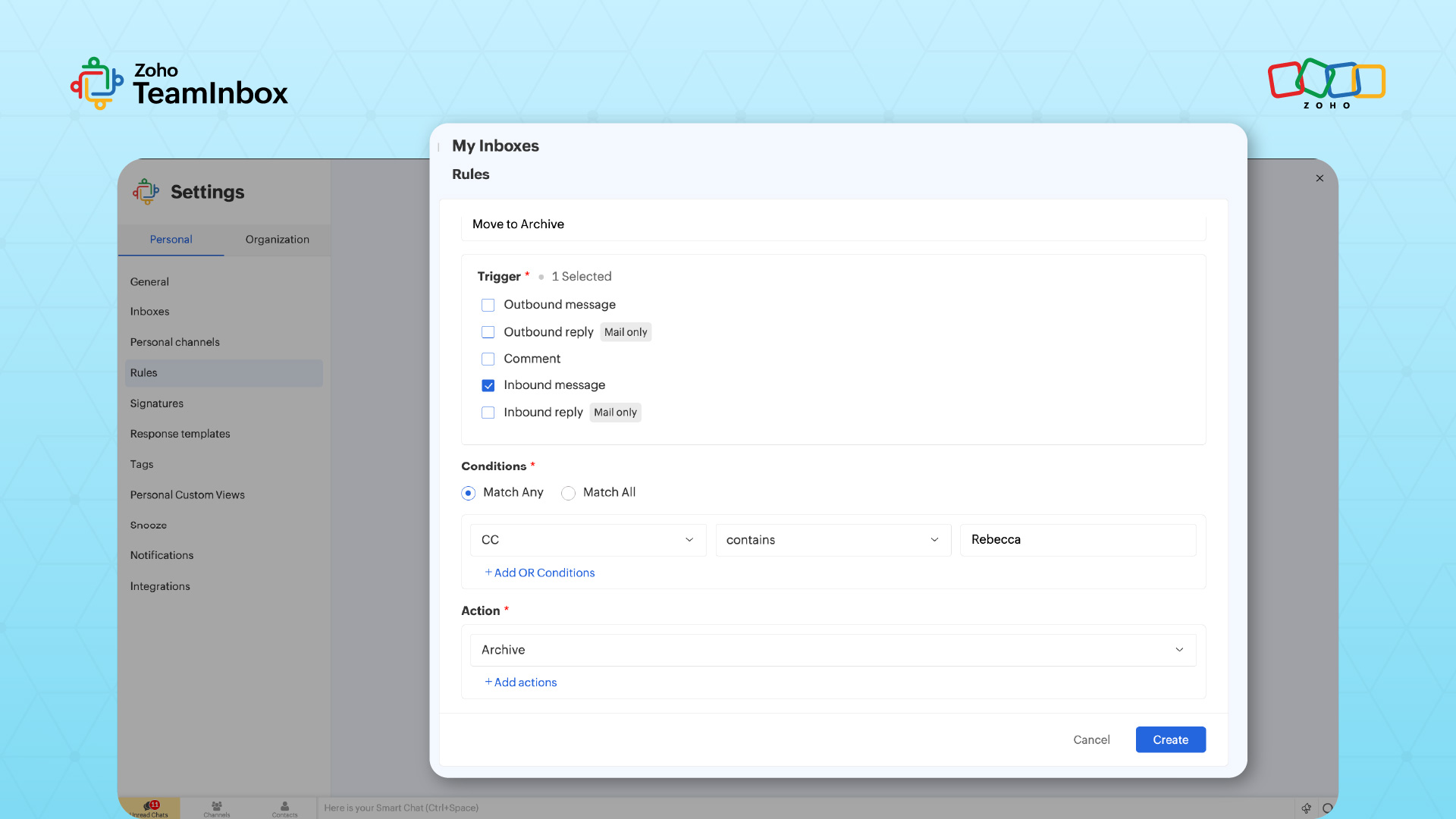
With Zoho TeamInbox, you can set up automation rules that trigger actions when a message arrives, such as sending an acknowledgment or assigning the conversation based on predefined conditions.
Doing this saves you from manually responding to each one just to confirm receipt. Plus, it gives you time to review it properly.
2. Design a support triage that you can run daily
Once expectations are in place, the next step is deciding how to manage incoming customer messages without reacting to everything as and when it arrives.
Review messages in batches and quickly sort them by importance. For instance, when you open your inbox or chat queue, you might come across an email from a customer who can’t access their account and a live chat asking about a feature.
Here, it’s obvious. The first one needs immediate action, while the second can wait until your next review block.
3. Preserve context within support conversations
What if a potential customer messages you on WhatsApp and later follows up through a form or LinkedIn?
You stick to one channel to continue the conversation. With Zoho TeamInbox, you can bring communication from email, WhatsApp, and social media into a single inbox, where every interaction is organized into its own thread.
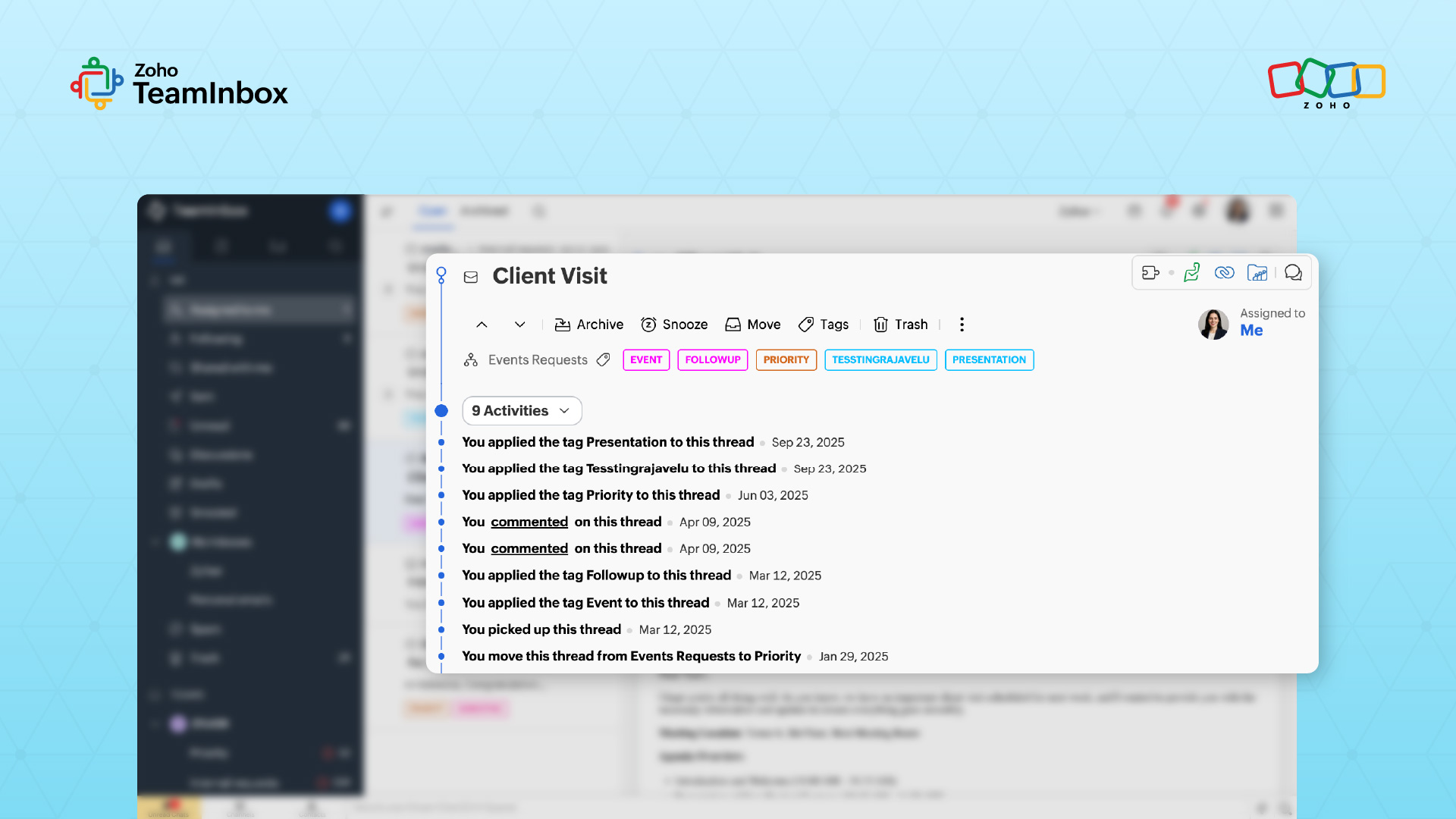
View the full conversation history in one place and continue without losing track of what’s already been shared. This way, you don’t have to reconstruct what’s already been discussed before replying and customers don’t have to repeat what they’ve already shared with you.
Establish a repeatable solopreneur marketing rhythm
Solopreneur marketing generates attention. Your job is to turn that attention into customer conversations you can follow up on. The simplest way to do this is to focus on a small number of channels and maintain a predictable response routine. Here’s how.
1. Choose where to support customers
Instead of spreading yourself thin, anchor your efforts in two places. Pick one place to publish your content (e.g., LinkedIn, newsletter, blog) and one place to respond (comments, DMs, replies). Now decide what counts as a lead. Some examples include:
A LinkedIn comment asking about your service.
A reply to your newsletter.
A DM showing interest.
That way, you can respond on the same channel and keep the conversation there. So, if someone comments on your LinkedIn post, reply to the comment and if they continue the conversation, respond in DMs.
2. Run two simple loops you can stick to
Keep your activity tied to a small, repeatable routine throughout the week.
Loop | When | What you do | Output |
Weekly loop | One to two times per week |
| New conversations started |
Daily loop | 15–20 mins/day |
| Conversations progressing |
Instead of keeping an eye on messages throughout the day, everything gets handled during these short check-ins.
When a shared inbox becomes useful for solopreneurs
You may not need a shared inbox initially. When message volume is low and everything arrives through one address or a handful of channels, a regular inbox is often enough. However, the requirement shifts when:
- Your inbox starts acting like a task list: As the number of ongoing conversations grows, you start using your inbox to keep track of follow-ups and pending replies. This makes it harder to separate what needs action from what’s already handled.
- It becomes harder to see what still needs a reply: When multiple conversations are in progress, you lose track of which ones need a response, which ones are waiting on the other person, and which ones are complete.
- You manage multiple role-based email addresses: Addresses such as support@, sales@, or hello@ begin collecting different types of inquiries. Reviewing each mailbox separately takes extra effort and makes it easier to miss something.
- You want a clearer record of how requests were handled: When conversations stretch across multiple replies, it becomes difficult to quickly understand what’s already been discussed and what actions were taken.
- Other people may need access to customer communication: Even if you run the business alone, you may partner with assistants, contractors, or collaborators who may need visibility into incoming messages without losing context.
When these patterns start to appear, it’s a sign that your current setup lacks the structure needed to manage conversations reliably.
Zoho TeamInbox addresses this through specific controls at the thread level. For example, you can assign conversations to define ownership, use shared tags to categorize them by status, and apply inbox views to filter what needs attention at any given time.
Features like snooze allow you to resurface messages exactly when a follow-up is due, while the activity log maintains a complete record of replies, assignments, and updates within each thread. Together, these capabilities replace the need to track conversations manually across inboxes and help you manage them through a defined workflow.
Next steps for organized solopreneur communication
At this point, the goal is simple: Manage customer support and communication in a way you can sustain.
Start by setting fixed times each day to review incoming messages across channels. During each review, assign a clear status to every conversation—whether it needs a reply, is waiting for a response, or is complete.
For any conversation that requires follow-up, define the next step before moving on, even if you don’t respond immediately. At the end of each week, review unresolved or delayed conversations to identify patterns and refine your approach.
Zoho TeamInbox supports this by giving you a single place to manage conversations across email, WhatsApp, and social channels, while letting you tag threads, control follow-ups, and track replies without switching between tools.
Start with structure. Then build on it. Try Zoho TeamInbox for free.
 Ganeshkiran Arasu
Ganeshkiran is a Growth and Digital Marketing manager at Zoho. He's passionate about writing content that actually helps — breaking down how products solve real, complex problems and what genuine collaboration looks like in practice. When he's not crafting strategies with his team, he's keeping tabs on the latest industry trends — always with a cup of tea in hand.