- HOME
- Best practices & Guides
- Microsoft Forms vs Google Forms: Which is the best for your business in 2026?
Microsoft Forms vs Google Forms: Which is the best for your business in 2026?
- Last Updated : January 6, 2026
- 1.0K Views
- 9 Min Read
Understanding your form builder requirements
Before analyzing specific platforms, it is important to assess your organization's unique requirements. Consider factors like your existing software ecosystem, budget constraints, your team's technical expertise, compliance requirements, and the complexity of the data you need to collect.
Your choice should also factor in scalability. While you might start with basic forms today, consider whether you will need advanced features like payment processing or workflow automation in the future.
Choosing the right form builder matters
Not all form builders are created equal. While some excel at simplicity and ease of use, others pack enterprise-grade features that can handle complex business processes. The challenge lies in finding the perfect balance between functionality, cost, and user experience for your specific needs. But with so many tools available, it is easy to feel stuck between familiarity and functionality.
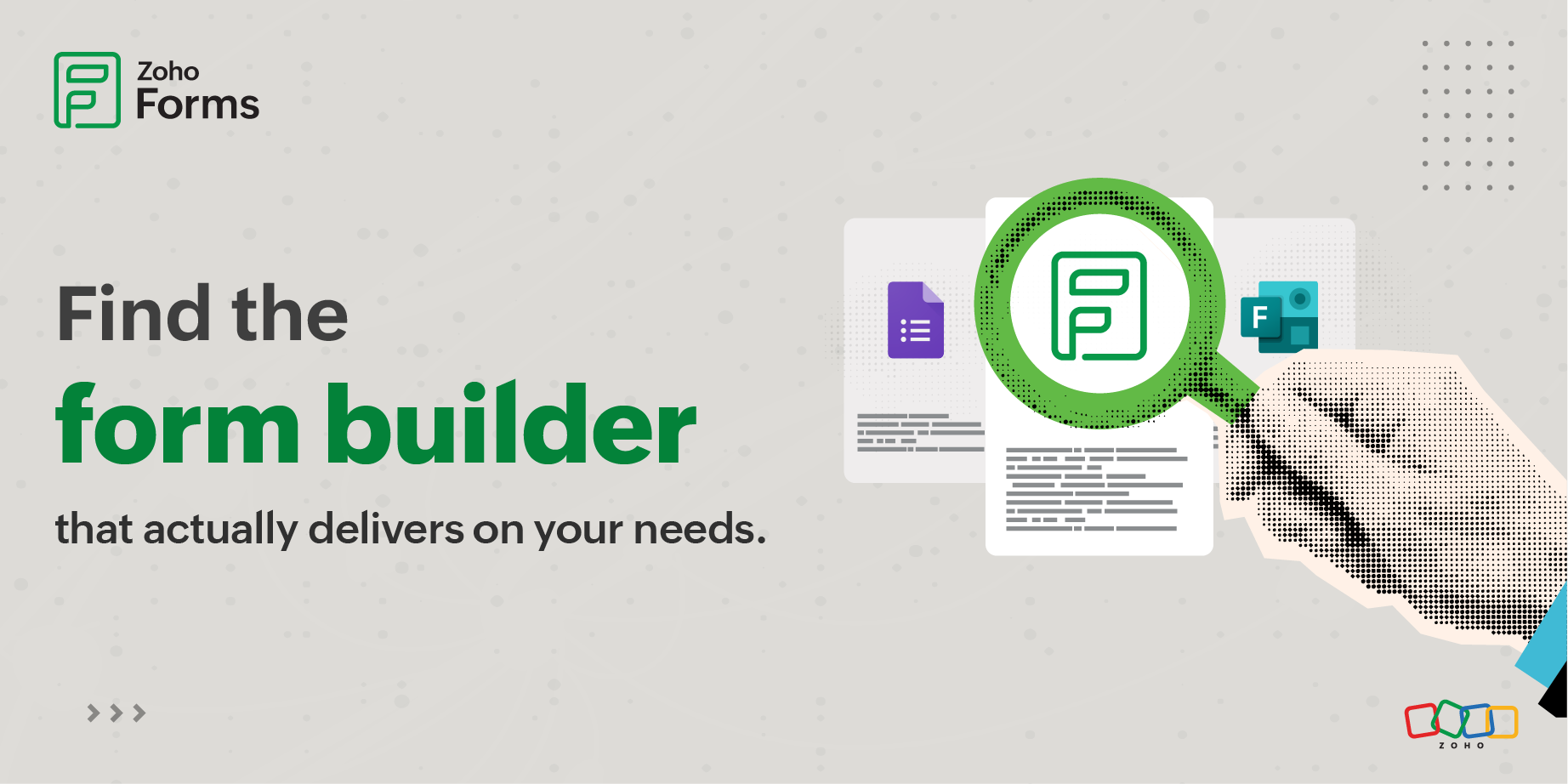
Microsoft Forms, Google Forms, and Zoho Forms are three of the most popular solutions, but which one is right for you?
Microsoft Forms vs Google Forms: Quick verdict
Microsoft Forms and Google Forms dominate the form builder conversation because they are bundled with the world's two most popular productivity suites.
Microsoft Forms and Google Forms are great starting points for basic needs.
But being popular does not automatically mean they are the best choice for your needs. The question isn't whether Microsoft Forms or Google Forms is "better" in absolute terms. The question is: what are you actually trying to accomplish?
Organizations that take data collection seriously whether for events, healthcare, field services, e-commerce, or complex operations, consistently graduate to dedicated platforms like Zoho Forms that were built for these exact scenarios.
Microsoft Forms
Pros
Seamless Microsoft 365 Integration
Microsoft Forms integrates natively with the entire Microsoft ecosystem including Teams, SharePoint, Excel, OneDrive, and Power Automate. This deep integration allows real-time data syncing with Excel, automatic file storage in OneDrive, and seamless collaboration through Teams channels. Organizations already using Microsoft 365 can leverage Forms without additional costs or complex setup.
AI-Powered Response Analysis
Forms includes intelligent analytics that automatically analyze response patterns, identify trends, and provide actionable insights. According to HubSite365, Microsoft continues enhancing these AI capabilities with features like interactive forms in Stream and live data synchronization.
Excellent Quiz Functionality
Forms excels at creating quizzes with automatic grading, point assignment, and instant feedback. The quiz features are more sophisticated than competitors, making it the preferred choice for educational institutions and training programs.
Clean, Professional Interface
The user interface is intuitive and uncluttered, following Microsoft's modern design language. As noted by Louisville Geek, the drag-and-drop interface makes form creation quick and hassle-free without requiring technical expertise.
Cons: Why look for an alternative?
Requires Microsoft 365 Subscription
Accessing forms requires a subscription. This creates a barrier for individuals or small businesses not invested in the Microsoft ecosystem.
No Payment Collection
Forms lacks built-in payment processing capabilities. Organizations needing to collect payments must use workarounds or third-party tools, creating friction in the user experience.
Limited Question Types
WPS Office analysis highlights that "Microsoft Forms provides only very basic question formats" including Choice, Text, Rating, Date, Ranking, and Likert Scale. It lacks advanced field types like file uploads for external users, matrix grids with flexible options, and calculation fields.
Restricted Conditional Logic
According to Plumsail's research, "branching only works with single-choice fields and does not allow for any complex behaviors.
Poor Integration with Non-Microsoft Tools
Vantage 365 points out that while Forms integrates beautifully with Microsoft products, "it has few integrated options with non-Microsoft products," requiring workarounds like Power Automate for third-party connections.
Google Forms
Pros
Completely Free with Unlimited Usage
Google Forms is genuinely free forever with no hidden costs. According to Jotform's analysis, "there is no specific limit on the number of forms or submissions you can have with Google Forms" beyond a 5 million cell cap in the corresponding Google Sheet.
Seamless Google Sheets Integration
Responses automatically flow into Google Sheets in real-time, enabling powerful data analysis, pivot tables, and custom reporting. This integration is automatic and requires zero configuration.
Extremely User-Friendly
Google Forms has the lowest learning curve of any form builder. The interface is so intuitive that users can create professional forms within minutes without training. Nerdy Form emphasizes that "Google forms has an intuitive user interface that makes it easy to create forms without any coding knowledge."
Also read: Google Forms Alternative for 2026
Cons: Why you should switch?
Basic Customization Options
Google Forms offers only basic customization features like changing the color scheme and adding logos. You cannot completely remove the "Powered by Google Forms" branding from the footer of a standard Google Form.
Limited Advanced Features
Google Forms lacks enterprise-grade capabilities including approval workflows, advanced calculations, payment processing (native), subforms, and sophisticated conditional logic. Nerdy Form concludes that "it is best suited for creating surveys and questionnaires" but falls short for complex business processes.
No Offline Data Collection
Google Forms requires an internet connection for both creation and submission. There's no offline mode for field data collection in areas with limited connectivity.
Basic Analytics Only
The built-in analytics show simple charts and response summaries but lack advanced reporting, cross-tabulation, or predictive insights. Serious analysis requires exporting to Google Sheets.
Limited Date Picker Control
Nerdy Form notes that "the datepicker has no ability to restrict dates from being chosen," making it problematic for scheduling forms where certain dates should be unavailable.
Compare MS Forms, Google Forms and the best alternative
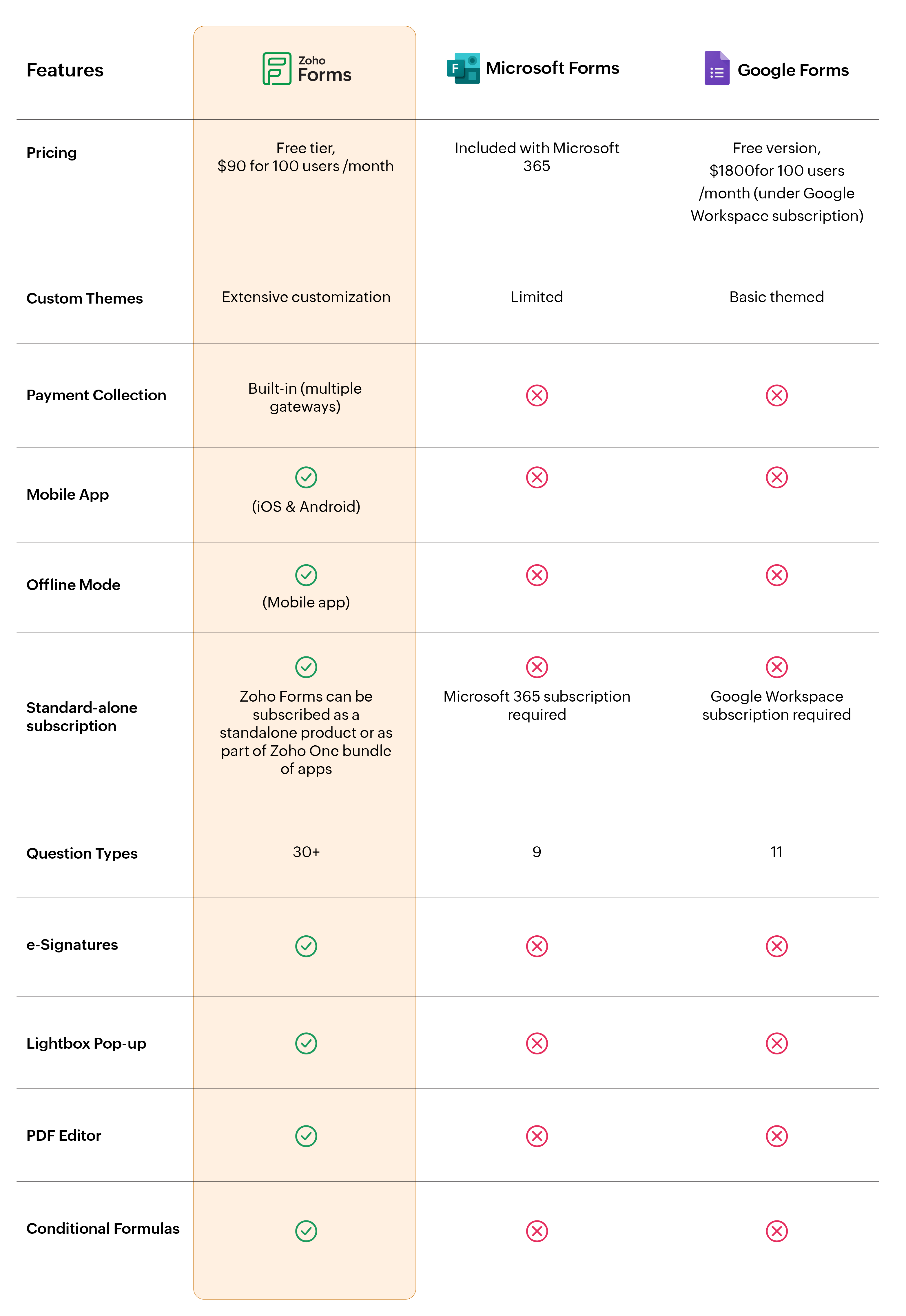
All third-party product name(s), trademark(s), and logo(s) are the property of their respective owner(s) and are used here solely for identification and comparison purposes. Their use does not imply any affiliation, sponsorship, or endorsement. Prices and features are drawn from publicly available information on each vendor’s website(s) as on 24/07/2025, and the information is subject to change on those website(s) at any time without notice. The information contained in this webpage is for general information purposes only and should not be considered as authorized information from the vendors. Prices published here may not include applicable taxes or discounts offered, which may alter the final price payable by a customer. Zoho makes no representations or warranties, express or implied, including, without limitation, warranties of accuracy, completeness, merchantability, or fitness for a particular purpose, and accepts no liability for any loss or damage arising from reliance on the information. Please contact us at legal@zohocorp.com if you believe any information is inaccurate or outdated.
Why people choose Zoho Forms
Most businesses need more than just a form. They need a data workflow engine.
Zoho Forms stands out because it integrates design, automation, payments, mobility, and analytics into one platform. It does not just collect data. It moves your business forward.
Integration ecosystem
One of the most commonly overlooked aspects when choosing a form builder is how well it integrates with existing tools and workflows. Your form builder doesn't operate in isolation. It needs to communicate with your CRM, email marketing platform, or project management tools. If you need to connect your forms to multiple platforms across different vendors, Zoho Form's extensive integration library becomes a significant advantage.
Data security and privacy
Zoho Forms goes the furthest in compliance options, offering HIPAA compliance for healthcare, GDPR for European data protection, and SOC 2 Type 2 certification. Organizations in regulated industries should carefully review each platform's compliance documentation and ensure it aligns with their legal obligations.
Scalability and long-term growth
Your needs today might be simple, but what happens when your organization grows? Can the platform handle increasingly complex workflows as your processes mature? Scalability encompasses both technical capacity and feature availability.
Microsoft and Google Forms have relatively static feature sets. What you see is what you get.
Zoho Forms, however, offers a clear upgrade path from simple forms to sophisticated data collection systems with advanced calculations, subforms, and multi-step approval workflows.
Zoho Forms supports growth also through an expanding library of templates that evolve with your business needs.
User experience
With Zoho Forms, you can build incredibly sophisticated forms that would be impossible on simpler platforms. Zoho provides extensive documentation, video tutorials, and webinars to help you build beautiful forms within moments!
Ready-to-use templates for every use case
Choosing the right form builder is only half the battle. Getting started quickly without building everything from scratch is what really drives adoption.
Zoho Forms comes with an extensive library of ready-to-use form templates designed for real business scenarios across industries.
From contact forms, registrations, and order forms to HR and healthcare forms, each template is thoughtfully designed. You can use them as-is or customize them to match your branding, workflows, and integrations.
Industry-specific considerations
Healthcare
If you are in healthcare, compliance is mandatory. Zoho Forms stands out with its HIPAA-compliant forms, offering encrypted data storage. Neither Microsoft Forms nor Google Forms currently offer HIPAA compliance, making Zoho Forms the clear choice for collecting protected health information (PHI).
Ecommerce and Retail
Businesses that need to collect payments alongside form submissions should look closely at Zoho Forms which offers native integration with PayPal, Stripe, Square, and other payment gateways. You can create order forms, registration forms with fees, and donation forms with built-in payment processing. Microsoft Forms and Google Forms require workarounds or add-ons for payment collection.
Field services and remote work
Organizations with field workers, sales teams, or employees working in areas with unreliable internet connectivity need offline capabilities. Zoho Forms is the only platform among the three that offers a dedicated mobile app with offline data collection. Field technicians can fill out inspection forms, service reports, or audit checklists without an internet connection, and the data automatically syncs when connectivity is restored. This feature alone can be of extreme importance for industries like construction, utilities, and field research.
Best practices to implement online forms
Regardless of which platform you choose, successful implementation follows similar patterns.
- Start with a pilot project.
- Select one form that replaces an existing paper or email-based process. This allows your team to learn the platform without risking critical operations.
- Choose something with moderate complexity (not too simple, not too complicated) to truly test the platform's capabilities.
- Use the platform's pre-built templates as starting points but customize them for your brand and workflow.
- Keep forms as short as possible.
- Use clear, specific language and avoid jargon.
- Group related questions together and use conditional logic to show only relevant questions.
- Minimize typing by using dropdown menus, checkboxes, and radio buttons where appropriate.
- Set appropriate validation rules but do not over-validate.
- Set up integrations and test data flow to ensure information reaches the right systems.
- Conduct user acceptance testing with a small group of actual respondents.
Conclusion
Choose Microsoft Forms if: You are already using Microsoft 365 and need integration with Teams/SharePoint with minimal setup.
Choose Google Forms if: You need a free solution, want the simplest user experience, or primarily use Google Workspace tools.
Choose Zoho Forms if: You need advanced features like payment collection, offline mode, complex workflows, or enterprise-grade compliance (HIPAA, GDPR).
Frequently asked questions
Is Microsoft Forms better than Google Forms for business?
It depends on your organization’s needs.
Microsoft Forms can be a better fit if your team is deeply invested in the Microsoft 365 ecosystem, values seamless integration with Teams, SharePoint, and Excel, and needs advanced quiz capabilities. However, Google Forms wins for teams seeking zero cost, simplicity, and unlimited use.
For more complex business use cases, many organizations explore alternatives like Zoho Forms to bridge that gap.
When is Microsoft Forms the better choice?
Microsoft Forms is often the better choice when your organization:
- Already uses Microsoft 365 (no extra subscription needed)
- Wants real-time Excel integration
- Needs quiz grading, branching, or assessments
- Prefers tools that are easy to adopt for internal teams already trained on Microsoft apps
When is Google Forms the better choice?
Google Forms makes sense when:
- You want a free, unlimited form builder
- You need quick form creation without training
- You rely on Google Sheets for data analysis
It’s ideal for small teams and nonprofits that need straightforward form creation without enterprise complexity.
Why should you consider alternatives to Microsoft Forms and Google Forms?
While both Microsoft Forms and Google Forms are excellent for basic use cases, many businesses outgrow their capabilities as complexity increases.
Common limitations include:
- No native payment processing
- Limited conditional logic and calculations
- Lack of workflow automation
- No offline data collection
- Minimal enterprise reporting
These gaps make it harder to use Microsoft or Google Forms for order forms, field data collection, approvals, or advanced business workflows leading many organizations to look for more capable solutions.
How does Zoho Forms stand as a better alternative to Microsoft and Google Forms?
- Built-in payment collection (multiple gateways supported)
- Offline data collection via mobile apps
- Advanced conditional logic and formulas
- Conditional approval workflows
- Extensive integration ecosystem
- Compliance features like HIPAA and GDPR
- Custom branding and reporting
 Samhita V
Samhita is a seasoned product expert at Zoho Forms who blends deep product expertise and user education to help businesses make sense of powerful features without the jargon. Known for her thoughtful storytelling and crisp communication, she adds a subtle creative flair to every piece she writes. With a knack for spotting real-world use cases and adding a touch of fun to her narratives, she’s on a mission to make even the most complex workflows feel approachable. Beyond the desk, she channels her creativity into dance and mural art, finding new ways to infuse her surroundings with color, rhythm, and meaning.