- HOME
- Work Culture
- Simplify eSignatures: Automate document workflows with Zoho WorkDrive
Simplify eSignatures: Automate document workflows with Zoho WorkDrive
- Last Updated : August 17, 2026
- 47 Views
- 5 Min Read

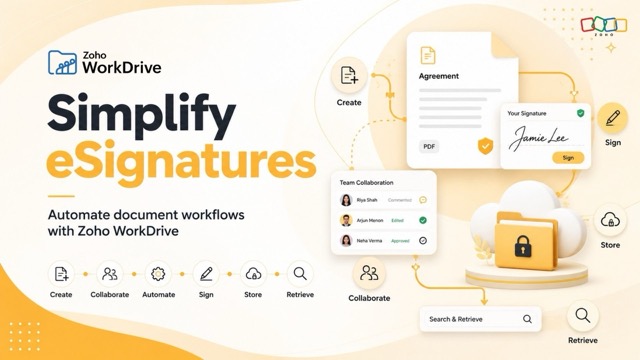
For many businesses, getting a document signed electronically is no longer the difficult part. The bigger challenge is everything that happens around managing signed documents and automating these document workflow.
Think about a typical contract or agreement. Someone creates it, shares it with the right people, waits for feedback, gets the necessary approvals, sends it for signature, stores the document, and eventually needs to retrieve it later.
On paper it may sound simple. But what happens most of the time is, each step happens across different tools and what should be a simple workflow can quickly become fragmented. Email chains grow longer. Teams work on different versions of the same file. Approvals require repeated follow-ups. Signed documents end up scattered across inboxes, local folders, and storage platforms.
The signature may only take a few seconds. Managing the entire document lifecycle around it can take considerably longer. That is why businesses are beginning to look beyond eSignatures alone and think about how the entire document workflow can be simplified.
From signing documents to managing document workflows
The traditional document process often looks like this:

While straightforward in theory, it often relies on emails, multiple applications, manual follow-ups, and disconnected storage systems. A more connected approach looks like this:

The key difference is not simply automation. It is bringing these activities into a structured document management environment where information, people, and processes remain connected.
As organizations grow, this becomes increasingly important. More documents mean more stakeholders, more approvals, and more information to keep track of. Without a connected system, questions that should be easy to answer can become surprisingly difficult:
Which version is the final one?
Has legal approved the contract yet?
Who still needs to sign it?
Where is the signed copy?
Who has access to it?
A good document workflow should make those questions easier to answer.
Bringing the document lifecycle together with Zoho WorkDrive
Zoho WorkDrive provides a central environment where teams can create, collaborate on, automate, sign, store, and manage business documents.
Rather than treating eSignatures as a separate activity at the end of a process, teams can think of signing as one step within a larger, connected document lifecycle.
Here are a few ways that can work in practice.
Keep signed documents in one place
Once a contract is signed, it should be easy to find again.
Yet completed agreements often end up buried in email threads, personal folders, or different storage locations. That can become a problem when someone needs the document months later for a renewal, an audit, or simply to answer a business question.
With centralized Team Folders in Zoho WorkDrive, teams can keep signed documents alongside the other files related to their work.
This creates a more reliable source of truth, makes documents easier to retrieve, and helps teams control who can access important business records.
Create signature-ready documents with Zoho Writer
Many signature workflows begin long before the signature request is sent.
An HR team may need to prepare an offer letter. A legal team may be drafting an NDA. Procurement could be preparing a vendor agreement.
With Zoho Writer as part of WorkDrive's Office Suite, teams can create these documents, work with reusable templates, collaborate on changes, and prepare them for signature.
This can help streamline recurring processes involving documents such as offer letters, NDAs, vendor agreements, and client contracts while reducing repetitive work and encouraging greater standardization.
Work with PDFs without switching tools
Not every document arrives in an editable format. Vendor agreements, compliance forms, customer contracts, and other business documents are often shared as PDFs. If teams need a separate application every time they want to make a change or add an annotation, that adds another layer of friction.
WorkDrive allows teams to work with PDFs, make edits and annotations, and prepare them for the next stage of the workflow.
Reducing tool sprawl may seem like a small improvement, but avoiding repeated downloads, uploads, and app switching can make a noticeable difference when teams handle high-volume documents every day.
Bring your entire workflow into one ecosystem
Organizations using eSignature applications often depend on a separate cloud storage provider to manage documents for signing. That can mean additional subscriptions, administration, vendor relationships, and frequent context switching.
With Zoho WorkDrive available as a cloud picker source within Zoho Sign, users can access documents from WorkDrive directly while working in Zoho Sign and send them for signature. It creates a more connected experience while helping businesses reduce unnecessary tool sprawl.
Automate what happens before and after the signature
The most time-consuming part of a document workflow is often not the signing itself. It is getting the document to the right point where it is ready to be signed.
Consider a contract that needs to move through several teams:
Create contract → Manager review → Legal approval → Finance approval → eSignature → Store final copy
Without a defined workflow, each transition may depend on someone sending an email, messaging a colleague, or remembering to follow up. With WorkDrive custom workflows, organizations can structure these steps instead of coordinating each one manually.
The result can be fewer follow-ups, faster approvals, better process visibility, and a more consistent record of how documents move through the organization.
AI can make document repositories more useful, too
As organizations accumulate more documents, another challenge emerges: finding and understanding the information inside them. WorkDrive's AI capabilities can help teams work with organizational content more effectively.
Zia Search can help users discover files based on names, file content, OCR, and metadata.
Zia AI can help summarize documents such as contracts, agreements, and policies, as well as surface key information, action items, and important clauses.
With Zia Hubs (Beta), organizations can bring together content such as contracts, policies, and agreements and generate contextual insights from that information.
The goal is increasingly not just to store documents, but to make organizational knowledge easier to discover and act on.
Automation also requires governance
Automation should make document processes easier, but it should not make them harder to govern.
Business documents often contain sensitive information, which means organizations still need to think about who can access them, what changes were made, and how activity can be tracked.
Capabilities such as role-based permissions, Team Folders, access controls, audit trails, activity logs, version history, DLP, two-factor authentication, and backup and restore can help organizations maintain control as their document workflows become more automated.
For organizations working with regulatory requirements, support for frameworks such as GDPR and HIPAA can also form part of a broader approach to managing business information responsibly.
The future of eSignatures is connected
eSignatures have already removed a major source of friction from business processes. We no longer need to print a document, sign it by hand, scan it, and email it back simply to complete an agreement.
But there is still plenty of work to do.
Documents still need to be created. People need to collaborate on them. Approvals need to happen. Final copies need to be stored. And months later, someone needs to find them again. Bringing those steps together is where the next opportunity lies.
When document creation, collaboration, approvals, signatures, storage, discovery, and governance work as part of one connected process, teams can spend less time managing the movement of documents and more time focusing on the work those documents enable.
Want to see what a connected document workflow looks like in practice?
Join our webinar, “Simplify eSignatures: Automate document workflows with Zoho WorkDrive,” where we'll walk through practical ways to simplify the journey from document creation and approval to eSignatures, storage, automation, and retrieval.
Register for the webinar: 09:00 AM GMT | 10:00 AM PDT