Data Templates: The first step to Intelligent Data Processing (IDP)
- Last Updated : April 24, 2026
- 269 Views
- 4 Min Read


Storing documents is easier than ever, but teams often still struggle to organize their work because the meaning of those documents—deadlines, project owners, risk levels, deal stages—lives in people’s heads, chat threads, spreadsheets, and separate systems like CRM. And those in-between spaces are exactly where mistakes and delays love to hide.
Intelligent Document Processing (IDP) exists to solve that bigger problem: it’s the practice of moving from documents as static files to documents as structured, usable data that can be classified, validated, routed, and integrated into real workflows.
Understanding what IDP entails
At its core, Intelligent Document Processing is about teaching your systems to read documents a little more like people do and, then doing something useful with that understanding.
A typical IDP setup will:
Capture documents from scanners, email, uploads, or cloud drives
Use OCR (optical character recognition) to turn images and PDFs into text
Apply AI/ML and NLP to figure out what the document is and which bits matter
Extract key fields (names, dates, amounts, IDs, line items, clauses)
Validate those values against rules or reference data
Feed clean, structured data to the tools that need it (ERP, CRM, help desk, etc.)
Most modern IDP models describe an end-to-end flow that looks like this:
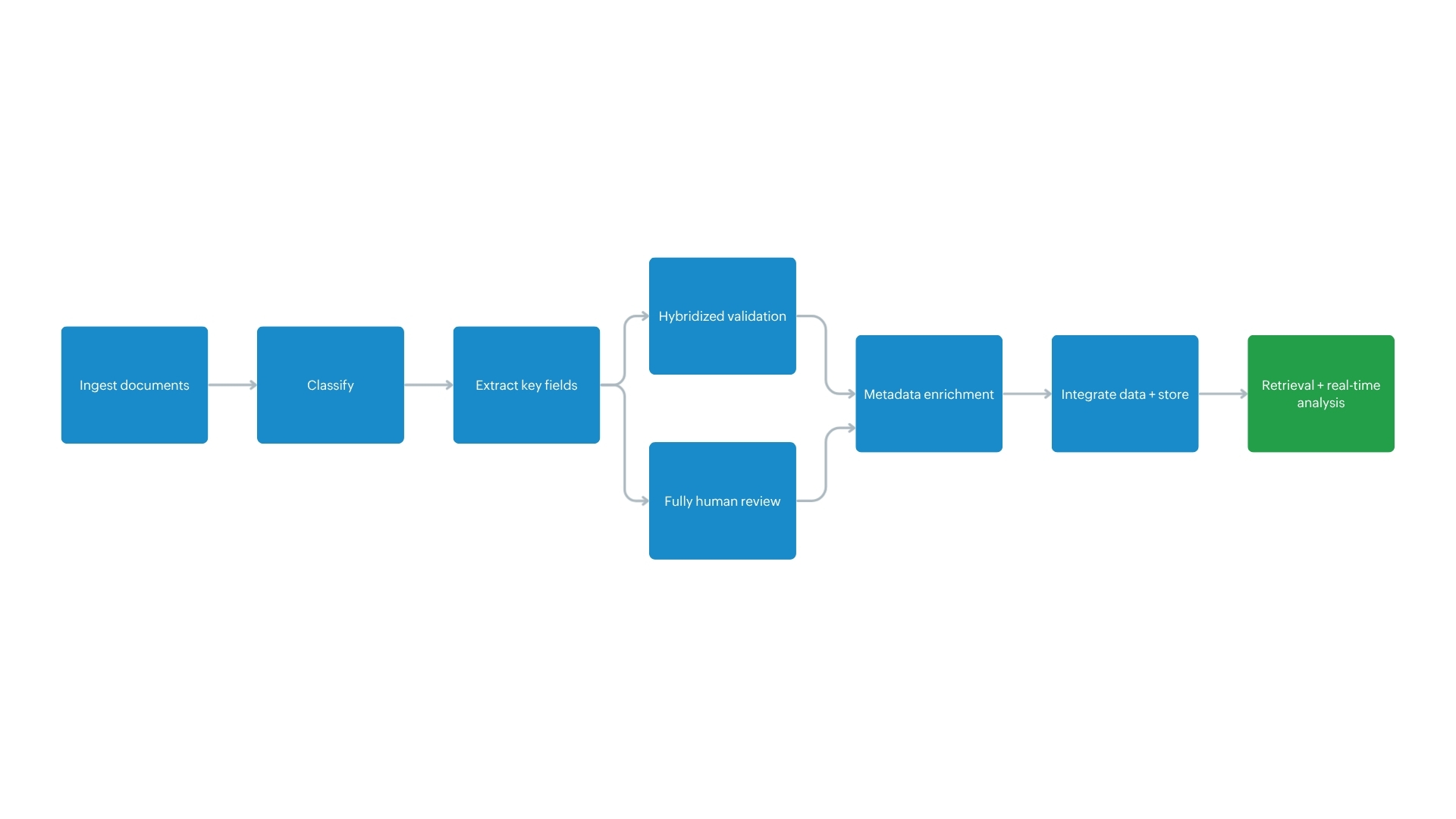
The catch? For IDP to work well, your documents can’t live in the wilderness of ad‑hoc folders, inconsistent names, and mysterious ownership. You need a content hub that’s organized, governed, and rich in metadata. That’s the bridge WorkDrive is trying to build with Data Templates.
Where basic OCR stops at “Here’s the object found,” IDP keeps going on with “Here’s an invoice from this vendor, with this total, due on this date—and I’ve already pushed it into your finance system for approval.”
Now, WorkDrive’s Data Templates isn’t an OCR engine. It forms the metadata layer that makes IDP outcomes realistic in day-to-day work: you define the fields that matter, attach them to files and folders, and use them to search and govern content.
With WorkDrive 6.0, Data Templates deliver more enterprise-grade IDP capabilities thanks to three very practical upgrades:
1,000+ custom fields
Up to 1,000 searchable fields .
The ability to restrict who can associate specific templates to Team Folders
The key idea here is: IDP isn’t just “AI extraction.” It’s also about what structure you extract into, how you validate it, and how you retrieve and make it usable later. This is also where the difference between a “cool demo” and a “fully-operational information system” for metadata design becomes evident.
Documents don’t fail processes but undefined context does
Let’s assume a painfully common Monday situation: you need the latest audit report, a contract needs to be renewed, or the marketing team is completing a review of all event-related campaigns and assets from last quarter.
You could search by file name. You could scroll through folders. You could message a colleague and hope they’re not in back-to-back calls.
But the core issue is simpler than it looks: folders are great at telling you where something is. They’re not great at telling you what something is and what you should do with it next.
This is why IDP is an important step forward. Modern businesses run on documents and communications across multiple departments. Handling that volume manually gets expensive, slow, and error-prone.
WorkDrive’s Data Templates let you create a template and associate it with files and folders by adding custom information using custom fields. Once associated, you can search for and manage that content easily. In short, Data Templates help you classify and organize business data stored across files and folders with relative ease.
For more info, check out this help doc about Data Templates and Custom Functions.
Data Templates' role in IDP
Data Templates don’t replace the extraction/classification engines in IDP. They support the scaffolding around them by:
Defining the fields to store and retrieve for specific document types
Providing a controlled way to capture and validate those fields
Making it easy to query documents by business context
If you want an IDP-friendly mental model, try this: Data Templates make your WorkDrive library behave more like a simple record collection—without turning your system into a crowded database project.
Why the changes for Data Templates as a whole matter from an IDP angle is because IDP doesn’t break in the demo—it breaks at a feasible scale. When your field models are too small to represent reality, we are expanding metadata capacity as a practical step toward sustaining long-term enterprise content intelligence.
Finer admin control: With the 6.0 updates, we add more administrative control by letting you restrict Data Template usage to specific users or groups. Fine-tuning control in restricting which users/groups can apply certain templates reduces classification drift and supports controlled governance over structured metadata.
This is an underrated IDP requirement: If classification rules and structured fields are applied inconsistently, you don’t get business intelligence. All you get is a sloppy dataset that only looks “clean” on the surface.
Data Template mandates: Data Templates now also supports mandating association to a folder. So when someone adds a file/folder into a configured location, the template is associated automatically and the user is prompted to add custom properties.
This is a very simple explanation of how IDP ingestion works. It defines structured capture at the point of entry and, not as an afterthought.
Better search with customized field selection: Finally, WorkDrive search supports filtering by Data Templates. Once fields are marked searchable, you can narrow down content using template + custom-field criteria. You can locate documents by structured attributes, not just keywords.
When Data Templates are mandated at folder levels, WorkDrive prompts collaborators to add custom properties when they create/upload/move/copy items into that folder. This IDP-centric capture discipline works without forcing everyone to adopt a completely new tool!
Wrapping up
If your day‑to‑day reality still involves “final_v3_really_this_time”-style filenames and mystery folders, this is a good time to revisit your templates, talk to your admins, and pick one or two high‑impact areas (like contracts or recruitment) to start with.
You don’t have to roll out an enterprise‑wide IDP project to start benefiting from document intelligence. With Data Templates, you’re already preparing your content for smarter search, smoother workflows, and AI‑powered insights!