
 Expert verified
Highlights
- Build applications faster with visual development tools and minimal coding knowledge.
- Automate workflows, approvals, and repetitive tasks without building everything from scratch.
- Connect applications, data sources, and third-party systems using built-in integrations.
- Create scalable business applications for internal operations, customer portals, and core systems.
- Enable business users and developers to collaborate on application development more efficiently.
- Reduce development costs, maintenance effort, and deployment timelines compared to traditional coding.
- Launch multiplatform applications for web and mobile from a single development environment.
What is low-code?
Low-code is a programming approach that requires minimal coding knowledge to create applications. It's used to develop applications faster, in a visual environment, and without the need for extensive training. Platforms employing low-code technology allow users to create complex applications without needing to write a lot of code. This can be done using visual drag-and-drop tools or by using a limited amount of code. Low-code platforms can be used to create everything from simple applications to complex systems.
Read more about low-code platforms
What is low-code application development?
Low-code application development is a way to design and develop applications with little or no coding. Low-code application development platforms empower businesses to build custom solutions with innovative functionalities that cater to specific business models. These low code application platforms offer intuitive visual builders, ready-to-use code snippets, form and report templates, and built-in connectors that speed development and extend the ability to innovate to a broader set of people. Users can also start building their applications right away, as these platforms eliminate typical coding processes, like creating frameworks, modeling data, and developing user interfaces.
Benefits of low-code application development

Rapid application development
By abstracting most of the repetitive coding, low-code enables you to release applications as quickly as the needs arise. You can also make constant iterations at any point in the application lifecycle.

Business-IT alignment
Business users can bring innovative ideas to life by just dragging and dropping low-code elements. These prototypes simplify the life of programmers who can use them as a starting point when building enterprise software.

Eliminate shadow IT
Since business users can build their own solutions on an IT-sanctioned low-code platform, the use of unsanctioned software can be curbed.

Effective security and governance
Low-code platforms provide all the necessary security features, framework, authentication mechanisms, and governance controls for your applications under one roof, making security easy to manage for an entire organization.
What are the features to look for when choosing a low-code platform?

Visual development
Low-code platforms typically use more visual development tools and environments, which makes it easy to learn and create applications.

Faster app building
These platforms can help you create applications quickly, which is ideal for businesses that need to get up and running rapidly.

Drag-and-drop builders
Most low-code platforms provide a drag-and-drop interface, which makes it easy to create applications without needing to write much code.

Prebuilt components
Low-code platforms typically come with a library of prebuilt components which can be used to create applications quickly.

Integration capabilities
Low-code solutions should connect seamlessly with other software using APIs or prebuilt connectors.

Scalable by design
Low-code platforms are designed to be scalable, so they can be used to create applications of any size and cater to large businesses, too.
Learn how to choose the best low-code platform
Compare the features, automation capabilities, integrations, security, and scalability offered by different low-code platforms before choosing the right solution for your business.
What can you build with low-code platforms?
You can use low-code platforms to build applications for automating various business processes. These are broken down into categories.

Internal tools
Build scalable internal tools to simplify processes, automate recurring tasks, create approval workflows, track items, and boost employee engagement.

Portals
Build self-service portals that can help customers, vendors, business partners, and others who need a single point of access to your products, services, and information.

Core systems
Build mission-critical core systems tailored to your business needs without the challenges of traditional development or the limitations of off-the-shelf solutions.

Extend applications
Supercharge your existing systems, whether it's a Zoho application or a third-party application, to create apps tailored to your unique use cases.
"Low-code platforms make software development 10 times faster than traditional methods."

Who can use low-code development platforms?
Low-code application development helps teams build and deploy multiplatform apps in days instead of months.

Business users
Create the solutions you need to drive success—without needing technical expertise. Customize workflows, automate repetitive tasks, and gain insights for smarter decisions. Stay ahead by focusing less on tools and more on what really matters—growing your business.

Business leaders
Turn your vision into reality with tools that keep your organization agile and innovative. Empower your teams to collaborate seamlessly and deliver measurable results. From improving efficiency to scaling operations, Zoho Creator helps you lead with confidence.

Developers
Transform how you work with tools that accelerate development and reduce complexity. Focus on impactful projects while automating repetitive tasks and integrating systems. Build scalable, high-performing apps that deliver value faster than ever.

IT Leaders
Simplify the complexities of digital transformation. Build secure, enterprise-ready solutions that adapt as your business grows. Balance innovation with control, ensuring compliance, seamless collaboration, and operational excellence across your organization.
Which industries can low-code cater to?
Low-code can be used for building smart, secure, and scalable enterprise applications for most major industries, including:
- Professional services
- Manufacturing
- Education
- Retail
- Healthcare
- Logistics
- Information technology
- Banking
- Government
- Real estate
- Hospitality
- Media/publishing
- Nonprofit
Forrester
Forrester predicts the low-code market could approach $50 billion by 2028, driven by AI adoption and the rise of citizen development.
Real-world examples of low-code application development

Sales optimization
Optimized ecommerce sales:
- E-procurement Online
- Warehouse management
- Online order tracking
- Digital invoices

Digital transformation
Modernized business operations:
- Production workflow automation
- Real-time inventory visibility
- Centralized operational data
- Faster internal approvals and reporting

Construction management
Streamlined field project coordination:
- Site and project tracking
- Contractor coordination workflows
- Equipment and resource management
- Real-time operational monitoring

Remote team tools
Improved distributed team collaboration:
- Remote employee coordination
- Digital workflow approvals
- Centralized communication systems
- Secure access to operational data
Low-code vs traditional application development
Traditional programming | Low-code development | |
|---|---|---|
Who does the development?(Skill set requirements) | Technical expertise requiredNeeds developers with expertise in programming languages for web (Javascript, Python, CSS, PHP), iOS (Swift), and Android (Java, C++). | Little to no coding neededLow-code's intuitive drag-and-drop interface makes it easy for both non-technical users and developers to create applications. |
What will it cost?(Cost of development) | ExpensiveUpfront investment for infrastructure setup, developer fees, continuous maintenance, and more. | EconomicalLicense-based pricing allows you to pay as you grow and save on the massive amount needed for infrastructure. |
How fast is development?(Rapid development) | Takes months to go liveWith many teams building applications from scratch through extensive coding and multiple revisions of prototypes, development takes a very long time. | Launches in daysReady-to-use code blocks and templates enable you to develop 10x faster. Building off an existing framework in low-code is significantly faster than writing, debugging, and compiling traditional code. |
What about mobile devices?(Multiplatform) | Runs on one OS onlyApplications need to be developed separately for each OS, and code can't be shared between Android and iOS. | Multiplatform appsWith low-code, you build the application only once, and it works for desktop, mobile, on-premise, and in the cloud. |
Is my data protected?(Security/Privacy) | Risky and complicatedThe developer will have to edit the code behind each module in each application to build in the necessary defenses. | Up-to-date, built-in securityAll the applications running on a low-code platform automatically inherit the latest security protection, audit logs, user controls and automated threat assessments, ensuring complete safety of data |
Will it fit into my existing ecosystem?(Enterprise application integration) | Limited integration capabilitiesRequires complex scripting and testing of compatible code to integrate with new external applications. | Fast and seamless integrationsEasy coupling with external and existing systems with low-code's out-of-the-box APIs and smart integration tools. |
How do I stay current with the technology?(Application updates and maintenance) | Requires dedicated laborDifficult to implement the latest technologies across platforms (web and mobile) once the application is deployed. | Automatic upgradesHandled by the hosting company, low-code tools periodically roll out the latest updates and features to all applications built on them, without the need for a team or third-party vendor. |
Can I scale my application?(Scalability/Changes) | Monolithic, complex codebaseScaling after deployment is a cumbersome task that demands the involvement of various teams—development, testing, production, etc. | Modular, highly scalable codebaseYou have the flexibility to gather feedback, make changes, and update your low-code applications in real time. |
What support comes with my application?(Support) | Separate cost and effort requiredHuge costs involved in getting comprehensive support for the application. | Built-in supportLifelong support at a fraction of the cost, through AMC, for the low-code platform. |
How is low-code different from no-code application development?

Room for customization
Low-code platforms come with the option to write code for more customization into the applications built on them. This is compared to a no-code platform which uses graphical components with little space to tweak existing templates or logic.

Scalable solutions
Apps built on low-code platforms can grow with usage volume and requirement demands, whereas no-code tools are usually best suited for simple process digitization use cases.

Inclusive design
Most low-code platforms are designed in a way that simple solutions need no coding at all, hence catering to a business user's needs and technical know-how. They also come with powerful tools to improve the productivity of professional developers. No-code tools, however, are solely built for business users.
Kickstart your journey to low-code application development with Zoho Creator
Revolutionize the way you build apps with low-code application development on Zoho Creator
Zoho Creator is a AI-powered low-code platform that abstracts 90% of the complexities in the app development lifecycle, enabling you to create the apps you need easily, without reinventing the wheel.
DATABASE & FORM CREATOR
Collect and manage all your data in one place
Gather, unify, analyze, share, and manage data from multiple sources seamlessly. Instantly create and publish forms that can capture over 30 types of data, like locations, signatures, QR codes, and barcodes.
BUSINESS PROCESS CREATOR
Get productive with automatic workflows
Set up business workflows in a snap with our user-friendly, drag-and-drop workflow builder. Use our ready-to-use code snippets to create automatic workflows, send automated messages, trigger actions based on user input, schedule routine tasks, speed up multi-tiered approvals, and configure payments.
BI & ANALYTICS CREATOR
Track key metrics with interactive dashboards
Bring all your important reports together to create meaningful dashboards and gain a 360-degree view of your business. Use components like widgets, gauges, buttons, and custom KPI panels to add everything you need and get a quick understanding of what's happening.
INTEGRATION CREATOR
Break down silos with prebuilt connectors
It’s simple to integrate Zoho Creator with your other business applications. Just drag and drop the built-in connector, choose the service you want to integrate with, and connect your key applications.
"I was so delighted when I saw members from the accounting team, from the admin, from HR—who are not even programmers—developing web and mobile applications with minimal help from IT. To date, we have 46 applications hosted using Zoho Creator."
Jojo GuingaoChief Digital Officer, AEV

Four ways to get started with Zoho Creator
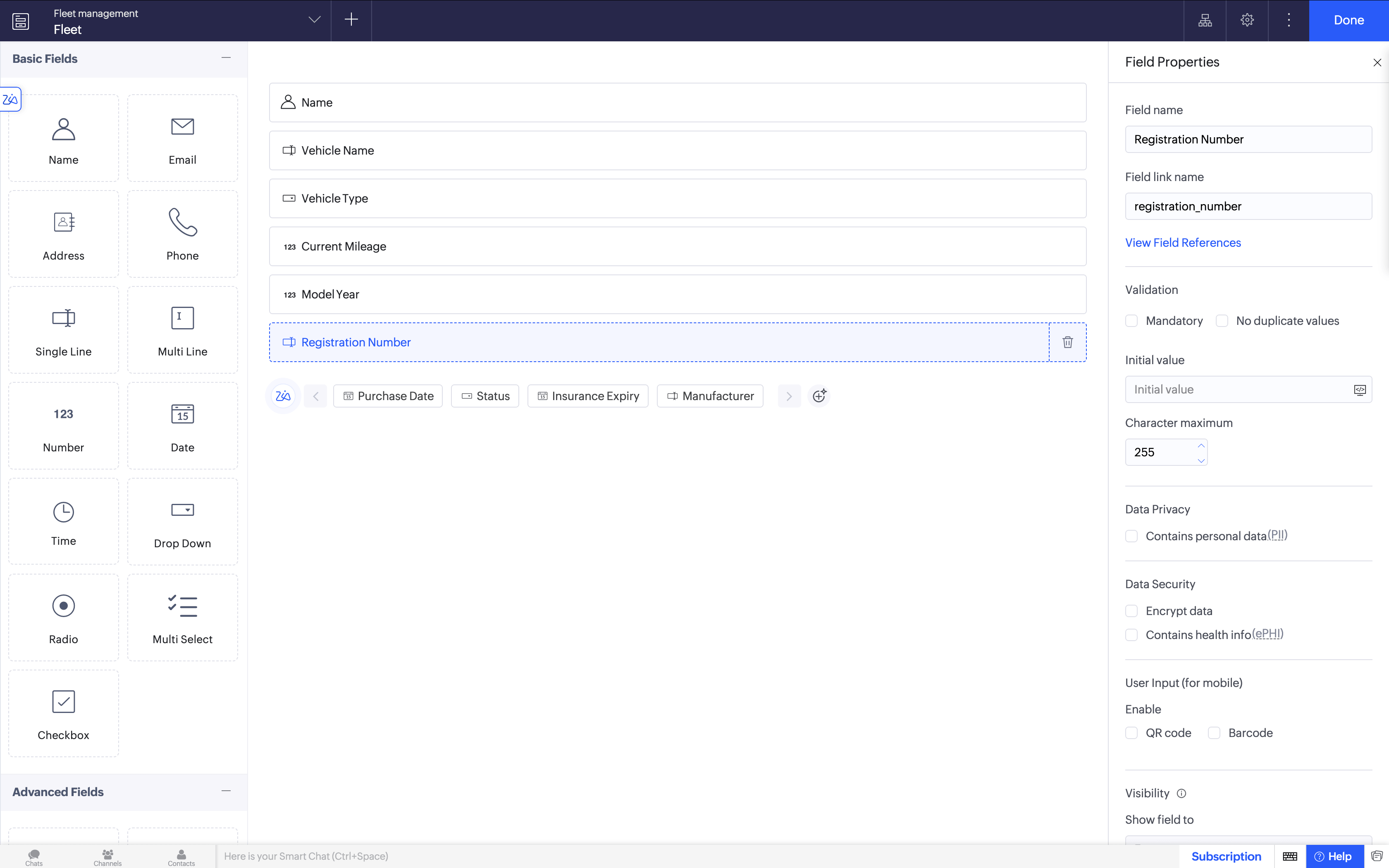
1. Build your application from scratch
Start with a blank canvas and build exactly what your business needs. Use Zoho Creator's drag-and-drop interface to design forms, set up workflows, and configure logic—no prior coding experience required.
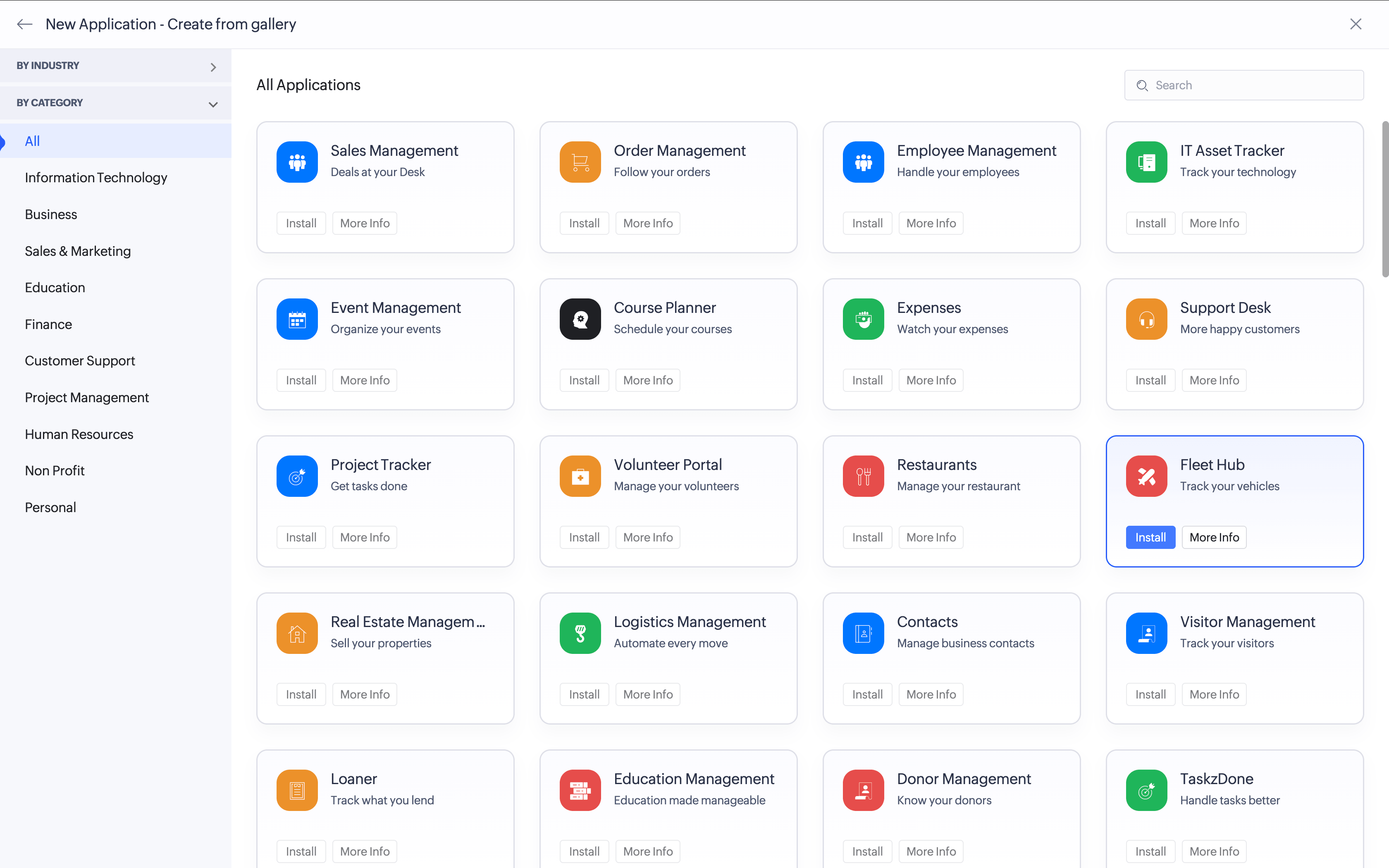
2. Accelerate development using 100+ prebuilt applications
Skip the groundwork and hit the ground running with a library of 100+ ready-to-use apps built for common business needs. Customize them to fit your processes and go live in a fraction of the time it would take to build from scratch.
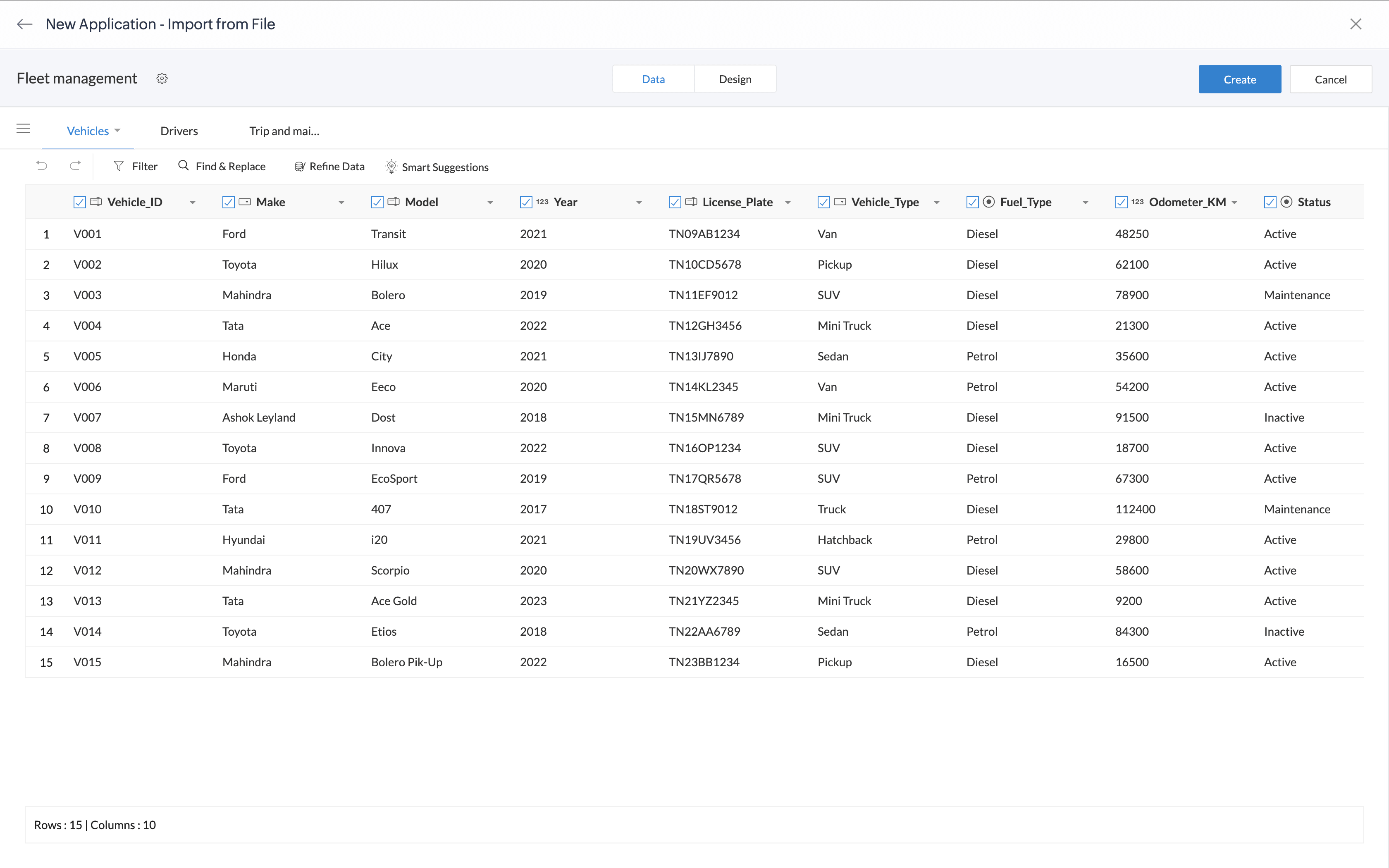
3. Import an existing spreadsheet or migrate from MS Access, FileMaker
Already managing your data in spreadsheets or legacy database tools? Bring it all into Zoho Creator without starting over. Map your existing data, migrate seamlessly, and immediately unlock the power of a scalable, cloud-based low-code platform.
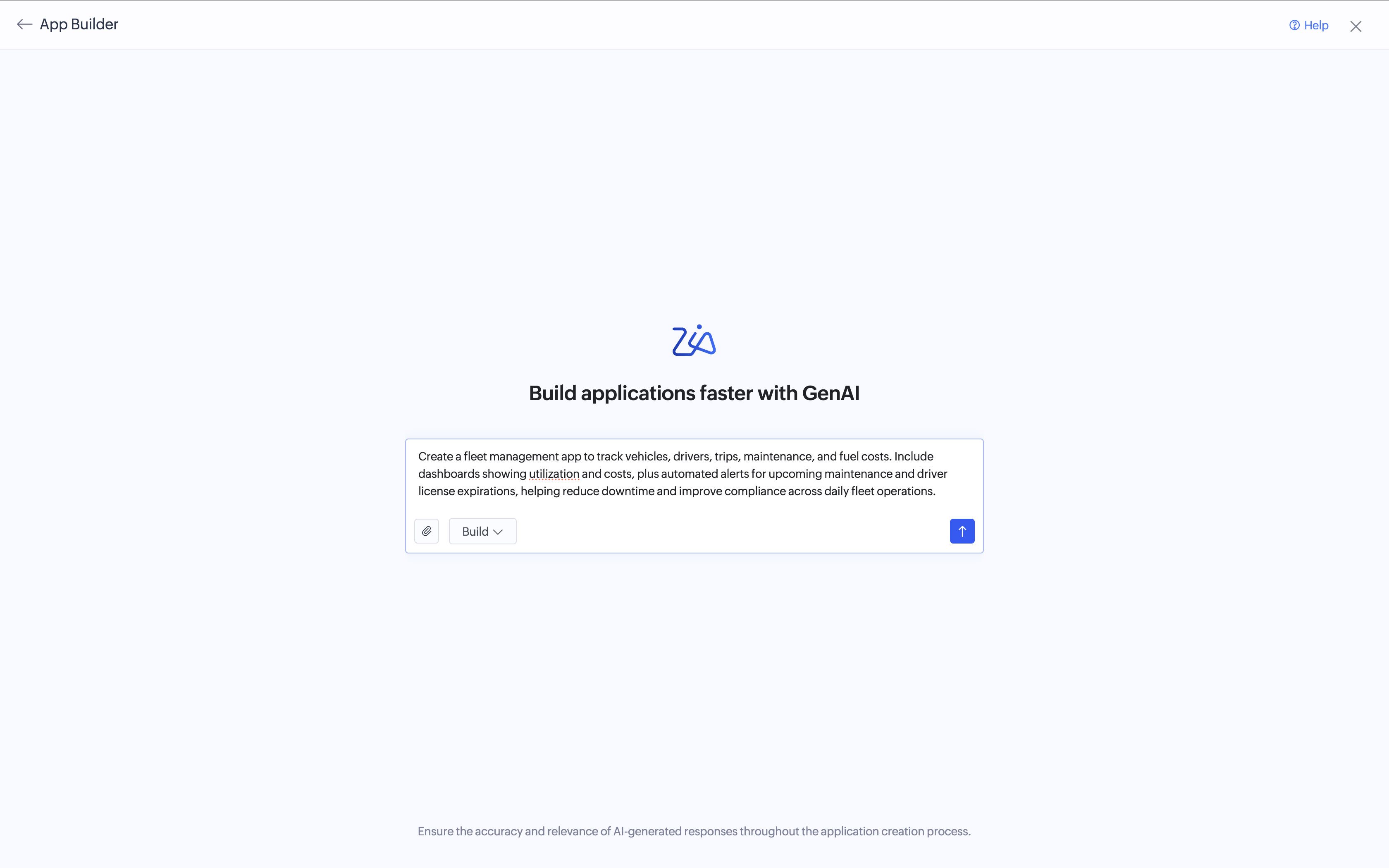
4. Generate your app using Zia, Zoho Creator's AI assistant
Have an app idea but don't know where to begin? Just describe what you need in plain language, and Zia generates the app structure for you—forms, reports, dashboards, and workflows included. From there, you can fine-tune the details visually, add automation logic, and launch a fully functional app in hours instead of weeks.
Build and deploy your applications faster with Zoho Creator

Frequently Asked Questions
No. Low-code platforms are built to serve both ends of the skill spectrum. Business users can build functional applications without writing a single line of code, while professional developers use the same platform to handle complex logic, custom integrations, and advanced configurations. In Zoho Creator, for example, developers can write Deluge scripts to extend functionality well beyond what drag-and-drop alone can do, while operations teams work independently on forms, workflows, and dashboards.
Security is handled at the platform level, which is one of the practical advantages of low-code. Every application built on the platform automatically inherits its security infrastructure, including audit logs, role-based access controls, encryption, and compliance frameworks. This means organizations don't need a dedicated security team for each application they build. Updates and patches are also deployed by the platform provider, so applications stay protected without manual intervention.
Yes, and integration is one of the stronger use cases for low-code. Most platforms ship with prebuilt connectors to common business tools and expose APIs for anything that doesn't have a native connector. Zoho Creator, for instance, lets you connect to third-party applications by simply dragging in a connector and configuring the service, without writing custom API code from scratch.
Low-code applications are designed to scale alongside the business. You can add new modules, update workflows, and extend functionality at any point in the application's lifecycle without starting over. Because low-code builds on a modular architecture rather than a monolithic codebase, making changes in one area doesn't risk breaking the rest of the application.
Off-the-shelf software ships with a fixed set of features built for a general audience. You adapt your process to fit the tool. Low-code flips that: you build the tool around your actual process. This matters most for workflows that are specific to your industry, team structure, or operational model, where a generic product either does too much (with features you'll never use) or too little (missing the one thing your team actually needs).