- HOME
- Feature Spotlight
- Give every subform record its own document
Give every subform record its own document
- Last Updated : August 12, 2026
- 76 Views
- 2 Min Read

Hello everyone,
Generating personalized documents is challenging when working with a form containing multiple items.
When a form contains multiple items (subforms), generating personalized documents for each item using the item data and the common data from the form becomes complex.
Take a hiring campaign, for example. The HR handling the campaign receives a list of all candidates selected to receive job offers. While all candidates are selected from the same campaign, each one needs a personalized offer letter with their name, corresponding role, compensation, and joining date. The company information, interview date, and HR manager remain the same, while candidate-specific information will vary.
Until now, mail merge generated all subform records within a single document as repeating sections or table rows. While this works well for reports and summaries, it isn't ideal when every subform entry needs its own personalized document.
That's where Writer's subform merge comes in.
With this feature, Zoho Writer automatically creates a separate document for every record in a subform while carrying over the relevant information from the parent record. Instead of manually filtering records, duplicating templates, or running multiple merge operations, you can generate a personalized document for every subform record in a single merge.
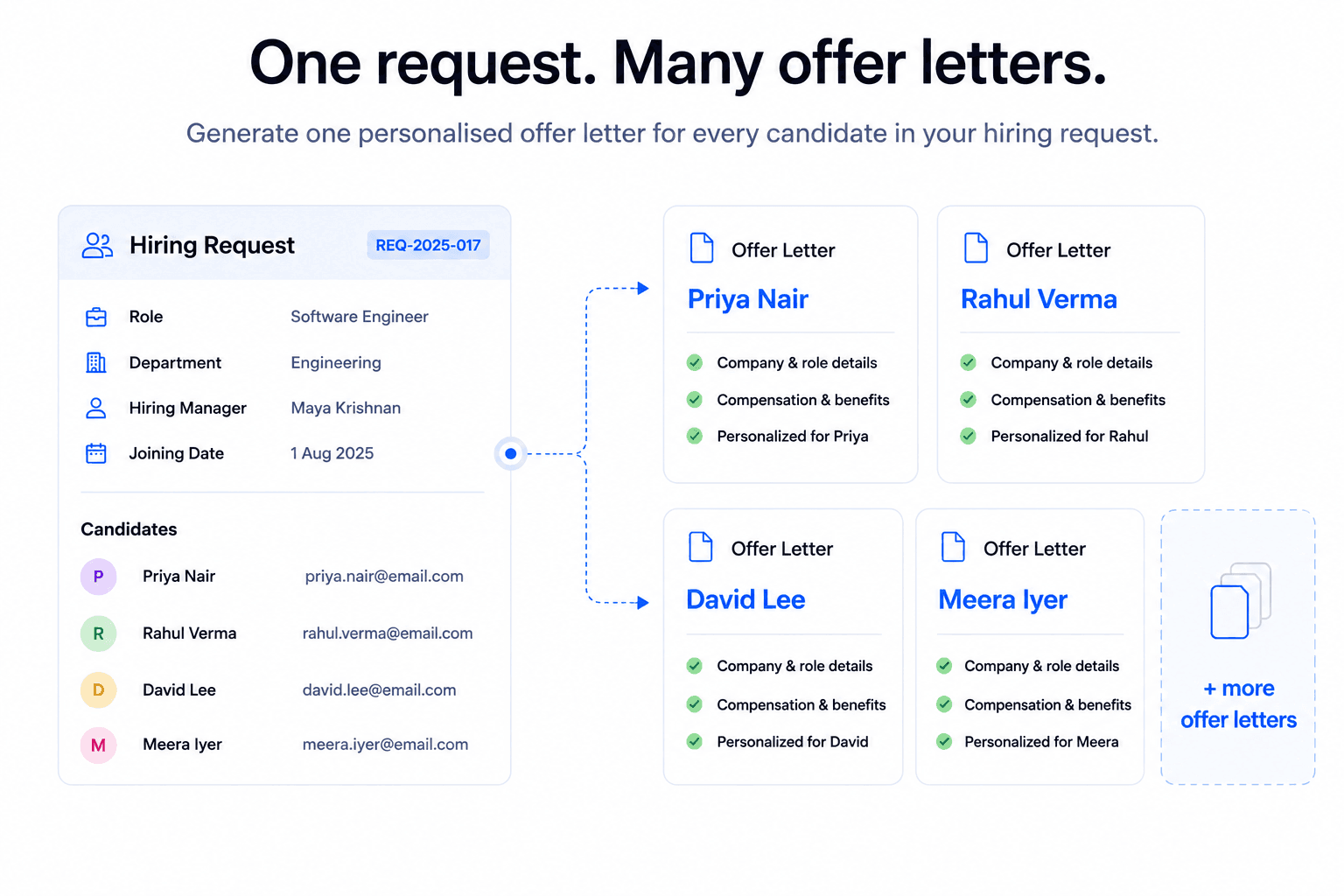
Some common use cases include:
- Generate an offer letter for every candidate in a hiring campaign.
- Create an individual certificate for every participant in a training program.
- Prepare separate agreements, consent forms, or NDAs for multiple signatories.
- Generate individual tenant agreements from a single rental application.
- Create personalized investor agreements from a single investment deal.
- Generate individual service reports for every asset in a maintenance request.
With subform merge, you can automate document generation at scale while ensuring every recipient gets a document that's tailored to them, without any manual effort.
To get started, check out our help documentation to learn how to set up subform merge.
Give it a try, and let us know what you think in the comments. If you have any questions, write to us at support@zohowriter.com, or support@eu.zohowriter.com if you're in the EU.