What this page covers
- Platform security model
- Form-level security features
- Access control and administration
- Global compliance standards
- Customer stories
- Frequently asked questions
Platform security
Security model overview
Zoho Forms is covered by Zoho's platform-wide security architecture. The application is secure by design, where every change and feature in our products goes through secure coding guidelines, code analyzer tools, vulnerability scanners, and manual review processes.
Regional data centers
Your data center is automatically assigned based on the country you select at sign-up. Our disaster recovery and business continuity programs help us provide you with high availability. Our DCs are physically secure with strict access control from our colocation providers.
Operational security
We have a robust logging and monitoring system to ensure clean and secure traffic through our servers. We use a combination of certified third-party scanning tools and in-house tools to manage vulnerabilities.
Form-level security
Beyond platform security, Zoho Forms gives form builders hands-on controls to harden individual forms against spam, fraud, and data leakage.
SSL on every form
All forms, whether embedded, shared by link, or accessed directly are served over secure sockets layer (SSL). Data submitted through any form is encrypted end-to-end, preventing interception in transit.
Form Encryption
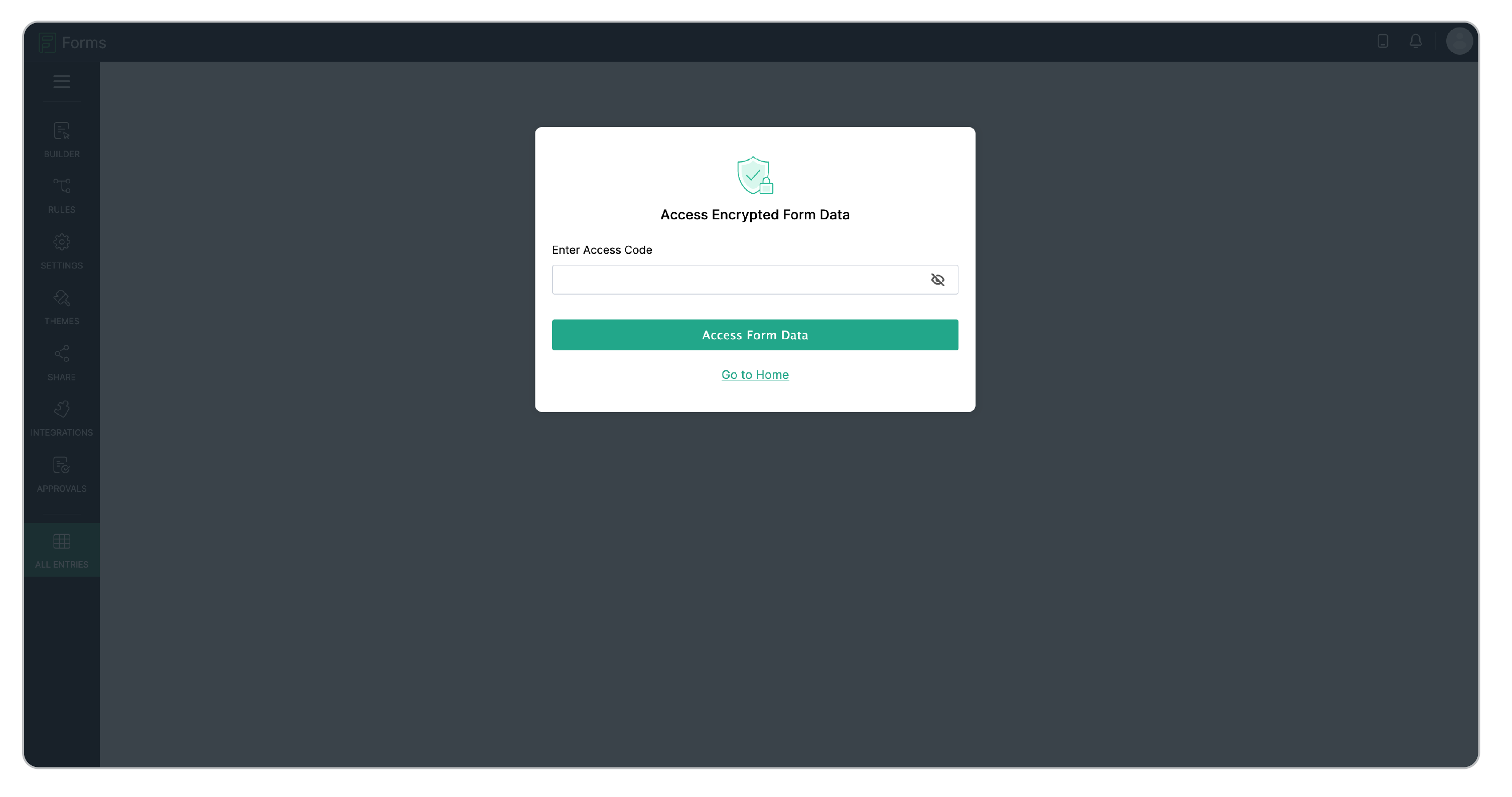
You can encrypt a form so that all its entries, reports, approvals, and tasks are locked behind a six-character alphanumeric Access Code. Every time someone tries to view the data, they're prompted to enter it. The session stays open for 30 minutes, then locks again automatically. Form encryption means even if someone gains unauthorized access to the database, they walk away with gibberish.
Field-level encryption
You can add an extra layer of security to your form respondents' data while it is stored by enabling field encryption via Field Properties → Privacy → Encrypt. Encrypting data protects your data from any possible data leak or unauthorized access. It is the process of encoding information to make it accessible only to authorized parties.

OTP verification
Add an extra layer of security with one-time password (OTP) confirmation. Users receive a unique code via WhatsApp, SMS, or email, and the form becomes accessible only after the OTP verification.

Double opt-in
Implement double opt-in for your forms to verify user submissions. This feature requires users to confirm their identity via email to reduce spam entries and ensure that only genuine form submissions are validated.

CAPTCHA Protection
Protect your forms from spam and abuse with CAPTCHA. Zoho Forms supports Zoho CAPTCHA, Google reCAPTCHA v2/v3, and Cloudflare Turnstile, ensuring submissions come from real users, not automated bots.
Form URL disabling
Instantly deactivate a form's public URL to disable all shared links, embeds, and social posts simultaneously. No new submissions can be accepted, and existing data remains secure behind authenticated access.

Access control and administration
Zoho Forms allows you to configure granular form sharing controls like choosing specific users in your organization and assigning permissions such as Submit Form, Modify Form, or Modify Form, Entries, and Reports.
Sharing controls
You can choose to share the form with a specific set of users in your organization with specific permissions. Zoho Forms allows you to grant the following permissions while sharing a form privately:
Submit Form: With this permission, the user will be able to access, fill, and submit the form.
Modify Form: With this permission, the user will be able to edit, access, fill, and submit the form.
Modify Form, Entries, Reports: With this permission, the user will have all permissions of a user with modify form permission, and in addition can manage all entries, create and modify reports.

Record audit logs
Zoho Forms offers a Record Audit feature that helps you keep track of changes made to your forms and submissions. This feature logs who made changes and when, which helps ensure accountability and transparency.

Email audit trail
Zoho Forms allows you to track and analyze email notification deliveries to identify and rectify any issues in the email delivery process and enhance deliverability rates.
Beyond basic access controls, Zoho Forms also supports approval workflows to route submissions through designated reviewers before any action is taken.
Global standards and certifications
Zoho Forms is designed to help organizations meet major data privacy and security regulations worldwide. Here's what the compliance portfolio covers:
General Data Protection Regulation (GDPR)
What it GDPR?
The EU's landmark data privacy regulation governing how organizations collect, store, and process personal data of EU/EEA residents.
Who does GDPR apply to?
Any organization regardless of location that collects or processes data from EU or EEA residents.
How does Zoho Forms comply to GDPR?
Full compliance with the EU's landmark privacy law. GDPR-compliant forms include double opt-in for consent, field-level encryption for data minimization, user consent management, rights to access, rectification, and erasure ("right to be forgotten"), and data protection impact assessments.
Infringements could result in a GDPR fine of up to €20 million by EU regulators according to https://gdpr.eu/fines/
Health Insurance Portability and Accountability Act (HIPAA)
What is HIPAA?
A US federal law mandating protection of protected health information (PHI). Enforced by HHS. More at HHS.gov/HIPAA
Who does it apply to?
Healthcare providers, insurers, clearinghouses, and business associates handling PHI in the US.
How does Zoho Forms comply with HIPAA?
Zoho Forms supports HIPAA-compliant healthcare data collection - patient intake, consent forms, and appointment requests.Encryption, strict access controls, and audit logging collectively satisfy HIPAA's safeguard requirements.
California Consumer Privacy Act (CCPA)
What is CCPA?
California's comprehensive consumer privacy law granting residents rights over their personal data collected by businesses.
Who does it apply to?
Businesses in California or collecting data from California residents that meet certain size or revenue thresholds.
How does Zoho Forms comply with CCPA?
Zoho Forms is CCPA-compliant, giving California residents rights over their collected personal data, including the right to know, the right to delete, and the right to opt out of data sale. Field encryption helps minimize exposure of personally identifiable information.
International Standards (ISO/IEC)
What is ISO/IEC?
Internationally recognized standards for information security management, cloud security, and privacy information management.
Who does it apply to?
Enterprise clients and regulated industries seeking internationally recognized security assurances.
How does Zoho Forms comply with ISO/IEC?
Zoho holds ISO/IEC 27001:2013 (Information Security Management), ISO/IEC 27701 (Privacy Information Management), ISO/IEC 27017 (Cloud Security Controls), and ISO/IEC 27018 (Protection of PII in Public Cloud).
WCAG 2.2 Web Content Accessibility Guidelines Level AA · W3C
What is WCAG 2.2?
The W3C's standard for web accessibility — defining how digital content must be usable by people with disabilities. See W3C WCAG 2.2 Quick Reference.
Who does it apply to?
Organizations in public sector, education, or healthcare subject to ADA, Section 508, or EU Web Accessibility Directive obligations.
How does Zoho Forms comply to WCAG 2.2?
Zoho Forms meets WCAG 2.2 Level AA, making it one of the most accessible forms platforms available, covering perceivable content, operable interfaces, understandable inputs, and robust compatibility with assistive technologies including screen readers and voice control software.
Zoho Forms offers enterprise-grade security through a combination of strong encryption, advanced access controls, and global compliance certifications to collect customer data or sensitive information.
Frequently asked questions
How does Zoho Forms protect my data?
All Zoho products are secure by design. Our framework ensures that each customer's data is logically separated from other customers' data. Individual sensitive fields can be independently encrypted via field-level encryption. Our data centers (DCs) are physically secure with strict access control.
Is Zoho Forms GDPR compliant?
Yes. Zoho Forms is GDPR compliant. Key satisfied requirements include:
- Lawful basis for processing: Through double opt-in and consent checkboxes
- Right to erasure: Individual submission deletion is supported
- Data minimization: Field-level encryption reduces exposure
- EU data residency: Data can be stored exclusively in EU data centers
See the official GDPR compliance checklist at GDPR.eu
Can I trust Zoho Forms with sensitive or healthcare data?
Yes. Zoho Forms is designed for sensitive data collection including protected health information (PHI). For healthcare organizations, HIPAA-compliant forms provide field-level encryption for PHI fields and audit logs.
See HHS HIPAA Security Rule guidance for full requirements.
How do I enable security features in Zoho Forms?
Key security features and where to find them in the builder:
- Field encryption: Select field > Field Properties > Privacy > Enable Encrypt
- CAPTCHA: Settings tab > Spam Control > choose from Zoho CAPTCHA, reCAPTCHA v2/v3, or Cloudflare Turnstile
- OTP verification: Settings tab > Spam Control → OTP Verification
- Double opt-in: Settings tab > Spam Control > Double Opt-In
- Form URL disable: Share tab > Toggle off
- Role-based sharing: Share tab > Share with specific users > Permission
What happens to my data if I stop using Zoho Forms?
The forms created or the data collected would still be accessible and will not be lost or deleted unless the same is deleted manually on your end when the account is downgraded to the Free plan. We do not have a time boundary for our Free plan.
However, if you do not access Zoho Forms for a year, you would receive three email notifications from our end and your free Zoho Forms account would be eligible for cleanup. To avoid deletion of your free Zoho Forms account, we recommend that you log in to Zoho Forms at least once a year.
How do I enable field encryption in Zoho Forms?
To enable field encryption on a specific field:
- Open your form in the builder
- Click on the field you want to encrypt.
- Go to Field Properties > Privacy > Select Encrypt