
Exporting Events to Google Calendar
Sharing your Zoho CRM calendar events is made easy with the Export to Google Calendar feature. By exporting the selected events from CRM Calendar to Google Calendar, you can view and share them with other users in Google Calendar. It also helps you schedule your business events and keep them organized to avoid missing any event.
Availability
 Profile Permission Required: All Zoho CRM users can export events from Zoho CRM to Google Calendar.

Standard Calendar Field Mapping
| Zoho CRM Calendar | Google Calendar | Description | Data Type |
| Event Owner | Displays the user to whom the event is assigned. This is a mandatory field. | User Name | |
| Subject | What | Specify the subject of the event. This is a mandatory field. | Text box, alphanumeric (50) |
| Start Date Time | When: From | Specify the start date and time of the event. This is a mandatory field. | Mini Calendar |
| End Date Time | When: To | Specify the end date and time of the event. This is a mandatory field. | Mini Calendar |
| Venue | Not mapped | Specify the location of the event. | Text box |
| Send Notification Email | Select the check box to send a notification to the Zoho CRM user to whom the event is assigned. | Check box | |
| Recurring Activity | Not mapped | Select the check box if the event is a recurring activity. Also specify the Start Date, End Date, and Repeat Type. | Check box |
| Remind At | Not mapped | Select the check box to send reminder for the event. | Check box |
| Description | Description | Specify additional details about the event. | Text box |
To add an event to Google Calendar
- In G Suite, click on
 (the Apps icon).
 - Click More > Zoho CRM.
You will be redirected to Zoho CRM. - In the Activities tab, click New Event. Alternatively, click the New Event button from records such as leads, contacts, potentials.
- In the Create Event page, specify the event-related details.
- Click Save and Export to Google Calendar.
The newly created event is saved in CRM and Google Calendar.
To export events to Google Calendar
- In G Suite, click on (the Apps icon).
- Click More > Zoho CRM.
You will be redirected to Zoho CRM. - In the Activities tab, select Events.
- Click
 [More Actions icon] > Export to Google Calendar.
The selected CRM events are added to your Google Calendar.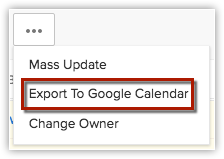
Note:
- You must have the same time zone in Zoho CRM and G Suite.
- Events are displayed in Google Calendar - Month view.
- You cannot add the events from detail view.
- The option to Export to Google Calendar will be available only in the default list views (such as, My Events and All Events).
The custom list views that you create will not have this option.