
Anomaly Detector
Zia takes insights from your past and current sales metrics to create a business trend. Any sudden spike or dip in your usual business will be detected by Zia and presented to you as an anomaly. Anomaly detector, lets you define specific parameters to keep a watch on number of deal closures, average annual revenue generated or number of lead conversions and so on. In other words, any deviation from your usual sales pattern will be detected and notified for easy identification and quick action.
Say for example, you have not been able to monitor the deal closure pattern of your sales team for a while and suddenly notice a significant dip in the annual revenue. You need not go through pile of data to figure this out, anomaly detector will compare the actual deal closure pattern with the set sales metrics and show the anomaly at a defined period of time.
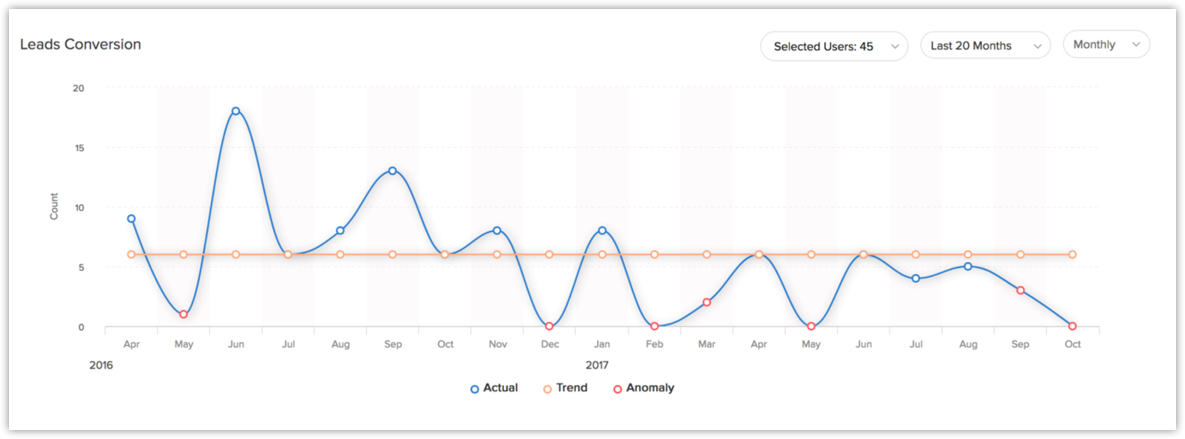
Create an Anomaly Detector
You can create an anomaly detector for both standard and custom modules.
To create an anomaly detector
- Click the Dashboards tab.
- In the Dashboard Builder page, select the dashboard in which the Anomaly detector has to be added.
- Click Add Component.
- In the Add Component page, click the Anomaly Detector icon.
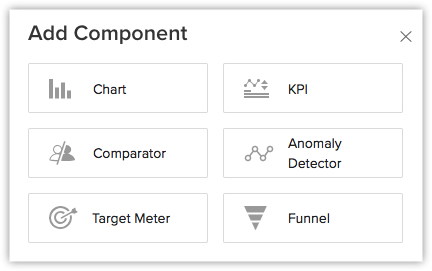
- In the Add Anomaly Detector page, do the following:
- Enter the component name.
- In Detect Anomaly, select a Module from the drop-down list.
- In Associated Date Field select the time from the drop-down list.
Click +Criteria filter to remove any particular record.
- Click Save.
Click Add & Reorder to add and rearrange the component in dashboard.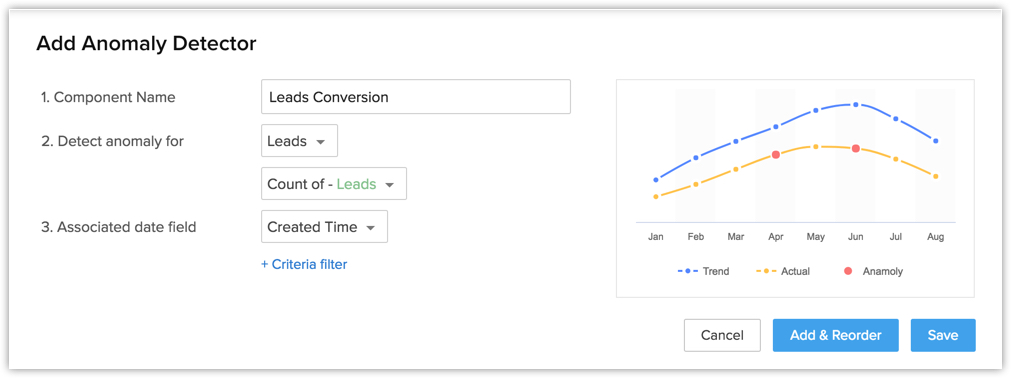
Note:
You can Edit, Delete, Print, Add to Home, Embed URL or Add a chart to favourite by clicking on the More icon in the component.