- HOME
- Know Your Tech
- How to become a low-code specialist: A complete guide
How to become a low-code specialist: A complete guide
- Last Updated : March 31, 2026
- 399 Views
- 6 Min Read
You use business software every day. Some of it works well. Most of it almost fits what you need, but not exactly as your team needs it. What if you could build your own tools, designed for the way your team actually works?
That's what low-code development makes possible. It gives business professionals a way to create custom applications without writing code from scratch. The skills you need are simpler than you think.
Highlights
- A low-code specialist builds custom business applications using visual, drag-and-drop platforms instead of traditional coding.
- You don't need a programming background to get started. Business process knowledge is the most important foundation.
- Core skills include logical thinking, UI/UX basics, data handling, and workflow design.
- Choosing the right platform matters. Look for visual builders, prebuilt templates, integration options, and strong learning resources.
- Hands-on practice through real projects is the fastest way to build confidence and capability.
This blog post covers what a low-code specialist does, the skills you need, and all the steps you need to take to get started.
What is low-code development?
Low-code development is an approach to building applications that combines visual development tools with the ability to write custom code when needed. Instead of coding every feature from scratch, you use visual designers, reusable components, and configuration-driven logic to define how an application works.
The platform handles technical background tasks—such as database schema generation, API handling, security configurations, and deployment setup—so you can focus on business logic. For example, rather than manually writing front-end and back-end code for a form, you define fields in a visual interface, configure validation rules, and bind the form to a data model. The platform generates the supporting logic and structure behind the scenes.
Low-code does not eliminate coding. It reduces repetitive development efforts while still allowing developers to extend applications using scripts, integrations, and APIs for complex requirements.
How low-code development differs from traditional coding
The difference comes down to speed, accessibility, and who can build. Here's how they compare:
| Factor | Low-code development | Traditional coding |
| Skills needed | Business logic, workflow design, and basic data handling | Proficiency in programming languages and frameworks |
| Development speed | Faster with prebuilt components and templates | Slower since everything is built from scratch |
| Customization | High with visual tools, extensible through scripting | Fully customizable at every level |
| Ease of use | Designed for business users and citizen developers | Requires deep technical training |
| Who builds | Business professionals, operations teams, and analysts | Professional software developers |
Low-code does not replace traditional development. It fills the space between off-the-shelf software that doesn't quite fit and custom-built systems that take months to deliver.
What does a low-code specialist do?
A low-code specialist is someone who uses low-code platforms to build, customize, and maintain business applications. This is not a traditional developer role—it's a business role powered by technology.
In practice, a low-code specialist identifies a process that needs improvement, designs an application to solve it, builds it on a low-code platform, and maintains it over time. For example, an operations manager might build an approval workflow app that replaces email chains and manual tracking spreadsheets.
Low-code specialists work across departments. They might build internal tools for HR, customer portals for support teams, or inventory tracking systems for warehouse operations. The common thread is solving business problems with custom software, fast.
Essential skills you need to become a low-code specialist
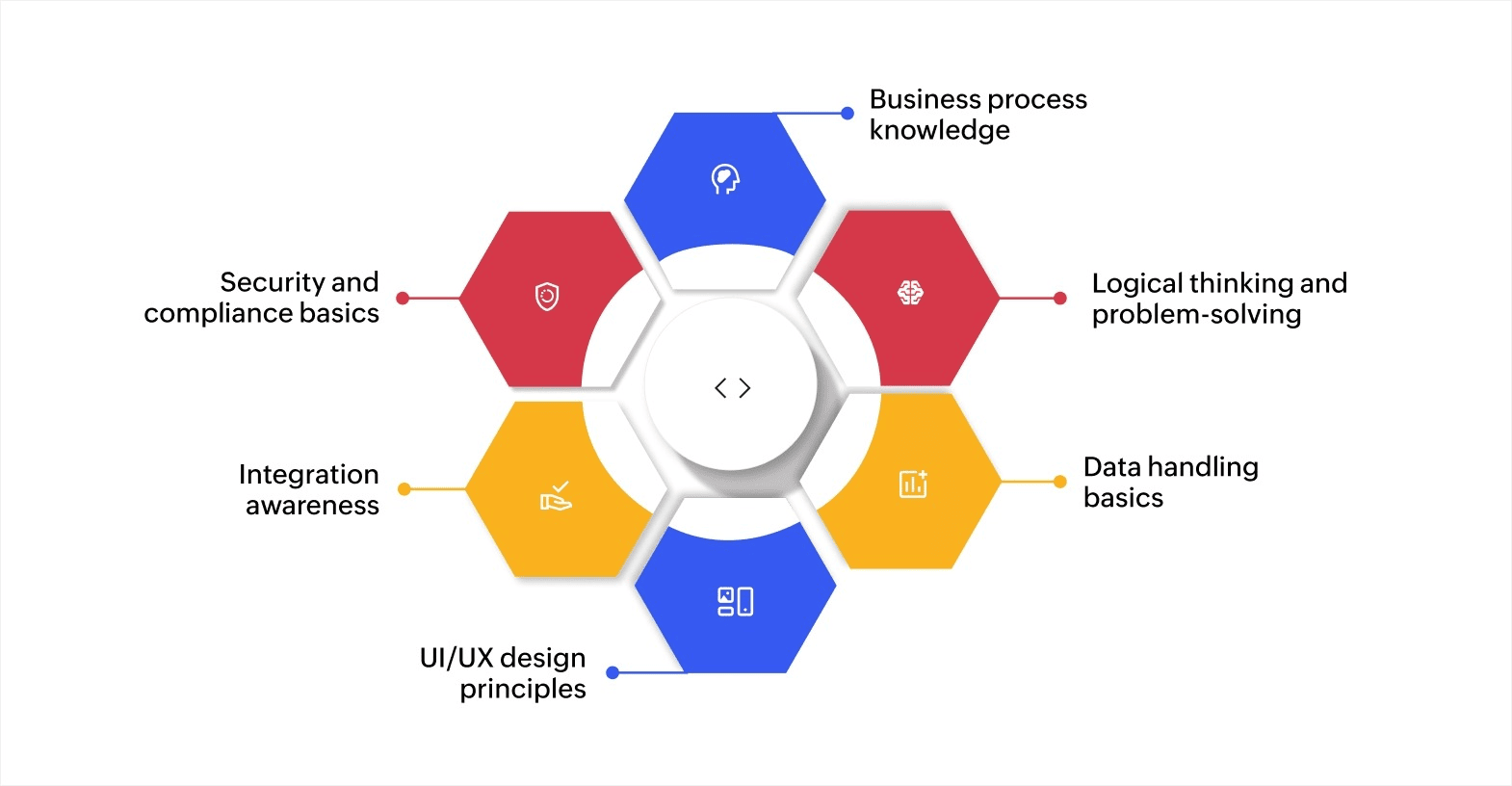
You don't need advanced coding skills to become a low-code specialist. Here are the key areas to focus on:
Business process knowledge
This is your most valuable skill. You need to understand how work flows through your organization, where bottlenecks happen, and what steps can be automated. The better you know your business processes, the better apps you'll build.
Logical thinking and problem-solving
Low-code platforms use conditions, rules, and triggers to make apps work. You need to think through "if this happens, then do that" scenarios clearly. For instance, if a purchase request exceeds a certain amount, it should be routed to a senior manager for approval.
Data handling basics
Most applications involve collecting, organizing, and displaying data. You should know how to structure a database, create relationships between data sets, and set up forms that capture the right information. Low-code platforms simplify this with visual data builders, but a solid grasp of data logic helps you build better solutions.
User interface and user experience (UI/UX) design principles
Your apps need to be easy for others to use. Learn the basics of user interface design: clean layouts, clear labels, logical navigation, and consistent formatting. The goal is to build apps people actually enjoy using.
Connecting software systems
Modern business tools need to talk to each other. Understanding how to connect your app with existing tools like email, CRMs, payment gateways, and cloud storage is important. Most platforms offer prebuilt connectors, so you don't need to code these connections from scratch.
Security and compliance basics
When your apps handle sensitive data, you need to know the basics of data security and compliance standards like GDPR. This means setting up role-based access, encrypting sensitive fields, and following your organization's data policies.
None of these skills require years of training. Most low-code platforms are designed to help you pick them up as you build. The key is to start with what you already know about your business and layer in technical skills along the way.
How to get started as a low-code specialist: A roadmap
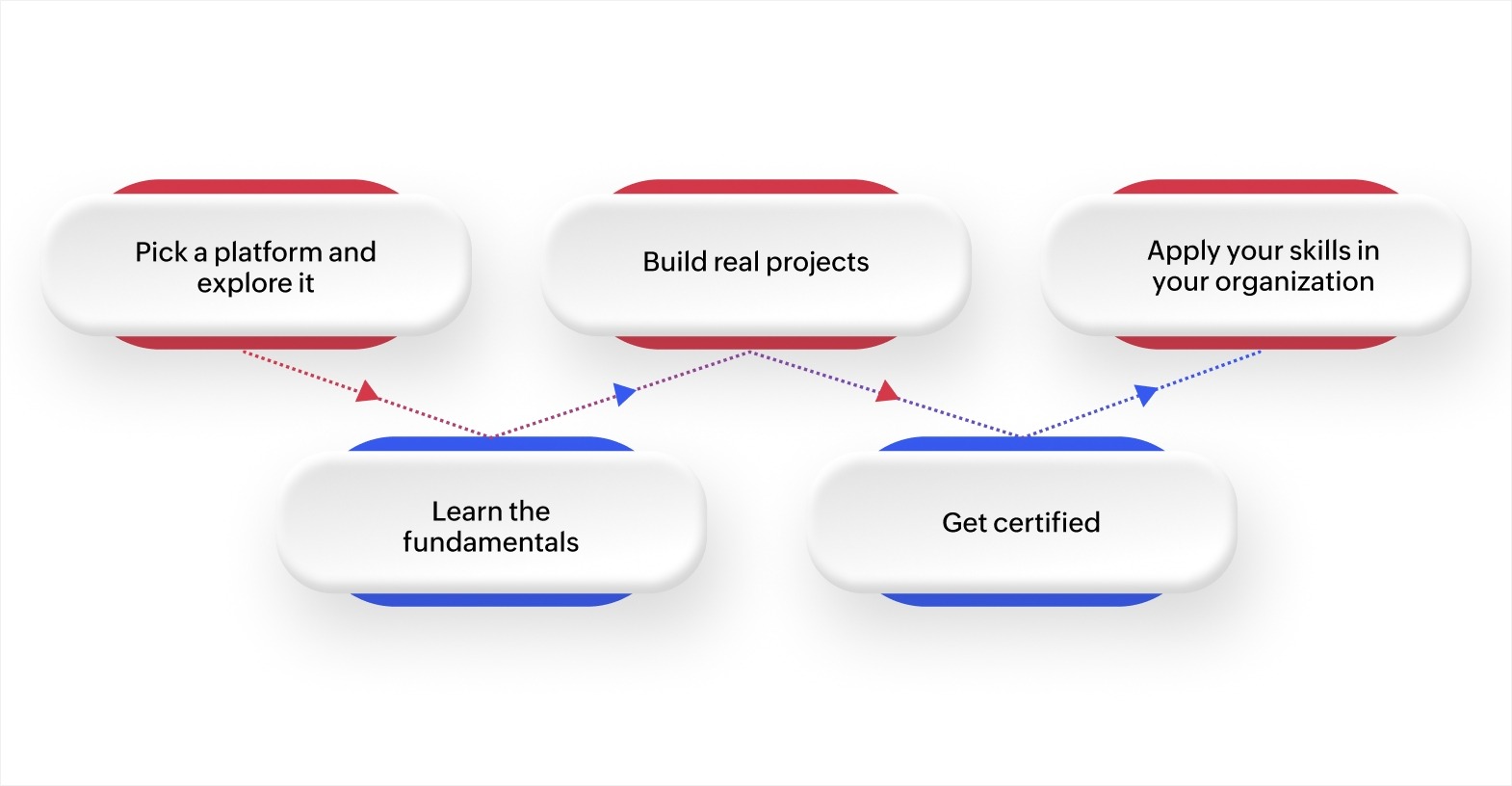
The good news is that most of the skills above come together once you start building. You learn faster by doing than by just studying concepts. Here's a practical path to get you from beginner to confident builder:
1. Pick a platform and explore it
Start with one platform. Look for one that offers a visual builder, prebuilt templates, workflow automation, and strong documentation. With platforms like Zoho Creator, you can sign up for a free trial and start exploring the interface, building simple apps, and understanding the building blocks right away.
2. Learn the fundamentals
Focus on these core skills first:
- Building forms: Create data collection forms with validation rules and conditional fields.
- Setting up workflows: Design automated processes that trigger actions based on rules you define.
- Working with data: Learn how to create databases, link related data sets, and generate reports.
- Connecting tools: Practice integrating your app with email, calendars, or other business software.
Most platforms offer free learning resources, help centers, webinars, and community forums. Use them.
3. Build real projects
The fastest way to learn is by building. Start small. Create an expense tracker for your team. Build a leave request app. Design a simple customer feedback portal. Each project teaches you something new and gives you a portfolio to show.
4. Get certified
Certifications validate your skills and signal to employers or stakeholders that you can deliver. Many platforms offer official certifications. For example, Zoho Creator has a certification program that covers everything from form building to advanced workflow automation. Look for certifications in:
- Low-code development
- Business process automation
- Application development
- Data management and integration
5. Apply your skills in your organization
You don't need to wait for a new job title. Start solving problems in your current role. Offer to build a tool for your team. Automate a process that everyone complains about. This hands-on experience builds credibility and helps you grow faster than any course alone.
Start your low-code journey with Zoho Creator
Every team has processes that don't fit neatly into off-the-shelf software. Approval chains run through email. Data lives in scattered spreadsheets. Reports take hours to compile manually.
Zoho Creator is an AI-powered low-code application development platform that lets you build custom business applications without deep coding knowledge. It provides a visual drag-and-drop builder, app templates, and guided scripting to help you go from idea to working app quickly.
With Zoho Creator, you can design automated workflows that route tasks and approvals without manual follow-ups. The platform supports 1,000+ integrations with tools you already use
Sign up for free today and start building apps that match the way your team actually works.
FAQs
1. What is the first skill to learn for low-code development?
Start with understanding business processes and workflows. Knowing how work moves through your organization helps you design better apps. Technical skills come easier once you have this foundation.
2. How long does it take to build a working app on a low-code platform?
Simple apps like trackers or request forms can be built in hours. More complex applications with integrations and custom logic may take a few days to a couple of weeks, depending on the scope.
3. Can I use low-code skills outside of IT roles?
Yes. Business analysts, operations managers, HR teams, and finance professionals all use low-code platforms to build tools specific to their departments without relying on dedicated developers.
4. Do low-code platforms work for large-scale applications?
Most modern platforms support enterprise-grade applications with features like role-based access, data encryption, audit logs, and scalable infrastructure. They handle growth as your needs expand.
5. What types of apps can you build with low-code?
You can build internal tools, customer portals, inventory systems, approval workflows, project trackers, CRM extensions, reporting dashboards, and many more. The range depends on the platform's capabilities.
 Rohith Krishnan S
Rohith is a product marketer at Zoho. He writes about low-code, workflow automation and follows the latest digital transformation trends. Outside work he enjoys spending time with family, watching football matches and reading about futuristic trends, in no specific order.