- HOME
- Know Your Tech
- 5 key workflow components: Benefits, challenges, and tips
5 key workflow components: Benefits, challenges, and tips
- Last Updated : May 3, 2026
- 290 Views
- 11 Min Read
A support ticket comes in, gets assigned, and then goes quiet. No one follows up. The customer reaches out again, frustrated. Your team realizes the ticket was stuck at an approval step no one knew about.
Highlights
- Workflow components are the building blocks of any business process, including triggers, actions, data flow, decision points, and notifications.
- Well-designed workflow components help teams reduce errors, save time, and improve cross-team coordination.
- Common workflow challenges include unclear ownership, inconsistent data, and resistance to new processes.
- Proper data flow between systems prevents re-entry errors and keeps every team working with accurate, up-to-date information.
- Keeping workflows simple, scalable, and well-tested is key to long-term success as your business grows.
The main cause is almost always either a missing or unclear workflow component. When the process lacks the right triggers, decision points, or alerts, tasks get lost between steps.
This blog post covers the essential parts of a workflow and how each one contributes to a smooth process. Explore their benefits and get tips for designing your own workflows.
What are workflow components?
Workflow components are the individual parts that make up a business process. Each one has a specific job, from starting a process to routing decisions to keeping people informed along the way.
When these parts are clearly defined and connected, tasks move from one step to the next without confusion. When they’re not, you end up with missed handoffs, repeated work, and delays that are hard to trace.
According to Precedence Research, the global workflow management system market crossed $22.84 billion in 2025 and is estimated to reach close to $371.92 billion by 2035. That just shows how much businesses are investing in getting their workflows right.
Key workflow components overview
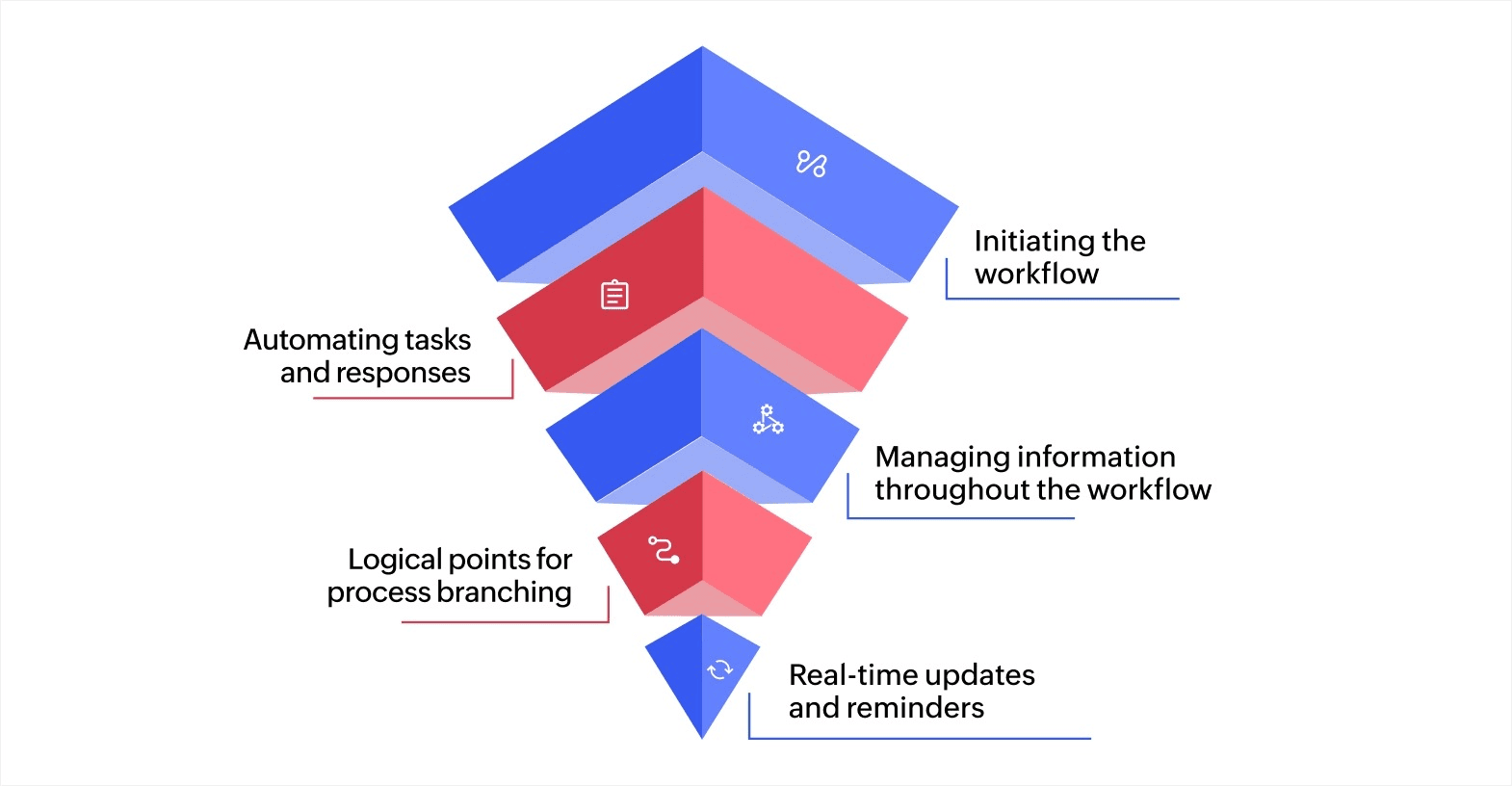
A comprehensive workflow system comprises key components such as triggers, actions, data flow, decision points, and notifications. Here’s a complete breakdown of every component, along with their functions and how they interact to drive business efficiency.
1. Trigger: Initiating the workflow
The trigger is the foundational component of a workflow. It’s the event or condition that causes the workflow to begin. Triggers are often tied to changes in data or specific actions taken within a system. They can be defined based on particular parameters in a system or application and serve as the starting point for the workflow.
Triggers can be categorized into:
- Event-based triggers: These are fired when a specific event occurs, such as a new record being created in a CRM system or a user clicking a button on a web form.
- Time-based triggers: These are activated at scheduled intervals or at specific times, such as sending out weekly reports or initiating data backups.
Triggers ensure that workflows are activated automatically based on predefined conditions, reducing manual input and accelerating the process cycle.
2. Actions: Automating tasks and responses
Once a trigger initiates the workflow, actions define the tasks or steps that occur within the workflow. Actions can be either automated tasks, which execute without human interaction, or manual tasks that require user input. They’re the core of workflow automation, ensuring that the correct sequence of tasks is followed based on the initial trigger.
Actions can include:
- Automated tasks: These tasks are handled entirely by the system; for example, creating an invoice automatically once an order is placed or updating customer records in a database based on specific inputs.
- User-initiated tasks: These actions require intervention by a user. An example is a manager approving a purchase request or a team leader assigning a task to an employee.
Automated actions are typically implemented using API integrations or scripting using JavaScript, Python, or platforms like Zoho Creator, enabling smooth data transfer between systems. Manual actions can be tied to user interfaces within the workflow tool to guide human participants through the necessary tasks.
3. Data flow: Managing information throughout the workflow
Data flow refers to how information moves between systems, tools, and people throughout the workflow. It ensures that everyone involved is working with accurate, up-to-date information.
Data flow is often managed using:
- Data pipelines: These are a series of processes that collect, transform, and load data across various stages of the workflow. ETL (extract, transform, load) processes are often used to ensure data consistency and accuracy when it moves between systems.
- Database synchronization: Data flow is supported by database management systems that ensure the accurate transfer and updating of data across platforms.
Keeping data flow tightly managed is especially important when your workflow spans across departments or relies on information from multiple systems.
4. Decision points: Logical points for process branching
Decision points are moments within the workflow where a decision must be made to determine the next step in the process. These are conditions that guide the flow of tasks based on specific parameters or rules.
Decision points are implemented using:
- Conditional logic: Conditional statements, such as "if-else" logic or case-based logic, determine the path the workflow will follow. For example, if an approval request is rejected, the workflow may end or escalate to a higher authority.
- Workflow rules: These rules are configured within the workflow management tool, which allows you to specify criteria for decision-making, such as a minimum order value for approval.
Decision points are often implemented in conjunction with a rule engine or business logic layer that evaluates the conditions and triggers the appropriate actions accordingly.
5. Notifications and alerts: Real-time updates and reminders
Notifications and alerts are key to keeping users and stakeholders informed about the status of the workflow and any required actions. They provide real-time updates to ensure that tasks are completed on time and that users are aware of their responsibilities at each stage of the workflow.
Notifications are handled through:
- Push notifications: Delivered through web or mobile applications to notify users of pending tasks, approvals, or deadlines.
- Email notifications: Automatically sent based on workflow events, such as task completions or important deadlines.
- SMS alerts: Used in workflows that require immediate attention or are time-sensitive.
Notifications and alerts are typically powered by messaging queues using tools like RabbitMQ and Kafka, or by email services like SMTP and Twilio, ensuring timely and reliable communication with users and stakeholders.
Understanding and effectively implementing these workflow components, businesses can create automated processes that minimize errors, save time, and improve collaboration. A well-executed workflow system not only optimizes operations but also drives greater productivity and efficiency, enabling businesses to stay competitive and agile in today’s fast-paced environment.
Where workflow components apply (and where they don’t)
Not every task or process needs a structured workflow. Knowing where workflow components add value and where they don’t helps you avoid over-engineering simple work or forcing structure where it doesn’t fit.
Where they work well
Workflow components are most effective for processes that are repeatable, involve multiple steps, and require coordination between people or systems. Here are some common examples:
- Approval routing: Purchase orders, leave requests, and budget sign-offs that follow a set path with clear decision points.
- Support ticket management: Incoming requests that need to be assigned, tracked, and resolved within a defined timeline.
- Order processing: Tasks that move through stages like confirmation, fulfillment, and shipping, often across departments.
- Employee onboarding: Multi-step processes where HR, IT, and management each handle specific tasks for every new hire.
- Invoice and expense handling: Financial workflows that require data validation, approvals, and record-keeping across systems.
If a process runs the same way every time with defined inputs, steps, and outputs, workflow components help keep it reliable and efficient.
Where they’re not the best fit
Some types of work don’t benefit from structured workflow components. These include:
- One-off tasks: A single, non-recurring task, like researching a new tool or writing a one-time proposal, doesn’t need triggers or decision points.
- Highly creative or unstructured work: Brainstorming sessions, strategy discussions, or design exploration don’t follow predictable steps.
- Single-person tasks with no handoffs: If a task starts and ends with one person and doesn’t need tracking or approvals, adding workflow components creates unnecessary overhead.
- Processes that change every time: If no two instances of a task follow the same path, a rigid workflow structure can slow things down rather than speed them up.
Apply workflow components where they create clarity and save time, not to force every activity into a structured process. Starting with your most repetitive, multi-step processes is typically the best approach.
The benefits of efficient workflow components
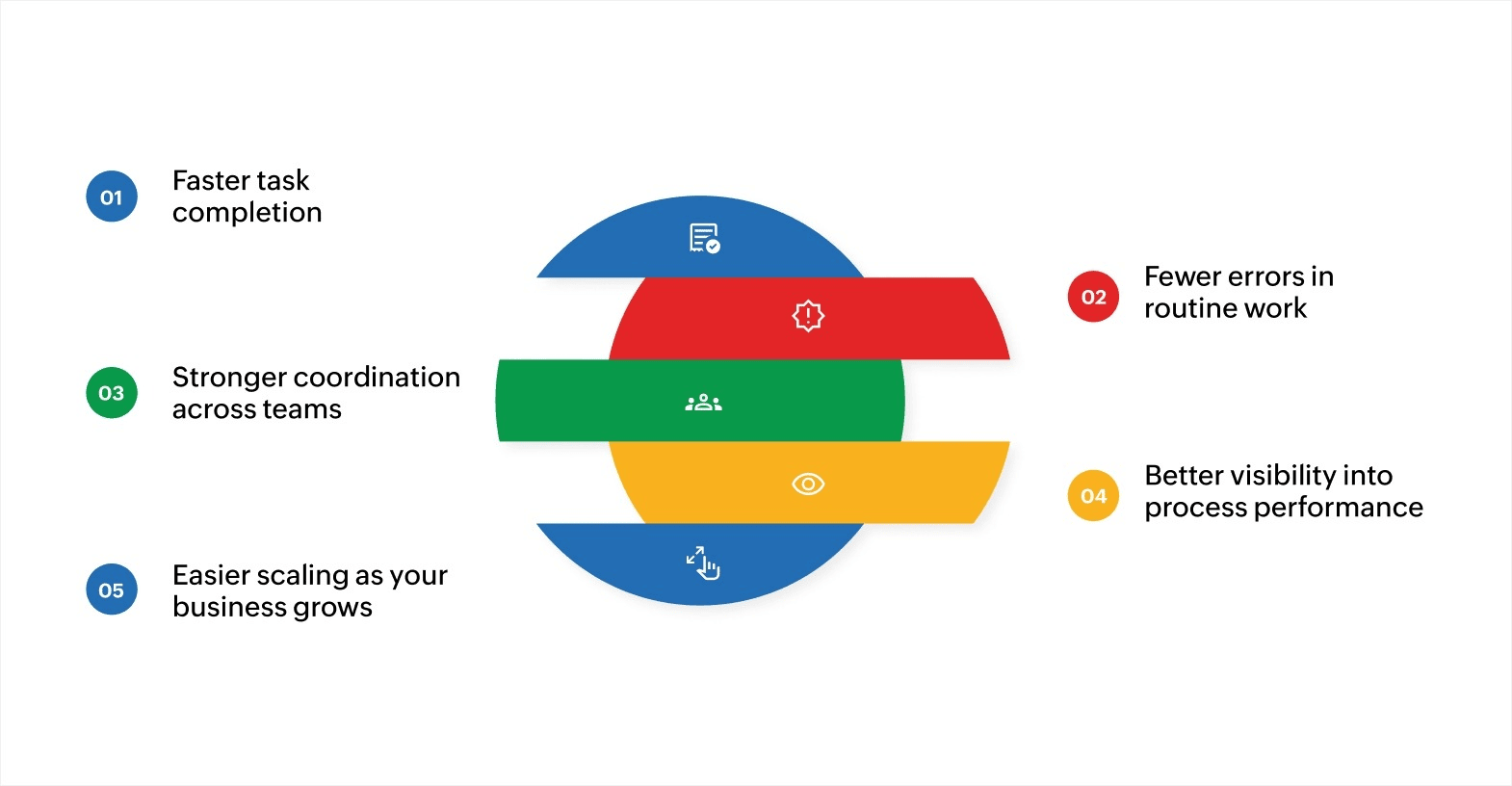
Well-designed workflow components have a direct impact on how fast, accurate, and coordinated your team can be. Here’s what that looks like in practice.
Faster task completion
When triggers and actions are clearly defined, tasks move forward without waiting for someone to manually push them along. Automated handoffs reduce idle time between steps, and your team spends less time chasing updates.
For instance, consider a support team that manages help desk tickets. Without a trigger, a new ticket sits in a shared inbox until someone notices it.
With an event-based trigger tied to the ticket submission form, the workflow instantly assigns it to the right agent based on issue type, sets a response deadline, and moves to the next step. What used to take hours of manual sorting now starts within seconds.
Fewer errors in routine work
Manual data entry and repetitive tasks are where most mistakes happen. Automating these steps through well-built actions and data flow rules helps keep information accurate and consistent across systems.
For example, a finance team processing expense claims manually might enter the same details into three separate tools: the accounting system, the payment tracker, and the project ledger. Each re-entry is a chance for a typo or mismatch.
With proper data flow set up between these systems, the expense details flow automatically once they’re entered, keeping records consistent without extra effort.
Stronger coordination across teams
Workflows that include clear decision points and timely notifications keep everyone aligned. Each person knows what they’re responsible for and when it’s their turn to act. This reduces miscommunication, especially when processes involve more than one department.
For instance, in a construction project, the design team completes a blueprint, and the procurement team begins sourcing materials immediately. A well-designed workflow can notify procurement the moment the design is approved, set a sourcing deadline, and alert the project manager once materials are confirmed.
Without these components, the handoff happens over email and delays pile up before the project even breaks ground.
Better visibility into process performance
When workflow components are connected to dashboards and reporting tools, you get a clear view of where tasks stand, where bottlenecks occur, and where improvements are needed. Real-time data helps you make adjustments before small issues grow into bigger problems.
For example, an operations manager overseeing order management can use a dashboard to see how many orders are pending at each stage, which steps are taking longer than expected, and where tasks are piling up.
Instead of waiting for complaints to surface, they can reassign resources or adjust the workflow before delays affect customers.
Easier scaling as your business grows
Simple, well-structured workflows are easier to expand. As your team or operations grow, you can add new steps, triggers, or decision points without rebuilding the entire process.
For instance, a company with a five-person sales team might start with a simple lead tracking workflow. As the team grows to 20, they can add decision points based on region, deal size, or product line to route leads more precisely.
Because the workflow was built with clear, modular components, scaling it takes minor adjustments rather than a full redesign.
Common challenges in managing workflow components
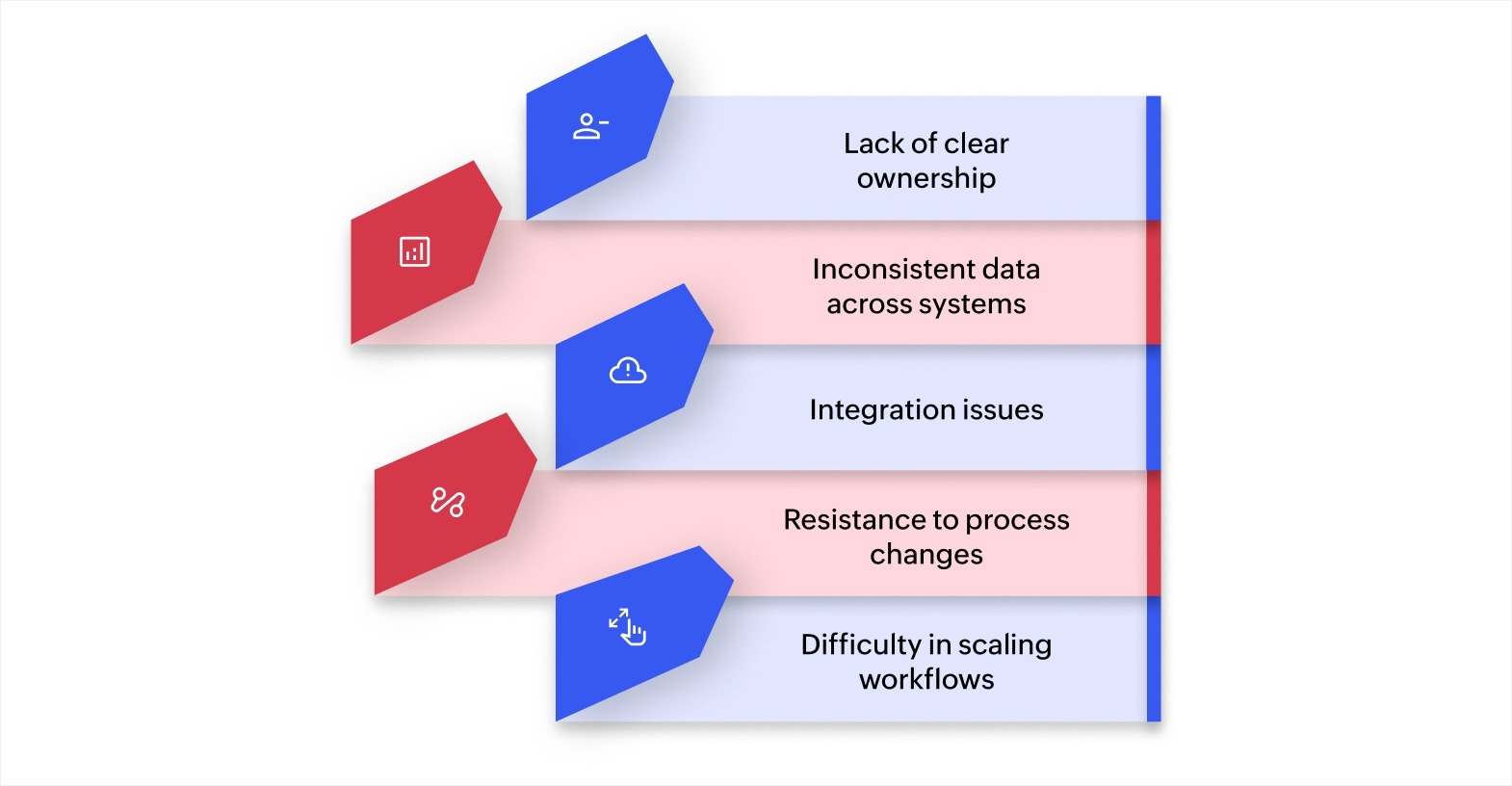
Managing workflow components is essential for businesses aiming to improve operational efficiency and reduce manual tasks. However, several challenges often arise that can impede smooth workflow management. Here are five common issues businesses face.
Lack of clear ownership
When roles and responsibilities aren't clearly defined, team members may not understand their duties, leading to confusion and delays. This can negatively impact the progress and quality of work.
Solution: Ensure that each workflow component has a designated owner responsible for its progress and outcomes. Clear communication about roles and expectations from the outset can eliminate confusion.
Inconsistent data across systems
Another common issue is inconsistent or outdated data, often due to fragmented systems. When different workflow components rely on separate tools that don’t share updated information, it can lead to errors and poor decision-making.
Solution: Implement centralized tools that ensure data synchronization across all systems, and automate updates to ensure that every component works with the most current information.
Integration issues
Businesses typically use various tools to manage different workflow components. However, these tools may not integrate smoothly, causing information silos and inefficiencies.
Solution: Choose platforms that integrate easily with your existing tools. API-based solutions can improve communication between systems, allowing for smoother workflow management.
Resistance to process changes
Introducing new workflow systems or automation can often face resistance from employees, slowing down the adoption process and hindering progress.
Solution: Involve employees early by explaining the benefits of new systems. Provide training and support to ensure smooth adoption and demonstrate how these changes will enhance efficiency.
Difficulty in scaling workflows
As businesses grow, scaling workflows becomes a challenge. What worked for a small team may not be effective for larger, more dynamic operations.
Solution: Use scalable workflow solutions that can grow with your business, allowing you to customize processes based on evolving needs.
By addressing these common challenges, businesses can improve workflow management and enhance operational efficiency, driving growth and success.
Tips for designing effective workflow components
Building a workflow that actually holds up over time comes down to a few practical principles. Here are some tips to keep in mind.
- Start with a clear goal: Every workflow should solve a specific problem. Define what the process needs to achieve before adding any components.
- Map out the full process first: Sketch each step, including triggers, actions, decision points, and handoffs. This helps you spot redundancies or missing steps before you build anything.
- Keep it simple: Avoid adding steps that don’t serve the goal. Overly complex workflows are harder to manage and more likely to break when changes are needed.
- Automate where it makes sense: Focus on automating repetitive, rule-based tasks first. Leave manual steps only where human judgment is necessary.
- Test with real scenarios: Run the workflow through actual use cases before launching it. Testing helps you catch edge cases and logic errors that are easy to miss during the design phase.
- Review and refine workflows regularly: Business needs change, and so should your workflows. Set a regular schedule to review performance, gather feedback from your team, and make adjustments.
A workflow is only as effective as the thought that goes into its design. Taking the time to plan, test, and refine your components upfront saves significant effort later.
Build better and more efficient workflows with Zoho Creator
Designing workflows from scratch can be time-consuming, especially when your tools aren’t built for it. Spreadsheets and emails may work for simple tasks, but they fall short as your processes grow more complex and involve more people.
Zoho Creator is an AI-powered low-code application development platform that lets you build custom workflows tailored to your exact business needs. You can set up triggers, define actions, configure decision points, and add real-time notifications—all through a visual, drag-and-drop interface that doesn’t require deep technical expertise.
The platform also supports process automation with features like multi-level approval workflows, scheduled tasks, and 1,000+ integrations that connect your existing tools.
Zoho Creator gives you the flexibility to start small and scale as your business grows. Sign up for free today and see how quickly you can turn a manual process into a structured, automated workflow.
FAQ
1. How can businesses determine which workflow components to automate?
To determine which workflow components to automate, businesses should identify repetitive, manual tasks that consume significant time or are prone to errors. Look for processes with clear, standardized steps, such as data entry or task approvals. Automating these components can improve efficiency and reduce the risk of human mistakes.
2. What is the role of conditional logic in workflow components?
Conditional logic in workflow components allows workflows to adapt to specific situations. By setting predefined rules, workflows can determine different paths based on conditions such as approval status or data inputs. This flexibility helps create more dynamic and responsive workflows that adjust according to business needs.
3. How do decision points influence the workflow’s success?
Decision points act as important junctures where the workflow can branch depending on conditions or inputs. These points help optimize decision-making by automatically directing tasks to the correct process, ensuring that only the right actions are taken, which contributes to more efficient business operations.
4. What are the best ways to manage and optimize data flow in a workflow system?
Effective management of data flow involves ensuring smooth and accurate data transfer between all systems involved in the workflow. This can be achieved by integrating systems with APIs or data synchronization tools, establishing data validation rules, and regularly monitoring data accuracy to prevent discrepancies that could impact the workflow’s performance.
 Ann Elizabeth Sam
Hey! I'm Ann, and I work as a content writer at Zoho Creator. I'm exploring the SaaS world through various forms of content creation. Outside of work, I love dancing and would give up anything to read a good murder mystery.