- HOME
- Know Your Tech
- Integration errors: Types and strategies to handle them
Integration errors: Types and strategies to handle them
- Last Updated : March 31, 2026
- 417 Views
- 8 Min Read
You set up an automation to move customer data from one tool to another. It worked yesterday. But today, half the records didn't show up, and no one noticed until your support team got flooded with complaints.
Highlights
- Integration errors happen when connected systems fail to exchange data correctly, causing workflow delays and inaccurate records.
- The most common types include data format mismatches, authentication failures, API rate limits, network connectivity, mapping errors, and version compatibility.
- Accurate data mapping and format validation are the first steps in preventing transfer failures between systems.
- Monitoring API usage and rate limits helps avoid sudden disruptions during high-traffic periods.
- Secure authentication methods like OAuth and token-based protocols reduce the risk of access-related failures.
Situations like these aren't just frustrating. They quietly undo hours of effort, damage customer trust, and force your team to drop everything to fix undetected errors. Most integration errors occur without immediate alerts or notifications. A single field mismatch, outdated API, or missing key can quietly break the flow, and by the time it's caught, the damage is already done.
These problems usually don't come from one mistake. They are often the result of overlooked planning, inconsistent system rules, or small gaps between tools that weren't built to communicate with each other. In this blog post, you'll explore the most common integration errors that disrupt business workflows and the practical ways to prevent, detect, and handle them before they escalate.
What are integration errors?
Integration errors occur when connected systems fail to transfer or sync data correctly. These failures can happen at any point during the data exchange process, whether during format conversion, authentication, or field mapping between platforms.
For example, an order management system sending fulfillment data to a warehouse platform may fail if the two platforms expect data in different formats. The result is rejected records, missing order details, or incorrect quantities that go unnoticed until customers report shipping problems.
These errors are common in environments where multiple tools handle different parts of a workflow. As more systems connect, the chances of miscommunication between them increase, making it important to recognize where and why these failures happen.
Types of common integration errors
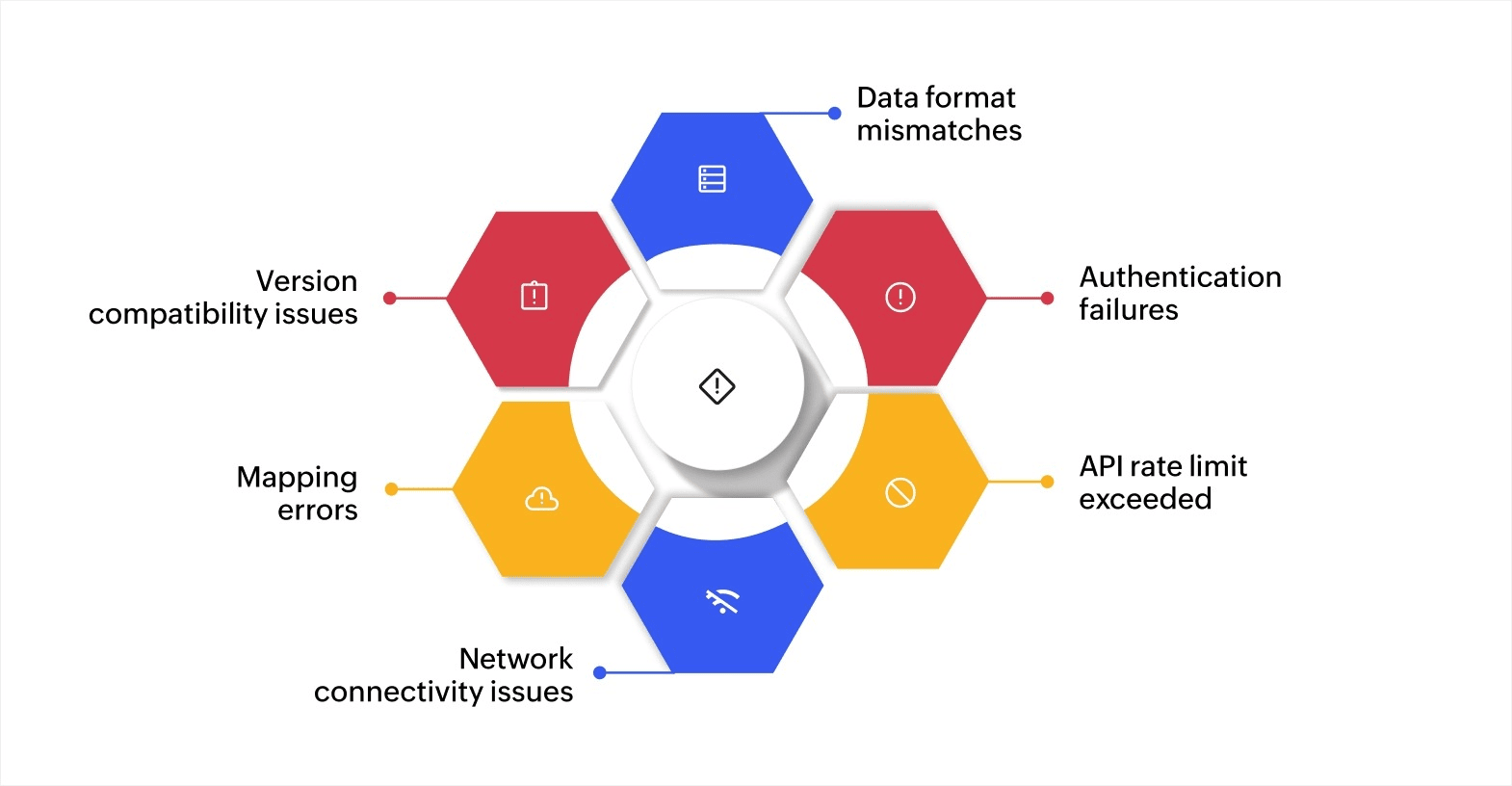
Integration errors arise from various factors that disrupt data flow, interfere with workflows, create data discrepancies, and reduce operational efficiency. Understanding these errors is important for diagnosing issues early and implementing effective prevention strategies.
Here are some of the most common integration errors that can affect your business processes.
Data format mismatches
Systems often use different data formats like JSON, XML, or CSV. When a sending system outputs data in one format and the receiving system expects another, the transfer fails or produces incomplete records.
For instance, if your payment gateway sends transaction data in XML but your accounting software only accepts JSON, those records either get rejected or arrive with missing fields. This is especially common with third-party services where you may not control the output format.
Authentication failures
Authentication failures occur when systems cannot verify the identity of users or applications due to expired tokens, incorrect credentials, or failed authorization. These issues are often seen in integrations using secure protocols like OAuth 2.0 or API keys.
For example, an expired authentication token between your CRM and marketing platform can stop data from syncing entirely. Scheduled campaigns may not pull the latest contact lists, leading to missed outreach or duplicate sends.
API rate limit exceeded
Most service providers implement API rate limits to control the number of requests made in a certain time frame. Exceeding these limits triggers errors, halting further data transfers between systems.
For instance, during a product launch, your ecommerce platform may send a high volume of requests to the payment processor. If the API limit is reached, transactions get delayed or fail entirely.
Network connectivity issues
Network connectivity issues can cause intermittent failures in data exchanges, particularly with cloud-based systems. Network disruptions may arise due to server downtime, latency, or connection issues.
For example, if your cloud CRM loses connection to the inventory management system during a sync cycle, stock levels may not update in real time. This can lead to overselling or inaccurate availability data on your storefront.
Mapping errors
Mapping errors occur when data fields are not correctly aligned between integrated systems. These errors are especially common in integrations involving databases or systems with different data schemas.
For instance, if a "customer_id" field in your CRM is mapped to an "account_number" field in your billing system, customer records may get linked to the wrong accounts. These errors often need manual correction to resolve.
Version compatibility issues
Version compatibility errors arise when different systems are running incompatible versions of software. This is often an issue when integrating legacy systems with newer software versions or cloud services.
For example, a financial system using an older payment gateway API may not support newer transaction types. Updates to one system without checking compatibility across connected tools can trigger unexpected failures.
Recognizing these errors early and addressing them proactively is key to minimizing their impact and ensuring smooth, efficient operations across your integrated systems.
The impact of integration errors on business efficiency
Integration errors have far-reaching consequences, particularly in systems where real-time data exchanges are important for business operations. The impact can be observed in several key areas.
- Downtime: When an integration error occurs, systems may fail to communicate, causing downtime. This can range from missing data from an external service to a complete halt of an entire business function. For example, if a billing system can’t receive payment data due to a failed integration, orders cannot be processed, leading to delays.
- Data discrepancies: Errors in the integration process can result in mismatched data between systems. For instance, if customer information in a CRM is not properly synchronized with an ecommerce platform, this could lead to incorrect shipping details, order fulfillment errors, and delayed deliveries. These discrepancies not only cause confusion but also undermine data accuracy, leading to poor decision-making.
- Financial loss: Integration errors often result in financial loss, as incorrect data can cause incorrect calculations, billing mistakes, or missed transactions.
Addressing integration errors promptly is essential in maintaining operational continuity and data integrity. These errors can be costly, but with the right approach, they can be managed effectively. Taking preventive measures ensures smoother workflows and reduces the risk of disruption.
Effective strategies for handling integration errors
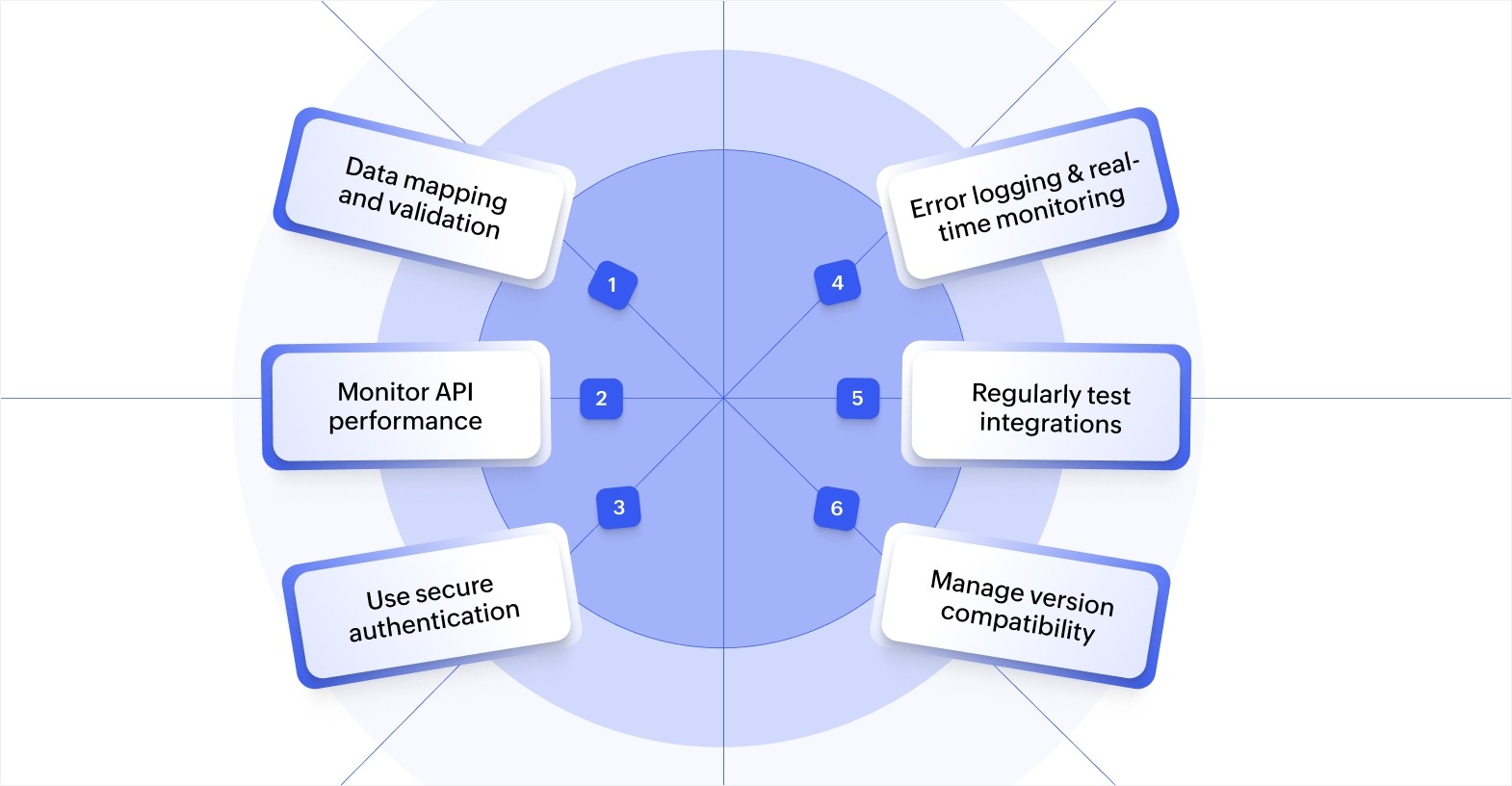
A structured, proactive approach is essential for minimizing the impact of integration errors. Here are some key strategies you can implement to prevent and handle common integration errors effectively.
Ensure accurate data mapping and validation
Inaccurate data mapping is one of the most frequent causes of integration errors. When systems exchange data, it's important that the data fields align correctly. Small discrepancies, such as different data formats or mismatched fields, can cause severe disruptions in data flow and business operations.
To mitigate this:
- Validate data formats to ensure compatibility across systems. This can help avoid errors in data interpretation.
- Map data fields accurately across systems to prevent data misalignment and discrepancies that can affect decision-making and operations.
Monitor API performance and set rate limits
APIs are central to most integrations, but errors can arise when they are overloaded or misconfigured. One of the most common API-related issues is exceeding rate limits, which can stop data transfers altogether.
To avoid this:
- Track API usage to ensure systems don’t exceed rate limits. This allows you to identify when API calls might be too frequent or when performance could be affected.
- Set appropriate rate limits to prevent overloads, especially during peak periods.
By closely monitoring API calls and adjusting limits when necessary, you can prevent the types of integration errors that arise from API failures.
Use secure authentication and authorization methods
Authentication errors are a major source of integration disruptions, especially when the integration involves sensitive data. Failing to properly authenticate API requests or verify user credentials can prevent data from flowing between systems.
To reduce the risk of authentication failures:
- Adopt secure authentication protocols like OAuth or token-based authentication to ensure only authorized users or systems can access your data.
- Regularly update credentials and tokens to prevent expired sessions from halting integrations.
Securing your integrations with strong authentication methods will ensure a smooth and error-free flow of data across your systems.
Implement comprehensive error logging and real-time monitoring
Even with the best systems in place, integration errors can still occur. However, their impact can be minimized by logging errors and monitoring the system in real time. This allows you to detect issues early and address them before they cause significant disruption.
Key actions to take are:
- Log errors as they happen to capture all relevant details for troubleshooting.
- Set up real-time monitoring to receive immediate alerts when an issue arises, so your team can take prompt action.
Having a reliable system for error logging and monitoring enables you to identify integration problems early, preventing minor issues from escalating into significant operational problems.
Regularly test integrations to prevent issues
Testing integrations is an important step that many businesses overlook. Without regular testing, issues may go unnoticed until they significantly affect operations. Running tests on a regular basis ensures your integrations are always functioning as expected.
Testing strategies include:
- Simulate different scenarios in a testing environment to ensure integrations perform under various conditions.
- Automate regular testing to save time and ensure any changes or updates do not cause failures.
Periodically testing integrations will help you catch errors before they disrupt your business processes and maintain smooth data exchanges between systems.
Manage version compatibility to prevent integration errors
As your systems evolve, so must your integrations. Version compatibility issues can arise when systems are updated, but their integrations are not. This is especially common when integrating legacy systems with newer platforms.
To avoid version compatibility errors:
- Use version control to track changes to software and ensure all integrated systems are using compatible versions.
- Regularly check compatibility when updates are made, ensuring both old and new systems work well together.
Managing software versions through version control will ensure compatibility across systems, reducing the risk of integration errors that arise due to outdated or incompatible versions.
Regular monitoring, testing, and securing your integrations will ensure smoother workflows and maintain data integrity. A proactive approach to managing integration errors not only keeps your systems running efficiently but also helps protect your business from costly disruptions and downtime.
Minimizing integration errors with automation tools
Integration errors can significantly disrupt business operations, leading to inefficiencies and customer dissatisfaction. The key to minimizing these errors lies in adopting proactive strategies and utilizing the right tools for smooth system integrations.
Zoho Creator, an AI-powered low-code app development platform, helps you build custom applications with strong integrations. You can easily automate data flows with its 1,000+ integrations that connect to popular business tools.
For more advanced needs, its custom API integration capabilities let you connect to any external service and set up the exact data exchange rules your workflows require.
Take the next step to simplify your integrations and ensure error-free operations. Sign up for free today and build customized, integrated applications with ease.
FAQ
What tools can help automate the detection of integration errors?
Several tools are available to automate the detection of integration errors, such as API monitoring software, real-time error tracking tools, and system observability platforms. These tools help businesses monitor their integrations continuously, alerting them to any issues like failed API calls, authentication errors, or connectivity problems.
How can businesses prepare for integration errors when using third-party services?
When using third-party services, it's essential to have clear agreements on data formats, API protocols, and troubleshooting procedures. Businesses should also have contingency plans, including fallback mechanisms and alternative workflows in case third-party integrations fail.
How do version compatibility issues affect integration success?
Version compatibility issues arise when different software versions of integrated systems are not aligned. These issues can affect integration success because they can lead to data transfer failures or malfunctioning processes. Regular checks and updates, along with using version control, can prevent these issues and ensure smooth integration even with evolving systems.
What are some common causes of data synchronization failures in integrations?
Data synchronization failures often occur due to mapping errors, inconsistent data formats, or incorrect timestamps. Inaccurate data mapping between systems, especially when fields like customer IDs or account numbers don't match, can cause synchronization issues that disrupt business processes.
 Bharathi Monika Venkatesan
Bharathi Monika Venkatesan is a content writer at Zoho Creator. Outside of work, she enjoys exploring history, reading short novels, and cherishing moments of personal introspection.