- HOME
- Know Your Tech
- How to handle complex workflows effectively
How to handle complex workflows effectively
- Last Updated : March 2, 2026
- 317 Views
- 7 Min Read
Approval requests sit in inboxes for days. Teams can't find where requests went. Tasks take weeks because they cross five departments. Complex workflows directly impact your delivery timelines, team productivity, and operational costs.
Highlights
- Complex workflows involve multiple approval stages, cross-department coordination, and system integrations that create dependencies between tasks and teams.
- Real-time visibility across workflow stages helps teams identify delays and bottlenecks before they affect delivery timelines.
- Automation of repetitive tasks like notifications, data transfers, and routine approvals reduces manual coordination and speeds up processes.
- Centralized information access eliminates searching across email threads and disconnected systems to find request status.
- Visual process mapping reveals bottlenecks and clarifies handoff points where coordination typically breaks down.
Without structured management approaches, these multi-step processes create bottlenecks that slow operations. In fact, according to a Deloitte survey, just 22% say their companies can make their work simpler, highlighting the growing need for effective strategies to manage complex workflows.
This blog post breaks down in detail what makes workflows complex, common management challenges, and strategies that reduce delays and improve coordination across complex processes.
What makes a workflow complex?
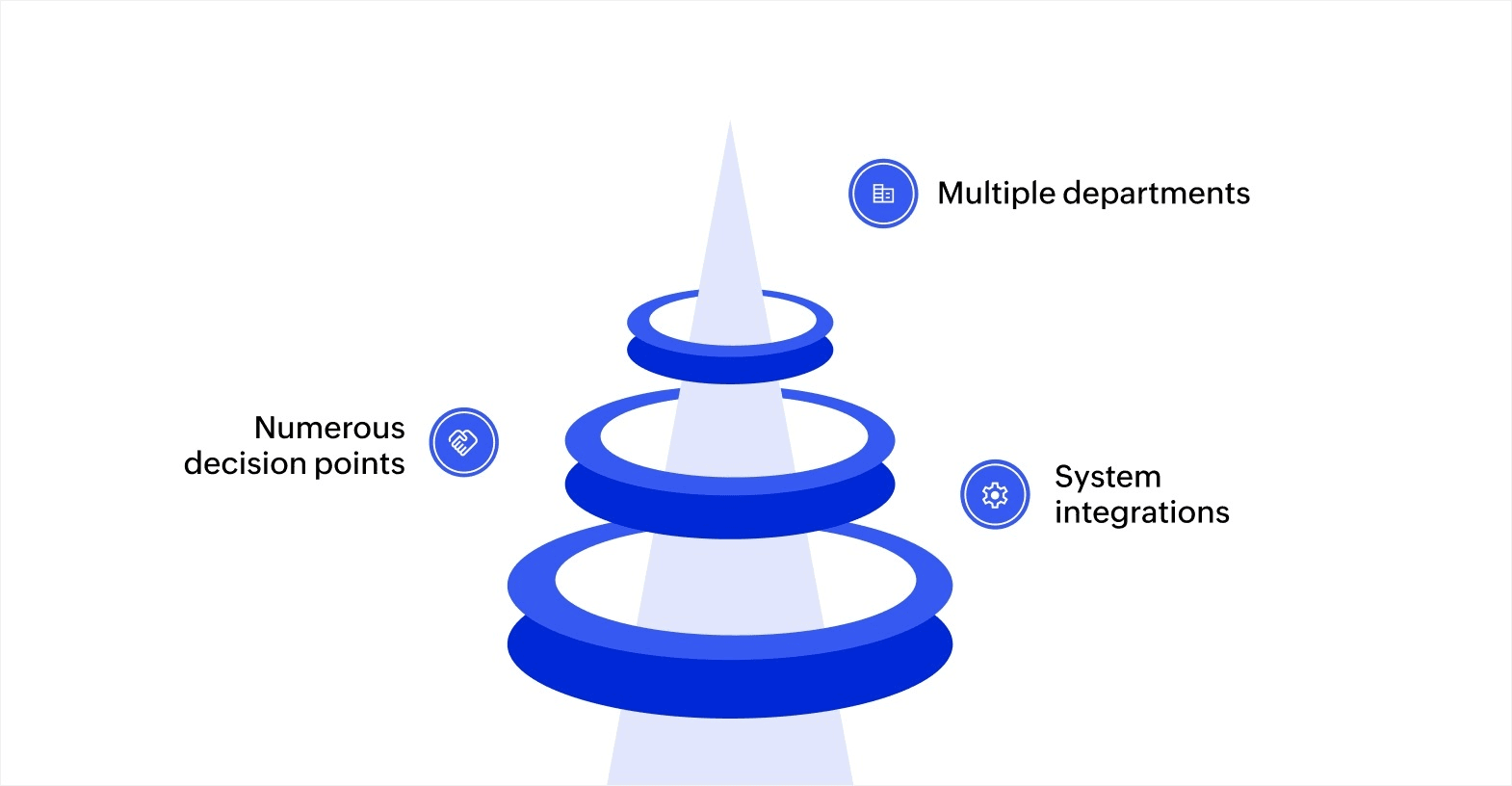
Complex workflows are multi-step processes that require coordination across multiple teams, approval stages, and systems. Several factors can contribute to workflow complexity:
- Multiple departments: When a workflow involves different teams, each with its own tools and processes, coordination becomes challenging. Varying priorities and communication styles can cause delays and inconsistencies.
- Numerous decision points: Complex workflows typically include multiple decision points. The more decision points, the higher the chances of delays or errors, especially if decisions are based on outdated or incomplete data.
- System integrations: Workflows often require integration between various systems, like CRMs, ERPs, or custom tools. Poor integration can result in data synchronization problems, leading to inaccuracies and workflow disruptions.
Challenges in managing complex workflows
Complexity creates specific operational issues that affect team productivity and process efficiency. Recognizing these challenges helps you identify which problems to address first in your workflow improvement efforts.
Coordination delays between teams
Handoff points create waiting periods when tasks move from one team to another. Marketing requests wait for compliance review before proceeding to design. IT tickets wait for manager approval before technical work begins. Each handoff adds time, even when individual team response is fast.
Limited visibility across stages
Managers struggle to determine where requests are in the process when workflows span multiple email threads, systems, and departments. Without centralized tracking, finding out why a request is delayed requires asking multiple people and checking several places. This lack of visibility prevents proactive problem-solving and makes it difficult to identify patterns in delays.
Manual data entry and transfers
Copying information between systems or entering the same data multiple times creates errors and wastes time. When customer information moves from inquiry forms to CRM to project management to billing systems through manual entry, each transfer introduces potential mistakes and requires staff time that could be spent on higher-value work.
Inconsistent communication across channels
Teams miss updates when notifications get scattered across email, messaging apps, and project management tools. Important approvals or questions get buried in full inboxes. Without standardized communication channels for workflow updates, information gaps create delays as teams wait for responses that were actually sent but not seen.
Difficulty tracking accountability
Determining who's responsible for current delays becomes challenging when tasks move through many hands across different departments. When a request gets stuck, identifying whether it's waiting for finance, compliance, operations, or executive review requires investigation. This ambiguity slows resolution and makes it harder to address recurring bottlenecks.
Key strategies for handling complex workflows
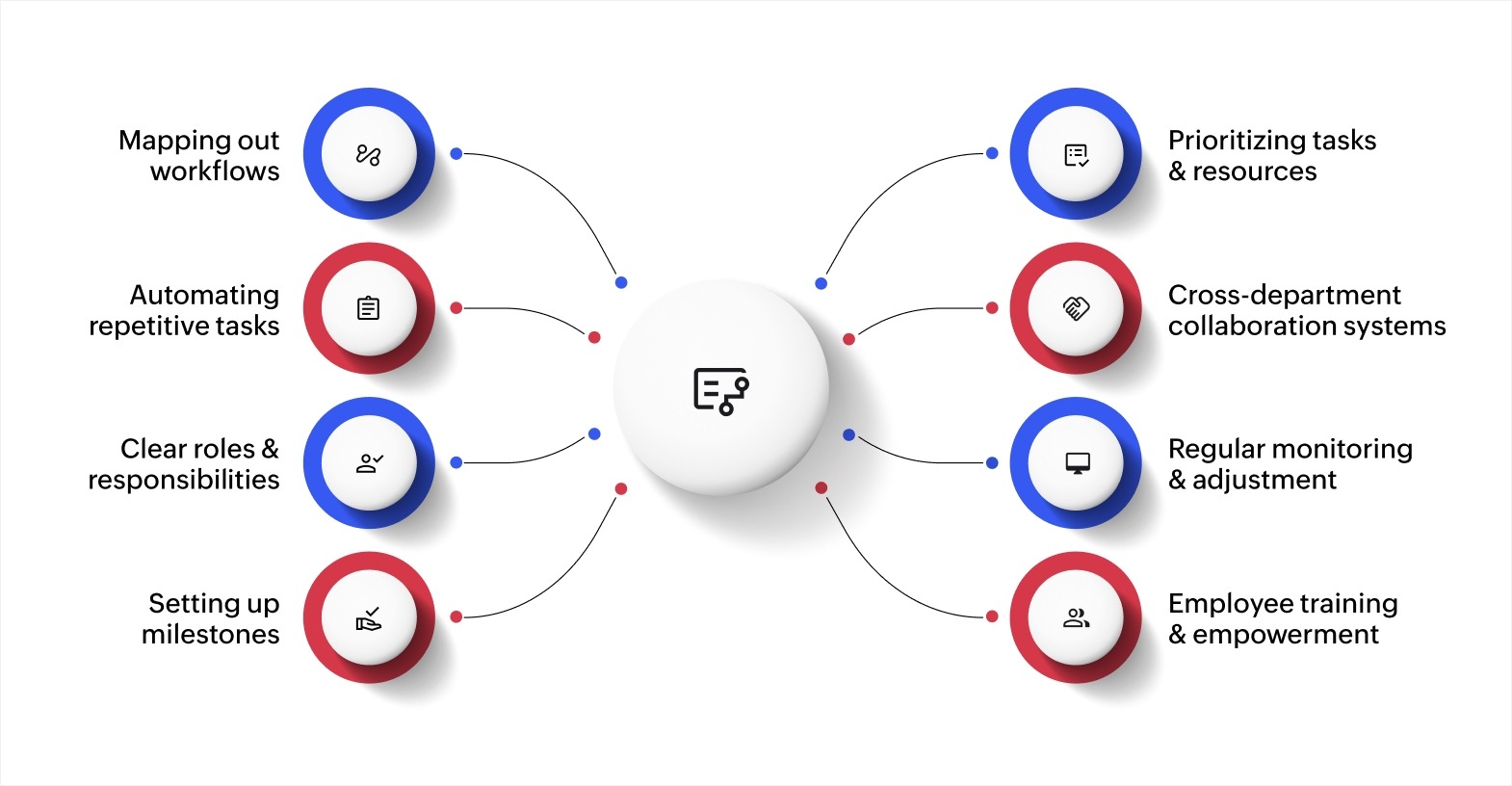
Mapping out workflows
Visualizing workflows is essential for understanding how tasks flow across teams and systems. It enables better task tracking, early detection of delays, and overall process optimization.
- Flowcharts and process mapping tools: Platforms like Zoho Creator allow you to visually map out workflows, providing a structured approach to task management. This clarity enhances team collaboration and helps identify potential areas for improvement.
- Clear process design: Breaking down larger projects into smaller, manageable tasks ensures nothing is overlooked and everyone knows their responsibilities.
Mapping workflows is crucial because businesses are increasingly relying on structured systems to stay competitive.
Automating repetitive tasks
Automation significantly improves the efficiency of complex workflows by eliminating manual, repetitive tasks and reducing human error.
- Workflow automation platforms: Platforms like Zoho Creator automates tasks such as data entry, notifications, approvals, and report generation. Automating these processes saves time and ensures consistency.
- Error reduction and time savings: With automation, manual interventions are minimized, leading to fewer mistakes and a smoother workflow process.
Defining clear roles and responsibilities
Well-defined roles and responsibilities are crucial for ensuring accountability and preventing delays in workflows. When a team member understands their specific tasks and deadlines, it fosters better coordination and minimizes misunderstandings.
- Role clarity: Assign tasks based on team members' expertise and availability. This ensures that the right person handles each task.
- Ownership and accountability: Regular check-ins and updates help reinforce ownership and ensure all team members are aligned on their responsibilities.
Setting up milestones and checkpoints
Milestones are key to tracking progress and ensuring tasks are completed on time. Establishing clear checkpoints throughout the workflow ensures tasks stay on track.
- Strategic milestone setting: Break large tasks into smaller milestones, each with a clear set of criteria and a deadline. This provides better visibility into the project's progress and allows for timely interventions.
- Adjusting when needed: Regular checkpoints help you identify any delays or issues early, giving you the flexibility to make adjustments as required.
Prioritizing tasks and resources
Effective prioritization ensures the most important tasks are completed first, avoiding delays and ensuring smooth execution.
- Task assessment: Evaluate tasks based on their urgency and overall impact. Prioritize accordingly to ensure key objectives are achieved without delay.
- Efficient resource allocation: Allocate resources based on task priority to ensure critical work is completed on time. Regularly reassess workloads and make adjustments where necessary.
Building cross-department collaboration systems
Complex workflows often require coordination between marketing, sales, operations, finance, and compliance teams. Establishing shared platforms where all departments access the same information prevents delays caused by data silos or miscommunication.
- Centralized information access: Unified data platforms eliminate the need to search across multiple email threads and disconnected systems. Teams spend less time looking for information and more time completing their workflow tasks.
- Defined communication channels: Establish clear communication paths for each workflow stage to reduce confusion about where updates should go. Marketing teams update campaign briefs in the project system while finance teams check approval queues in the workflow platform instead of monitoring email threads.
Shared systems ensure everyone works from the same information, reducing errors caused by outdated data or miscommunication between departments.
Regular monitoring and adjustment
Workflows need ongoing evaluation to remain efficient as business requirements change. Tracking metrics like completion times, approval delays, and bottleneck frequency reveals where processes need refinement.
- Performance tracking: Monitor workflow metrics to identify stages that consistently cause delays. If customer onboarding consistently takes 15 days when your target is 10 days, tracking data helps pinpoint which specific stages need improvement.
- Data-driven adjustments: Use performance data to evaluate whether recent changes improved efficiency or created new problems. Automating approval notifications that reduced average approval time from three days to one day confirms the change worked effectively.
This ongoing evaluation keeps workflows aligned with current business requirements and helps teams address inefficiencies before they impact delivery timelines.
Employee training and empowerment
Team members work more efficiently when they understand both their specific roles and how their work fits into larger workflows. Training programs covering workflow tools, approval processes, and escalation procedures help employees handle tasks independently.
- Comprehensive training programs: Provide ongoing training that covers workflow tools and processes so employees can troubleshoot issues and complete tasks without constant guidance. New employees should understand tools and processes from their first day.
- Feedback channels for improvement: Create opportunities for employees to suggest workflow improvements. The people using workflows daily often spot inefficiencies that managers miss, keeping workflows aligned with actual work patterns rather than theoretical process designs.
Empowering employees to propose changes and test improvements leads to better workflows over time as processes evolve.
Build custom solutions to manage complex workflows with Zoho Creator
Managing complex workflows with spreadsheets and disconnected tools creates visibility issues and coordination delays. Teams spend time searching for information, manually updating systems, and tracking down approvals instead of focusing on actual work. These inefficiencies compound as workflows grow more complex and request volume increases.
Zoho Creator is an AI-powered low-code application development platform that helps businesses build custom workflow solutions matching their specific approval processes, team structures, and coordination requirements. You can create applications tailored to how your organization actually works without extensive coding knowledge or long development cycles.
With its visual workflow builder, you can map all your business processes. The platform's automation capabilities handle repetitive coordination tasks while scheduled notifications keep everyone informed. You can also build custom apps matching your specific processes.
Start with a 15-day free trial today to see how quickly you can build workflow solutions that reduce coordination delays and give teams real-time visibility.
FAQ
1. What are the key benefits of automating complex workflows?
Automation can significantly improve the efficiency of complex workflows by reducing manual errors, saving time, and enhancing consistency. By automating tasks like data entry, approvals, and report generation, businesses can allocate more time to strategic, high-priority activities. Automation simplifies the workflow, ensuring smoother transitions between stages and minimizing potential delays.
2. How can businesses prevent errors in complex workflows?
To reduce errors in complex workflows, it’s important to have clear role definitions, automate repetitive tasks, and maintain effective communication across departments. Additionally, using workflow management tools that provide real-time tracking and feedback can help spot and correct issues early, before they escalate.
3. How can I measure the effectiveness of my workflow management system?
Key performance indicators (KPIs) like cycle time, completion rates, error rates, and resource utilization can help measure the effectiveness of your workflow management system. These metrics allow businesses to identify inefficiencies and optimize processes for better performance.
4. How does technology reduce IT dependency in managing complex workflows?
By using low-code platforms like Zoho Creator, business users can design, implement, and modify workflows without needing heavy IT involvement. This reduces the dependency on IT teams for updates and changes, allowing faster implementation of workflow adjustments and enhancing overall business agility.
 Ann Elizabeth Sam
Hey! I'm Ann, and I work as a content writer at Zoho Creator. I'm exploring the SaaS world through various forms of content creation. Outside of work, I love dancing and would give up anything to read a good murder mystery.