- HOME
- Know Your Tech
- A complete guide to using AI to speed up app development
A complete guide to using AI to speed up app development
- Last Updated : March 24, 2026
- 660 Views
- 8 Min Read
What if your team could stop spending hours on repetitive tasks and start focusing on work that drives real results? Building custom applications that meet your business's needs can often feel like a time-consuming and resource-draining process. And with the constant pressure to innovate and deliver quickly, it can be tough to keep up.
This is where artificial intelligence (AI) can help. AI doesn’t just improve app functionality; it changes how apps are built, making the entire process faster and more efficient.
Highlights
Automated tasks: AI tools automate repetitive tasks, reducing manual effort and development time.
Faster development: AI-powered low-code platforms like Zoho Creator, enhanced with AI, enable fast app creation without extensive coding.
Data-driven insights: AI-powered predictive analytics and machine learning models help prioritize features and optimize app performance.
Improved UX/UI: AI assists in refining user interfaces by analyzing behavior and making design recommendations for better engagement.
With AI, your team can focus on producing valuable outcomes, speeding up development, and maintaining quality, rather than being bogged down by routine work.
In this blog, we'll explore how AI techniques can speed up app development using AI-driven tools and how you can apply them to your workflow.
What is AI app development?
AI app development involves creating applications using generative AI technologies, particularly large language models (LLMs), to automate and accelerate the development process. These AI tools can generate data models, create form fields and structures, produce sample data, and write functional code for workflows, making app creation faster and more accessible.
The core technology behind this approach is generative AI, which handles the actual development work by interpreting your requirements and building the application components automatically.
Technologies like machine learning, natural language processing (NLP), and predictive analytics are services you can add to finished applications to make them smarter, such as enabling chatbots, recommendation engines, or forecasting features.
Key capabilities of AI-powered app development

Machine learning and data processing
AI-powered apps use machine learning algorithms, natural language processing (NLP), and computer vision to handle complex data operations. So your developed apps can analyze user behavior patterns, understand text and voice inputs, and process images or documents automatically, without requiring manual work from your team.
Automation
AI apps automate time-consuming, repetitive tasks. For instance, RPA (robotic process automation), powered by AI, can handle administrative tasks like data entry, email sorting, and transaction processing, which are typically manual and prone to error.
Personalization
AI algorithms analyze large datasets to generate insights into user preferences, which helps tailor content, products, or services. In ecommerce, recommendation engines use collaborative filtering and content-based filtering models to provide personalized product suggestions based on past behavior.
Data-driven decision-making
AI apps use predictive analytics and statistical models to uncover trends, forecast future outcomes, and support decision-making. Machine learning models, such as regression analysis and decision trees, help businesses predict customer behavior, market trends, and operational needs.
Key aspects of AI-powered application development
AI-powered application development uses generative AI to handle the actual building process, turning your ideas into functional apps with minimal manual coding. Here are the key aspects that make this possible:
Natural language interpretation: Generative AI understands your requirements written in plain language and translates them into technical components like form fields, validation rules, and database structures.
Automated data modeling: AI creates the underlying data architecture by generating tables, defining relationships, and setting up field types based on what your app needs to accomplish.
Code generation for workflows: AI generates the logic for business processes, approval workflows, and automated actions without requiring manual coding.
Intelligent component suggestions: AI recommends relevant features, fields, and integrations based on the type of application you're building and patterns from similar apps.
Rapid prototyping: Generative AI produces working prototypes quickly, allowing you to test your application concept within hours instead of weeks.
Low-code enablement: AI generates complex application logic behind visual interfaces, letting users build custom business applications through drag-and-drop components and guided workflows.
6 key steps in building an app with AI
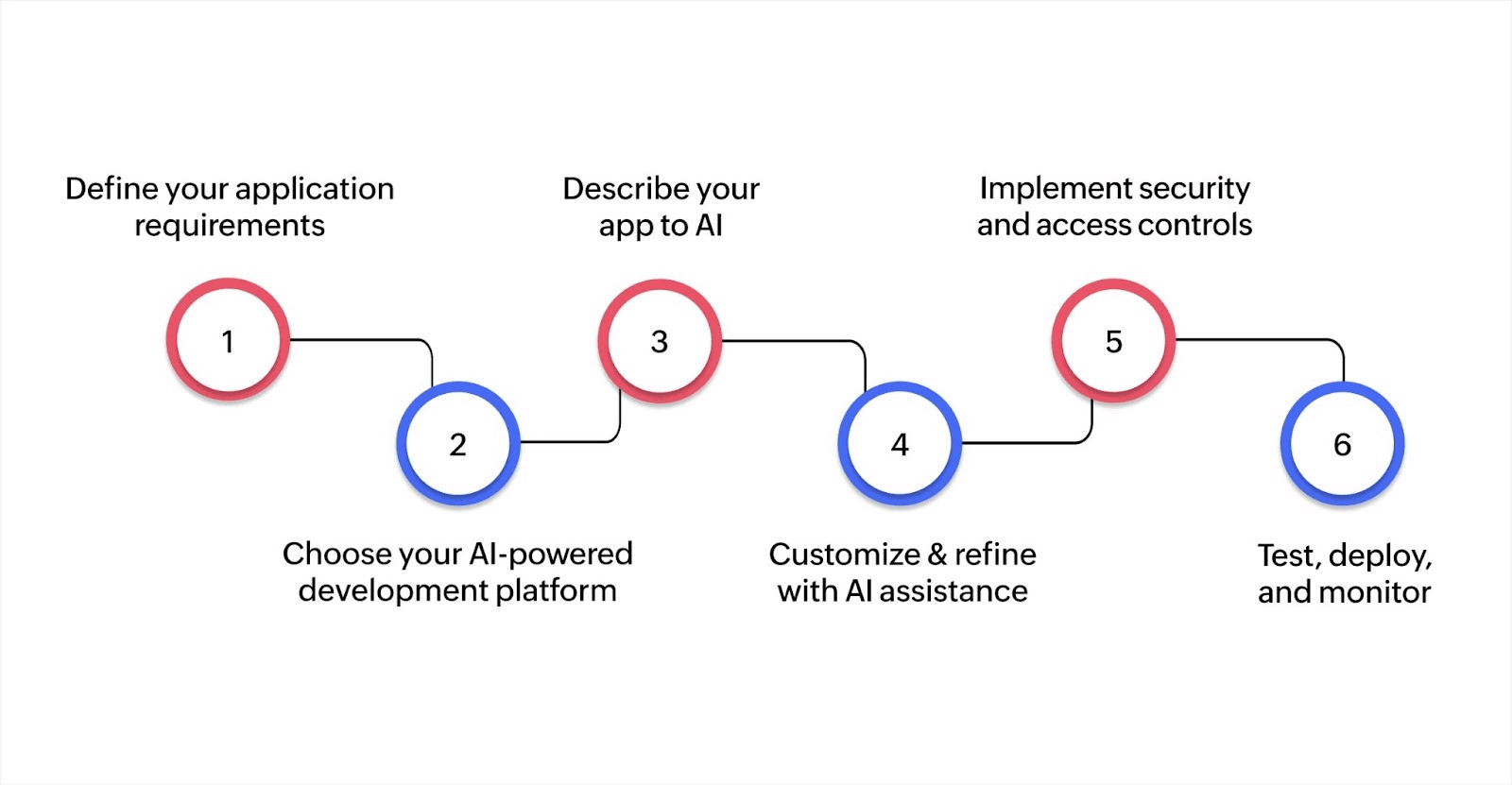
Building applications with AI-powered development platforms simplifies the process and reduces the time from concept to deployment. Here's how to approach it:
Step 1: Define your application requirements
Start by identifying the specific business problem your application needs to solve and who will use it. For example, you might need a customer onboarding system, an inventory tracker, or an approval workflow tool. Focus on what users need to accomplish rather than technical specifications.
Step 2: Choose your AI-powered development platform
Select a platform that uses generative AI to accelerate the building process. Zoho Creator combines AI capabilities with visual development tools, letting you build custom apps through natural language descriptions and drag-and-drop interfaces.
Step 3: Describe your app to AI
Explain what you want to build in plain language. Describe the data you need to collect, the processes you want to automate, and how users should interact with the app. AI interprets your requirements and generates the initial data models, forms, fields, and basic structure automatically.
Step 4: Customize and refine with AI assistance
Review what AI has generated and make adjustments based on your specific needs. AI suggests relevant workflows, integrations with existing systems, and additional features based on similar applications. You can iterate quickly by requesting changes in the natural language and seeing updates in real time.
Step 5: Implement security and access controls
Set up user permissions to control who can view, edit, or delete data within your application. Implement data encryption, access controls, and compliance with data protection regulations like GDPR. Configure authentication methods and define role-based access for different user groups.
Step 6: Test, deploy, and monitor
Test your application with actual users to identify any issues or improvements needed. Deploy the app to your team or customers through web, mobile, or desktop interfaces. Monitor usage patterns, gather user feedback, and track performance metrics to continuously improve the application over time.
How to use AI in different phases of app development?
AI-powered tools can significantly improve efficiency across the entire development lifecycle, from coding to deployment.
AI-powered code generation
AI-driven tools use deep learning models to generate code based on context, speeding up the development process.
Technical insight
Transformer-based models interpret syntax and application logic.
AI tools suggest code snippets or even entire functions, reducing manual work.
Developers can focus on higher-level tasks, while AI handles manual coding.
AI models like Codex predict the next lines of code using vast data from repositories.
Context-aware suggestions adapt to the developer's workflow, improving efficiency.
Key benefits
Faster coding with contextual suggestions
Reduced manual effort and error-prone code
AI-driven design optimization
AI enhances the user interface and experience by analyzing user behavior and making design suggestions.
Technical insight
Reinforcement learning automatically adjusts layouts and content placements.
A/B testing powered by AI identifies the most effective design elements.
NLP and sentiment analysis help AI refine designs based on user feedback.
AI analyzes user interactions, adjusting the UI for better engagement.
Computer vision algorithms help optimize visual elements and layouts.
Key benefits
Real-time, data-driven design adjustments
Faster design iterations
Improved user satisfaction with optimized interfaces
Optimizing deployment and DevOps with AI
AI helps automate key aspects of DevOps, improving the efficiency of deployment, integration, and monitoring.
Technical insight
Predictive models scale resources based on app traffic predictions.
AI automates testing and ensures quality code deployment.
Anomaly detection monitors the app in real time, resolving issues before they cause disruptions.
Dynamic resource allocation ensures the app scales according to demand.
Predictive analytics helps foresee traffic spikes, adjusting resources accordingly.
Key benefits
Automated scaling based on real-time data
Faster deployments with fewer errors
Continuous monitoring for system performance
AI's role in security during app development
AI strengthens app security by detecting vulnerabilities early in the development process.
Technical insight
Unsupervised learning detects anomalies in code and user behavior.
Natural language processing scans code for malicious scripts or vulnerabilities.
AI continuously monitors traffic patterns, identifying potential security risks.
Anomaly detection algorithms help identify abnormal patterns that may indicate security threats.
AI predicts new vulnerabilities based on historical data, addressing security issues proactively.
Key benefits
Continuous security monitoring
Early detection and resolution of vulnerabilities
Reduced risk of security breaches
Top 5 benefits of AI app development
AI app development brings a wide array of advantages that enhance both the functionality and efficiency of business operations, allowing companies to improve decision-making, increase automation, and simplify processes. Here's how AI can transform your operations:
1. Enhance user experience
AI-driven personalization improves user engagement. For example, machine learning models can adjust content or recommendations based on a user’s behavior and preferences, providing a tailored experience.
2. Increase productivity
Automation of routine tasks, such as data entry or basic customer inquiries, frees up employees for more valuable tasks. AI systems can handle large-scale, time-consuming processes, improving operational efficiency.
3. Unlock data-driven decision-making
AI applications use statistical models and machine learning to predict trends and provide actionable insights. For example, AI-driven analytics tools in retail can help optimize inventory based on customer purchasing patterns.
4. Speed up app development
By utilizing prebuilt models, frameworks, and cloud-based AI services, businesses can reduce development time significantly. These tools enable faster prototyping and deployment, making AI more accessible to companies of all sizes.
5. Cost savings
AI automation reduces labor costs by eliminating manual tasks and improving efficiency. Businesses can achieve higher productivity without increasing headcount, leading to long-term cost savings.
With AI's growing role in businesses, it's clear why 93% of organizations plan to increase their AI investments over the next two years.
Maximizing efficiency in app development with AI
AI techniques can significantly speed up app development by automating repetitive tasks and simplifying the creation of custom solutions. By using AI, businesses can reduce the time and effort required to build applications, making the process more efficient and accessible.
Zoho Creator is an AI-assisted low-code application development platform that allows businesses to quickly design, test, and deploy applications customized to their specific needs, without needing extensive coding knowledge.
To speed up app development using AI, Zoho Creator provides a platform that supports businesses in creating custom applications quickly and efficiently. With its user-friendly features and AI-driven capabilities, businesses can build solutions that fit their unique requirements.
Ready to see how AI can speed up your app development? Try Zoho Creator with a personalized demo and see how its AI-assisted features can help you build custom applications quickly and efficiently.
How long does it take to develop an AI app?
The timeline for building an AI-powered app varies based on your approach, resources, and requirements. Here are the key factors that influence development speed:
Development approach: AI-powered low-code platforms can reduce development time from days to just a few hours or even minutes by providing prebuilt components and visual builders.
AI model complexity: Using pretrained models speeds up deployment, while building custom models from scratch requires additional time for training and testing.
Team expertise: Experienced developers and data scientists can work faster, but low-code platforms enable teams with limited technical skills to build effectively.
Integration requirements: Apps that connect with multiple existing systems need more time for API setup and data synchronization.
FAQ
1. How much coding knowledge do I need to use AI-powered app development platforms?
Most AI-powered low-code platforms require minimal coding knowledge. You can build functional apps using visual interfaces and drag-and-drop components. However, having basic technical awareness helps you customize features and workflows more effectively.
2. Can AI-generated code be trusted for production applications?
AI-generated code provides a solid foundation and follows best practices, but it should always be reviewed and tested. AI tools excel at creating standard code and common functions, while human developers ensure the code meets specific business requirements and security standards.
3. What types of applications are best suited for AI-accelerated development?
AI-accelerated development works well for internal business tools, customer portals, workflow automation apps, and data-driven applications. Complex applications requiring highly specialized logic may still benefit from traditional development approaches combined with AI assistance.
4. How does AI handle changes in project requirements during development?
AI tools adapt quickly to requirement changes by regenerating code, adjusting workflows, and updating test cases automatically. This flexibility significantly reduces the time and effort needed to accommodate changes compared to manual rewriting and retesting.
5. What is the typical learning curve for teams adopting AI development tools?
Most teams become productive with AI development tools within a few weeks. Low-code platforms with AI assistance are particularly beginner-friendly, while AI coding assistants require some familiarity with programming concepts. Training resources and documentation accelerate the learning process.
 Bharathi Monika Venkatesan
Bharathi Monika Venkatesan is a content writer at Zoho Creator. Outside of work, she enjoys exploring history, reading short novels, and cherishing moments of personal introspection.