- HOME
- Feature Spotlight
- Add Zoho Checkout payment links in Zoho Writer mail merge emails
Add Zoho Checkout payment links in Zoho Writer mail merge emails
- Last Updated : July 6, 2026
- 150 Views
- 2 Min Read

Zoho Writer now lets you embed Zoho Checkout payment links directly into the personalized emails generated and sent via its document automation. This enables you to generate personalized documents (like invoices), and share them via an automated, custom email with a payment link, enabling you to automate the entire life cycle easily.
How does the Zoho Writer-Zoho Checkout integration work?
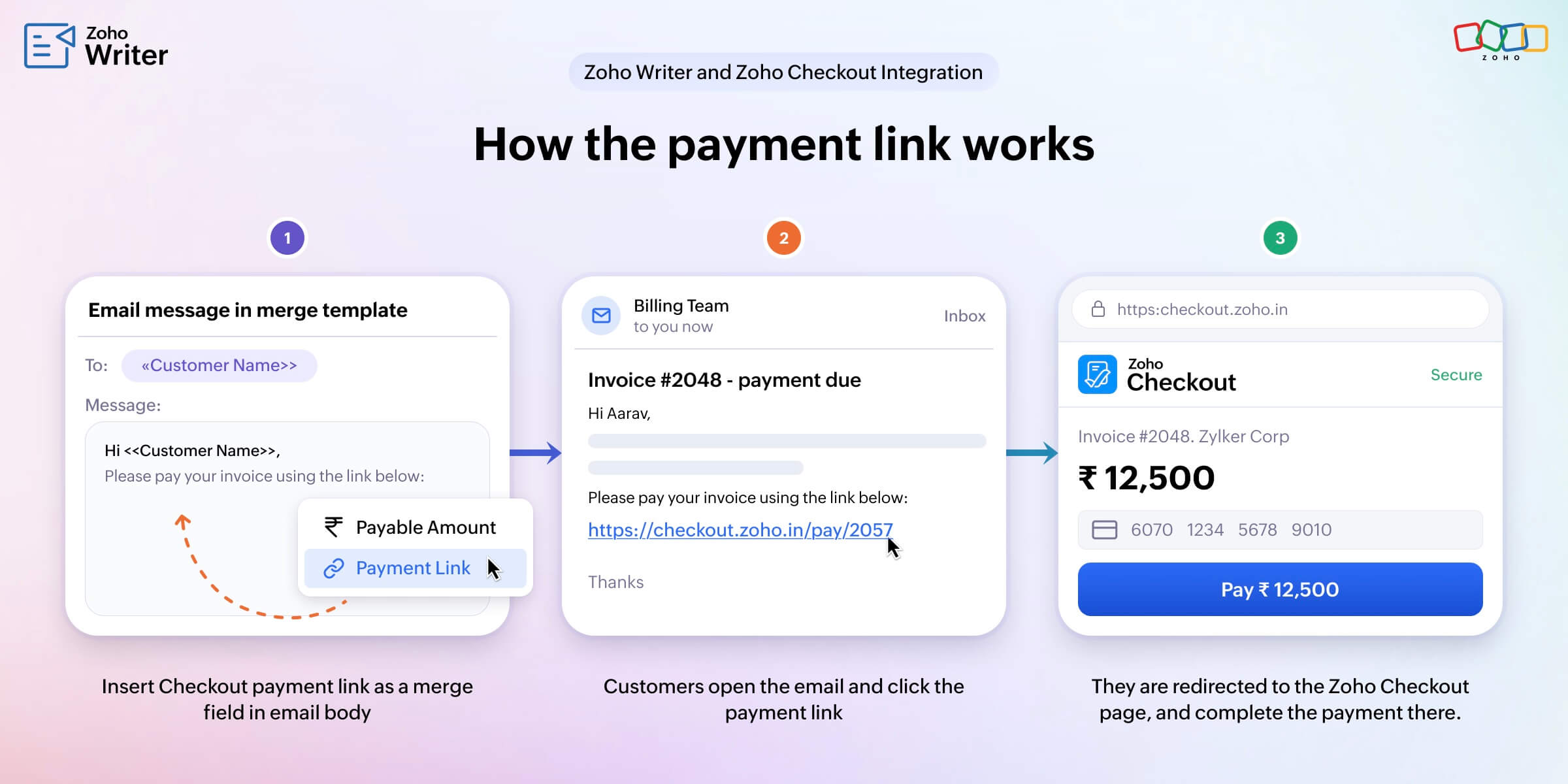
This integration lets you add a Zoho Checkout payment page link as a merge field. Writer's merge template pulls data from a data source (like CRM, a spreadsheet, or a CSV file), generates a personalized email for each record along with the Checkout payment page link, and delivers them all in bulk. Every recipient will see the details and payment link specific to them.
Key benefits of adding Zoho Checkout links to mail merge emails
- Shorter payment journeys: The email itself becomes the starting point for payment, so recipients don’t have to move between invoices, portals, or PDFs.
- Less manual follow-up: One automation handles personalization, email delivery, and payment initiation, cutting down repetitive reminders and reducing the chances of errors creeping in.
- Better tracking: With mail merge tracking in Writer and analytics in Zoho Checkout, you know who opened, clicked, and completed payment.
Event registration workflows with payment-enabled mail merge emails
Imagine you’re running a paid online workshop and already manage registrations in a spreadsheet or Zoho CRM.
Here’s how this feature changes your workflow:
- Design an event confirmation email in Writer with the session details, date, time, and fee.
- Connect your registration list as the mail merge data source.
- Insert a Zoho Checkout payment link for the event fee in the call-to-action section of the email.
When you run the merge, each registrant receives a personalized email with their name, session details, and a direct payment link. They don’t have to wait for a separate invoice or ask how to pay. They click the link, complete the payment, and they’re done.
On your side, the same merge run that previously sent a simple “You’re registered” email now also takes care of “You’re registered, and here’s how to pay right now.” Because this is part of Writer’s existing automation and merge configuration, you don’t need extra tools or complex integrations to get started.
For a detailed step-by-step configuration guide, check out this help article .
Try adding a Zoho Checkout payment link to your email workflows created using Writer merge templates, and let us know how it works for you in the comments. You can also write to us at support@zohowriter.com, or support@eu.zohowriter.com if you’re in the EU.