- HOME
- Feature Spotlight
- AI-powered document and content generation in Zoho Writer
AI-powered document and content generation in Zoho Writer
- Last Updated : January 22, 2026
- 745 Views
- 2 Min Read

Create business docs and templates like a pro without wrestling with layouts. With Zoho Writer’s AI-powered document and template designing, you describe what you need and let the AI design it for you in minutes. It’s like having a smart design partner built right into your word processor.
What this feature actually does
At its core, this update lets you use Zia, Zoho Writer’s AI assistant, to instantly generate beautifully structured documents and templates tailored to your needs. No manual formatting required. You just tell Zia what you want, and it delivers multiple options that you can refine or reuse.
Highlights
Design from scratch
Zia can build templates and full documents for many business scenarios like sales orders, proposals, purchase orders, NDAs, offer letters, and more with layout and content.
Styles that fit your document
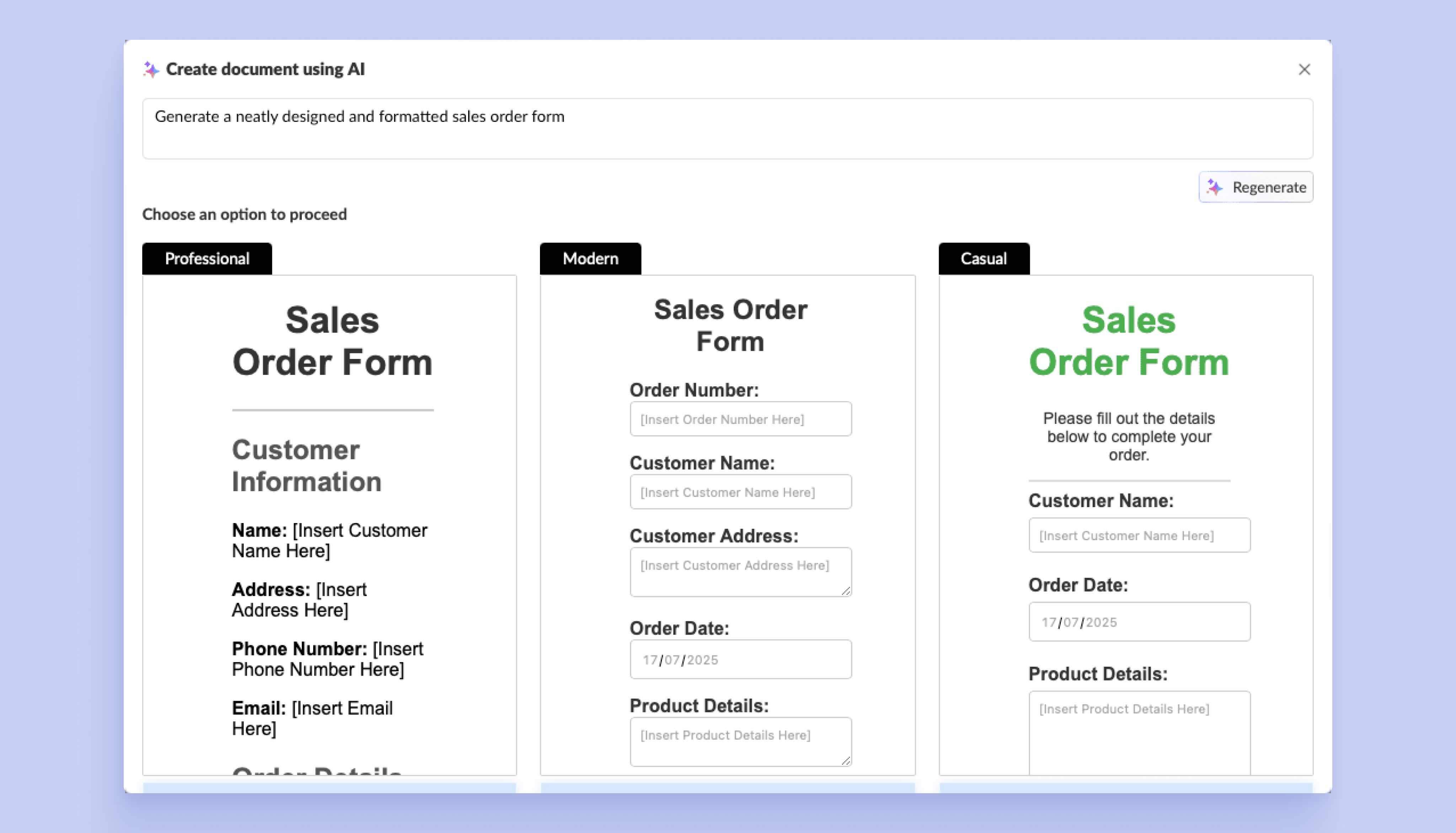
Choose from professional, modern, or casual styles. Zia tailors the design tone and format for different audiences, so what you generate feels purposeful from the first draft.
Preview and regenerate options
Not happy with a layout? Regenerate all suggestions or just the ones you don’t like. Preview each style before making your selection.
Conversational refinement
Once a draft is generated, you can ask Zia to add tables, shift heading styles, tweak spacing, insert headers or footers, and more, without diving into menus.
Save and reuse
When you settle on a design, save it as a Zoho Writer document. Use it as a standard doc or convert it into a merge template, fillable form, or sign template to power automation workflows later.
Why it matters
- Whether you’re creating internal reports or client deliverables, Zia can help get you 80% of the work done in seconds.
- From business formatting norms to style consistency, Zia ensures your output looks professional without extra design time.
- With the layout and structure handled, you can focus on what matters most: the message, data, and results behind your document.
How it works
- Go to Create New > Document Using AI in Zoho Writer.
- Adjust the pre-filled prompt or write your own description of what you want.
- Hit Generate and let Zia do its magic.
- Pick a style, preview, refine, and save.
The blog dives deeper into the same highlights with more context. If you need a step-by-step guide, see the Zoho Writer help doc .
Try creating your next document using AI-powered designing in Zoho Writer and see how it works for your use case. If you have feedback or need help, reach out to us at support@zohowriter.com or support@eu.zohowriter.com if you're in the EU.