

- HOME
- Accounts payables
- Everything you need to know about AP automation software
Everything you need to know about AP automation software
At some point, every finance team reaches the same conclusion. The process they have been using, whether that is a spreadsheet, a basic accounting tool, or an entry-level AP solution, is no longer keeping up with the business.
Invoices are piling up. Errors are creeping in. Approvals are slow. Reconciliation takes longer than it should. And the team that should be focused on financial strategy is spending most of its time on manual tasks that a good system should handle automatically.
If that sounds familiar, you are in the right place. This guide covers everything a finance team needs to make a confident, informed decision about AP automation software, what to look for, what separates genuinely powerful tools from average ones, and the right questions to ask before you commit to a switch.
What AP automation software actually does
AP automation software is financial technology designed to manage the accounts payable process from invoice capture to payment execution without manual intervention at every step. It is worth distinguishing it clearly from adjacent tools.
General accounting software handles bookkeeping, financial reporting, and reconciliation but typically does not automate the AP process in any meaningful depth. ERP systems include AP modules, but those modules are often rigid, expensive to configure, and built for enterprises with large IT teams. Standalone AP automation software sits in a different category. Purpose-built for the payables process, faster to implement, and designed around the day-to-day realities of a finance team managing vendor invoices at scale.
The best AP automation software does not just speed up existing tasks. It restructures the process itself, removing the manual touchpoints that create errors and delays and replacing them with automated logic that is faster, more consistent, and fully traceable.
The features that matter most in AP automation software
Not all AP automation software is built equally. These are the six capabilities that define a serious tool from one that will create new problems while solving old ones.
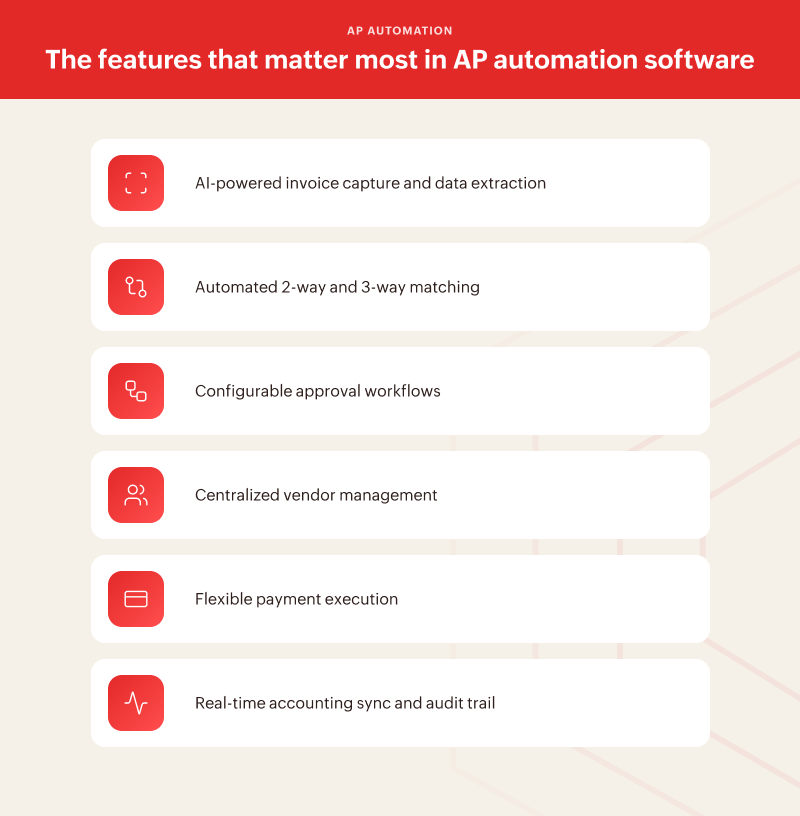
1. AI-powered invoice capture and data extraction
The starting point for any AP automation tool is how it handles incoming invoices.
The best software uses artificial intelligence combined with optical character recognition to capture invoices from any source including email, vendor portals, scanned documents, or direct integrations, and extract header and line-item data automatically.
This means vendor name, invoice number, line items, amounts, tax, and due dates are pulled accurately without anyone keying them in. If a tool requires manual data entry at the capture stage, it has not automated the most error-prone part of the process.
2. Automated 2-way and 3-way matching
Transaction matching is where AP automation software earns its keep.
A 2-way match checks an invoice against a purchase order to confirm the amounts and terms are consistent. A 3-way match adds a check against the goods receipt, confirming delivery before payment is approved.
Automated matching catches discrepancies in seconds. Before an invoice reaches an approver and long before money leaves the account. Finance teams that rely on manual matching are one missed check away from an over-payment or a vendor dispute.
3. Configurable approval workflows
Approval workflows are only valuable if they reflect how your organization actually works.
Good AP automation software lets finance teams define approval rules based on invoice amount, expense category, department, vendor type, or any combination of criteria.
Invoices route to the right person automatically, escalation paths handle exceptions, and no payment moves forward without the right authorization. Rigid, one-size-fits-all approval logic is a sign that the software was not built with real finance teams in mind.
4. Centralized vendor management
AP does not begin at the invoice. It begins when a vendor is onboarded.
Strong AP automation software maintains a centralized vendor record. Verified bank details, payment terms, tax documentation, and contact information. It also gives vendors a dedicated portal to submit invoices and track payment status.
Centralized vendor management eliminates the ambiguity that leads to payment errors and reduces the back-and-forth communication that consumes AP team time.
5. Flexible payment execution
The ability to pay vendors through the right method for every scenario is a feature that gets overlooked until it becomes a problem.
Good AP automation software supports multiple payment methods like ACH, bank transfers, and scheduled payments. It executes them accurately against vendor terms. Payment scheduling tied to cash flow data is the difference between a reactive payment process and a deliberate one.
6. Real-time accounting sync and audit trail
Every payment processed through an AP automation tool should flow automatically into the accounting system, with no manual re-entry and no reconciliation lag.
Real-time sync keeps the books current and eliminates the month-end scramble. Equally important is the audit trail, a complete, timestamped record of every invoice, approval decision, exception, and payment. A tool that cannot produce a clean audit trail is a liability, not an asset.
What separates good AP automation software from average
Feature lists are a starting point, not a verdict. The characteristics that separate genuinely powerful AP automation software from tools that look good in a demo but under deliver in practice are harder to see on a spec sheet.
Ease of implementation is one of the most underrated factors in a software decision. The best AP automation tools are designed to be operational quickly, without requiring months of IT configuration or a dedicated implementation team. A long, complex implementation is a warning sign that the software was not built with the finance team's operational reality in mind.
Scalability matters more than it seems at the evaluation stage. A tool that handles 200 invoices a month comfortably may struggle at 1,000. Before committing, finance teams should understand not just how the software performs at current volume but how it performs as the business grows. Processing speed, workflow capacity, and vendor management should all scale without requiring a new tier of configuration or a support call every time volume increases.

The depth of integration with existing finance tools determines how much manual work survives the automation investment. AP does not operate in isolation, it connects to procurement, accounting, payroll, and ERP systems. Software with shallow integrations forces finance teams to maintain manual bridges between systems, which reintroduces exactly the kind of errors and delays that automation is supposed to eliminate.
Exception handling reveals how a tool performs under real conditions, not ideal ones. Every AP process encounters invoices that do not match, vendors with disputes, and approvals that need to be escalated or overridden. The software that handles exceptions gracefully, with clear flags, defined resolution paths, and a documented trail, is the software that earns trust over time. Tools that break down at the edges create more work than they save.
Finally, pipeline visibility separates tools built for operators from tools built for processors. A finance team should be able to see, at any moment, the exact status of every invoice in the system, what is pending, what is approved, what is overdue, and what is scheduled for payment. Without that visibility, cash flow planning remains guesswork regardless of how automated the rest of the process is.
Questions every finance team should ask before switching AP software
How long does implementation take and what does it require from our team?
Implementation time and resource requirements vary significantly between tools. Some AP automation software can be configured and operational within days. Others require weeks of setup, data migration, and staff training before a single invoice is processed.
Ask for a realistic implementation timeline, understand what your team will need to contribute, and factor that cost into the decision alongside the subscription price.
Does the software scale with our invoice volume and vendor base?
Growth changes the demands on any software. A tool that works well at your current size may create bottlenecks as invoice volume increases or your vendor base expands. Ask specifically how the software handles volume spikes, what the upper limits of its processing capacity are, and whether pricing scales in a way that remains sustainable as the business grows.
How does it handle exceptions and edge cases?
The routine cases are easy. Ask the vendor to walk you through what happens when an invoice does not match a purchase order, when an approver is unavailable, when a vendor disputes a payment, or when a duplicate slips through. The quality of exception handling is where the real difference between strong and average software becomes visible.
What integrations does it support natively?
Native integrations are more reliable and easier to maintain than custom-built connectors. Ask which accounting systems, ERP platforms, and procurement tools the software connects to out of the box, and what the data sync looks like in practice. Whether it is real-time or batch, and whether it is configurable to match your existing workflows.
How does it maintain a complete audit trail?
Audit readiness is a non-negotiable for any finance team. Ask how the software logs approval decisions, invoice changes, payment records, and exceptions. Understand whether the audit trail is exportable, how far back it retains data, and whether it meets the compliance requirements relevant to your industry or region.
Does it give us visibility into purchasing activity before the invoice arrives?
This is the question most finance teams do not think to ask, and the one that most clearly exposes the ceiling of standalone AP automation tools.
By the time an invoice arrives, the purchasing decision has already been made. A team that only has visibility from the invoice stage forward is managing consequences, not decisions. The most powerful AP outcomes come from connecting payables to the procurement process upstream, where spend commitments are made and where the greatest opportunities for control and savings actually exist.
Why the best AP automation software is part of a larger procurement solution
Standalone AP automation tools solve a real problem. They make invoice processing faster, reduce errors, and give finance teams better control over the payment stage of the process. For many businesses, that is a meaningful improvement over where they started.
But there is a structural limitation that even the best standalone AP tool cannot overcome. It enters the process too late.
By the time an invoice reaches the AP team, a purchase has already been committed to, a vendor has already been selected, and the terms have already been agreed upon. The AP team is, at that point, executing a decision someone else made, often without a purchase order, sometimes without a policy check, and occasionally without the right approval.
The finance teams with the clearest spend visibility and the fewest payment surprises are not just the ones that automated their AP process. They are the ones that connected AP to procurement, so that every purchase request, vendor selection, and spending commitment flows through the same system as the invoice, the approval, and the payment. That connection is what transforms AP from a processing function into a genuine financial control.
That is the case for AP automation within a full procurement solution rather than as a standalone tool. It is not about having more features. It is about having visibility and control at every stage of the spend cycle, not just the final one.
How Zoho Procurement takes AP automation further and delivers genuine financial control
Zoho Procurement is built around the full procure-to-pay cycle, and that is what makes it a different category of solution from standalone AP automation software.
On the AP automation side, it delivers every capability a finance team should expect from a serious tool.
AI-powered invoice capture pulls data from incoming invoices automatically, regardless of format or source. Automated 2-way and 3-way matching checks every invoice against purchase orders and goods receipts before it moves to approval. Configurable workflows route invoices to the right approvers instantly, with escalation paths that prevent bottlenecks. Every transaction syncs to accounting in real time, and the audit trail is complete, timestamped, and always accessible.
But Zoho Procurement does not start at the invoice.
It starts at the purchase request. That means every spending commitment your business makes, from the initial request to vendor selection to purchase order creation, runs through the same system as the invoice approval and payment.
Finance teams get visibility into what is being spent before it is spent, not after. Vendor onboarding and management happens centrally, with verified records that the AP process draws from automatically.
The result is an AP function that is not just automated but genuinely connected to the rest of your finance operation. No manual bridges between procurement and payables. No spend commitments made outside the system. No invoice arriving without a corresponding purchase order to match it against.
For finance teams that have outgrown standalone AP tools and are ready for the control and visibility that comes from managing the full spend cycle in one place, Zoho Procurement is the natural next step. Explore Zoho Procurement with an all access, credit card-less, 14-day free trial now!
Conclusion
The right AP automation software does not just process invoices faster. It gives your finance team the visibility and control to make better decisions across the entire spend cycle. That starts with choosing a tool built to do more than manage the final step.