- HOME
- Know Your Tech
- 5 key automation capabilities every business needs
5 key automation capabilities every business needs
- Last Updated : April 9, 2026
- 234 Views
- 7 Min Read
Running a business means constantly balancing competing priorities. With every minute of your day packed with important tasks, finding ways to make operations more efficient can feel increasingly challenging. But what if you could eliminate the mundane, repetitive work that drains your team's time and energy?
By automating routine processes, you can cut down on errors, improve efficiency, and allow your team to focus on higher-value work. It saves time, optimizes workflows, and helps you stay competitive.
Highlights
- Automation capabilities handle repetitive tasks like data entry, approvals, and reporting so your team can focus on higher-value work.
- Process automation speeds up routine operations like invoicing and order processing by removing manual steps and reducing errors.
- Data automation collects, cleans, and reports information in real time, giving you faster and more reliable insights.
- Businesses that automate see measurable gains in efficiency, accuracy, and scalability without proportionally increasing headcount.
- A strong implementation starts by identifying repetitive processes, choosing the right tools, and scaling gradually based on results.
In this blog post, we'll explore how automation can simplify your operations and the specific capabilities that can make a measurable difference. By the end, you'll have a clearer understanding of how to implement automation to drive meaningful improvements in your business.
What is automation?
Automation refers to the use of technology, software, and machines to perform tasks traditionally handled by humans. It covers a wide range of activities, from routine tasks like data entry and sending emails to more complex processes like inventory management and customer service.
In practice, businesses use a mix of robotic process automation (RPA), workflow management systems, and AI to automate manual tasks. These tools help ensure that work is done quickly, accurately, and with minimal human intervention.
What is the purpose of automation?
The purpose of automation is to remove the delays and inconsistencies that come with manual work. As operations grow, handling everything by hand becomes slower and more error prone.
Here's what automation helps businesses do:
- Reduce manual effort: Offload repetitive, rule-based tasks so your team spends less time on admin work.
- Lower operational costs: Fewer manual steps mean fewer resources needed to keep processes running.
- Improve consistency: Automated tasks follow the same rules every time, reducing variation and mistakes.
- Speed up decisions: Real-time data and automated reporting give you faster access to the information you need.
- Scale without added headcount: Handle higher volumes of work without needing to grow your team proportionally.
Automation keeps your processes reliable and efficient, even as the demands on your business increase.
5 key automation capabilities your business needs
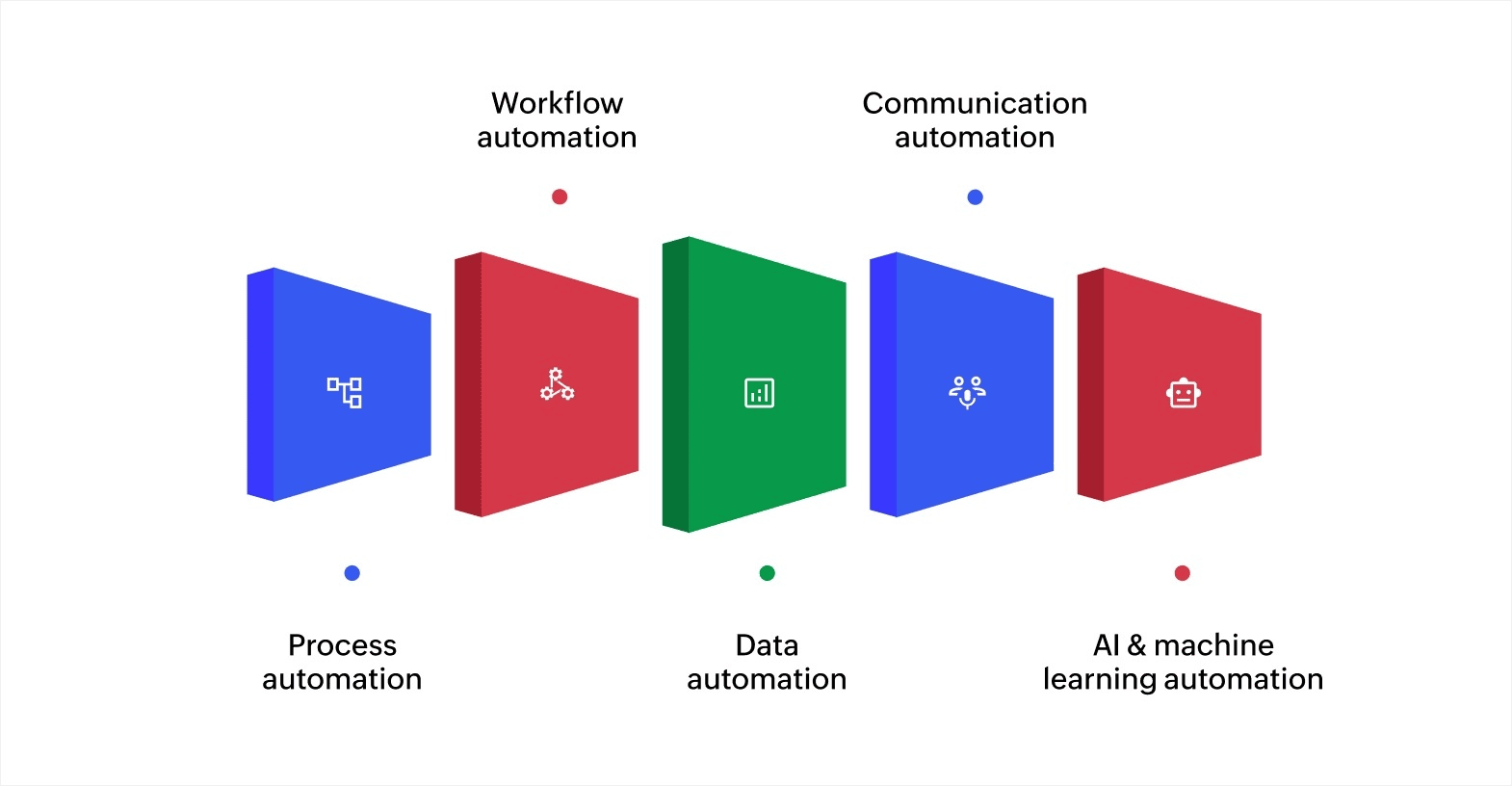
To fully use the power of automation, businesses need to implement specific capabilities that target different areas of their operations. Each of these capabilities serves a distinct function in improving operational efficiency and ensuring that businesses stay ahead of the competition.
1. Process automation
Process automation takes over repetitive, rule-based tasks within larger workflows. It covers activities like invoicing, purchase orders, and order processing, where speed and accuracy matter.
For example, automating invoice approvals in a finance team can reduce payment processing time significantly. The accounting team no longer has to manually review each document, and payments go out on schedule with fewer errors.
2. Workflow automation
Workflow automation manages how tasks move between people and teams. It handles assignments, approvals, routing, and notifications, so nothing stalls because someone didn't get the memo.
For instance, in HR, automating leave requests means managers get notified instantly, employees receive updates without follow-up emails, and the whole process wraps up in hours instead of days.
3. Data automation
Data automation collects, cleans, and organizes information from different sources. It generates reports and insights in real time, so you're always working with the latest numbers.
For example, a marketing team can use data automation to track campaign performance across channels, identify trends, and adjust budgets without waiting for someone to build a manual report every week.
4. Communication automation
Communication automation keeps your messaging consistent and timely across email, SMS, and support channels. It lets you engage customers at scale without relying on someone to send each message.
For example, an online store can trigger follow-up emails after a purchase, send shipping updates automatically, and reach out to customers who left items in their cart, all without manual effort.
5. AI and machine learning automation
AI and machine learning add a layer of intelligence to automation. Instead of just following fixed rules, these systems learn from data, spot patterns, and make predictions.
For example, a financial services company can use AI to monitor transactions in real time and flag suspicious activity based on learned behavior patterns. This improves security and reduces the need for manual review.
Each of these capabilities serves a different function, but together they help you build a more efficient and responsive operation.
Benefits of automation capabilities
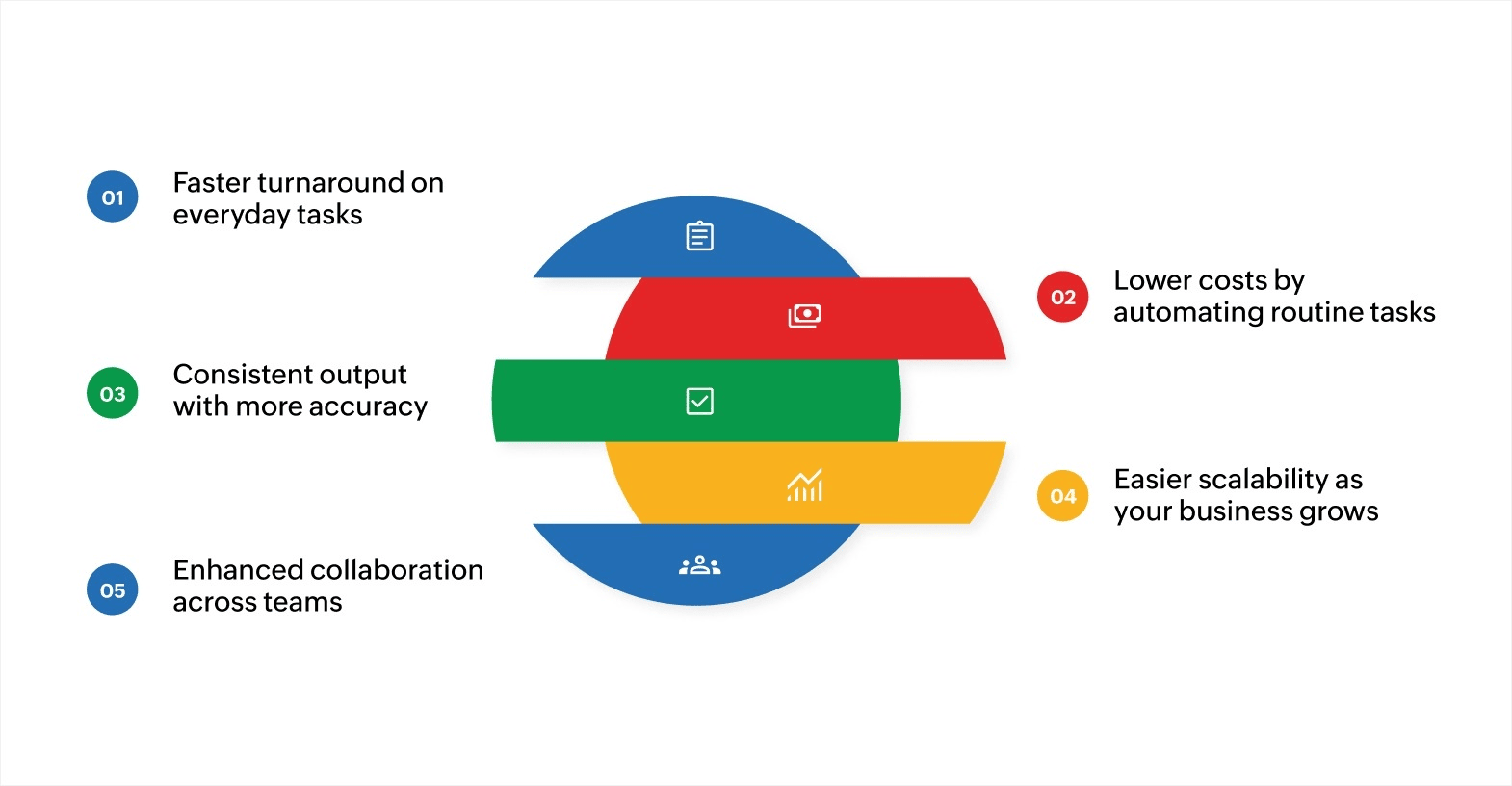
Automation enables significant improvements in cost management, scalability, and collaboration, all while enhancing operational efficiency. Here are some of the key benefits of automation:
Faster turnaround on everyday tasks
Automation removes the wait times built into manual processes. Tasks like order processing, data entry, and report generation run continuously without someone needing to start, monitor, or hand off each step.
For example, an automated invoicing system can receive, validate, and route invoices for approval in minutes. The same process done manually could take days across multiple team members.
Lower costs by automating routine tasks
Automating repetitive work reduces the hours of labor required to manage it. It also reduces errors that lead to rework, compliance issues, or customer complaints, each of which carries its own cost.
For example, a logistics company managing warehouse inventory manually might rely on staff to count stock, update records, and flag reorder points. Automating inventory tracking handles all three at a lower cost, while real-time updates keep stock records accurate and prevent both overstocking and shortages.
Consistent output with more accuracy
Automated systems follow the same rules every time. They don't get tired, distracted, or inconsistent. This matters most in areas like financial reporting, compliance records, and customer communication, where even small errors can be costly.
For instance, an automated system matching invoices against purchase orders can flag mismatches instantly. A manual review of the same records might take hours and still miss a billing error buried in hundreds of line items.
Easier scalability as your business grows
As demand grows, automation handles the increased volume without requiring proportional increases in staff or infrastructure. You can process more orders, manage more data, and serve more customers with the same setup.
For example, an ecommerce business can manage seasonal spikes in orders, from inventory updates to shipping notifications, without adding temporary staff or experiencing fulfillment delays.
Enhanced collaboration across teams
Automation connects departments by keeping tasks, data, and notifications flowing between teams without manual handoffs. Everyone stays informed, and delays caused by miscommunication or missing information go down.
For example, when a marketing team automates CRM updates based on campaign activity, the sales team always has the latest lead data without waiting for someone to share a spreadsheet.
These benefits compound over time. As you automate more processes, the efficiency gains build on each other, giving you more capacity to focus on growth.
How to implement automation capabilities in your business
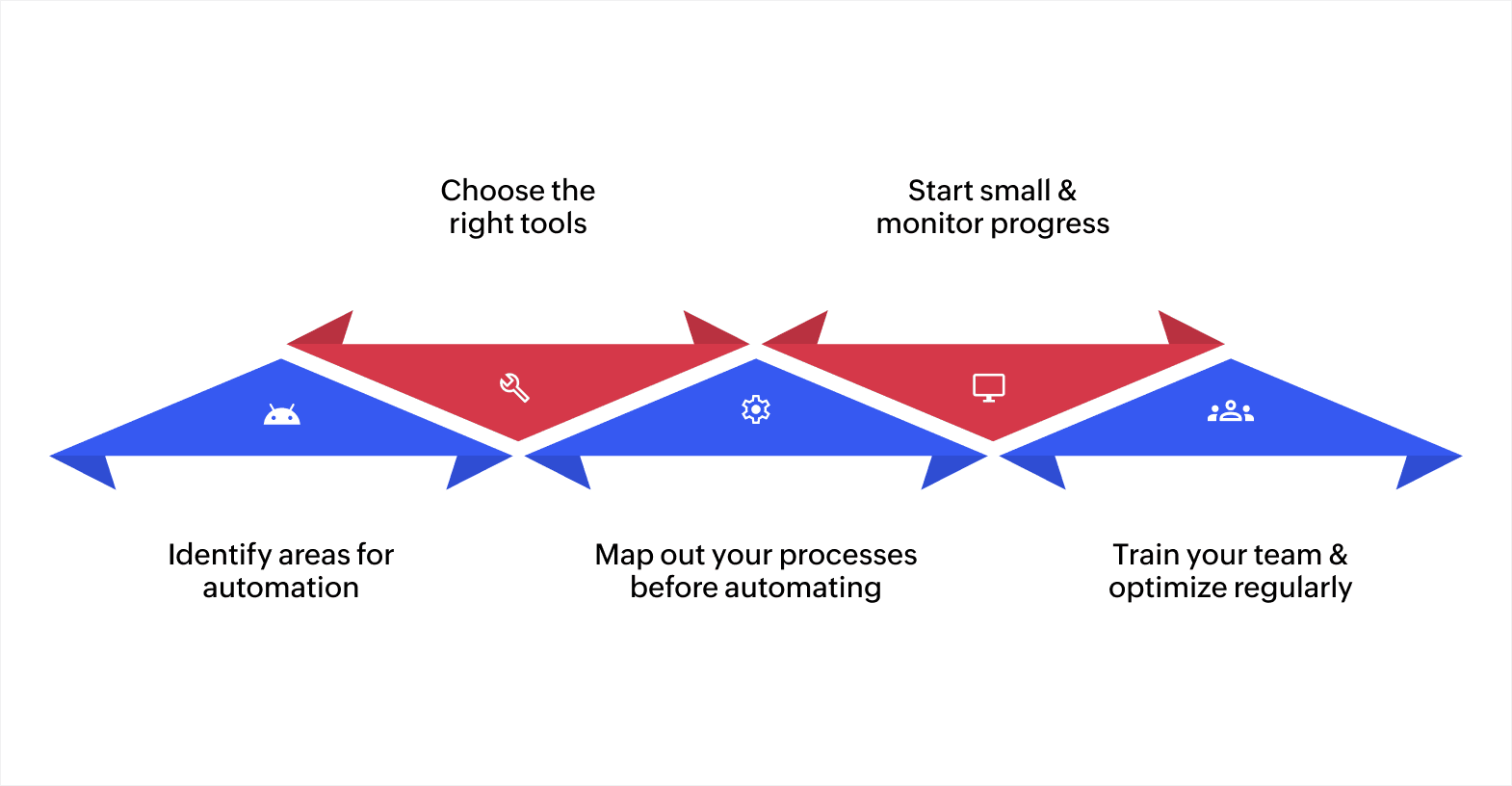
Implementing automation capabilities is essential to improving operational efficiency and reducing manual errors. Here's how you can implement automation in your business:
- Identify repetitive tasks first: Start with rule-based, time-consuming activities like data entry, approval routing, and customer follow-ups where automation delivers the quickest returns.
- Choose tools that fit your stack: Pick platforms with prebuilt integrations for your existing systems so data flows smoothly across teams without manual transfers.
- Map processes before automating: Document each workflow step and decision point to remove bottlenecks up front, so you don't end up automating a broken process.
- Start small and track results: Automate one or two workflows first, measure time saved and error reduction, then use those results to guide your next steps.
- Train your team and review regularly: Make sure your team knows how to handle exceptions and flag issues, and revisit automated workflows periodically to keep them aligned with changing business needs.
A steady, measured approach gives you the best results. Start where the impact is highest and build from there.
Create efficient automated workflows with Zoho Creator
As your business grows, managing automation across scattered tools and manual workarounds becomes harder to sustain. You need a platform that lets you build, automate, and connect your processes in one place, without heavy development effort.
Zoho Creator is an AI-powered low-code app development platform that helps you create custom business applications and automate workflows with minimal coding. You can design processes that match how your team actually works, not how a generic tool assumes you work.
With Zoho Creator, you can set up automated approval workflows and business process blueprints that route tasks to the right people at the right time. Real-time dashboards give you visibility across departments, and 1,000+ prebuilt integrations keep your existing systems connected.
Sign up for free today and see how quickly you can build workflows that fit your business.
FAQ
1. How can automation impact employee roles within my business?
While automation reduces manual tasks, it can shift employee roles toward higher-value work. Rather than replacing jobs, it allows employees to focus on strategic initiatives like decision-making, problem-solving, and innovation. Businesses should provide training to ensure staff can adapt to their evolving roles.
2. How do I ensure smooth integration of automation tools with existing systems?
To ensure smooth integration, choose automation tools that offer prebuilt integrations with your existing software. It’s essential to map out your processes and work with tools that support cloud-based solutions for real-time data syncing, ensuring smooth connectivity across all systems.
3. What are the main challenges of implementing automation in my business?
Common challenges include high upfront cost, worker displacement concerns, system redundancies, and the need for ongoing human supervision. Addressing these early on through proper planning and gradual adoption can minimize disruption and ensure a successful transition to automation.
4. How do I measure the success of automation implementation in my business?
Measure the effectiveness of automation by tracking key performance indicators such as time saved, reduction in errors, and improvements in productivity. Regularly evaluate cost savings and efficiency gains to determine whether automation is providing the expected return on investment.
 Ann Elizabeth Sam
Hey! I'm Ann, and I work as a content writer at Zoho Creator. I'm exploring the SaaS world through various forms of content creation. Outside of work, I love dancing and would give up anything to read a good murder mystery.