- HOME
- Know Your Tech
- Customer service workflow guide: Build efficient processes
Customer service workflow guide: Build efficient processes
- Last Updated : March 2, 2026
- 425 Views
- 14 Min Read
Support volume continues to rise while customers expect faster responses across more channels. Your team handles requests through email, chat, social media, and phone, but without clear processes, each inquiry takes longer than it should.
Highlights
- Customer service workflows map structured steps from request receipt through resolution, defining actions, responsibilities, and timing.
- Clear workflows reduce average response times by removing coordination delays and clarifying next steps for team members.
- Standardized processes ensure every customer receives consistent service quality regardless of which team member handles their request.
- Automated routing assigns requests to appropriate team members based on issue type, priority, or availability, without manual sorting.
- Regular workflow reviews identify bottlenecks and improvement opportunities based on actual performance data and team feedback.
According to recent data, 57% of customer service leaders estimate call volumes to rise by nearly 20% in the next few years. At the same time, industry analysis reveals that the average self-service success rate currently stands at just 14%, which means most customers still need direct support.
These trends highlight the increased pressure on support teams to handle more requests efficiently while maintaining quality. That’s where an effective customer service workflow comes in.
This blog post breaks down what a customer service workflow is, why it's crucial, and how you can implement effective workflows that enhance both team performance and customer satisfaction.
What is a customer service workflow?
A customer service workflow maps the structured steps your team follows when handling support requests. It defines how requests get received, who takes which actions, what information needs gathering, when escalations occur, and how resolutions get communicated back to customers.
Workflows create clarity around support processes that might otherwise rely on individual judgment or informal coordination. Instead of team members deciding independently how to handle each request, workflows provide consistent paths that maintain quality while reducing decision time.
For instance, when a customer reports a billing issue, the workflow defines how the request gets logged in your system, which team member receives the assignment based on expertise and availability, what account information they need to verify, approval requirements for refunds or credits, and how resolution details get sent to the customer with confirmation.
Benefits of streamlining customer service workflows
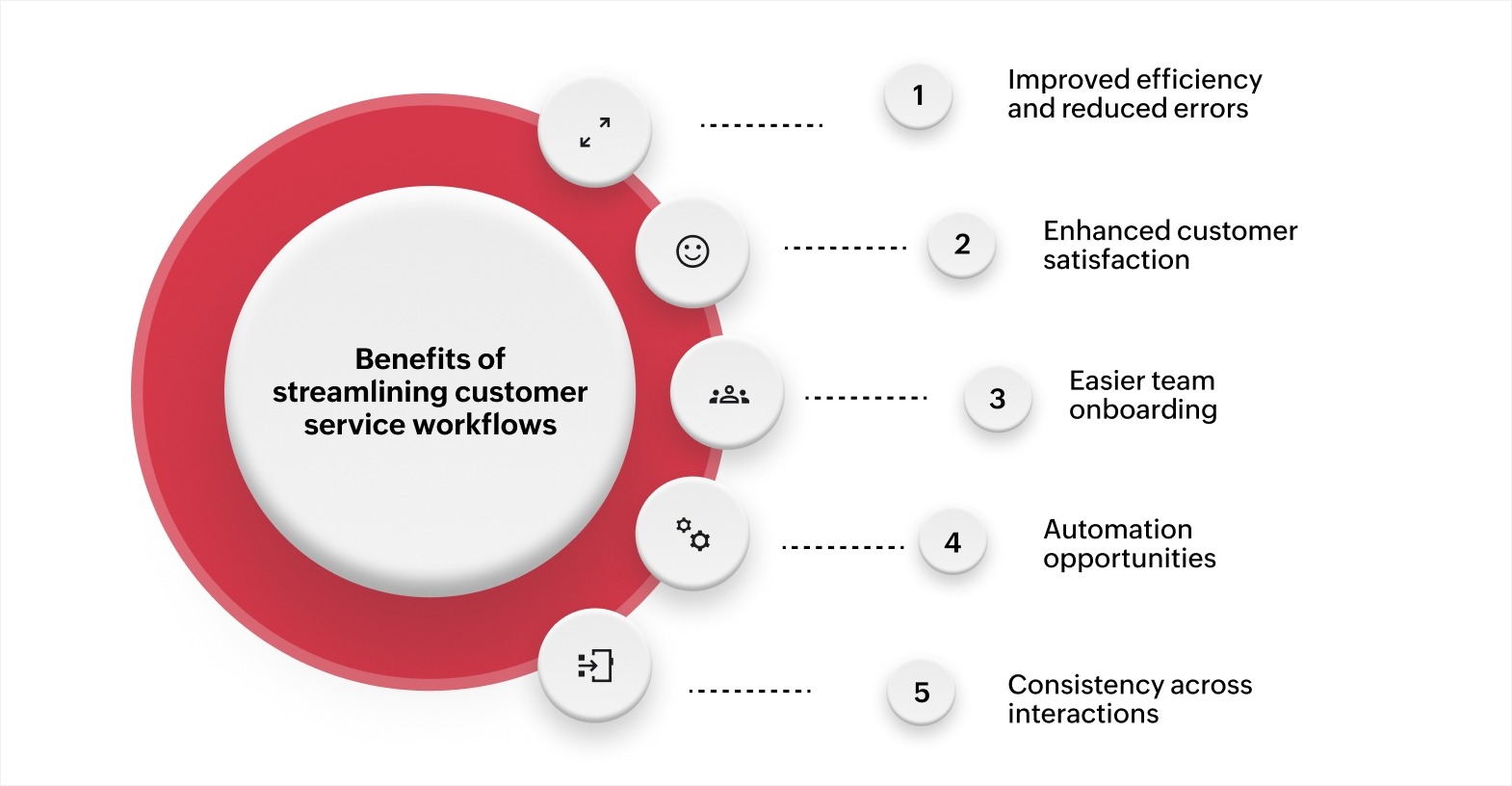
Improved efficiency and reduced errors
A clear, structured workflow reduces mistakes and speeds up the process. With defined steps, team members are less likely to overlook tasks, allowing them to serve more customers quickly and accurately.
Example: In customer support, a standardized process for issue resolution ensures faster response times and minimizes errors.
Enhanced customer satisfaction
Efficiency leads to faster issue resolution and better service, improving customer satisfaction. A simplified workflow ensures that customers receive quick, consistent support every time.
Example: In ecommerce, automating returns processing reduces customer wait time and enhances their experience, leading to higher satisfaction and loyalty.
Easier team onboarding
A clear and documented service workflow helps new team members quickly grasp their responsibilities, accelerating their onboarding process and boosting their productivity from the start.
Example: A software support company's onboarding process helps new agents confidently handle support tickets with a clear, step-by-step workflow.
Automation opportunities
Simplifying workflows allows you to identify repetitive tasks for automation, freeing up your team's time for more complex tasks. This leads to greater efficiency and fewer manual errors.
Example: A telecom company uses chatbots to automate routine inquiries, letting human agents focus on more detailed support.
Consistency across interactions
A structured workflow ensures each customer receives the same level of service, building trust and improving loyalty through consistent, high-quality interactions.
Example: In hospitality, a consistent check-in/check-out process ensures smooth, efficient service and improved guest satisfaction.
Also read: Your go-to guide for workflows
Essential elements and steps to build an effective customer service workflow
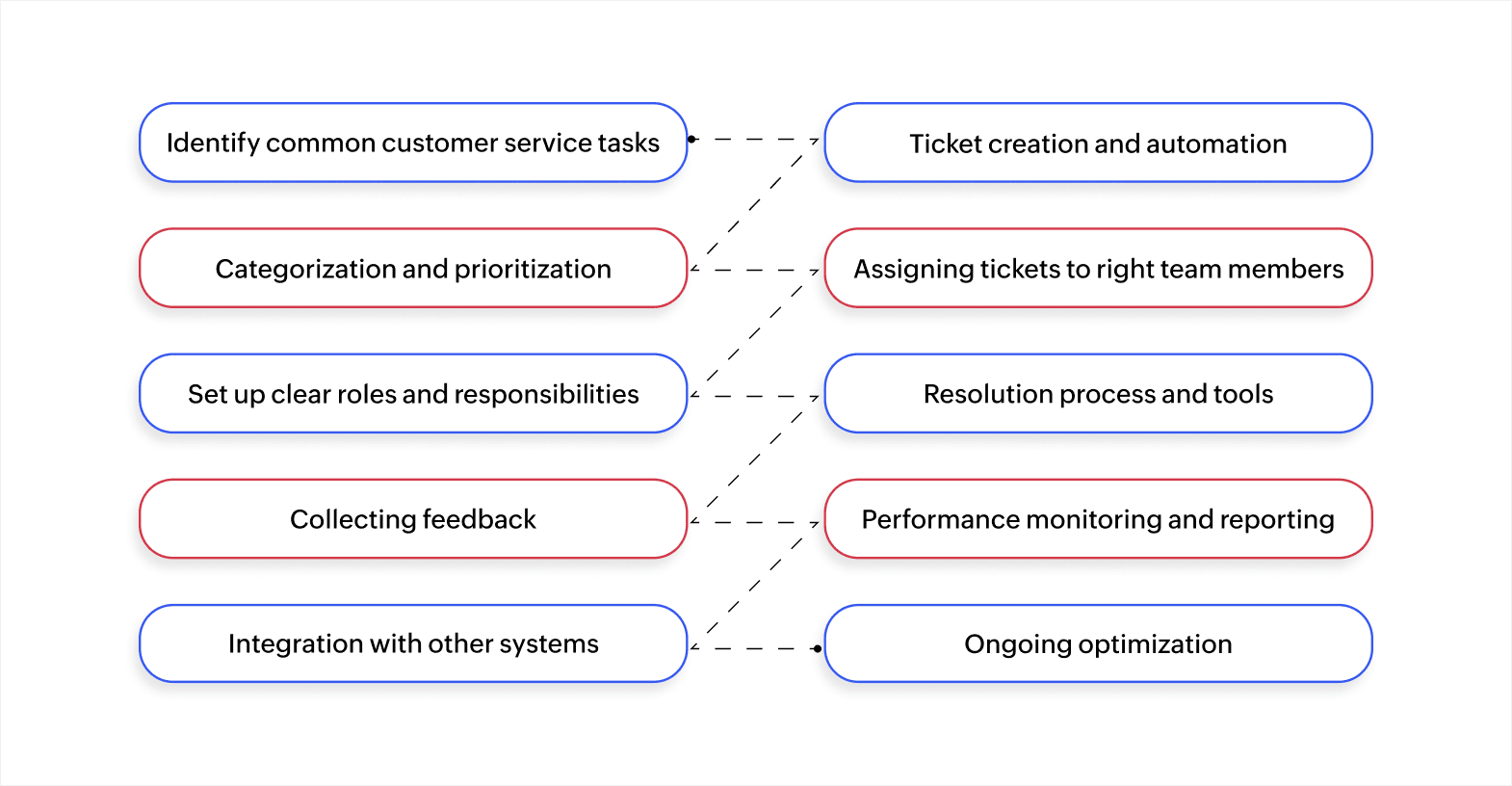
Creating an efficient customer service workflow is essential for delivering excellent customer support. A proper workflow reduces operational inefficiencies, minimizes manual tasks, and improves customer satisfaction. To build an effective workflow, you need to focus on both the core components and the steps involved in its creation.
Identify common customer service tasks
Start by identifying the most common tasks your customer service team handles daily. These tasks include creating tickets, resolving issues, handling escalations, and following up. Understanding these tasks is crucial for mapping out a smooth workflow.
Once you've identified the tasks, you can start automating and organizing them. Automation tools, such as ticketing systems or helpdesk platforms, will help capture customer inquiries across multiple channels, without needing manual input.
Ticket creation and automation
Automating ticket creation is the first step to reducing delays and improving efficiency. When customers submit inquiries, an automated system captures the request and assigns it a unique ticket ID, allowing for easy tracking and management.
This can be achieved by connecting your communication platforms with your ticketing software. This removes the need for manual ticket creation, accelerating the process and ensuring that no customer inquiry is missed.
Categorization and prioritization
Once a ticket is created, it's important to categorize and prioritize the issue. By classifying tickets based on issue type and urgency, you can ensure that high-priority tickets are addressed first, reducing resolution time for critical issues.
Using AI-driven algorithms to automate this step can save time. These systems can analyze incoming tickets, categorize them, and assign priority levels automatically, ensuring your team focuses on resolving the most important issues first.
Assigning tickets to the right team members
Assigning tickets to the appropriate team member is key to maintaining an efficient service workflow. Automated ticket routing ensures that each ticket is sent to the team member with the right expertise and availability.
Dynamic routing systems, integrated with workforce management tools, can assign tickets based on the agent’s skillset, current workload, and past performance. This ensures that your team is always focused on the tasks they're best suited to handle.
Set up clear roles and responsibilities
For a service workflow to run smoothly, everyone on the team must know their role and responsibilities. Clearly defining each team member’s tasks and the procedures they need to follow ensures consistency and minimizes confusion.
Creating standard operating procedures (SOPs) for common issues will guide your agents through the resolution process. This ensures a structured approach to handling queries, improving the overall customer experience.
Resolution process and tools
A well-defined resolution process is at the heart of an effective service workflow. By using SOPs, your team can resolve issues consistently and efficiently. Agents should have access to resources like a knowledge base and collaboration tools to help them resolve customer inquiries quickly.
Integrating a knowledge management system into the workflow will allow agents to find solutions instantly. Collaborative platforms can also enable teams to work together when a complex issue arises, speeding up the resolution time.
Collecting feedback
Once an issue is resolved, collecting customer feedback is critical to understanding how well your team handled the situation. Post-resolution surveys provide valuable insights into customer satisfaction and highlight areas for improvement.
Automating the feedback process ensures that surveys are sent to customers automatically after a ticket is closed. This eliminates manual effort and ensures that you gather feedback at scale, providing the data you need to continually improve your service.
Performance monitoring and reporting
Tracking key performance indicators (KPIs) such as resolution time, customer satisfaction, and agent productivity is essential to measure the effectiveness of your service workflow. Monitoring these metrics helps to identify areas that need attention and makes it easier to optimize workflows over time.
Real-time reporting tools and dashboards can consolidate data from various sources, such as CRM systems and helpdesk platforms, into actionable insights. These tools enable managers to track team performance and identify bottlenecks that may slow down the service process.
Integration with other systems
For maximum efficiency, your service workflow should integrate with other business systems, such as CRM, databases, and helpdesk software. This ensures that all relevant customer data flows smoothly between platforms, giving agents full context for every customer interaction.
APIs can help integrate your service workflow with existing systems, providing a centralized view of customer interactions and eliminating manual data entry. This enables agents to concentrate on solving problems instead of looking for customer information.
Ongoing optimization
A successful service workflow is built on continuous evaluation and adaptation. By regularly gathering feedback and analyzing performance, you can fine-tune your workflow to better align with shifting customer expectations and business goals.
Automation tools and A/B testing can help you experiment with different workflow configurations and determine which changes lead to the best results. Using data-driven insights to tweak and improve your service workflow will help you maintain a high level of efficiency over time.
By combining these key components with actionable steps, you can build a service workflow that's both efficient and scalable. The use of automation, integration, and continuous performance tracking ensures that your team is always ready to meet customer needs, resolve issues promptly, and improve service quality.
Customer service workflow examples for different industries
Different industries face unique support challenges that require tailored workflow approaches. Knowing how workflows adapt to industry-specific requirements helps you design processes that match your actual support needs. Here's how various sectors structure their customer service workflows to handle common scenarios efficiently.
Ecommerce: Managing returns and exchanges
Handling returns and exchanges is a critical part of ecommerce customer service. A well-structured service workflow ensures smooth and efficient handling of customer requests, reducing frustration and increasing customer satisfaction.
Steps for managing returns and exchanges:
- Customer initiates the return: The customer requests a return or exchange through your website or customer support channel.
- Request verification: An agent reviews the request, checking whether it meets return policy criteria.
- Return label provided: If eligible, the customer receives a prepaid return shipping label.
- Inspection of returned item: Once returned, the item is inspected for damage or use. If it meets the return conditions, the process continues.
- Resolution: The customer is either refunded or provided with a replacement product.
- Feedback request: After the process is complete, the customer is asked for feedback to improve future returns handling.
This workflow ensures that returns are processed in a timely manner, improving customer loyalty and reducing operational inefficiencies.
Healthcare: Appointment scheduling and patient queries
In healthcare, managing appointments and handling patient queries efficiently can significantly improve the patient experience. Here's a simplified service workflow for scheduling and addressing patient concerns.
Steps for appointment scheduling and patient queries:
- Appointment request: The patient contacts the healthcare provider to schedule an appointment through a phone call, email, or online system.
- Appointment confirmation: Once the request is received, the team checks availability and confirms the appointment.
- Patient arrival and check-in: Upon arrival, the patient’s information is verified, and they are checked in for the consultation.
- Consultation with healthcare provider: The healthcare provider meets the patient, addresses their concerns, and provides necessary care.
- Follow-up and patient queries: After the appointment, any additional patient queries are addressed promptly.
- Feedback collection: The patient is asked for feedback to enhance future care and service.
This workflow minimizes wait times, ensures accurate scheduling, and improves patient satisfaction.
IT support: Ticket creation to resolution
In IT support, timely resolution of issues is essential for maintaining business operations. A structured service workflow ensures that each support ticket is handled efficiently from creation to resolution.
Steps for an IT support workflow:
- Ticket creation: The customer submits a support ticket detailing their issue via an online portal or customer service call.
- Ticket sorting and prioritization: The ticket is categorized and prioritized by the service desk team based on urgency and impact.
- Issue diagnosis: An IT professional diagnoses the problem. If it's a simple issue, it’s resolved immediately; if it's complex, it's escalated.
- Resolution and testing: The issue is fixed, and the solution is tested to ensure functionality.
- Ticket closure: The customer is notified of the resolution, and the ticket is closed once feedback has been gathered.
- Post-resolution follow-up: A follow-up ensures that the solution was effective and gathers insights for future improvements.
This workflow enhances productivity by ensuring that IT teams respond swiftly to issues and minimize downtime.
Telecommunications: Handling customer complaints and issue resolution
Telecommunications companies face a variety of customer complaints, from service disruptions to billing errors. A clear service workflow is essential for resolving these issues promptly and maintaining customer satisfaction.
Steps for complaint handling and issue resolution:
- Complaint lodging: The customer contacts the provider with a complaint, detailing the issue, such as a network outage or billing error.
- Complaint verification: The agent verifies the complaint details, confirming the problem and checking the customer's account.
- Issue categorization and assignment: The complaint is categorized (e.g., technical, billing) and assigned to the appropriate department or technician.
- Resolution process: The issue is addressed, whether by fixing the technical problem or issuing a credit for a billing issue.
- Customer notification: The customer is updated on the resolution and given a clear explanation.
- Feedback collection: A survey is sent to the customer to assess the service experience and gather suggestions for improvement.
By following a clear service workflow, telecommunications companies can resolve complaints quickly, improving customer retention and brand loyalty.
Whether in ecommerce, healthcare, IT support, or telecommunications, having an organized service workflow is essential for delivering timely solutions and ensuring customer satisfaction. Implementing such workflows using platforms like Zoho Creator can automate processes, reduce manual labor, and enhance overall operational efficiency.
Also read: 10 practical workflow examples to enhance business operations
Common challenges in customer service workflows and how to overcome them
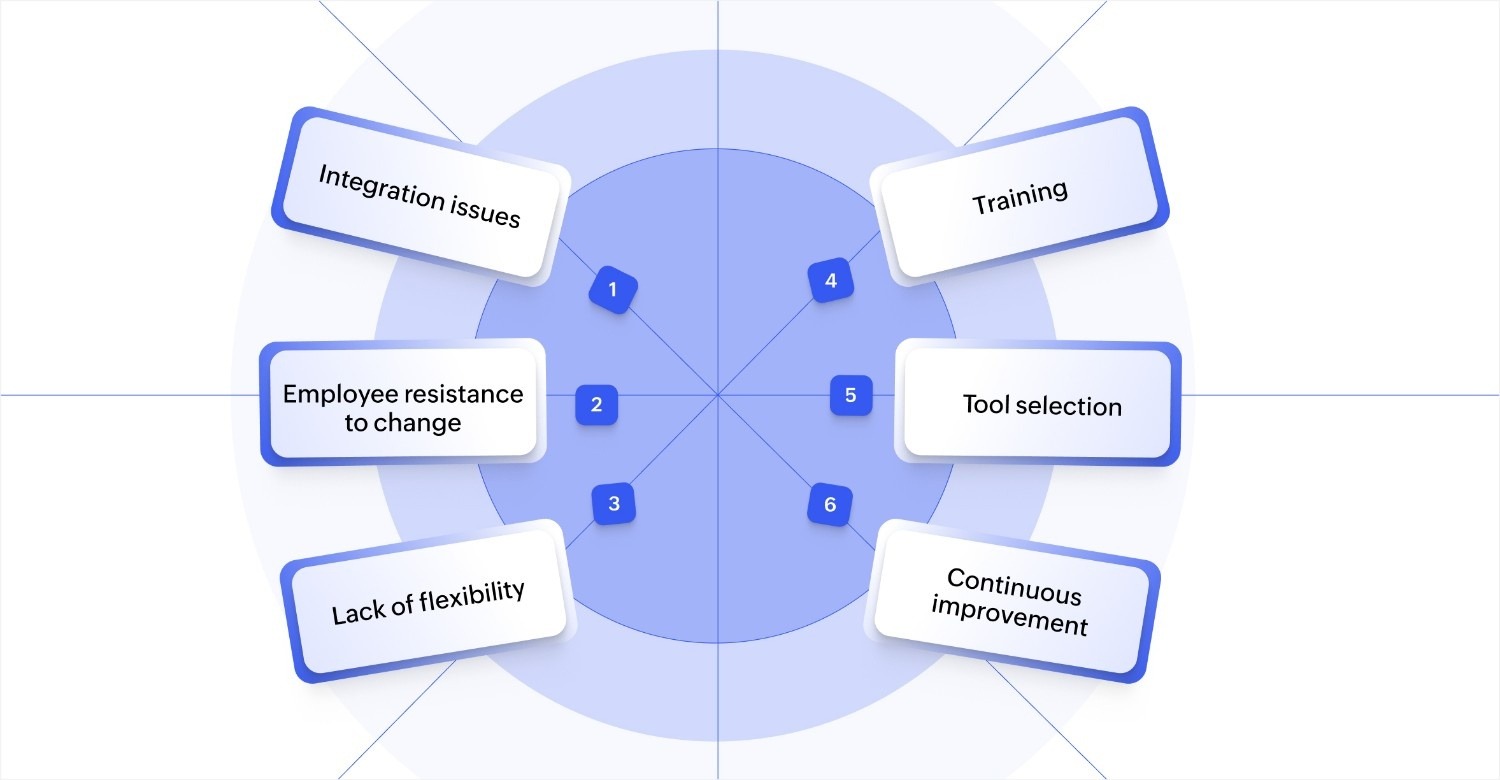
Managing customer service workflows comes with several challenges that can hinder operational efficiency if not addressed properly. Here’s a breakdown of the most common obstacles and how to overcome them.
Integration issues
Connecting new workflow tools with existing systems creates technical complexity. Customer data sits in your CRM, support history lives in your helpdesk platform, and communication happens through separate email and chat tools.
When these systems don't communicate properly, agents waste time switching between platforms. They manually copy information and search for customer context across disconnected databases.
Solution: Select workflow platforms that connect directly with your current infrastructure through built-in integrations or robust APIs. Look for tools that sync data automatically between your CRM, helpdesk, communication platforms, and knowledge bases.
This eliminates manual data transfer and gives agents complete customer context within their primary workspace. Test integration capabilities during evaluation phases by connecting the new system with your actual tools, not just reviewing compatibility lists.
Employee resistance to change
Team members familiar with current processes often resist adopting new workflows, even when improvements are clear. Support agents who've built informal workarounds or developed personal systems for managing requests see workflow changes as disruptions to their established routines.
This resistance slows adoption, reduces productivity during transitions, and can lead to incomplete implementation. Some team members follow new processes while others continue using old methods, creating inconsistency.
Solution: Involve support team members in workflow design decisions before implementation begins. Ask agents which current processes create the most friction and what improvements would make their work easier.
Provide comprehensive training that shows how new workflows solve problems they actually face, not just theoretical benefits. Assign workflow champions within the team who understand the changes deeply and can answer questions as colleagues adapt to new processes.
Lack of flexibility
Rigid workflows struggle to adapt when business requirements shift or customer needs evolve. A workflow designed for handling product support requests might not accommodate new service offerings, changing escalation requirements, or expanded support channels.
Teams find themselves forcing new scenarios into processes that weren't built for them. This creates inefficiencies and workarounds that undermine the workflow's original purpose.
Solution: Design workflows with adaptation in mind by using modular components that can be adjusted independently. Create decision points that route requests based on configurable rules rather than hard-coded paths.
This allows you to modify how specific request types get handled without rebuilding entire workflows. Choose platforms that let nontechnical team members adjust workflow rules, timing, and routing as needs change, reducing dependence on development resources for minor updates.
Training issues
New team members struggle to learn complex workflows without proper guidance. Existing staff forget specific steps or workarounds when they face less common scenarios.
Without accessible training materials and ongoing support, agents develop inconsistent approaches to similar requests. This variation reduces service quality and creates longer resolution times.
Solution: Schedule regular training sessions that cover workflow updates, new features, and best practices discovered through actual usage. Create reference materials like quick guides and video tutorials that team members can access when they face unfamiliar scenarios.
Monitor how agents use workflows through activity data and identify areas where additional guidance would improve efficiency or reduce errors. Provide refresher training for complex processes that agents handle infrequently.
Tool selection challenges
Choosing workflow platforms without testing them against your actual requirements leads to capability gaps. Features that sound useful in demonstrations might not match how your team actually handles support requests.
Platforms optimized for one type of workflow may struggle with your specific processes. This mismatch forces workarounds that reduce the efficiency gains you expected.
Solution: Evaluate workflow platforms based on your specific requirements rather than feature lists. Test how easily you can build workflows that match your actual support processes, not generic examples.
Verify that tools can scale with increasing support volume without performance degradation. Request trial periods long enough to build representative workflows and have team members use them with real customer requests before making final decisions.
Lack of continuous improvement
Workflows that remain unchanged over time become less effective as business needs evolve. Teams lack processes for identifying which workflow steps create bottlenecks or where automation could eliminate manual work.
Without regular review and optimization, workflows accumulate inefficiencies. Performance gradually declines as workarounds and exceptions multiply.
Solution: Establish regular workflow review cycles where you analyze performance metrics and gather team feedback. Track resolution times, escalation rates, and customer satisfaction scores to identify which workflow stages need improvement.
Use A/B testing to compare workflow variations and determine which configurations deliver better results. Implement changes incrementally and measure their impact before rolling them out across your entire support operation.
By tackling these common customer service workflow challenges directly and applying the appropriate solutions, you can create a more efficient, flexible, and scalable workflow system that improves your business operations.
Build effective customer service workflows with Zoho Creator
Manual support coordination through spreadsheets and disconnected tools creates visibility issues and slows response times. As support volume increases, these limitations lead to longer resolution times, inconsistent service quality, and team members spending more time coordinating than actually helping customers.
Zoho Creator is an AI-powered low-code application development platform that helps support teams build custom workflow applications matching their specific processes. You can create solutions for ticket routing, escalation management, or request tracking without extensive coding.
The platform’s Blueprint feature lets you design support processes through drag-and-drop interfaces rather than writing code. Map how requests move from initial contact through resolution, define decision points for escalation, and configure automated actions at each step. Integration capabilities connect your workflow with email platforms, chat systems, CRM software, and knowledge bases, so information flows automatically between the tools your team already uses.
Teams can start with readymade solutions from the app template library, including customer service and support systems, help desk applications, and call tracking tools. Customize these templates to match your specific requirements or build applications from scratch when you need unique workflows.
FAQ
1. What are the key components of a customer service workflow?
A customer service workflow includes ticket creation, categorization and prioritization of issues, assigning tickets to the appropriate team members, and a structured resolution process. It also involves gathering customer feedback and monitoring performance metrics to continually optimize the workflow.
2. How can automation improve service workflows?
Automation reduces manual tasks by automatically capturing customer inquiries, creating tickets, and routing them to the right team members. This speeds up response times, reduces errors, and frees up your team to focus on more complex tasks, improving overall efficiency.
3. How do I train my team to use a new service workflow?
Effective training involves introducing the new workflow early, clearly communicating its benefits, and offering hands-on training sessions. Providing accessible resources, regular feedback, and ongoing support helps ensure your team is confident and skilled in using the new processes.
4. What are the common challenges when implementing a service workflow, and how can I overcome them?
Common challenges include integration issues with existing systems, employee resistance to change, and a lack of flexibility in workflows. Overcome these issues by selecting adaptable tools, providing thorough training, and continuously refining workflows based on feedback and performance metrics.
 Ann Elizabeth Sam
Hey! I'm Ann, and I work as a content writer at Zoho Creator. I'm exploring the SaaS world through various forms of content creation. Outside of work, I love dancing and would give up anything to read a good murder mystery.