- HOME
- Know Your Tech
- How to build collaborative workflows for your team
How to build collaborative workflows for your team
- Last Updated : March 30, 2026
- 194 Views
- 8 Min Read
Getting your team to truly work together isn’t always as simple as it sounds. You’ve probably seen it: Emails go unanswered, updates get missed, and two people end up doing the same task. Everyone’s trying their best, but things still fall through. It’s frustrating, especially when you know how much smoother things could be with the right system in place.
Highlights
- A collaborative workflow defines how tasks, updates, and approvals move across your team using a shared, repeatable process.
- Automated notifications and task assignments replace manual follow-ups and keep projects moving forward.
- Teams that map their workflows visually can spot bottlenecks and improve processes faster.
- Role-based access and permission controls protect important data while keeping collaboration open.
- Regular workflow reviews help teams adapt their processes as projects, team sizes, and priorities change.
As someone managing people and projects, you carry the pressure of keeping everything on track. But when tools are scattered and processes aren’t aligned, it becomes tough to maintain that flow. That’s where a clear collaborative workflow can make all the difference, not just in getting work done, but in helping your team feel less overwhelmed and more in sync.
This blog post offers simple, practical tips to help you improve team collaboration at work. You’ll learn how to build the kind of workflow that helps your team do their best work, together.
What is a collaborative workflow?
A collaborative workflow is a structured process that defines how tasks, information, and decisions move among team members. It lays out who’s responsible for each step, what triggers the next action, and how updates reach the right people. Instead of relying on individual check-ins, the workflow itself keeps things moving.
For example, when a client submits a support request, a collaborative workflow can automatically assign it to the right team member, notify the account manager, and log the update in your project tracker.
These workflows also work across departments. Marketing, sales, and operations can all follow linked processes where one team’s output feeds directly into the next team’s task queue. The main goal is to reduce coordination overhead and give everyone visibility into where things stand.
Key benefits of collaborative workflows
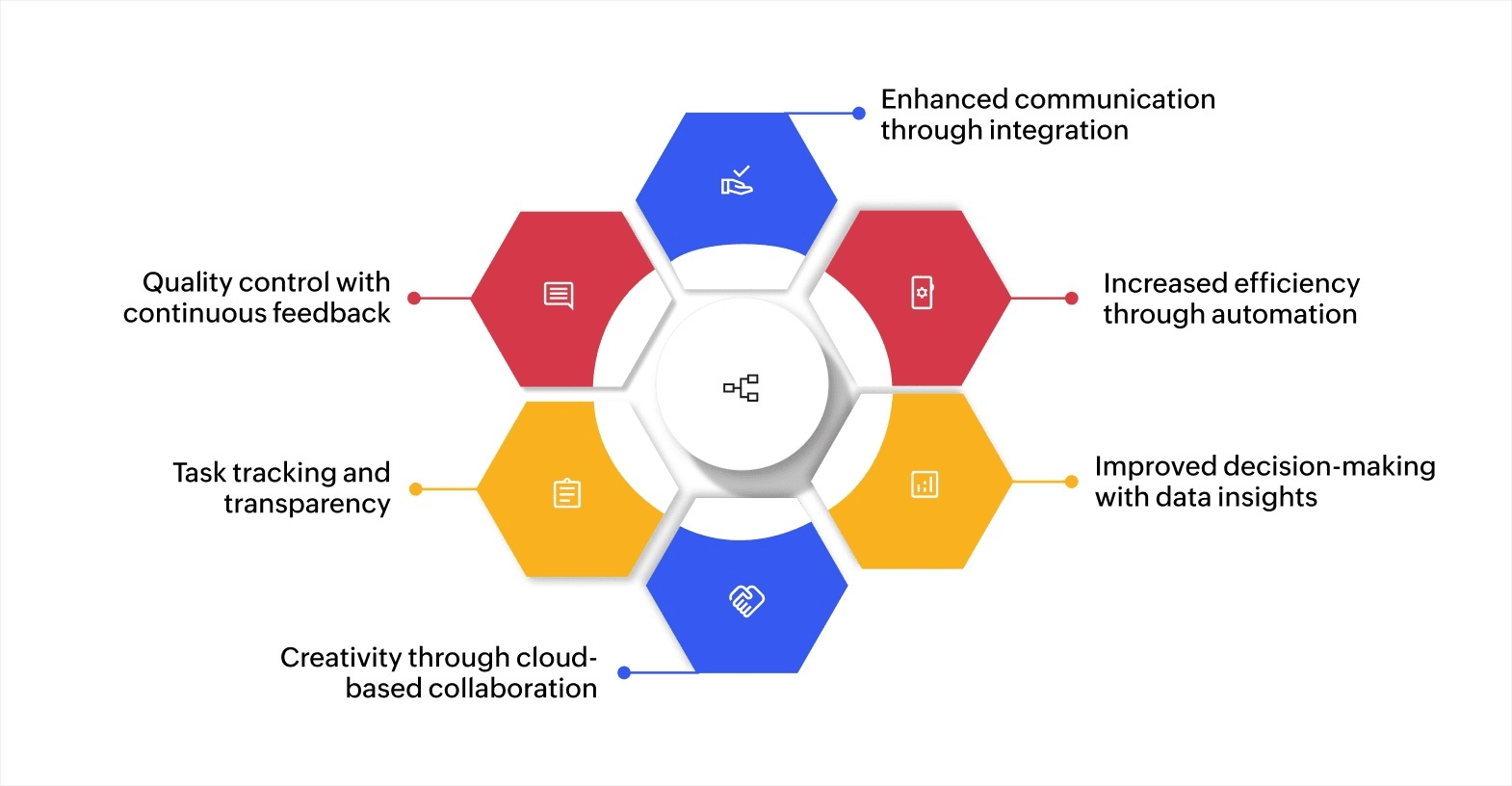
The global market for collaborative work management solutions is expected to grow from USD $27.56 billion in 2024 to USD $67.57 billion by 2033, with a CAGR of 11.9%. This growth highlights the increasing adoption of advanced collaborative workflows in business operations.
Here’s how collaborative workflows benefit your business.
1. Enhanced communication through integration
Collaborative tools integrate with project management systems, CRMs, and cloud storage to centralize communication, reducing reliance on multiple platforms and ensuring real-time collaboration.
2. Increased efficiency through automation
Automated workflows streamline tasks such as notifications, task assignments, and approvals, reducing manual work and minimizing errors, allowing teams to focus on strategic activities.
3. Improved decision-making with data insights
Built-in analytics features provide real-time insights into project performance, helping decision makers allocate resources effectively and adjust workflows as needed for better outcomes.
4. Boosted creativity through cloud-based collaboration
Cloud platforms allow teams to collaborate on documents in real time, facilitating instant feedback and driving creative solutions to problems through shared input.
5. Higher motivation with task tracking and transparency
Collaborative workflows feature task tracking and progress dashboards, enhancing accountability and providing team members with a sense of accomplishment as milestones are met.
6. Better quality control with continuous feedback
Real-time feedback loops built into these tools ensure ongoing refinement and quality assurance, allowing for early identification and resolution of issues before final deliverables.
Tips for building collaborative workflows
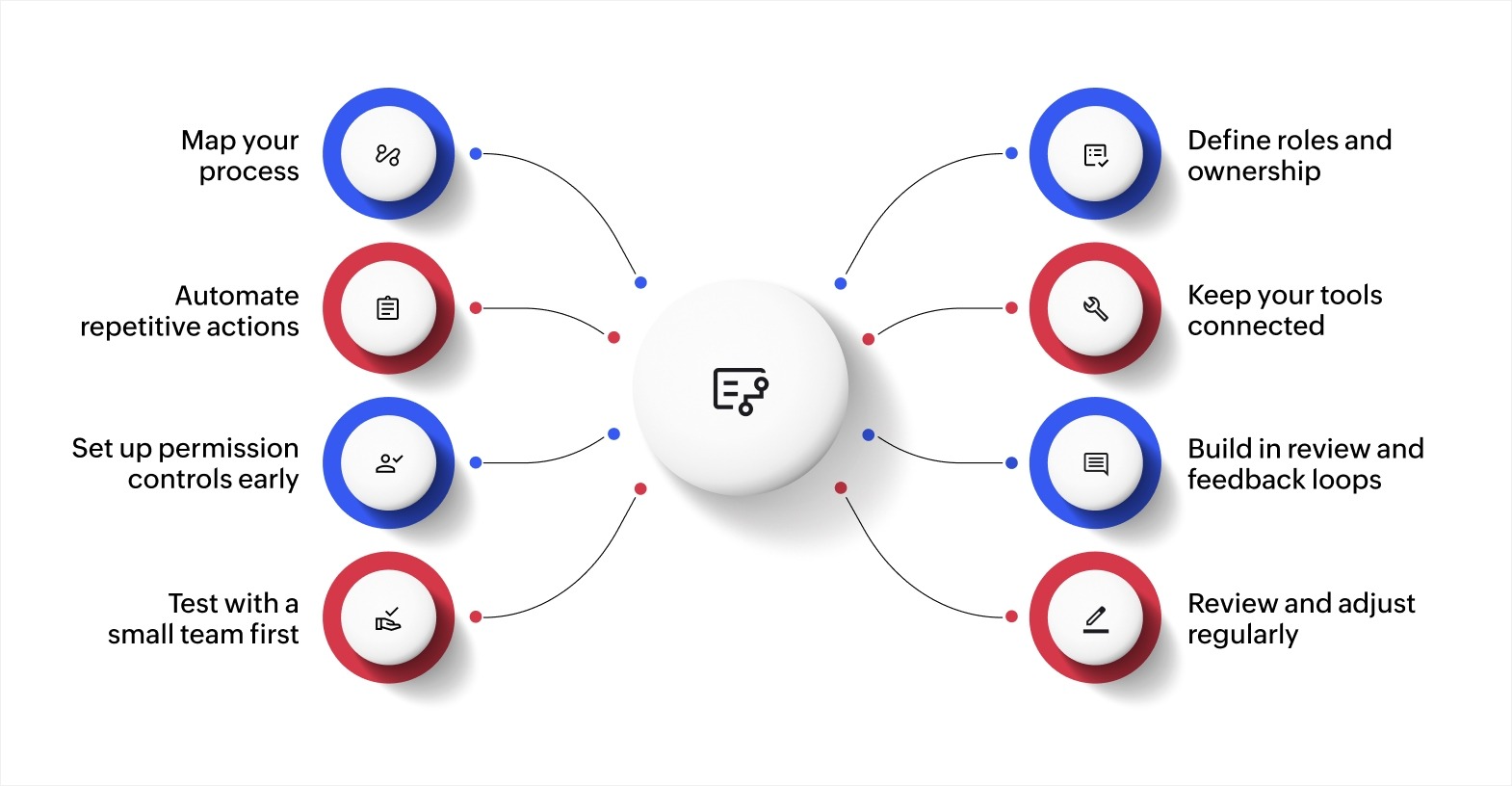
1. Map your process before you automate it
Start by documenting how work currently moves through your team. Identify each step, who handles it, and where delays tend to happen. You can use a whiteboard, a simple flowchart, or a visual process builder.
Mapping your process first helps you see what actually needs automation and what just needs better organization. Skipping this step often leads to automating a broken process, which only makes things worse faster.
2. Define roles and ownership for every step
Every task in your workflow should have a clear owner. When roles overlap or go undefined, tasks are either duplicated or ignored entirely. Document who’s responsible for each stage and what completion looks like at every handoff point.
For instance, if your team handles client onboarding, define exactly who sends the welcome email, who sets up the account, and who schedules the kickoff call. No step should rely on someone assuming it’s their turn.
3. Automate repetitive actions
Once your process is mapped and roles are clear, look for steps that happen the same way every time. Task assignments, status updates, approval requests, and reminder notifications are all strong candidates for workflow automation.
Automation removes the coordination overhead from routine tasks. Your team spends less time on admin work and more time on the tasks that need their judgment and expertise.
4. Keep your tools connected
Your workflow only works if the tools involved share data reliably. When your project tracker, communication tool, and file storage operate in isolation, people end up re-entering information or working from outdated details.
Look for business process management platforms that offer built-in integrations or API support. The fewer manual data transfers your team needs to make, the fewer errors and delays you’ll run into.
5. Set up permission controls early
Not everyone on your team needs access to every document or approval step. Define role-based permissions from the beginning so that sensitive data stays protected while collaboration remains open where it should be.
For example, a project contributor might need access to task details and deadlines but not to financial approvals or client contracts. Setting these boundaries early avoids confusion and security issues later.
6. Build in review and feedback loops
A workflow should include checkpoints where work is reviewed before moving to the next stage. Without these, small errors compound as tasks move downstream.
Add approval steps at key milestones. Let reviewers leave feedback directly within the workflow so comments remain attached to the task, not buried in separate emails or chat threads.
7. Test with a small team first
Before rolling a workflow out to the entire organization, run it with a small group. This lets you spot friction points, unclear steps, or missing automation triggers before they affect everyone.
Gather feedback from the pilot group and make adjustments. A workflow that works well for five people is much easier to scale than one that launches broken at full capacity.
8. Review and adjust regularly
Your workflow should evolve as your team and projects change. Set a regular cadence, monthly or quarterly, to review how the workflow is performing. Look at where tasks get stuck, where manual workarounds are happening, and where new steps might be needed.
Common mistakes to avoid when building collaborative workflows
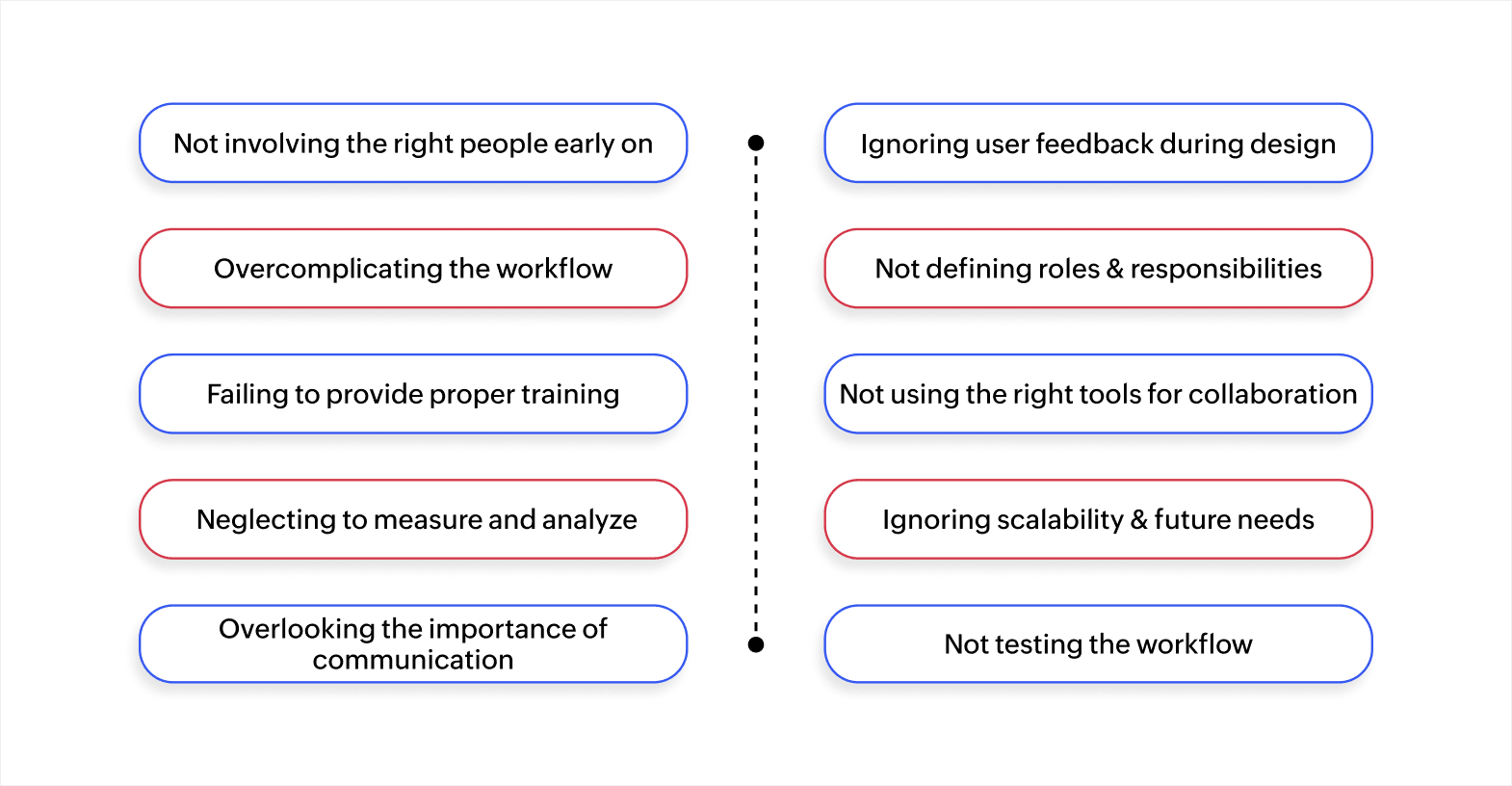
1. Not involving the right people early on
One of the first mistakes businesses make is not involving the right people from the start. Involving key stakeholders, team leaders, department heads, and decision makers early in the process ensures that the workflow aligns with business goals and works across departments.
2. Ignoring user feedback during design
Skipping user feedback during the design phase can result in a workflow that doesn’t meet the needs of those using it daily. Engage team members early on to understand their challenges. Their input helps refine the workflow and ensures it’s user-friendly and effective.
3. Overcomplicating the workflow
Complex workflows with too many steps and conditions can confuse users and hinder adoption. Keeping the workflow simple by focusing on essential tasks and automating repetitive steps improves efficiency and user engagement.
4. Not defining roles and responsibilities clearly
When roles and responsibilities aren’t defined clearly, it leads to confusion and delays. Clearly communicate each person’s responsibilities to ensure they understand their part in the workflow, which will reduce errors and missed deadlines.
5. Failing to provide proper training
Training is crucial for successful adoption. Without it, team members may struggle to use the system effectively. Provide comprehensive training, both during initial implementation and as ongoing support, to keep everyone confident in using the workflow.
6. Not using the right tools for collaboration
The tools you choose can make or break the collaborative workflow. Select tools that align with your business needs and integrate smoothly with existing systems. This reduces complexity and ensures that the workflow runs efficiently.
7. Neglecting to measure and analyze workflow performance
It’s essential to measure the workflow’s performance regularly. Without tracking metrics like task completion times and employee satisfaction, you may miss opportunities for improvement. Continuously evaluate the workflow to ensure it remains effective and aligned with business objectives.
8. Ignoring scalability and future needs
As your business grows, your workflow needs to scale accordingly. Design your workflow with scalability in mind to accommodate future changes such as increased team size, more complex projects, or evolving technology. Planning for growth avoids disruptions later.
9. Overlooking the importance of communication
Effective communication is key to any collaborative workflow. Without clear communication channels for updates, feedback, and task tracking, confusion and delays are inevitable. Ensure that the workflow includes tools for real-time communication to keep everyone aligned.
10. Not testing the workflow before full implementation
Launching a workflow without testing it first can lead to unforeseen issues. Running a pilot program helps identify potential problems before full implementation. Gather feedback from a small group of users, refine the workflow, and resolve any issues before rolling it out to the entire team.
Build better collaboration workflows for your team
As your team grows and projects get more complex, generic tools often hit their limits. You need a platform that adapts to your process, not the other way around.
Zoho Creator is an AI-powered low-code application development platform that lets you build custom collaborative workflows tailored to how your team actually works. You can design, test, and deploy workflow apps without writing complex code or relying on your IT team for every change.
With Zoho Creator, you can set up automated task assignments and approval workflows that move work forward without manual follow-ups. Built-in dashboards and analytics give you real-time visibility into project progress. The platform also connects with 1,000+ tools so your data stays consistent across every system your team uses.
Every app you build runs on web, iOS, and Android, so your team stays connected whether they’re at their desk or in the field. Sign up for free today and start building workflows your team will actually follow.
FAQ
1. What are the key differences between collaborative workflows and traditional workflows?
Collaborative workflows focus on teamwork, real-time communication, and shared task management, while traditional workflows often operate in isolated silos, with limited interaction between team members. Understanding these differences can help you decide which approach best fits your organization’s needs.
2. How do collaborative workflows support remote teams?
Collaborative workflows enable remote teams to stay connected and efficient by using cloud-based tools that facilitate real-time communication, file sharing, and task management. This ensures that remote team members can collaborate seamlessly, no matter where they're located.
3. What role do APIs play in collaborative workflows?
APIs are crucial for integrating different software tools within a collaborative workflow. They enable seamless data flow between systems, reducing manual data entry and keeping all team members updated in real time, improving efficiency and decision-making.
4. How can businesses measure the success of their collaborative workflow?
Businesses can measure the success of a collaborative workflow by tracking key performance indicators (KPIs) such as task completion rates, response times, and overall team productivity. Regular performance reviews help identify areas for improvement and ensure that the workflow is meeting business goals.
 Ann Elizabeth Sam
Hey! I'm Ann, and I work as a content writer at Zoho Creator. I'm exploring the SaaS world through various forms of content creation. Outside of work, I love dancing and would give up anything to read a good murder mystery.