No more silos: How Zoho Workplace creates a unified workflow

Remember when "digital collaboration" felt like a futuristic luxury?
Email was enough, meetings were plenty, and if you needed to share something urgently, you just shouted across the office. Fast forward through a few years of hybrid work and evolving office models, and digital collaboration is no longer an option; it’s become like the air we breathe.
Today, the market is flooded with powerful tools. Need to chat? There’s an app for that. Need a video call? There’s another. Need to write a document? Open a third tab. On paper, we have everything we need to succeed. So why does the workday still feel like a digital obstacle course?
The problem isn't a lack of tools; it’s the “pile of tools” approach. Many vendors treat software like a recipe for disorder: a dash of email, a sprinkle of chat, a side of file storage, and voila, productivity. But when these tools don’t talk to each other, they become a collection of silos rather than a solution. You could very well end up with:
- Spending half your day jumping between 15 different tabs just to find one file.
- Getting pinged in three different places about the same task.
- Feeling under-equipped despite having a million-dollar tech stack.
There’s a massive difference between having a pile of apps and a connected ecosystem of unified apps. When your tools share the same DNA—where an email can become a chat, and a chat can become a task, all without leaving your window—the friction disappears. You stop managing your software and start doing your work.
If your tools don’t make sense together, they aren’t working for you; you’re working for them. It’s time to move past the “pile” and embrace a unified way of working.
This is where the Zoho Workplace ecosystem steps in. We didn’t just throw a bunch of apps into a bucket and hope they’d get along. We built them to function like a high-performance team: interconnected, intuitive, and—dare we say—actually pleasant to use.
Our suite handles your emails, chats, meetings, passwords, and documents within a single, flexible environment. It’s designed to boost employee satisfaction by removing the digital friction that makes people want to throw their laptops out the window.
Instead of just telling you it’s better, let’s look at some examples of how Zoho Workplace, a connected ecosystem, solves the “collaboration headaches” we’ve all grown to tolerate.
Challenge 1: Collaboration overload
Let’s be honest. Some days, it feels like your actual job is just “logging into things.” You’re navigating five different login screens, following rigid processes, and manually copying data from one tab to another.
This is exactly why a “pile of apps” fails and where a unified platform succeeds. You need a suite that’s diverse enough to handle every task, but integrated enough that your data actually follows you.
Zoho Mail + Zoho Calendar: Where your calendar knows you're on vacation
You’ve finally finished your last task before a well-deserved vacation, set your “out of office” email reply, and you’re ready to disconnect. You’re halfway to the beach when your phone starts buzzing.
People are still pinging you on chat, inviting you to “urgent” Friday afternoon updates, and wondering why your calendar shows you as available. Marking yourself absent in five different places? That’s a chore.
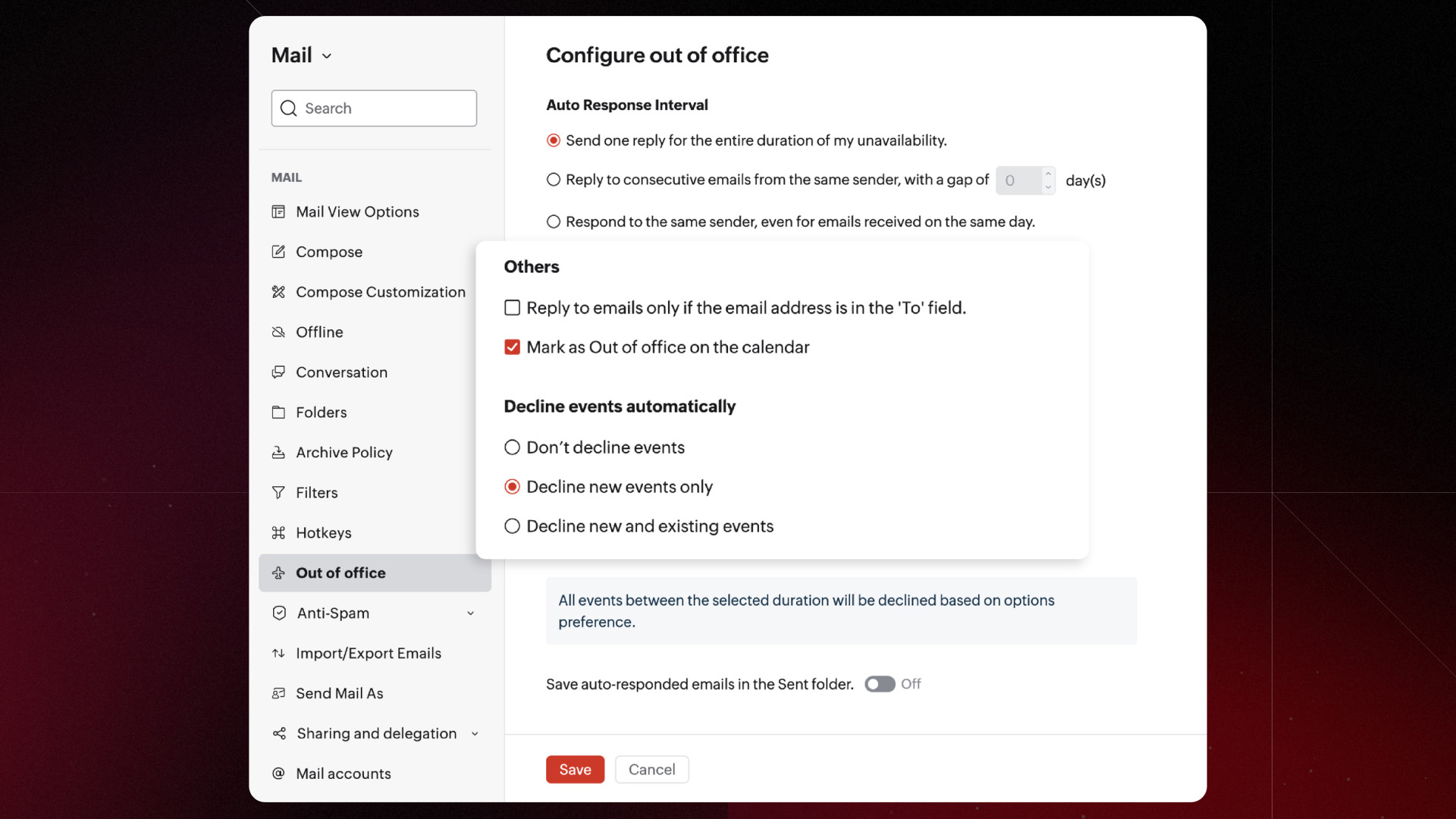
In Zoho Workplace, when you set up your out of office response in Zoho Mail, your calendar is automatically blocked for new events for your OOO dates. Any meeting invites that try to sneak in while you're away are automatically declined.
Zoho Cliq + Trident: Where you’re not chained to devices anymore
In a world of hybrid work, we aren’t just using different apps; we’re using different devices. Ideally, this should mean more freedom. In reality, it often means being tethered to your desk because you’re terrified that switching to your phone will drop that important client call.
With Zoho Workplace, however, that’s not the case.
Imagine you start a high-stakes strategy call on your web app. Ten minutes in, you realize you desperately need a coffee or just a quick stretch. Instead of the awkward “Sorry, let me hang up and call you back from my cell,” you can hand the call off to your mobile device and keep walking. Back at your desk? Slide it back to the web app or even the desktop app (Trident) on your laptop.
The person on the other end stays completely oblivious. To them, you’re just a consistently great listener. To you, you’ve just cruised through three different devices without breaking your stride; it’s collaboration with flexibility built in.
Zoho Cliq + Zoho Voice: Where you call beyond the office walls
While chatting with your teammates is great, not every call is internal. Eventually, you have to talk to the “outside world”; to clients, vendors, or that one person who still refuses to use an app.
You have to put down your collaboration tool, find your phone, manually punch in a number (and likely mistype it at least once), and juggle two different devices.
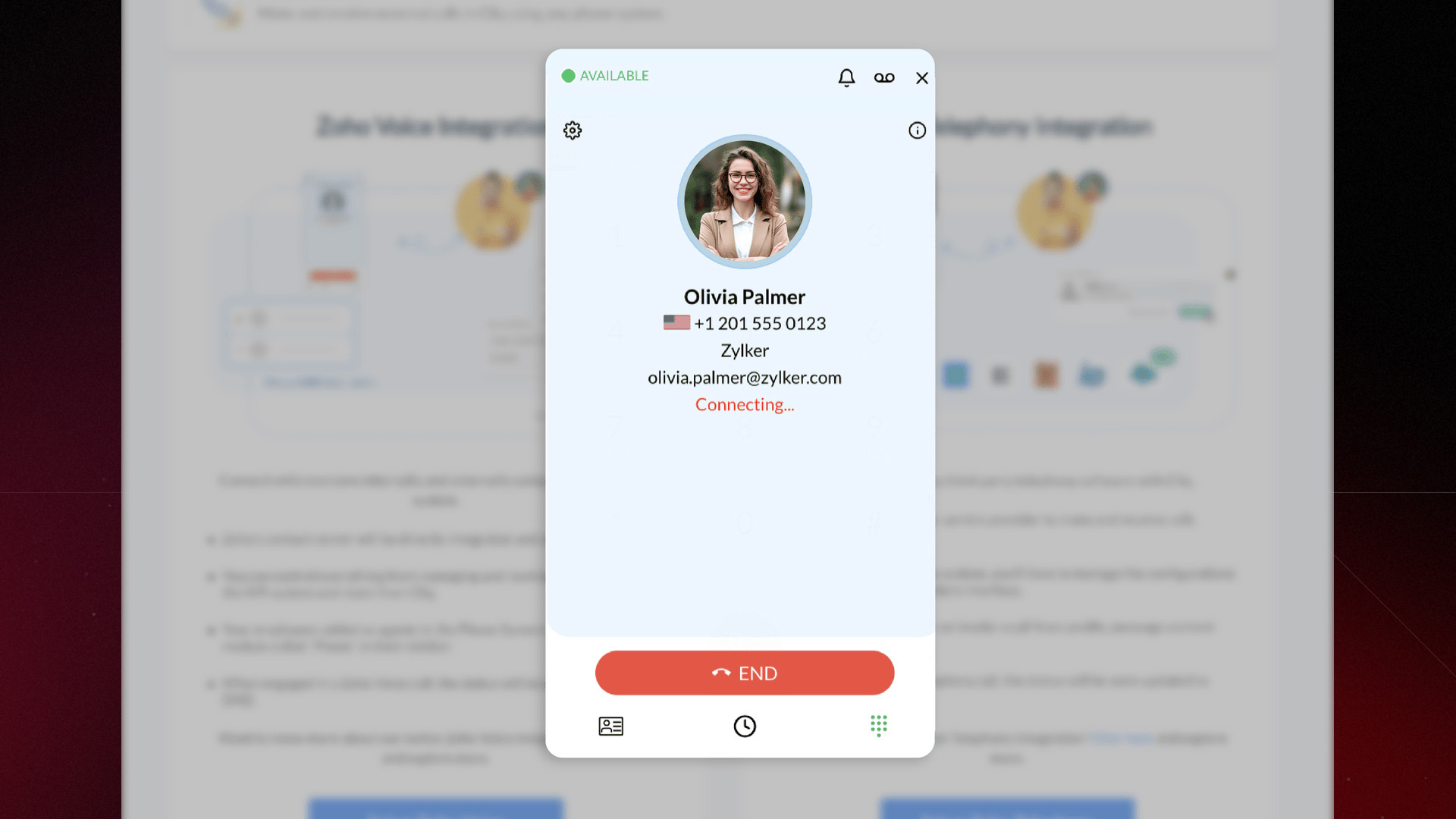
But with Zoho Cliq’s telephony integration, connected to Zoho Voice and other providers, you can place those external calls directly from your web application. Your web app becomes your handset. One click, one platform, two jobs done: staying connected inside your team and reaching the world outside.
Challenge 2: Monotony of tasks
If your workday feels like a series of repetitive “ctrl+c, ctrl+v” moments, it’s stealing your most valuable resource: time.
Zoho Workplace is designed to take those repetitive tasks off your plate through smart automation and built-in shortcuts.
Zoho Writer: Freed up to focus on your writing
You’re in the flow, weaving together research, quotes, and your own brilliant ideas. Then, you hit Publish. A day later, you realize you forgot to cite that one “perfect” sentence you borrowed from a source and suddenly, your professional credibility is on the line. Even with the best intentions, the line between “inspired by” and “copied from” can get blurry when you’re juggling a dozen tabs.
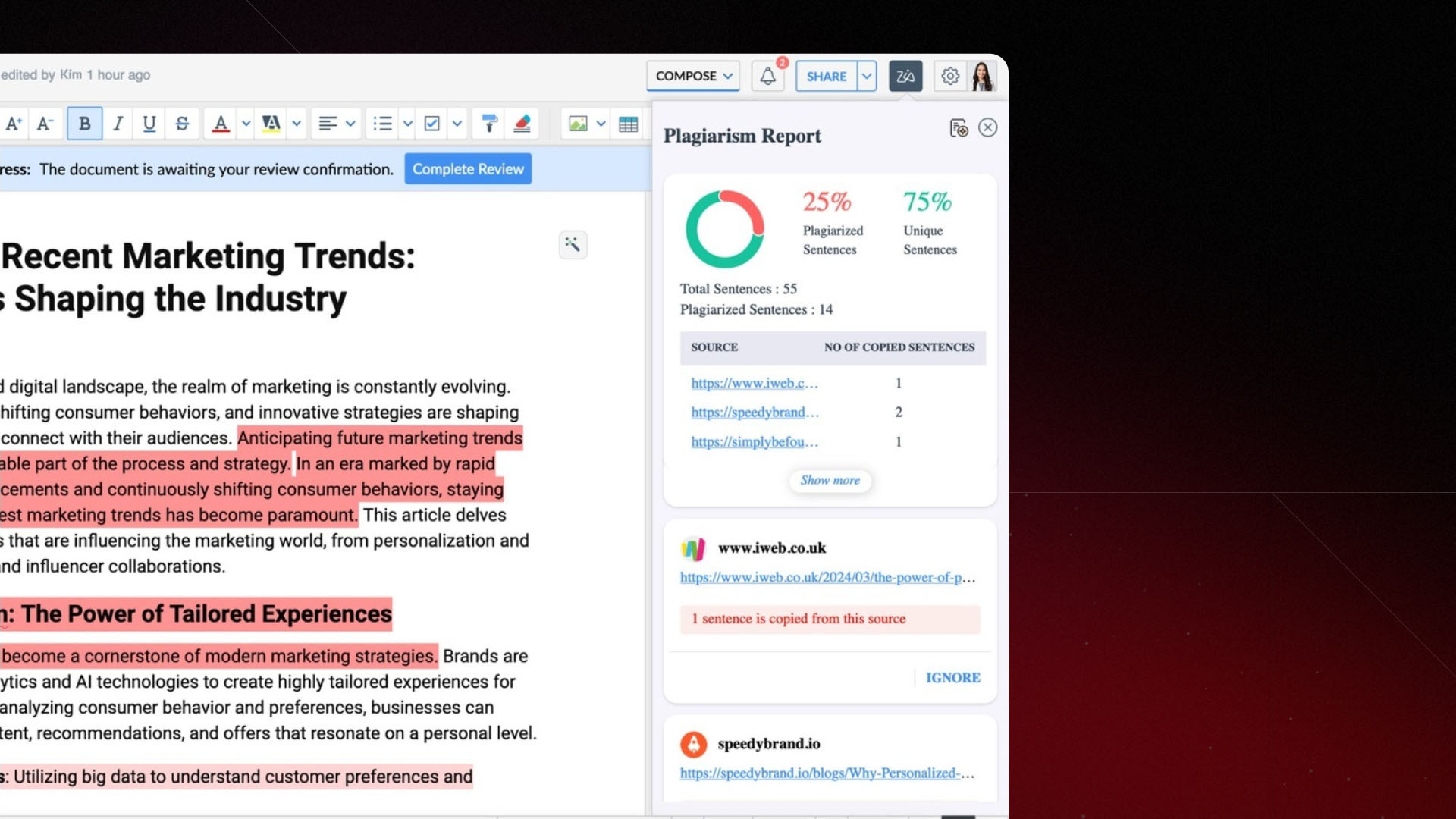
Zoho Writer’s built-in Plagiarism Checker acts as your final, eagle-eyed editor before you go live. It scans the web to see if your phrasing is a little too close to an existing source and nudges you to add the proper citation or tweak your working in case of an overlap.
With Zoho Writer, you can spend more time writing and less time worrying about accidental overlaps.
Zoho Cliq: Freed up to focus on the subject
They say words are powerful, but in the world of virtual communication, they can also be a bit... unpredictable. When you’re speaking face-to-face, a smile or a shrug does half the work for you. But in a chat window or an email, your “Let’s get this done” can sound like a motivated rally cry to some...and a terrifying ultimatum to others.
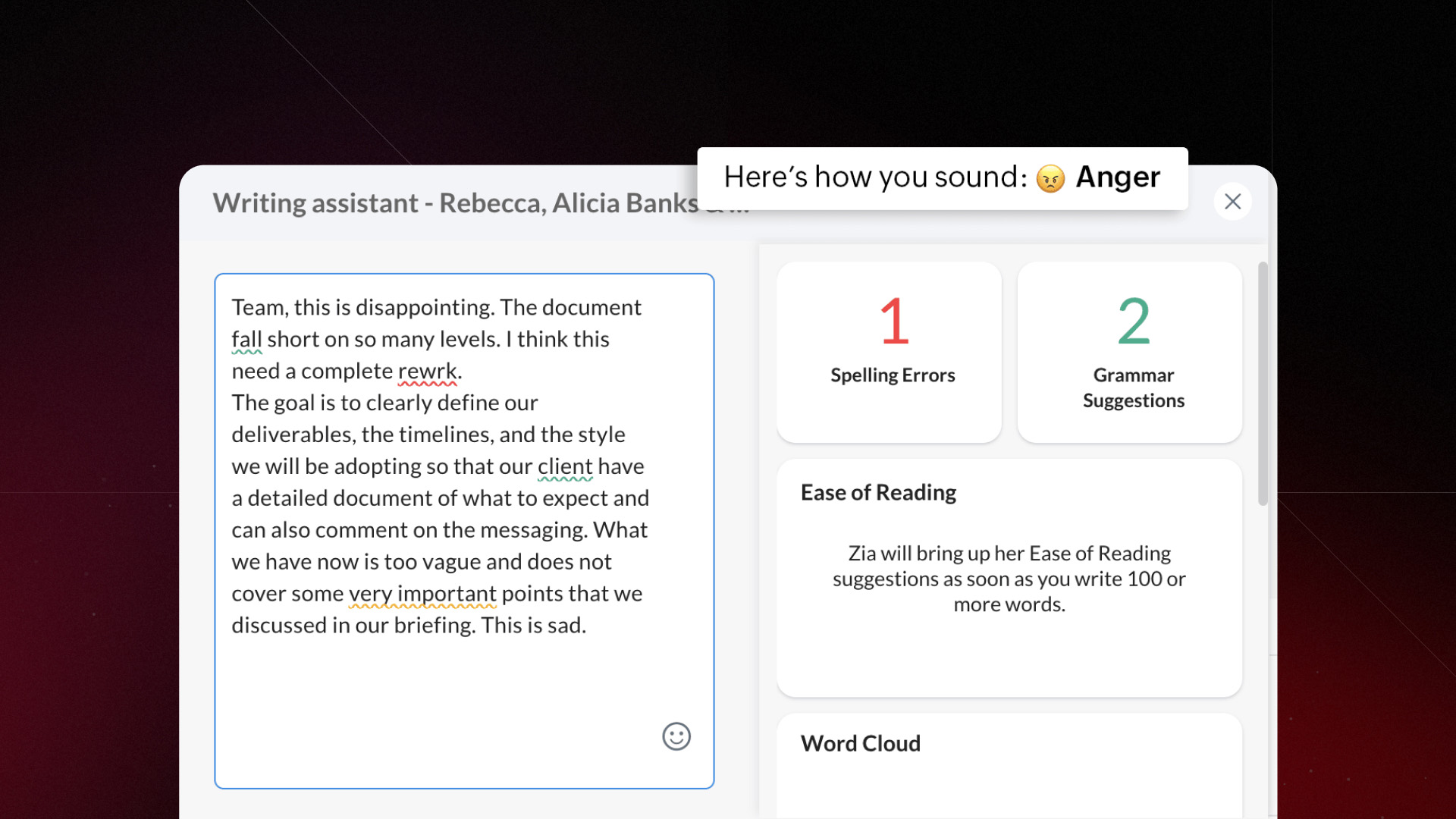
With Zoho Cliq, you can quickly scan your message to see how it actually sounds before you hit Send. Is it friendly? Authoritative? Or accidentally a bit too salty? It’s like having a friend read your text over your shoulder.
Eliminate the pesky grammar glitches and typos and adjust your phrasing in seconds so your feedback feels constructive, your requests feel reasonable, and your “urgent” emails don’t cause a panic.
Zoho Connect: Freed up to focus on solutions
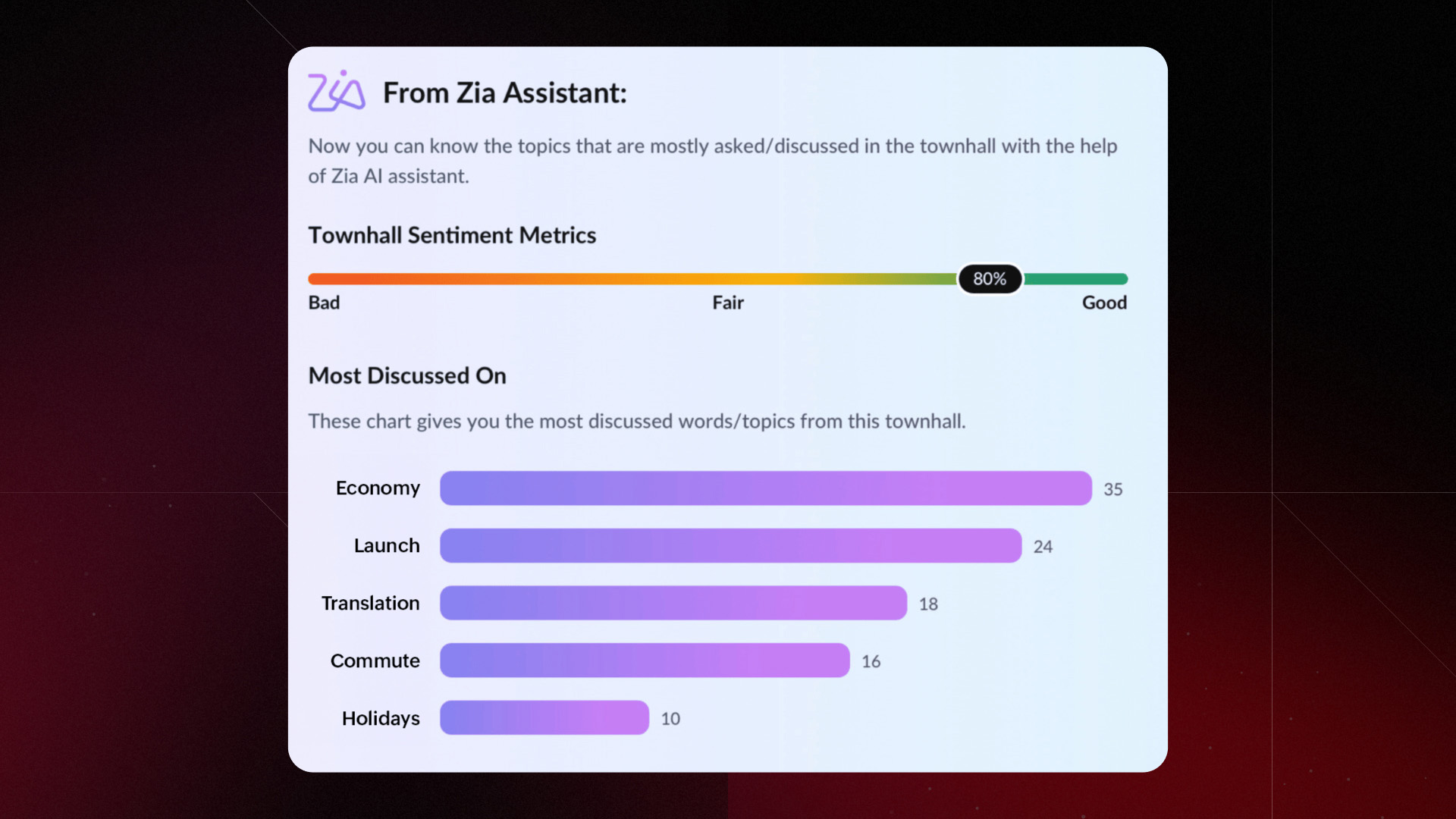
Hosting a company-wide Town Hall is a bit like throwing a big dinner party; you want everyone to speak their mind, but by the time the Q&A session hits, you’ve got a whirlwind of mixed emotions flying around. For an HR leader or a manager, trying to manually summarize that mountain of feedback is a marathon task.
Zoho Connect automatically gauges the overall tone of the session. Was the mood generally optimistic, curious, or a bit anxious? Its analytics highlight the “Top trends.” If 40% of the questions are about “Remote Flexibility,” you know exactly what needs to be addressed in your next follow-up.
Instead of spending hours tallying up feedback, you get a clean dashboard of metrics. You can spend your time actually solving problems rather than just identifying them.
Challenge 3: Paddling with no goal in sight
Sometimes, the tools meant to help us work actually become the work itself, creating the collaboration paradox. We believe that collaboration without context is just noise. If your chat app doesn’t talk to your CRM, or your document editor doesn’t know about your project deadlines, you’re missing the point. Collaboration should be the engine, but your business goals are the GPS.
Zoho Workplace bridges the gap, connecting your communication directly to your business tools.
Trident + Zoho Desk: Collaboration that satisfies customers
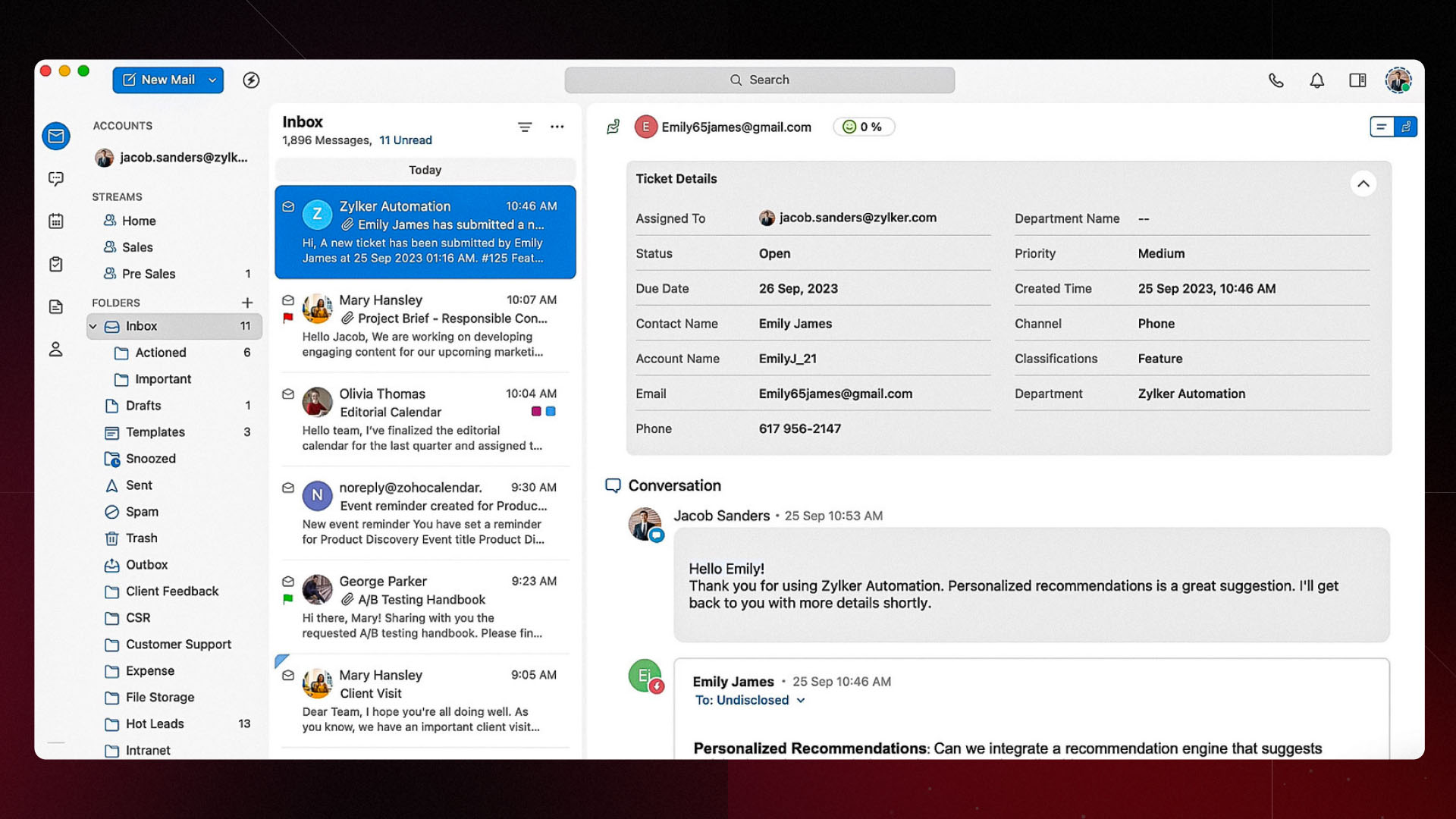
In Trident, when a ticket notification hits your inbox, you don’t just get a boring alert. Clicking the notification opens the full Zoho Desk ticket context right there, nested neatly inside your email view.
You can see the entire conversation history, read the private comments from your team, and check the ticket status all from the inbox. Since you have all the facts in front of you, you can type your response and resolve the issue immediately.
Zoho Mail + Zoho CRM: Collaboration that wins deals
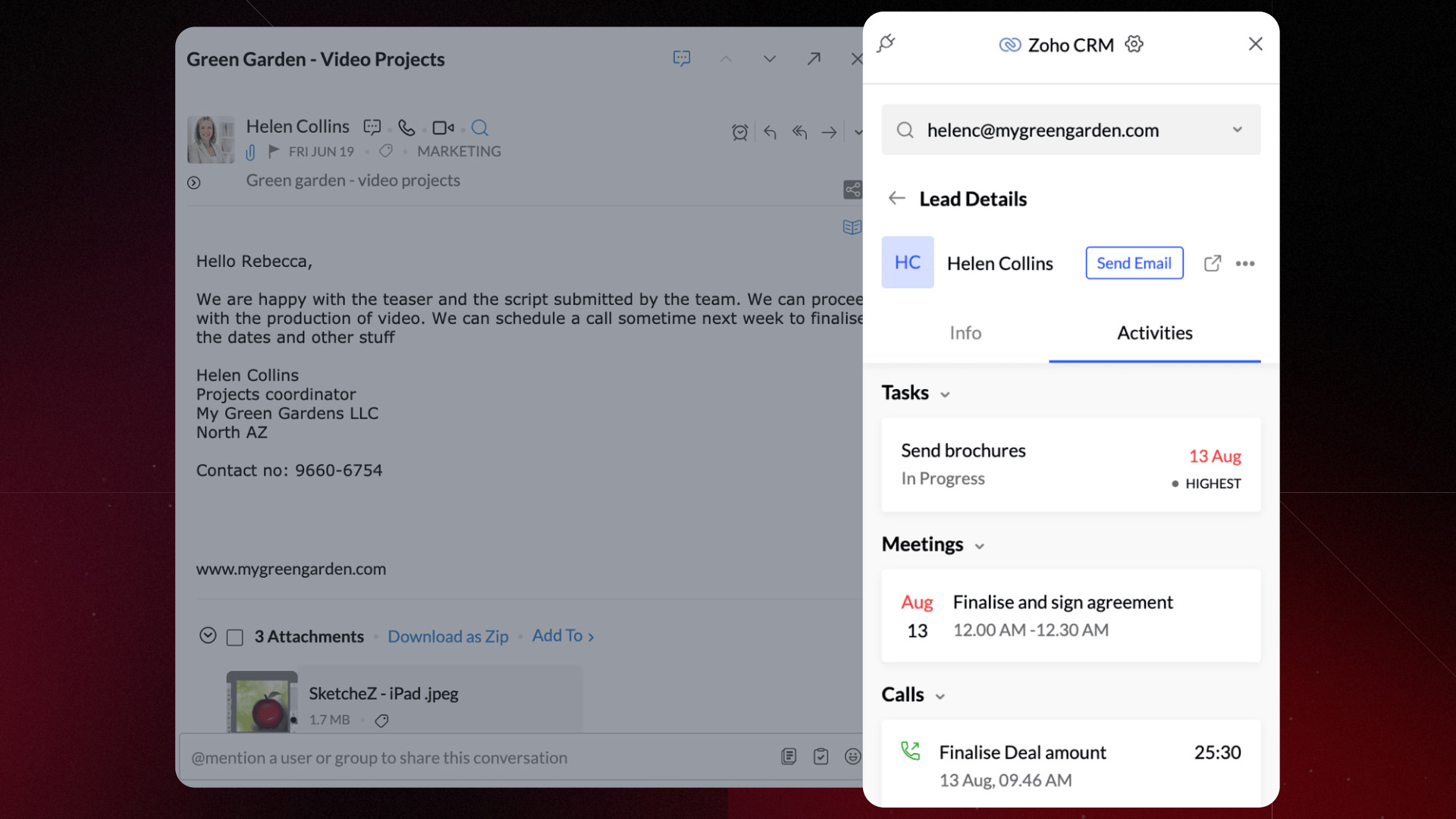
Usually, when a promising lead lands in your inbox, you have to copy the name, jump over to your CRM, create a lead, set a task, and hope you didn’t mistype the phone number along the way.
With the Zoho CRM extension in Zoho Mail, you can manage your entire sales pipeline without ever looking away from your email. Spotted a potential client? Turn that email contact into a CRM lead with a single click. You can also organize and track your existing customers right from the sidebar. You can see their history, notes, and status while you’re reading their latest message. Need to set a follow-up? You can associate notes, tasks, and calendar events to a contact immediately.
Zoho Writer + WordPress: Collaboration that gets your word out
You’ve spent hours researching, writing, and perfecting every comma in Zoho Writer. It’s your best work yet. You have to export the file, log into WordPress, fix the broken formatting, re-upload the images, and pray the layout doesn't get messed up.
With the WordPress extension in Zoho Writer, you can send your content directly from your Zoho Writer dashboard to your WordPress site without losing your bold headers or perfectly placed images. Whether you want to post it immediately or save it as a draft for one last look, the integration handles the heavy lifting.
Challenge 4: Data overwhelm
At the heart of every great collaboration is data. A lot of data. Messages, file versions, timestamps, edit histories, it’s all there, piling up in the background.
The good news about digital tools is that everything is logged, audited, and accounted for. The bad news? Trying to make sense of it all can be overwhelming.
We believe that data shouldn’t just be stored; it should be understood. After all, the human brain isn’t a spreadsheet; it’s a storytelling machine. That’s why in Zoho Workplace, we focus on turning those endless logs into visual insights.
Zoho Show: From data to inferences
Zoho Show’s built-in tools let you turn those cold, hard numbers into clear, colorful insights without the manual labor.
You don’t have to just copy-paste a wall of numbers. Use our integration to instantly transform your Zoho Sheet data into a clean, professional chart right inside your deck. Since your deck is connected to your data, you don’t have to worry about manual updates. If the numbers in your spreadsheet change, your chart syncs up to reflect them.
Zoho Mail: Extensive admin reports
Being an organization’s email administrator is a bit like being the air traffic controller of the digital office. When things are moving smoothly, no one notices, but the second a “spam storm” hits or a security alert blips, all eyes are on you.
Zoho Mail’s admin console comes loaded with a suite of real-time charts and reports designed to give you the big picture in seconds.
You can monitor the performance of chats and emails as they happen and keep an eagle eye on spam rates and security threats through visual dashboards. If your traffic spikes or dips unexpectedly, you’ll be the first to know.
Zoho Sheet: A holistic view for everyone on the team
In any growing company, roles are like fingerprints—no two are exactly alike. You have HR, Finance, Marketing, and Sales, all running on their own specialized engines.
So, how do you share the “wins” without giving everyone a login to every single app?
You can link Zoho Sheet directly to your business apps. It pulls in the latest numbers from CRM, Social, or Finance automatically. Then, you can share a single spreadsheet with the whole team. They get a clear, real-time view of the metrics that matter, while your core business tools stay safely locked away for the power users.
Challenge 5: Decision-making delays
A simple project starts with two people and somehow ends up with a 15-person email chain, three “sync” meetings, and a dozen conflicting opinions. When every minor detail requires a town hall meeting, decision-making grinds to a halt. The goal isn't just to talk; it’s to decide.
Your collaboration platform shouldn’t just host conversations; it should drive actions. At Zoho Workplace, we’re big fans of what we call micro-collaboration. It’s about breaking the teamwork down into small, focused strikes.
Zoho WorkDrive: Record thoughts in a snap
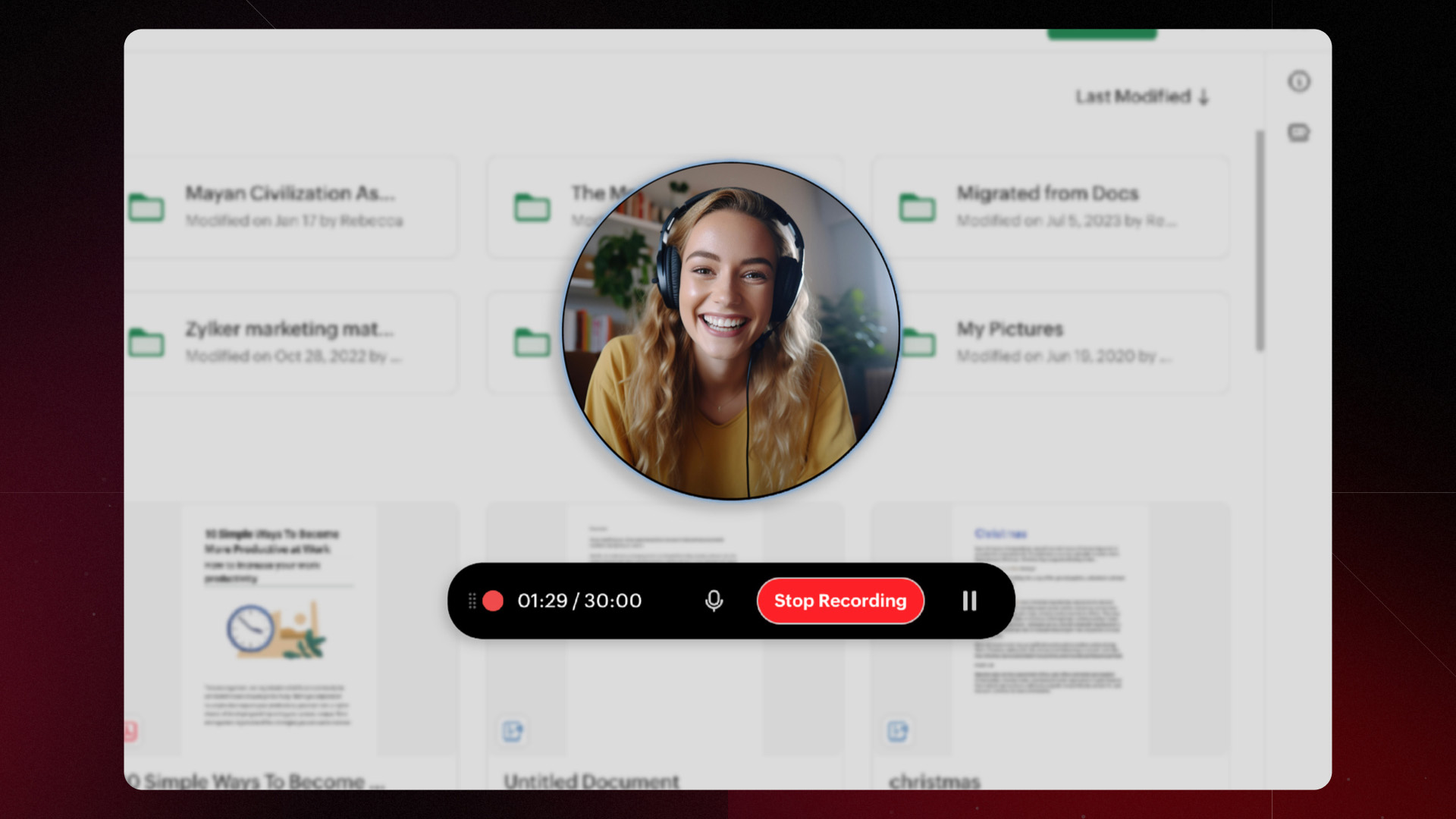
While live communication has its place, the real MVP of the modern office is Asynchronous Communication. In Zoho WorkDrive, we’ve made it incredibly easy to give your team the full picture without forcing them into another 30-minute video call.
Capture your screen while you walk through a design, record your voice to explain a complex strategy, or use video to add that human touch. Got a brilliant idea at 11:00 PM? Record it while it’s fresh and share it. Your team gets a clear, focused walkthrough, and you get to go to bed knowing the message is safely delivered.
Zoho Meeting: Personal meeting rooms for quick gatherings
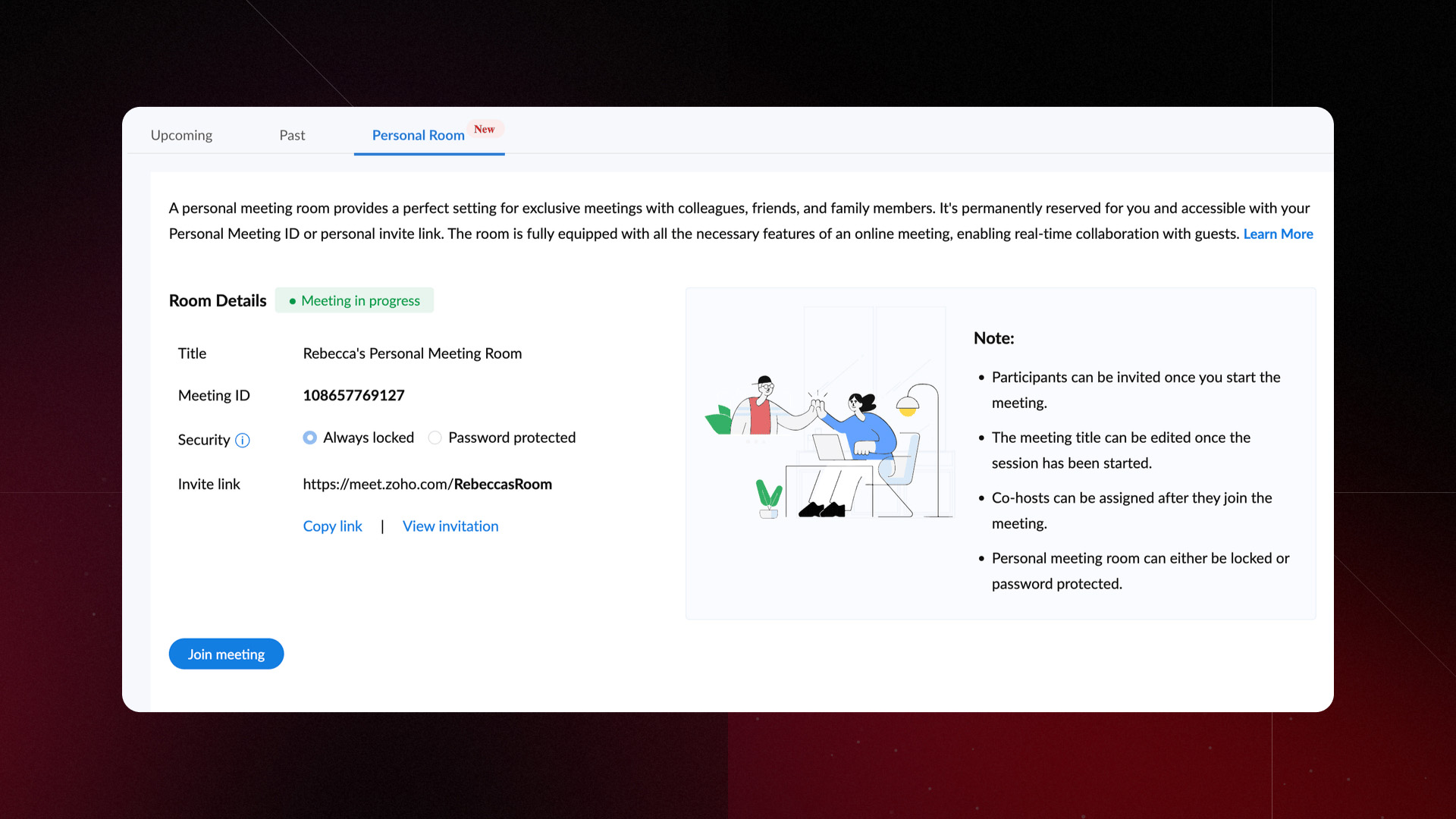
Not every great idea needs a 24-hour lead time, a formal agenda, and a calendar invite sent three days in advance.
In Zoho Meeting, we’ve decided to give you your own “private corner of the office” that’s always open for business. With Personal Meeting Rooms, you get a fixed, custom URL that never changes. When a quick question turns into a complex discussion, don’t type it out. Get it sorted out quickly in your personal meeting room.
Zoho Meeting: Breakout rooms for focused discussions
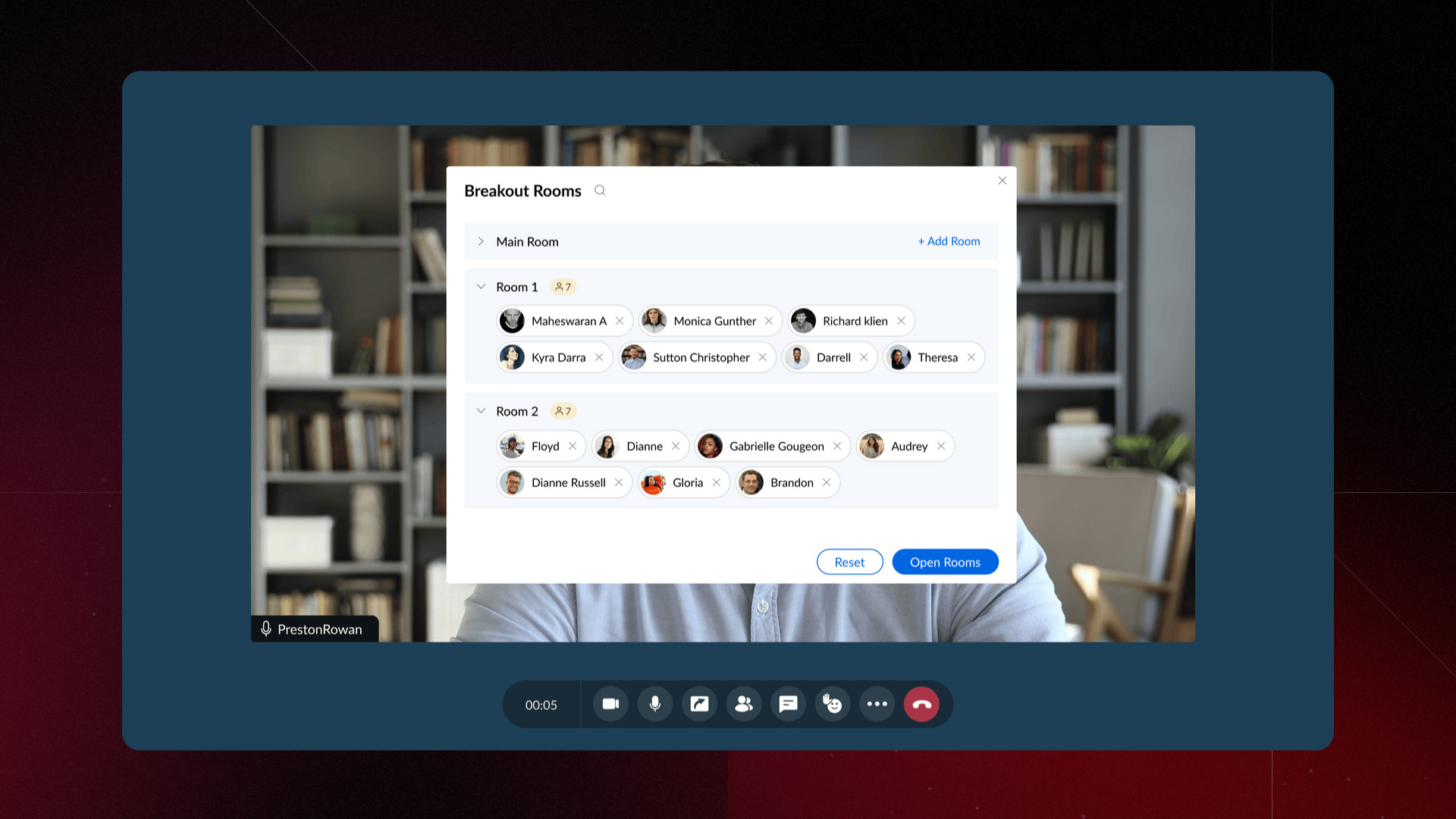
Huge meetings are great for announcements, but they’re often where specific, tactical decisions go to die. Sometimes, you just need to “take it offline” without actually going offline.
With Zoho Meeting’s Breakout rooms, you can split your main meeting into smaller groups so the designers can talk pixels while the developers talk code. It’s the same big meeting, just with way more productivity per square inch. Once the small groups have solved the world’s problems, you can bring everyone back into the main room to share the results.
Wrapping up: Eliminate your silos
The modern workplace isn’t just about sending messages; it’s about creating a living, breathing ecosystem where tools talk to each other so you don’t have to do the shouting.
When you have a smart, integrated suite of collaborative tools, your business operations start to resemble that famous gliding duck: Everything on the surface looks calm, professional, and effortless. Your clients see results, your team stays composed, and the work “just happens.” Below the surface, Zoho Workplace is paddling furiously to automate the mundane, sync the data, and bridge the gaps between your apps.

Comments