• 16K

    Customers

  • 3M

    Users

The only finance dashboard software you'll ever need

Everything finance teams need to track cash flow, monitor profitability, ensure compliance, and make confident decisions, on one powerful platform.

Finance data sources and integrations with Zoho Finance, QuickBooks, Xero, Stripe, and 100+ connectors

Bring all your finance data together

Zoho Analytics eliminates the chaos of scattered financial data by pulling numbers from every source into a single, unified view, so your team always sees the full picture, not just one slice of it.

  • ✔ Native, one-click connectors for Zoho Finance, Zoho Books, QuickBooks, Xero, Stripe, Zoho Inventory, and 100+ business apps

  • ✔ Connect directly to SQL/NoSQL databases, data warehouses (BigQuery, Snowflake, Redshift), and data lakes

  • ✔ Import flat files (CSV, Excel) or set up live API feeds for any custom finance source

  • ✔ All data syncs automatically. No manual exports, no outdated spreadsheets on the day of a board meeting

Jumpstart analytics with 100+ pre-built finance dashboards

Why spend weeks building dashboards from scratch when the most important ones are already built for you? Our library of expert-designed dashboard templates gives your finance team instant visibility into cash flow, P&L, expense trends, and more as soon as your data is connected.

  • ✔ Ready-made dashboards for every major accounting, billing, and payment platform

  • ✔ Covers all critical finance KPIs: gross margin, burn rate, budget vs. actuals, accounts payable and receivable, and cash runway

  • ✔ Designed by finance and BI experts. Not generic templates, but field-tested finance analytics frameworks that reflect how finance teams actually work

  • ✔ Fully customizable: use them as-is or tailor them to match your organisation's exact reporting structure

Pre-built finance dashboards for cash flow, P&L, expense trends, and 50+ visualization types
Custom finance dashboard builder with drag-and-drop visualizations and team collaboration

Build custom finance dashboards instantly

Every finance team tracks metrics that are unique to their business. Our drag-and-drop builder lets anyone on the team create precise, professional dashboards without writing a single line of code.

  • ✔ 50+ visualization types: waterfall charts, variance charts, heatmaps, KPI scorecards, trend lines, geo maps, and more

  • ✔ Simply drag financial data columns onto the canvas and your chart builds itself

  • ✔ Mix and match visualizations on a single dashboard for a complete P&L or cash flow view

  • ✔ Apply filters, drill-downs, and period-over-period comparisons with a single click

Ask Zia, AI that actually helps

Most AI features sound impressive until you actually use them. Zia is different. Ask a question in plain English, like "Why did operating expenses spike in Q3?" or "Create a cash flow dashboard for this quarter," and Zia does the work. It also explains what the numbers mean and what to do next.

  • ✔ Conversational Q&A: type any finance question and get an instant, visual answer

  • ✔ Auto-generates complete dashboards from a single natural language prompt

  • ✔ Surfaces anomalies, trends, and budget variances you might have missed

  • ✔ Provides plain-language narrative summaries alongside every chart, and offer recommendations to improve KPIs

Ask Zia AI conversational analytics for finance dashboards and natural language queries
Sharing and data blending for financial insights, role-based access, and scheduled reports

Share financial insights securely

Get the right financial data in front of the right people, while keeping sensitive numbers out of the wrong hands. From real-time sharing to scheduled board-pack reports, collaboration and control are built in.

  • ✔ Granular role-based access: control who can view, edit, or export each dashboard and report

  • ✔ Comment and annotate directly on charts to capture context where decisions happen

  • ✔ Schedule automated email reports to CFOs, auditors, or department heads on your preferred cadence

  • ✔ Securely embed live dashboards in your ERP, intranet, or client-facing portal

Create your finance dashboard in 3 simple steps

So easy your finance team can build dashboards on their own. No IT team or data analysts required.
1

Connect your data

Zoho Analytics connects to 100+ finance apps right out of the box. Zoho Books, QuickBooks, Xero, Stripe, and more. Click once, and your financial data flows in automatically. Every dashboard you build stays current without anyone having to refresh it manually.

2

Build your dashboard

Pick your metrics, drag your data columns onto the canvas, and your charts build themselves. Cash flow, P&L, budget vs. actuals, burn rate. Done in just minutes. Prefer to skip even that? Ask Zia: "Create a finance dashboard for this quarter." It generates the whole thing from one prompt.

3

Share & collaborate

Once your dashboard is ready, share it with exactly the right people. Role-based permissions mean your CFO sees what the CFO needs, and sensitive numbers stay out of the wrong hands. Teams can comment directly on charts, flag anomalies, and align on decisions without a single status meeting.
More powerful features for modern finance teams

Automated data sync

Keep your finance dashboards up to date with automated sync schedules. Analyze near real-time financial data without manual effort.

Data blending

Combine finance data with sales, operations, and inventory data to get a complete view of business performance.

Intuitive visualization builder

Create interactive dashboards with a simple drag-and-drop interface designed for finance and business users.

Advanced analytics

Go deeper with forecasting, budgeting analysis, what-if scenarios, and anomaly detection.

Automated slideshow generation

Instantly turn dashboards into presentation-ready slides with automated slideshow generation.

AI-powered analytics

Leverage Zia's AI assistance throughout your analytics journey, from data preparation to insight discovery.

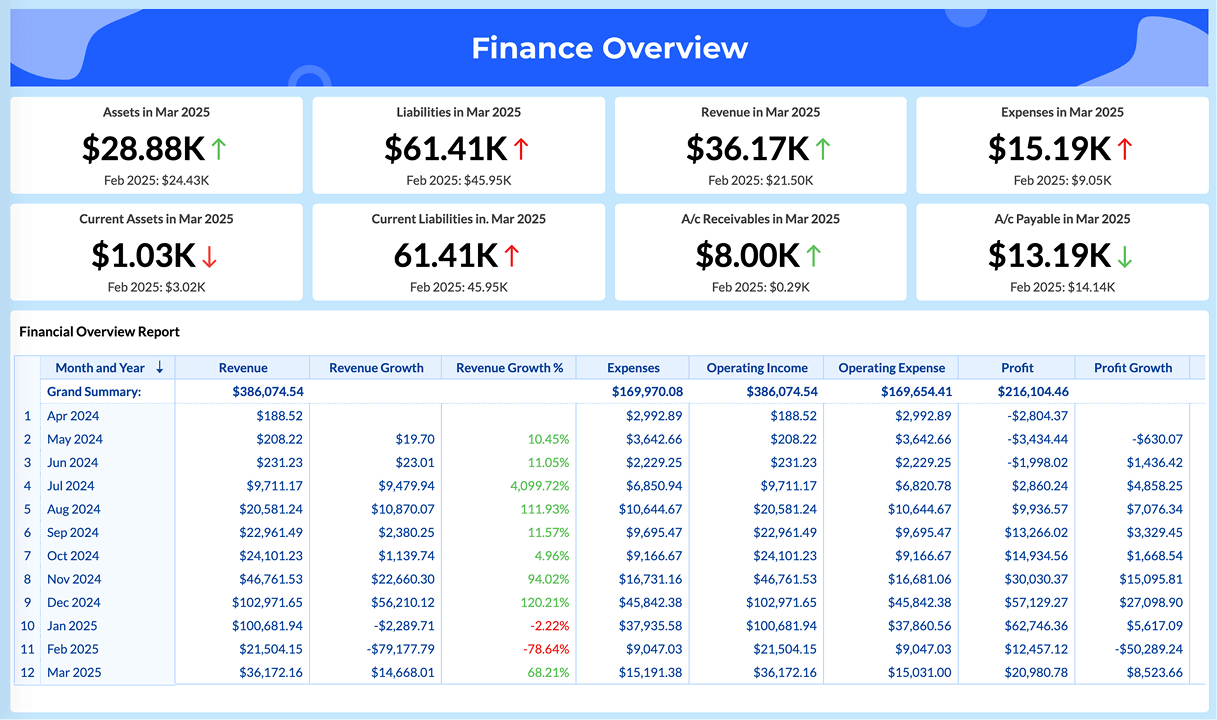
Pre-built finance dashboard templates for your team to get started

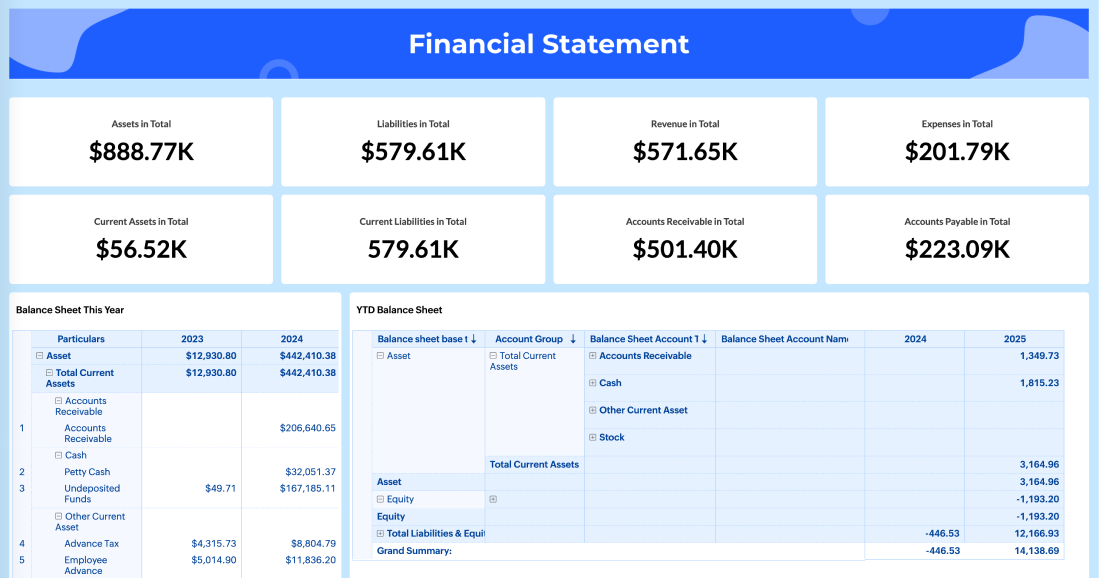
Pre-built financial statement dashboard template with key metrics and visualizations
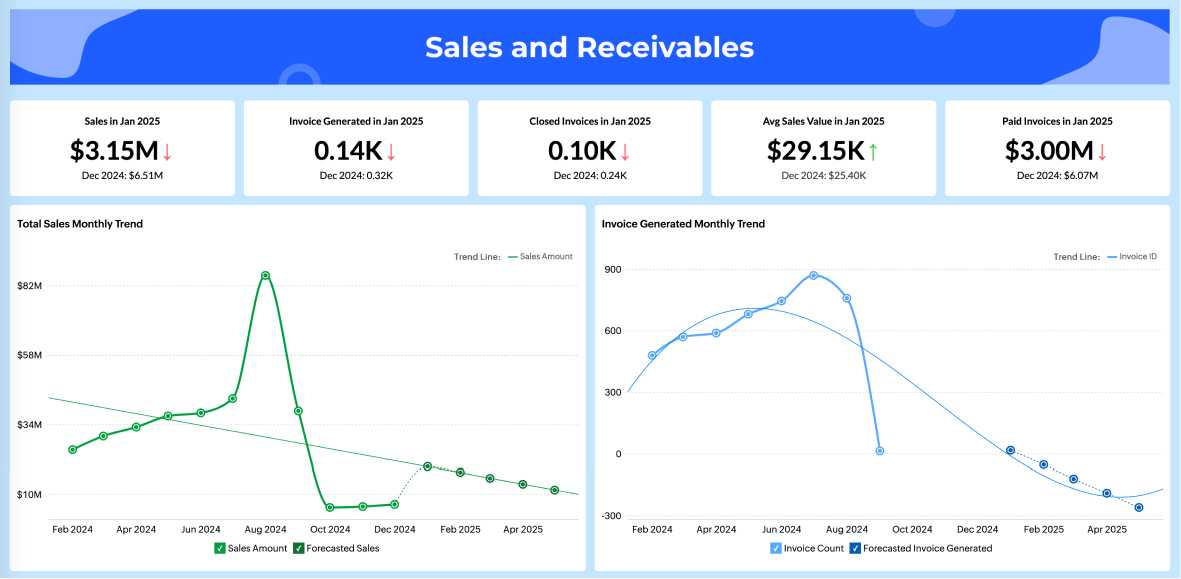
Sales and receivables finance dashboard template
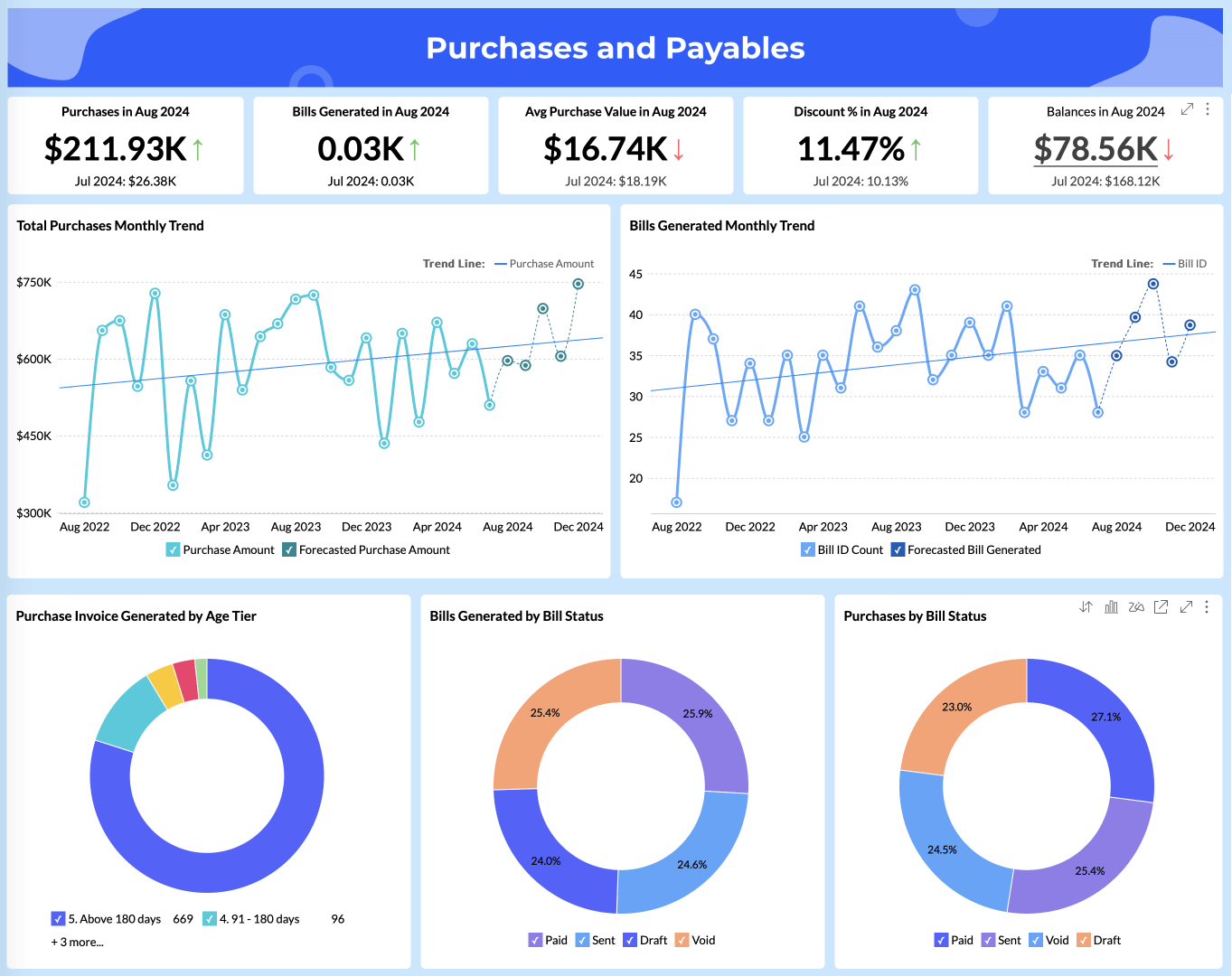
Zoho Quick Books purchases and finance dashboard template

Hear what happy customers say about our finance dashboard software

See all testimonials
Connor Nobert, Director of Analytics and Technology at Pulse LLC
Connor Nobert
Director of Analytics and Technology, Pulse LLC

"Zoho Analytics gives us a superior edge over Power BI and Tableau, when it comes to the aesthetics of visualization. ‌We're very happy with Zoho's capability."

Steve Dubane, Founder & CEO of Wingman Media
Steve Dubane
Founder & CEO, Wingman Media

"Zoho Analytics created a tremendous amount of value for the agency and takes our relationship with clients to the next level. The preparedness to integrate the data, build alluring visualizations, and its shrewdness have given us the ability to retain clients.

Korvi Rakshand, Founder of JAAGO Foundation
Korvi Rakshand
Founder, JAAGO Foundation

"Our main intent was to make data-driven decisions. We use Zoho CRM and Zoho Books and we wanted to precisely analyze every single data point from these apps. So we fell back on Zoho Analytics. The visualization with data precision is impeccable and we are extremely happy with the Zoho suite of products."

ED Levis, Head of IT at NYC Navigator
ED Levis
Head of IT, NYC Navigator

"Data visualization is important for any BI tool. It's great to present data in a way that is meaningful to the audience, helping them quickly grasp the content. That's where Zoho Analytics is very strong. We now analyze our sales, operations, and finance using Zoho Analytics."

Daniel Franey, Director & Shareholder at Courier logistics limited
Daniel Franey
Director & Shareholder, Courier logistics limited

"With Zoho Analytics, the ability to visualize things became easy. Most of my managers now use Zoho dashboards and quickly create reports themselves. Its usability features, like easy drag and drop filters and drill down options, are top-notch."

Ben Smith, Advisor and former COO of Sugarfina
Ben Smith
Advisor and former COO of Sugarfina

"Zoho Analytics is the only product with the right mix of cost and value—with features like data visualization, integration, data blending, collaboration, user filters, drag and drop, geomaps, and much more at an affordable price"

Maurizio Pisana, IT Manager at Caffe Moak
Maurizio Pisana
IT Manager, Caffe Moak

"Zoho Analytics—being fast, simple, yet compelling BI software—made our lives easier for importing, integrating, and analyzing data. Visualization is another plus in this product, and dashboards are very appealing"

Connor Nobert, Director of Analytics and Technology at Pulse LLC
Connor Nobert
Director of Analytics and Technology, Pulse LLC

"Zoho Analytics gives us a superior edge over Power BI and Tableau, when it comes to the aesthetics of visualization. ‌We're very happy with Zoho's capability."

Steve Dubane, Founder & CEO of Wingman Media
Steve Dubane
Founder & CEO, Wingman Media

"Zoho Analytics created a tremendous amount of value for the agency and takes our relationship with clients to the next level. The preparedness to integrate the data, build alluring visualizations, and its shrewdness have given us the ability to retain clients.

Korvi Rakshand, Founder of JAAGO Foundation
Korvi Rakshand
Founder, JAAGO Foundation

"Our main intent was to make data-driven decisions. We use Zoho CRM and Zoho Books and we wanted to precisely analyze every single data point from these apps. So we fell back on Zoho Analytics. The visualization with data precision is impeccable and we are extremely happy with the Zoho suite of products."

ED Levis, Head of IT at NYC Navigator
ED Levis
Head of IT, NYC Navigator

"Data visualization is important for any BI tool. It's great to present data in a way that is meaningful to the audience, helping them quickly grasp the content. That's where Zoho Analytics is very strong. We now analyze our sales, operations, and finance using Zoho Analytics."

Daniel Franey, Director & Shareholder at Courier logistics limited
Daniel Franey
Director & Shareholder, Courier logistics limited

"With Zoho Analytics, the ability to visualize things became easy. Most of my managers now use Zoho dashboards and quickly create reports themselves. Its usability features, like easy drag and drop filters and drill down options, are top-notch."

Ben Smith, Advisor and former COO of Sugarfina
Ben Smith
Advisor and former COO of Sugarfina

"Zoho Analytics is the only product with the right mix of cost and value—with features like data visualization, integration, data blending, collaboration, user filters, drag and drop, geomaps, and much more at an affordable price"

Maurizio Pisana, IT Manager at Caffe Moak
Maurizio Pisana
IT Manager, Caffe Moak

"Zoho Analytics—being fast, simple, yet compelling BI software—made our lives easier for importing, integrating, and analyzing data. Visualization is another plus in this product, and dashboards are very appealing"

Understand your financial performance better. Improve it. Act faster.

Zoho Analytics gives finance teams the visibility they need to track cash flow, control costs, ensure compliance, and make confident decisions.

Sign up for freeSIGN UP FOR FREE

Finance dashboard FAQs

What is finance dashboard software?

  • Finance dashboard software is a business intelligence tool that consolidates financial data from accounting systems, billing platforms, payment gateways, databases, and spreadsheets into interactive dashboards. It helps finance teams track KPIs, monitor financial health, and make informed decisions in real time.

Which finance applications does your finance dashboard software integrate with?

  • Our finance dashboard software natively integrates with Zoho Finance, Zoho Books, QuickBooks, Xero, Stripe, Zoho Inventory, and 100+ other business applications, along with databases, data warehouses, and data lakes.

Do I need technical skills to create finance dashboards?

  • No. The platform includes an intuitive drag-and-drop builder that requires zero coding. Finance teams can build dashboards independently or use our AI assistant to generate dashboards using simple text prompts.

How often does financial data update in the dashboards?

  • Our finance dashboard software supports automated data synchronization with flexible schedules. You can refresh data hourly, daily, or at custom intervals based on your needs.

Can I share finance dashboards securely?

  • Yes. The software offers granular access controls, role-based permissions, secure embedding, scheduled reports, and collaborative commenting.

What financial metrics can be tracked in finance dashboard software?

  • Track gross margin, net profit, operating expenses, financial statement, cash flow, revenue by product or region, accounts payable and receivable, budget vs. actuals, variance analysis, and financial forecasts. All metrics update automatically from your connected accounting and billing sources.

How to make financial reporting easier?

  • Connect your accounting system to a finance dashboard tool like Zoho Analytics. Use pre-built report templates, automate data sync, and let AI generate reports instantly. This eliminates manual data pulls, reduces close cycle times, and gives your team always-current insights without extra effort.

What are the best free finance dashboard software options?

  • Zoho Analytics offers a free plan with core dashboard and reporting features. Other options include Google Looker Studio (free, but limited native finance app integrations) and Power BI Desktop (free desktop version, limited sharing). Zoho Analytics is typically the strongest free option for teams already using Zoho Finance or QuickBooks.

How to choose finance dashboard software for enterprise financial reporting?

  • Prioritize deep integrations with your ERP and accounting systems, granular role-based access controls, and the ability to handle large data volumes without performance degradation. Look for automation, AI-driven insights, embedded analytics, and audit-trail capabilities. Ensure enterprise-grade security, SSO support, and compliance with relevant data governance standards. Zoho Analytics is built to meet all of these requirements.
 

Start your 15-day free trial.

No credit card required