What are interactive emails? Examples, benefits, and how they work
- Published : May 30, 2026
- Last Updated : May 30, 2026
- 335 Views
- 8 Min Read

Have you ever rated your shopping experience with just an emoji after buying something online?
A smiling face for a great experience or a sad one for disappointment. Simple interactions like these add a human touch to emails. They let customers instantly express how they feel, making the experience more personal and engaging instead of feeling like just another transactional message.
These are nothing but interactive emails. In this article, we'll understand what they are, and how to make your emails interactive with some examples. Also, we'll look into some of the limitations and best practices for using interactive email design for emails.
What are interactive emails?
An interactive email is one type of email design that contains dynamic elements allowing recipients to engage with content directly inside their inbox rather than clicking away to a website or application.
Unlike traditional static emails, interactive emails can react when users:
Swipe through a product image carousel.
Expand an accordion section to read more.
Click a star rating to leave feedback.
Fill out a form or confirm an RSVP.
Submit forms.
Watch an animated element load in real time.
For example, instead of asking users to click a link to check shipping updates, you can embed a live tracking section inside the email itself so they can view the delivery status instantly.
Traditional emails vs. interactive emails
Feature | Traditional email | Interactive email |
Content type | Static text and images | Dynamic elements, animations, forms |
User action | Click to external website | Act directly within the email |
Engagement | Low (read and close) | High (interact, respond, explore and close) |
Design complexity | Simple HTML | Advanced CSS/AMP for email |
Personalization | Name/order data injected | Contextual, real-time content |
Feedback collection | Via external survey link | Inline rating or poll |
Development effort | Low | Medium to high |
The benefits of interactive emails
Interactive emails do more than just look modern. They improve how users engage with your emails by making actions faster, simpler, and more engaging directly within the inbox. Here are some of the benefits of sending interactive emails.
Higher engagement rates
When you add interactive elements to your emails, it naturally encourages users to click, explore, and participate. Features like carousels, polls, quizzes, or expandable sections can keep recipients engaged for longer compared to static emails.
Reduce drop-offs
Every redirect to a website or application is a drop-off risk. Inline actions like confirm an order, rate a delivery, and update preferences remove that barrier entirely. This helps the user act on something quickly inside the email itself without switching multiple tabs.
Better conversion rates
Fewer steps between intent and action means higher completion rates. Let's say you're expecting a survey response or a review submission from a user. Interactive emails help you get the user's answers within the email without wasting their time.
Stronger brand perception
A polished, interactive email signals that a brand is modern, attentive, and invested in customer experience. It stands apart, so customers will find yours different from the crowd.
Better way to collect data
Interactive emails make it easier to gather customer insights through polls, ratings, surveys, preference selections, and more. This helps businesses understand customer behavior without relying heavily on external forms or landing pages.
Reduced support load
Interactive emails allow the users to do something fully. Whether it's updating an address, confirming an email address, receipt or downloading an invoice. So when the users are aware of what to do next, it eventually reduces support requests.
How do interactive emails work?
Interactive emails work by combining HTML, CSS, and dynamic email technologies to create experiences that respond to user actions directly inside the inbox.
The level of interactivity depends on the technology used and the email client supporting it. There are three ways you can create an interactive email design for your business.
1. HTML and CSS interactions
Many interactive emails use HTML and CSS to create lightweight interactions such as:
Accordions.
Hover effects.
Image carousels.
Animated buttons.
Hidden/reveal sections.
These elements help make emails more engaging while allowing users to interact with content directly inside the inbox without needing to open another webpage or application.
2. AMP for email
In AMP-powered emails, AMP stands for Accelerated Mobile Pages, an open-source framework introduced by Google. It enables web-like interactivity inside emails by supporting features such as forms, carousels, live content updates, and real-time data, allowing users to interact with content directly within the inbox without needing to leave the email. With AMP, users can:
Fill out forms.
Browse live product listings.
Respond to surveys.
Book appointments.
View real-time order tracking.
3. Interactive and fallback versions
Not every email client supports advanced interactivity equally. For example, Gmail may support AMP components while some versions of Outlook may not. That is why interactive emails usually include:
An interactive version.
A fallback static version.
This ensures that all recipients can still access the email content properly. This is preferred by most businesses so that recipients don't miss out on any email.
Types of interactive email
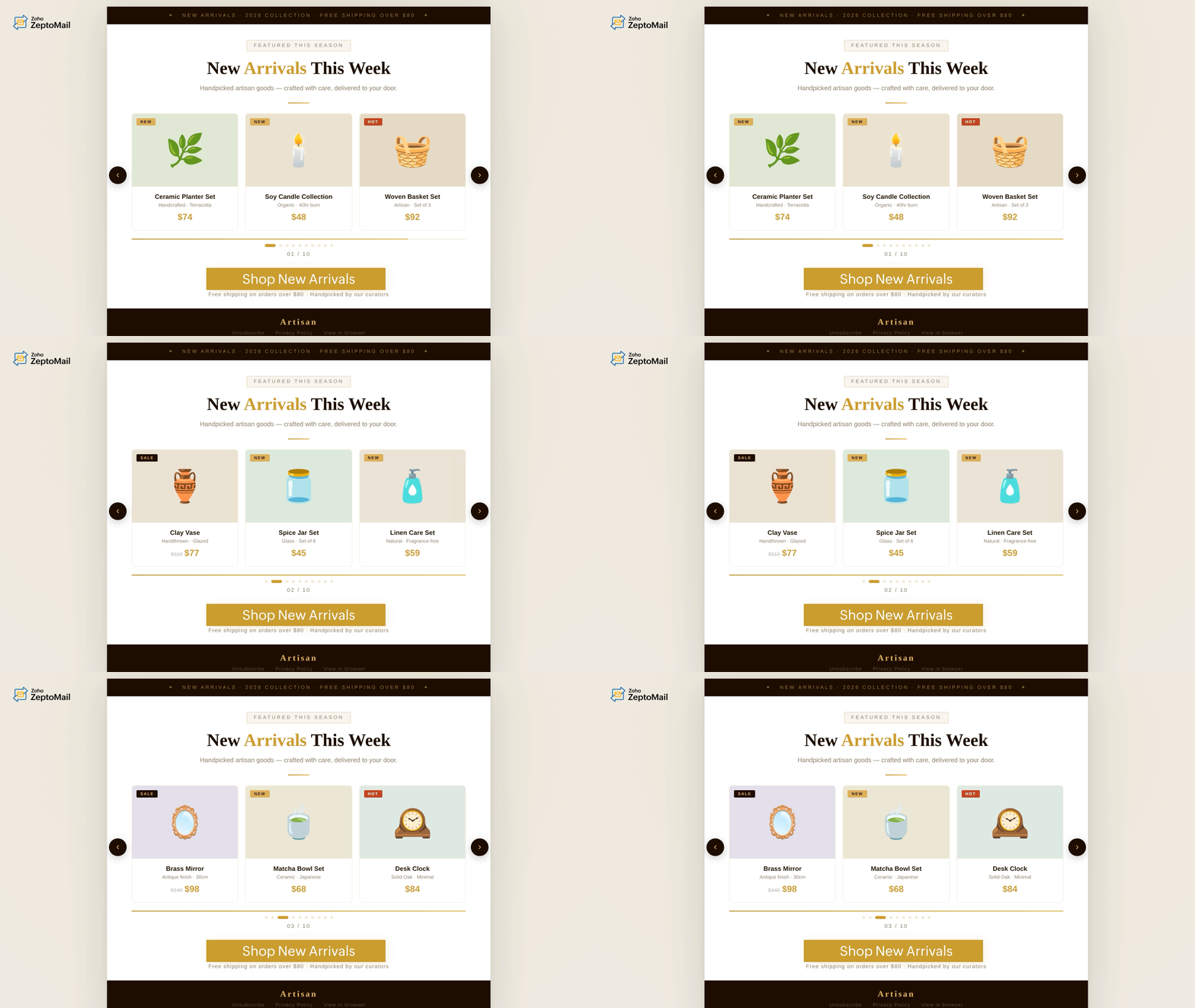
1. Image carousels
Image carousels allow users to swipe or click through multiple images directly inside the email, creating a more interactive and visually engaging browsing experience. This makes it easier for users to explore more options and details within limited email space while keeping the design clean, modern, and engaging. These are commonly used for:
Product showcases
Fashion collections
Travel destinations
Property listings
Feature highlights
Order confirmations
Example:
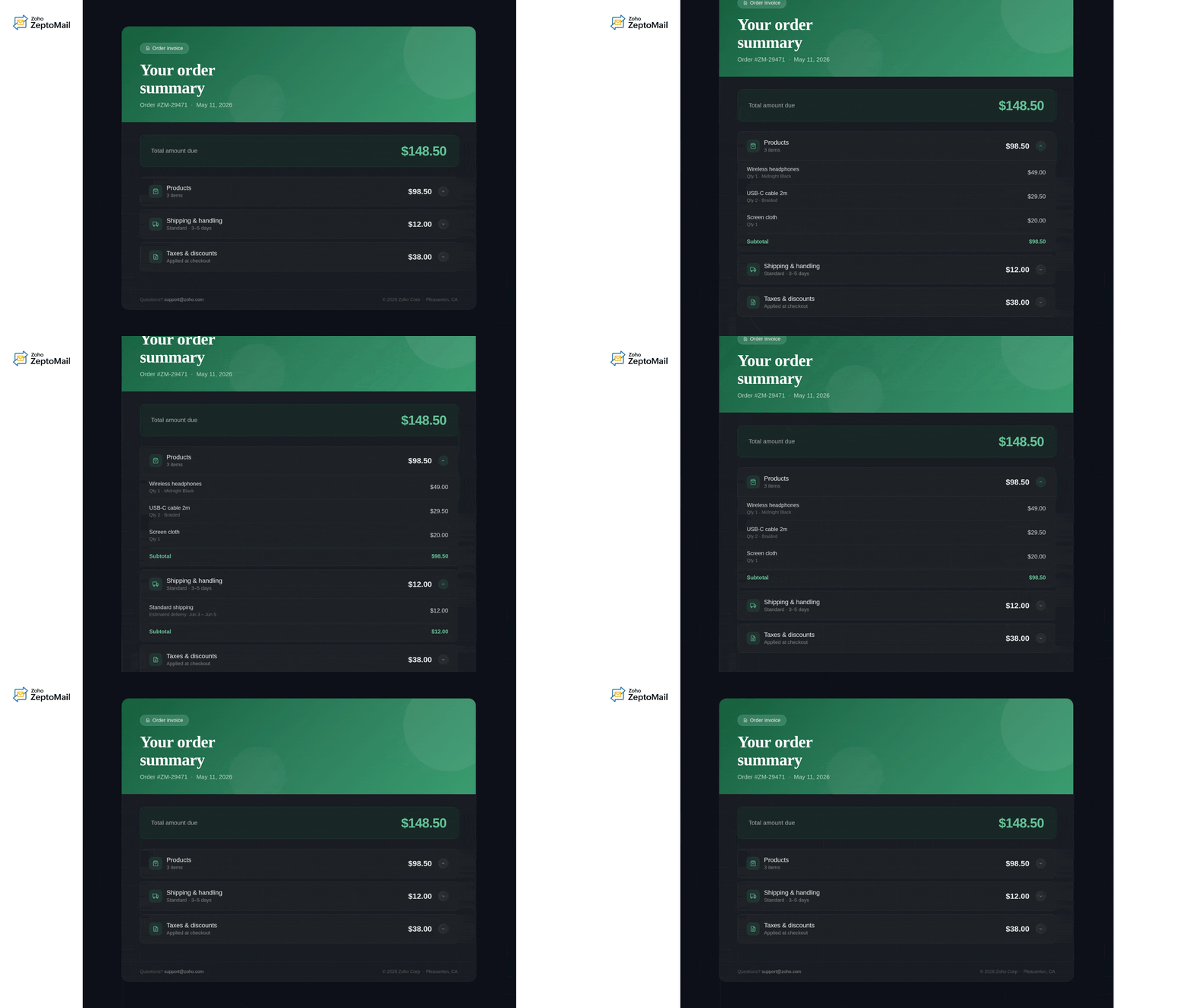
2. Accordions
Accordion emails let users expand or collapse sections to reveal more information only when needed. This helps keep emails clean and organized while still providing detailed information. This element is useful for:
FAQs
Product details
Event schedules
Order summaries
Terms and conditions
Example:
3. Polls and surveys
Users can vote, rate, or answer questions directly within the email without opening an external survey page. Inline surveys often improve response rates because they reduce extra steps. These are useful for:
Customer feedback
NPS surveys
Product research
Event feedback
Example:
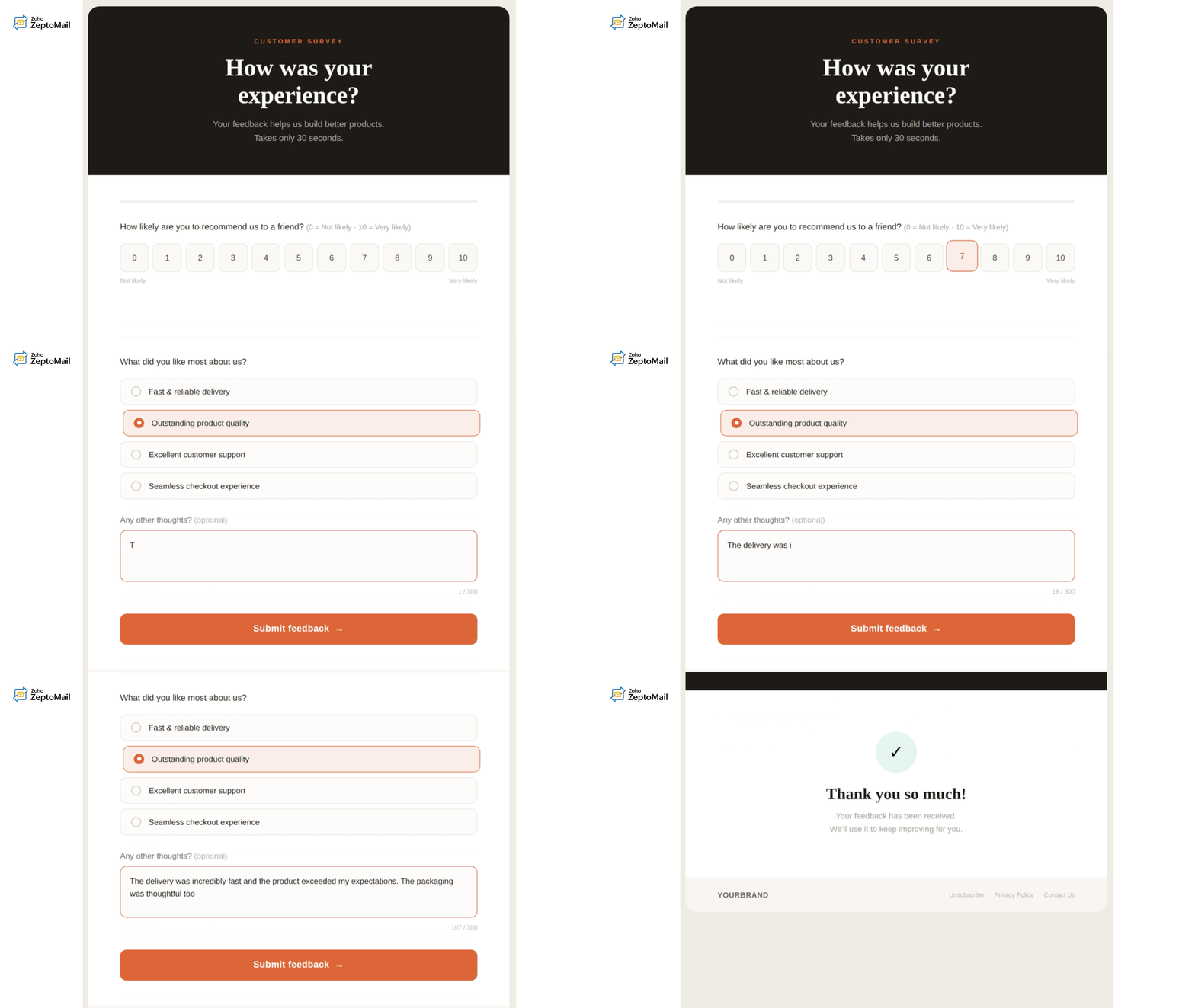
4. Gamified emails
Some brands use interactive games or playful experiences inside emails to boost engagement. Gamified emails work especially well during festive campaigns, product launches, and promotional events. Examples include:
Spin-the-wheel discounts
Scratch cards
Quizzes
Countdown challenges
Mystery reveals
Example:
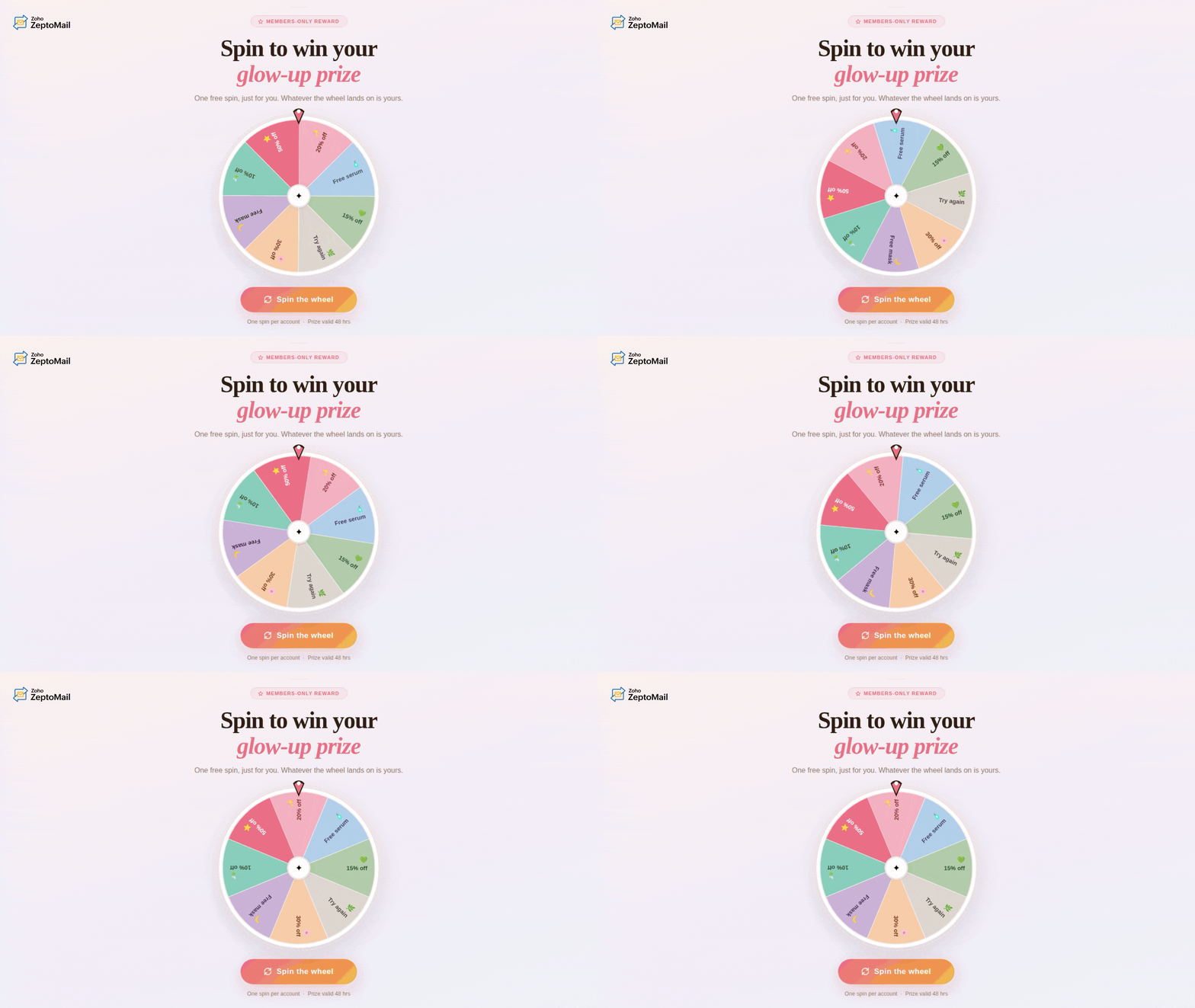
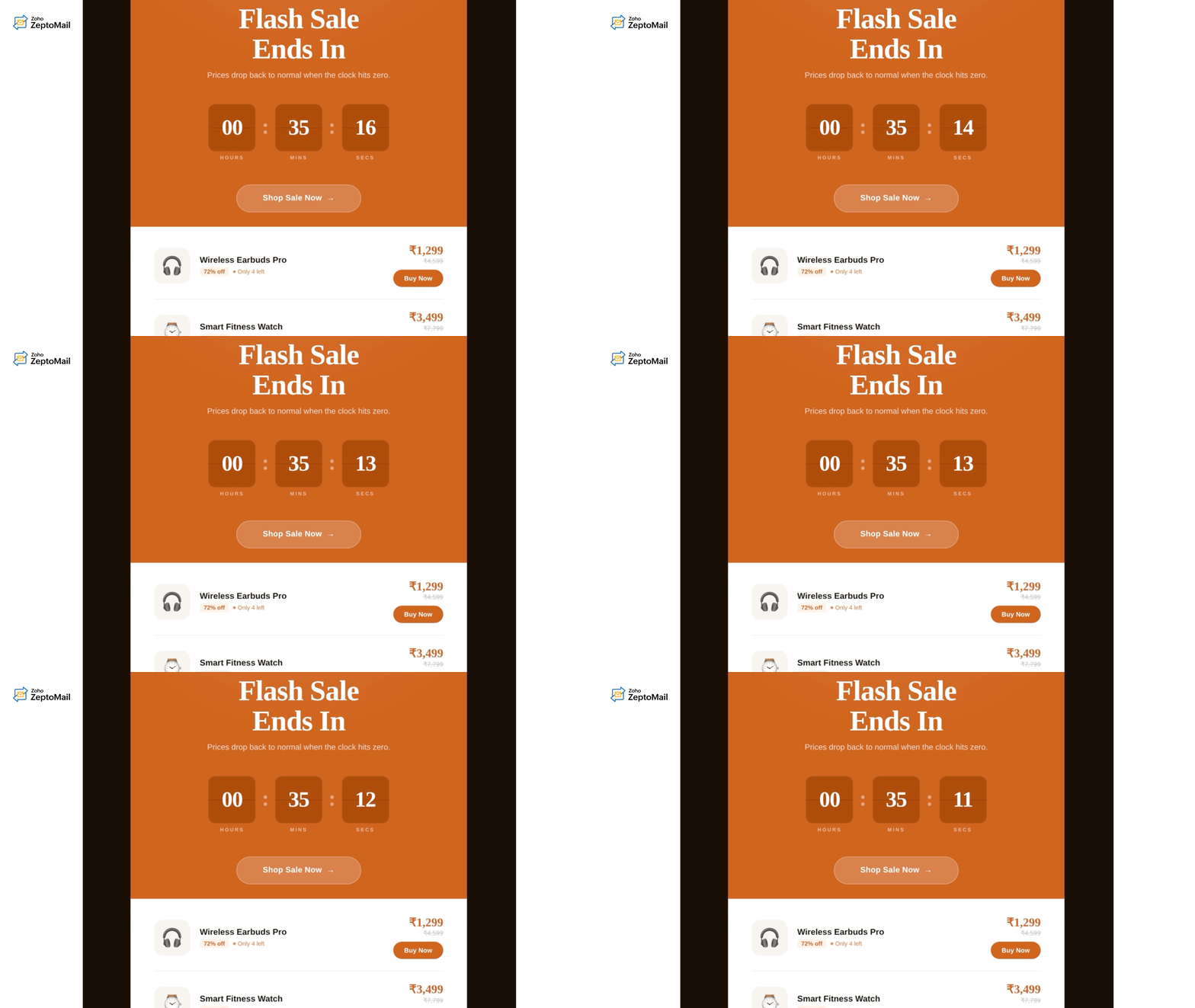
5. Live content emails
These emails display real-time information whenever the email is opened. This keeps the content fresh and relevant even after the email has already been delivered. Examples include:
Live order tracking
Weather updates
Stock availability
Price changes
Sports scores
Countdown timers
Example:
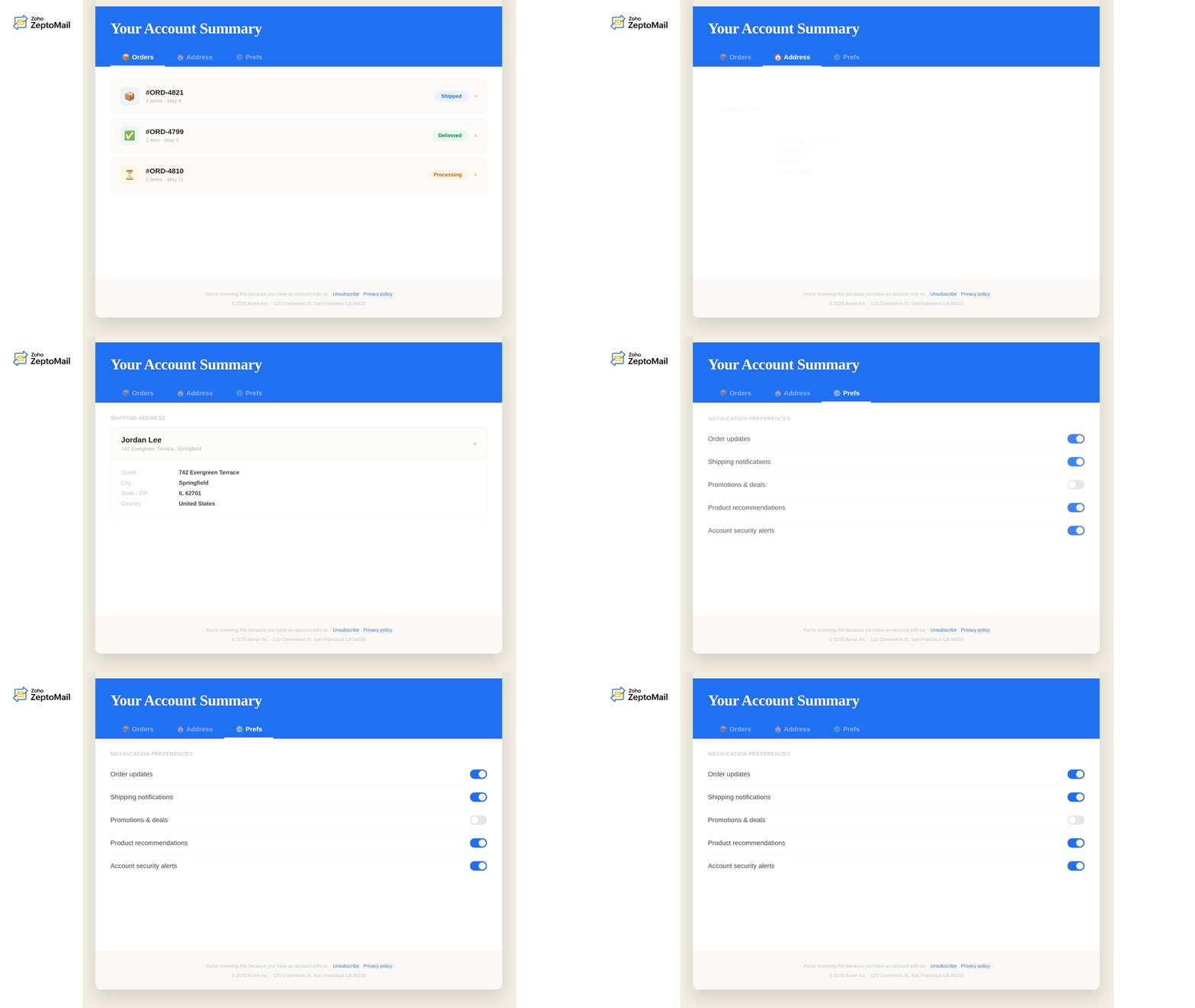
6. Embedded forms
In this type, users can fill out forms directly inside the email instead of visiting a webpage. These forms are commonly used for:
Appointment confirmations
RSVP responses
Preference updates
Support requests
Feedback submissions
Example:
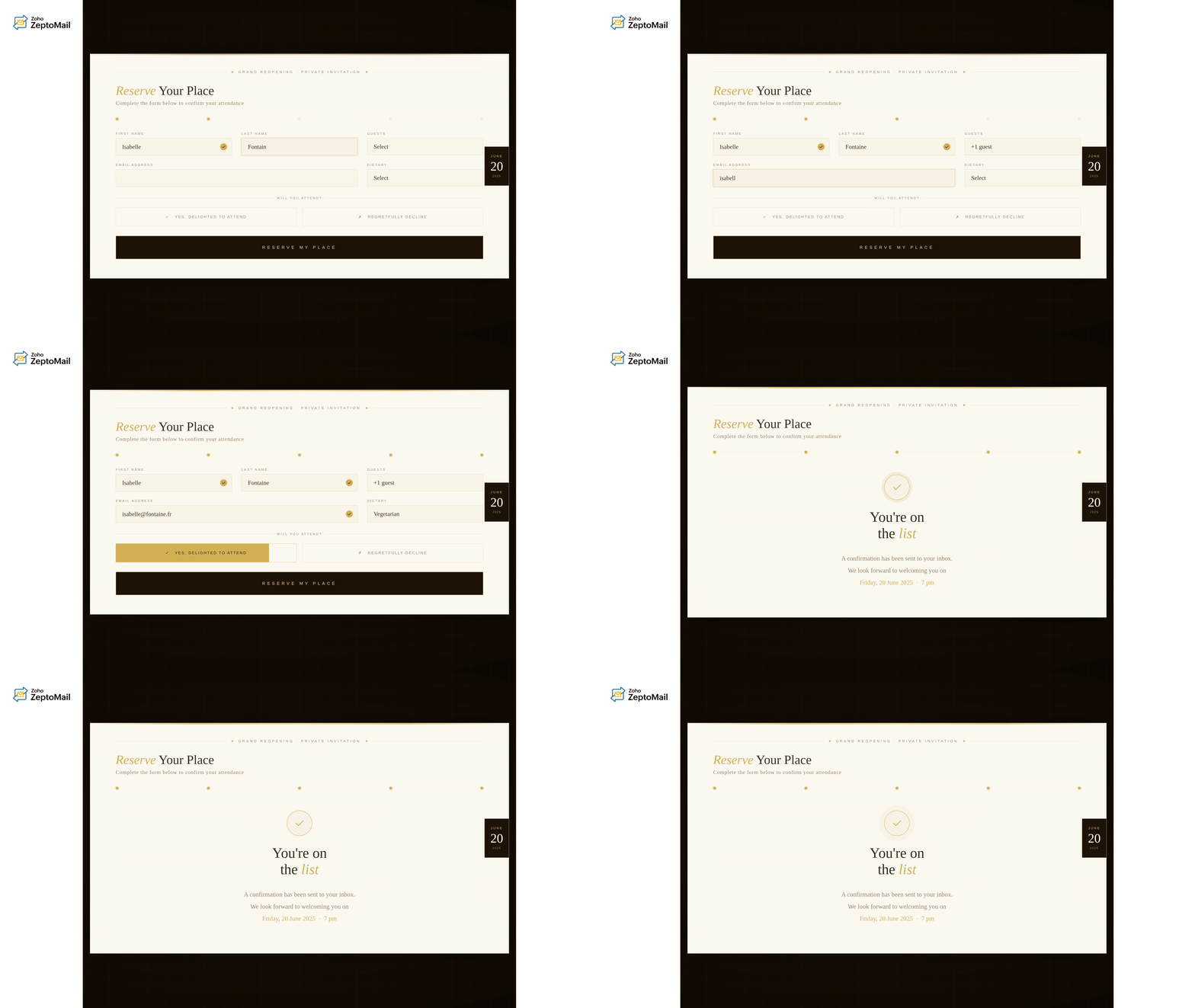
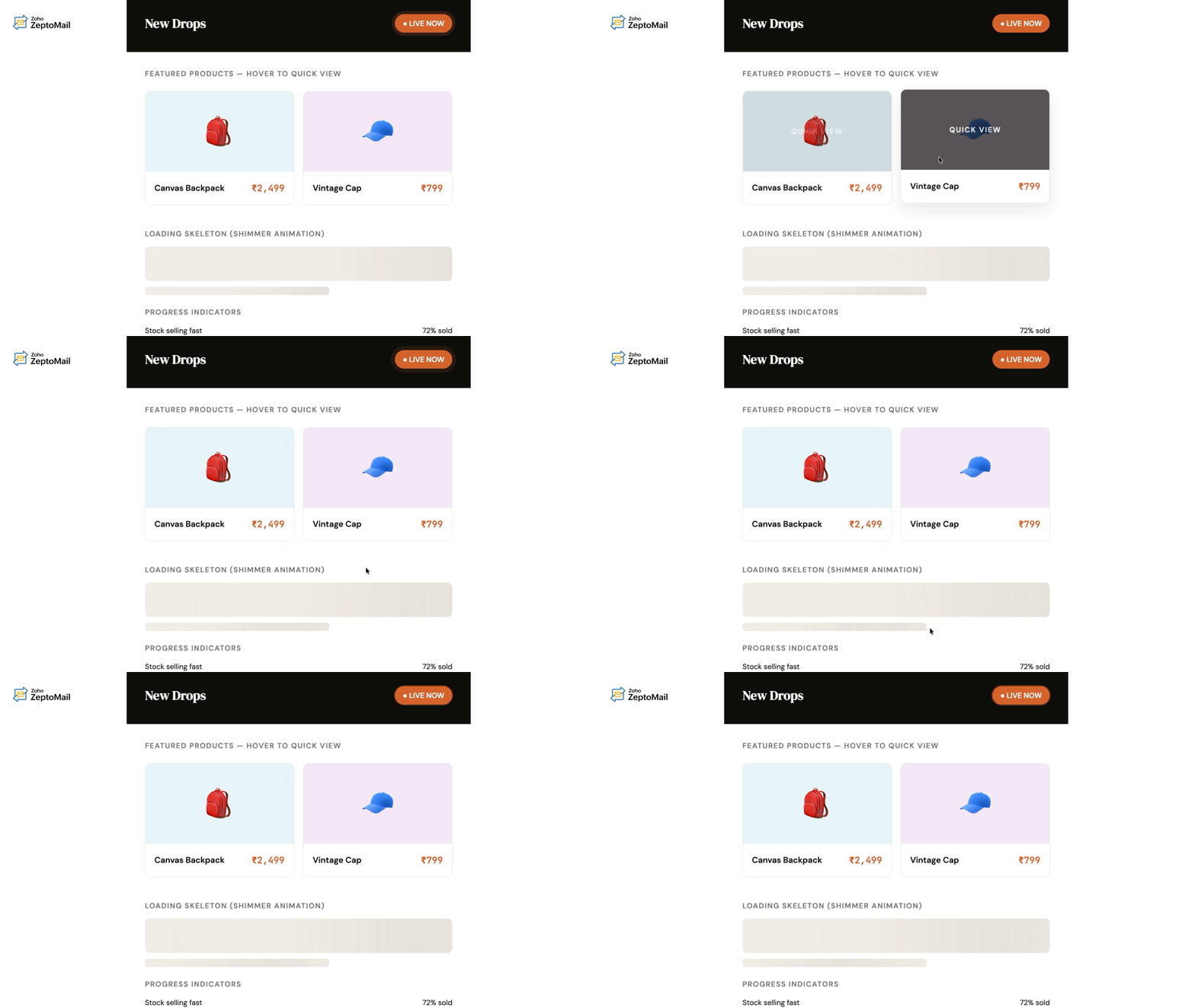
7. Interactive product recommendation emails
By making product discovery and shopping actions possible within the email itself, interactive recommendation emails create a smoother buying experience, reduce friction, and encourage faster purchase decisions. These emails allow users to:
Browse products
View alternate colors or variants
Compare options
Add items to cart directly from the inbox
Example:
8. AMP-powered emails
AMP emails enable advanced interactive experiences that feel similar to using a web application directly inside the inbox. With AMP, users can:
Schedule appointments
Reply to comments
Browse dynamic content
Complete workflows
Submit forms
View live updates
This is all without leaving the email or switching between multiple tabs. This creates a faster, more seamless user experience while improving engagement and convenience.
Example:
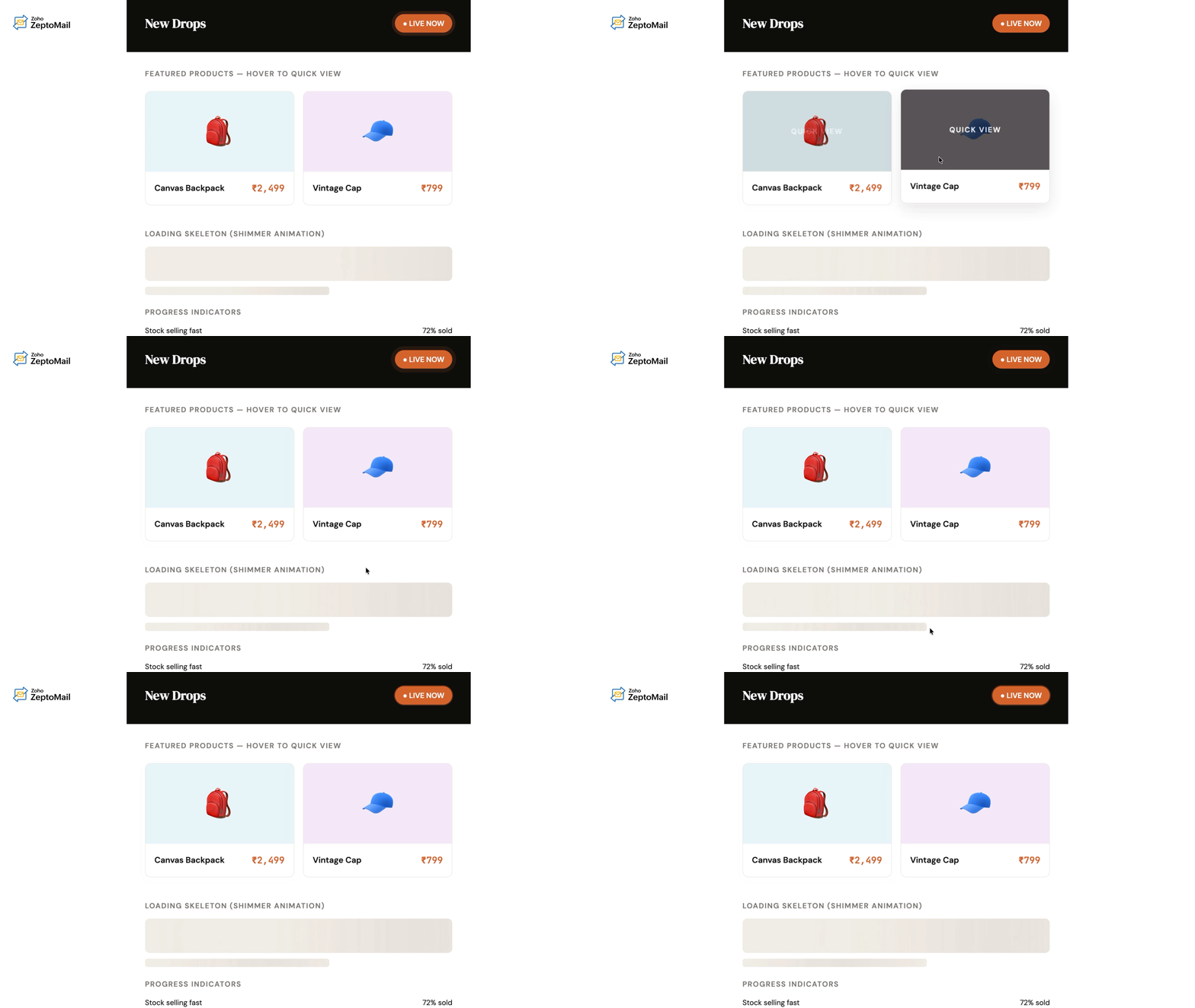
9. Hover and rollover effects
Simple interactions like hover effects, image swaps, or animated buttons help make emails feel more responsive and visually engaging. These are often used to:
Highlight CTAs
Reveal additional information
Showcase product variations
Example:
10. Live search buttons
Live search button emails allow users to search for products, services, or information directly from within the email itself. Instead of redirecting recipients to a homepage and asking them to search again, these emails streamline the discovery process. Users can:
Search products
Find hotel availability
Browse job listings
Explore travel destinations
Check inventory
Filter recommendations without leaving the inbox
These emails reduce friction and help users reach relevant results faster, improving both engagement and conversion opportunities.
Example:

Best practices for crafting interactive emails
If you're planning to make your emails interactive, then here are some key best practices that can help you while crafting them.
Keep subtle elements
Keep interactive elements subtle and purposeful. Adding too many interactions can overwhelm readers and distract them from the email’s main goal. Instead, focus on one or two meaningful interactive features that improve the user experience without making the email feel cluttered.
Always include fallback versions
Always include fallback versions. Not all email clients support advanced interactive elements, so provide a fallback option that still lets users complete the intended action even if the interactive feature doesn’t load properly. This ensures a consistent experience across different devices and email clients.
Design for mobile first
Because most emails are opened on mobile devices, ensure that:
Buttons are easy to tap.
Layouts are responsive.
Text remains readable.
Interactions work smoothly on smaller screens.
Prioritize accessibility and readability
Interactive emails should remain usable for everyone. So always choose:
Proper color contrast.
Clear labels.
Alt text for images.
Readable font sizes.
Keyboard-friendly interactions.
Optimize loading speed
Heavy designs and large assets can slow down email rendering. Keep interactions lightweight and optimized. Faster-loading emails improve the user experience, especially on mobile devices during slower network connections.
Test across email clients
An email that works perfectly in Gmail may break in Outlook. Always test across:
Desktop and mobile devices.
Multiple inbox providers.
Dark mode environments.
Make interactions purposeful
Interactivity should improve usability, not exist just for visual appeal. Every interactive element should help users complete tasks faster or understand information better.
Challenges and limitations of interactive emails
Here are some of the common challenges and limitations of interactive emails.
Limited email client support: Not all email clients support advanced interactive elements like AMP, CSS animations, or embedded forms. Features may work in Gmail but not in certain versions of Outlook or Apple Mail.
Need for fallback versions: Because support varies across email clients, businesses often need to create both interactive and static fallback versions, which increases development effort.
Complex development process: Building interactive emails requires knowledge of HTML, CSS, AMP for email, and email client compatibility rules, making development more complex than standard emails.
Rendering inconsistencies: Interactive elements may display differently across devices, browsers, and inbox providers, affecting the user experience.
Security and privacy restrictions: Many email clients restrict scripts and dynamic content for security reasons, limiting the type of interactivity that can be implemented.
Slower loading times: Heavy designs, animations, or large assets can slow down email rendering, especially on mobile devices or slower internet connections.
Accessibility concerns: Poorly designed interactive emails may not work well with screen readers or keyboard navigation, making them difficult for some users to access.
Testing becomes more time-consuming: Interactive emails require extensive testing across multiple email clients, devices, and operating systems to ensure consistent functionality.
Analytics limitations: Tracking user interactions inside emails can sometimes be less reliable due to privacy protections and image-blocking settings.
Higher maintenance effort: As email client support changes over time, interactive email components may require ongoing updates and compatibility checks.
Can interactive emails be used for transactional communication?
Absolutely! Transactional emails can be made interactive too, and this is still a highly under-explored area for many businesses.
Transactional emails already achieve exceptionally high open rates when compared to marketing emails because recipients actively expect and look for them. Because these emails are primarily functional, many businesses hesitate to add interactive elements, assuming it may over complicate the experience.
Remember, the key is to ensure that the interaction supports the transactional purpose of the email. Interactive elements should simplify actions and reduce friction, not act as decorative distractions.
Wrapping up
Interactive emails are transforming the inbox from a passive reading space into an engaging user experience. Instead of simply delivering information, they allow users to take action directly within the email itself.
However, successful interactive emails aren't about adding flashy effects everywhere. The best interactive experiences are the ones that genuinely make tasks easier, faster, and more convenient for users.
As inbox technology continues to evolve, interactive emails are likely to become a much larger part of both marketing and transactional communication strategies. Brands that focus on usability, accessibility, and meaningful interactions will stand out in increasingly crowded inboxes.