Workflow automation best practices: How to build reliable, secure workflows
- Last Updated : June 29, 2026
- 277 Views
- 12 Min Read
Key takeaways
- Reliable automation starts at design time: map and modularize your workflows, validate data at the entry point, and plan for failure with error branches and idempotent steps instead of hoping nothing breaks.
- Monitoring and governance are part of building, not an afterthought: execution history, audit trails, and least-privilege connections are what keep automations trustworthy as more people and teams start building.
- Use AI deliberately: let it build first drafts and handle judgment-based tasks, but verify what it generates, keep a human in the loop for high-stakes decisions, and leave deterministic logic to rules.
Automating workflows has become as crucial as any other critical business operation today. Building workflows is the easy part—but designing something that keeps running correctly when an API goes down, a record arrives in the wrong format, or three teams start editing the same record in an app is a different problem entirely.
The good news is that the strategies that close the gap are well understood. They fall into five areas: designing flows clearly, making them reliable, testing and monitoring them, governing them securely, and applying AI deliberately. This guide walks you through each one, with the specific reasons they matter and how you can incorporate them in your organization.
1. Designing workflows you can understand later
Map and visualize the process before you build
The most common reason an automation becomes unmaintainable is that nobody planned it. Someone wired up a trigger, added a few actions, and the logic grew sideways from there. Six months later no one can say what the flow does without clicking through every step.
Before you connect anything, sketch the path: what starts the flow, what each step does, if (or where) it branches, and what the end result should be. Laying it out first gives you clarity about the workflow before building it rather than after you've started to run it.
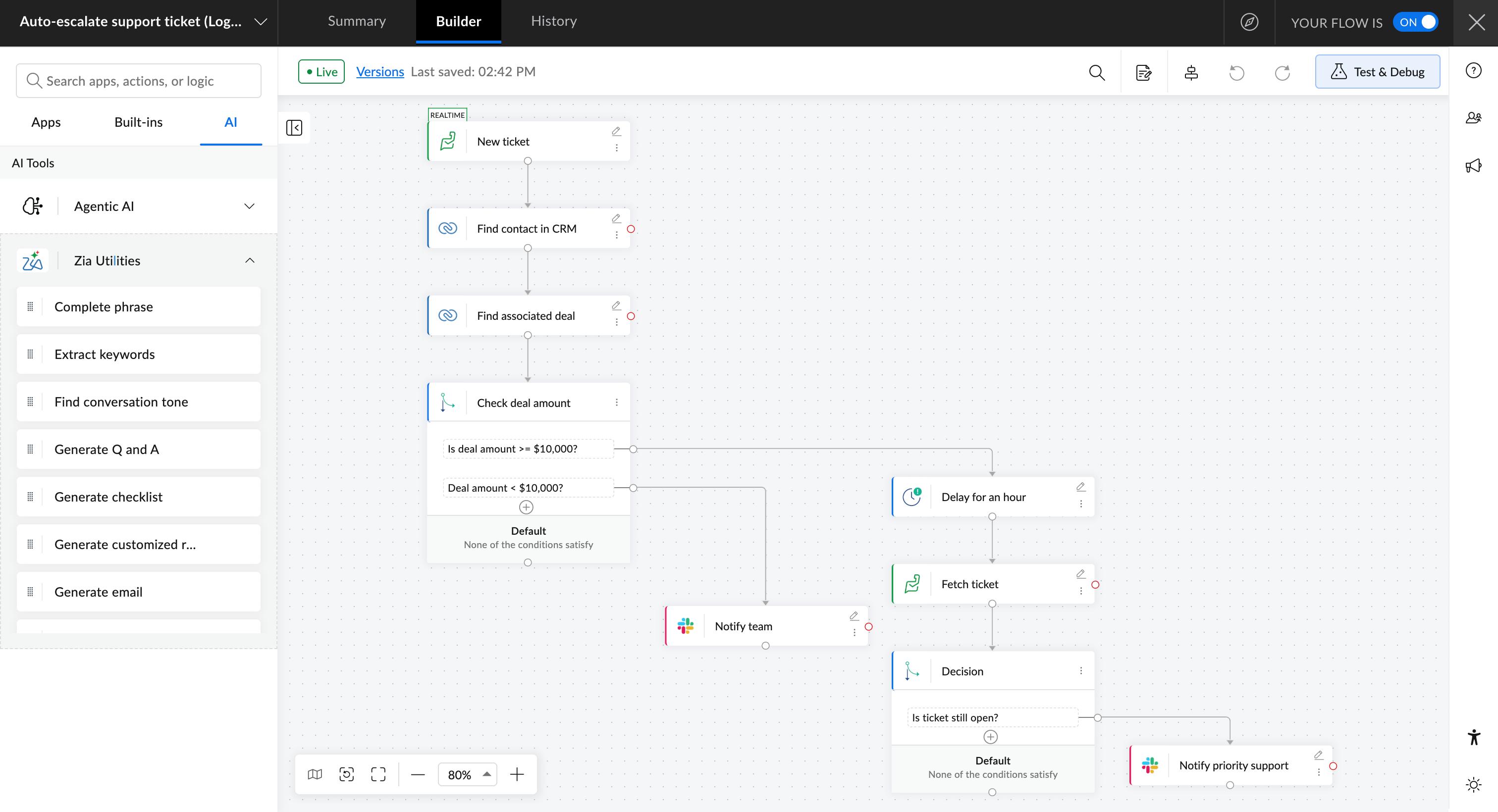
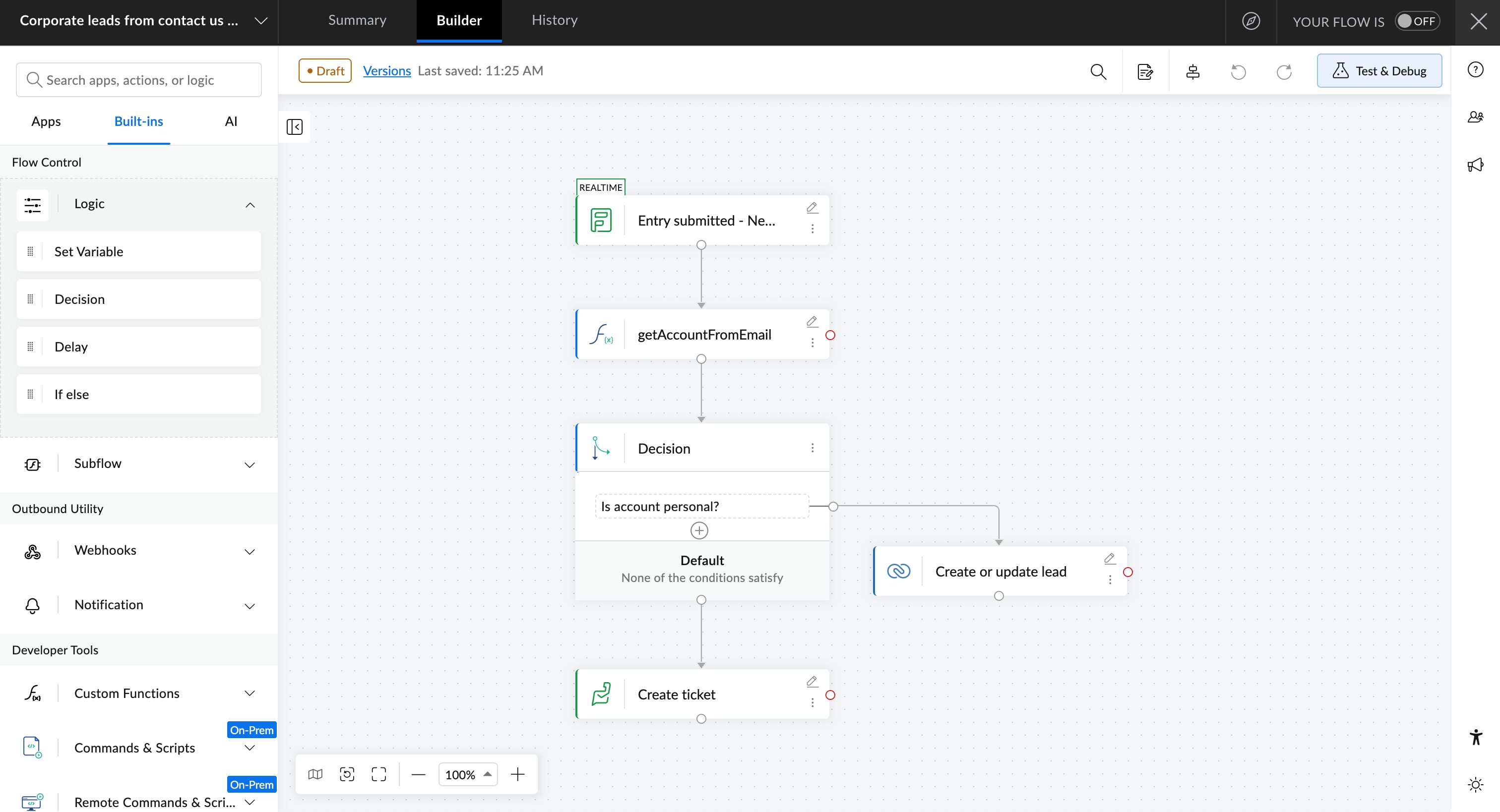
Zoho Flow is built around this idea. Its builder lets you design your automation as a true-to-life workflow diagram, so you see the actual data flow and every branch the way it will run, not as a list of disconnected steps. When the logic is visible, reviewing it and handing it to someone else both get easier.
Use the right building blocks instead of over-engineering
A lot of teams reach out to developers for automations, who then write custom code too early. If a platform gives you logic elements out of the box, use them. Native elements are easier for the next person to read, and they fail in predictable ways.
You'll also get values that change, such as email addresses, IDs, dates, etc., as natively available variables, and will have the option to create custom variables if you need additional values from calculations or external processes.
Zoho Flow ships with a wide set of built-in elements for this: decisions for branching, delays for timing, custom variables for configurable values, custom functions for the cases that genuinely need code, and a native email sender so notifications don't require a separate connected app.
Use modular and reusable workflows wherever possible
A single workflow should handle one aspect of a process. However, if you look at five different workflows, at least three of them will share some common steps that would essentially do the same thing but in a slightly different context. Building each of these steps in your workflows from scratch will waste your time.
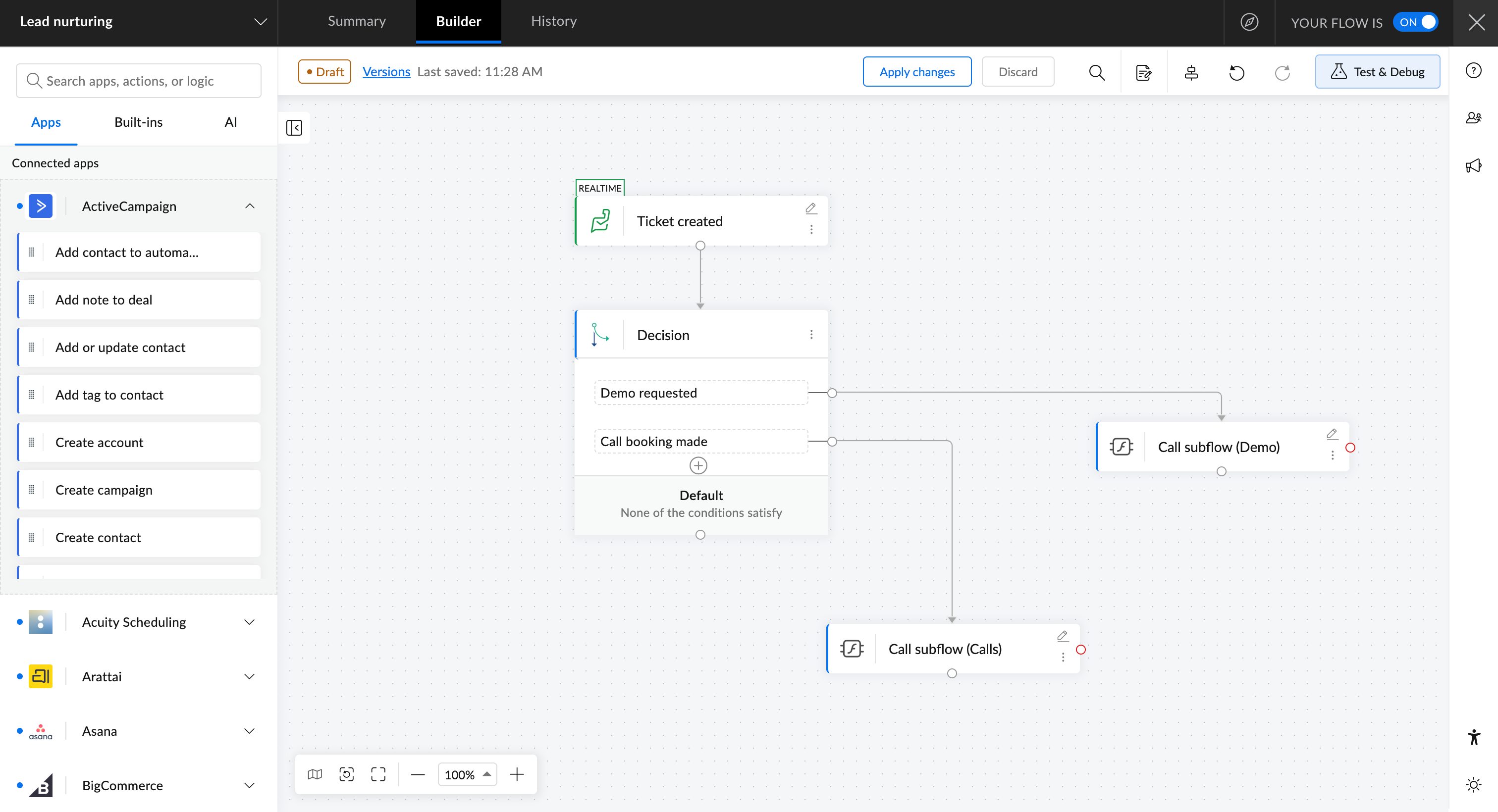
Zoho Flow supports this with subflows, which are modular mini-flows made of a set of actions you can reuse across other workflows, and with shareable connections. Connections are private by default, but when a team relies on a common app, you can share one connection across the organization so everyone builds on it instead of creating their own.
Validate and transform data at the entry point
Most automation failures are really data failures. A date arrives in a format the destination rejects, a required field is empty, or the trigger hands you only part of the record you need. Catching this at the start of the flow, rather than letting an incorrect value travel three steps before it fails, saves hours of debugging.
Check the fields you depend on, normalize formats early, and make sure you're pulling the full set of data the later steps require.
Zoho Flow helps on both fronts. Its auto date-time formatter reconciles the source and destination formats for you, and it leaves the choice of format in your hands rather than guessing. Its fetch actions also retrieve more data than a standard trigger or action returns, which gives you control over exactly what gets passed to the steps that follow.
Organize and document your workflows
As the number of flows grows, the risk shifts from "this flow is broken" to "nobody knows which flow does what or who owns it." Consistent naming, a clear owner for each flow, and a logical grouping scheme prevent that. Documentation is what keeps an automation maintainable long after the person who built it has moved on.
Zoho Flow lets you organize workflows into folders by team, purpose, or any structure that fits how your organization works, so the library stays navigable as it scales.
2. Making workflows reliable
Build error handling and safety nets
Sometimes your automations can hit a failure you may not anticipate: an API timeout, an expired token, a service that went unavailable for a brief period, etc. The question is whether your workflow notices and responds, or whether it fails silently and someone finds out days later.
The best practice is to always plan in advance what should happen when a critical action fails. Sometimes that means retrying, alerting a person, or assigning an alternative path so the rest of the process continues. It also helps to separate temporary failures, which are worth retrying, from permanent ones, which should be routed to someone for review.
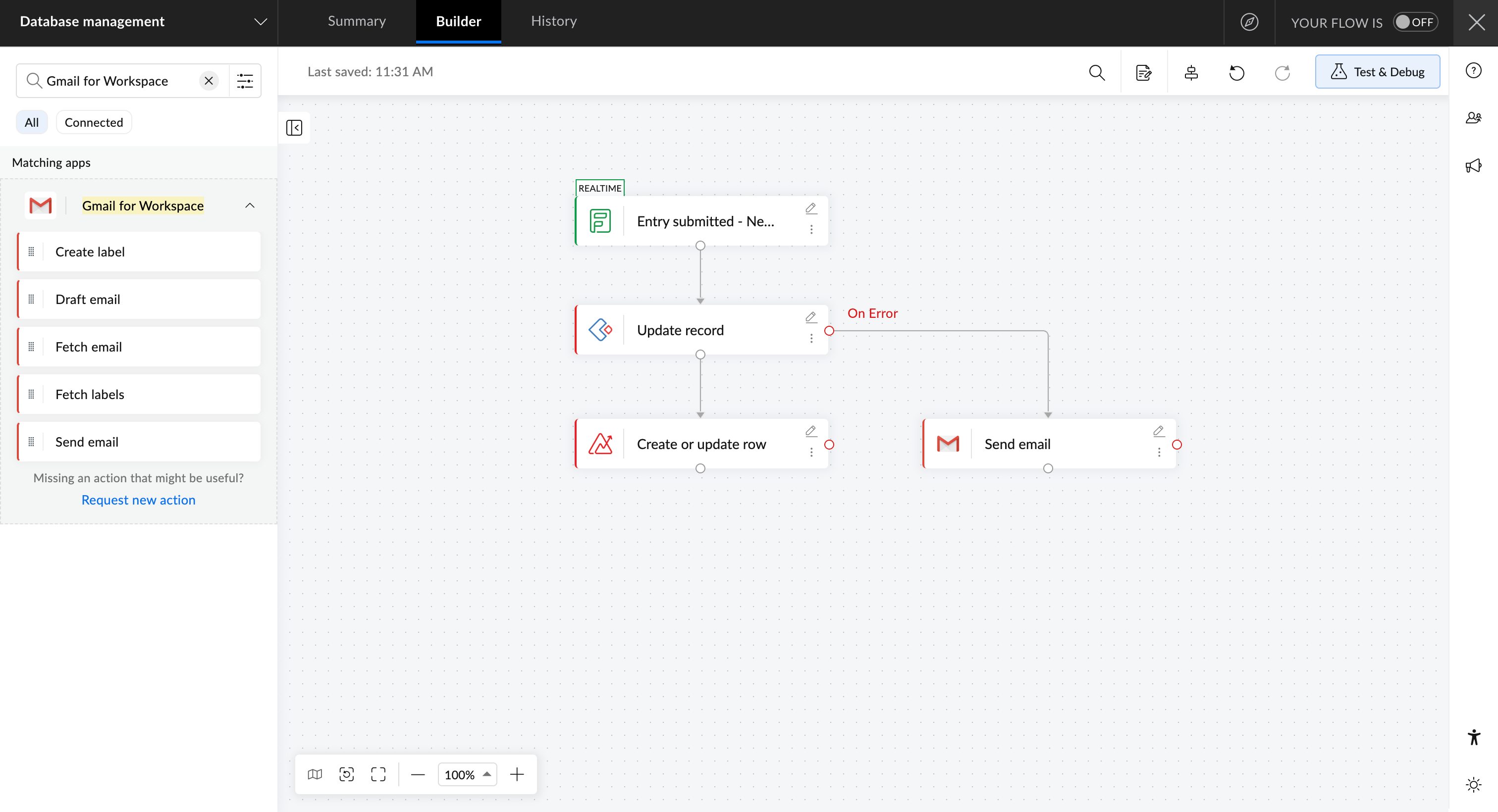
Zoho Flow provides an error branch for exactly this. If a critical action fails, you can have the flow send a notification to your team or run an alternative action instead of stopping cold. Zoho Flow also provides auto and manual reruns with the option to resume at a failed step or restart the entire workflow from the trigger event.
Make operations idempotent
Idempotent is a technical word for a simple safety property: running the same flow twice shouldn't create two of the same thing. Without it, a retry or a duplicate trigger produces a second invoice, a duplicate contact, or a doubled payment, and these errors are painful to clean up after the fact.
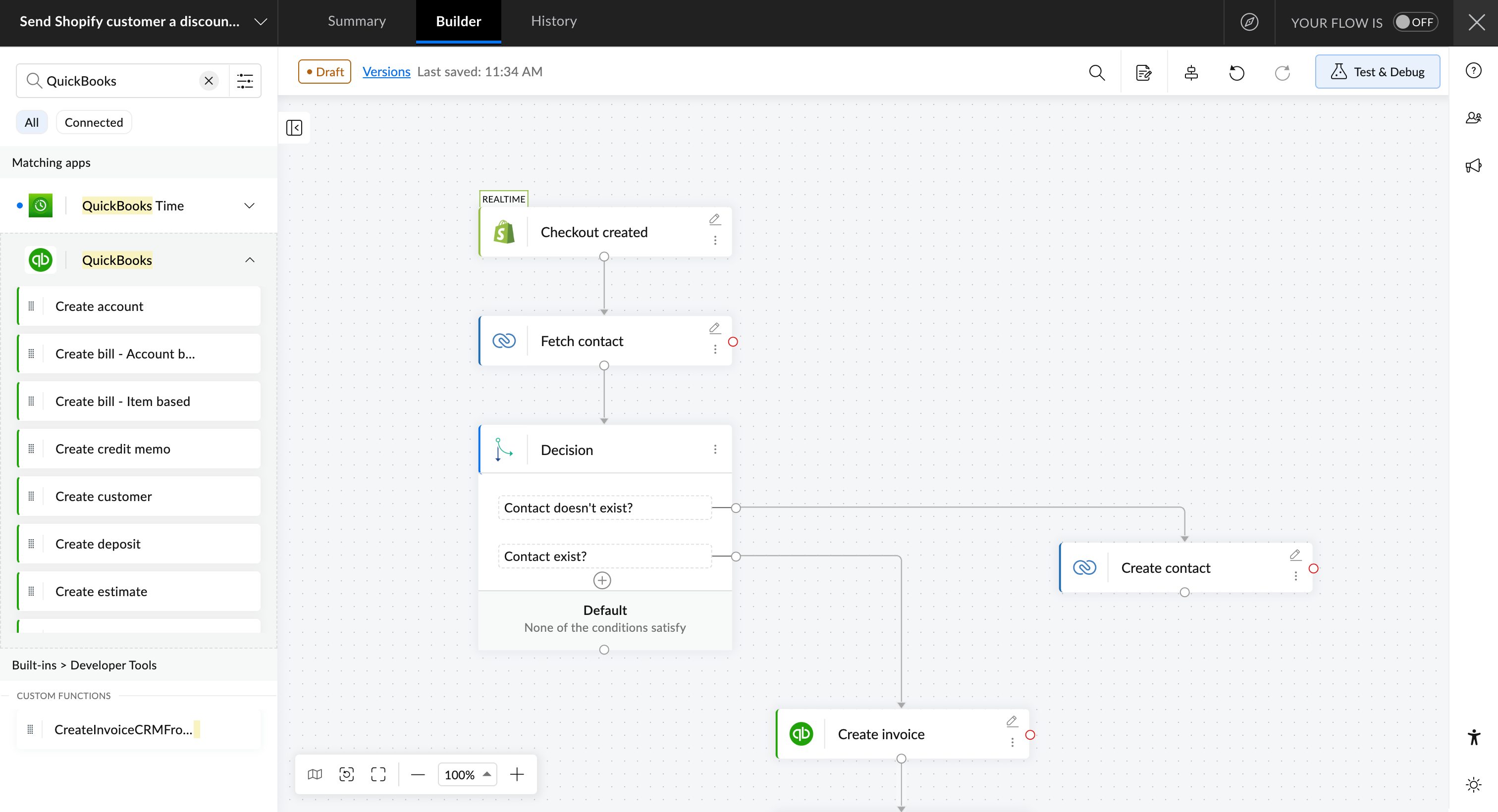
The best approach is to look for an existing record before creating a new one, matching a unique key like an email address, an order number, or a contact ID, and updating instead of inserting when you find one.
In Zoho Flow, fetch actions let you look up existing records first, so your flow can decide whether to update what is already there rather than blindly creating a duplicate.
Respect API rate limits
Every connected app sets a ceiling on how many requests it will accept in a given window. A workflow that ignores this works fine in testing, when volume is low, and then starts failing the day real traffic hits it. Know the limits of the apps you depend on, and pace or batch high-volume actions so you stay under them.
3. Testing and monitoring
Test before you go live
Any workflow you build should be tested for multiple scenarios. Run it with realistic sample data, including awkward cases like missing fields, unusual formats, and large records. Check the output of each step, not only the final result, because a workflow can finish successfully while sending inaccurate data halfway through.
Zoho Flow's Test and Debug feature lets you run a flow with dummy data and retest using previous test data or recent execution data, so you can confirm behavior before any of it touches a live system.
Monitor executions and troubleshoot with full data
Even a tested workflow can run into unexpected errors—and when you have multiple team members with varying workflow-building experience build workflows, there's always a chance that some of your workflows may experience errors.
You'll want to know your error and completion rates as a matter of routine, and you want enough detail to diagnose a problem fast when one appears. Reactive log-reading isn't enough on its own; pair it with proactive alerting so failures find you rather than the other way around.
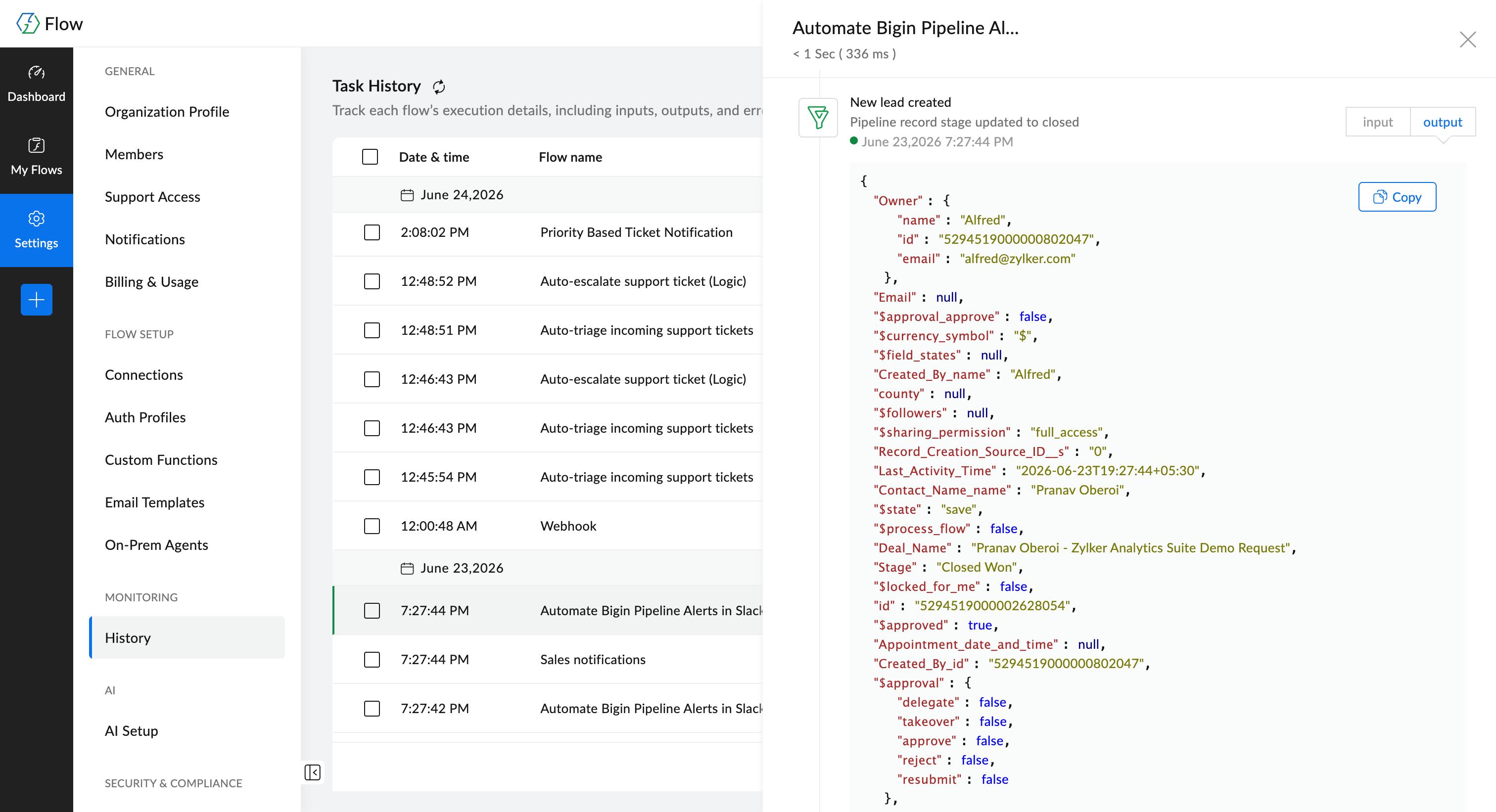
Zoho Flow keeps a detailed execution history with the complete data for each run: full input and output payloads, completion statuses, and any error messages. That means you can trace what actually happened in a given execution without reconstructing it by hand. How long history is retained depends on your plan, so check the current limits when you plan your troubleshooting process.
4. Governing automations securely
Use secure connections and least-privilege access
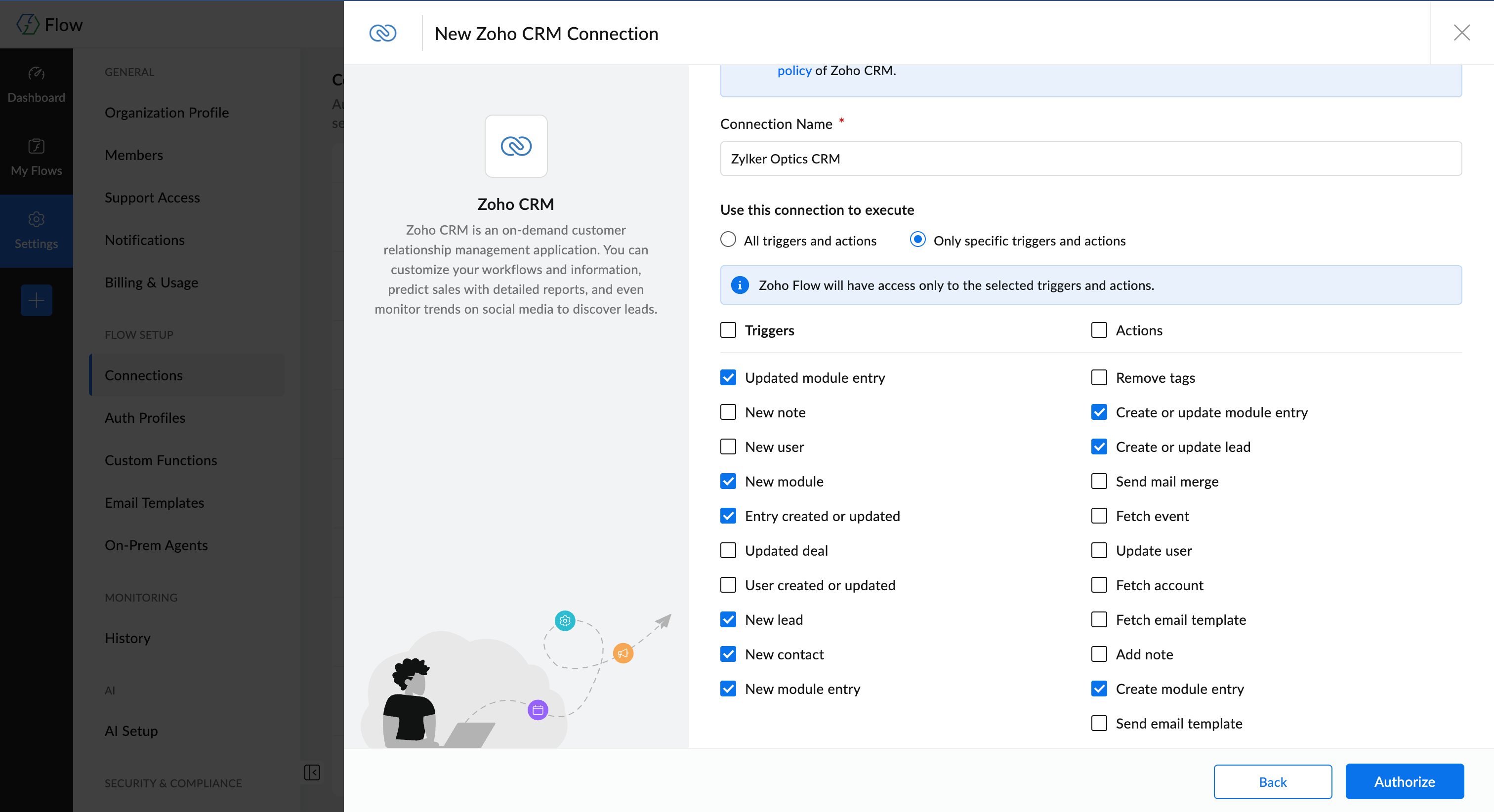
An automation often has consistent access to your most sensitive systems, so its credentials deserve the same care as a user's. Prefer OAuth, which grants scoped, revocable access, over raw API keys that are easy to leak and hard to rotate. Give each connection only the access it needs to do its job, and nothing more. Systems that live inside your own network need a secure path out rather than being exposed to the open internet.
Zoho Flow supports a range of connection methods, predominantly OAuth-based and stored securely. You also get granular access permissions for different modules within an app account. For example, if you want to connect your Zoho CRM with your marketing automation app for lead email addresses alone, you can restrict the connection to only access the Lead module of your CRM, exempting it from Customers, Deals, or Reports.
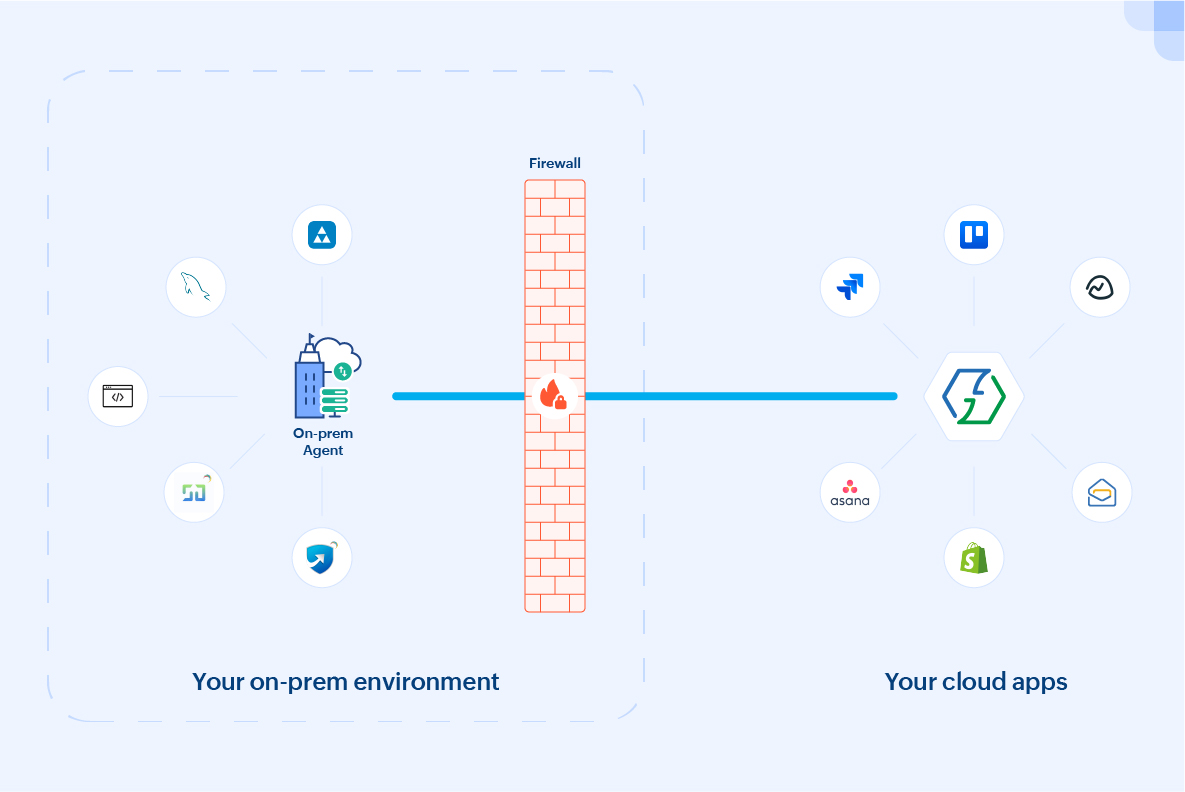
For systems that can't live in the cloud, Zoho Flow's on-prem agent provides a secure channel for integrating on-premises and cloud applications.
Maintain an audit trail and manage change
In any environment with more than a couple of people, you need to answer a basic governance question: Who changed what, and when. This matters for compliance, and it matters the day a working flow suddenly stops and you need to know what was modified. Pair that record with a real change process, so updates to live flows are deliberate rather than accidental.
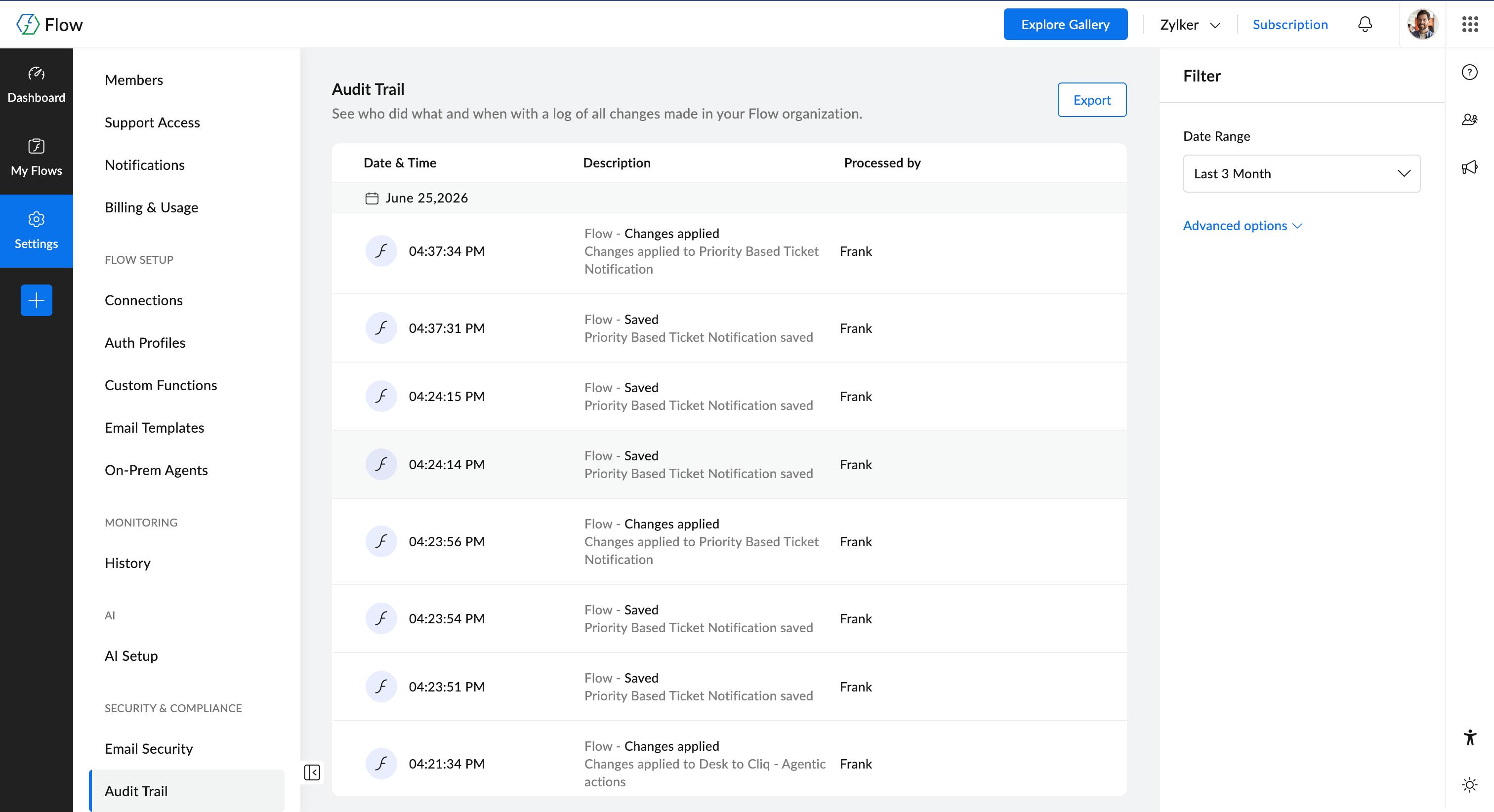
Zoho Flow keeps an audit trail that logs the actions taken across your account: flows created, modified, or deleted, connections added or removed, and users added or removed, all in one place. That gives managers and admins clear visibility into changes without having to piece the story together from memory. As with execution history, the retention period depends on your plan, so confirm the current details when you set your governance policy.
5. Using AI in your workflows without losing control
AI changes two things about automation: it lets you build flows faster, and it lets you automate actions and decisions that would otherwise involve human intervention or a host of decision branches. Both are useful, and both go wrong when AI is treated as a default rather than a deliberate choice. The practices below keep AI working for you with the least exposure to the risks associated with it:
Use AI to build faster, then verify what it generates
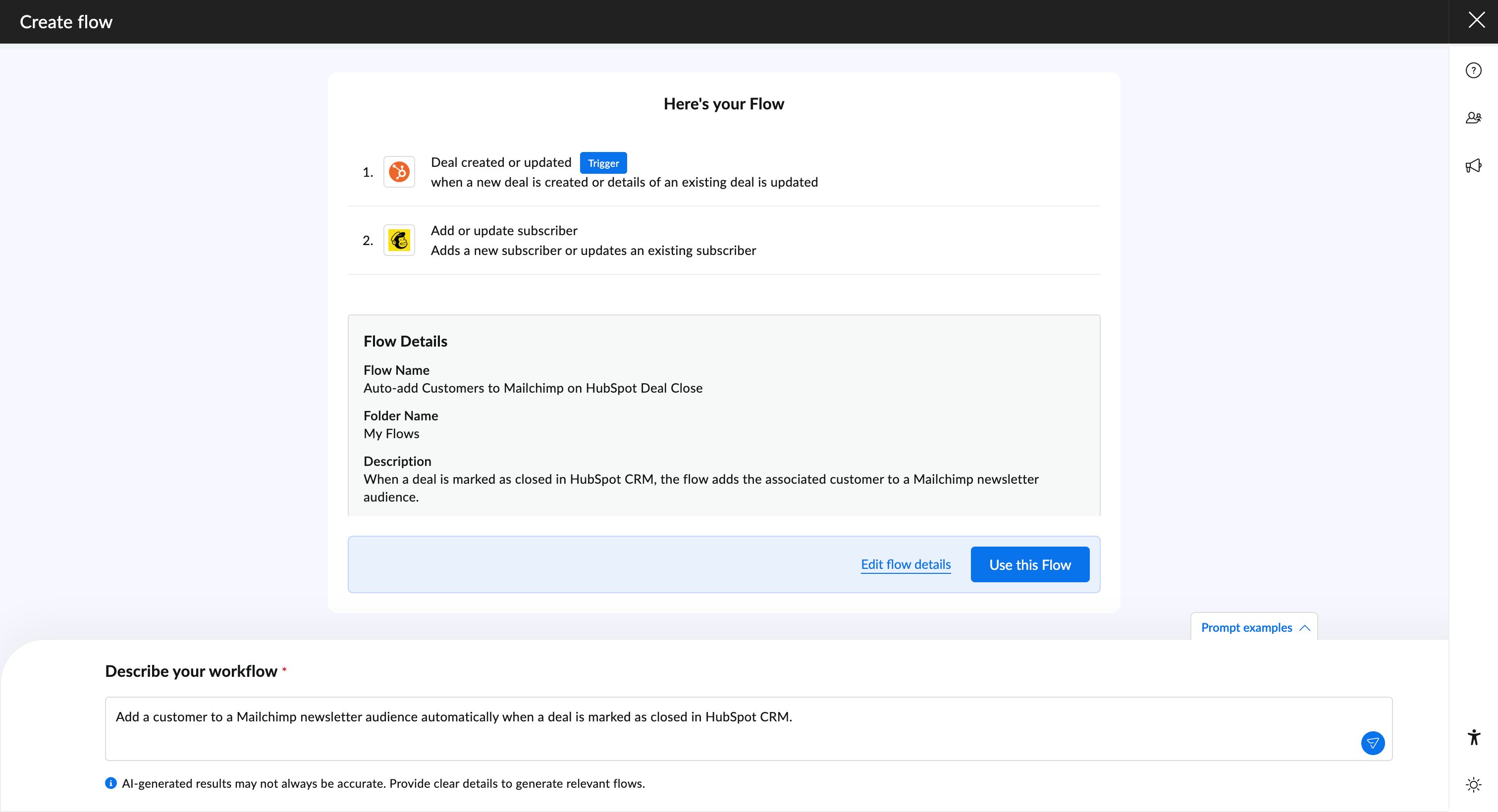
Describing a flow in plain language and getting a working draft back is a real time-saver, especially for a first version. It's still a draft, though, so read through the logic, check the branches, and confirm it does what you want before you turn it on, the same way you would review anything generated for you.
Zoho Flow lets you create flows from a prompt, giving you a starting point you can refine rather than a blank canvas.
Use AI for what rules can't do, and rules for everything else
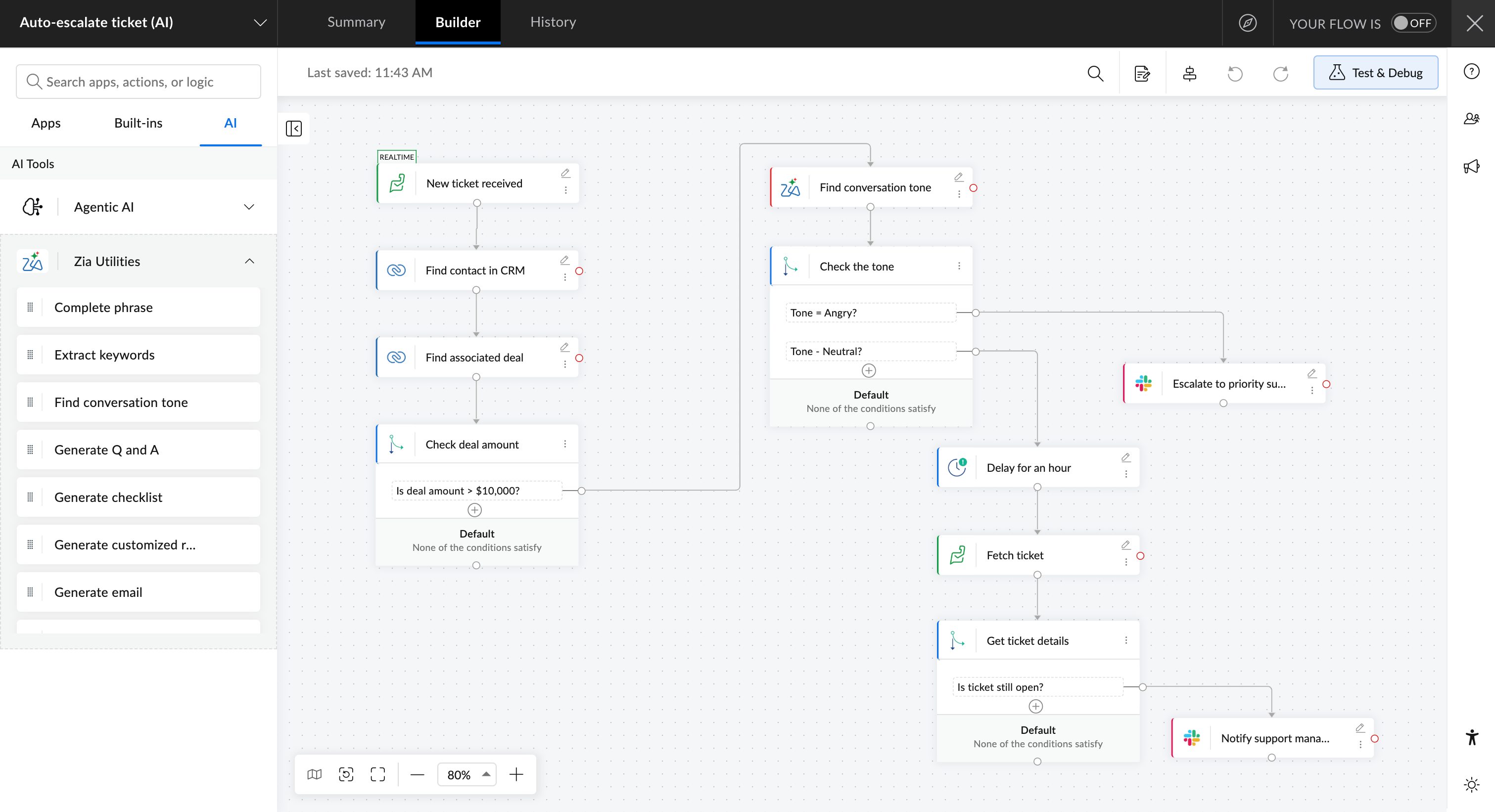
Plenty of automation logic is deterministic: If a value is over a threshold, route it here; if a field is empty, stop. That work belongs in rules, which are faster, cheaper, and fully auditable. Save AI for the tasks that rules genuinely cannot handle, like summarizing a long message, classifying free-form text, pulling structured data out of an unstructured document, or judging sentiment. Knowing where the line sits keeps your flows both capable and predictable.
Zoho Flow offers Zia Utilities you can drop in as intelligent steps between actions, so the AI work happens at the exact point in the flow where you need it.
Keep a human in the loop for high-stakes or irreversible decisions
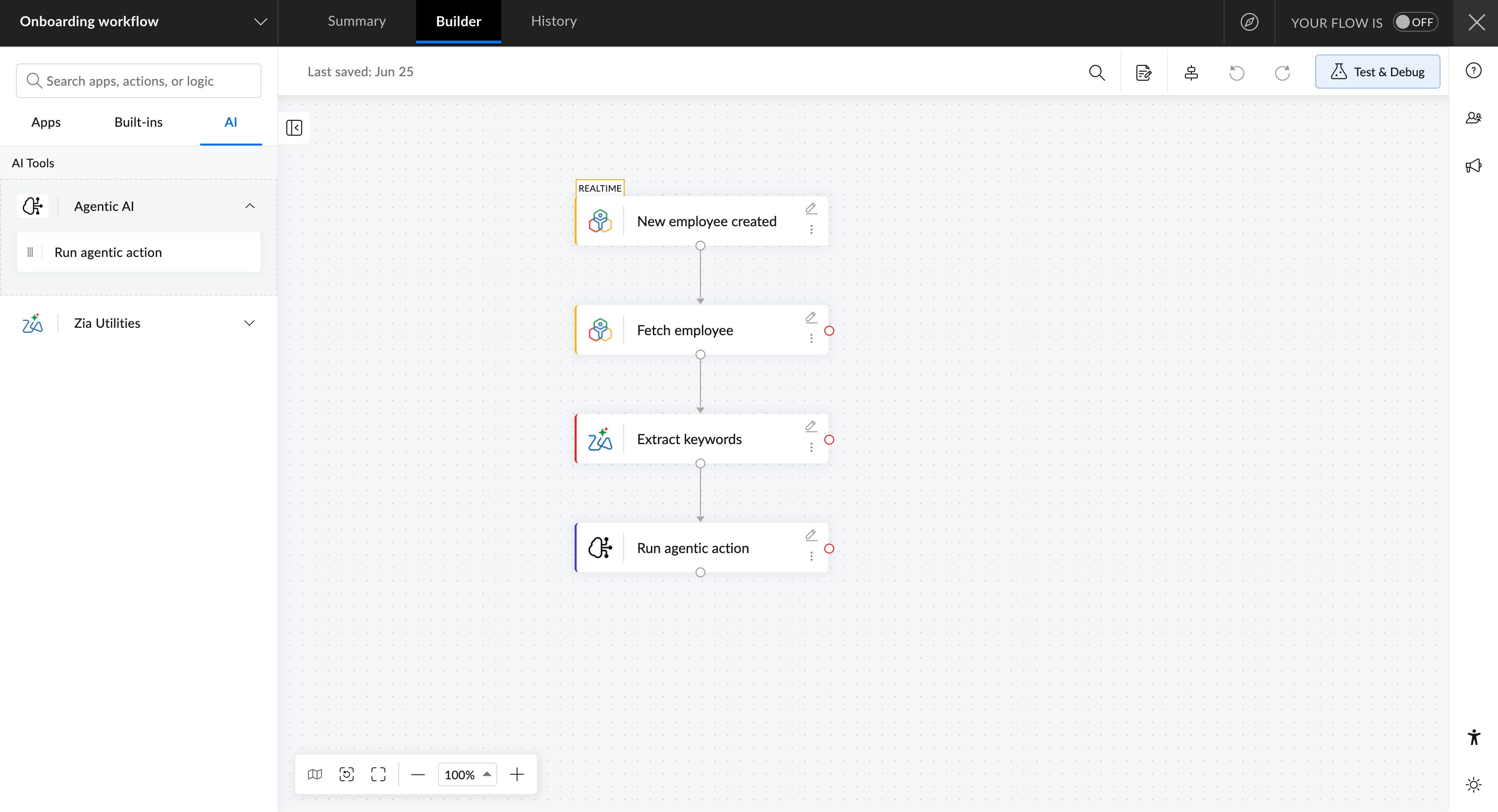
Agentic actions let AI do the thinking and deciding inside a flow, which is genuinely powerful for steps that would otherwise need a person. But the more consequential or hard to reverse the action, the more you want a checkpoint. Route high-stakes decisions through an approval or review step so a person can confirm before anything irreversible happens.
In Zoho Flow you can use agentic actions to delegate decisions to AI, and pair them with decision and notification elements to build approval gates where they matter. In Zoho Flow, you're required to restrict agentic actions to perform steps from a set of apps and their predefined actions so that AI doesn't touch unrelated app accounts or actions.
Treat AI output as untrusted until validated
AI does not fail the way a rule does. Instead of an error, it can return something plausible but wrong, or a format you did not expect. Validate what comes back before you act on it, constrain it with clear prompts and an expected output format, and send failures through the same error handling you use everywhere else. Because the output varies from run to run, these flows need more testing, not less.
Mind cost, latency, and data sensitivity
An AI step is slower and more expensive than a simple condition, so putting one where a rule would do adds cost and delay for no benefit. Be deliberate about where AI earns its place, and be just as deliberate about what data you send to it.
Where to start
You don't have to adopt all of this at once. If you're early, get the design and error handling right first, because those prevent the failures that are hardest to recover from. As your use of automation grows and more people start building, that's when monitoring and governance start paying for themselves. Bring in AI where it removes real work, and to everyday workflows where you're not putting critical operations at risk. The platforms worth standing on are the ones that support every stage, from the first diagram to the audit trail, so the automation you build this month is still trustworthy a year from now.
Ready to build automations that hold up? Start with Zoho Flow.
You can also check Zoho Flow's pricing here.
Frequently asked questions
What are the best practices for workflow automation?
Workflow automation best practices fall into five areas: design (map and modularize your flows and validate data early), reliability (handle errors, make operations idempotent, and respect API rate limits), testing and monitoring (test with sample data and track executions), governance (use least-privilege connections and keep an audit trail), and AI (apply it deliberately and verify its output). Together they keep an automation maintainable and trustworthy over time, not just functional on day one.
Why do automated workflows fail?
Most failures are data or connection problems rather than logic errors. Common causes are malformed or missing data, an API that is temporarily down, expired authentication tokens, and hitting a connected app's rate limit. Validating data at the entry point and building in error handling catches most of these before they cause damage.
What is idempotency in workflow automation?
Idempotency means running the same workflow twice does not create two of the same thing, such as a duplicate invoice, contact, or payment. You achieve it by looking up an existing record using a unique key, like an email address or order number, before creating a new one, and updating the existing record instead of inserting a duplicate.
How do you handle errors in an automated workflow?
Decide in advance what should happen when a critical step fails: retry it, alert a person, or branch to an alternative path so the rest of the process continues. It also helps to separate temporary failures that are worth retrying from permanent ones that need human review. In Zoho Flow, an error branch handles this, and auto and manual reruns let you resume from a failed step or restart from the trigger.
How do you keep workflow automation secure?
Connect apps using OAuth rather than raw API keys, grant each connection only the access it needs, and restrict it to specific modules where possible. Keep an audit trail of who created, changed, or deleted flows and connections, and use a secure channel like an on-prem agent for systems inside your own network. These steps give you both least-privilege access and the traceability that compliance requires.
When should you use AI in a workflow versus a rule?
Use rules for deterministic logic, such as routing on a threshold or stopping when a field is empty, because rules are faster, cheaper, and fully auditable. Use AI for tasks rules cannot handle, like summarizing text, classifying free-form input, extracting data from unstructured documents, or judging sentiment. Whatever AI produces should be validated before the workflow acts on it.
How do you test a workflow before going live?
Run it with realistic sample data, including edge cases like missing fields, unusual formats, and large records, and check the output of each step rather than only the final result. A workflow can report success while writing the wrong value partway through, so step-by-step verification matters. Zoho Flow's Test and Debug lets you run with dummy data and retest using previous test or recent execution data before anything touches a live system.
 Arjun
ArjunProduct Marketer at Zoho Flow: Passionately curious, with a love for thinking, writing, and exploring creative ways to connect people with science and technology.