How to implement AI in your existing business workflows
- Last Updated : May 29, 2026
- 254 Views
- 9 Min Read
Key takeaways
- Workflow automation handles repetitive tasks, but AI goes further by reading situations, generating content, and making decisions inside your workflows.
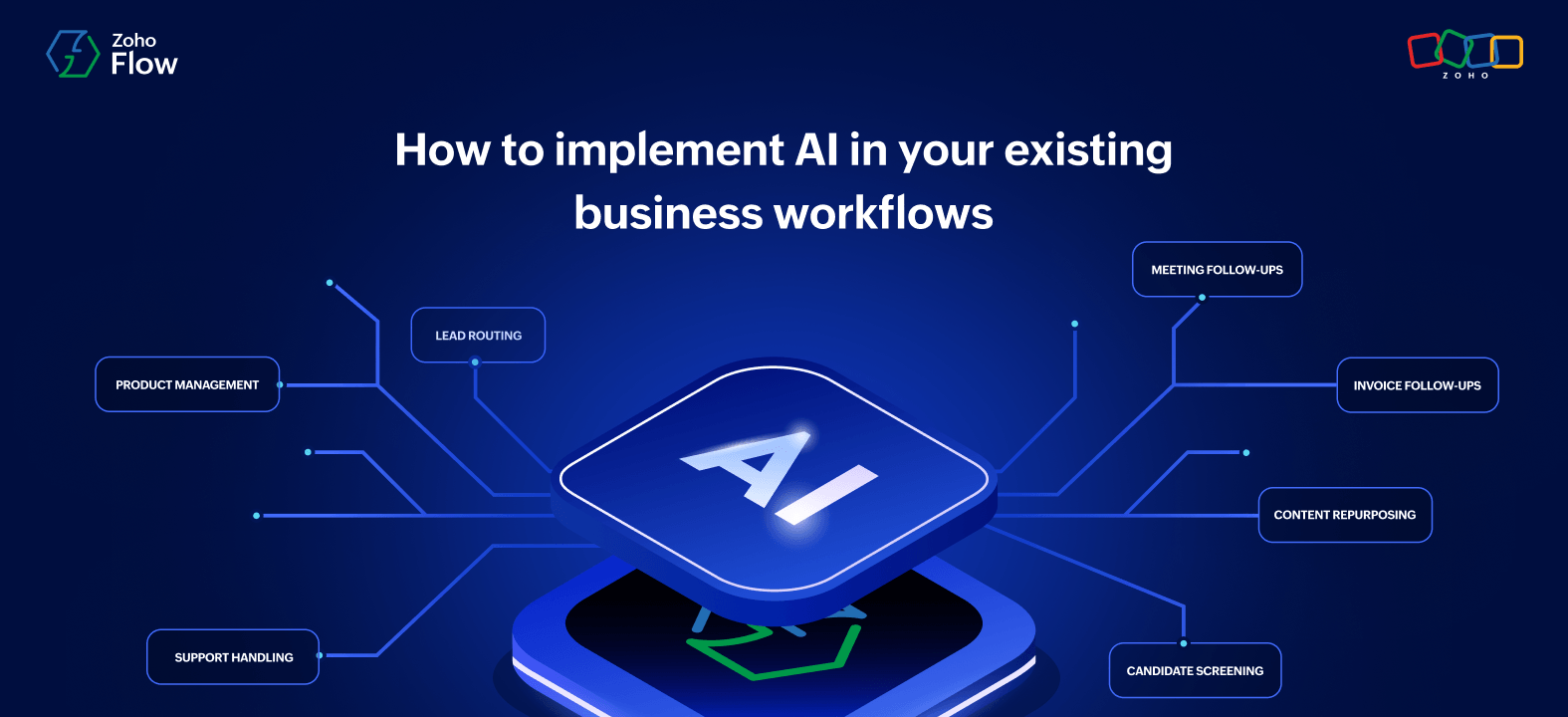
- From lead routing and invoice follow-ups to candidate screening and content repurposing, AI can handle the reading, writing, and deciding across every business function.
- Zia utilities help you summarize, extract, and generate content at any step, so your team always has the context they need before they act.
- Agentic actions go further by deciding what happens next, routing leads, escalating tickets, or screening candidates without anyone needing to step in.
Workflow automation has come a long way. You can connect your CRM to your email tool, move data between apps without writing code, and trigger actions the moment something happens. But automation handles tasks that follow a fixed rule. When a lead comes in, a support ticket arrives, or a candidate applies, someone still has to read it, understand it, and decide what to do next. These steps aren't complicated, but they add up.
The problem is that most AI tools sit outside your workflows. You paste text into ChatGPT, get a summary, and then manually carry that output to the next step. The work still falls on a person to connect the dots. What you actually need is an integration platform that has AI built in to the workflow itself, so the reading, summarizing, and deciding happens in the same place.
In this article, we’ll look at some practical ways to bring AI in to your existing workflows using Zia utilities and agentic actions in Zoho Flow.
7 real-world AI use cases for business workflows
1. Lead qualification and routing
The business scenario
Your sales team receives new leads throughout the day from your website form, paid ad campaigns, webinar signups, or partner referrals; and each lead has a different level of intent, budget, and fit. Someone has to read each one, decide how valuable it is, and route it to the right rep.
The AI-powered approach
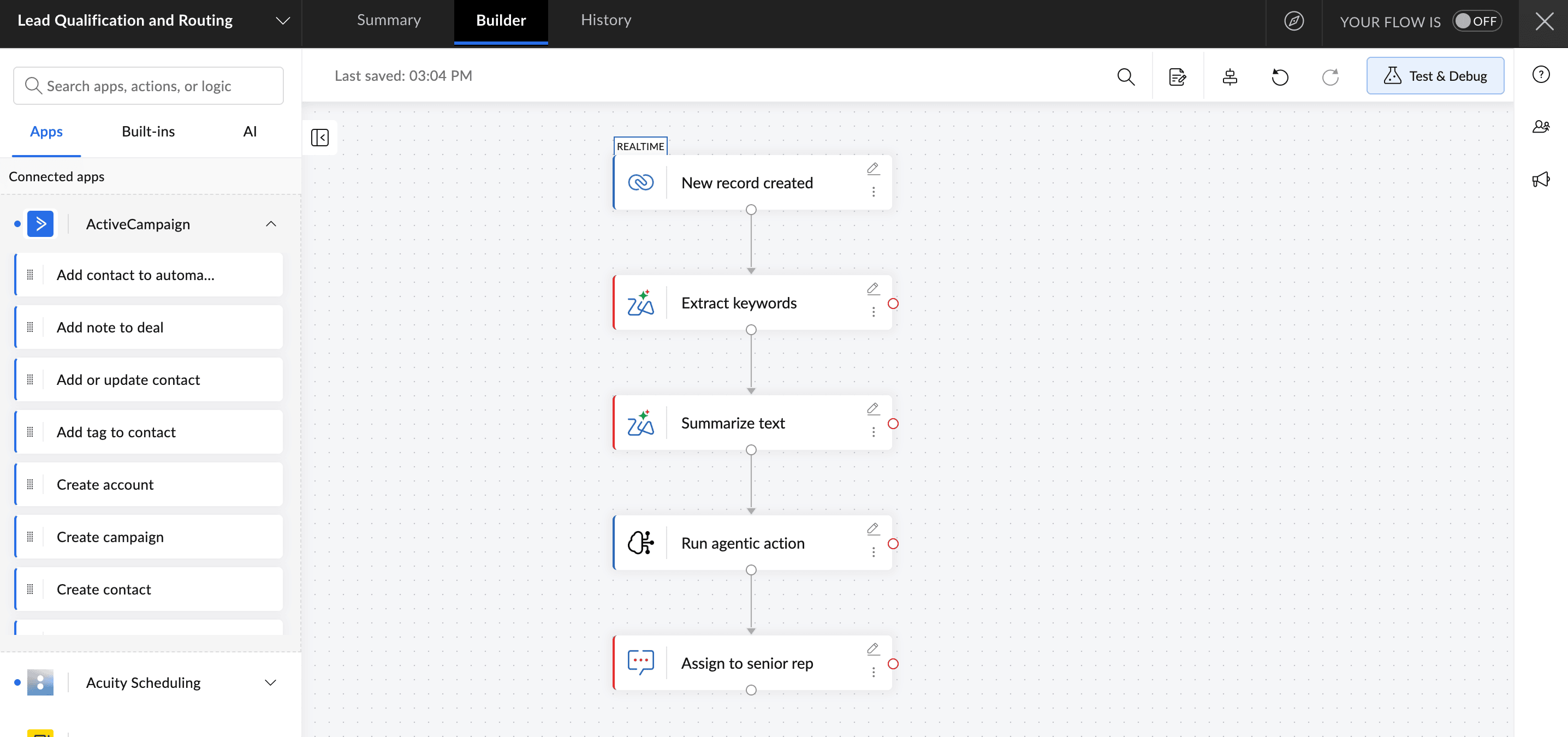
When a new lead enters your CRM, a Zoho Flow workflow triggers. Zia (Zoho's AI engine) reads the lead (name, company, message, source) and extracts the key signals: company size, product interest, and urgency language. It then generates a qualification summary and routes the lead automatically. High-value leads with enterprise signals go to your senior rep. Early-stage or smaller leads go to a junior rep for nurturing.
Example: Whenever a new lead is created in Zoho CRM, Zoho Flow extracts the key details and summarizes it, and the agentic action automatically routes it to the right sales rep based on its value.
AI features used: Extract keywords, summarize text, and agentic action
How it helps you
Reps stop spending time reading and categorizing leads. They start every conversation already knowing what the lead is about, and your highest-value prospects get a faster response.
2. Customer support ticket handling
The business scenario
A customer submits a support ticket. It might be a billing question, a bug report, a frustrated complaint, or a quick how-to query. Your team needs to read it, understand the urgency, and respond. When volume is high, agents spend most of their time just getting up to speed on what each ticket is saying.
The AI-powered approach
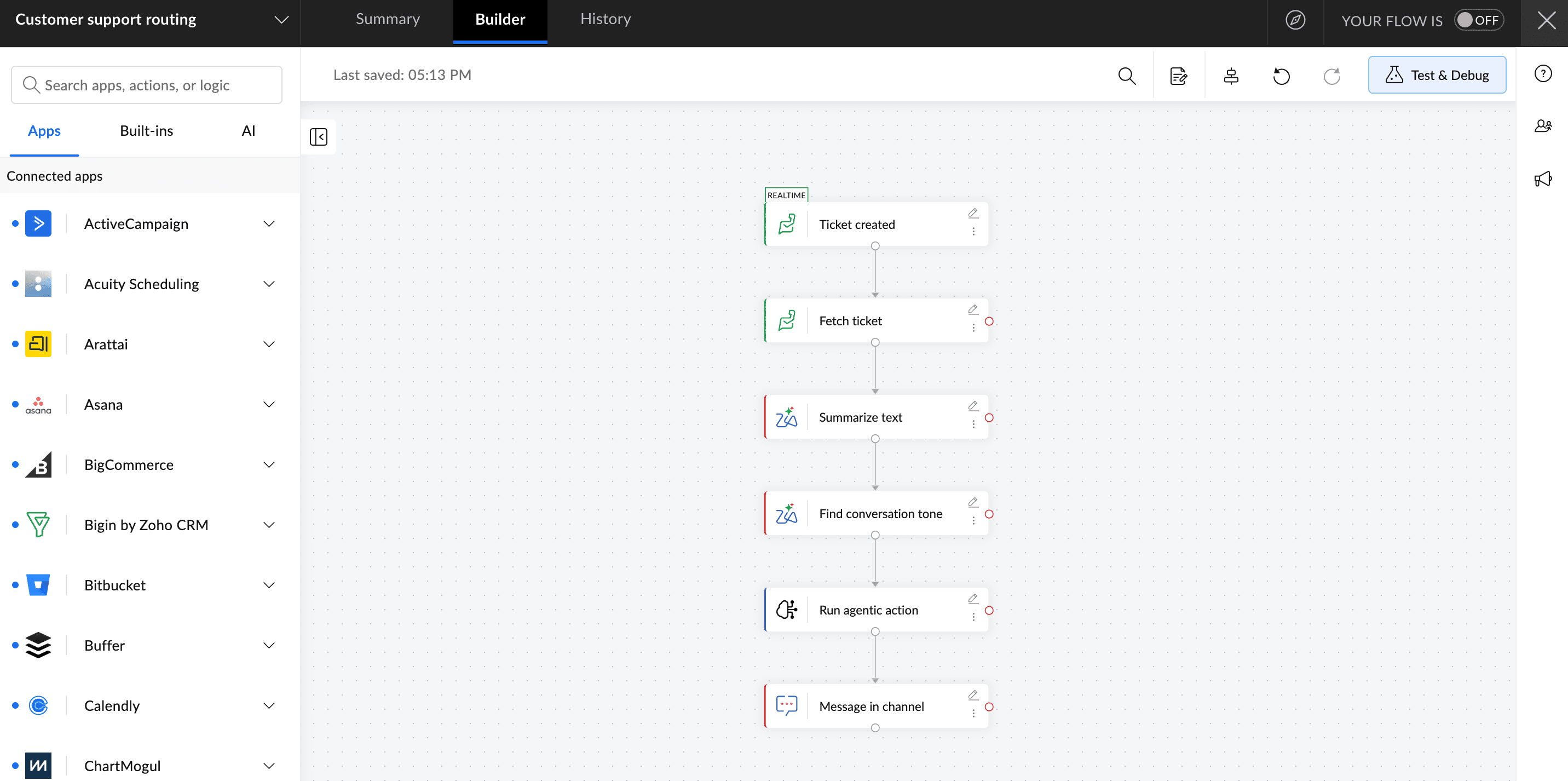
A Zoho Flow workflow runs every time a ticket comes in. Zia summarizes the issue in two or three lines, detects the customer's sentiment (calm, frustrated, urgent), and generates a draft response for the agent to review. If the sentiment is angry or the issue is a billing dispute, the agentic action escalates it to a senior agent automatically. Simple how-to queries get an automated reply sent immediately.
Example: Whenever a customer submits a ticket via Zoho Desk, Zia analyzes and summarizes it, detects the sentiment, and automatically escalates complex or frustrated cases to the appropriate support agent while drafting an empathetic response. Simpler questions are instantly handled with automated replies.
AI features used: Summarize text, find conversation tone, and agentic action
How it helps you
Urgent issues get faster human attention. Simple issues get instant responses. Support teams spend less time reading and more time resolving.
3. Ecommerce product management
The business scenario
You run an online store and regularly add new products. Each one needs a title and a product description before it can go live. But writing them takes time, the quality varies, and new products often wait in a backlog simply because no one has got around to the copy yet.
The AI-powered approach
When a new product record is created in your system, a Zoho Flow workflow triggers. Zia generates a product title based on the product details and writes a description optimized for your store's tone. The draft goes into your product management tool for a quick review before the listing goes live.
Before: A team member writes each product title and description from scratch. New listings sit in a backlog for days.
After: Zia generates a ready-to-review draft the moment a new product record is created. Your team edits rather than writes.
AI features used: Generate title, generate product description, and rephrase text
How it helps you
New products go live faster. Your team reviews and edits rather than writing from scratch. And your catalogue stays consistent in tone and quality across every listing.
4. After-meeting task automation
The business scenario
A meeting ends, and you're left with a transcript, a recording, or a set of rough notes. Someone needs to pull out what was decided, who owns what, and what needs to happen next. This almost always gets done late, partially, or not at all.
The AI-powered approach
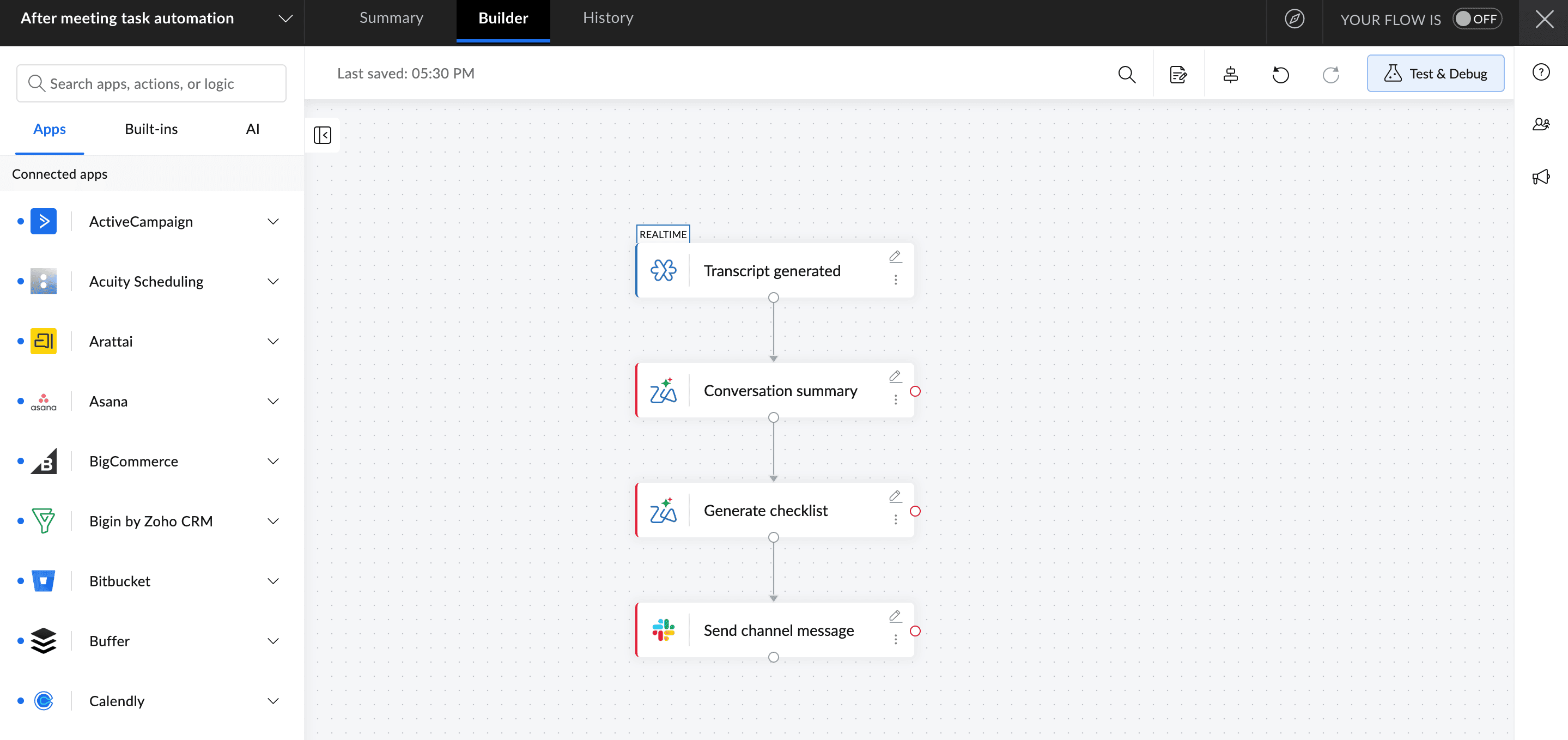
A workflow in Zoho Flow triggers when a meeting transcript or notes document is added. Zia summarizes the key discussion points and generates a checklist of action items with owners and deadlines where mentioned. The summary and checklist are sent to the team's Slack channel and added to their project tool automatically.
What this looks like in practice: Your call on Zoho Meeting ends at 3pm. By 3:01pm, a Slack message lands in your team channel with a three-line summary and a bulleted list of action items, each tagged with an owner. Nobody had to write a single word.
AI features used: Summarize conversation and generate checklist
How it helps you
Clear follow-ups and better team alignment: The team has a clear record of what was agreed without anyone spending 20 minutes writing it up.
5. Social media and content repurposing
The business scenario
Your team publishes blog posts, case studies, or reports regularly. Each one could become a LinkedIn post, a short summary for your newsletter, or a set of social captions, but repurposing content manually takes time most teams do not have.
The AI-powered approach
Once a new piece of content is published in your CMS, Zia reads it and generates repurposed versions automatically: a LinkedIn post, a newsletter summary, and three social captions in your brand's tone. Each version lands in a shared folder or is posted to a draft queue in your social tool for review.
Example: Whenever a new blog post is published in your CMS, Zia uses generate customized response to create a LinkedIn post, generate essay to produce a newsletter-ready summary, and generate tweet to draft social captions in your brand's tone and pushes them to your social tool as drafts for review.
AI features used: Generate customized response, generate essay, and generate tweet
How it helps you
Content gets more mileage without extra work, your team publishes more consistently across channels, and the tone stays on-brand because Zia is working from the same source material every time.
6. HR recruitment and candidate screening
The business scenario
A candidate applies for a role. Their CV arrives and someone needs to read it, pull out the relevant skills, decide whether they meet the requirements, and take the next step. At volume, this takes hours, and the quality of screening varies depending on who is reviewing and how busy they are.
The AI-powered approach
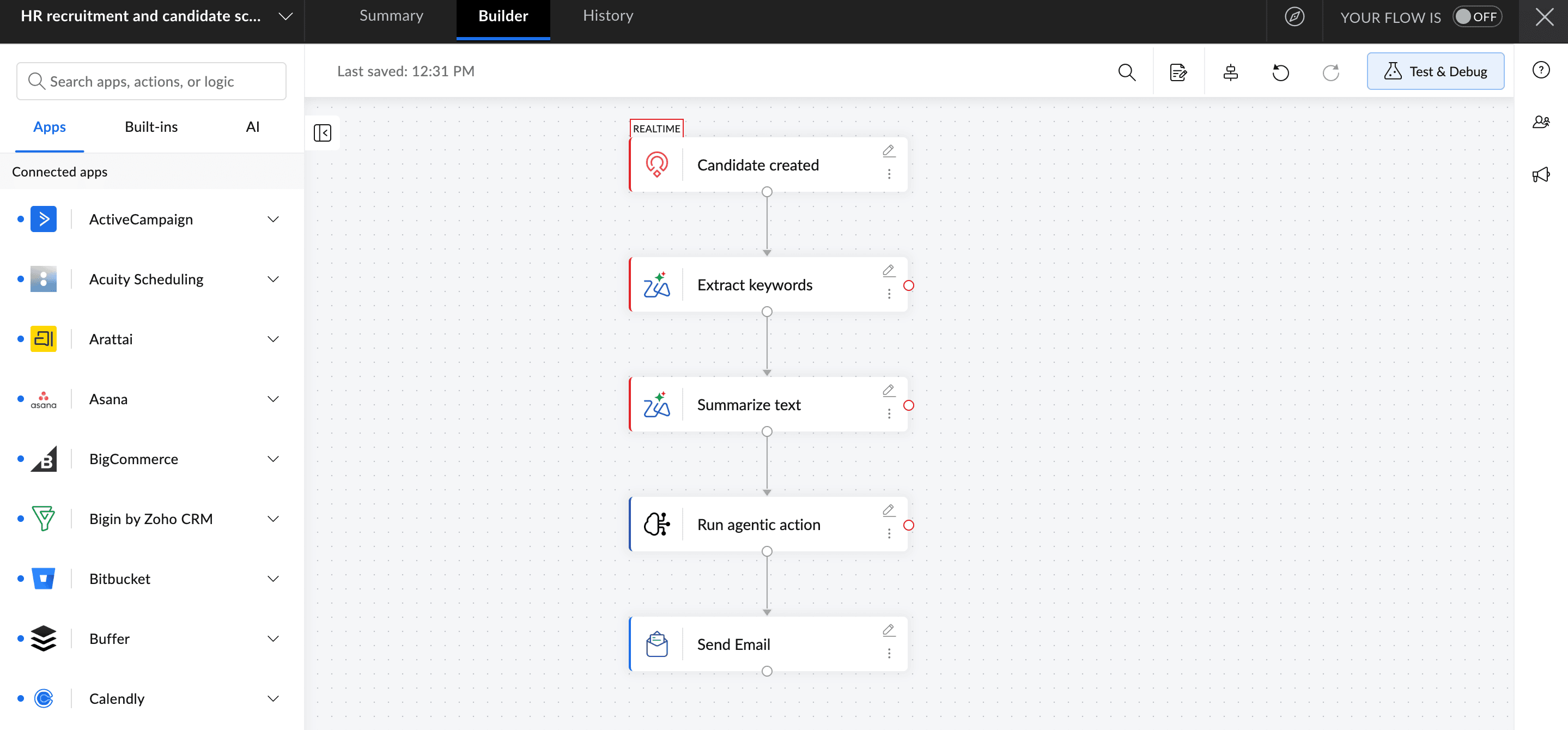
When a CV is received, a Zoho Flow workflow triggers. Zia extracts key skills and experience, summarizes the candidate's background in a few lines, and generates an evaluation checklist against the role requirements. An agentic action then decides the next step: Strong match triggers a shortlist and schedules an interview, weak match sends a respectful rejection email, and unclear match flags the application for manual review.
Before: A recruiter spends 10–15 minutes reading each CV, then decides manually whether to shortlist, reject, or flag.
After: Zia reads the CV, generates a candidate summary, and routes it to the right outcome automatically. Your recruiter reviews the shortlist, not the pile.
AI features used: Extract keywords, summarize text, and agentic action
How it helps you
Your HR team focuses on conversations, not sorting. Strong candidates get a faster response, rejections go out promptly and professionally, and every candidate gets a consistent first-stage review regardless of how busy the team is.
7. Finance and invoice follow-ups
The business scenario
An invoice is overdue. You need to follow up quickly, and the right message depends on how overdue it is, the invoice value, and your relationship with the client. Most teams either send the same generic reminder to everyone or put off writing the email entirely.
The AI-powered approach
A workflow in Zoho Flow triggers when an invoice passes its due date. Zia generates a tailored email body and subject line based on how many days overdue the invoice is. An agentic action then decides the follow-up strategy: a soft reminder for invoices one to three days overdue, a firmer email at two weeks, and a full escalation with a task for the finance manager at 30 days.
Example: Whenever an invoice becomes overdue in Zoho Books, Zia uses the generate email action to create a tailored follow-up email body and subject line based on the invoice amount and number of days overdue, and then uses an agentic action to decide the next step.
AI features used: Generate email and agentic action
How it helps you
Follow-ups go out on time with the right tone, without anyone having to sit down and write them. Your finance team reviews rather than drafts, and nothing slips through because someone was too busy to write the email.
Ready to get started?
All of this is available on your existing Zoho Flow plan. Open Zoho Flow, pick one workflow where your team currently reads, writes, or makes decisions manually, and add a Zia step to that single workflow first. You'll see the time saving immediately. Then expand from there.
Start building AI-powered workflows in Zoho Flow today!
Frequently asked questions
1. What is the difference between Zia utilities and agentic actions in Zoho Flow?
Zia utilities handle specific AI tasks inside a workflow step, such as summarizing text, extracting keywords, detecting sentiment, or generating content. Agentic actions go further by reading the full context of a situation and deciding what action to take next, without needing a fixed rule or a human to step in.
2. Do I need any coding or technical knowledge to add AI to my workflows in Zoho Flow?
No. Zia utilities and agentic actions are built into Zoho Flow as ready-to-use steps. You pick the action, connect it to your data, and configure it in plain language. No coding is required.
3. Is my business data safe when AI processes it inside Zoho Flow?
Yes. All data processed through Zia and agentic actions stays within the Zoho ecosystem and is governed by Zoho's data privacy and security policies. Your data is never used to train external AI models.
4. Can I use AI in Zoho Flow with non-Zoho apps?
Yes. Zoho Flow connects with hundreds of third-party apps. You can trigger AI steps using data from tools like HubSpot, Salesforce, Gmail, Slack, and many others, not just Zoho products.
5. How do I measure whether AI is actually saving my team time?
Start by tracking the time your team spends on the manual version of the task before you automate it. After the workflow goes live, compare how many steps now happen automatically and how much time your team spends reviewing versus doing. Zoho Flow's history log also shows how many times each workflow has run, which gives you a clear picture of the volume handled automatically.
6. What are the available Zia utilities in Zoho Flow?
Zoho Flow offers a range of ready-to-use Zia utilities you can add to any workflow. These include summarize text, extract keywords, detect sentiment, generate tweet, punctuate text, and more. For the full list of available utilities and how to configure each one, refer to the Zia utilities documentation.
 Gayathri Babu
Content writer for Zoho Flow. Passionate about creating engaging content that truly resonates with the readers.