5 practical ways to integrate SAP with your business tools
- Last Updated : May 29, 2026
- 273 Views
- 5 Min Read
Key takeaways
- SAP workflows often involve manual coordination across CRM, finance, HR, procurement, and project management tools.
- Zoho Flow helps automate the steps between SAP and the other applications your teams already use.
- Invoice creation, purchase orders, onboarding, production updates, and finance operations can all run automatically without changing your existing SAP setup.
Over 90% of Fortune 500 companies run their core operations on SAP. SAP stores critical business data, but the work around that data often happens elsewhere. Sales teams work in CRM, procurement teams manage requests in custom apps, and finance teams process payments in accounting systems.
Without automation, teams spend time copying information between systems and following up manually.Whether your SAP runs on-premise, in a private cloud, or in a hybrid setup, Zoho Flow can connect to it.
Here are five practical workflows where you can connect SAP with the tools your teams already use and automate the steps between them.
1. Automatically create a sales invoice in SAP when a deal closes in your CRM
The problem
When a sales order is confirmed in your CRM, someone has to open SAP, look up the business partner, locate the order, and create the invoice. It takes time, and if it happens during a busy period, it gets delayed or missed.
How automation solves this.
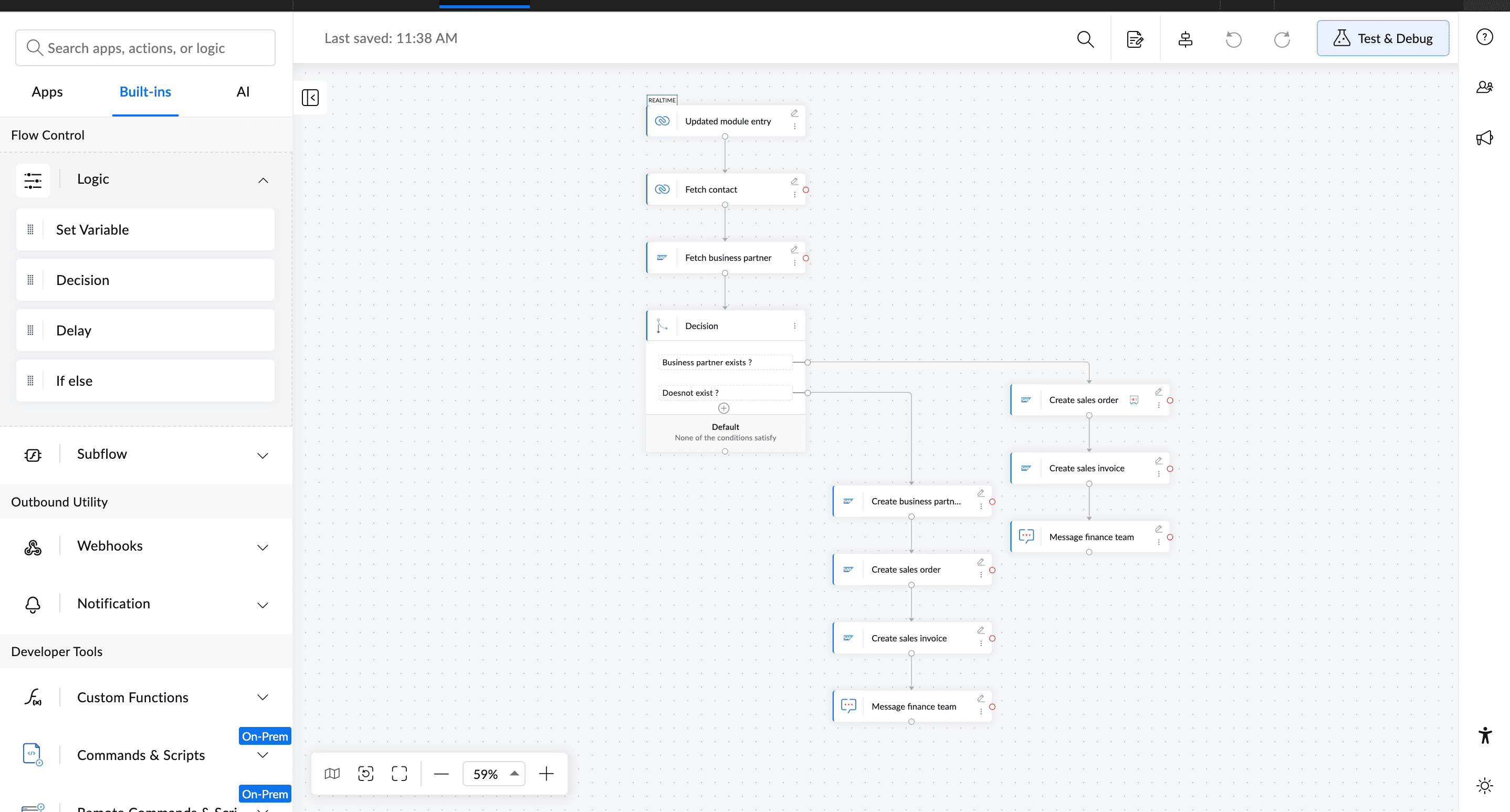
When a sales order is created or updated in your CRM, the contact record is fetched and checked against SAP S/4HANA to see if a matching business partner exists.
If the business partner exists, the sales order and invoice are created directly, and the finance team is notified in Zoho Cliq. If the business partner doesn't exist, the record is created in SAP first, then the sales order and invoice follow automatically.
Either way, the finance team gets notified once the invoice is ready, without anyone logging into SAP manually. You can try this workflow in Zoho Flow today.
Apps involved: Zoho CRM, SAP S/4HANA, Zoho Cliq
2. Create SAP purchase orders automatically from your vendor management app
The problem
In procurement, when items need to be purchased, the request typically lives in one tool, and the purchase order (PO) has to be created manually in SAP S/4HANA. That gap creates delays and introduces errors when information is re-entered by hand.
How automation solves this
When a record is updated in the Zoho Creator vendor management app with the items to be purchased, the vendor's details are retrieved from SAP S/4HANA using their email address. A purchase order is then created in SAP S/4HANA and sent to the procurement team. Then the vendor's record in Zoho Creator is updated to reflect that the PO has been raised.
Procurement teams get purchase orders created and distributed the moment a request is confirmed, with no manual data entry in between.
Apps involved: Zoho Creator, SAP S/4HANA
3. Sync Zoho Books transactions with SAP Business One
The problem
Finance teams often process payments in accounting software while purchase order tracking happens in SAP Business One. Before creating an invoice, someone has to manually check whether a matching purchase order exists in SAP Business One, and if it doesn't, create one before the process can continue.
How automation solves this
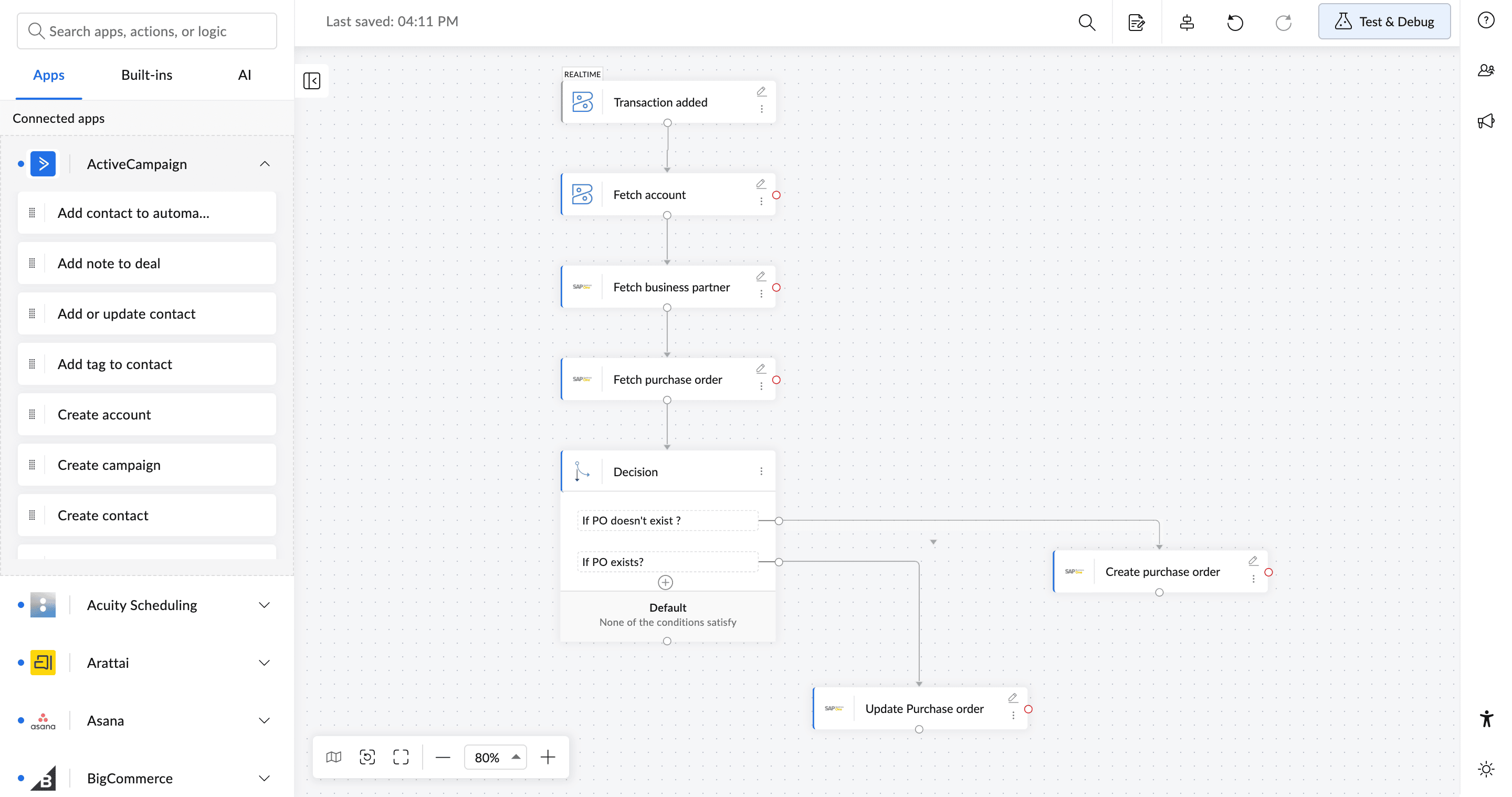
When a transaction is added in Zoho Books, the account details are fetched and matched against the corresponding record in SAP Business One. The flow then checks whether a purchase order already exists for that transaction.
If no PO exists, one is created. If a PO already exists, it's updated with the latest details. Once that's done, an invoice is created and a notification is sent to the relevant team. Finance teams get accurate invoice records in SAP without manually checking for missing POs or creating them by hand. Try setting this up in Zoho Flow.
Apps involved: Zoho Books, SAP Business One
4. Turn SAP production updates into actionable tasks automatically
The problem
Production and operations teams rely on SAP S/4HANA for manufacturing data, but the coordination work often happens in other tools. Teams manage tasks in project management apps, communicate updates in Slack or Microsoft Teams, and track planning data in spreadsheets.
When production data changes in SAP, teams often have to check those updates manually and re-enter the information elsewhere, which slows down coordination and increases the chances of missed updates.
One common example is changes to a bill of materials (BOM), which defines the components and materials required for production.
How automation solves this
When a sales order BOM is created or updated in SAP S/4HANA, a task is created in your project management tool, Zoho Projects, with the BOM details. The production team is notified in Slack, and the information is logged in Zoho Sheet for planning visibility.
Production teams get faster visibility into BOM changes, without monitoring SAP or copying data into other tools manually.
Apps involved: SAP S/4HANA, Zoho Projects, Slack, Zoho Sheet
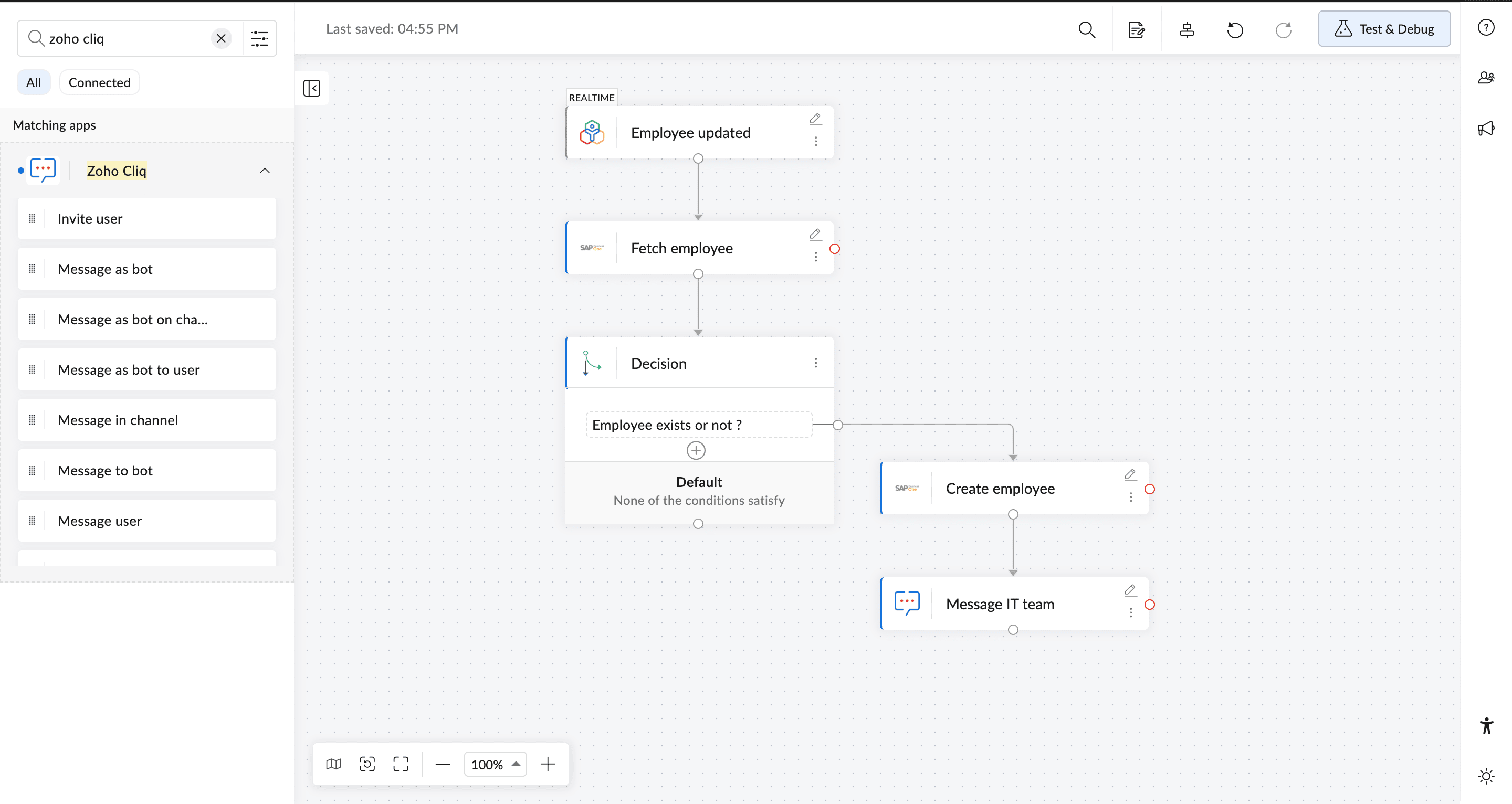
5. Sync employee onboarding data from Zoho People to SAP Business One automatically
The problem
When a new employee is hired, HR teams manage recruiting and onboarding in their HR software. Once hired, the same details have to be re-entered into SAP to set up payroll and user profiles. That dual entry delays onboarding timelines and leads to data discrepancies across systems.
How automation solves this
When a candidate's status changes to "Hired" in Zoho People, SAP Business One is checked for an existing employee profile. If no profile exists, a new employee record is created using their name, contact information, and role. The IT department is then notified in Zoho Cliq to assign asset codes.
New hires are set up in payroll and system directories on day one, without HR or IT manually re-entering the same data in multiple places.
Apps involved: Zoho People, SAP Business One, Zoho Cliq
Start automating your SAP workflows
SAP is trusted by the world's largest organizations to manage their most critical operations. These five workflows are a practical first step to making sure that data reaches every team that depends on it.
Explore SAP integrations in Zoho Flow and set up your first workflow today.
Frequently asked questions
1. What is the difference between SAP S/4HANA and SAP Business One?
SAP S/4HANA is built for large enterprises managing complex operations across sales, finance, and supply chain. SAP Business One is designed for small and mid-sized businesses that need core ERP functions like accounting, procurement, and HR in a simpler setup.
2. Do I need a developer to set up SAP integrations?
Not with a no-code tool like Zoho Flow. The workflows in this article are built using a visual flow builder. You select a trigger, add the steps, and connect your apps—no custom code needed.
3. Does SAP work with external tools?
Yes. SAP is designed to connect with external applications through APIs and connectors. Tools like Zoho CRM, Zoho Books, Zoho People, and Zoho Creator can all exchange data with SAP S/4HANA and SAP Business One.
4. Can I automate SAP workflows without changing my existing setup?
Yes. Zoho Flow connects with your existing SAP setup, so you can automate workflows without replacing your current systems or changing how SAP is configured.
5. Is it safe to connect SAP with other business apps?
Yes. Zoho Flow connects to SAP using secure API connections, so data moves directly between your applications without manual handling. Zoho also follows a privacy-first approach. You stay in control of your data while automating workflows across SAP and the other tools your teams use every day.
 Gayathri Babu
Content writer for Zoho Flow. Passionate about creating engaging content that truly resonates with the readers.