- HOME
- Know Your Tech
- How to build your first workflow system: A complete guide
How to build your first workflow system: A complete guide
- Last Updated : March 2, 2026
- 545 Views
- 11 Min Read
When your team was small, managing work over email and quick conversations was enough. Now there are more people, more requests, and more approvals happening at the same time. The old way of coordinating doesn't hold up anymore.
Highlights
- A workflow system organizes tasks into a structured sequence with defined roles, rules, and automation to keep processes consistent.
- Workflows can be fully manual, semi-automated, or fully automated, depending on how much human input each step needs.
- Key components include tasks, roles, triggers, conditional logic, notifications, and audit trails that work together to move processes forward.
- Building your first workflow starts with defining a clear goal, mapping participants, listing steps, and setting triggers before testing.
- A workflow system improves visibility, accountability, and compliance by logging every action and providing real-time progress tracking.
A workflow system gives your growing operations a structure that scales. It handles task assignments, approval routing, and deadline tracking automatically. Your processes stay consistent even as your team size and workload increase.
This blog post explains what a workflow system is, its key components, and how to build your first one step by step. You will also find best practices to get started effectively.
What is a workflow system?
A workflow system is a structured way to manage how tasks move through a business process. It defines each step, assigns the right person to handle it, sets the order of activities, and tracks progress from start to finish. Instead of relying on emails or verbal reminders, a workflow system puts every process on a repeatable, visible path.
Workflows typically fall into three categories:
- Fully manual workflows: These rely entirely on human effort. Examples include paper-based approvals or physically passing documents between team members. Manual workflows are prone to delays and errors and are difficult to scale.
- Semi-automated workflows: These combine automation with human input. For instance, an email chain with automated notifications, but where reviewing attachments still requires manual effort.
- Fully automated workflows: These operate entirely within a system management tool. Tasks move automatically between stages based on predefined rules and conditions. This ensures consistency, reduces delays, and frees your team from repetitive tasks.
Understanding these workflow types helps you choose the right approach for your business, whether you are a small business owner or managing enterprise operations.
Also read: What is workflow automation?
Benefits of using a workflow system
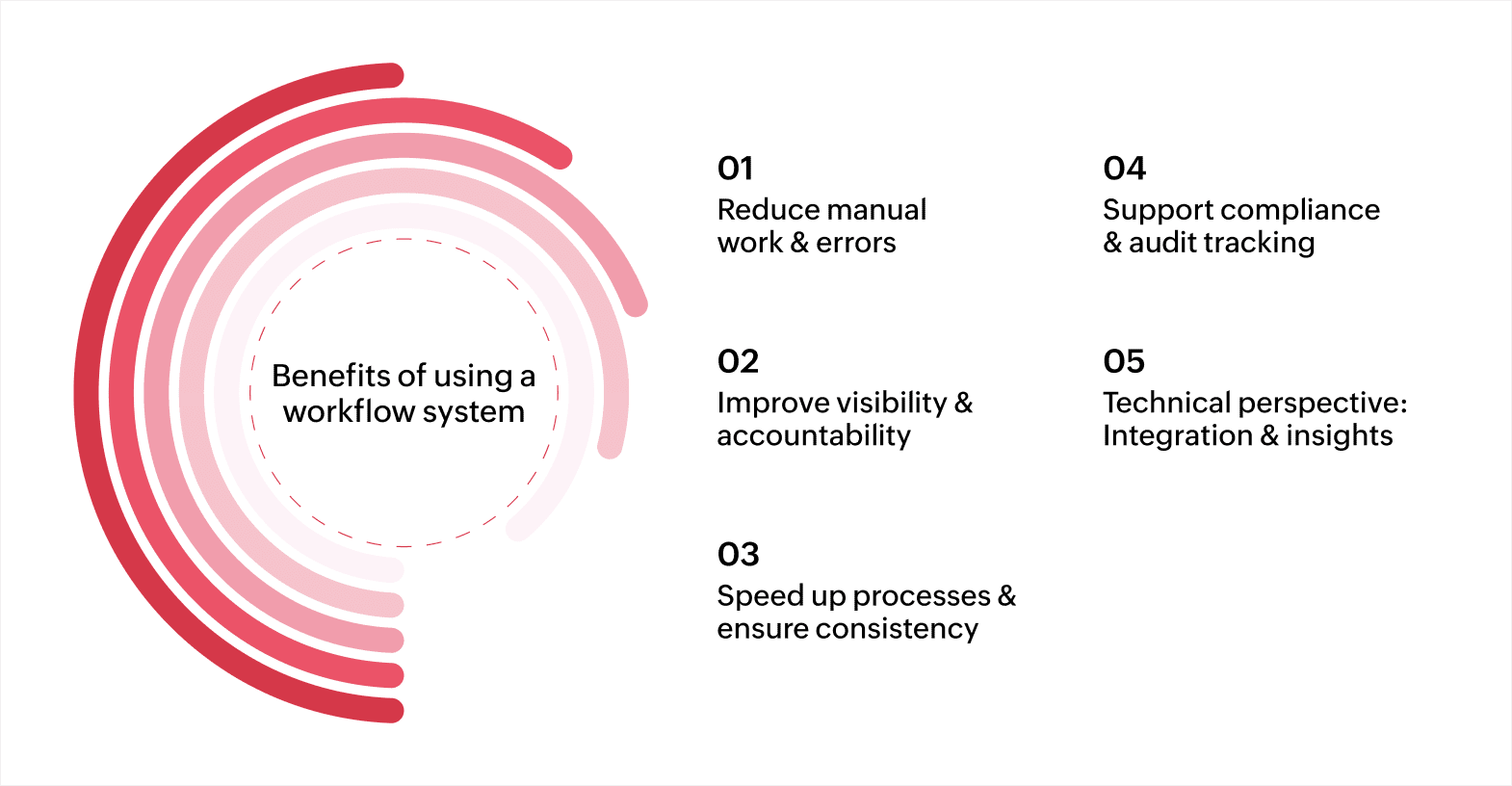
A workflow system does more than automate tasks. It improves efficiency, accountability, and compliance across your organization. Here’s how it can help your business.
Reduce manual work and errors
Manual processes take time and are prone to mistakes. A workflow system automatically moves tasks through defined steps, reducing human intervention. For example, instead of manually forwarding purchase requests for approval, the system routes them to the relevant manager automatically.
Similarly, client information entered through an online form can be synced directly to your CRM, reducing data entry errors. This frees your team to concentrate on more important tasks while lowering the chance of errors.
Improve visibility and accountability
A workflow system provides a clear view of every task, its status, and who is responsible. For instance, in a content publishing workflow, managers can see whether a draft is still in review or waiting for final approval. In an IT service request workflow, the system shows which technician is assigned to each ticket. This visibility helps you monitor progress closely and keeps tasks on schedule. Clear ownership helps identify slow points in processes and keeps responsibilities visible across teams.
Speed up processes and ensure consistency
Tasks move quickly and consistently when rules are predefined. For example, in an expense approval workflow, requests under $500 can be approved automatically, while larger amounts follow a defined approval path. In employee onboarding workflows, account creation, access rights, and welcome documentation can be assigned automatically in a set sequence. Consistent workflows reduce errors and make operations more predictable, helping teams deliver reliable results.
Support compliance and audit tracking
Workflow systems keep detailed records of every action, approval, and update. In financial workflows, every invoice approval is logged, making it easy to provide auditors with a clear trail. In healthcare or HR workflows, approvals for sensitive data are tracked to meet regulations. Storing all interactions in an organized format simplifies audits and reduces the risk of non-compliance.
Technical perspective: Integration and insights
Modern workflow systems connect with CRM, ERP, email platforms, and cloud storage. For example, a sales lead captured through a web form can trigger follow-up tasks automatically in your CRM and email platform. Built-in reporting provides insights into task completion times, workload distribution, and delays. Managers can use these reports to adjust processes and improve overall efficiency.
A workflow system helps your organization save time, reduce errors, and maintain accountability. It provides clear control over operations and supports consistent business outcomes.
Key components of a workflow system
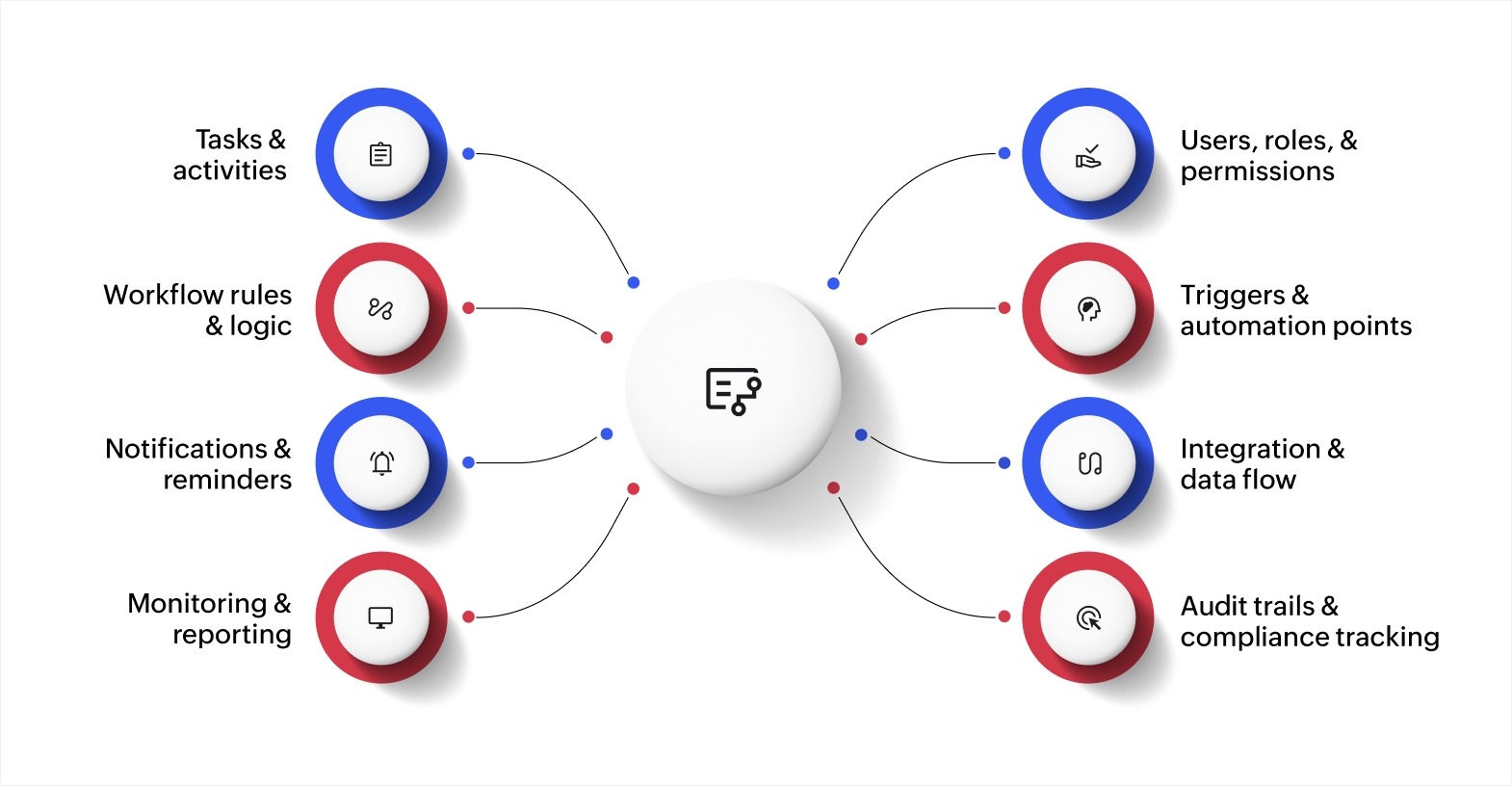
A workflow system is composed of several interconnected elements that control how tasks are executed, tracked, and managed. Understanding these components allows you to design workflows that are efficient, scalable, and adaptable.
- Tasks and activities: Tasks are the foundation of a workflow. They can include subtasks, deadlines, dependencies, and priority levels. This structure lets you model complex processes where some activities cannot start until others are completed.
- Users, roles, and permissions: Beyond assigning tasks, a workflow system defines who can view, edit, approve, or escalate them. Proper permissions ensure that sensitive tasks are handled by the right people and help maintain compliance with policies and regulations.
- Workflow rules and logic: Rules govern how tasks progress. Advanced systems support conditional logic, branching, loops, and exception handling. This allows workflows to dynamically adapt to inputs, approvals, or events, reducing the need for manual oversight.
- Triggers and automation points: Triggers start workflows automatically based on events such as form submissions, status changes, or scheduled times. When linked to automation points, repetitive manual actions are eliminated, and tasks move efficiently through the process.
- Notifications, escalations, and reminders: Workflow systems track task progress in real time. Automated alerts notify users of pending tasks, approaching deadlines, or deviations from the process. Escalation rules ensure important tasks are addressed promptly, maintaining operational consistency.
- Integration and data flow: Modern workflow systems connect with other business tools like CRM, ERP, email platforms, or cloud storage. This ensures data flows smoothly between systems, reduces duplication, and supports informed decision-making.
- Monitoring, reporting, and analytics: Workflow systems capture metrics such as task duration, bottlenecks, completion rates, and resource usage. Dashboards and reports provide insights that help optimize processes, improve team performance, and identify opportunities for automation.
- Audit trails and compliance tracking: Every action in a workflow is logged. Audit trails provide transparency and accountability, essential for enterprises needing to comply with internal policies or regulatory standards. They also serve as a historical record for review or improvement.
By understanding these components, you gain full control over your business processes. Each element works together to create workflows that are efficient, measurable, and resilient to operational challenges.
Also read: 10 must-have features and best practices to optimize your workflow management system
How to build your first workflow system
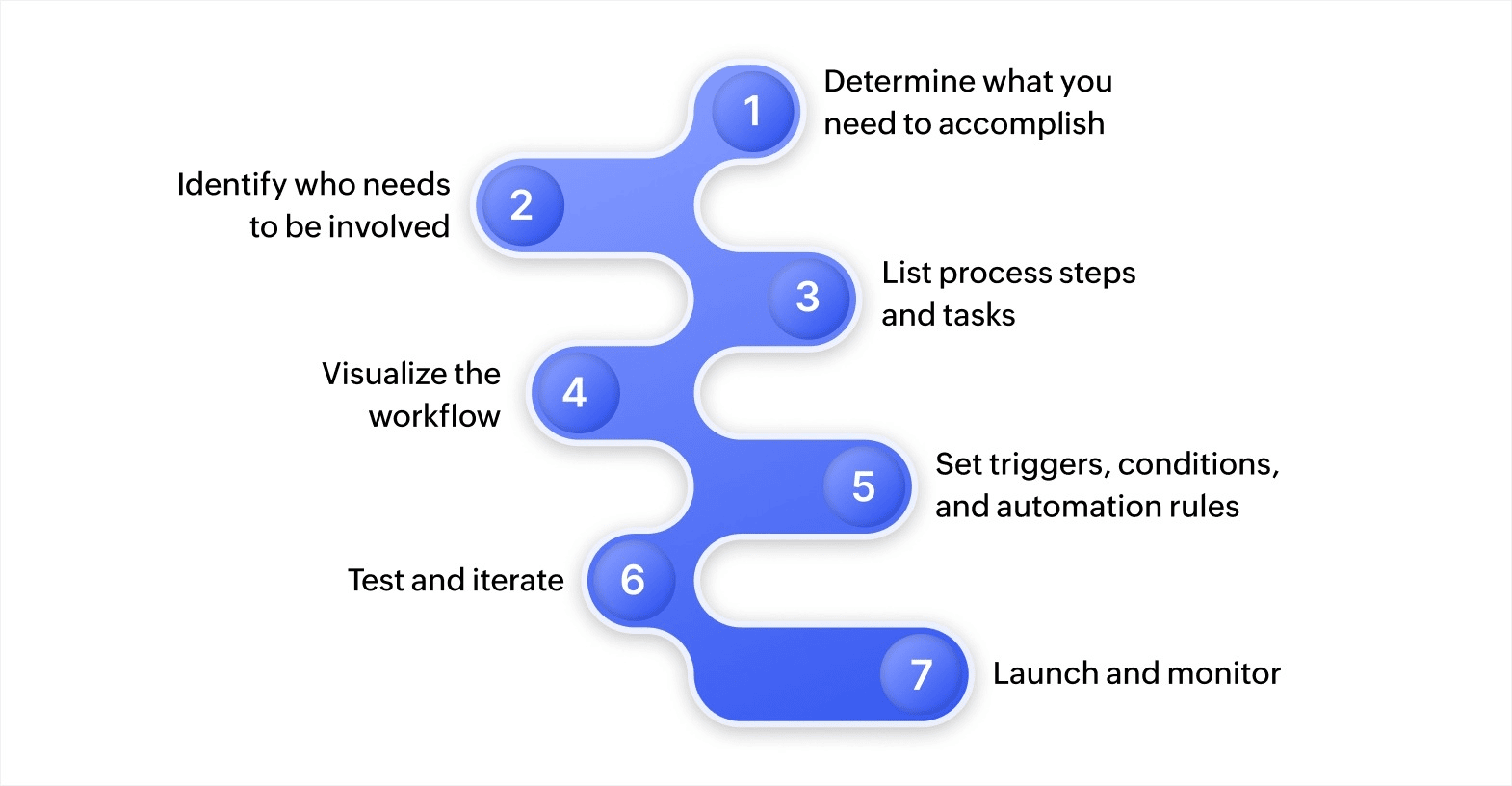
Creating a workflow in a system management tool is about organizing tasks so each step is clear, responsibilities are defined, and outcomes are measurable. A workflow system allows you to automate repetitive activities, assign tasks effectively, and monitor progress in real time. Taking a structured approach ensures that processes function consistently and teams stay aligned.
1. Determine what you need to accomplish
Clarify the purpose of your workflow before mapping its steps. Ask yourself about the exact outcome you want:
- Is it approving invoices, handling client requests, or managing internal approvals?
- Will it cover just submission and approvals, or include notifications, escalations, and record-keeping?
- Are there dependencies, such as a manager’s approval before finance action?
Documenting the workflow goal prevents confusion and ensures all necessary steps are captured. It also helps measure efficiency and success once the workflow is active.
2. Identify who needs to be involved
Map all participants, including task owners, reviewers, and approvers.
- Use a RACI matrix or role-based permissions to assign responsibilities systematically.
- Define approvals, consultations, and information flow to avoid missing steps.
- Ensure sensitive tasks reach the right people and approvals follow the correct hierarchy.
Even in complex processes, clearly defined roles reduce errors and maintain accountability.
3. List process steps and tasks
Break the workflow into sequential steps. Include all tasks, approvals, and dependencies:
- For instance, a content publishing workflow may include topic selection, drafting, image creation, editorial review, final approval, CMS upload, and social media promotion.
- Decide which tasks can run automatically and which need human input.
- Consider parallel tasks. For example, image creation can occur while content is being edited, provided dependencies are managed.
Low-code platforms, including Zoho Creator, allow you to map these steps visually and link them with automation rules or simple scripts to reduce repetitive manual work.
4. Visualize the workflow
Creating a visual map improves understanding and communication:
- Use flowcharts, timelines, or diagrams to show task sequences, conditional branches, and parallel processes.
- Include responsible roles and the expected duration for each step.
- Visualization helps spot gaps, overlapping responsibilities, or missing approvals before automation is applied.
A clear diagram ensures teams know who is responsible for each step and how tasks progress from start to finish.
5. Set triggers, conditions, and automation rules
Automation works when workflows respond to triggers and conditions:
- Triggers start workflows automatically, such as a form submission, a status update, or a scheduled event.
- Conditions control task flow depending on values, approvals, or exceptions.
- Example: An expense request above a set amount may route automatically to a senior manager for approval, while smaller amounts follow a standard path.
- Use low-code scripting or built-in workflow rules to define actions, notifications, and escalations.
Advanced workflows can include parallel paths, loops, and exception handling so tasks move according to real-world scenarios without constant manual intervention.
6. Test and iterate
Before full deployment, test the workflow in a controlled environment:
- Verify that triggers, conditions, and notifications work as expected.
- Check that parallel tasks execute correctly without conflict.
- Gather feedback from users to identify unclear steps, redundant tasks, or missing approvals.
Iteration ensures that workflows operate smoothly under real conditions. Even small refinements, like adjusting approval sequences or adding notification rules, can improve efficiency significantly.
7. Launch and monitor
After testing, implement the workflow across your team:
- Use dashboards to monitor task progress, completion times, and pending approvals.
- Automate notifications, reminders, and escalation rules to ensure timely task movement.
- Review workflow performance periodically and adjust rules, responsibilities, or task sequences as business needs evolve.
When implemented effectively, workflows reduce mistakes, maintain smooth task progress, and free employees to handle more important work. Low-code platforms, such as Zoho Creator, provide tools to implement workflows quickly while offering flexibility for future changes. According to Market Research, organizations adopting workflow automation report measurable improvements in productivity and fewer manual errors.
Also read: How to create an effective workflow model
Best practices to get your workflow system right
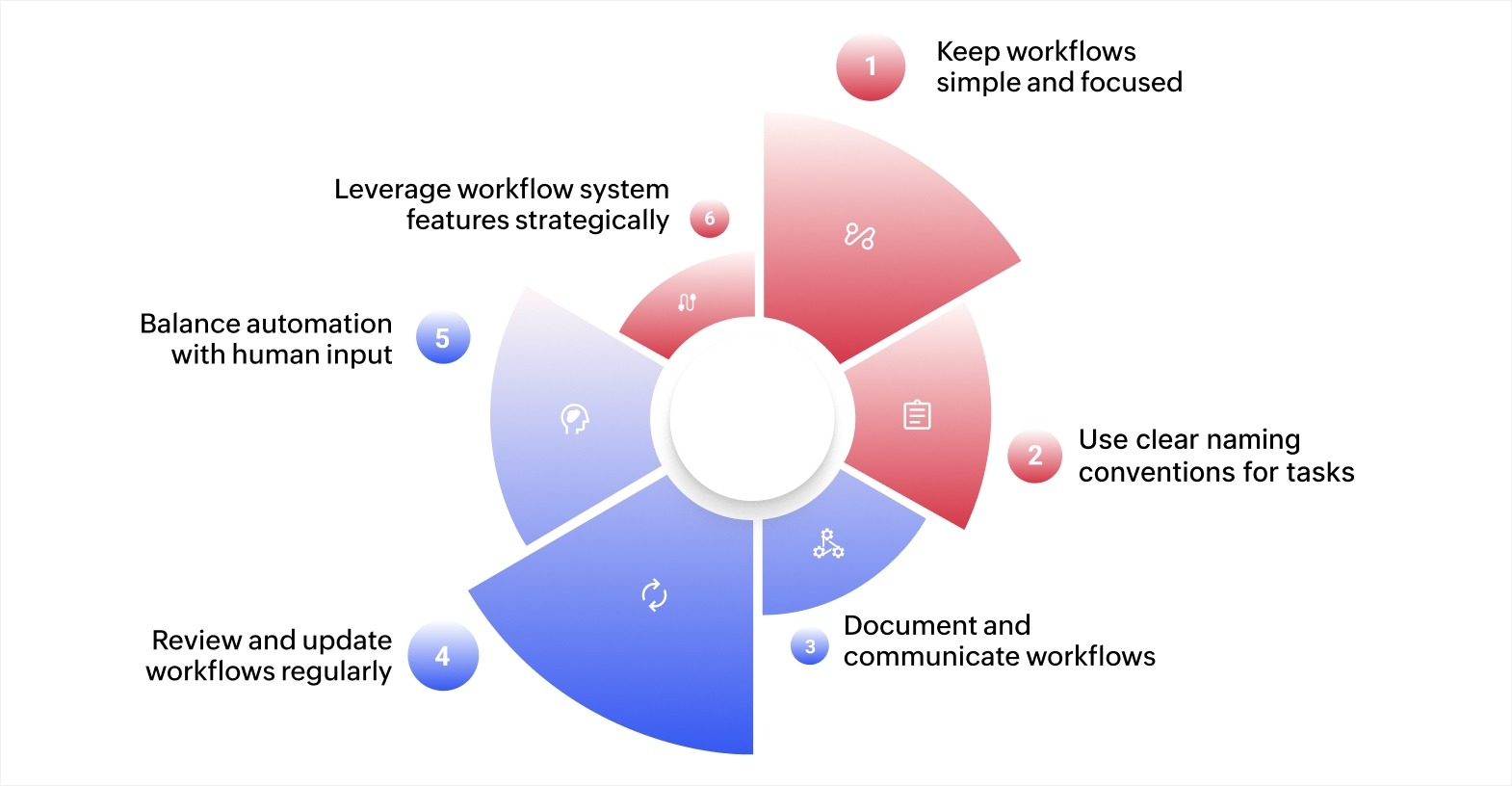
Once you've built your first workflow, the next step is to ensure it operates efficiently and reliably. Following best practices helps you maintain clarity, reduce errors, and get the most value from your workflow system.
Keep workflows simple and focused
Avoid overcomplicating your workflows by combining too many tasks or processes. Start with a small, specific process, such as approving invoices or handling client requests. For example, instead of automating the entire finance department process at once, focus on “Invoice approval for amounts under $5,000.” A focused workflow is easier to manage, test, and follow.
Use clear naming conventions for tasks and steps
Label each task and step descriptively. Instead of a generic “Review,” use “Manager approval Q2 budget,” or “Client feedback review, Proposal Draft.” Clear names reduce ambiguity, help team members understand responsibilities, and improve collaboration across departments using the same workflow system.
Document and communicate workflows
Even simple workflows benefit from documentation. Include step-by-step guides or visual maps showing task sequences, responsible roles, and conditions. For example, a content publishing workflow could document steps like topic approval, draft submission, editorial review, final approval, CMS upload, and social media promotion. Documentation ensures everyone follows the process correctly and supports onboarding and compliance.
Review and update workflows regularly
Workflows evolve as business needs change. Schedule periodic reviews to identify bottlenecks, outdated steps, or redundant actions. For example, if approvals are delayed because tasks are repeatedly reassigned, update the roles or rules to simplify progress. Workflow systems provide metrics like task duration and completion rates to help you spot areas for improvement.
Balance automation with human input
Automation can save time, but some decisions still require human judgment. Keep an important steps manual, such as approvals needing review or exception handling. For example, while routine expense requests under $500 can be auto-approved, larger amounts should route to a manager for evaluation. Over-automation can lead to errors if nuanced decisions are forced through rigid rules.
Leverage workflow system features strategically
Use triggers, conditional logic, notifications, and escalations selectively. For example:
- Trigger - Automatically assign a task when a client submits a service request form.
- Conditional logic - Route high-value sales deals to senior managers while lower-value deals follow a standard approval path.
- Notifications - Remind users of pending approvals before deadlines.
Applying these features strategically allows your team to focus on higher-value work without losing control over important decisions.
Following these best practices in your workflow system ensures your processes are clear, efficient, and adaptable. By keeping workflows simple, documenting clearly, and iterating consistently, you create processes that save time, reduce errors, and scale as your business grows.
Set up and run custom workflows with Zoho Creator
A workflow system works best when it matches your actual business process. When your workflows involve specific approval chains, conditional routing, or integrations with existing tools, you need a platform that adapts to your requirements.
Zoho Creator is an AI-powered low-code app development platform that lets you design, automate, and manage custom workflows without writing complex code. You can map your exact business process, set rules and triggers, and deploy it across web and mobile devices in a short time.
You can also connect your workflows to over 1,000 applications through prebuilt integration flows. Plus, real-time dashboards give you full visibility into task progress, completion rates, and bottlenecks.
Sign up for free today and build your first custom workflow system that fits the way your team actually works.
FAQ
How is a workflow system different from a project management tool?
A workflow system focuses on automating repeatable processes with defined steps, rules, and approvals. A project management tool, on the other hand, is designed to manage one-time or complex projects with milestones, dependencies, and timelines. While both can track tasks, a workflow system is best for routine business operations like approvals, onboarding, or compliance tracking.
Can a workflow system adapt as my business grows?
Yes. Most modern workflow systems, including low-code platforms, allow you to add new steps, conditions, and integrations as your processes evolve. You can start with simple workflows, such as expense approvals, and later expand into multi-department workflows that involve finance, HR, and operations without starting from scratch.
What should you avoid when creating workflows for the first time?
Common mistakes include overcomplicating the design with too many steps, ignoring user feedback, and automating tasks that still require human judgment. It’s best to keep workflows simple at the start, test them with real users, and gradually refine them based on results.
How do workflow systems improve collaboration across departments?
A workflow system gives every participant visibility into task status, deadlines, and responsibilities. For example, in a sales-to-finance hand-off, the system ensures the sales team’s closed deals automatically trigger finance tasks like invoicing. This reduces missed communication and helps departments work together without relying on manual updates.
 Ann Elizabeth Sam
Hey! I'm Ann, and I work as a content writer at Zoho Creator. I'm exploring the SaaS world through various forms of content creation. Outside of work, I love dancing and would give up anything to read a good murder mystery.