
Configure the Event Function
We will now begin coding the WorkDrive Sync app by configuring the Event function.
If you initialized the Event function in Node.js, its directory, functions/workdrivesync, contains:
- The index.js main function file
- The catalyst-config.json configuration file
- Node modules
- package.json and package-lock.json dependency files
If you initialized the Event Function in Java, its directory, functions/WorkDrive, contains:
- The WorkDriveSync.java main function file
- The catalyst-config.json configuration file
- Java library files in the lib folder
- .classpath and .project dependency files
You will be adding code in WorkDriveSync.java or index.js based on the stack you initialized.
You can use any IDE to configure the function.
For the Java function, you can directly copy the code below and paste it in WorkDriveSync.java located in the functions/WorkDrive directory and save the file.
View code for WorkDriveSync.java
Copied
import java.io.File;
import java.io.FileOutputStream;
import java.io.InputStream;
import java.io.OutputStream;
import java.util.ArrayList;
import java.util.List;
import java.util.logging.Level;
import java.util.logging.Logger;

import org.json.simple.JSONArray;
import org.json.simple.JSONObject;
import org.json.simple.parser.JSONParser;

import okhttp3.MediaType;
import okhttp3.MultipartBody;
import okhttp3.OkHttpClient;
import okhttp3.Request;
import okhttp3.RequestBody;
import okhttp3.Response;

import com.catalyst.Context;
import com.catalyst.event.EVENT_STATUS;
import com.catalyst.event.EventRequest;
import com.catalyst.event.CatalystEventHandler;
import com.zc.auth.connectors.ZCConnection;
import com.zc.component.files.ZCFile;
import com.zc.component.files.ZCFolder;
import com.zc.component.object.ZCObject;
import com.zc.component.object.ZCRowObject;
import com.zc.component.object.ZCTable;
import com.zc.component.zcql.ZCQL;

public class WorkDriveSync implements CatalystEventHandler {

	private static final Logger LOGGER = Logger.getLogger(WorkDriveSync.class.getName());
	JSONParser jsonParser = new JSONParser();
	private static final String WORKDRIVE_FOLDERID = "{{WORKDRIVE_FOLDER_ID}}"; //Enter your WorkDrive Folder ID

	@Override
	public EVENT_STATUS handleEvent(EventRequest paramEventRequest, Context paramContext) throws Exception {

		try {
			ZCFile fileStore = ZCFile.getInstance();
			org.json.JSONObject eventData = (org.json.JSONObject) paramEventRequest.getData();
			ZCFolder folder = fileStore.getFolderInstance(Long.parseLong(eventData.get("folder_details").toString()));
			InputStream is = folder.downloadFile(Long.parseLong(eventData.get("id").toString()));

			Response response = uploadFiletoWorkdrive(is, eventData);
			if (response.code() == 200) {

				org.json.simple.JSONObject resData = (org.json.simple.JSONObject) jsonParser
						.parse(response.body().string());
				JSONArray array = (JSONArray) resData.get("data");
				JSONObject data = (JSONObject) array.get(0);
				JSONObject attributes = (JSONObject) data.get("attributes");
				String resourceId = (String) attributes.get("resource_id");
				LOGGER.log(Level.SEVERE, resourceId);
				String query = "SELECT ROWID FROM WorkDriveFileID where FileID=" + eventData.get("id").toString();
				ArrayList<ZCRowObject> rowList = ZCQL.getInstance().executeQuery(query);
				Object ROWID = rowList.get(0).get("WorkDriveFileID", "ROWID");
				ZCObject object = ZCObject.getInstance();
				ZCTable table = object.getTable(1611000000552900L); //Replace this with your Table ID
				List<ZCRowObject> rows = new ArrayList<ZCRowObject>();
				ZCRowObject row = ZCRowObject.getInstance();
				row.set("WorkDriveFileID", resourceId);
				row.set("WorkDriveSync", "Completed");
				row.set("ROWID", Long.parseLong(ROWID.toString()));
				rows.add(row);
				table.updateRows(rows);
				return EVENT_STATUS.SUCCESS;

			} else {
				LOGGER.log(Level.SEVERE, "WorkDrive API Exception");
				return EVENT_STATUS.FAILURE;
			}

		} catch (Exception e) {
			LOGGER.log(Level.SEVERE, "Exception in WDSync Function", e);
			return EVENT_STATUS.FAILURE;
		}
	}

	@SuppressWarnings("unchecked")
	public String getAccessToken() throws Exception {

		JSONObject authJson = new JSONObject();
		JSONObject connectorJson = new JSONObject();

		authJson.put("client_id", "{{YOUR_CLIENT_ID}}"); //Enter your Client ID
		authJson.put("client_secret", "{{YOUR_CLIENT_SECRET}}"); //Enter your Client Secret
		authJson.put("auth_url", "https://accounts.zoho.com/oauth/v2/token");
		authJson.put("refresh_url", "https://accounts.zoho.com/oauth/v2/token");
		authJson.put("refresh_token", "{{YOUR_REFRESH_TOKEN}}"); //Enter your Refresh Token
		connectorJson.put("WorkDriveConnector", authJson);

		return ZCConnection.getInstance(connectorJson).getConnector("WorkDriveConnector").getAccessToken();
	}

	public Response uploadFiletoWorkdrive(InputStream is, org.json.JSONObject eventData) throws Exception {

		byte[] buffer = new byte[is.available()];
		is.read(buffer);
		File targetFile = new File(eventData.get("file_name").toString());
		OutputStream outStream = new FileOutputStream(targetFile);
		outStream.write(buffer);
		outStream.close();

		String accessToken = getAccessToken();
		OkHttpClient client = new OkHttpClient().newBuilder().build();
		RequestBody body = new MultipartBody.Builder().setType(MultipartBody.FORM)
				.addFormDataPart("content", eventData.get("file_name").toString(), RequestBody.create(
						MediaType.parse("application/octet-stream"), new File(eventData.get("file_name").toString())))
				.build();
		Request request = new Request.Builder()
				.url("https://workdrive.zoho.com/api/v1/upload?filename=" + eventData.get("file_name").toString()
						+ "&override-name-exist=true&parent_id=" + WORKDRIVE_FOLDERID)
				.method("POST", body).addHeader("Authorization", "Zoho-oauthtoken " + accessToken).build();
		return client.newCall(request).execute();
	}
}
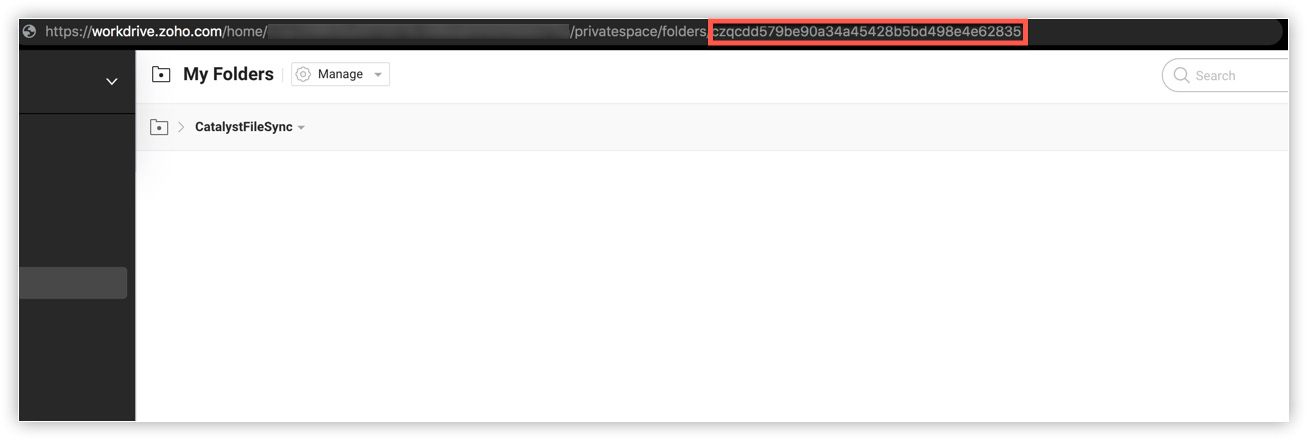
- WorkDrive Folder ID in line 37: You can obtain this value by opening the folder you created in WorkDrive earlier. The URL contains the Folder ID of the WorkDrive folder. Copy the ID displayed after folders/ from the URL.
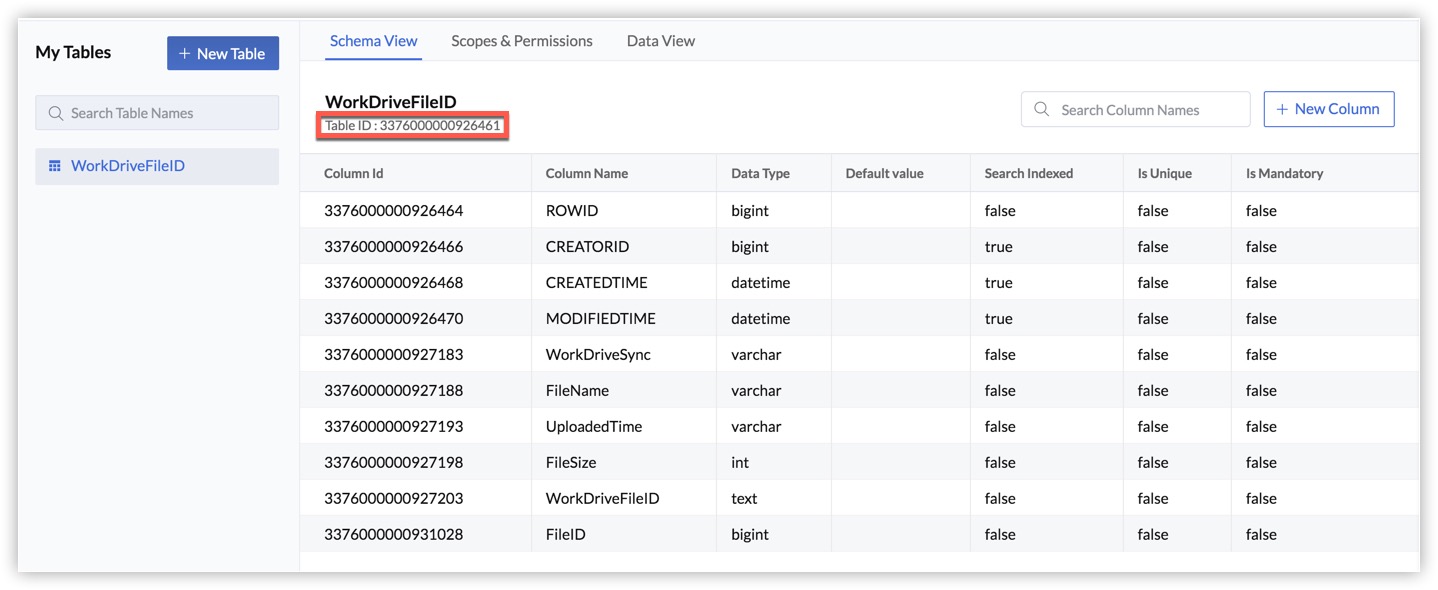
- Table ID in line 68: You can obtain the table ID of your table in the Data Store under its name.
- Client ID in line 89
- Client Secret in line 90
- Refresh Token in line 93
Install Packages for Node.js
The Node.js Event function requires three packages to be installed: axios, form-data, and fs.
axios
axios is a promise-based HTTP client that we will use to send asynchronous HTTP requests to the WorkDrive API endpoint to post files.
To install axios, navigate to the Node function's directory (functions/workdrivesync) and execute the following command:
$ npm install axiosThis will install the module.

form-data
We will use form-data to upload the file to WorkDrive, after reading it from the event data sent in by the event listener.
To install form-data, navigate to the Node function's directory (functions/workdrivesync) and execute the following command:
$ npm install form-dataThis will install the module.

fs
The fs module enables us to access the physical file system and create a read stream to fetch the file from the event data.
To install fs, navigate to the Node function's directory (functions/workdrivesync) and execute the following command:
$ npm install fsThis will install the module.

Information about these packages will also be updated in the package.json file of the Event function.
{
	"name": "workdrivesync",
	"version": "1.0.0",
	"main": "index.js",
	"author": "emma@zylker.com",
	"dependencies": {
		"axios": "^0.21.4",
		"form-data": "^4.0.0",
		"fs": "^0.0.1-security",
		"zcatalyst-sdk-node": "latest"
	}
}
You can now add the code in the function file.
Copy the code below and paste it in index.js located in functions/workdrivesync directory and save the file.
View code for index.js
Copied
const catalyst = require('zcatalyst-sdk-node');
const axios = require('axios').default;
const FormData = require('form-data');
const fs = require('fs');

const credentials = {
	WorkDriveConnectorz: {
		client_id: '{{YOUR_CLIENT_ID}}', //Enter your Client ID
		client_secret: '{{YOUR_CLIENT_SECRET}}', //Enter your Client Secret
		auth_url: 'https://accounts.zoho.com/oauth/v2/token',
		refresh_url: 'https://accounts.zoho.com/oauth/v2/token',
		refresh_token: '{{YOUR_REFRESH_TOKEN}}' //Enter your Refresh Token
	}
}
const FOLDERID = 'p98c29a39baa7a7284693b74608708fd6ba5f'; //Enter your WorkDrive Folder ID

module.exports = async (event, context) => {
	try {
		const app = catalyst.initialize(context);
		const accessToken = await app.connection(credentials).getConnector('WorkDriveConnectorz').getAccessToken();
		let filestore = app.filestore();
		let folder = filestore.folder(event.data.folder_details);
		let downloadPromise = folder.downloadFile(event.data.id);
		downloadPromise.then(async (fileObject) => {

			fs.writeFileSync(__dirname + '/' + event.data.file_name, fileObject, 'utf-8');
			var data = new FormData();
			data.append('content', fs.createReadStream(__dirname + '/' + event.data.file_name));

			const config = {
				method: 'POST',
				url: `https://workdrive.zoho.com/api/v1/upload?filename=${event.data.file_name}&override-name-exist=true&parent_id=${FOLDERID}`,
				headers: {
					'Authorization': `Zoho-oauthtoken ${accessToken}`,
					...data.getHeaders()
				},
				data: data
			};
			console.log(config)
		axios(config)
				.then(async function (response) {
					const body = response.data;
					const WorkDriveFileID = body.data[0].attributes.resource_id;
					const WorkDriveSync = 'Completed';
					const query = `SELECT ROWID FROM WorkDriveFileID where FileID=${event.data.id}`;
					const queryResult = await app.zcql().executeZCQLQuery(query);
					const ROWID = queryResult[0].WorkDriveFileID.ROWID;
					const catalystTable = app.datastore().table('WorkDriveFileID');
					await catalystTable.updateRow({
						WorkDriveFileID,
						WorkDriveSync,
						ROWID
					});
					context.closeWithSuccess();

				})
				.catch(function (error) {
					console.log(error)
					context.closeWithFailure();
				});
- WorkDrive Folder ID in line 15: You can obtain this value from the WorkDrive folder's URL, as explained in the Java function configuration.
- Client ID in line 8
- Client Secret in line 9
- Refresh Token in line 12
The Event function is now configured.