
Configure the Advanced I/O Function
If you initialized the Advanced I/O function in Node.js, its directory, functions/files, contains:
- The index.js main function file
- The catalyst-config.json configuration file
- Node modules
- package.json and package-lock.json dependency files
If you initialized the Advanced I/O Function in Java, its directory, functions/file, contains:
- The Files.java main function file
- The catalyst-config.json configuration file
- Java library files in the lib folder
- .classpath and .project dependency files
You will be adding code in Files.java or index.js based on the stack you initialized.
You can use any IDE to configure the function.
For the Java function, you can directly copy the code below and paste it in Files.java located in the functions/file directory and save the file.
View code for Files.java
Copied
import java.util.ArrayList;
import java.util.logging.Level;
import java.util.logging.Logger;

import javax.servlet.http.HttpServletRequest;
import javax.servlet.http.HttpServletResponse;

import com.catalyst.advanced.CatalystAdvancedIOHandler;
import com.zc.auth.connectors.ZCConnection;
import com.zc.component.files.ZCFile;
import com.zc.component.object.ZCObject;
import com.zc.component.object.ZCRowObject;
import com.zc.component.zcql.ZCQL;

import org.json.JSONArray;
import org.json.simple.JSONObject;

import okhttp3.OkHttpClient;
import okhttp3.Request;
import okhttp3.RequestBody;
import okhttp3.Response;

public class Files implements CatalystAdvancedIOHandler {
	private static final Logger LOGGER = Logger.getLogger(Files.class.getName());
	JSONObject responseData = new JSONObject();
	static String GET = "GET";
	static String DELETE = "DELETE";
	static String WORKDRIVEFILEID = "WorkDriveFileID";
	static Long FOLDER_ID = {{YOUR_FILESTORE_FOLDER_ID}}; //Enter your File Store Folder ID
	static Long TABLE_ID = {{YOUR_TABLE_ID}}; //Enter your Table ID

	@Override
	@SuppressWarnings("unchecked")
	public void runner(HttpServletRequest request, HttpServletResponse response) throws Exception {
		try {
			String url = request.getRequestURI();
			String method = request.getMethod();
			LOGGER.log(Level.SEVERE, url);

			if ((url.equals("/getFiles")) && method.equals(GET)) {

				String query = "SELECT * FROM WorkDriveFileID limit 1,100";
				ArrayList<ZCRowObject> rowList = ZCQL.getInstance().executeQuery(query);
				JSONArray jsonArray = new JSONArray();

				for (int i = 0; i < rowList.size(); i++) {
					JSONObject formDetailsJson = new JSONObject();
					formDetailsJson.put("FileID", rowList.get(i).get(WORKDRIVEFILEID, "FileID"));
					formDetailsJson.put("WorkDriveSync", rowList.get(i).get(WORKDRIVEFILEID, "WorkDriveSync"));
					formDetailsJson.put("FileName", rowList.get(i).get(WORKDRIVEFILEID, "FileName"));
					formDetailsJson.put("UploadedTime", rowList.get(i).get(WORKDRIVEFILEID, "UploadedTime"));
					formDetailsJson.put("FileSize", rowList.get(i).get(WORKDRIVEFILEID, "FileSize"));
					formDetailsJson.put("WorkDriveFileID", rowList.get(i).get(WORKDRIVEFILEID, "WorkDriveFileID"));
					formDetailsJson.put("ROWID", rowList.get(i).get(WORKDRIVEFILEID, "ROWID"));
					jsonArray.put(formDetailsJson);
				}

				response.setContentType("application/json");
				response.getWriter().write(jsonArray.toString());
				response.setStatus(200);

			} else if ((url.equals("/deleteFile")) && method.equals(DELETE)) {

				Long fileId = Long.parseLong(request.getParameter("fileID"));
				String query = "SELECT * FROM WorkDriveFileID where FileID=" + String.valueOf(fileId);
				ArrayList<ZCRowObject> rowList = ZCQL.getInstance().executeQuery(query);
				String WorkDriveFileID = (String) rowList.get(0).get(WORKDRIVEFILEID, "WorkDriveFileID");

				Response res = deleteWorkdriveFile(WorkDriveFileID);
				if (res.code() == 200) {

					ZCFile.getInstance().getFolderInstance(FOLDER_ID).deleteFile(fileId);
					String ROWID = (String) rowList.get(0).get(WORKDRIVEFILEID, "ROWID");
					ZCObject.getInstance().getTable(TABLE_ID).deleteRow(Long.parseLong(ROWID));
					responseData.put("message", "Deleted Successfully");

				} else {
					responseData.put("message", "Workdrive API Error");
				}

				response.setContentType("application/json");
				response.getWriter().write(responseData.toString());
				response.setStatus(200);

			} else {
				LOGGER.log(Level.SEVERE, "Error. Invalid Request");
				responseData.put("error", "Request Endpoint not found");
				response.setStatus(404);
			}
		} catch (Exception e) {
			LOGGER.log(Level.SEVERE, "Exception in Files", e);
			responseData.put("error", "Internal server error occurred. Please try again in some time.");
			response.getWriter().write(responseData.toString());
			response.setStatus(500);
		}

	}

	@SuppressWarnings("unchecked")
	public String getAccessToken() throws Exception {

		JSONObject authJson = new JSONObject();
		JSONObject connectorJson = new JSONObject();

		authJson.put("client_id", "{{YOUR_CLIENT_ID}}"); //Enter your Client ID
		authJson.put("client_secret", "{{YOUR_CLIENT_SECRET}}"); //Enter your Client Secret
		authJson.put("auth_url", "https://accounts.zoho.com/oauth/v2/token");
		authJson.put("refresh_url", "https://accounts.zoho.com/oauth/v2/token");
		authJson.put("refresh_token", "{{YOUR_REFRESH_TOKEN}}"); //Enter your Refresh Token
		connectorJson.put("WorkDriveConnector", authJson);
		return ZCConnection.getInstance(connectorJson).getConnector("WorkDriveConnector").getAccessToken();

	}

		@SuppressWarnings("unchecked")
	public Response deleteWorkdriveFile(String WorkDriveFileID) throws Exception {
		String accessToken = getAccessToken();
		OkHttpClient client = new OkHttpClient().newBuilder().build();
		JSONObject data = new JSONObject();
		JSONObject attributes = new JSONObject();
		attributes.put("status", "51");
		data.put("attributes", attributes);
		data.put("type", "files");
		JSONObject reqBody = new JSONObject();
		reqBody.put("data", data);
		LOGGER.log(Level.SEVERE, reqBody.toString());
		RequestBody body = RequestBody.create(null, reqBody.toJSONString());
		Request req = new Request.Builder().url("https://www.zohoapis.com/workdrive/api/v1/files/"+WorkDriveFileID).method("PATCH", body)
				.addHeader("Authorization", "Zoho-oauthtoken " + accessToken)
				.addHeader("Accept", "application/vnd.api+json").build();
		return client.newCall(req).execute();
	}
- File Store Folder ID in line 29: You can obtain the ID of the folder you created in the File Store from the remote console.

- Table ID in line 30: You can obtain the ID of the table you created from the Data Store section, as mentioned in the previous step.
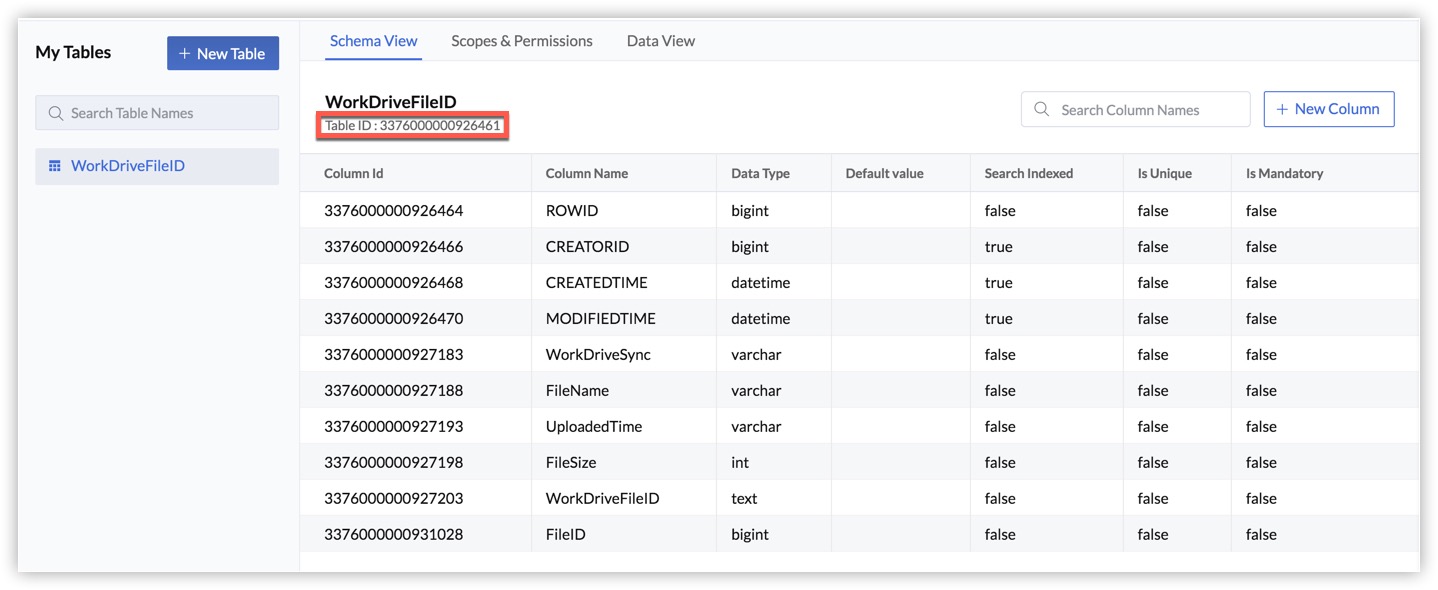
- Client ID in line 105
- Client Secret in line 106
- Refresh Token in line 107
Install Packages for Node.js
The Node.js Event function requires three packages to be installed: express and axios.
express
We will use the Express framework to manage the routing operations that enable us to fetch and delete files.
To install express, navigate to the Node function's directory (functions/files) and execute the following command:
$ npm install express --saveThis will install the Express module and save the dependencies.

axios
axios is a promise-based HTTP client that we will use to send asynchronous delete requests to the WorkDrive API endpoint.
To install axios, navigate to the Node function's directory (functions/files) and execute the following command:
$ npm install axiosThis will install the modules.
This information will also be updated in the package.json file of the Advanced I/O function.
{
	"name": "files",
	"version": "1.0.0",
	"main": "index.js",
	"author": "emma@zylker.com",
	"dependencies": {
		"axios": "^0.21.4",
		"express": "^4.17.1",
		"zcatalyst-sdk-node": "latest"
	}
}
You can now add the code in the function file.
Copy the code below and paste it in index.js located in functions/files directory and save the file.
View code for index.js
Copied
'use strict';
const express = require('express');
var app = express();
const catalyst = require('zcatalyst-sdk-node');
app.use(express.json());
const FOLDERID = {{YOUR_FILESTORE_FOLDER_ID}}; //Enter your File Store Folder ID
const axios = require('axios').default;

const credentials = {
	WorkDriveConnectorz: {
		client_id: '{{YOUR_CLIENT_ID}}', //Enter your Client ID
		client_secret: '{{YOUR_CLIENT_SECRET}}', //Enter your Client Secret
		auth_url: 'https://accounts.zoho.com/oauth/v2/token',
		refresh_url: 'https://accounts.zoho.com/oauth/v2/token',
		refresh_token: '{{YOUR_REFRESH TOKEN}}' //Enter your Refresh Token
	}
}

app.get('/getFiles', async (req, res) => {
	try {
		var catalystApp = catalyst.initialize(req);
		const query = 'SELECT * FROM WorkDriveFileID limit 1,100';
		const queryResult = await catalystApp.zcql().executeZCQLQuery(query);
		let resData = [];
		for (var i = 0; i < queryResult.length; i++) {
			const data = queryResult[i].WorkDriveFileID;
			resData.push(data);
		}
		res.status(200).send(resData);
	} catch (e) {
		console.log(e);
		res.status(500).send({ "error": "Internal server error occurred. Please try again in some time." });
	}
});


app.delete("/deleteFile", async (req, res) => {
  try {
    const FILEID = req.query.fileID;
    const catalystApp = catalyst.initialize(req);
    const query = "SELECT * FROM WorkDriveFileID where FileID=" + FILEID;
    const queryResult = await catalystApp.zcql().executeZCQLQuery(query);
    const ROWID = queryResult[0].WorkDriveFileID.ROWID;
    const WorkDriveFileID = queryResult[0].WorkDriveFileID.WorkDriveFileID;
    const accessToken = await catalystApp
      .connection(credentials)
      .getConnector("WorkDriveConnectorz")
      .getAccessToken();

    const config = {
      method: "PATCH",
      url: `https://www.zohoapis.com/workdrive/api/v1/files/${WorkDriveFileID}`,
      headers: {
        Authorization: `Zoho-oauthtoken ${accessToken}`,
        Accept: "application/vnd.api+json",
      },
      data: JSON.stringify({
        data: {
          attributes: {
            status: "51",
          },
          type: "files",
        },
      }),
    };

    axios(config)
      .then(async function (response) {
        const folder = catalystApp.filestore().folder(FOLDERID);
        await folder.deleteFile(FILEID);
        const table = catalystApp.datastore().table("WorkDriveFileID");
        await table.deleteRow(ROWID);
        res.status(200).send({ message: "Deleted Successfully" });
      })
      .catch(function (error) {
        console.log(error);
        res.status(500).send({ message: "Internal server error occurred. Please try again in some time" });
      });
  } catch (e) {
    console.log(e);
    res
      .status(500)
      .send({
        error: "Internal server error occurred. Please try again in some time.",
      });
  }
});

module.exports = app;
- File Store Folder ID in line 6: You can obtain this value from the File Store, as explained in the Java function configuration.
- Client ID in line 11
- Client Secret in line 12
- Refresh Token in line 15
The Advanced I/O function is now configured. We will discuss the function and client code, after you configure the client.