Apptics MCP playbook: Use cases you can try today
- Last Updated : April 28, 2026
- 240 Views
- 5 Min Read

If you're new to Apptics MCP, we recommend starting with our Apptics MCP server introduction blog to understand how it works and get started with the MCP setup.
In this playbook, we’ll focus on practical, real-world use cases you can try with Apptics MCP. It builds on the MCP server capabilities and shows how product, UX, marketing, and engineering teams can use MCP in their day-to-day workflows.
Apptics MCP comes with a set of powerful tools that let you query product data across events, screens, crashes, and devices—using software like Claude, Cursor, Windsurf, or VS Code—and uncover insights using natural language.
When should you use this playbook?
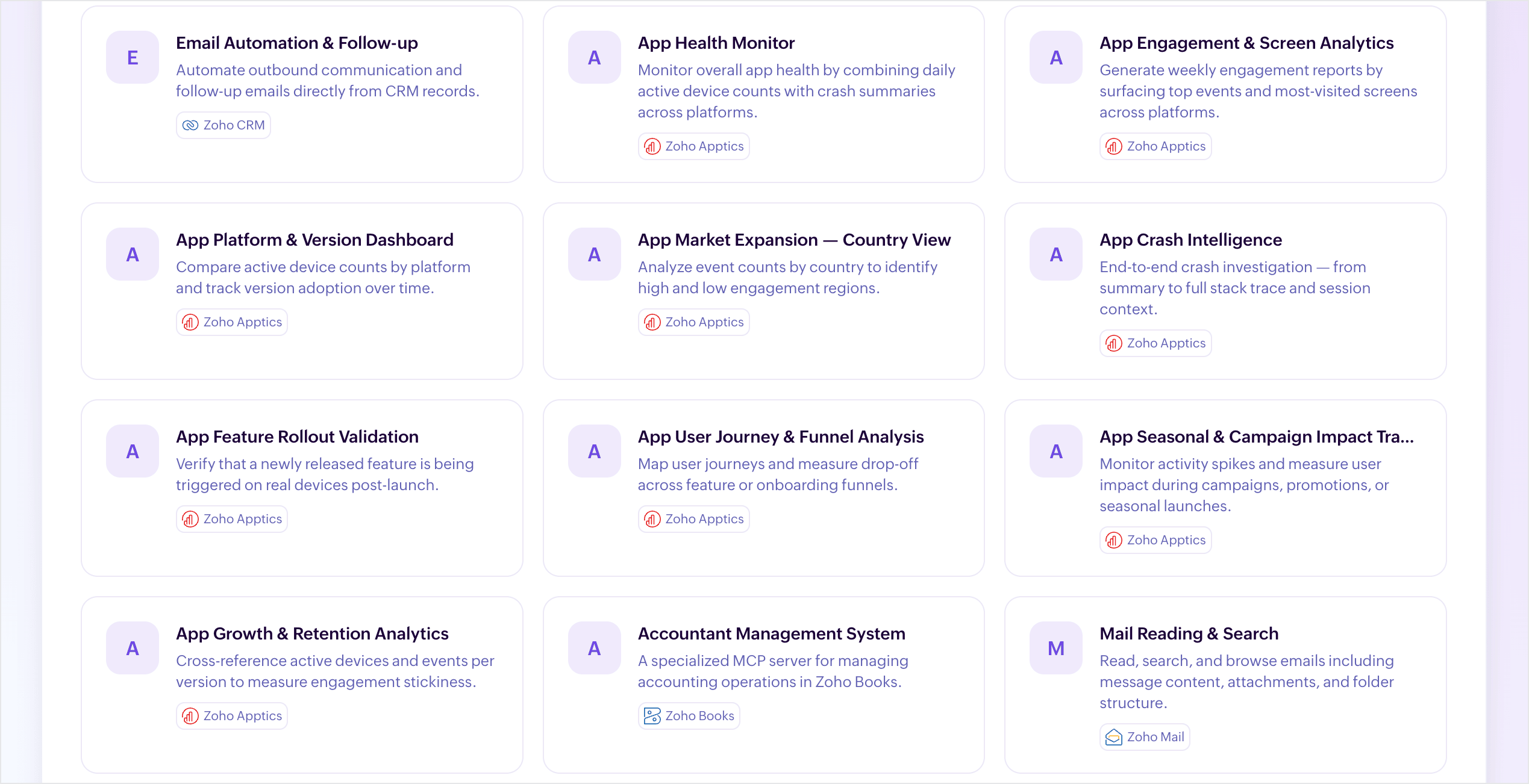
This blog contains a curated list of tested use cases along with sample prompts you can try.
Use this guide if you want to:
- Explore your app data without navigating dashboards.
- Understand user behavior, engagement, or performance.
- Validate hypotheses quickly using natural language.
- Build repeatable workflows using MCP templates.
Use cases for product managers and leadership
App health checkup
Get a quick snapshot of overall app health by combining daily active devices, crash trends across platforms, app versions, and device types.
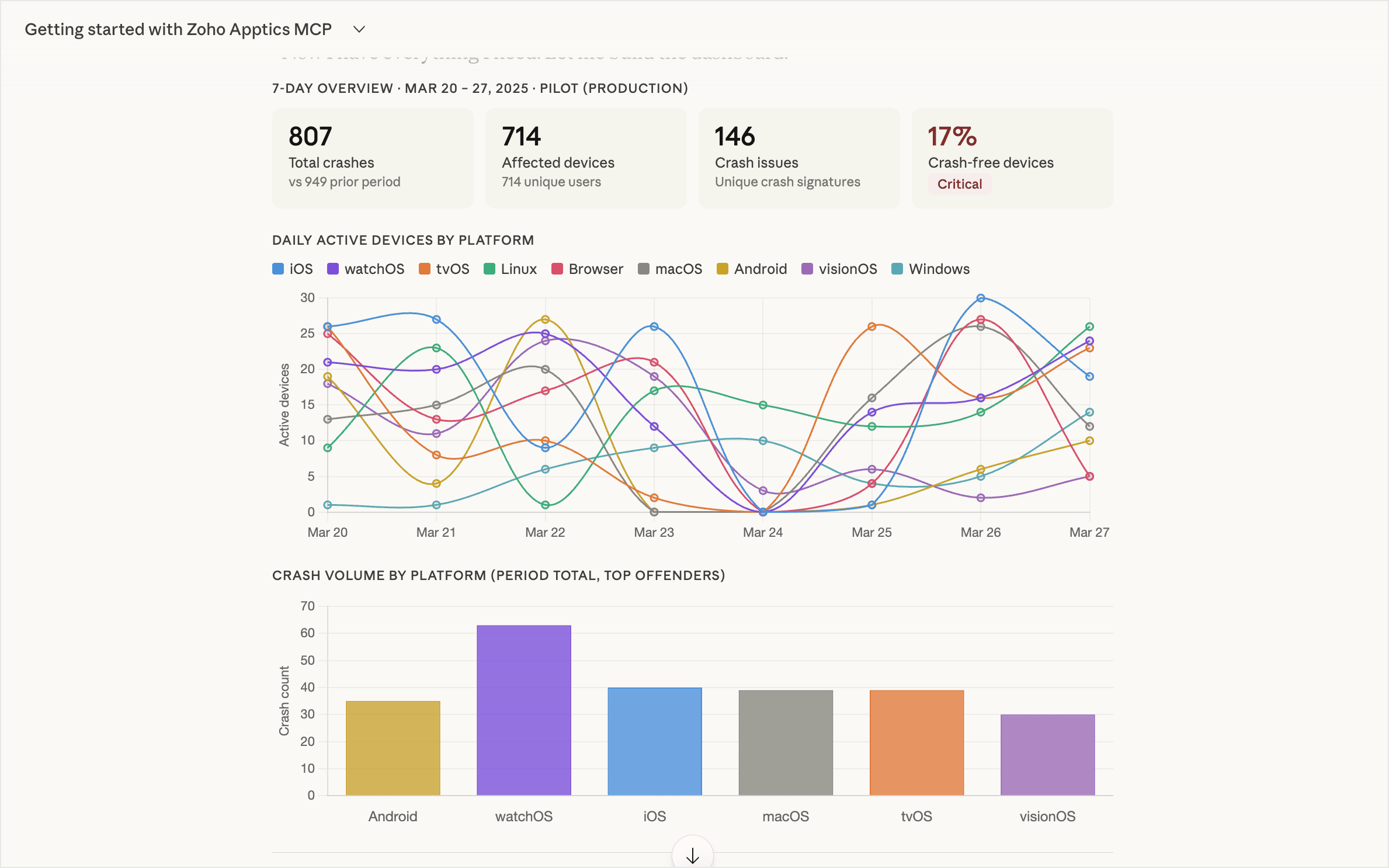
- Zoho MCP template: App health monitor
- Tools: getActiveDeviceCountByDate + getCrashList + getCrashSummary
Try this prompt:
For the last 14 days, show daily active devices alongside a crash list and summary across all platforms. Flag any dates where crash rate spiked relative to active device count, and call out which platform or version is responsible.
Weekly engagement report
Identify top events and most-visited screens by platform, which is useful for weekly syncs and stakeholder updates.
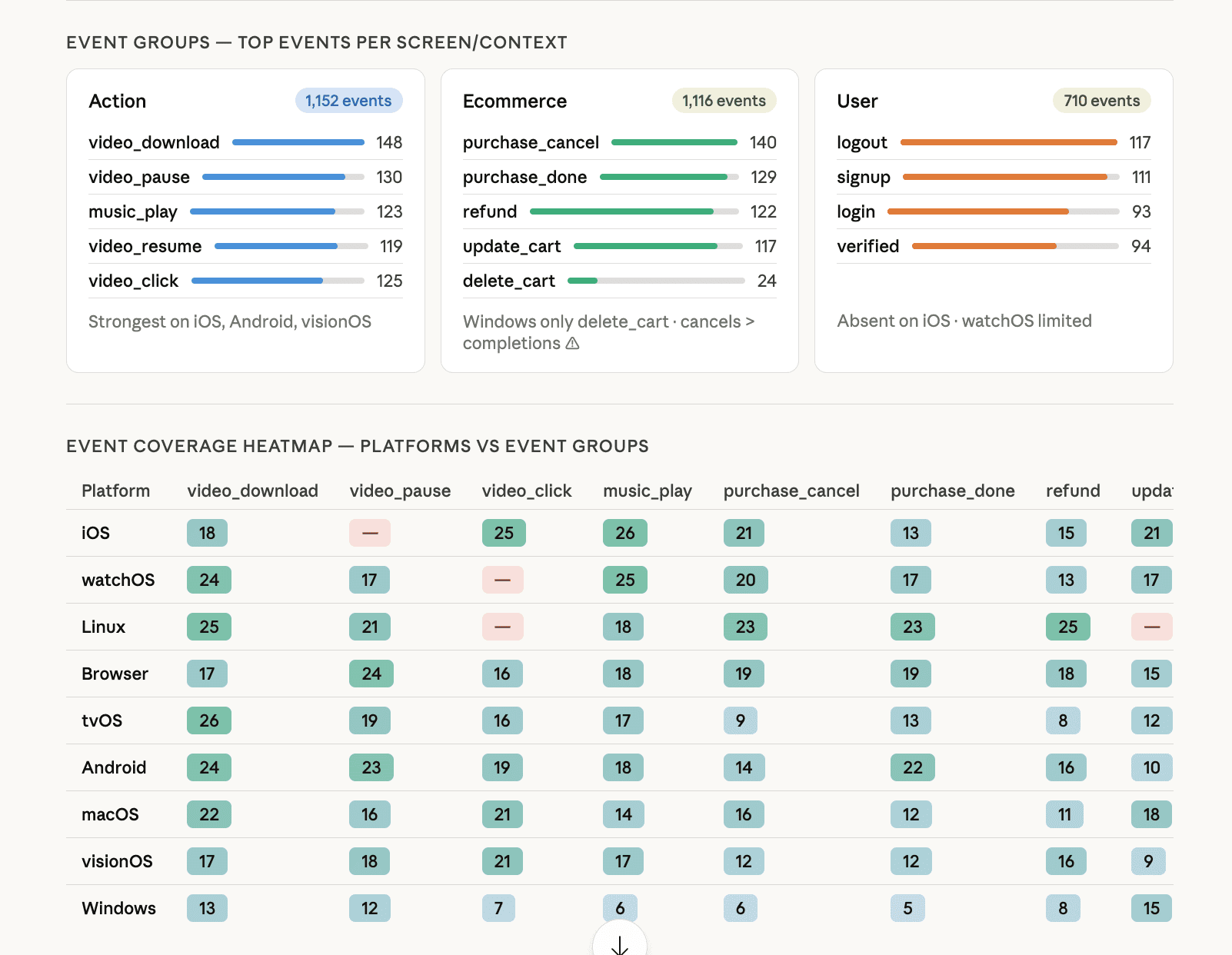
- Zoho MCP template: App engagement and screen analytics
- Tools: getEventSummary + getAllScreenStats
Try this prompt:
Show the top 10 events and top 10 most-visited screens broken down by platform for the last seven days. Highlight anything that changed significantly compared to the prior 7-day period.
Platform comparison
Track platform-wise growth trends and identify which platforms are gaining or losing traction.
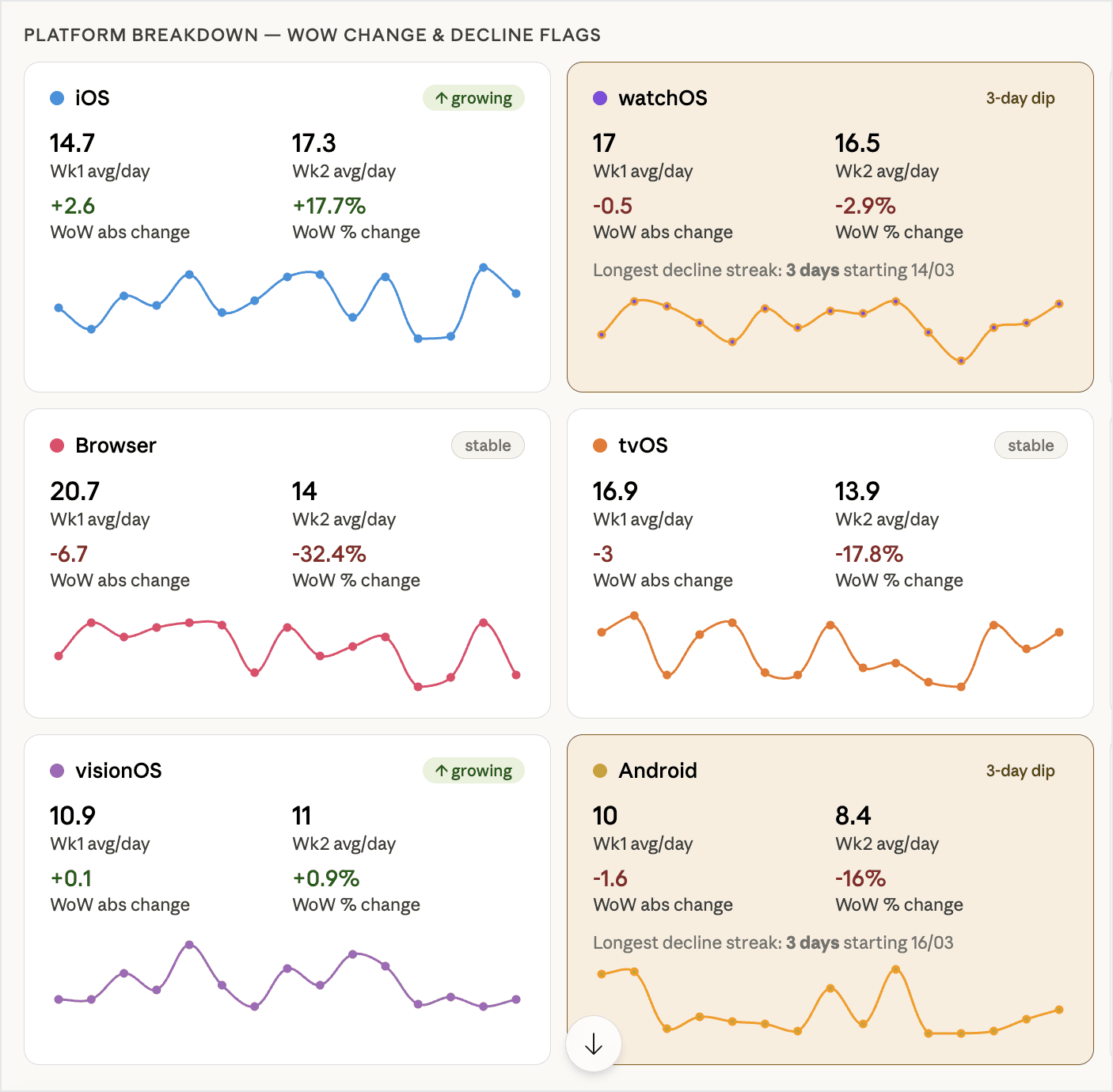
- Zoho MCP template: App platform and version dashboard
- Tools: getAllActiveDeviceStats (group by date and platform)
Try this prompt:
Show daily active devices broken down by platform over the last 14 days. Calculate the week-over-week change for each platform and flag any platform showing a consistent decline for 5 or more days.
Country-wise engagement tracking
Understand engagement distribution across regions to guide localization and GTM efforts.
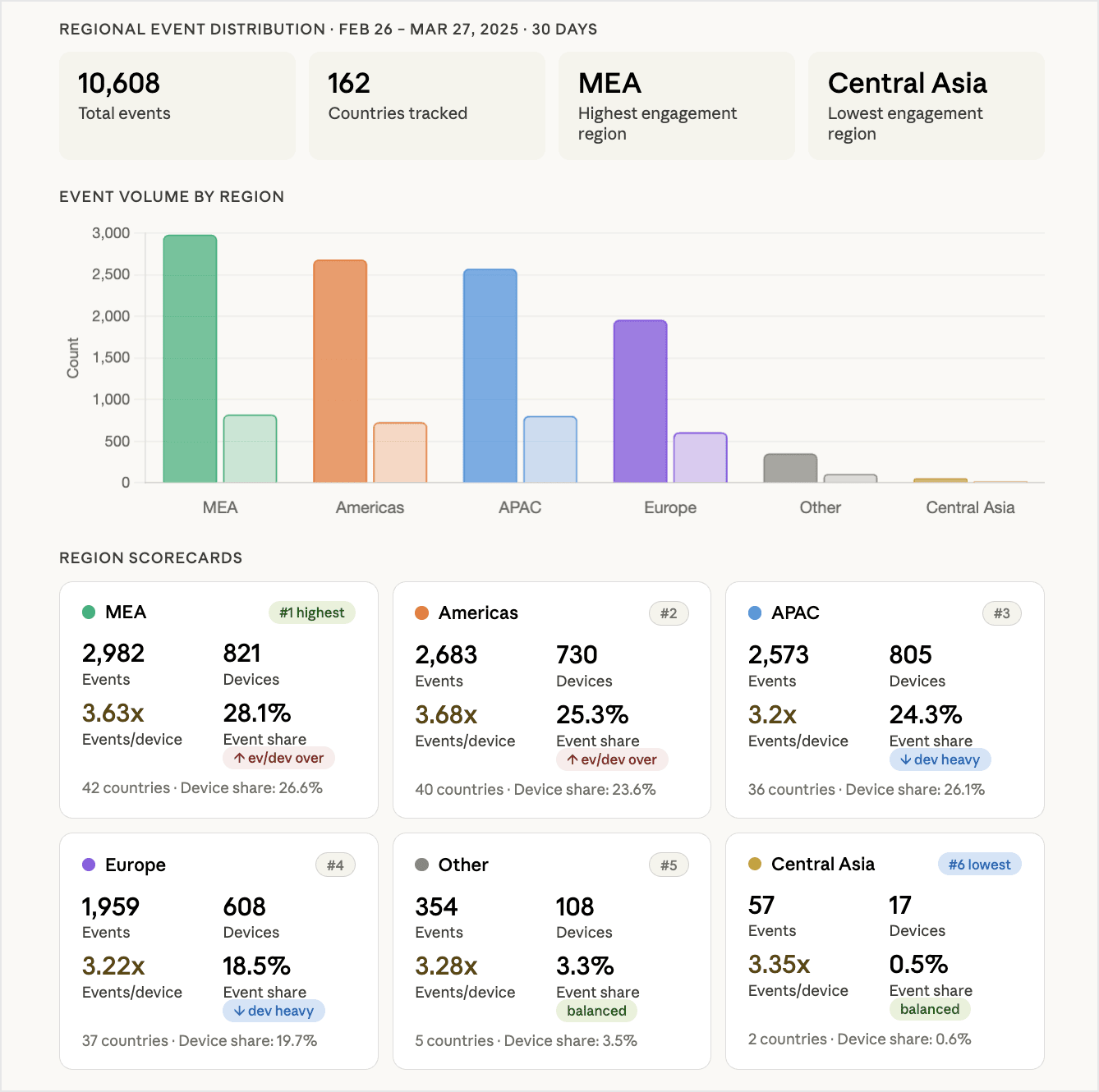
- Zoho MCP template: App market expansion – country view
- Tools: getEventCountrywiseSummary
Try this prompt:
Show event distribution by country for the last 30 days. Which regions have the highest and lowest engagement? Rank regions by engagement volume, and share the countries with disproportionately high or low event counts relative to their active device share.
Version adoption tracking
Monitor how quickly users move to newer versions after releases and identify long-tail usage on older builds.
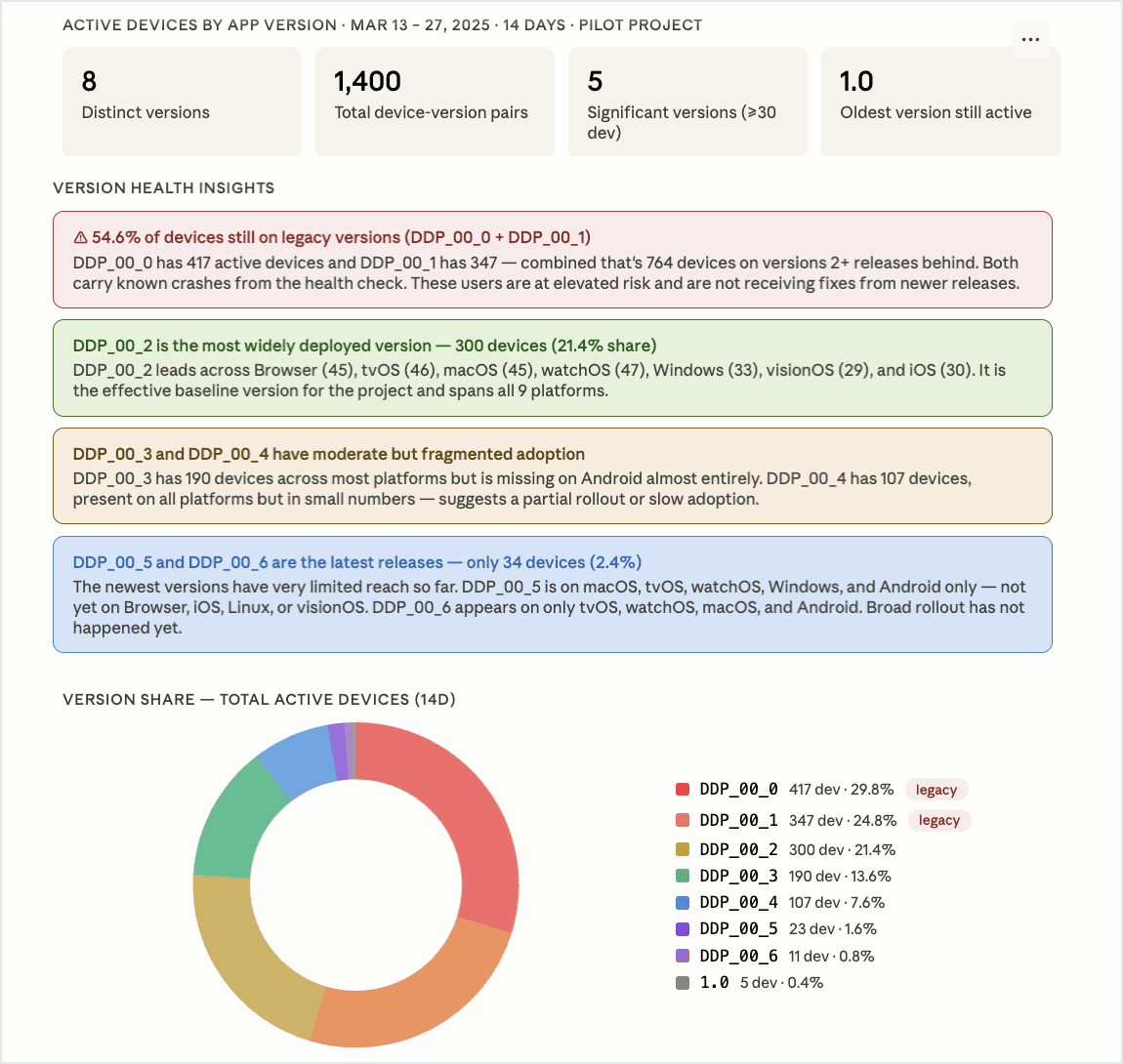
- Zoho MCP template: App platform and version dashboard
- Tools: getAllActiveDeviceStats (to group by app version)
Try this prompt:
Show active devices by app version over the last 14 days. Which versions still have significant usage?
Feature rollout validation
Verify whether newly released features are being triggered on real devices post-release.
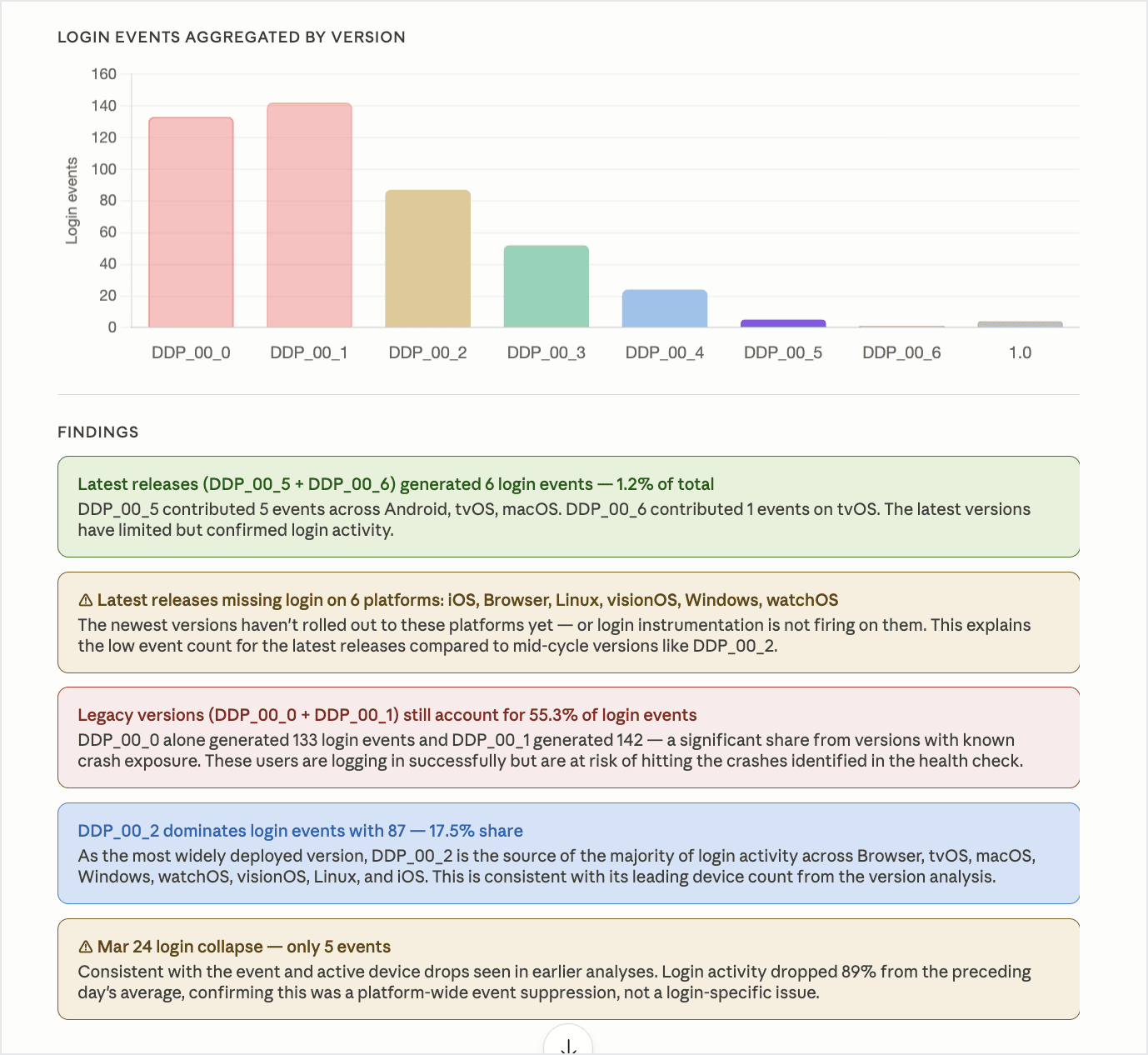
- Zoho MCP template: App feature rollout validation
- Tools: getAllEventStats + getEventDeviceCount
Try this prompt:
After the latest release, how many devices triggered [feature_event]? Show trends over the [last xx days].
Use cases for product and UX analytics
User journey analysis
Map how users move through screens and events and understand which ones drive key actions.
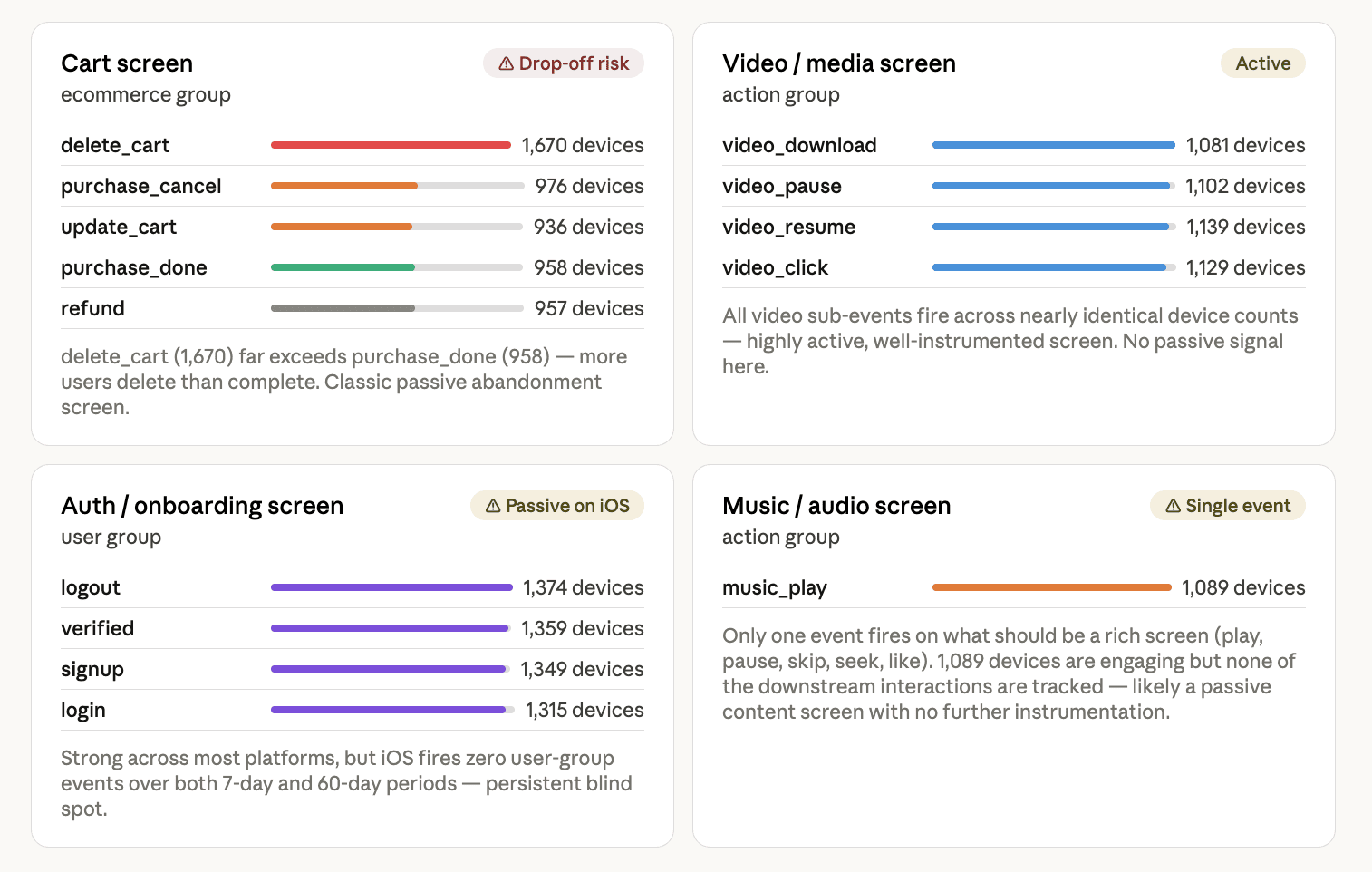
- Zoho MCP template: App user journey and funnel analysis
- Tools: getAllScreenStats + getAllEventStats
Try this prompt:
Show top screens and associated events for the last 14 days. Which screens drive the most user actions?
App version stickiness
Compare engagement depth across versions to see if newer releases improve user activity.
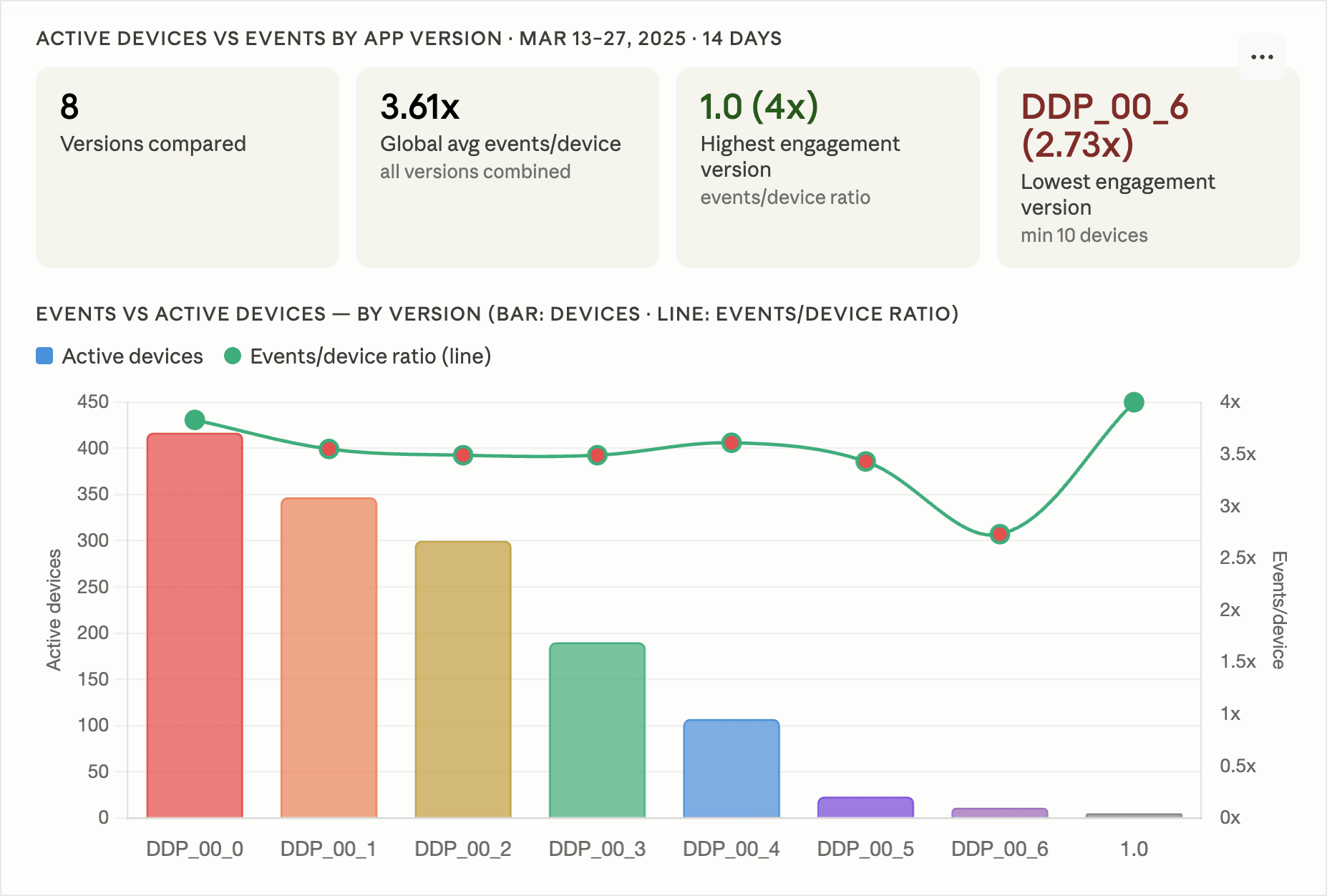
- Zoho MCP template: App growth and retention analytics
- Tools: getAllActiveDeviceStats + getAllEventStats (grouped by app version)
Try this prompt:
Compare active devices and event counts by app version for the last 14 days. Are newer versions seeing more engagement per device?
Dead screen detection
Analyze screens with low traffic to identify candidates for redesign or removal.
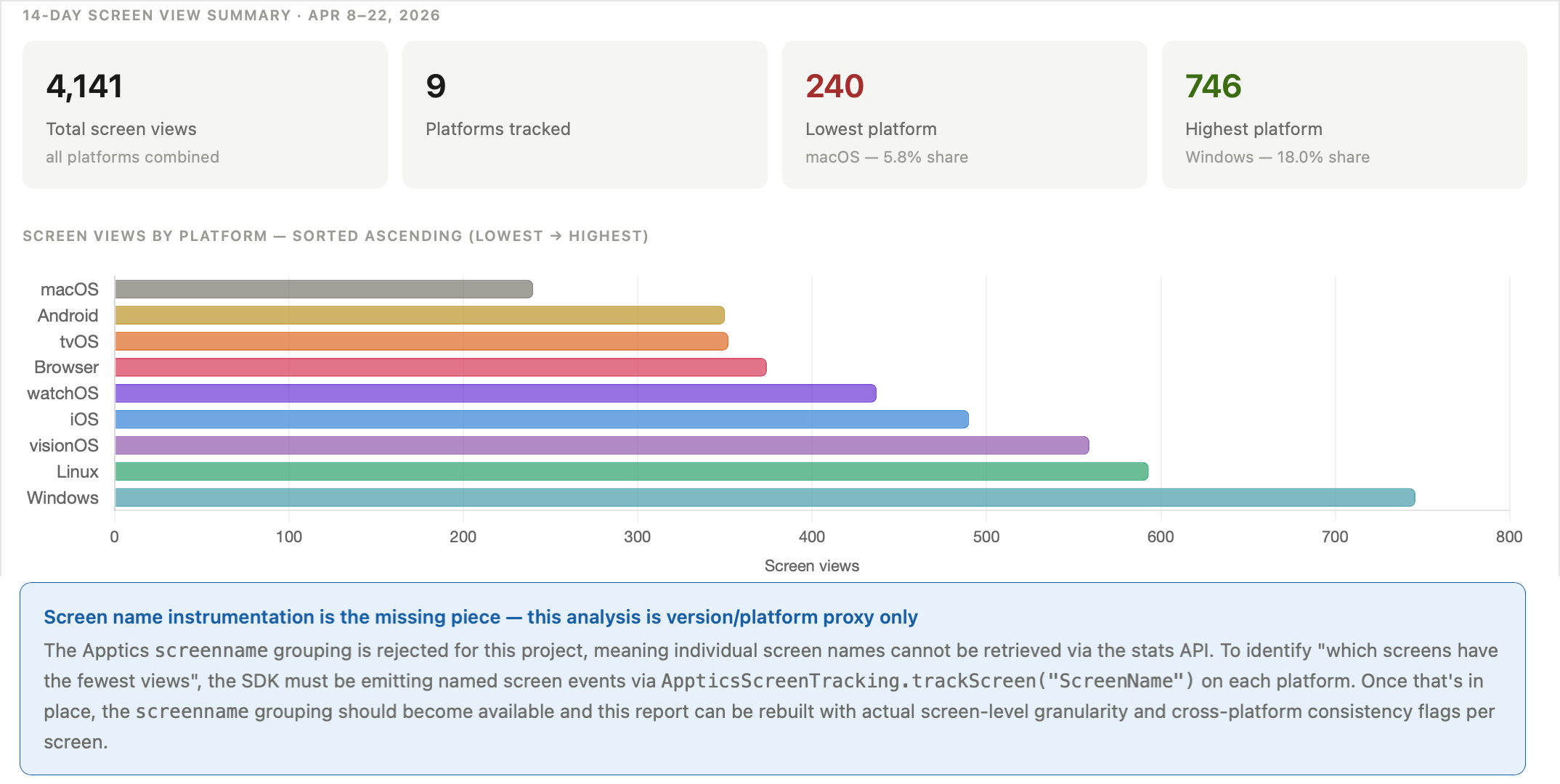
- Zoho MCP template: App growth and retention analytics (or app engagement and screen analytics)
- Tools: getAllScreenStats
Try this prompt:
Show all screens with the least views across platforms in the last 14 days. Group by platform and sort ascending by view count. Flag screens that appear consistently low across both platforms.
Feature adoption funnel
Analyze funnel flows and identify drop-offs at each step of the funnel.
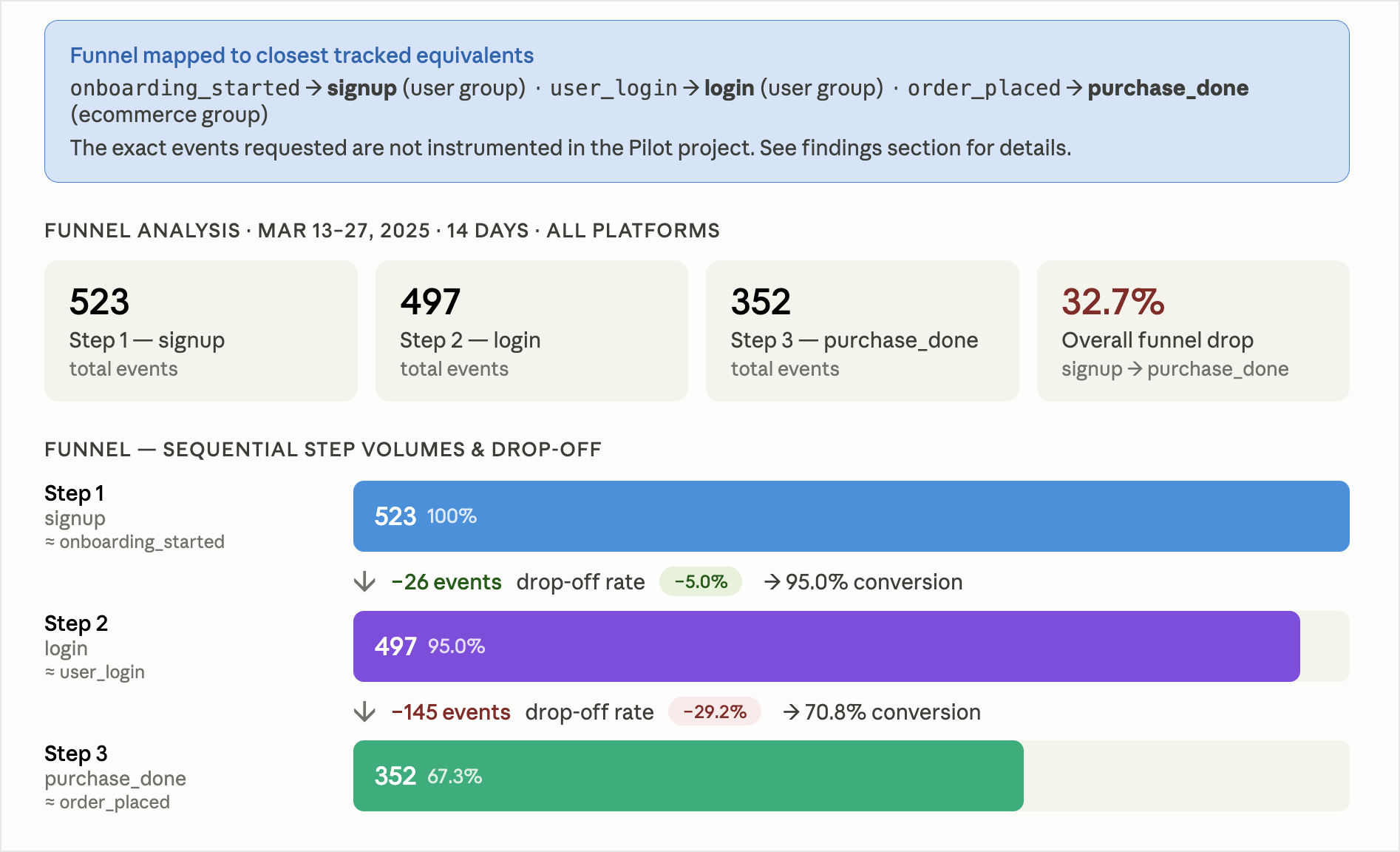
- Zoho MCP template: App user journey and funnel analysis
- Tools: getEventCountByDate + getAllScreenStats + getActiveDeviceCountByDate
Try this prompt:
Track these events as a sequential funnel over the last 30 days:
onboarding_started → profile_completed → first_purchase. Show counts for each step and calculate the drop-off rate between steps.
Seasonal/campaign impact tracking
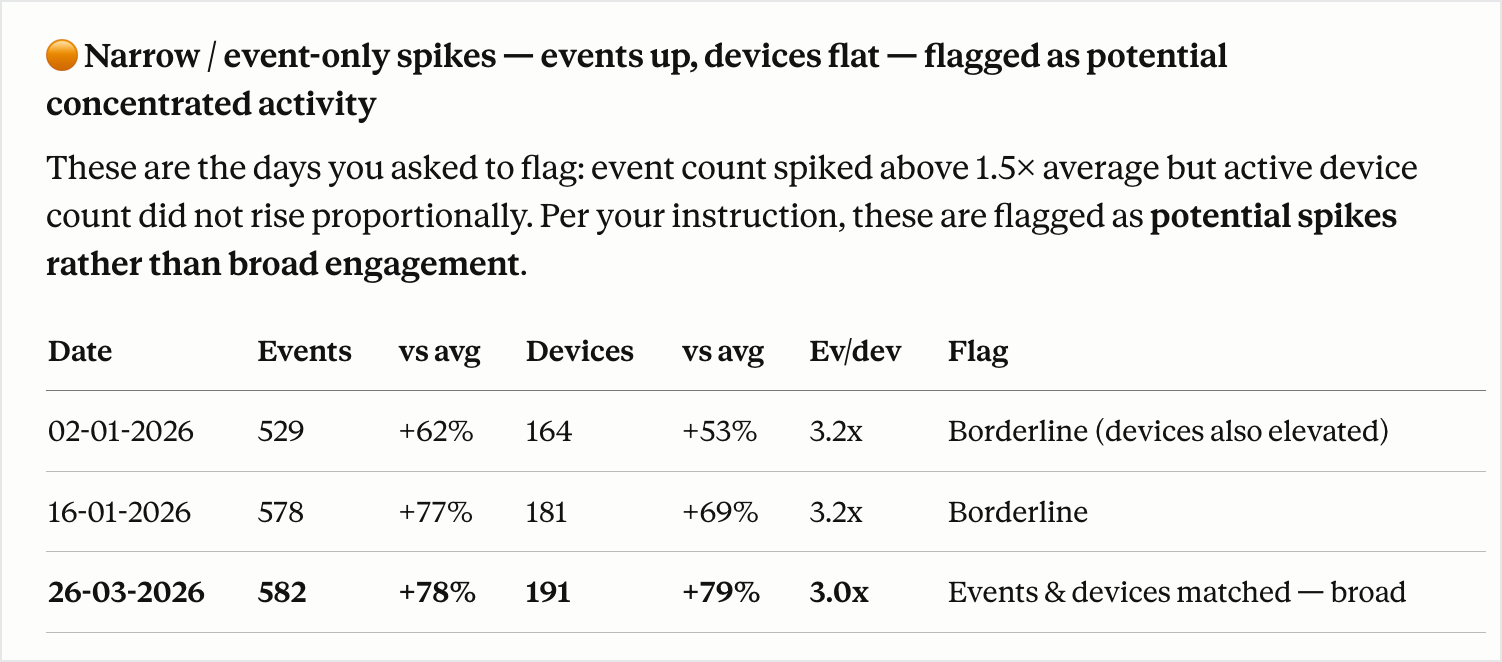
Monitor spikes in activity during campaigns, promotions, or launches. This helps distinguish real user engagement and evaluate campaign effectiveness.
- Zoho MCP template: App seasonal and campaign impact tracking
- Tools: getEventCountByDate + getActiveDeviceCountByDate + getAllScreenStats
Try this prompt:
Analyze event counts, screen activity, and active devices starting from [campaign_start_date]. Identify spikes and explain whether they are driven by broad user activity or a small set of users. If event count spiked but device count didn't, flag it as a potential spike rather than broad engagement.
Use cases for engineering and debugging
Crash drill-down workflow
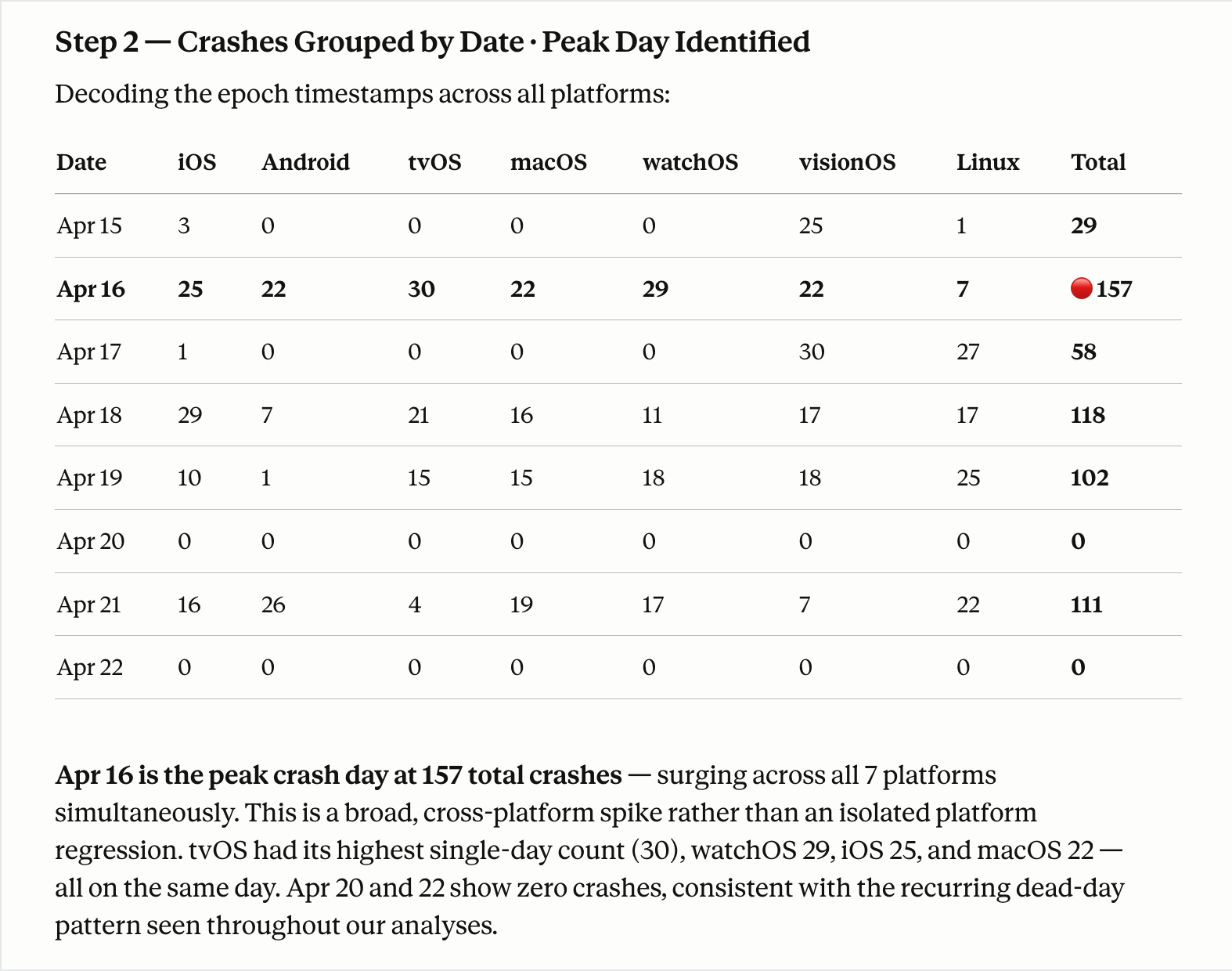
Start with a high-level crash overview, drill into timelines, identify top unique issues causing crashes, and fetch detailed diagnostics for specific issues.
- Zoho MCP template: App crash intelligence
- Tools: getCrashSummary → getCrashesByDate → getCrashList → getCrashSummaryWithUniqueMessageId
Try this prompt:
Start with a crash summary for the last seven days, then show crashes grouped by date to identify which day had the highest crash volume. From that day, list the top five crash signatures by frequency. For the most frequent crash, fetch the full summary using its unique message ID and describe the likely cause and affected versions.
Instrumentation audit
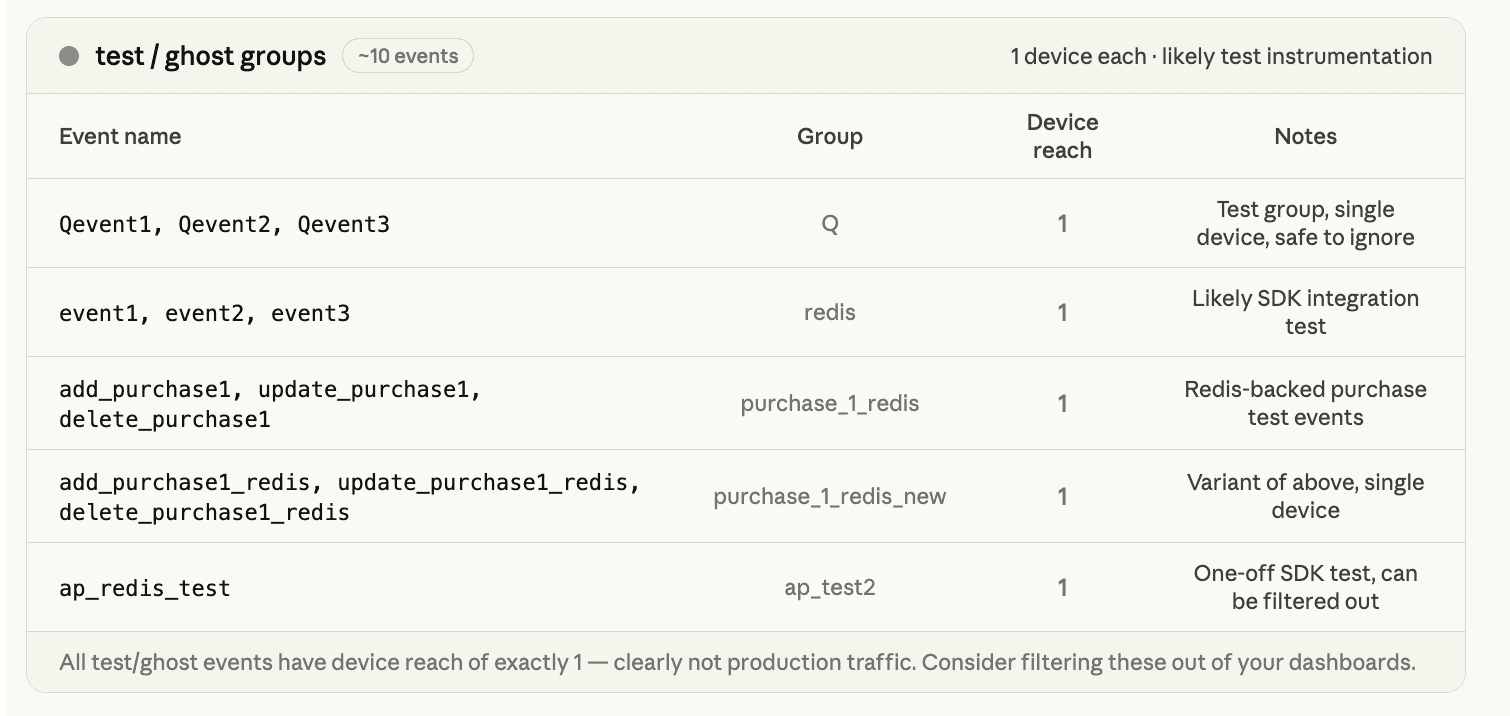
Conduct periodic audits of the events and screens tracked for your product across platforms. Identify ghost events, stale screen views, or test instrumentation that never got cleaned up.
- Zoho MCP template: App health monitor
- Tools: getAllEventStats + getAllScreenStats + getAllActiveDeviceStats
Try this prompt:
List all events and screens tracked in the last 30 days for [project]. Group by platform and show view/event counts. Flag any events or screens with no associated device count or those that appear on only one platform to fine tune SDK instrumentation.
What you can explore next
You can also extend current use cases by breaking down spikes by screens, events, or features, or you can identify root causes with probing questions and enable deeper multi-dimensional analysis via LLM queries.
If you’re already using Zoho Apptics, MCP is a great way to explore your data faster and validate assumptions with real insights. You can sign up for free in Zoho MCP and start exploring these prompts to uncover actionable insights from your app data.
Note: The screenshots in this blog are based on test results from a pilot project and do not represent real user data. Prompts can be customized based on your specific use cases and requirements.
 Supraja Gayathri S
Supraja is a Product Marketer at Zoho Apptics with 5+ years of experience in breaking down complex concepts into easy-to-digest, detailed blogs. She loves blending technical content and data with creative storytelling.