- HOME
- BI & Analytics
- Free Looker Studio Alternatives and Competitors to Consider
Free Looker Studio Alternatives and Competitors to Consider
- Last Updated : April 8, 2026
- 740 Views
- 13 Min Read
Looker is widely used for business intelligence, particularly in organizations that rely on the Google Cloud ecosystem. Its semantic modeling layer, LookML, enables centralized data definitions and governance, making it a preferred choice for data teams managing complex analytics environments.
However, the expectations from modern BI platforms have evolved. Organizations today prioritize faster implementation, self-service analytics, AI-assisted insights, and predictable pricing. In many cases, teams find that maintaining LookML models, managing infrastructure costs, and supporting non-technical users slows down adoption and time-to-insight.
At the same time, advancements in AI-powered analytics, automated data preparation, and cloud-native architectures have introduced a new generation of BI tools that reduce dependency on engineering teams while improving accessibility across business functions.
This shift has led many organizations to evaluate alternatives that can:
- Accelerate dashboard development and reporting cycles
- Enable business users to explore data independently
- Deliver AI-driven insights such as forecasting and anomaly detection
- Reduce total cost of ownership without compromising scalability
In this guide, we provide a detailed comparison of the best alternatives to Looker in 2026. Each tool is evaluated based on implementation complexity, AI capabilities, integrations, usability, and pricing, helping you make an informed decision based on your organization’s needs.
Summary: Which alternative should you choose?
Selecting the right alternative depends on your team structure, technical expertise, and analytics maturity.
- If you want a self-service BI platform with strong AI capabilities and faster implementation → Choose Zoho Analytics
It reduces reliance on engineering teams while offering automated insights, data preparation, and broad integrations. - If your organization is deeply integrated with Microsoft tools like Excel, Azure, or Teams → Choose Power BI
It provides tight ecosystem integration and strong data modeling capabilities. - If your priority is advanced data visualization and dashboard customization → Choose Tableau
It is well-suited for analysts who need granular control over visual storytelling. - If you are looking for AI-first, search-driven analytics with natural language querying → Choose ThoughtSpot
It enables users to interact with data through a Google-like search experience. - If your focus is real-time operational dashboards and business monitoring → Choose Domo
Quick decision shortcuts
- Lower-cost alternative to Looker → Zoho Analytics / Power BI
- Faster implementation compared to Looker → Zoho Analytics
- Best for non-technical users → Zoho Analytics / ThoughtSpot
- Best for advanced data modeling → Power BI
- Best for visualization-heavy use cases → Tableau
TRY ZOHO ANALYTICS FOR FREE - THE BEST LOOKER ALTERNATIVE
Why teams look for alternatives to Looker
Looker is widely adopted for its strong data modeling capabilities and integration with the Google Cloud ecosystem. It works particularly well for organizations with mature data teams that can manage centralized data models and governance.
However, as business needs evolve, many teams begin to encounter limitations that impact usability, cost, and speed. These challenges often lead organizations to evaluate more flexible, self-service, and AI-driven BI platforms.
- Dependency on LookML slows down analytics workflows
- High total cost of ownership at scale
- Limited accessibility for non-technical users
- Slower time-to-insight compared to modern BI tools
- Complexity in implementation and onboarding
- Growing demand for AI-powered analytics

Source: Reddit
Dependency on LookML slows down analytics workflows
Looker’s semantic layer (LookML) is designed to standardize metrics and ensure consistency. While this is beneficial for governance, it introduces a dependency on technical teams.
To create or modify reports, teams often need:
- SQL knowledge
- LookML expertise
- Developer involvement
This creates a bottleneck, especially for business users who need quick answers. This delay directly impacts decision-making speed in fast-paced environments like marketing or sales.
High total cost of ownership at scale
Looker’s pricing model can become expensive as usage grows. Costs typically include:
- Platform licensing
- Underlying data warehouse costs (e.g., BigQuery)
- Engineering resources for maintenance
Unlike some modern BI tools, Looker often requires continuous investment in both infrastructure and technical expertise. This makes cost predictability a major concern for mid-sized businesses and growinng teams.
Limited accessibility for non-technical users
Although Looker provides dashboards, deeper data exploration often requires:
- Writing SQL queries
- Understanding underlying data models
This limits adoption across non-technical teams such as:
- Marketing
- Customer success
- Operations
As a result, organizations struggle to fully democratize data access.
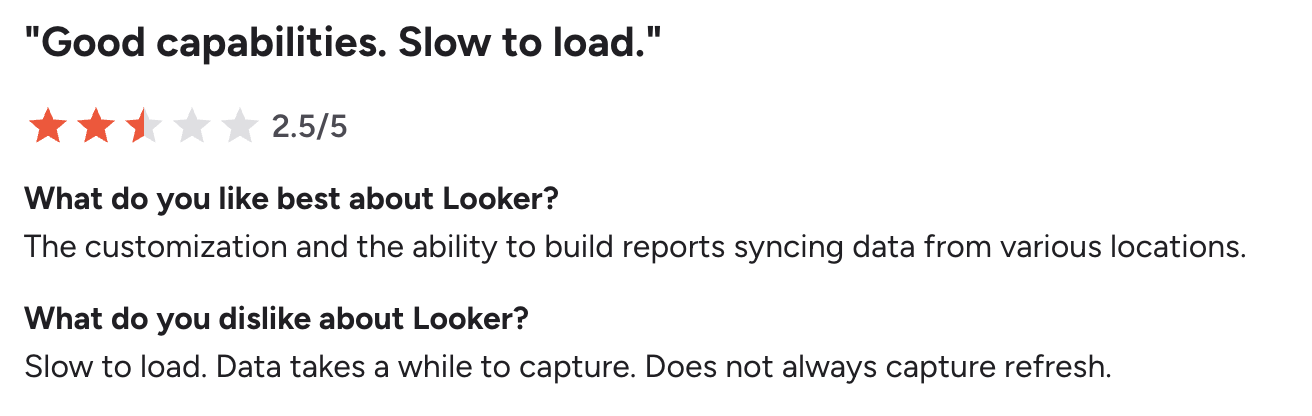
Slower time-to-insight compared to modern BI tools
Looker workflows typically involve:
- Defining data models in LookML
- Validating logic
- Deploying updates
While this ensures accuracy, it also introduces delays.
Modern BI platforms, in contrast, offer:
- Automated data preparation
- Drag-and-drop dashboard creation
- Real-time or near real-time updates
This allows teams to move from data to insight much faster.
Source: G2
Complexity in implementation and onboarding
Implementing Looker often requires:
- Data modeling setup
- Integration with data warehouses
- Dedicated onboarding time
For organizations without strong data engineering support, this increases time-to-value.

Source: G2
Growing demand for AI-powered analytics
Traditional BI tools, including Looker, focus heavily on dashboards and reporting. However, modern analytics demands more:
- Automated insights
- Predictive analytics
- Anomaly detection
- Natural language querying
Organizations increasingly expect BI tools to not just display data, but actively analyze and interpret it.
What this means for modern teams
These challenges highlight a broader shift in how organizations approach analytics.
Instead of relying on centralized, engineering-heavy workflows, teams are moving toward platforms that:
- Enable self-service analytics
- Reduce dependency on technical teams
- Provide AI-driven insights
- Offer faster implementation and lower costs
That’s why many organizations are actively exploring modern alternatives that are more accessible, scalable, and aligned with today’s analytics needs.
What to look for in a Looker alternative
Choosing the right alternative to Looker requires more than a feature checklist. It involves evaluating how effectively a platform supports modern analytics workflows, especially in terms of usability, automation, scalability, and AI-driven decision-making.
Below are the key capabilities organizations should prioritize when evaluating a replacement.
- Self-service BI and data democratization
- AI-powered analytics and automated insights
- Data integration and pipeline automation
- AI-powered data preparation and modeling
- Embedded analytics and extensibility
- Real-time analytics and automated reporting
- Collaboration and decision-making features
- Cost efficiency and scalability
- Security, governance, and compliance
- Deployment flexibility (Cloud, On-premise, Hybrid)
See how an all-in-one analytics platform brings together data preparation, AI insights, and reporting—without the complexity of LookML.
Explore all features
Self-service BI and data democratization
One of the primary reasons teams move away from Looker is the dependency on technical users. A modern BI platform should enable self-service analytics, allowing business users to independently explore data without relying on SQL or data modeling layers.
This includes:
- Drag-and-drop report creation
- Pre-built data models or auto-modeling
- Intuitive filtering and drill-down capabilities
Self-service BI reduces reporting bottlenecks and accelerates decision-making across teams like marketing, sales, and finance.
AI-powered analytics and automated insights
AI is no longer an add-on feature in BI tools, it is a core capability. Modern platforms should go beyond dashboards and actively assist users in analyzing data.
Key AI capabilities to look for:
- Natural language queries (ask questions in plain English)
- Automated insight generation (highlight trends, patterns, outliers)
- Predictive analytics and forecasting
- Anomaly detection with real-time alerts
These capabilities significantly reduce manual analysis and help teams move from descriptive to predictive decision-making.
Data integration and pipeline automation
A BI tool is only as powerful as the data it can access. Strong alternatives should provide:
- Native integrations with CRM, marketing, finance, and cloud databases
- Automated data syncing and scheduling
- Support for both structured and semi-structured data
This eliminates manual data consolidation and ensures that dashboards always reflect up-to-date information.
AI-powered data preparation and modeling
Unlike Looker, which relies on LookML for modeling, modern BI tools offer automated data preparation layers that simplify transformation workflows.
Key capabilities include:
- Data cleaning and transformation without coding
- Automatic schema detection
- Data blending across multiple sources
- No-code or low-code modeling environments
This reduces dependency on engineering teams and speeds up report creation.
Embedded analytics and extensibility
For SaaS companies and product teams, embedding analytics into applications is a critical requirement.
A strong Looker alternative should support:
- Embedding dashboards into web or mobile apps
- APIs and SDKs for customization
- White-labeling capabilities
This allows organizations to deliver analytics directly to customers or internal users within their existing workflows.
Real-time analytics and automated reporting
Modern businesses require near real-time visibility into operations. BI tools should support:
- Live data connections or frequent refresh cycles
- Scheduled and automated reports
- KPI monitoring with alerts
For example, sales teams can track pipeline changes in real time, while marketing teams can monitor campaign performance continuously.
Collaboration and decision-making features
Analytics is no longer an individual activity, it’s collaborative. Look for features that enable teams to work together on insights:
- Shared dashboards and reports
- Commenting and annotations
- Role-based access control
- Version tracking
These capabilities ensure that insights are not siloed and can be acted upon quickly.
Cost efficiency and scalability
Cost is a major factor when replacing Looker. A modern BI platform should offer:
- Transparent pricing models
- Flexible user-based or usage-based plans
- Minimal infrastructure dependency
Scalability should not come at the cost of unpredictability. Organizations should be able to grow usage without significant cost spikes.
Security, governance, and compliance
Even while improving accessibility, governance cannot be compromised. A strong alternative should include:
- Role-based access control (RBAC)
- Row-level and column-level security
- Data encryption (at rest and in transit)
- Compliance with standards like GDPR, SOC 2
This ensures that sensitive data remains protected while being accessible to the right users.
Deployment flexibility (Cloud, On-premise, Hybrid)
Depending on organizational needs, deployment flexibility can be critical.
- Look for platforms that support:
- Cloud-native deployment
- On-premise or private cloud options
- Hybrid environments
This is particularly important for enterprises with strict data residency or compliance requirements.
What this means for your evaluation
When comparing Looker alternatives, the goal is not just to replicate existing workflows but to improve them.
The ideal platform should:
- Reduce reliance on technical teams
- Accelerate time-to-insight
- Provide AI-driven analysis
- Scale efficiently with business growth
Organizations that prioritize these capabilities typically achieve faster adoption, better data accessibility, and more impactful decision-making.
How we evaluated these alternatives
To identify the best alternatives to Looker, we used a structured evaluation framework based on the factors that most directly impact adoption, scalability, and long-term value.
Instead of focusing only on feature lists, we evaluated each platform based on how well it performs in real-world scenarios, especially for teams transitioning from engineering-heavy BI workflows to more accessible, AI-driven analytics environments.
| Criteria | Weight | Why it matters |
| Implementation speed | 25% | Faster deployment reduces time-to-value and accelerates ROI |
| AI capabilities | 25% | Determines ow effectively the tool delivers automated insights and predictive analytics |
| Integrations | 20% | Reduces manual data movement and ensures a unified analytics layer |
| Reporting and collaboration | 15% | Enables cross-functional teams to act on insights together |
| Support and enablement | 10% | Critical for onboarding, mogration, and ongoing adoption |
| Security and governance | 5% | Ensures enterprise-grade data protection and compliance |
How scoring works:
Each tool is scored on a scale of 1 to 5 across all the above criteria:
5 = Industry-leading (best-in-class performance)
4 = Strong (above average, reliable for most use cases)
3 = Adequate (meets basic requirements but with limitations)
2 = Limited (noticeable gaps that may affect usage)
1 = Weak (significant limitations)
We then apply the weights to calculate an overall score, helping you compare tools more objectively instead of relying on feature lists alone.
Best Looker Alternatives
Based on the evaluation criteria outlined above, here are the best alternatives to Looker in 2026:
- Zoho Analytics - Best overall alternative for self-service and AI-powered BI
- Power BI - Best for Microsoft ecosystem users
- Tableau - Best for advanced data visualization
- ThoughtSpot - Best for AI-driven, search-based analytics
- Domo - Best for real-time operational dashboards
Zoho Analytics - Best overall Looker alternative
Zoho Analytics stands out as the most well-rounded alternative to Looker, especially for organizations looking to move away from engineering-heavy BI workflows toward a more self-service, AI-driven approach.
While Looker relies heavily on LookML and developer involvement, Zoho Analytics is designed to make data accessible to both technical and non-technical users without compromising on depth or scalability.
Why Zoho Analytics is a strong alternative to Looker
The biggest shift when moving from Looker to Zoho Analytics is the removal of dependency on a modeling layer like LookML.
- Instead of requiring:
- SQL queries
- Data modeling expertise
- Developer intervention
Zoho Analytics enables:
- Drag-and-drop report creation
- Automated data preparation
- AI-assisted insights
This significantly reduces the time required to move from raw data to actionable insights.
Key strengths
True self-service BI across teams
Zoho Analytics is built for business users as much as for analysts.
Teams can:
- Build dashboards without coding
- Drill down into data with simple interactions
- Share insights across departments
This improves adoption across marketing, sales, finance, and operations teams.
AI-powered analytics with Zia
One of the key differentiators is its AI assistant, which enables:
- Natural language queries (“Show revenue growth by region”)
- Automated insight generation
- Predictive analytics and trend forecasting
- Smart alerts for anomalies
This reduces manual analysis and helps teams identify patterns faster.
"The Ask Zia and Zia Insights features are so cool. I can ask for a specific agent name for their quarterly or monthly performance and get to see if their sales numbers are trending up or down, and from which geographic areas their sales are coming from. I can also dive into why they can't close deals in other areas and try to replicate the successful ones."
John Sheldon
Business Intelligence Manager, Renu Energy Solutions
Built-in data preparation and blending
Unlike Looker, which depends on pre-modeled data, Zoho Analytics includes a native data preparation layer.
Users can:
- Clean and transform data
- Join multiple data sources
- Automate data pipelines
All without writing complex SQL queries.
Extensive integrations ecosystem
Zoho Analytics supports 500+ integrations, including:
- CRM tools
- Marketing platforms
- Financial systems
- Cloud databases
This allows teams to centralize data from multiple sources without manual effort.
Faster implementation and time-to-value
Compared to Looker’s longer setup cycles, Zoho Analytics enables:
- Quick onboarding
- Pre-built connectors
- Ready-to-use templates
Many teams can go live within days instead of weeks.
Cost-effective and scalable
Zoho Analytics offers:
- Transparent pricing
- Lower infrastructure dependency
- Scalable plans for growing teams
This makes it particularly attractive for SMBs and mid-market organizations that find Looker expensive at scale.
Limitations to consider
- Does not replicate LookML-level semantic modeling for highly complex data environments
- Advanced enterprise customizations may require configuration
However, for most organizations, these trade-offs are outweighed by improved usability and speed.
Who should choose Zoho Analytics
- Small to mid-sized businesses
- Teams transitioning to self-service BI
- Marketing, sales, and finance teams
- Organizations looking to reduce BI costs and complexity
"I have, and will continue to share with others, my ringing endorsement of Zoho Analytics. With the fantastically friendly user interface, phenomenal customer support, and cost-effective pricing, Zoho Analytics has really hit a sweet spot."
Doug Freeman
CEO of nCentix
Pricing
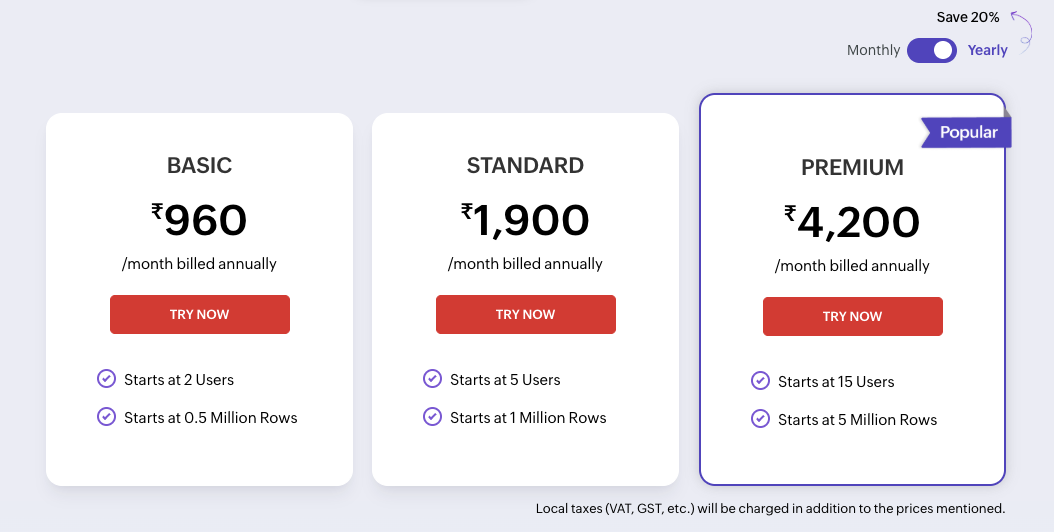
Power BI - Best for Microsoft ecosystem users
Power BI is one of the most widely adopted BI tools globally, particularly among organizations already using Microsoft products.
Why it’s a strong alternative to Looker
Power BI offers a balance between data modeling and self-service analytics, making it a viable alternative for teams that want flexibility without fully relying on engineering-heavy workflows.
Key strengths
- Deep integration with Excel, Azure, and Microsoft Fabric
- Strong data modeling capabilities (alternative to LookML)
- Affordable entry pricing compared to Looker
- Wide adoption and community support
Limitations to consider
- Requires learning DAX for advanced calculations
- Performance can degrade with large datasets
- UI may feel complex for non-technical users
Who should choose Power BI
- Enterprises using Microsoft ecosystem
- Data teams comfortable with modeling
- Organizations needing cost-effective scalability
Pricing
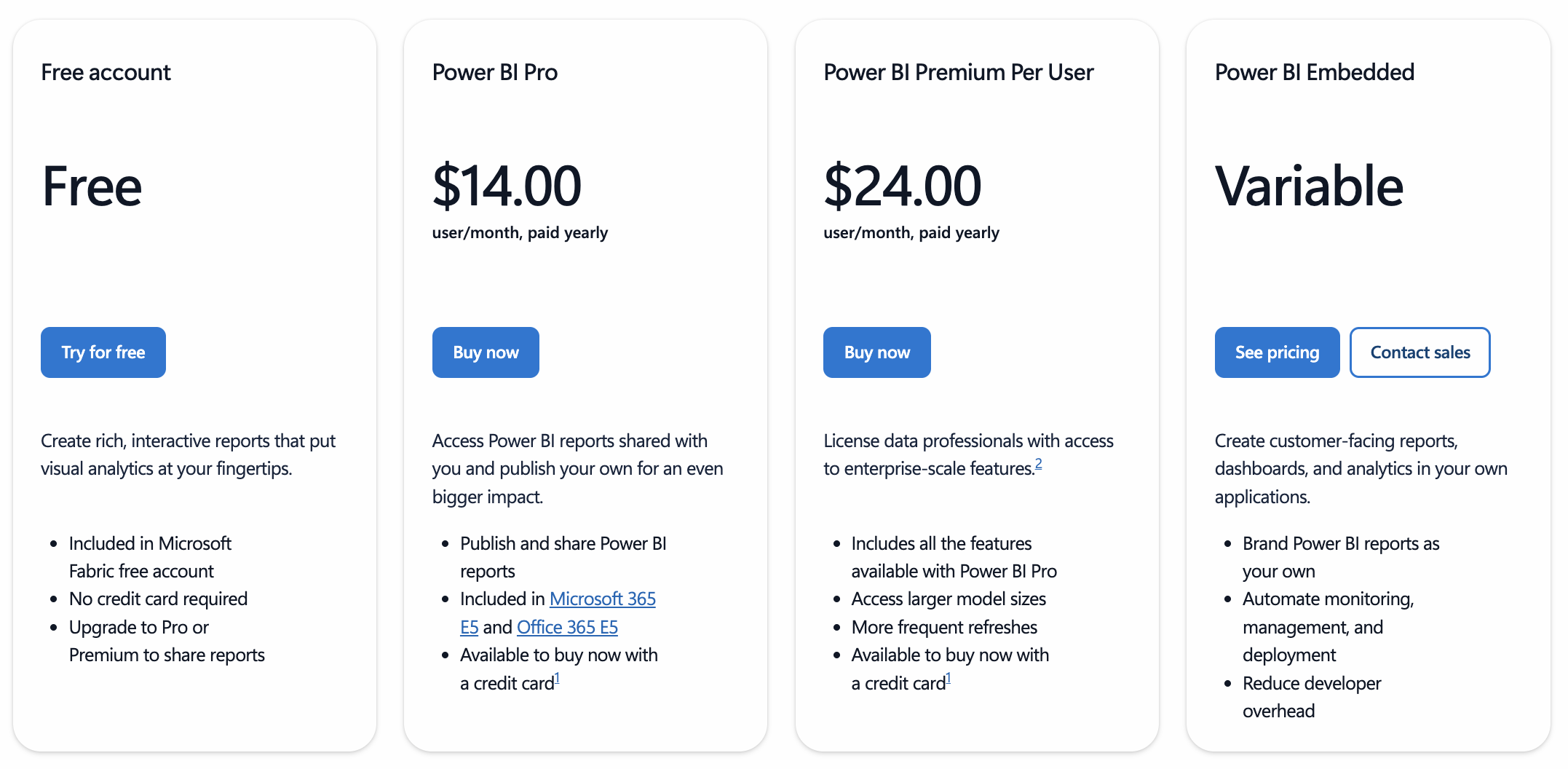
Source: Power BI
Tableau - Best for advanced data visualization
Tableau is known for its powerful visualization capabilities and flexibility in dashboard design.
Why it’s a strong alternative to Looker
Tableau excels in turning complex datasets into highly interactive and visually rich dashboards, making it ideal for data analysts and visualization-heavy use cases.
Key strengths
- Industry-leading visualization capabilities
- Highly customizable dashboards
- Strong community and ecosystem
Limitations to consider
- Expensive licensing costs
- Requires training for effective use
- Less focus on AI-driven automation compared to newer tools
Who should choose Tableau
- Data analysts and BI specialists
- Organizations focused on storytelling with data
- Teams requiring highly customized dashboards
Pricing
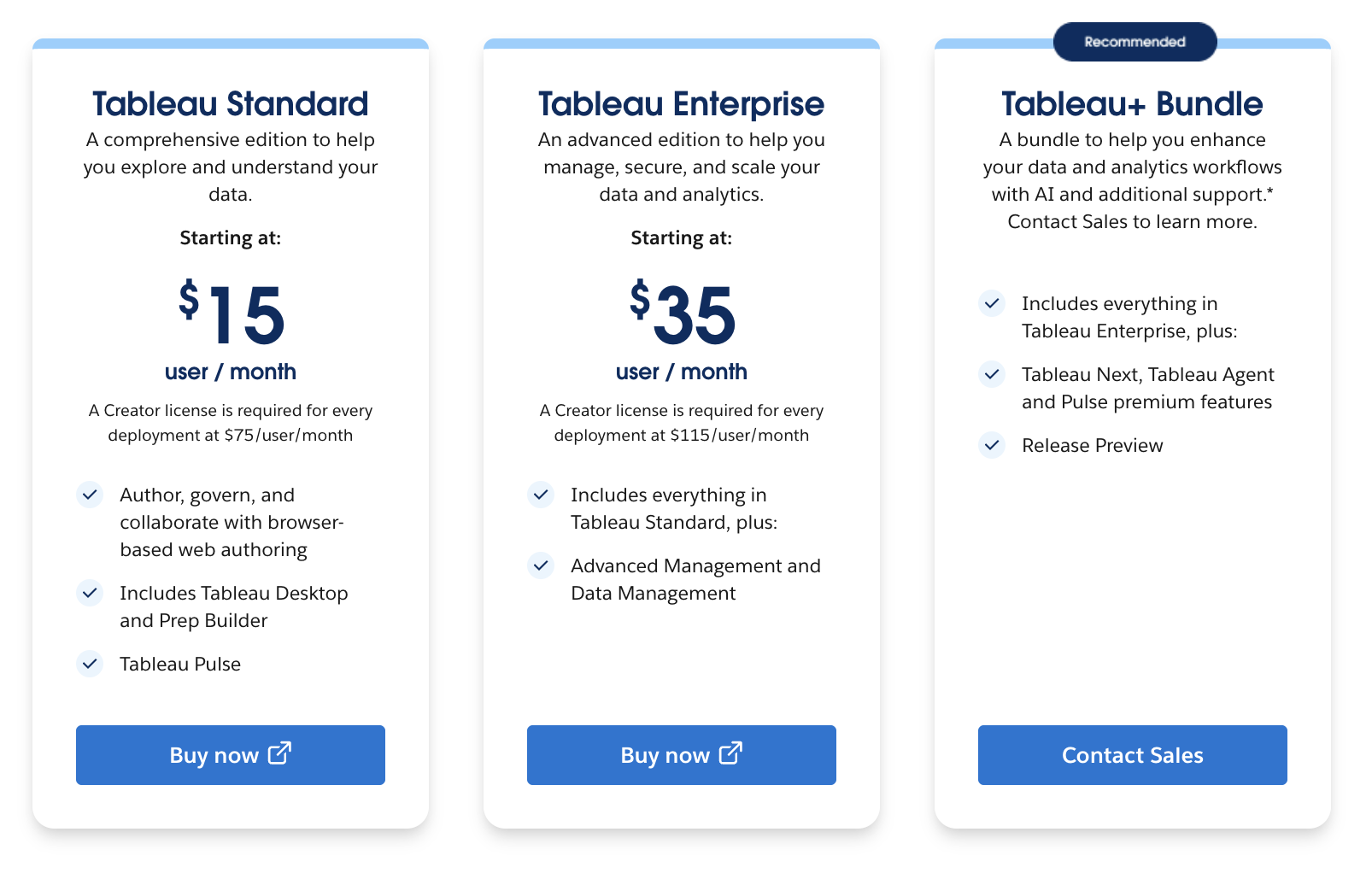
Source: Tableau
ThoughtSpot - Best for AI-driven analytics
ThoughtSpot is built around a search-first approach to analytics, making it one of the most AI-focused BI tools.
Why it’s a strong alternative to Looker
Instead of traditional dashboards, ThoughtSpot allows users to query data using natural language, similar to a search engine.
Key strengths
- Search-based analytics experience
- Strong AI and machine learning capabilities
- Fast data exploration
Limitations to consider
- Premium pricing
- Limited customization compared to traditional BI tools
Who should choose ThoughtSpot
- AI-first organizations
- Business users who prefer search over dashboards
- Teams focused on quick data exploration
Pricing
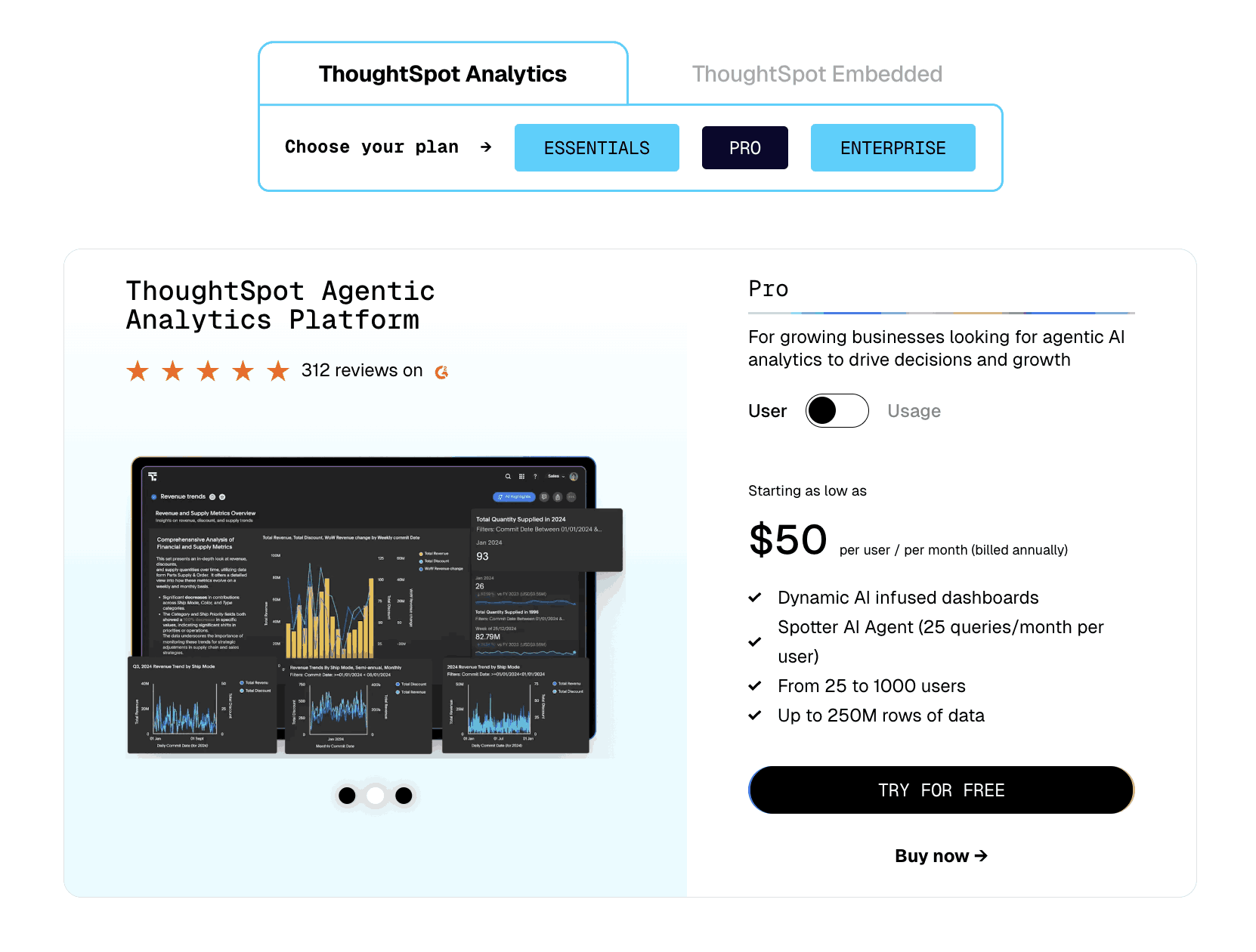
Source: ThoughtSpot
Domo - Best for real-time operational dashboards
Domo is designed for organizations that require real-time visibility into business operations.
Why it’s a strong alternative to Looker
Domo focuses on operational intelligence, enabling teams to monitor KPIs and performance metrics in real time.
Key strengths
- Real-time data updates and dashboards
- Strong collaboration features
- End-to-end data platform
Limitations to consider
- High cost compared to competitors
- Complex implementation process
Who should choose Domo
- Large enterprises
- Operations-focused teams
- Organizations requiring real-time analytics
Pricing
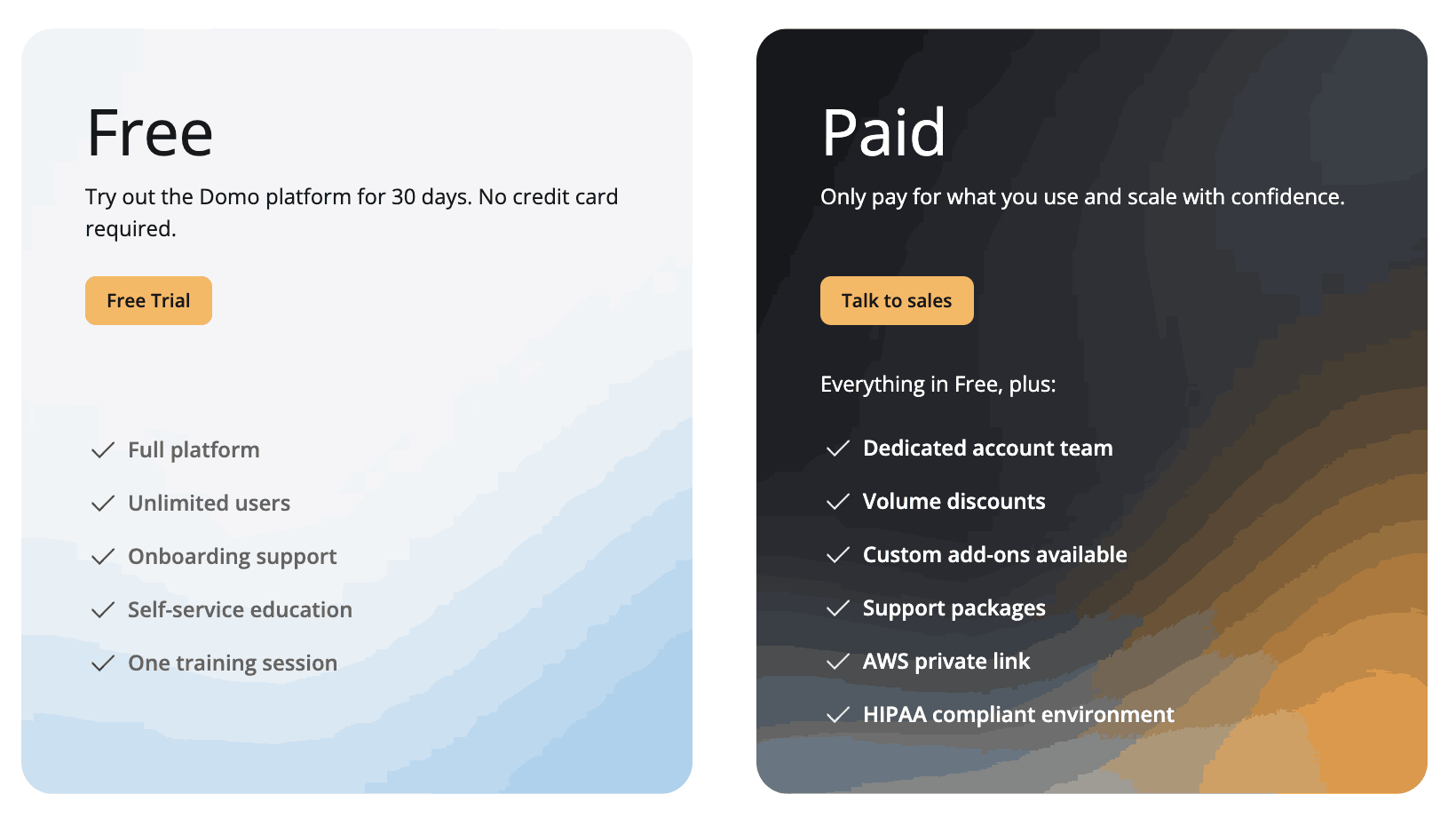
Source: Domo
Best Looker alternatives compared
To simplify decision-making, here’s a side-by-side comparison of the top alternatives to Looker based on implementation speed, AI capabilities, integrations, usability, and pricing.
| Tool | Implementation time | AI strength | Integrations | Ease of use | Pricing range | Best for |
| Zoho Analytics | Fast (days - weeks) | Strong | Extensive (500+) | Easy | Affordable | Businesses of all sizes |
| Power BI | Medium (weeks) | Strong | Strong (Microsoft ecosystem) | Medium | Low to moderate | Microsoft-centric organizations |
| Tableau | Medium (weeks) | Moderate | Strong | Medium | High | Data analysts ans visualization-heavy teams |
| ThoughtSpot | Medium (weeks) | Strong | Moderate | Easy | High | AI-first, search-driven analytics |
| Domo | Slow (weeks- months) | Moderate | Strong | Medium | High | Enterprises and real-time operations |
From this comparison, few clear patterns emerge:
- Tools like Zoho Analytics and Power BI stand out for cost efficiency and accessibility
- Tableau remains strong for visualization depth, but comes with higher costs
- ThoughtSpot leads in AI-driven exploration, though at a premium
- Domo is better suited for real-time enterprise use cases
Switching from Looker: What teams should know
Migrating from Looker to another BI platform is not just a technical transition, it’s a shift in how teams interact with data. Understanding the key considerations can help ensure a smoother transition.
Data migration and model restructuring
Looker relies on LookML for defining data models. When switching tools, teams typically need to:
- Recreate data models using the new platform’s structure
- Reconnect data sources and pipelines
- Validate metrics and calculations
For tools with built-in data preparation (like Zoho Analytics), this process is often simplified through visual interfaces rather than code.
Retraining and adoption
The learning curve depends on the tool you choose:
- Self-service tools reduce training time for business users
- Tools with modeling layers (like Power BI with DAX) may require technical onboarding
The key goal during migration should be to increase accessibility, not just replicate existing workflows.
Feature parity vs workflow improvement
Not all Looker features need to be replicated exactly.
For example:
- LookML → replaced by automated data modeling
- Complex SQL workflows → replaced by drag-and-drop interfaces
- Static dashboards → enhanced with AI-driven insights
Most teams benefit more from improving workflows rather than maintaining legacy structures.
Timeline expectations
Migration timelines vary based on complexity:
- Small teams / simple dashboards: 2–4 weeks
- Mid-sized organizations: 1–2 months
- Enterprise migrations: 2–3 months
Choosing a tool with faster implementation can significantly reduce transition time.
Change management and stakeholder alignment
Successful migration requires:
- Clear communication with stakeholders
- Training sessions for teams
- Gradual rollout of dashboards
Organizations that treat migration as a strategic upgrade (not just a tool switch) see better adoption and ROI.
Final Thoughts
For organizations evaluating alternatives to Looker, the decision ultimately comes down to balancing power, usability, and cost.
While Looker remains a strong choice for data engineering-heavy environments, many modern teams require tools that are faster, more intuitive, and accessible across business functions.
For most use cases, Zoho Analytics emerges as the best overall alternative due to its:
- Strong self-service capabilities
- AI-powered insights and automation
- Faster implementation
- Cost efficiency at scale
At the same time:
- Power BI is ideal for Microsoft-centric environments
- Tableau is best for advanced visualization
- ThoughtSpot fits AI-first use cases
- Domo supports real-time enterprise analytics
The right choice depends on your organization’s data maturity, team structure, and long-term analytics strategy.
Ready to simplify your analytics and get insights faster?
Common questions about Looker alternatives
Why do teams replace Looker?
Teams often replace Looker due to its reliance on LookML, high total cost of ownership, and limited accessibility for non-technical users. These factors can slow down reporting and reduce adoption across business teams.
Which Looker alternative is easiest to migrate to?
Tools like Zoho Analytics and Power BI are generally easier to adopt because they offer intuitive interfaces, pre-built connectors, and minimal dependency on coding or complex data modeling.
Which alternative is most cost-effective long term?
Zoho Analytics and Power BI provide the best cost efficiency due to lower licensing costs, reduced infrastructure requirements, and faster implementation.
Are Looker alternatives secure for enterprise use?
Yes, most modern BI platforms offer enterprise-grade security features such as role-based access control, data encryption, and compliance with standards like GDPR and SOC 2.
Can these tools handle large-scale data?
Yes, platforms like Power BI, Tableau, and ThoughtSpot are designed for large-scale analytics. Zoho Analytics also supports scalable deployments for growing organizations with increasing data needs.
 Vinisha
Vinisha is a Marketing Analyst at Zoho Analytics with a strong passion for both marketing and data. She’s naturally curious about trends and loves diving into data to uncover what drives effective campaigns. She has a knack for simplifying complex information and presents insights in a relatable and engaging way that connects with audiences. Outside of work, she enjoys exploring the creative side of digital marketing.