Insurance email: Types, templates and best practices
- Published : February 25, 2026
- Last Updated : February 25, 2026
- 629 Views
- 7 Min Read

An insurance policy confirmation reassures someone that their family is protected. A payment receipt confirms their coverage remains active. A renewal reminder prevents an unexpected lapse. A maturity notification signals years of disciplined planning coming full circle.
For customers, these emails aren’t just updates, they’re proof. Proof that their policy exists. Proof that their money is accounted for. Proof that their coverage is secure when it matters most.
Because of this, every insurance transactional email carries weight. It must be clear, accurate, timely, and sent securely. A poorly structured email can create confusion, trigger unnecessary support calls, or shake confidence in the insurer.
That’s why designing strong, reliable email templates for insurance-based transactional communication isn’t just a technical task. It’s a responsibility. Let’s look into what insurance emails are, along with template examples and some best practices to craft them.
What are insurance emails?
Insurance emails are messages sent by insurance companies to keep customers informed about their policies, payments, and coverage.
Example: If you’ve ever bought insurance for house, health, life, motor, travel, you’ve probably received a few emails right after. Maybe it was:
A confirmation that your policy was issued.
A receipt after paying your premium.
A reminder that your renewal date is coming up.
A notice that your policy is about to expire.
Are insurance emails completely transactional?
Not necessarily. Not every email sent by an insurance company qualifies as a transactional email. Broadly, insurance emails fall into two categories.
1. Marketing emails
These are promotional emails sent to a wider audience, often to all customers or subscribers. Their goal is to promote products, offers, or brand engagement.
Examples:
Early bird discounts
Seasonal offers
Coupon codes
Free health check-up campaigns
New policy launch announcements
2. Transactional emails
These emails are triggered by a specific user action or policy-related event. They’re essential, expected, and directly tied to a customer’s account or policy.
Examples:
Welcome emails for new users
Password reset emails
Payment reminder emails
Policy confirmation emails
Policy renewal reminders
Payment confirmation receipts
Policy cancellation confirmations
In this article, we’ll focus primarily on transactional insurance emails along with practical template examples and best practices for creating and sending them effectively.
The importance of timely insurance emails
They strengthen customer trust
When customers receive clear and timely updates about their policy status, payments, or renewals, it reinforces their confidence in the insurer. On the other hand, delayed or confusing emails can quickly create uncertainty and doubt.
They support regulatory compliance
In many regions, insurers must provide written confirmation for actions such as policy issuance, renewals, cancellations, and payment acknowledgments. Transactional emails act as official records, helping companies stay compliant while keeping customers informed.
They reduce customer support tickets
A well-structured email that clearly mentions the policy number, due date, payment amount, or next steps can answer questions before customers even think about contacting support. This saves time for both the customer and the internal team.
They act as timely reminders to users
Clear and timely reminders help customers remember premium due dates and avoid policy lapses. When the amount due and deadline are clearly communicated, customers are far more likely to take action promptly.
They provide a reliable digital record
Insurance emails document important milestones in a customer’s journey. They serve as digital proof of policy activation, premium payments, cancellation confirmations, and coverage updates. When customers need verification, their inbox becomes their first point of reference.
8 types of insurance emails along with template examples
Welcome emails for new users
One-time password verification emails
Password reset emails
Policy confirmation emails
Policy renewal reminders
Payment reminder emails
Payment confirmation receipts
Policy cancellation confirmations
1. Welcome emails
Purpose:Welcome emails welcomes a new customer after account creation or policy purchase and sets expectations for next steps.
When it’s sent: Immediately after sign-up or first policy purchase.
Template example:
Subject: You’re all set! Welcome to {{Company Name}}
Hello {{Customer Name}},
Welcome to {{Company Name}}. We’re glad to have you with us.
Your account has been successfully created, and you can now manage your policies, payments, and documents online.
Registered Email: {{Customer Email}}
Customer ID: {{Customer ID}}You can log into your account here: {{Login Link}}
If you have any questions, our support team is here to help at {{Support Contact}}.
We look forward to serving you.
Regards,
{{Company Name}}
2. One-time password verification email
Purpose: An OTP email verifies a user’s identity during login, policy access, or sensitive account changes.
When it’s sent: Immediately after a verification request is initiated.
Template example:
Subject: Your verification code for verifying {{Company_Name}} account!
Hello {{Customer Name}},
Use the one-time password (OTP) below to complete your verification request:
{{OTP Code}}
This code is valid for {{Expiry Time}} minutes.
If you did not request this code, please ignore this email or contact us immediately at {{Support Contact}}.
For security reasons, do not share this code with anyone.
Regards,
{{Company Name}}
3. Password reset emails
Purpose: A password reset email allows users to securely reset their password after requesting access recovery.
When it’s sent: Immediately after a user clicks “Forgot Password” or initiates a reset request.
Template example:
Subject: Reset your password for your {{Company Name}} account!
Hello {{Customer Name}},
We received a request to reset your password.
To create a new password, click the link below:
{{Reset Link}}
This link will expire in {{Expiry Time}} minutes for security reasons.
If you did not request a password reset, you can safely ignore this email. Your account will remain secure.
If you need assistance, contact us at {{Support@abc.com}}.
Regards,
{{Company Name}}
4. Policy confirmation email
Purpose: Confirmation emails confirm policy purchase and activation.
When it’s sent: Immediately after the successful purchase of a policy.
Template example:
Subject: Your policy #{{Policy Number}} is activated!
Hello {{Customer Name}},
Thank you for choosing us.
Your {{Policy Type}} policy has been successfully issued.
Policy Details:
Policy Number: {{Policy Number}}
Coverage Amount: {{Coverage Amount}}
Start Date: {{Start Date}}
Policy type: {{Premium Amount}}You can download your policy document here: {{Policy Download Link}}
If you have any questions, contact us at {{Support Email}}.
Regards,
{{Company Name}}
5. Policy renewal reminder email
Purpose: Renewal reminder emails remind the customer to renew before the policy expires.
When it’s sent: 30/15/7 days before expiry.
Template example:
Subject: Reminder: Your policy expires on {{Expiry Date}}
Dear {{Customer Name}},
Your {{Policy Type}} policy {{Policy Number}} will expire on {{Expiry Date}}.
To continue your coverage without interruption, please renew before this date.
{{Renewal now}}
Need assistance? Reach us at {{Support Contact}}. Our team will be happy to guide you through the renewal process.
Thank you,
{{Company Name}}
6. Payment reminder email
Purpose: A payment reminder email notifies customers about an upcoming premium due date, helping them avoid missed payments and prevent policy lapses.
When it’s sent: Before the due date.
Template example:
Subject: Action required: Premium due on {{Due Date}}!
Dear {{Customer Name}},
This is a gentle reminder that your premium of {{Amount}} is due on {{Due Date}}.
Policy Details:
Policy Number: {{Policy Number}}
Coverage Amount: {{Coverage Amount}}
Validity: {{Due Date}}
Policy Type: {{Premium}}To avoid any service interruption, please complete payment before the due date by clicking the link below:
{{Pay Now}}
If you have any queries regarding your payment, please feel free to contact our support team at {{support@abc.com}}
Regards,
{{Company Name}}
7. Payment confirmation email
Purpose: Payment confirmation emails confirm that the payment was successful.
When it’s sent: Immediately after payment success.
Template example:
Subject: Payment received! Receipt for Policy #{{Policy Number}}
Hello {{Customer Name}},
We’ve successfully received your payment of {{Amount}} on {{Payment Date}}. Here are some of your key details for your reference.
Transaction ID: {{Transaction ID}}
Policy Number: {{Policy Number}}Click the link below to download your payment receipt.
{{Download receipt}}
Thank you for choosing {{Company Name}}!
Regards,
{{Company Name}}
8. Policy cancellation confirmation email
Purpose: Cancellation emails confirm a cancellation request and the effective date.
When it’s sent: After a cancellation request is processed.
Template example:
Subject: #{{Policy Number}} Policy cancellation confirmed!
Hello {{Customer Name}},
Your request to cancel Policy #{{Policy Number}} has been successfully processed. The cancellation will be effective from {{Cancellation Date}}.
Policy Details:
Policy Number: {{Policy Number}}
Coverage Amount: {{Coverage Amount}}
Policy Type: {{Premium}}
Effective Date of Cancellation: {{Cancellation Date}}If you believe this was done by mistake, please contact us immediately at {{support@abc.com}.
Thank you,
{{Company Name}}
10 best practices and mistakes to avoid while sending these emails
1. Keep the subject line clear
Your subject line should immediately tell the customer what the email is about. Avoid vague phrases like “Important update.” Instead, be specific and use action-oriented subject lines to reduce confusion. Don’t forget to include due dates in subject lines.
Example: “Premium due on March 10 for Policy #12345.”
2. Prioritize clarity over design
Insurance transactional emails should be structured, clean, and easy to scan. Focus on readability rather than visual complexity. Avoid heavy images, complicated layouts, and decorative fonts that distract from the message or affect loading speed.
3. Include essential policy identifiers
Every insurance email should clearly mention key identifiers such as the policy number, customer name, and relevant dates. Including these details minimizes back-and-forth with support teams and helps customers quickly understand the context.
4. Use secure links
Never display sensitive personal or financial data directly in the email body. Instead, direct customers to a secure portal where they can log in and access detailed information safely.
5. Avoid promotional content in transactional emails
Transactional emails should stay strictly informational. Avoid adding promotional banners, upgrade suggestions, discount offers, or referral campaigns. Mixing marketing content with transactional emails can create compliance issues and affect email deliverability.
6. Maintain consistent branding
Even with a minimal design, maintain your brand identity. Use your official logo, consistent tone of voice, and verified contact details. This reassures customers that the email is authentic and trustworthy.
7. Ensure timely triggering of emails
Transactional emails should be sent in real time or near real time after an action occurs. Delays, especially for payments or policy confirmations, can reduce trust and create unnecessary support queries. To ensure timely and reliable email delivery, use a dedicated transactional email service like ZeptoMail that’s built specifically for sending critical, time-sensitive emails.
8. Test personalization variables
Before sending emails at scale, test all personalization fields or merge tags such as {{Customer Name}}, {{Policy Number}}, and date formats. Broken placeholders or formatting errors can damage credibility.
9. Optimize for deliverability
Because these emails are critical, your email sending infrastructure must be strong. Use a dedicated sending domain, monitor bounce rates, authenticate with SPF, DKIM, and DMARC, and warm up IP addresses before scaling volume. Avoid mixing transactional traffic with marketing IP pools.
10. Don’t miss out on important details
Pay attention to the small elements that make a big difference. Use clear and specific email CTAs instead of vague phrases like “Click here.” Always include accurate customer support details so recipients know where to turn for help. Keep legal language concise and easy to understand, and make sure the email is fully optimized for mobile devices, since many customers will read it on their phones.
Wrapping up
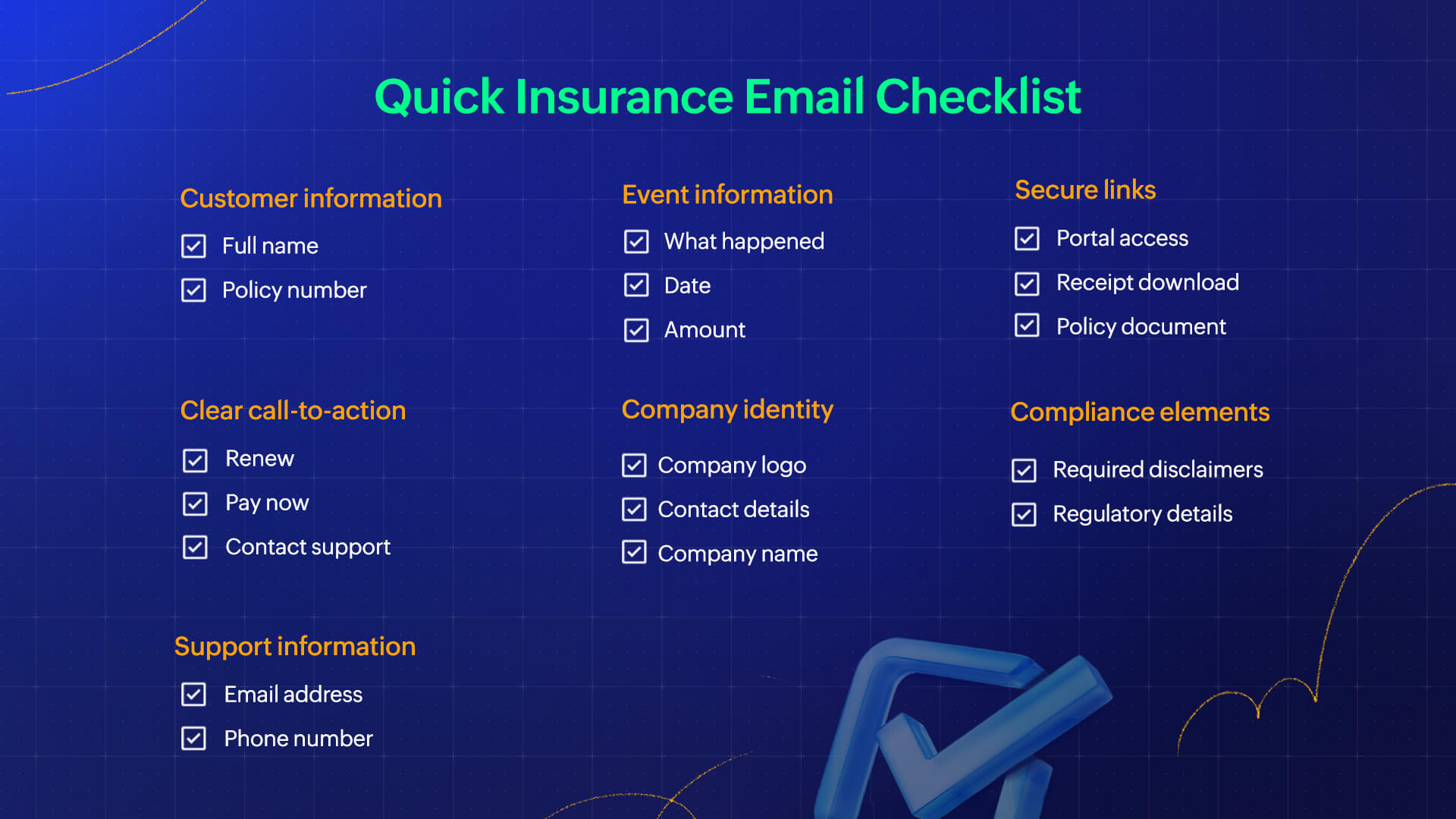
Insurance transactional emails play a critical role in building trust, ensuring compliance, and guiding customers through important policy events. With clear templates and the right best practices, you can deliver timely, reliable communication that strengthens the overall user experience. Here’s a quick checklist on the what should be included in a insurance email. Before you send these emails, ensure the email includes: