Use Connections
Summary
This guide explains how to utilize connections within your Zoho Writer extension code. It covers integrating connection JSON into your plugin-manifest file and using the Request Method to securely make authenticated API requests.
Purpose
- Copy connection JSON from Sigma and add to plugin-manifest.json
- Use the Request Method with
connectionLinkNamein your extension code - Let Zoho handle authorization, token management, and proxying
- Make secure authenticated API calls without exposing credentials
Step 1: Get Connection JSON
- Navigate to your created connection in Sigma
- Click Connection Details
- Select the JSON tab under "Sample Code"
- Click Copy to copy the connection JSON
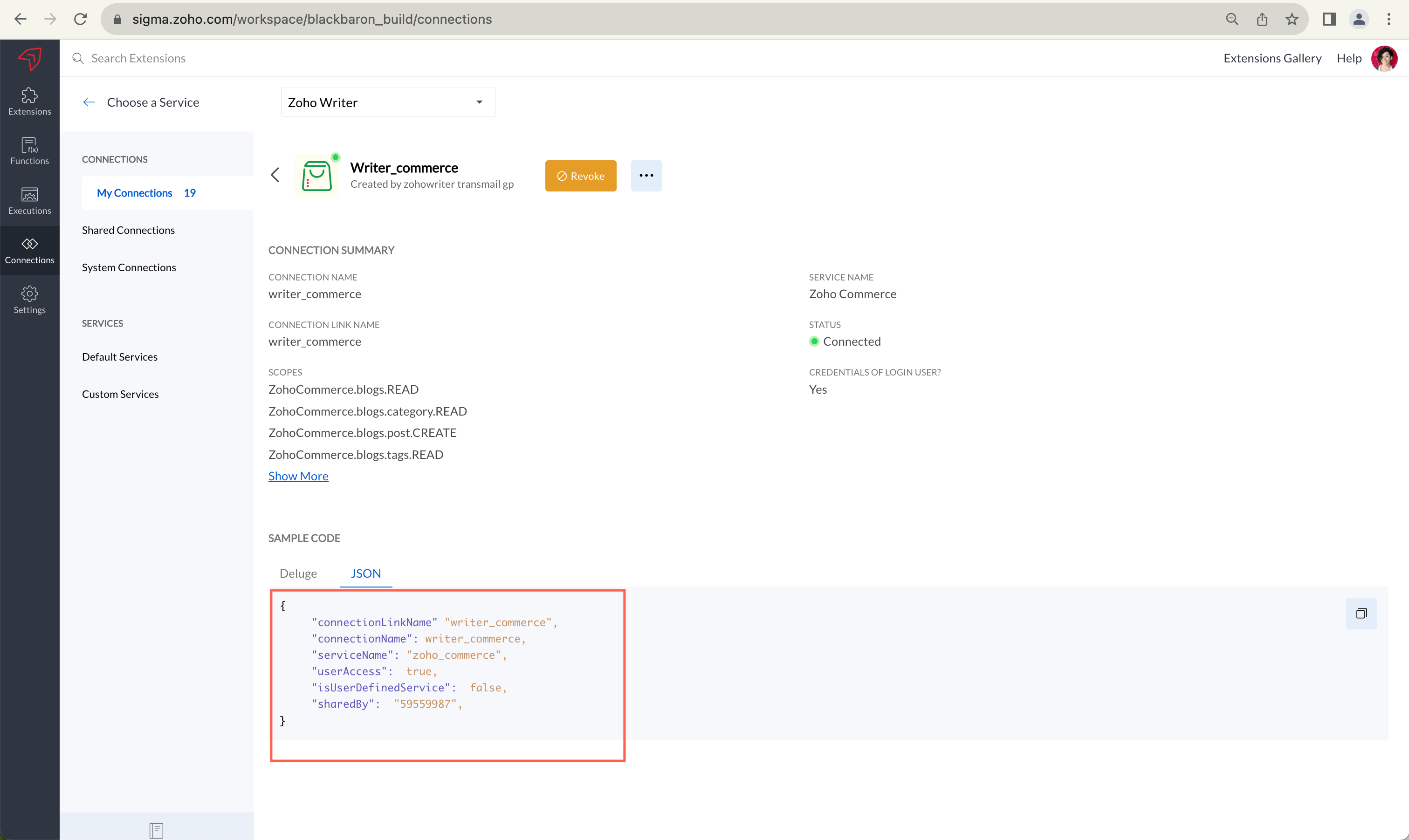
Step 2: Add to Plugin-Manifest
{
  "service": "WRITER",
  "modules": {
    "widgets": [ ... ]
  },
  "connectors": [
    {
      "name": "my_connection",
      "type": "OAuth",
      "authorizationUrl": "https://...",
      "scopes": ["api", "refresh_token"]
    }
  ]
}
Step 3: Use Request Method in Widget HTML
Request Method Parameters
| Parameter | Type | Required | Description |
|---|---|---|---|
connectionLinkName | String | Yes | Name of connection from plugin-manifest |
type | String | Yes | HTTP method (GET, POST, PUT, DELETE) |
url | String | Yes | API endpoint URL |
headers | Object | No | Optional custom HTTP headers |
postBody | Object/String | No | Request body for POST/PUT |
Related Pages
Sample Request
Copied<!DOCTYPE html>
<html>
<head>
    <title>API Integration Widget</title>
    <script src="https://static.zohocdn.com/sigma/client/sdk/v3/sigma-sdk.min.js"></script>
    <style>
        body { font-family: Arial, sans-serif; padding: 20px; }
        button { padding: 10px 20px; cursor: pointer; }
        #response { margin-top: 20px; padding: 10px; background: #f0f0f0; }
    </style>
</head>
<body>
    <h1>API Integration Widget</h1>
    <button onclick="fetchData()">Fetch Data</button>
    <div id="response"></div>

    <script>
        SigmaSDK.WRITER.init();

        function fetchData() {
            SigmaSDK.WRITER.request({
                connectionLinkName: "my_salesforce_connection",
                type: "GET",
                url: "https://api.example.com/v1/accounts"
            })
            .then(function(response) {
                document.getElementById("response").innerHTML =
                    "<p>Data: " + JSON.stringify(response) + "</p>";
            })
            .catch(function(error) {
                SigmaSDK.WRITER.showMessage({
                    type: "error",
                    message: "Request failed: " + error.message
                });
            });
        }
    </script>
</body>
</html>
Fetch Data Sample Request
Copied<!DOCTYPE html>
<html>
<head>
    <title>API Integration Widget</title>
    <script src="https://static.zohocdn.com/sigma/client/sdk/v3/sigma-sdk.min.js"></script>
    <style>
        body { font-family: Arial, sans-serif; padding: 20px; }
        button { padding: 10px 20px; cursor: pointer; }
        #response { margin-top: 20px; padding: 10px; background: #f0f0f0; }
    </style>
</head>
<body>
    <h1>API Integration Widget</h1>
    <button onclick="fetchData()">Fetch Data</button>
    <div id="response"></div>

    <script>
        SigmaSDK.WRITER.init();

        function fetchData() {
            SigmaSDK.WRITER.request({
                connectionLinkName: "my_salesforce_connection",
                type: "GET",
                url: "https://api.example.com/v1/accounts"
            })
            .then(function(response) {
                document.getElementById("response").innerHTML =
                    "<p>Data: " + JSON.stringify(response) + "</p>";
            })
            .catch(function(error) {
                SigmaSDK.WRITER.showMessage({
                    type: "error",
                    message: "Request failed: " + error.message
                });
            });
        }
    </script>
</body>
</html>
Create Data Sample Request
CopiedSigmaSDK.WRITER.request({
    connectionLinkName: "my_connection",
    type: "GET",
    url: "https://api.example.com/users"
}).then(response => console.log(response))
  .catch(error => console.error(error));