Merge and Sign
Purpose
This API allows to send the merged documents for sign.
Prerequisites
Before using this API, you need to access the merge template once from Zoho Writer's UI.
Steps to access the template in Zoho Writer
Open Zoho Writer dashboard and select your preferred merge template.
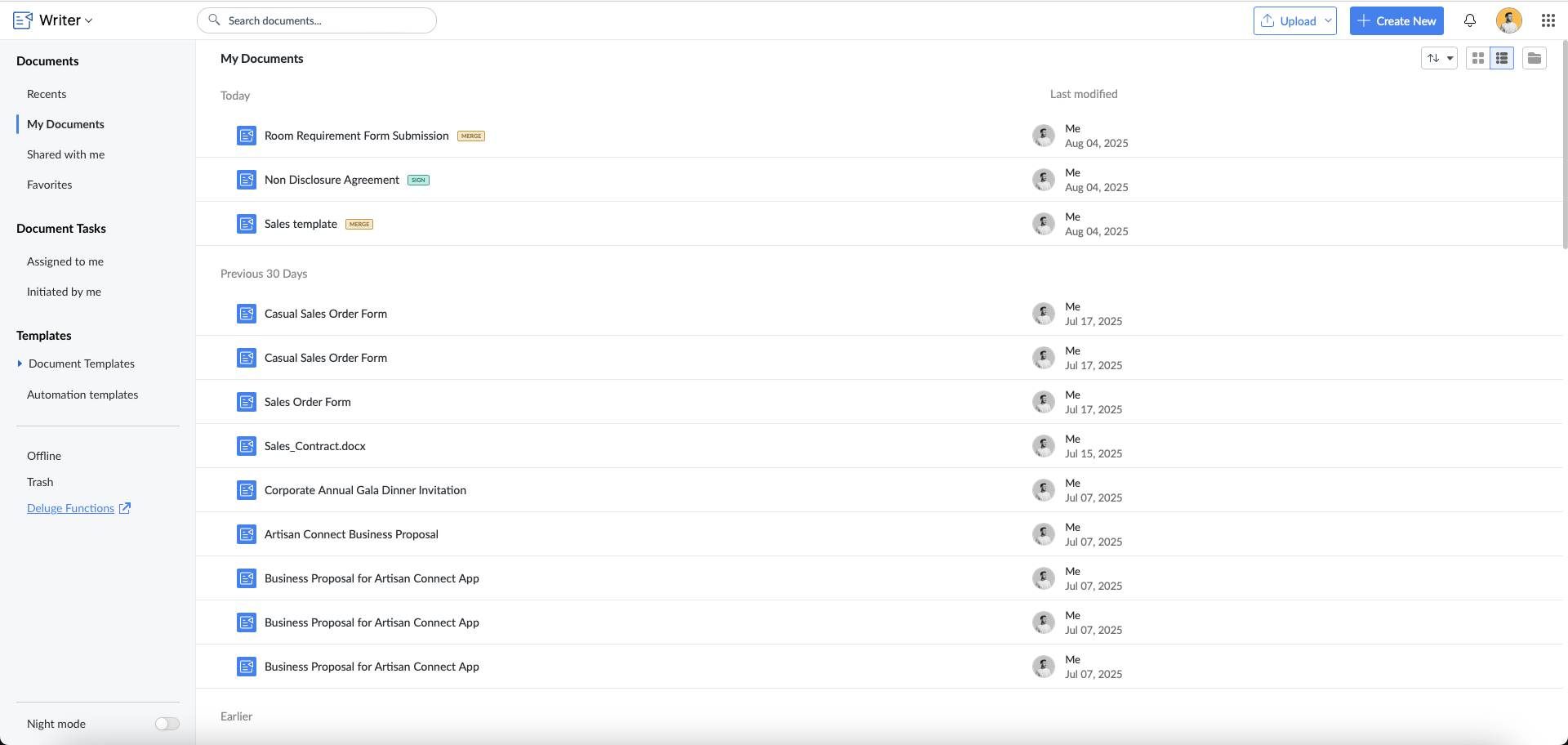
- Click the hamburger menu -> Automate tab.

Quick Reference
| Property | Value |
|---|---|
| Method | POST |
| Request URL | https://{zohoapis_domain}/writer/api/v1/documents/{document_id}/merge/sign |
| Scopes | ZohoWriter.documentEditor.ALL, ZohoWriter.merge.ALL, ZohoPC.files.ALL, WorkDrive.files.ALL, ZohoSign.documents.ALL |
| Rate Limit | See Writer API throttle limits |
Parameters
Path Parameters
| Parameter | Data Type | Description |
|---|---|---|
| document_id | String | Specify a unique id for the writer document. |
Body Parameters
| Parameter | Data Type | Description |
|---|---|---|
| Mandatory Parameters | ||
| service_name | String | Specify the sign service name (zohosign). |
| filename | String | Specify a unique name for the signed document. |
| Merge Data — pass data using any one of the below formats | ||
| merge_data | JSONObject | Pass a String value through 'data' key as JSON Array. |
| merge_data_csv_content | File | Provide the required csv content in your API request body. |
| merge_data_json_content | File | Provide the required json content in your API request body. |
| merge_data_csv_url | url | Provide the required csv url in your API request body. |
| merge_data_json_url | url | Provide the required json url in your API request body. |
| record_id | String | Instead of using merge_data, you can pass the record_id and we will fetch the data internally. Note: This is applicable only for Zoho CRM, Creator and Bigin templates. Maximum length allowed: 25 |
| Optional Parameters | ||
| signer_data | JSON Array: } | Specify the recipients to whom the document needs to be sent to get signed, in person signed, approved or viewed in the form of a JSON Array. You can also specify the notification type and language in which the notification needs to be sent to the signers. It is also possible to verify and provide private notes to the recipients. Supported languages are: Chinese(zh), Dutch(nl), English(en), French(fr), German(de), Italian(it), Japanese(ja), Polish(pl), Portuguese(pt), Russian(ru), Spanish(es), Swedish(sv). You can refer to the sample JSON Array here. Note: 1. If this parameter is not passed, we will consider the values configured in the template settings. 2. You can configure multiple delivery type for a recipient via 'delivery_type' key. |
| sign_in_order | Boolean (true / false) | Specify if we need to maintain the order of signing as mentioned. |
| message | String | Specify any message for the signer. |
| set_expire | Number | Specify when the merged documents which are sent for sign needs to be expired. Maximum limit: 99 days |
| reminder_period | Number | Specify the interval when the remainder email needs to be send to the signers. |
| common_attachments | File | Specify the attachments that needs to be sent to all the recipients in common. Maximum files allowed: 20 attachments Maximum file size allowed per attachment: 10 MB Total attachment size: 40 MB Supported file formats: docx / doc / rtf / pdf / zip / html / txt / png / jpeg / gif / jpg |
| unique_attachments | [ { " type ": "field", " field_id ": <field_id> } " type ": "file", " folder_id ":123456789, " filename_filter ": { "type":"startswith/contains/is/endswith", "value": <field_id> }, }, ... ] | Using this param, you can send a different or unique attachment to each recipient.
|
| test_mode | Boolean (true/false) | Using this param, you can test the Merge APIs without consuming any credit points. The output file will contain a watermark as it is used only for testing purpose. Test mode limit: 50 merges/day for an org. Note: Sign credits will still be consumed when the document is sent for signing. |
| sign_org_id | String | Specify the Zoho Sign organization ID from which the document is sent for signing. |
| sign_request_type_id | String | Specify the Zoho Sign document type ID. |
| allowed_cloud_provider_ids | JSON Array Example: | Specify the digital signature or identity providers your signers are allowed to use when they sign documents. By setting provider IDs (such as [10, 25] for Zoho Sign and Aadhaar eSign), you can control and restrict the signing process to only the chosen providers. Supported digital signature list. |
signer_data
| Keys | Type | Possible Values | Default Value |
|---|---|---|---|
| Mandatory Parameters | |||
| recipient_n | string | recipient_1, recipient_2, ... , recipient_10 Note: Upto 10 recipients are supported as of now. | Atleast 1 recipient email address |
| Optional Parameters | |||
| action_type | string | approve/sign/view/in_person_sign | sign |
| language | string | zh / nl / en / fr / de / it / ja / pl / pt / ru / es / sv | This option is available only for Zoho Sign Premium Plan users. For Free Plan users, the notification email will be sent in their account language by default. |
| delivery_type (type) | string | sms / whatsapp | If this key is not passed, notifications will be sent to signers via email by default. If the key is passed, notifications will be sent via email as well as the specified delivery type. |
delivery_type
| Possible values | Type | Example |
|---|---|---|
| sms | JSON Array | { "type": "sms", "countrycode": "+91", "phonenumber": "1234567890" } |
| JSON Array | { "type": "whatsapp", "countrycode": "+91", "phonenumber": "1234567890" } |
verfication_info (optional)
| Possible values | Type | Example |
|---|---|---|
| JSON Object | { "type":"email" } | |
| sms | JSON Object | { "type": "sms", "countrycode": "+91", "phonenumber": "1234567890" } |
| offline | JSON Object | { "type": "offline", "code": "123456" //6-digit code mandatory } |
| JSON Object | { "type": "whatsapp", "countrycode": "+91", "phonenumber": "1234567890" } |
Notes
- You need to access the template once before sending an API request. You need not access the template every time before you send an API request.
- To use this API with CRM templates, record id needs to be passed for each record inside the key 'id' for each data.
- We have also provided an option to configure the values for all the above parameters while creating the document itself.
- If you have saved the merge settings earlier by configuring the parameter values, then we will get those values (by default) if you miss to pass the parameters while sending the API request.
- In Writer, we achieve the 'Digital Signature' by using our Zoho Sign API internally. The credits will be consumed based on the Zoho Sign API subscription plan. To know more about the Zoho Sign Credits Add-on, check here.
- To merge and sign documents with more than one record, you can use our Bulk Sign API.
- You can also send the merged document for signing using this deluge task.
- To know how to send the documents for signing via Whatsapp, checkout this help link.
- For possible errors, refer to error codes.
Sample Request
Copiedcurl -X POST "https://www.zohoapis.com/writer/api/v1/documents/{document_id}/merge/sign" \
  -H "Authorization: Zoho-oauthtoken <ACCESS_TOKEN>" \
  -F "service_name=zohosign" \
  -F "filename=Invoice_2026_001" \
  -F "merge_data={\"data\":[{\"name\":\"Amelia\",\"email\":\"amelia@zylker.com\"},{\"name\":\"Johnson\",\"email\":\"johnson@zylker.com\"}]}" \
  -F "signer_data=[{\"recipient_1\":\"john@zylker.com\”,\"recipient_name\":\"John\”,\"action_type\": \"sign\",\"language\": \"en\",\"private_notes\": \"Hey!Please sign this document\"},{\“recipient_2\":\"amelia@zylker.com\", \“recipient_name\":\"Amelia\", \"action_type\": \"approve\",\"language\": \"fr\"}]"
Sample Response
Copied{
    "merge_report_data_url": "https://writer.zoho.com/writer/api/v1/merge/job/0tq5n465132106580437abe99b6f56f2b0c85/data",
    "merge_report_url": "https://writer.zoho.com/writer/v1/mailmerge/job/0tq5n465132106580437abe99b6f56f2b0c85",
    "records": [
        {
            "data": {
                           "name": "Amelia",
                           "email": "amelia@zylker.com"
                         },
            "download_link": "{url}",
            "sign_request_id":12345****",
            "status": "inprogress"
        },
        {
            "data": {
                           "name": "John",
                           "email": "john@zylker.com"
                         },
            "download_link": "{url}",
            "sign_request_id":12345****",
            "status": "inprogress"
        }
    ]
}

// When 'merge_report_data_url' is invoked, you will receive the below response;

{
    "records": [
        {

            "download_link": “{url}“,
            "data": {
                            “name": "Amelia”,
                            "email": “amelia@zylker.com"
                         },
            "sign_request_id": “12345*****”,
            "status": "inprogress"
        },
        {

            "download_link": “{url}“,
            "data": {
                            “name": “John”,
                            "email": “john@zylker.com"
                         },
            "sign_request_id": “56789*****”,
            "status": "inprogress"
        }
    ],
    "status": "inprogress"
}
Snippet 1
Copieddocumentid = "c0hk4989965b9da804eb6b6232658d389c4ce";
url = "https://www.zohoapis.com/writer/api/v1/documents/" + documentid + "/merge/sign";
fields = Map();
fields.put("InvoiceNo","12345");
fields.put("InvoiceDate","27 May 2022");
fields.put("InvoiceAmount","$100");
data = Map();
data.put("data",fields);
params = Map();
signerList = List();
signerObj1 = Map();
signerObj1.put("recipient_1","john@zylker.com");
signerObj1.put("action_type","approve");  //approve|sign|view
signerObj1.put("language","en");
signerObj2 = Map();
signerObj2.put("recipient_2","amelia@zylker.com");
signerObj2.put("action_type","sign");  //approve|sign|view
signerObj2.put("language","fr");
signerObj3 = Map();
signerObj3.put("recipient_3","jack@zylker.com");
signerObj3.put("action_type","in_person_sign");  //in_person_sign
inPersonInfo = map();
inPersonInfo.put("email","tommy@zylker.com");
inPersonInfo.put("name","Tommy");
signerObj3.put("in_person_signer_info",inPersonInfo);
signerObj3.put("language","en");
signerList.add(signerObj1);
signerList.add(signerObj2);
signerList.add(signerObj3);
params.put("merge_data",data);
params.put("service_name","zohosign");
params.put("filename","Invoice data");
params.put("signer_data",signerList);
params.put("sign_in_order","true");  //optional
params.put("message", "Please find the document to be signed here");   //optional
params.put("reminder_period", "15");   //optional
params.put("set_expire", "30");   //optional
documentObj = invokeurl
[
url :url
type :POST
parameters:params
connection:”<connection_name>"
];
info documentObj;
Snippet 2 - Merge and Sign with common attachments
Copieddocumentid = "po5uobda049e029d44b13a9956f6d2cedc67b";
url = "https://zohoapis.com/writer/api/v1/documents/" + documentid + "/merge/sign";
fields = Map();
fields.put("InvoiceNo","12345");
fields.put("InvoiceDate","27 May 2022");
fields.put("InvoiceAmount","$100");
data = Map();
data.put("data",fields);
params = Map();
signerList =[];
signerObj1 = Map();
signerObj1.put("recipient_1","john@zylker.com");
signerObj1.put("action_type","approve");  //approve|sign|view
signerObj1.put("language","en");
signerObj2 = Map();
signerObj2.put("recipient_2","amelia@zylker.com");
signerObj2.put("action_type","sign");  //approve|sign|view
signerObj2.put("language","fr");
signerList = [signerObj1,signerObj2];
singerlistStr = "["+signerList.toString()+"]";
commonAttachmentFile1 = invokeurl
[
url :"https://example.com/download/publicdocument"
type :GET
];
info commonAttachmentFile1;
commonAttachmentFile2 = invokeurl
[
url :"https://example.com/download/publicdocument"
type :GET
];
info commonAttachmentFile2;
commonAttachmentFile2.setParamName("common_attachments");
paramList = list();
paramMap1 = {"paramName":"common_attachments","content":commonAttachmentFile1};
paramMap2 = {"paramName":"common_attachments1","content":commonAttachmentFile2};
paramMap3 = {"paramName":"merge_data","content":data.toString(),"Content-Type":"application/json","stringPart":true","encodingType":"UTF-8"};
paramMap4 = {"paramName":"filename","content":"Invoice data","stringPart":"true"};
paramMap5 = {"paramName":"signer_data","content":singerlistStr,"Content-Type":"application/json","stringPart":"true"};

paramList.add(paramMap1);
paramList.add(paramMap2);
paramList.add(paramMap3);
paramList.add(paramMap4);
paramList.add(paramMap5);
documentObj = invokeurl
[
url :url
type :POST
files:paramList
connection:"<connection_name>"
];
info documentObj;
Sample Response
Copied{
    "merge_report_data_url": "https://writer.zoho.com/writer/api/v1/merge/job/po5uobda049e029d44b13a9956f6d2cedc67b/data",
    "merge_report_url": "https://writer.zoho.com/writer/v1/mailmerge/job/po5uobda049e029d44b13a9956f6d2cedc67b",
    "records": [
        {
            "InvoiceNo": "12345",
            "InvoiceDate": "27 May 2022",
            "InvoiceAmount": "$100",
            "download_link": "{url}",
            "sign_request_id":12345****",
            "status": "inprogress"
        }
    ]
}