- HOME
- How much data do you need before analyzing a heatmap?
How much data do you need before analyzing a heatmap?
- Last Updated : June 30, 2026
- 70 Views
- 6 Min Read

Knowing When to Act on Heatmap Data
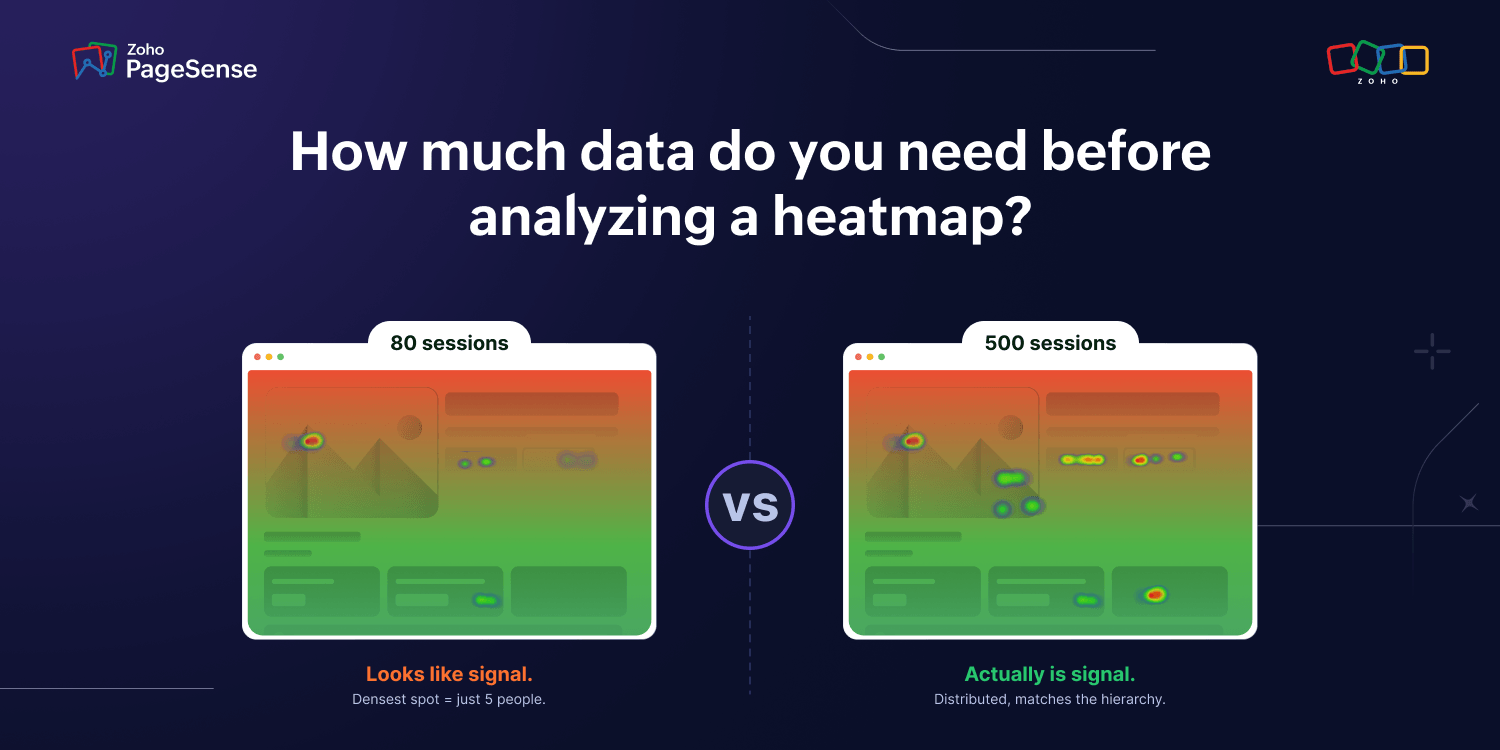
Heatmaps offer real value, but few teams extract all of it. They act too early or too late. Some wait around for a massive sample size before touching anything. Others jump the moment they spot a pattern, except not every pattern is real. At low volume, plenty of them are just noise dressed up as signal.
When you act on a misleading pattern, you risk altering something that was already working, while not having enough data to build a hypothesis. The gap on your site remains, and in some cases it widens. However, waiting too long for a huge sample size may cause you to pile up frustrated visitors and affect conversion rates.
The discipline of knowing when not, and when to act on data is just as valuable as knowing what the data means. Naturally, the question would arise, "what is the correct amount of data to act on a heatmap?"
Understanding a heatmap
Heatmaps aren't statistical tools, meaning there is no probability value or significance threshold. Hence, why it is difficult to place an exact number on how big of a sampling size you need before acting on heatmaps. But we will give a rule of thumb that you can refer back to whenever you need it.
Rational traffic by tool
Tool | Recommended Traffic (minimum threshold) |
Click Maps | 200 visitors — 300 visitors |
Scroll Maps | Around 200 visitors |
Session Recordings | 20-30 well chosen recordings |
Form Analytics | 50-100 entries per field |
Device Type | 200 visitors per device |

Click Maps
For click maps, 200–300 visitors is the minimum threshold for patterns to begin forming — not the threshold for acting on them. Below that number, what looks like a hotspot may just be 4 or 5 users who happened to click in the same place. For decisions that involve changing or removing an element, push to 500 sessions before drawing a conclusion. The 200–300 range tells you where to look next. It does not yet tell you what to do.
Scroll Maps
On the other hand, scroll maps can often work with a comparatively lower sample size. In practice, scroll patterns tend to stabilize faster than click patterns — there is less variance in how far people scroll than in exactly where they click. This is a practitioner observation rather than a published standard, so treat the 200-visitor threshold as a starting point, not a guarantee. When you see visitors rates drop towards the bottom of your website, adding more efficient content, or restructuring the sections can help.
Session Recordings
To know for sure why your website isn't getting as much scrolls, or a surplus of clicks using session recordings can benefit you greatly. For a session recording, you don't need a big sample size, but you need a good sample size. 20 - 30 session recordings with proper interaction can reveal consistent patterns worth acting on, which part is pulling away visitors while which ones keep them hooked in. Based on this, you can take decisions to optimize your website.
Form Analytics
Form analytics help you when your website features a form, but isnt getting enough submissions, and using form analytics you can find which field is causing the lag, and where visitors often rethink, and where they take too long. For overall form abandonment patterns, 50–100 entries is a workable starting point. For field-level conclusions on forms with more than 5 fields, aim for 100–200 entries before acting on any single field's data.
Device-Based Sampling
Although, you get a reasonable sample size, it is important you make sure they are for the same device type, a sample with 100 users on desktop and 100 users on mobile isn't the same as 200 visitors on desktop. With different interfaces, and interaction experience the data cannot be read as a single picture — mobile and desktop behavior are different enough that combining them masks what's actually happening on each. To ensure best optimization results, it is crucial to have sample sizes filtered according to device.
Additionally, it is also advised to use different sample sizes for major decisions such as restructuring a checkout flow, removing a key section from a high-value page — raise the threshold to 500 sessions before drawing a conclusion. The higher the stakes, the more data you need.
A low-sample heatmap will often show one or two intense hotspots with very little activity elsewhere. This looks like a clear signal — but it may just mean that two or three users happened to click in the same place. For instance, the heatmap below shows an illustrative example of 80 visitors — the densest area represents clicks from just 5 people. If you are using PageSense, you can replicate this by filtering a low-traffic page and observing how sparse and concentrated the pattern appears before the sample reaches a reliable size.
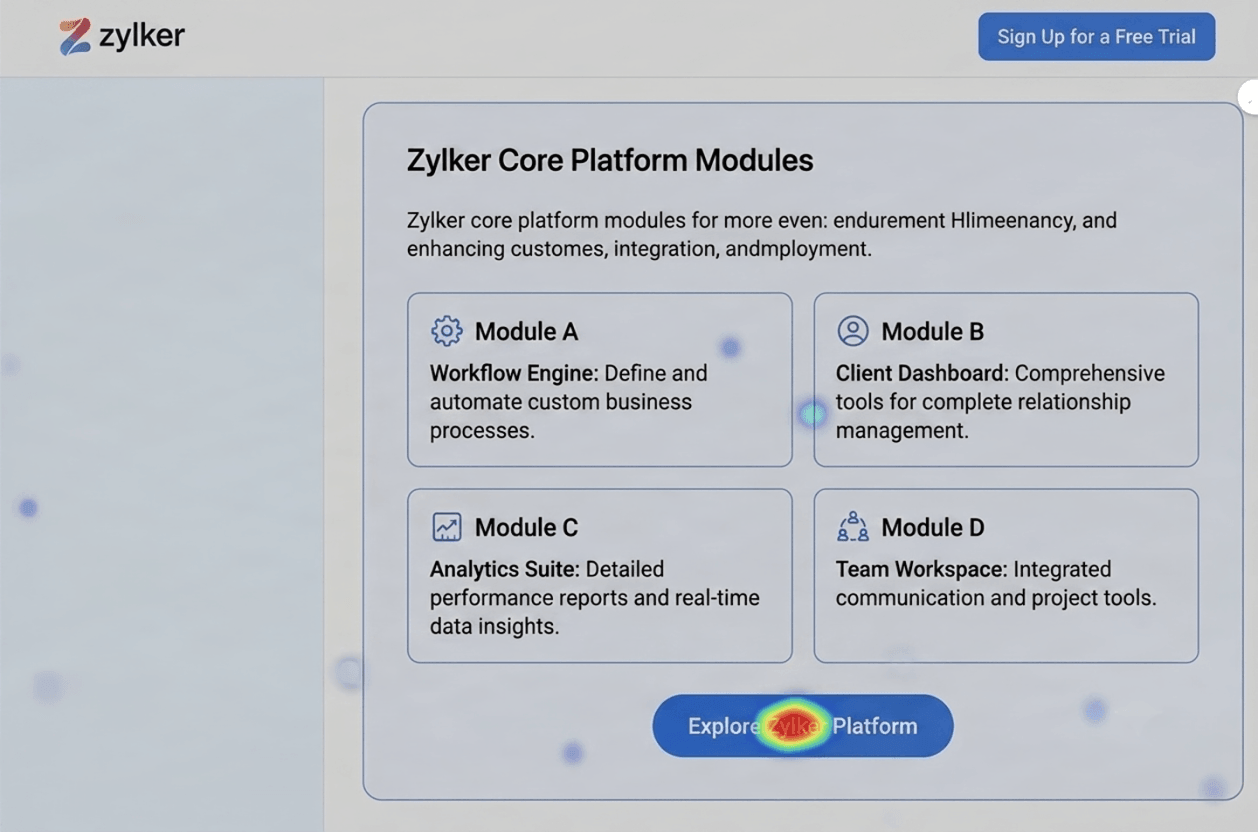
If your heatmap shows clicks clustered on a single unexpected element and almost nothing elsewhere, that is a sign the sample is too small to trust. Wait, collect more data, then check again.
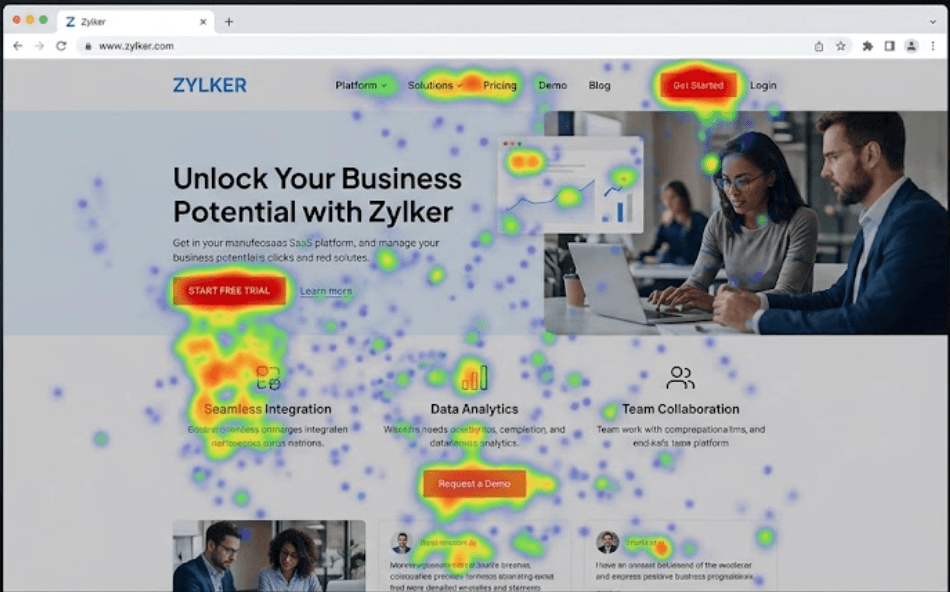
A reliable heatmap shows distributed activity that corresponds to the visual hierarchy of the page: high activity around the hero, navigation, CTAs, and interactive elements — with a clear scroll gradient. The heatmap below is a high traffic website with clear patterns.
A tip to remember is looking at the session count displayed in the tool before interpreting anything. Make it a habit to check the number before looking at the pattern. By doing so, you can come up with a stronger hypothesis.
When session recordings can substitute for heatmaps
If you have a low-traffic page and need to optimize it now, then session recordings are your answer. Filtering recordings to the page in question, and watching 15 to 20 sessions can help close the gap that causes visitors not to convert.
In a session recording, you are not looking for patterns — you are looking for consistent failure points. If 12 out of 15 users do the same thing (or fail to do the same thing), that is a finding worth acting on even without heatmap data.
Heatmaps give you quantitative patterns, while session recordings give you qualitative understanding. At low traffic, you have qualitative evidence available immediately. Using such evidence to make immediate changes can help for minor fixes on your website.
Frequently Asked Questions
How many sessions do I need for a heatmap?
At least 200 to 300 sessions per device type, with mobile and desktop counted separately, before click and scroll patterns are reliable. For bigger decisions, push that to 500 or more.
Can I trust a heatmap with 50 sessions?
Not for drawing conclusions or making changes. At 50 sessions, you're likely looking at noise. Investigate the page directly with session recordings instead, and let the heatmap data keep building in the background.
How long should I wait before reading my heatmap?
Time is a proxy for traffic volume, not the real measure. These are approximate starting points based on typical traffic patterns — your actual threshold is session count, not calendar time. High-traffic pages typically reach 1,000+ sessions in 5 to 7 days. Medium-traffic pages usually need 2 to 3 weeks to accumulate enough. Low-traffic pages (under 200 sessions a week) may need 4 to 6 weeks or longer — and if the page never reaches 500 sessions, session recordings are a more reliable tool than waiting for the heatmap to fill in.
Should I combine mobile and desktop data in one heatmap?
No. Keep them separate. The layouts differ, the fold sit in a different place, and the click targets aren't the same, so a combined map blends two behaviors into one misleading picture. Always read each device type on its own.
What if my traffic is too low to hit these numbers ever?
Lean on session recordings instead. On low-traffic pages, watching a handful of real sessions often tells you more than waiting months for a heatmap to fill in. Use the heatmap as a slow background signal, not your primary tool.