- HOME
- Best Heatmap and Session Recording tools in 2026
Best Heatmap and Session Recording tools in 2026
- Last Updated : June 24, 2026
- 267 Views
- 21 Min Read

For the longest time, everyone just installed Hotjar and called it a day. It wasn’t because we all did deep vendor evaluations; it was just the default. The documentation was clean, and if you didn't have an enterprise-level budget, your options were basically Hotjar or nothing.
Things have changed completely. In 2026, we actually have real choices, and the differences matter. It’s no longer just a race to the bottom on price. The actual architecture of these tools, how they handle your data, and where they leave you stranded in two years—that’s what you have to look at now.
Before you start looking at features, ask yourself three questions:
What are you actually trying to fix? Watching what people do is one thing. Running an experiment to change their behavior is a whole different thing. Too many teams buy a tool for the first problem and hit a wall when they want to solve the second.
How much traffic do you really have? Session limits will absolutely bite you if you aren't careful. A plan that looks cheap today can easily double your bills in a year. Look at the caps first.
Are you adding to a stack or replacing it? If you don't think this through, you'll end up paying for four different subscriptions and wasting hours trying to stitch the data together in a messy spreadsheet.
The classic trap is ending up with one tool for heatmaps, another for form analytics, and a third for A/B testing. It's a workflow nightmare. You spend half your time exporting CSVs just to get a single, cohesive picture of your user journey. A true Conversion Rate Optimization (CRO) platform handles all of that under one roof—behavioral data, forms, funnels, experiments, and personalization. You might not need every feature on day one, but you definitely want room to grow without having to migrate to a new tool later.
The quick breakdown
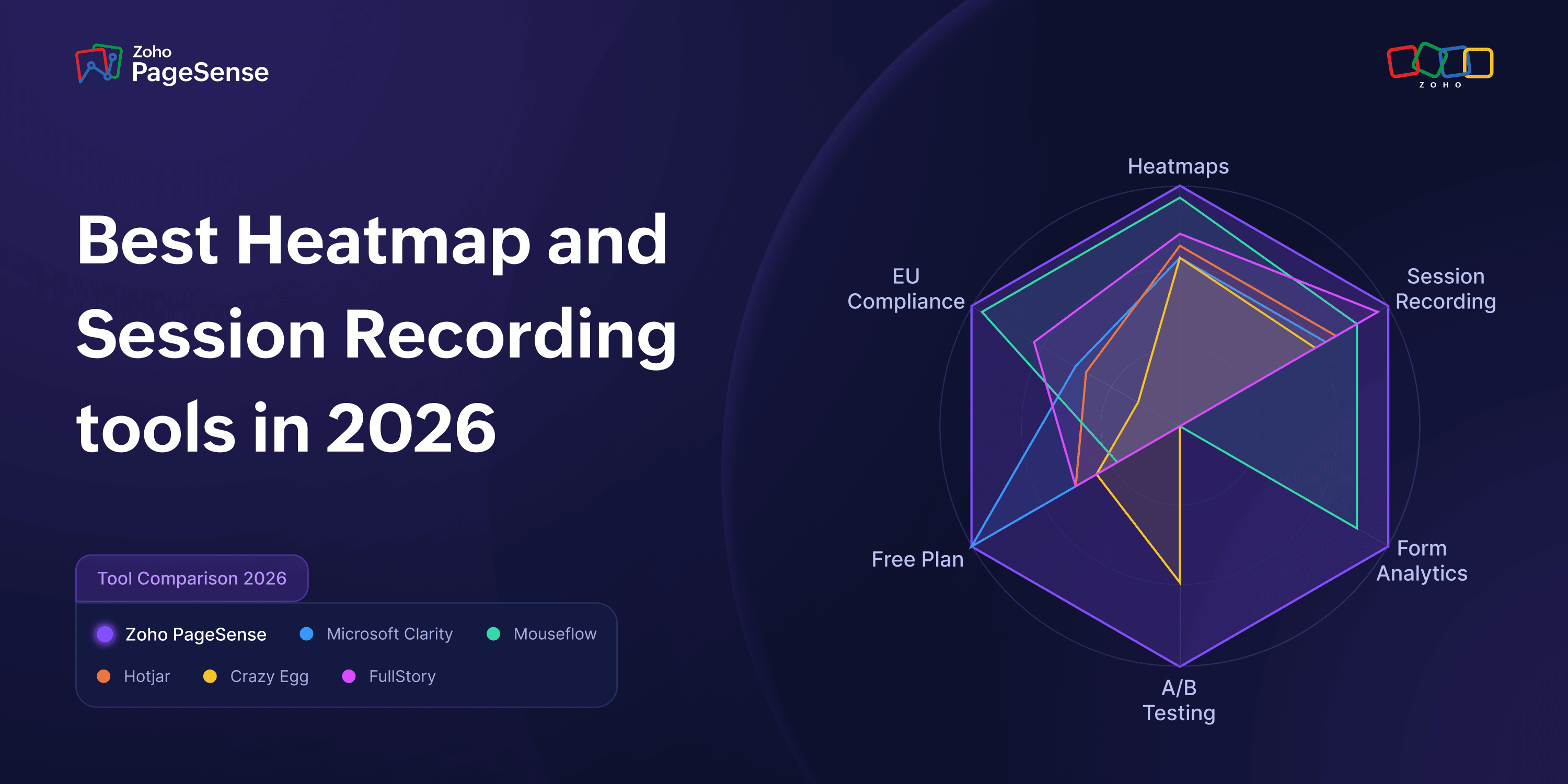
Here is a quick glance at how these stack up before we dive into the weeds:
Platform | Best For | Starting Price | Free Plan |
Zoho PageSense | Teams that want a single platform from insights straight to live A/B testing | $20/month | Yes – Forever Free |
Microsoft Clarity | Zero-budget teams needing unlimited sessions and basic heatmaps | Free | Yes – always free |
Hotjar / Contentsquare | Qualitative user research with surveys, interviews, and NPS | $49/month | Limited |
Crazy Egg | Basic heatmaps paired with A/B testing, pageview-based pricing | $29/month | 30-day trial |
Mouseflow | Deep analytics with strict EU data residency | $25/month | No |
Lucky Orange | Teams where live chat is the primary focus | $32/month | 7-day trial |
Inspectlet | JavaScript-heavy or single-page apps (React/Vue) | $39/month | Evaluation only |
FullStory | Enterprise-grade experience analytics | ~$10,000/year | Preview only |
Zoho PageSense
The full optimization stack without the context-switching.
The real value of Zoho PageSense isn’t that it has some magical, exclusive feature. It’s just that everything actually talks to each other.
One snippet. One dashboard. | Forever Free — no time limit. | EU data residency included. |
Web analytics, heatmaps, recordings, form analytics, funnels, A/B testing, and personalization in one place. | Heatmaps, recordings, form analytics, funnels, and web analytics for up to 5,000 monthly users. | Zoho-owned global data centers. No third-party cloud. No ad-revenue model. ISO 27001, 27017, 27018, 27701 and SOC 2 certified. |
Let's say you're looking at your dashboard and notice a massive 65% drop-off on your pricing page. Instead of exporting data or opening another tab, you just toggle over to the scroll heatmap right there. You see people are stopping right before the CTA. So, you filter your session recordings to those specific drop-off visitors and watch a dozen clips. It clicks: people keep clicking on the pricing tier names expecting them to expand, but they aren't links. It's a dead click. Because you're in one tool, you can launch an A/B test to fix it immediately. Three weeks later, your funnel numbers go up. That whole workflow happens without ever leaving the tab.
The Forever Free Plan is more complete than the paid plans of several tools in this comparison. It gives you web analytics, mobile tracking, heatmaps, recordings, and funnels for up to 5,000 monthly users. And because Zoho runs its own global data centers (fully GDPR compliant, by the way), we aren't subsidizing the free tier by selling your data or relying on third-party cloud markups.
When you scale, the Professional tier ($20/mo) brings in engagement tools like surveys and push notifications, while the Enterprise tier ($49/mo) unlocks full A/B testing and server-side experiments.
Key features of Zoho PageSense
Heatmaps and session recordings: Dynamic click, scroll, movement, and attention maps generated automatically across tracked pages. Session recordings capture complete browsing journeys — including navigation between tabs and pages — with adjustable playback speed and behaviour metrics. Segment both by device, traffic source, location, or custom event.
Form analytics: Field-level tracking that identifies which form fields have the highest drop-off rates, correction counts, hesitation time, and blank submissions. Connects directly to funnel data in the same dashboard without any export.
Funnel and web analytics: Multi-step funnel builder with conversion rates, drop-off visualisation, and time-to-completion data. Built-in web analytics tracks traffic sources, top-converting pages, and key KPIs — so you're not running a separate tool just for traffic data.
A/B testing and personalization: Visual and code editor for building page variants, with multivariate testing and server-side experiments on Enterprise. Personalization rules let you serve location-based, behaviour-based, or time-based content to specific segments — with a dedicated Heatmap tab to measure the performance of each personalised experience.
Zoho ecosystem and third-party integrations: Connects natively with Zoho CRM, Zoho SalesIQ, Google Analytics, GTM, Zapier, Amplitude, and more. Custom Identity API lets you identify visitor sessions by email or user ID for targeted segmentation across your full marketing stack.
What works
The full CRO loop in one place. Not just heatmaps — web analytics, recordings, form analytics, funnels, A/B testing, personalization, push notifications, surveys. One snippet, one dashboard, no context switching between tools
The Forever Free plan is real. Web analytics, heatmaps, recordings, form analytics, funnels for up to 5,000 tracked users with no time limit.
Zoho owns its own data centers globally, EU data residency included. No third-party cloud, no ad-revenue model. ISO 27001, 27017, 27018, 27701 and SOC 2 certified
Plans follow where you actually are — Free for understanding what is happening, Professional for engaging visitors, Enterprise for running experiments. Nothing is gated arbitrarily
Limitations
A/B testing and personalization require Enterprise. If experiments are the goal from day one, factor that into your budget upfront
Free plan is one project and one month of data retention. Works for a single site and recent data, not for teams managing multiple properties or needing to look back further

Microsoft Clarity
Free, unlimited, and straightforward.
If you have absolutely zero budget, start here. Microsoft has kept Clarity completely free with no session caps or traffic limits. You get heatmaps, recordings, funnel analysis, and some neat Copilot AI summaries.
But you need to know what you're giving up. There are no form analytics, no surveys, and no A/B testing. Recordings vanish after 30 days. And because there's no paid tier, once you outgrow it, you're forced to migrate to a new vendor and rebuild your workflows from scratch. Also, keep an eye on compliance: since late 2025, Clarity doesn't track EEA visitors without explicit consent, which leaves a massive blind spot if you have European traffic. Plus, Microsoft uses anonymized aggregate Clarity data to improve its own products including Bing and Edge.
Key features of Microsoft Clarity
Unlimited session recordings: Full capture of mouse movements, clicks, scrolls, and keypresses for every qualifying visitor session with no traffic caps or daily limits. Filter recordings by device, browser, traffic source, and frustration signals like rage clicks and dead clicks. Session highlights surface key moments automatically so you don't have to watch full recordings.
Heatmaps: Automatically generated click and scroll heatmaps across all tracked pages for desktop, tablet, and mobile. No manual snapshot setup required. Copilot AI summarises heatmap patterns across all three device types for a given page in seconds.
Copilot AI: Microsoft's built-in generative AI layer lets you ask natural-language questions about your data — "Where are users dropping off?" — and get concise, data-backed answers. Produces grouped session summaries, heatmap insights, and ad campaign analysis without manual review. Available to all users at no extra cost.
Funnel analysis: Multi-step funnel tracking included at no charge, showing drop-off rates and conversion data across defined visitor paths. One of the few free tools that includes funnel functionality out of the box.
GA4 integration: Clean two-way integration with Google Analytics 4 that links behavioural session data to acquisition and conversion metrics, allowing you to connect the what (GA4) with the why (Clarity) without leaving either platform.
What works
No traffic caps, no session limits, no cost. Microsoft has been consistent about this
Funnel analysis included at no charge, which most free tools skip entirely
GA4 integration is clean, Copilot AI summaries surface patterns without manual digging
Limitations
No form analytics, A/B testing, or surveys at any level — and there is no paid tier to upgrade to. When you need those things you are migrating to a completely new tool and rebuilding your setup
Session recordings are only kept for 30 days
Since October 2025, Clarity collects zero data from EEA visitors without consent. If you have meaningful EU or UK traffic, your heatmaps and recordings have blind spots that other tools with EU data residency do not
Microsoft uses Clarity data to improve its own products. That needs to be reflected in your privacy policy, which catches teams off guard
Hotjar (Contentsquare)
Excellent for user research, but watch the pricing.
Hotjar is now fully under the Contentsquare umbrella, and while the core heatmaps are still great, the pricing got complicated. They split surveys into a separate "Voice of Customer" product. So if you want heatmaps ($49/mo) and surveys ($99/mo), you're suddenly looking at $148 a month minimum. That’s caught a lot of legacy users off guard.
That said, if you actually want to talk to your users, Hotjar is brilliant. The user interview scheduling, on-site polls, and NPS tools are top-tier. Just don't expect it to help you optimize forms or run A/B tests—it’s a research tool, not an optimization platform.
Key features of Hotjar
Heatmaps and session replay: Click, scroll, and move heatmaps with zone-based analysis available on higher tiers. Session replay with one-click AI summaries that highlight key moments — frustration signals, drop-off points, and misclicks — so you can skip to what matters without watching full recordings.
On-site surveys and feedback widgets: 40+ survey templates with an AI survey generator that builds questionnaires in seconds. Results come with AI summary reports and sentiment analysis. Includes persistent and triggered feedback widgets for passive visitor input on any page.
User interview scheduling: Built-in recruitment and scheduling tools for live research sessions with your own visitors. Allows teams to invite survey respondents to follow-up interviews with a single click — without a separate research platform.
Funnel analysis with Sense AI: Multi-step funnel builder that shows where users drop off, with the ability to compare funnels across devices or segments. Sense AI can pinpoint conversion blockers automatically without manual segment drilling.
NPS and engagement tracking: Net Promoter Score surveys deployable directly on-site, with results linked to session recordings and heatmaps so you can connect a visitor's score to their actual experience on the page.
What works
The user research combination — on-site surveys, user interview scheduling, NPS, feedback widgets — is still the best in this comparison. If you need to ask visitors questions, not just watch them, nothing here matches it
200,000 free sessions per month is genuinely generous for small to mid-size sites
Limitations
Surveys are now a separate product. Heatmaps are $49/month, surveys are $99/month separately, so if you want both it is $148/month minimum. A lot of existing users are discovering this mid-migration
No form analytics or A/B testing at any tier. If conversion optimization is the goal rather than research, Hotjar gets you partway there and then stops
The Experience Analytics tier scales to $739/month at higher session volumes, which is a significant jump from where you started
Privacy terms changed when Contentsquare completed the merger. Worth reviewing the updated DPA before deploying, especially for regulated industries
Crazy Egg
Niche heatmap views and straightforward pageview pricing.
Crazy Egg has been around forever, and its biggest win is still the "Confetti" view. It lets you see individual clicks color-coded by traffic source or device. It’s incredibly eye-opening when you realize your paid ad traffic is clicking on entirely different elements than your organic visitors.
They price by pageviews, not sessions, meaning you only pay for the specific pages you care to track. However, their heatmaps are static screenshots. If your site relies heavily on JavaScript or framework tools like React, your click data can easily end up misaligned. Also, they force you into annual billing.
Key features of Crazy Egg
Confetti view: Individual clicks displayed as colour-coded dots segmented by traffic source, referrer, device type, or 22 other filters. Reveals not just where visitors click, but which audience — paid search, organic, social — is clicking there. Uniquely useful for diagnosing how different traffic sources interact with the same page.
Five heatmap report types: Click heatmaps, scroll maps, attention maps, overlay reports (exact click counts per element), and list reports — all generated per page without manual snapshot management. Toggle between device types to compare desktop and mobile behaviour side by side.
Session recordings: Full session replay with privacy masking for sensitive fields. Filter recordings by traffic source, new vs returning visitors, UTM codes, conversion status, and custom events to isolate exactly the sessions you need.
A/B testing with visual editor: Built-in split testing with a WYSIWYG editor, goal tracking, and statistical significance reporting. No separate tool or product purchase required. Available from the Plus plan upward.
Surveys and popup CTAs: On-site survey capability and popup builder included across plans, allowing you to collect qualitative feedback and run on-page promotions alongside your heatmap and recording data.
What works
The Confetti view is clearly differentiated. Clicks colour-coded by traffic source or device shows you not just where people click but which visitors are clicking there. Seeing paid social and organic audiences behaving completely differently on the same page changes how you diagnose problems
A/B testing included from the Plus plan, no separate product to purchase
Pageview-based pricing means you only pay for pages you are actively analyzing, not every session across your whole site
30-day trial gives you real runway to evaluate before committing
Limitations
No form analytics at any tier, so checkout and lead gen drop-off inside forms needs a separate tool
A/B testing is not on the $29 Starter plan. You need Plus at $99/month, which is a bigger jump than the entry price suggests
Static heatmaps only. On React, Vue, Angular, or Next.js sites, click positions will be inaccurate because the tool overlays a screenshot rather than the live page
Annual billing only, full year charged upfront regardless of when you decide it is not working
Mouseflow
Deep behavioral data for analytical teams.
Mouseflow doesn't mess around with feature depth. They give you seven different heatmap types—including friction maps that automatically flag where users are rage-clicking or hesitating. Throw in form analytics, journey funnels, and their Mina AI tool, and it's an incredibly robust package. For European teams, their strict EU data residency is a massive compliance green flag.
The downside? The UI is dense. It’s not a minimal, pretty dashboard you master in five minutes; your team will need to spend some actual time onboarding.
Key features of Mouseflow
Seven heatmap types: Click, scroll, movement, attention, geographic, friction, and interactive heatmaps — all generated automatically with no manual page setup. Advanced click metrics include hover-to-click rate and time-to-click. The friction heatmap automatically visualises rage clicks, dead clicks, and hesitation zones without any configuration.
Friction detection and session scoring: Every recorded session is automatically scored for friction based on 7+ signals: rage clicks, dead clicks, click errors, JavaScript errors, 404s, speed browsing, and more. Sessions are ranked by friction severity so you know exactly which recordings to watch first — no manual triage needed.
Form analytics: Field-level tracking showing drop-off rates, correction counts, hesitation time, refocus events, and blank submissions for every form on tracked pages. Connected directly to funnel data so you can trace form abandonment back to specific steps in the visitor journey.
Mina AI: Natural-language AI assistant that lets you query your session data conversationally. Ask what you're looking for and Mina surfaces the relevant sessions, friction patterns, and behavioural signals instantly — cutting hours of manual recording review down to minutes.
Journey analytics and conversion funnels: Visual user journey maps showing how visitors move between pages, where they enter, and where they exit. Funnel builder sits alongside journey data in the same dashboard, with advanced URL targeting for precise step definition.
What works
Seven heatmap types: click, scroll, geo, movement, attention, friction, and interactive. The friction heatmap automatically surfaces rage clicks, dead clicks, and hesitation — you do not have to go looking for them
EU data residency and full data ownership. One of the cleanest compliance options in this list for European teams
Form analytics, funnel analysis, and journey analytics all included without needing to upgrade or add anything
Mina AI surfaces friction patterns automatically, which cuts down manual review time meaningfully
Limitations
No A/B testing. Mouseflow shows you the problems clearly but you need a different tool entirely to test solutions
The jump from Essential plan at $25/month to Advanced plan at $109/month is steep and happens earlier than most teams expect as traffic grows
No web analytics dashboard built in — needs to run alongside a separate traffic tool
The interface takes longer to learn than it looks. Not complicated, but not minimal either. Budget onboarding time
Lucky Orange
Live chat meets visitor tracking.
Lucky Orange does one specific thing beautifully: it lets you see a live visitor stumbling on your site and open up a chat box to help them before they bounce. Every single feature—forms, funnels, recordings—is unlocked on every plan; you just pay for volume.
It’s fantastic if your primary goal is customer support or live sales. But if you’re trying to run deep e-commerce CRO, it misses the mark. For context, you could pair Zoho PageSense with SalesIQ to get that exact same live chat functionality alongside a massive testing and optimization engine.
Key features of Lucky Orange
Live visitor view with chat: Real-time dashboard showing every active visitor on your site with the ability to open a live chat conversation directly from their session view. Includes co-browsing capability, canned responses, and auto-invite triggers for high-intent visitors. Every chat response links back to that visitor's full session recording.
Dynamic heatmaps: Click, scroll, and move maps rendered on the actual live page rather than a static screenshot. Captures interactions inside dropdown menus, pop-ups, and dynamic content that static heatmap tools miss. Segmentable by location, device, browser, traffic source, and date range.
Session recordings with visitor profiles: Automatic recording of every visitor session, including dynamic and members-only pages. Each recording is linked to an individual visitor profile showing their full history, referral source, and pages visited — so you see behaviour in context, not just in isolation.
Conversion funnels and form analytics: Multi-step funnel builder with drop-off rates at each step, with one-click filtering to recordings of visitors who abandoned at a specific stage. Form analytics cover field-level interactions including hesitation time, refocus events, and submission failures.
Discovery AI: Natural-language AI tool that digests thousands of visitor interactions and surfaces the patterns and problems most likely to be affecting conversions. Flags high-impact opportunities across your site so you can prioritise fixes without manually combing through recording libraries.
What works
Live chat and live visitor view built directly into the analytics dashboard. Watch a real visitor on your site and open a conversation with them. Nothing else in this comparison does this natively
Dynamic heatmaps render on the actual live page rather than a screenshot, which means accuracy on responsive and interactive pages is better than most tools here
Every feature is available on every plan. Only session volume and data retention change between tiers, not what you can actually do
Limitations
No permanent free plan. The 7-day trial gives full access but after that it is a paid subscription. Build $32/month (3,500 sessions), Grow $72/month (10,000 sessions), Expand $199/month (50,000 sessions).
No A/B testing at any tier. Lucky Orange shows you what is happening but you need a separate tool to test fixes
No EU data residency option, which rules it out for teams with strict European data governance requirements
Discovery AI is an add-on, not included in the base plan price
Inspectlet
The developer's choice for complex web apps.
Most heatmap tools take a static screenshot of your page and overlay data. But if your site runs on React, Angular, Vue, or Next.js, the page changes constantly based on user actions. Static screenshots mean your data ends up looking broken. Inspectlet solves this by rendering heatmaps on the actual live page, so the data stays 100% accurate.
They include A/B testing and error logging across the board. The catch is the interface—it looks and feels like a developer tool. It's fantastic for product and engineering teams, but a non-technical marketing team will likely find it frustrating.
Key features of Inspectlet
Dynamic heatmap rendering: Heatmaps built on the actual rendered live page rather than a static screenshot. Click positions stay accurate on React, Next.js, Vue, and Angular apps where the DOM changes dynamically based on user state or route. Includes eye-tracking heatmaps that simulate attention based on mouse movement — not available in most tools in this category.
Session recordings with thumbnails and live view: Full session replay capturing every mouse movement, scroll, click, and keypress. Session thumbnails let you hover over any recording to see an animated preview without clicking in. Live View shows every current visitor on your site in real time, filterable by page, referral source, or conversion status.
AI session insights: AI layer that automatically surfaces important sessions and answers plain-English queries about your data — "show me sessions where users rage-clicked the checkout button" — without requiring manual filter setup. Identifies behavioural patterns across recordings without watching each one individually.
A/B testing and form analytics: Built-in split testing with a visual editor, goal tracking, and statistical significance reporting — included on every paid plan with no module pricing. Form analytics track field-level conversion rates, hesitation time, and ignored fields, also included across all tiers.
Error logging with session context: Automatic JavaScript error capture with full stack traces, network monitoring, and direct links to the session replay where each error occurred. Lets product and engineering teams reproduce and diagnose real user issues without needing a separate error tracking tool.
What works
Renders heatmaps on the actual live page, not a static screenshot. On React, Next.js, Vue, or Angular sites, this is the difference between accurate data and data that looks plausible but is wrong
A/B testing, form analytics, and error logging included on every plan — no module pricing, no feature gating by tier
Error logging alongside session replay is useful beyond just marketing teams. Product and engineering teams get real value from it too
Limitations
The free plan is not a usable analytics setup. It is an evaluation tool and nothing more
Interface is built for technical users. Non-developer marketing teams will find it less intuitive than most other tools here and will need more time to get comfortable
No EU data residency, which matters for teams with European compliance requirements
More expensive entry point ($39/mo) than comparable tools given what the base tier actually includes
FullStory
Enterprise-level power with a matching price tag.
FullStory is in a completely different ballpark. Thanks to their "Fullcapture" technology, they log absolutely every single micro-interaction automatically without you needing to tag events beforehand. If a bug pops up, you can retroactively go back and see exactly how many people hit it six months ago.
They offer a free preview plan with 30,000 sessions, but it's just a teaser—no dashboards or integrations. To actually use the platform, you have to talk to a sales rep and sign an annual contract that usually starts around $10,000. Unless you are an enterprise team with dedicated data analysts, it's total overkill.
Key features of FullStory
Fullcapture autocapture: Automatically records every micro-interaction — clicks, taps, scrolls, hovers, form inputs, and rage gestures — from day one, without any predefined event tagging or manual instrumentation. Enables retroactive analysis: if an issue surfaces weeks later, you can query sessions from months ago to see exactly how many users were affected and what they experienced.
AI-powered session replay with StoryAI: High-fidelity session playback with frustration signal detection including rage clicks, dead clicks, and error clicks. StoryAI — powered by Google Gemini — generates written narrative summaries of individual sessions or session cohorts, so teams can get the story of what happened without watching hours of footage.
Heatmaps and journey mapping: Aggregate heatmaps showing where users click and engage across pages, alongside journey maps that visualise how users move through your product. Omni-search lets you query across all session data to surface specific interaction patterns or user paths on demand.
Funnels, segmentation, and product analytics: Multi-step funnel builder with conversion tracking, drop-off analysis, and cohort segmentation. Connects behavioural data to business outcomes like revenue impact and conversion rate — designed for analyst and product teams that need to tie UX data to commercial metrics.
Enterprise compliance and integrations: SOC 2 Type II certified, with ISO 42001 certification for responsible AI governance. Connects to data warehouses, CDPs, CRMs, and product analytics platforms. Built for organisations that treat behavioural data as part of a broader data infrastructure, with role-based permissions, SSO, and multi-org management on Enterprise tier.
What works
Fullcapture indexes every interaction automatically without predefined event tagging. You can go back and investigate something you did not think to track at the time. For complex products with large teams, that retroactive capability is genuinely useful and nothing else here does it
SOC 2 Type II certified, strong enterprise compliance documentation. Built for the procurement requirements of large organizations
FullstoryFree gives 30,000 sessions with 12 months retention at no cost — enough to properly evaluate the platform before entering a sales conversation
Limitations
Paid plans start around $10k/year. That is not a negotiating position — it is the realistic floor based on independent procurement data. Small and mid-size teams should not start the conversation expecting it to come down to a number that works for them
The free plan is a preview, not a working product. No dashboards, no funnels, no integrations. When you need more there is no upgrade button — you request a demo, go through a sales process, and sign a contract
No A/B testing or personalization at any tier. FullStory shows you everything that is happening. Acting on it requires a different tool
Built for analysts and product teams with dedicated data resources. Marketing generalists will find the learning curve steeper than almost anything else in this comparison
Okay, so which one do you actually pick?
Zero budget. Clarity. Free, unlimited, no catch. Just know that when you need form analytics or experiments, there is no upgrade path — you migrate to a new tool and start over.
Under 5,000 monthly users, want the full picture without paying. PageSense's free plan covers more than most paid tools in this list — heatmaps, recordings, form analytics, funnels, web analytics. Worth a look before you pay for anything.
You know what is broken and you want to run tests to fix it. The question is whether you want to do that in the same platform where you spotted the problem. PageSense lets you do that. Most tools here do not.
User research is central to how your team works. Hotjar. Surveys, user interviews, NPS alongside heatmaps — still the best combination here for that specific need. The pricing changed post-merger so factor that in, but the research toolset itself holds up.
Site runs on React, Vue, Angular, or Next.js. Check your current heatmap data before you trust it. Static heatmaps on framework-built sites produce misleading results. Inspectlet is the one tool here that solves this.
EU data compliance is a hard requirement. Mouseflow has the clearest data residency story in the mid-market. If you also need to run experiments on that compliant data, PageSense covers both.
Want to start free and grow without switching tools. PageSense. Free plan for understanding what is happening, Professional for engaging visitors, Enterprise for running experiments. Same platform the whole way through.
FAQs
What is the best free heatmap tool in 2026?
Microsoft Clarity if you truly need unlimited and free forever. No session caps, no paid tier, just heatmaps and recordings. Zoho PageSense if you want more — their Forever Free plan includes form analytics and funnels too, and when you eventually need A/B testing you upgrade rather than migrate to something new.
Is GA4 enough for understanding visitor behaviour?
For traffic data, yes. For understanding what visitors actually do once they land, no. GA4 tells you someone left your pricing page. It does not tell you they rage-clicked the FAQ section three times before giving up. That is what heatmaps and session recordings are for.
What is the difference between session recordings and heatmaps?
Heatmaps show you what thousands of visitors did in aggregate. Recordings show you what one visitor actually did, played back as video. You need both. The heatmap tells you there is a problem. The recording tells you why.
Which heatmap tool has the most heatmap types?
Mouseflow. Seven types: click, scroll, geo, movement, attention, friction, and interactive, all generated automatically. Most tools give you click and scroll maps and call it a day. If heatmap depth matters most, Mouseflow wins. If you also need A/B testing and form analytics in the same platform, Zoho PageSense covers more of the full workflow.
Which tools include form analytics?
Zoho PageSense, Mouseflow, Lucky Orange, and Inspectlet. PageSense goes field-level — hesitation time, corrections, drop-offs, refocuses — and it connects directly to your funnel data in the same dashboard. Clarity, Hotjar, Crazy Egg, and FullStory do not have form analytics at any tier.
Is Hotjar still independent or is it part of Contentsquare now?
Fully merged into Contentsquare as of July 2025. Heatmaps, recordings, and surveys still exist but surveys are now a separate product at $99/month on top of the $49/month heatmap plan. Teams that need both are paying $148/month minimum. A lot of people are finding this out mid-migration.
Which heatmap and session recording tools are GDPR compliant?
All of them claim compliance. The real difference is data residency. Zoho PageSense and Mouseflow both offer EU data residency with full data ownership. Clarity stores data in Azure's EU boundary but Microsoft's US parent raises Schrems II questions, and since October 2025 it collects zero data from EEA visitors without consent. Lucky Orange, Crazy Egg, and Inspectlet are US-based with no EU residency option.
What is Mina AI in Mouseflow?
Mouseflow's built-in AI layer. It automatically flags friction patterns — rage clicks, hesitation, drop-off clusters — without you having to manually review recordings to find them. Included in paid plans, no add-on needed.
What is the best heatmap tool for e-commerce?
Depends on the problem. If live chat is the priority — watching a visitor struggle and starting a conversation before they leave — Lucky Orange is built for that. If the goal is improving conversion across the full purchase journey, diagnosing checkout drop-off, and running tests to fix it, Zoho PageSense does more. It includes live visitor tracking, integrates with Zoho SalesIQ for live chat, and lets you run experiments in the same platform where you spotted the problem.
Do I need a separate tool for A/B testing or does it come included?
Usually separate. Mouseflow, Lucky Orange, Clarity, and Hotjar have no A/B testing at any tier. Crazy Egg includes it from $99/month but no form analytics. Zoho PageSense is the only tool here with heatmaps, form analytics, funnels, and A/B testing in one place. You spot the problem and fix it without opening another tab.