Customer retention automation: Workflows, tools, and real examples
- Last Updated : July 1, 2026
- 1.7K Views
- 7 Min Read
Summary:
- Retaining an existing customer costs significantly less than acquiring a new one. But most retention processes still rely on manual effort that doesn't scale.
- Automating processes like post-sale surveys, support notifications, and refund follow-ups ensures every customer gets a consistent experience, regardless of how busy your team is.
- Most retention workflows in Zoho Flow require no coding and can connect all the apps you already use, like Shopify, Zoho CRM, Zoho Desk, and Mailchimp.
While generating new leads is essential for any business, keeping your existing customers is just as important—and far more cost-effective. Customer retention helps your company build a loyal customer base, increase word of mouth, and keep profits consistent. Yet most businesses still invest the bulk of their time and budget in acquisition, leaving retention to manual processes that are slow, inconsistent, and difficult to scale.
Automation changes that. By connecting your business apps together using an integration platform, you can build retention workflows that run in the background consistently, without manual effort, ensuring customers never slip through the cracks.
Here are a few ways you can do that:
Sync ecommerce purchases to your CRM instantly
How it works
Every time a customer makes a purchase on your ecommerce store, their details are automatically synced in your CRM.
Why it matters
Your CRM is the foundation of any retention strategy—but only if the data in it is accurate and up to date. Over 20% of global retail sales now happen online, which means a large portion of your customer base is coming through ecommerce channels. If you're manually updating those contacts in your CRM, it slows down the whole process, and you're likely to miss a significant remarketing audience due to errors.
How to set it up in Zoho Flow
This can be a simple one-step integration between an ecommerce platform like Shopify or WooCommerce and a CRM like Zoho CRM. Additionally, if you want your customers to be a part of your email campaign as well, you can include one more step to add them to your mailing list in Mailchimp or Zoho Campaigns.
Automate surveys after every invoice
How it works
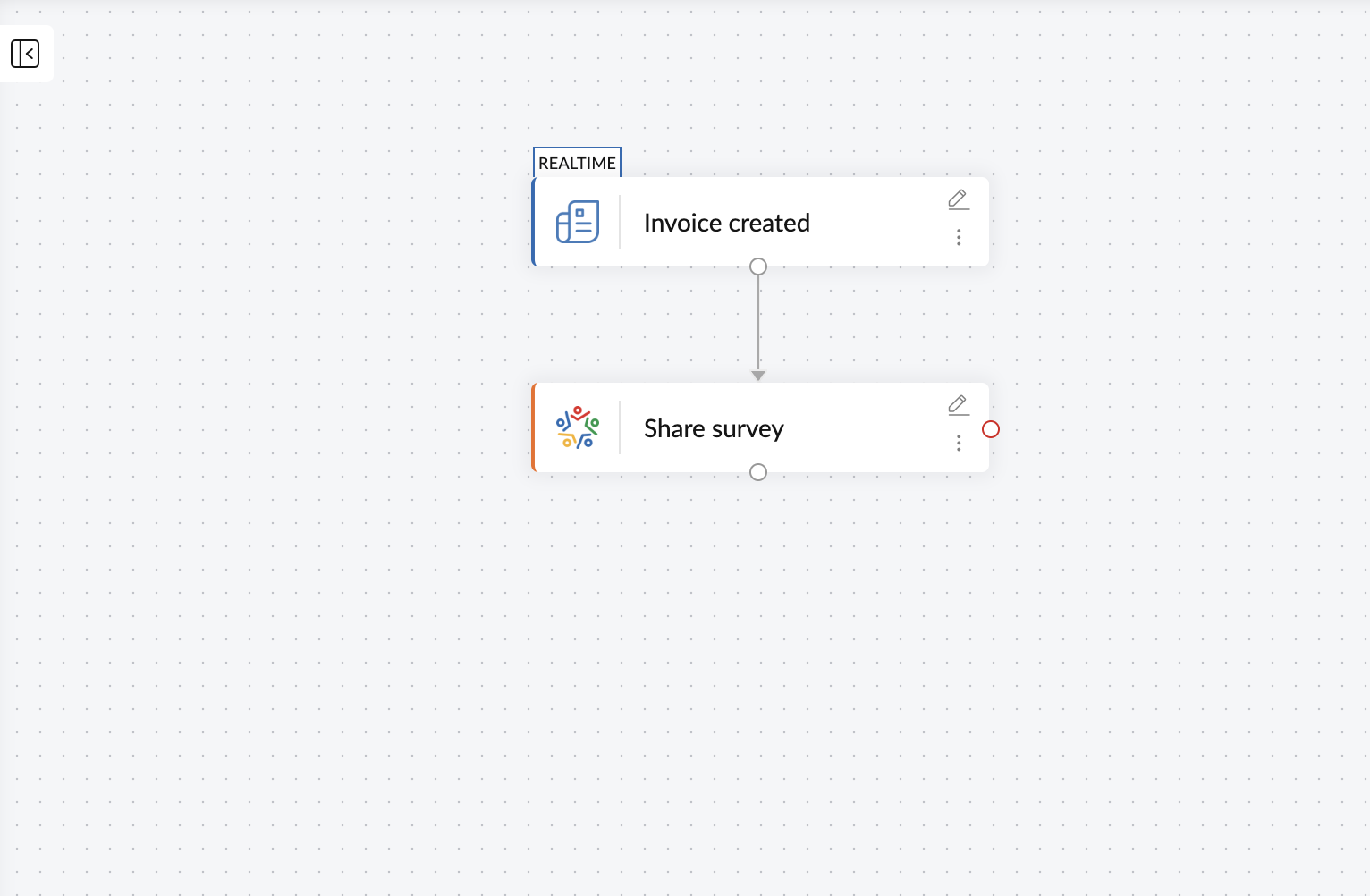
When an invoice is sent after a completed sale, a feedback survey is automatically shared with the customer.
Why it matters
Sending out surveys to customers can help businesses get a better understanding of how customers see your services or products, offering you the chance to address any shortcomings or problems on your end. Automating the sending of surveys can ensure that you don't miss out on getting feedback from any of your customers.
How to set it up in Zoho Flow
You can integrate invoicing applications like Zoho Invoice or QuickBooks with survey applications like Zoho Survey to ensure that every time an invoice goes out after a sale is made a survey will also automatically be sent to the customer. You can even add a third step to create a support ticket for negative tickets. We'll have more on this in a real-world customer story later.
Intelligently route customer support tickets
How it works
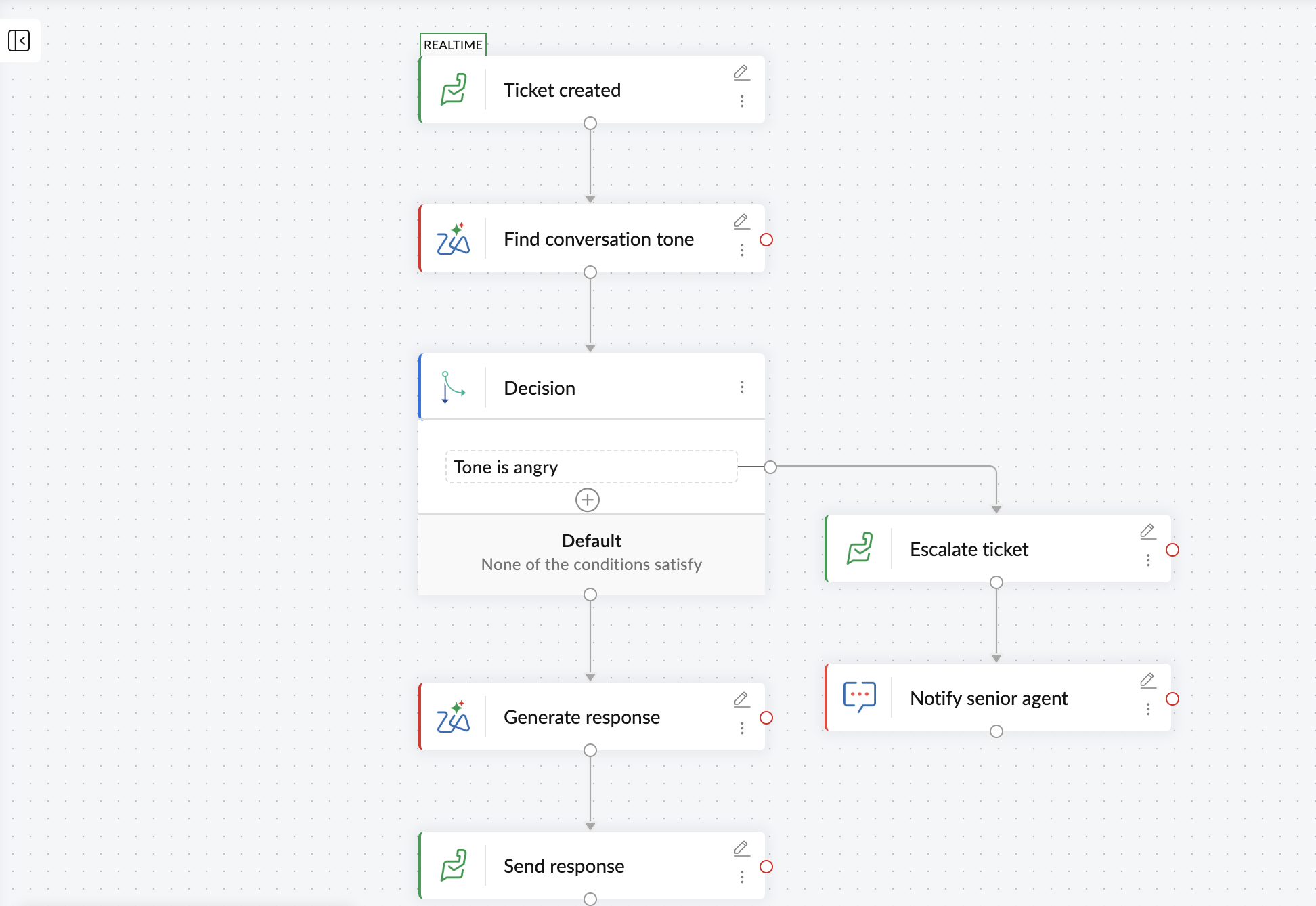
As soon as a customer raises a support ticket, AI will analyze the sentiment of the ticket and direct it to the right person.
Why it matters
Enhanced quality and speed of customer service are the foundation for building a loyal customer base. But to decrease the wait time of customers, assign and manage tickets quickly, and streamline the flow of tickets, you need more than just a help desk application. You need to automate your customer support operations.
How to set it up in Zoho Flow
You can leverage the power of AI to streamline this process. Once you receive a ticket through help desk apps like Zoho Desk or Zendesk, Zia, Zoho's AI assistant, can understand the sentiment of the ticket, route it to senior agents, and notify them instantly on high priority/angry tickets.
Similarly, for neutral or positive tickets, AI can generate a customized response and share it with the customer on its own. This removes manual involvement and enables your workflows to handle situations effectively based on context.
Sync customer data to your analytics platform automatically
How it works
When a contact is created or updated in your CRM, their data is automatically synced to your analytics platform.
Why it matters
Once you convert your leads, it's essential to categorize them based on multiple factors, including their purchases, interests, goals, and behavior. With the analyzed data, you'll be able to create targeted content that aligns with the interests and needs of your customers.
How to set it up in Zoho Flow
You can automate this process by integrating analytics applications like Zoho Analytics or Outreach with Zoho CRM to ensure that all your customer information is consistently in sync.
Add converted leads to email campaigns automatically
How it works
When a lead is marked as a customer in your CRM, they're automatically moved to the relevant list in your email marketing platform.
Why it matters
Emails to welcome new customers or sending newsletters to existing customers are cost-effective ways to engage with your customers—but manually exporting contacts from your CRM into your campaign tool can be time-consuming, which can lead to missing the window for a welcome email sequence for a new customer.
How to set it up in Zoho Flow
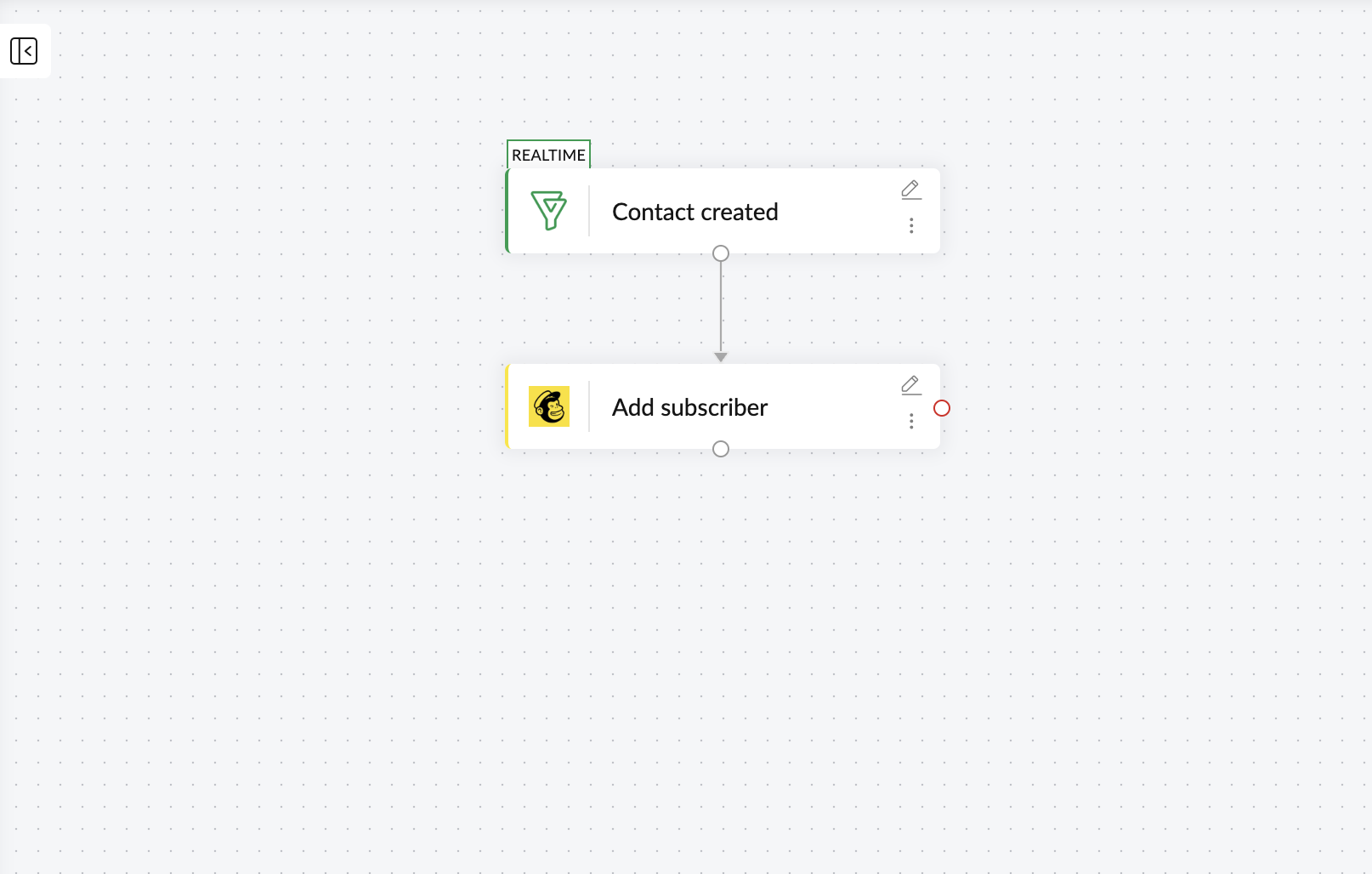
Integrating CRM apps like HubSpot or Bigin with email marketing tools like Mailchimp or Zoho Campaigns will make sure that when a lead is marked as a customer in your CRM, they'll be instantly added to the right email sequence, letting you plan your newsletter or email marketing activities with those customers.
Escalate refunds to offer priority support
How it works
When a refund request is raised, a support ticket is automatically created and assigned to an agent to follow up with the customer.
Why it matters
A refund request left unaddressed or delayed is a strong reason for a customer to leave. But a timely follow-up changes the dynamic. A customer whose refund request is addressed with urgency develops more confidence and loyalty towards your business, which is why requests like these need to be handled with efficiency and speed.
How to set it up in Zoho Flow
You can integrate payment processing platforms like Zoho Checkout or Stripe with Zoho Desk to ensure that when a refund is initiated, a support ticket is created instantly. You can also add an action to send a text notification in Slack to the support team, ensuring that no refund requests go unnoticed.
Real-world example: How Master Liveaboards uses Zoho Flow for customer retention
Master Liveaboards is a diving company based in Thailand that offers diving experiences across some of the world's top diving destinations. As a business built on memorable holiday experiences, customer feedback and post-booking communication are central to how they retain customers.
Before automation
Their feedback process ran entirely on paper. Customers filled out physical forms, and staff manually reviewed responses, created tickets in Zoho Desk, and followed up individually. Collecting, processing, and acting on a single round of feedback involved multiple people, multiple steps, and often took weeks to complete, as their tools were disconnected.
After Zoho Flow
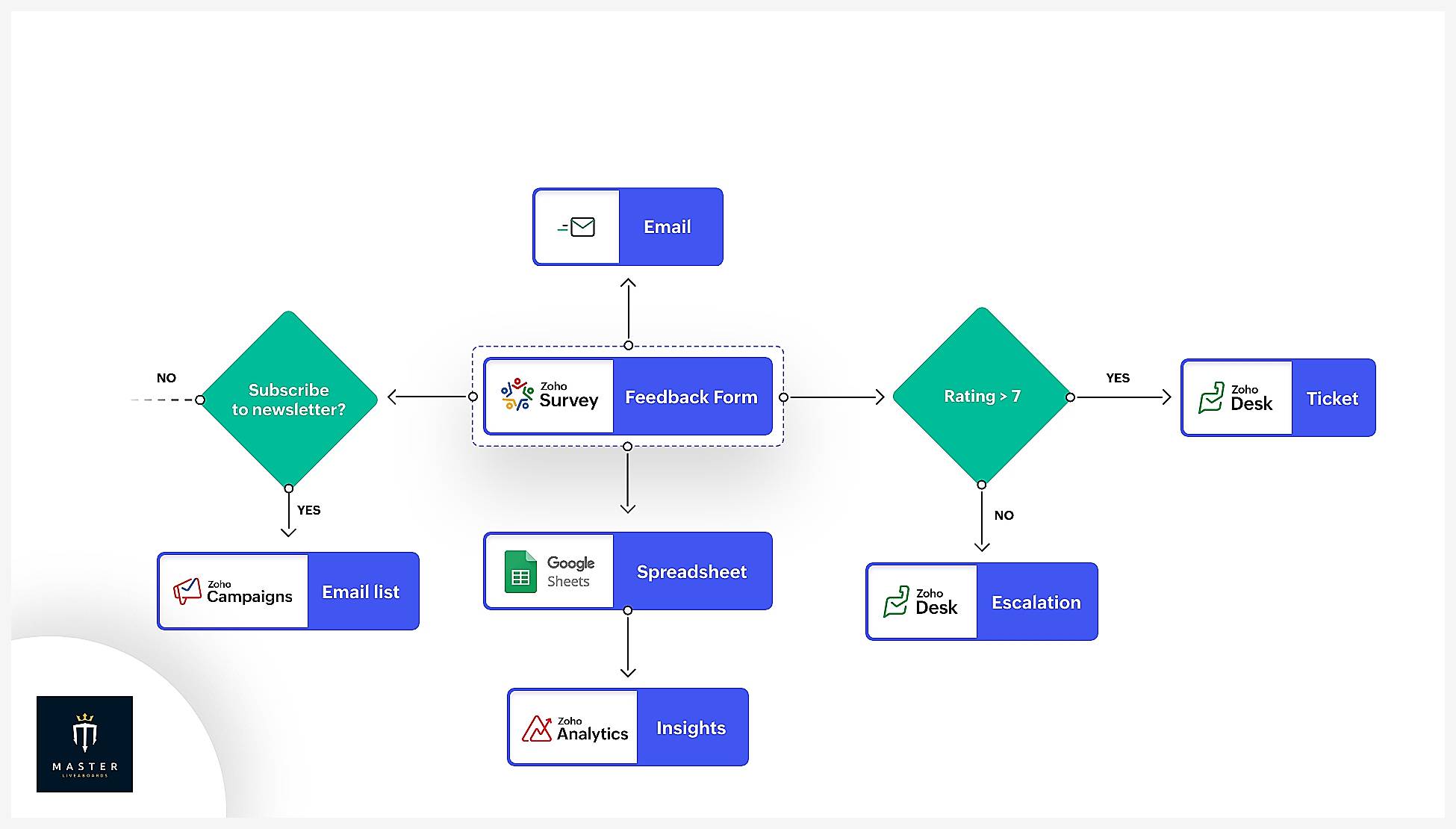
Their feedback workflow now triggers the moment a customer submits a Zoho Survey response. Based on the response on the feedback form, if the rating is more than 7, a support ticket will be created in Zoho Desk, and the team will reach out to the customers for reviews. If the rating is less than 7, an escalation will be created in Zoho Desk for the support team to address the negative feedback instantly.
This whole process happens in a matter of seconds, without any manual intervention. It helps Master Liveaboards understand and get the best out of every customer experience.
"With Zoho Flow, we've transformed our feedback process. Automating the creation of tickets in Zoho Desk based on responses from our feedback forms has significantly improved our customer support." — Toto, Technical Engineer, Master Liveaboards
Automation can bring efficiency into play and reduce the amount of time and effort spent on almost every part of a business—and this is certainly true for customer retention. The workflows above cover the most impactful points in the customer journey: keeping data current, gathering feedback, speeding up support, understanding behavior, staying in touch, and rewarding loyalty.
While these are just a few integration ideas that can be helpful for remarketing and retaining customers, you can check out Zoho Flow's list of apps to browse and build countless integrations that can be useful for your business.
Frequently asked questions
1. What is customer retention automation?
Customer retention automation is the use of software keep existing customers engaged automatically with activities like check-ins, renewal reminders, or win-back offers, discounts, newsletters and more.
2. How can automation improve customer retention?
It catches at-risk customers faster (e.g., flagging low usage or a support complaint), ensures timely follow-ups every time, and frees your team to focus on relationship-building instead of repetitive outreach.
3. What's the difference between manual vs automated retention?
Manual retention relies on someone remembering to check in, spotting warning signs, and sending follow-ups one by one. Automated retention runs these steps instantly and consistently based on triggers like usage drops or renewal dates, at any scale.
4. What tools are used for customer retention automation?
CRMs, email/marketing platforms, customer success software, and integration tools like Zoho Flow that connect these systems and trigger actions like alerts, emails, or task assignments automatically.
5. Can Zoho Flow automate workflows for both B2B and B2C customer retention?
Yes. Zoho Flow connects to CRM, support, and marketing apps regardless of business model, so you can build workflows for renewal reminders, churn alerts, or loyalty triggers suited to either B2B account management or B2C customer engagement.
Related reading:
- Improve customer experience by integrating your marketing and sales teams
- How to automate customer support workflows using Zoho Flow
- How to automate your lead management in Zoho CRM using Zoho Flow
- What is Sales Automation? A complete guide for streamlining your sales using Zoho
This article was originally published in March 2024. It was most recently updated in July 2026.
 Sooraj
Content writer for Zoho Flow. Ardent fan of sports and movies.