ServiceDesk Plus integrations: How to automate requests, changes, and workflows
- Last Updated : April 9, 2026
- 1.2K Views
- 5 Min Read

Summary
- ServiceDesk Plus workflows extend beyond ITSM and require seamless integration with tools like Jira, Slack, Teams, monitoring systems, and CRMs to avoid manual handoffs, missed updates, and slow incident resolutions.
- Zoho Flow lets teams automate common ServiceDesk Plus integrations without code, including Jira ticket sync, chat-based alerts and approvals, monitoring-to-ticket workflows, onboarding, project coordination, and MSP-specific processes.
- With a visual builder and built-in API support, teams can create reliable, end-to-end workflows across cloud and on-prem environments, reducing manual work and improving response times.
ManageEngine ServiceDesk Plus is central to how IT teams handle incidents, problems, changes, assets, and service requests. However, in any organization, your work always requires data movement across a variety of systems and applications. Alerts come in from monitoring systems, requests arrive through chats in Slack or emails, tasks get assigned in Azure or Jira, and customer or deal information lands in CRMs.
To keep your work flowing, it's not enough for your most used applications to talk to each other. You need clearly defined workflows that determine how data moves between tools—across cloud apps, on-prem systems, or a mix of both—each with its own constraints and capabilities.
Building and automating such workflows is now easier than ever with no-code integration platforms like Zoho Flow. This guide walks you through seven practical, real-world ways to automate workflows involving ServiceDesk Plus, Jira, Slack, Teams, SolarWinds, and more.
Forward ServiceDesk Plus requests to Jira
In IT support environments, handling support tickets and managing tasks across multiple projects can become overwhelming. To keep incidents and project work connected, you can automate various everyday workflows, like:
- Create a Jira issue when a request or problem is created in ServiceDesk Plus, with priority, category, requester, attachments, and custom fields mapped automatically
- Update a Jira issue when its ticket status changes
- Sync comments between Jira and ServiceDesk Plus
- Close a ServiceDesk Plus ticket when the linked Jira issue is resolved
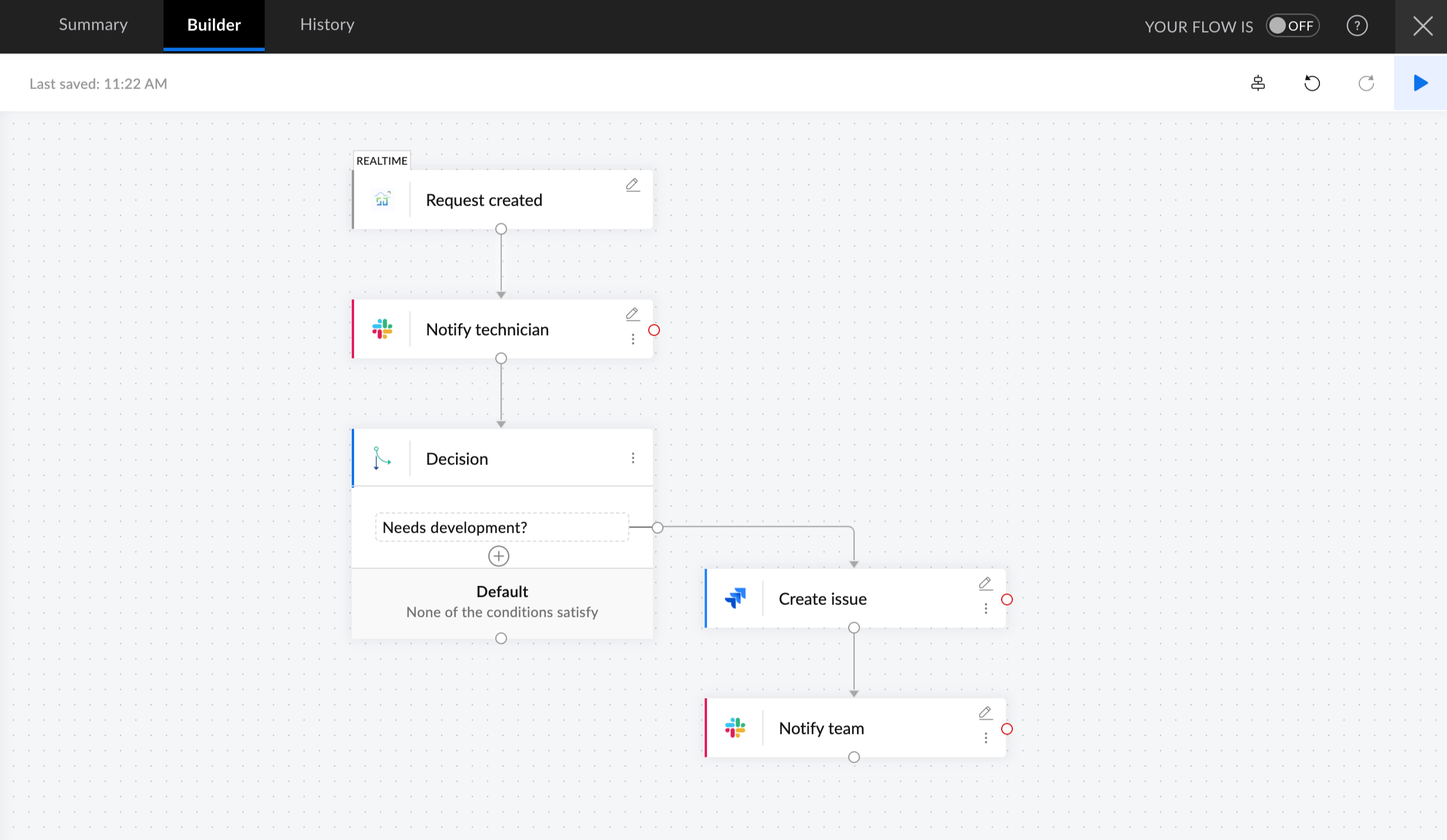
This ensures that support and development teams stay aligned without constant manual follow-ups.
Send updates and escalations to Microsoft Teams or Slack
Most IT teams rely on Microsoft Teams, Zoho Cliq, or Slack throughout the day. Agents often copy and paste ticket details across communication tools, losing time and sometimes missing important updates.
Automating a few frequent tasks here can save hours every week:
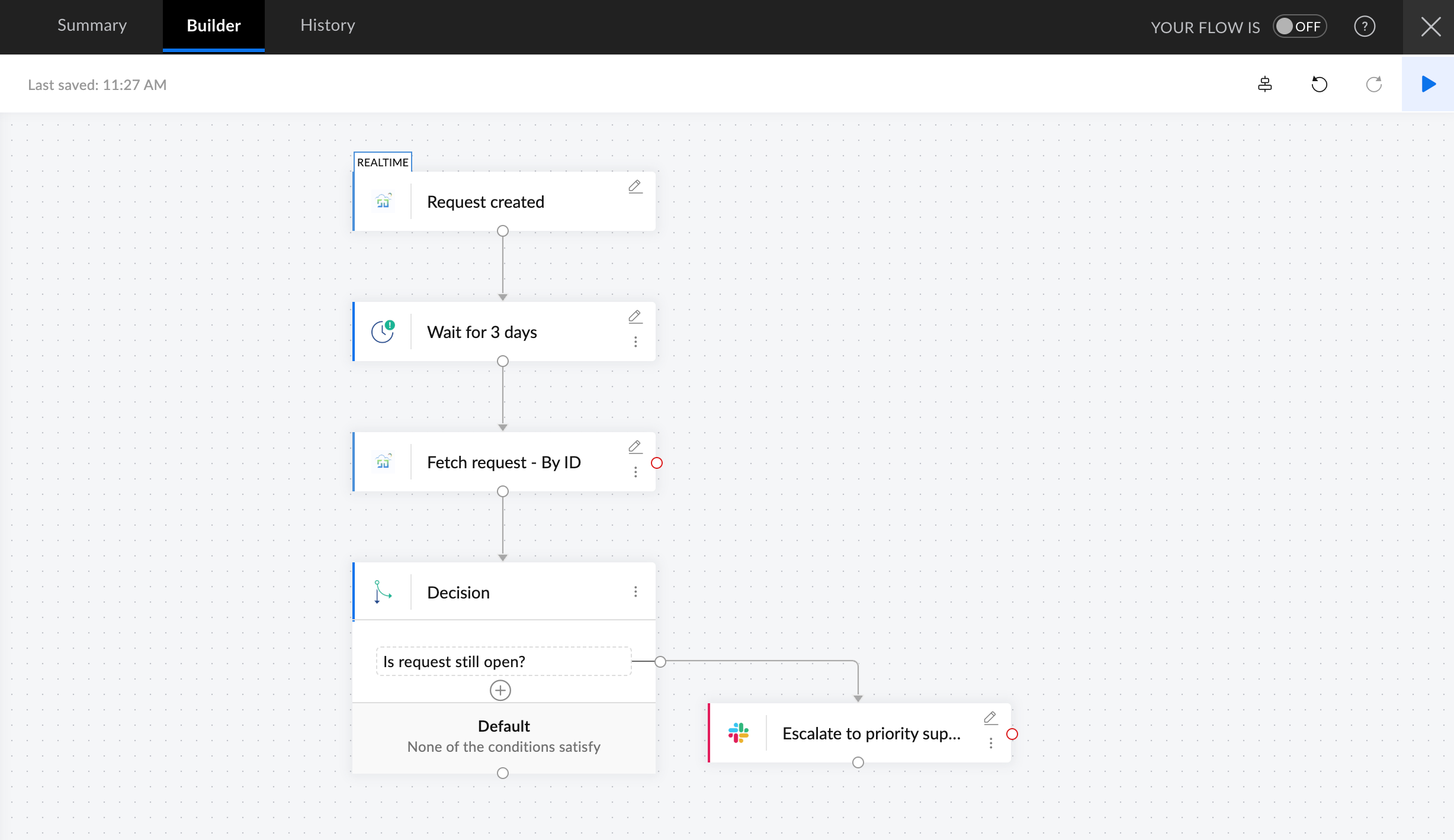
- Send alerts when high priority tickets are created
- Route change request updates to specific teams
- Notify groups when a ticket has been idle for too long
- Share comments and work logs during incident responses
- Trigger approvals directly from chat
Convert monitoring alerts into structured tickets
If your setup includes website or server monitoring tools like Site24x7, UptimeRobot, Opsgenie, SolarWinds, or Datadog, they generate frequent alerts and are often time-sensitive.
With Flow, you can automatically create ServiceDesk Plus tickets from these alerts and automate various follow-up actions:
- Create tickets with severity and category mapped from the alerts
- Assign the correct technician group
- Send Zoho Cliq, Slack, or Teams notifications
- Create parallel Jira or Azure DevOps tasks if development involvement is needed
- Update or close the ticket once the alert is resolved
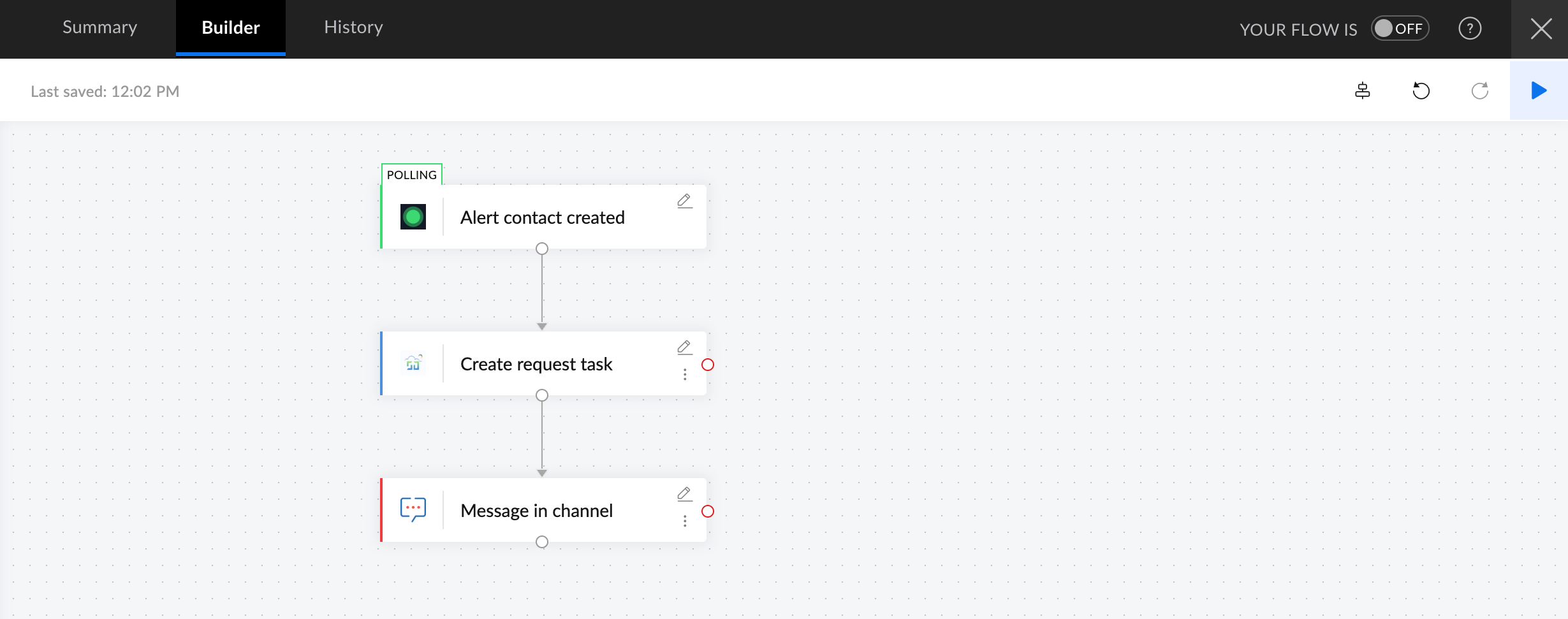
This keeps monitoring signals from getting lost in email inboxes or chat channels.
Automate onboarding and offboarding workflows
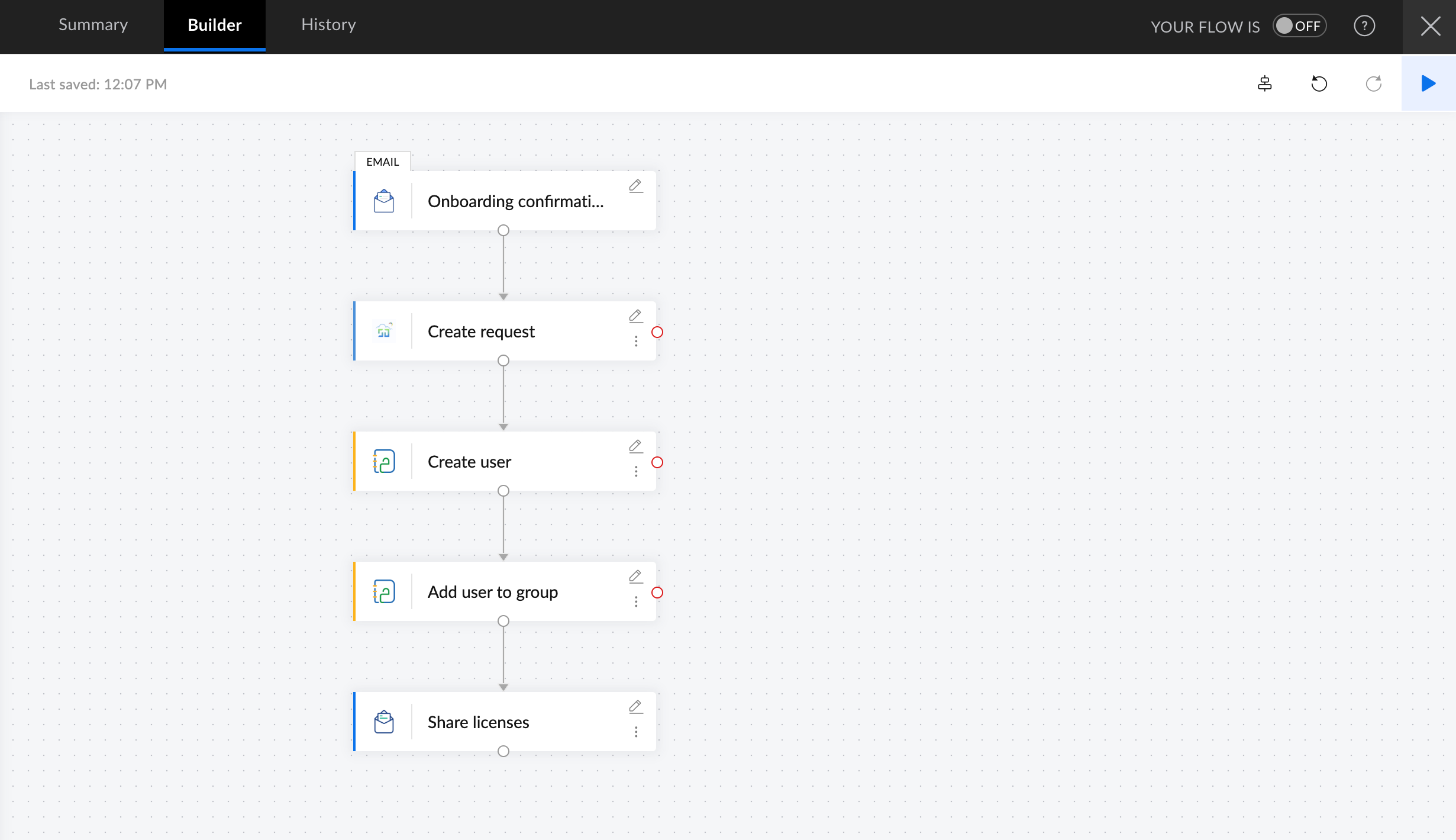
Onboarding involves many steps, such as account creation, license assignment, access provisioning, and asset allocation. Often, this results in back-and-forth emails between managers, IT admins, and department heads.
Automating tasks that don’t require human intervention reduces dependency on IT teams and speeds up onboarding. Here are a few workflows you can automate:
- Trigger workflows from onboarding request templates
- Create accounts in Azure, Entra ID, or Zoho Directory
- Assign licenses in your company's SaaS tools
- Allocate assets and notify system administrators
- Add users to security groups
Sync customer or requester data with CRM systems
Support teams often need context from CRM while handling tickets, especially in environments where internal IT support and customer support systems are separate.
A few workflows that you can automate here are:
- Enriching tickets with CRM data like account tier, owner, or plan
- Notifying CRM owners about major incidents
- Logging ITSM events back into the CRM
- Syncing requester details between systems
This ensures support teams always have the right context when prioritizing and resolving issues.
Connect SDP projects and tasks with project management tools
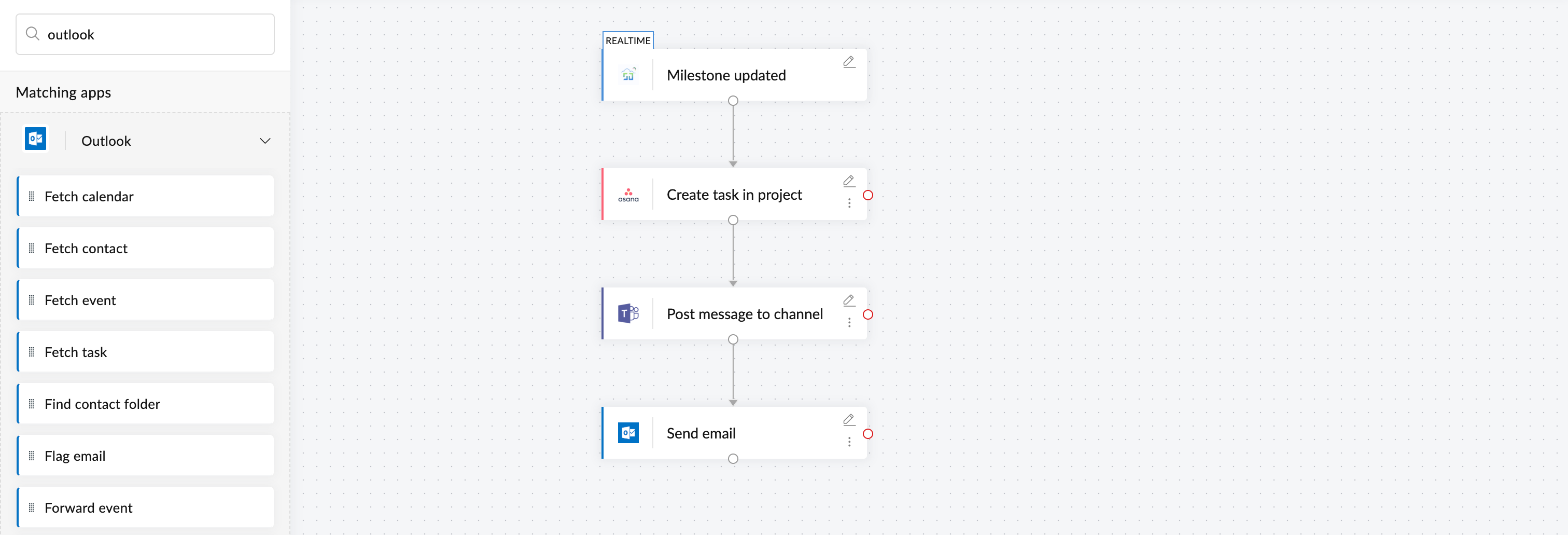
ServiceDesk Plus Cloud includes project tasks, milestones, work logs, and project-level updates. However, some organizations use different project management tools to deal with different types of IT projects. With a few integrations, you can automate:
- Creating project tasks when change requests reach a specific stage
- Syncing SDP work logs with billing or time-tracking tools
- Updating Jira or Zoho Projects when tasks move forward
- Routing milestone updates to Teams or Slack
Build account-specific automation for MSP environments
Managed service providers handle multiple client environments, each with its own workflows and communication needs. Zoho Flow supports MSP-specific triggers and actions, allowing you to:
- Route tickets based on account
- Notify specific client channels on Teams or Slack
- Mirror tickets into a client’s Jira or project tool
- Send automated status updates back to each client separately
How to automate a ServiceDesk Plus workflow: Creating a Jira issue from a ticket
You've already explored numerous workflows you can automate involving a different variety of ecosystems and apps. Now let's look at how to build a workflow in Zoho Flow using a simple example.
Here's a straightforward workflow that automatically creates an issue in Jira when a request with a particular category and priority is created in ServiceDesk Plus:
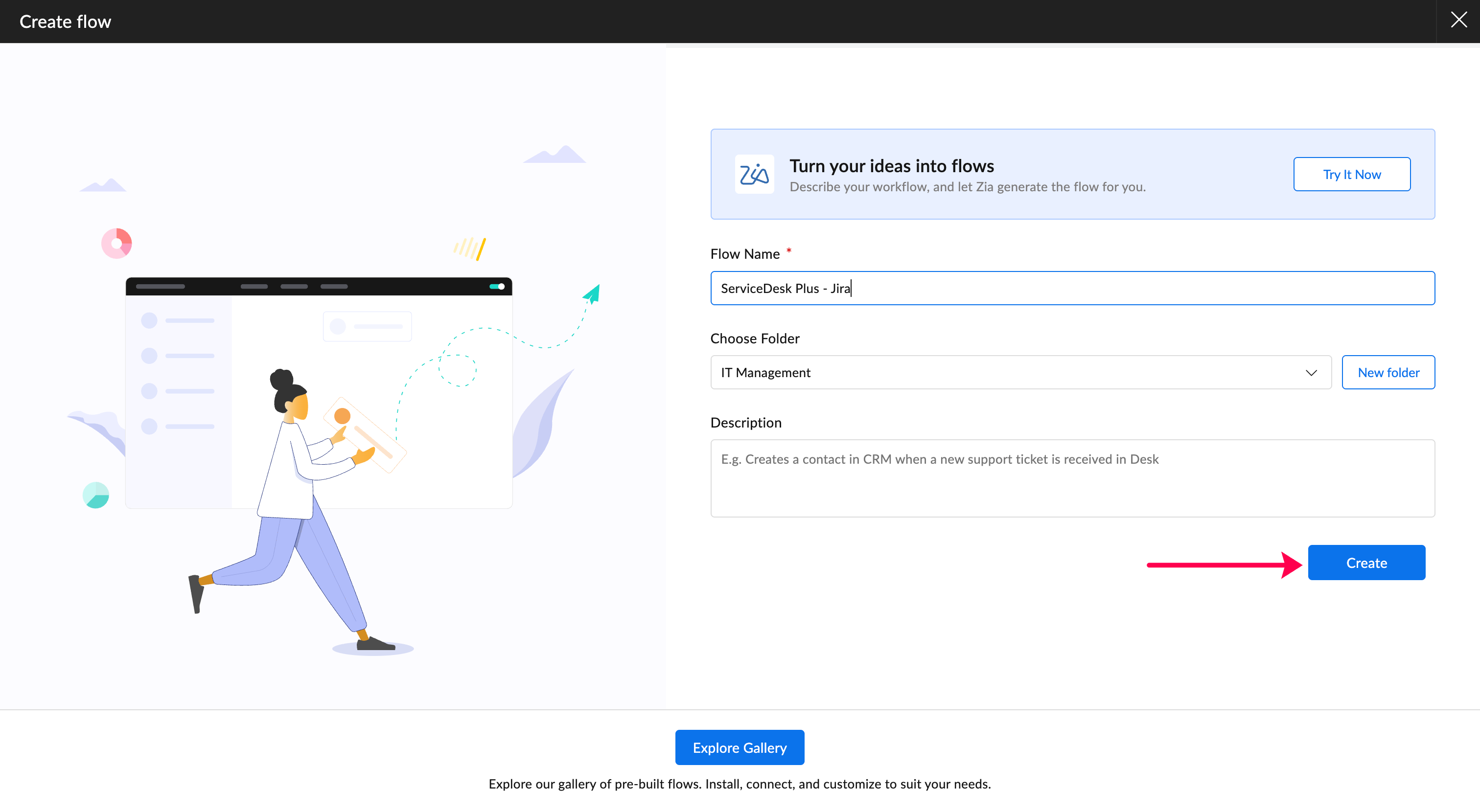
- Log in to Zoho Flow.
- Click Create flow.
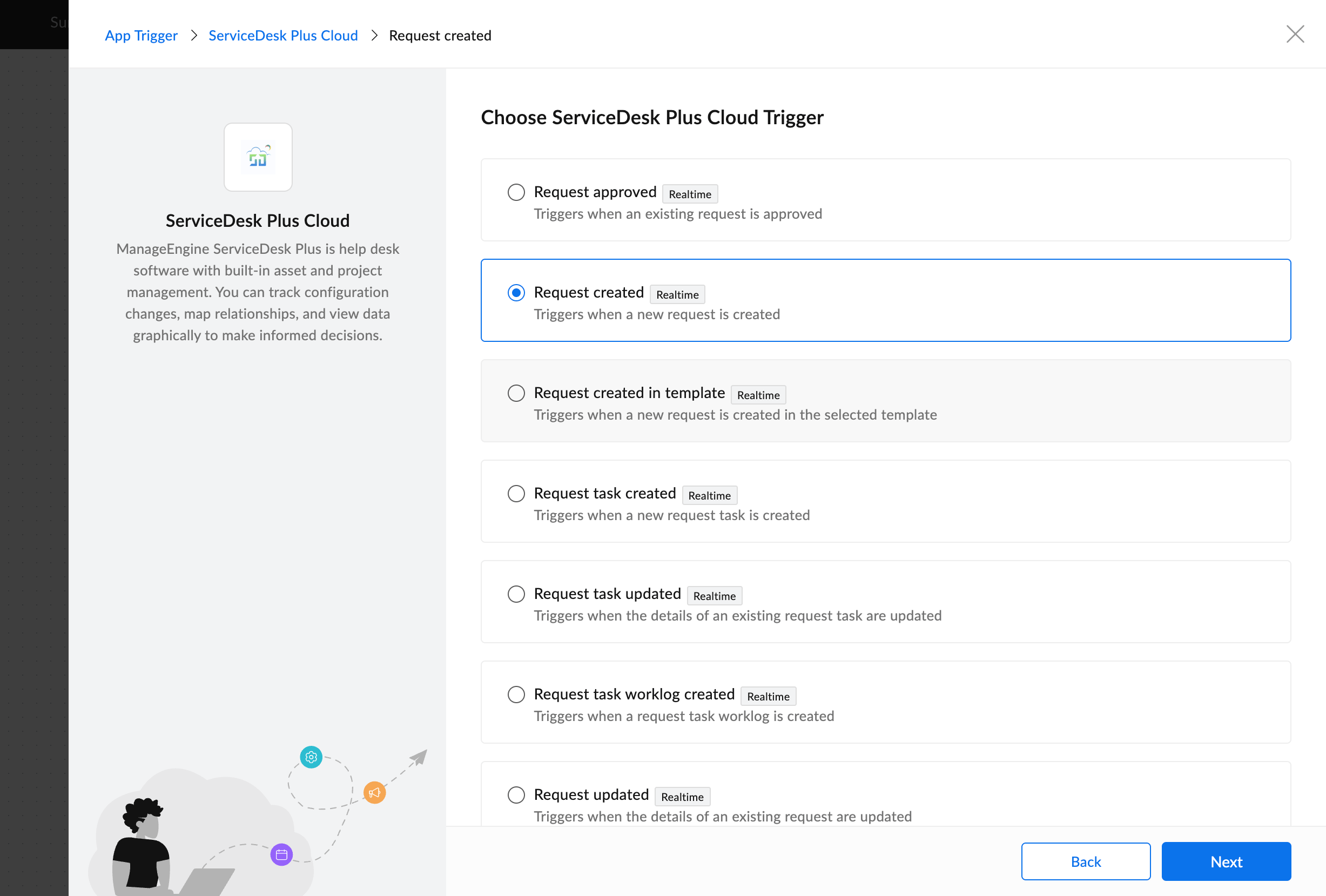
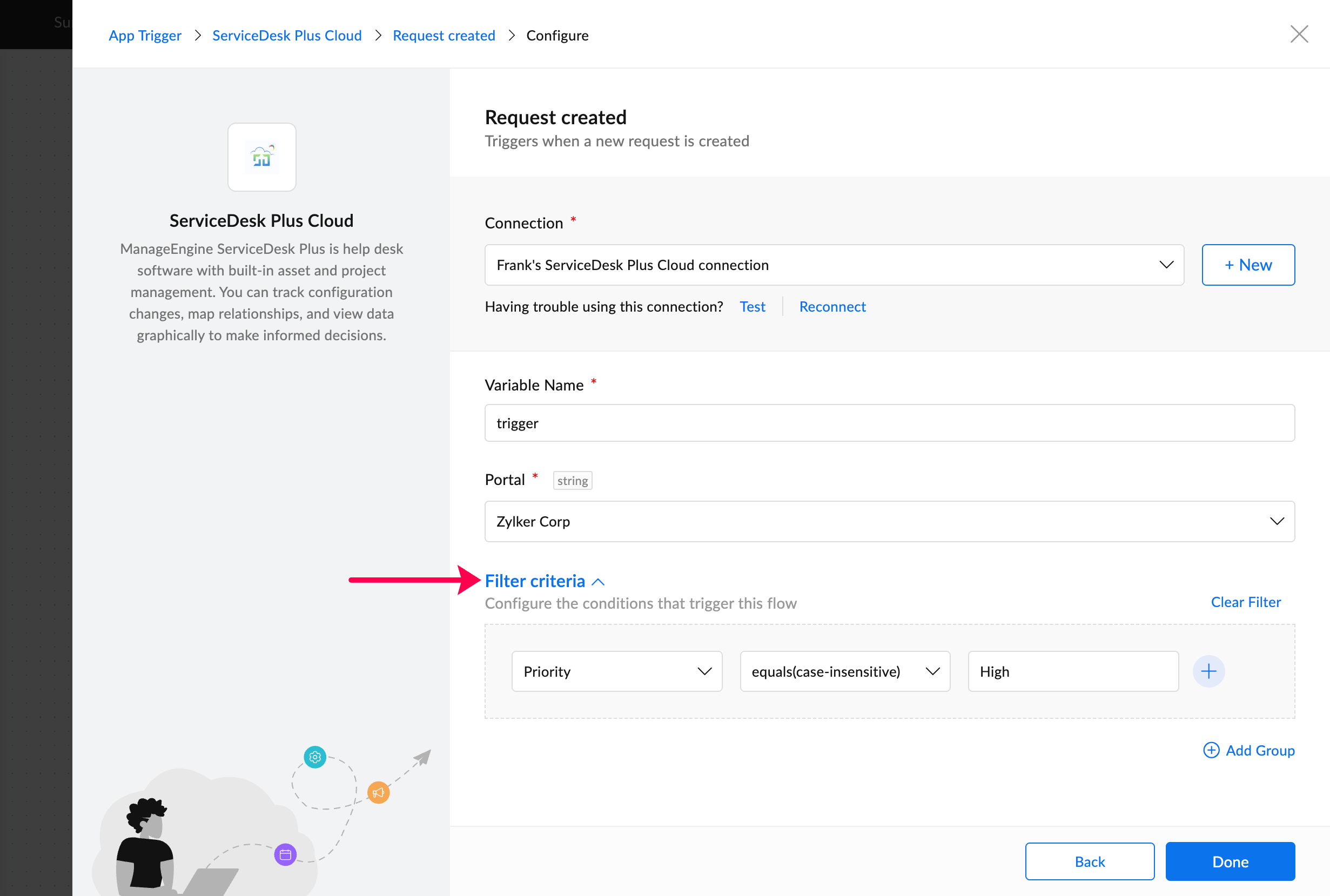
- Choose ServiceDesk Plus Cloud as the trigger app.
- Select Request created as the trigger.
- Add a filter to run only when the category is Software and priority is High.
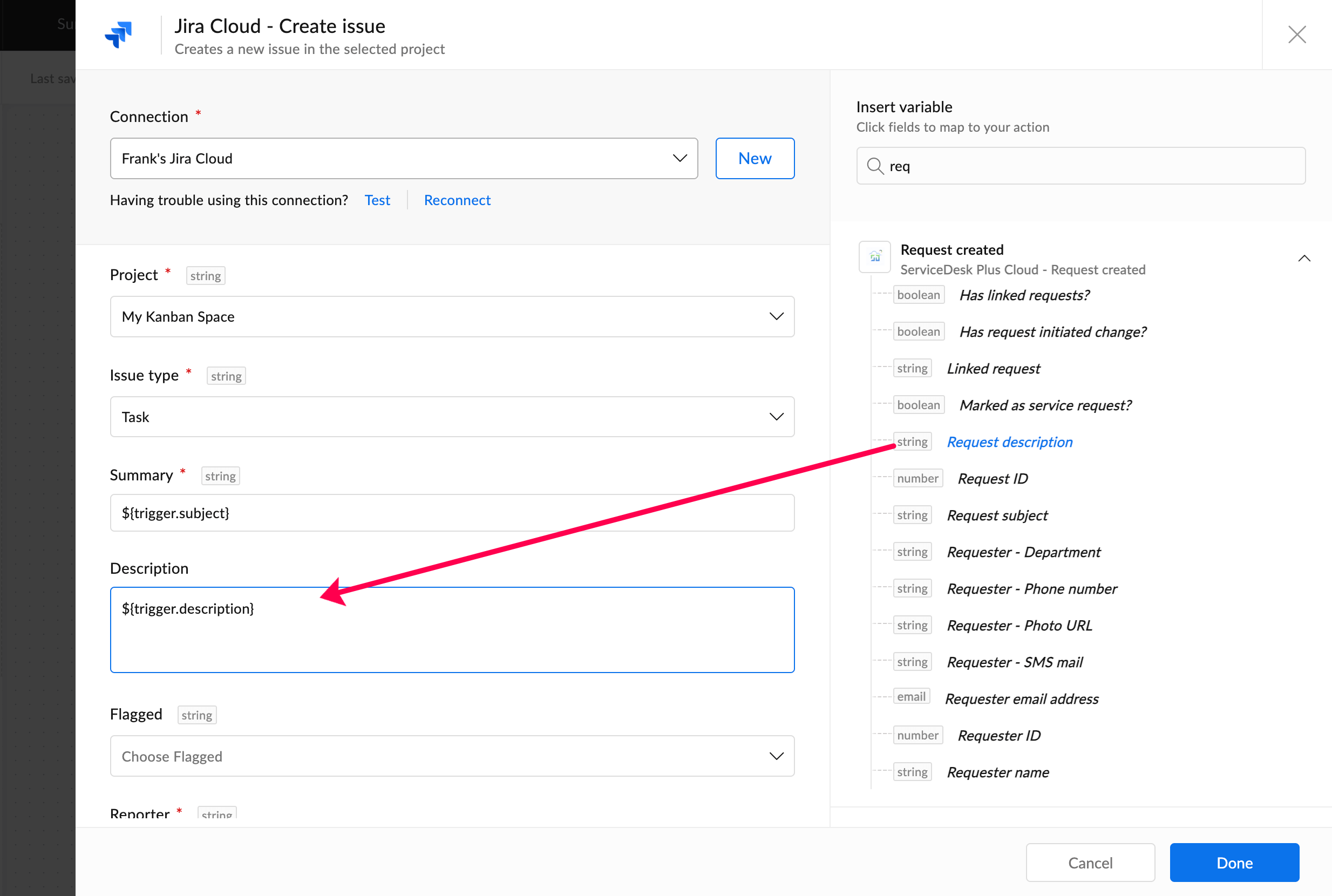
- Now search for "Jira", and drag and drop its Create issue action.
- Map fields such as subject, description, requester, priority, attachments, and due date.
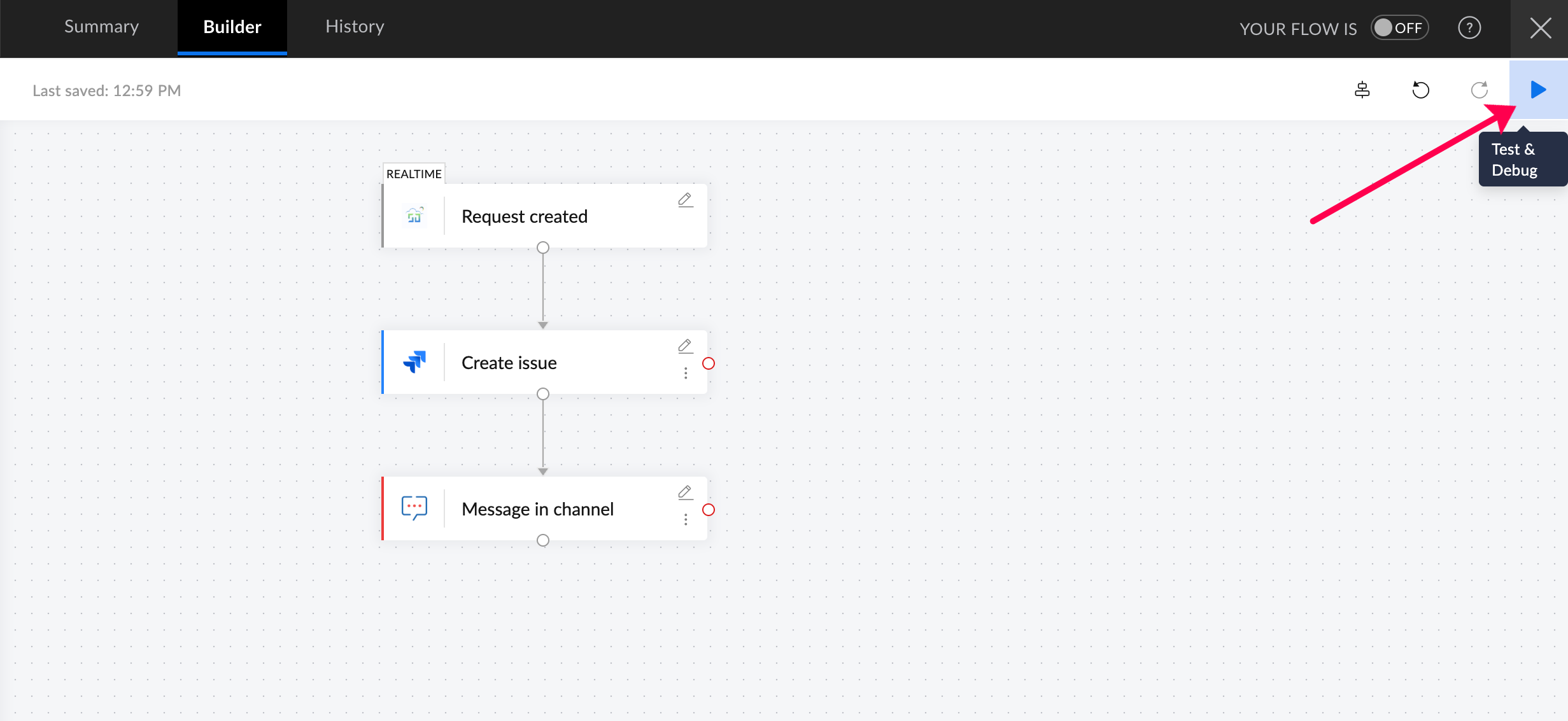
- Optionally add notifications to Teams, Slack, or Zoho Cliq.
- Test the workflow with a sample ticket and switch the flow on.
ServiceDesk Plus is a powerful ITSM platform, but most workflows around it involve coordination across tools, teams, and departments. Zoho Flow simplifies this by providing a no-code way to automate incident handling, monitoring alerts, onboarding workflows, DevOps handoffs, and MSP-specific processes across cloud, on-prem, and hybrid environments.
If you need help setting up custom integrations or workflows, reach out to us at support@zohoflow.com and we’ll be happy to help.
Frequently asked questions
Can Zoho Flow integrate with ServiceDesk Plus on-premises?
Yes. Zoho Flow supports ServiceDesk Plus on-premises integrations and lets you automate ticket, problem, and change workflows.
Does Zoho Flow support ServiceDesk Plus MSP?
Yes. MSP-specific triggers, such as account-based request creation and updates, are supported.
Is it possible to automate end-to-end workflows involving ServiceDesk Plus?
Yes. Whether you’re integrating popular apps or custom systems using webhooks, on-prem connectivity, or APIs, Zoho Flow supports end-to-end automation.
What apps can be connected to ServiceDesk Plus through Zoho Flow?
Common integrations include Jira, Azure DevOps, Teams, Slack, Site24x7, Zoho CRM, Endpoint Central, Active Directory, Entra ID, and Analytics Plus.
Do I need development experience to use Zoho Flow?
No. Zoho Flow provides a visual builder with conditions, field mapping, REST API support, and on-prem connectivity—without the need to write code.
Does Zoho Flow offer a free plan?
Yes. Once your 15-day trial period ends, you'll be automatically moved to the free plan. However, subscribing to a plan ensures that you get to use all of Zoho Flow's apps, capabilities, and task limits aligned to your team's requirements. You can check Flow's pricing here.
Related reading:
 Arjun
ArjunProduct Marketer at Zoho Flow: Passionately curious, with a love for thinking, writing, and exploring creative ways to connect people with science and technology.