8 workflow automation ideas that teams commonly implement
- Last Updated : January 27, 2026
- 786 Views
- 6 Min Read
Workflow automation helps you connect the apps you use and automate tasks between them to streamline operations, reduce errors, and save time. Automating all your operations at once can feel overwhelming—but most teams don't do it that way; they automate similar workflows at different stages as their business scales.
Here are some common workflow automation ideas that teams across many businesses implement at different stages to automate their tasks:
For teams starting out - Eliminate routine manual tasks
1. Collect and manage leads from multiple sources
For many businesses, leads come in from different sources. Without a proper system, your data will be spread across different apps, making it harder to track.
Why automate this process?
Without automation, you have to move data manually from forms, event platforms, or social media apps to your CRM. This can lead to data inconsistencies, delays, and errors.
Automation idea
Automatically capture leads from multiple sources and create or update records in your CRM.
Example:
- Integrate Zoho Forms or Contact Form 7 with Zoho CRM to ensure your leads are streamlined.
- Connect X, EventBrite, and more to your HubSpot account and centralize your leads in real time.
How it helps
Automated lead collection and management ensures every lead is recorded consistently and accurately without manual intervention.
2. Generate and send invoices automatically
Closing deals is as important as generating new leads. Automating your invoicing ensures a smooth and consistent deal closure process and helps you maintain your accounts more effectively.
Why automate this process?
While using an invoicing application can ease managing invoices, you have to create these invoices yourself every time. This is not only repetitive and time-consuming, but error-prone—which isn't ideal for invoices.
Automation idea
Integrate your CRM or appointment scheduling apps with invoicing applications.
Example:
- Integrate Zoho CRM with Zoho Invoice to automate invoices when deals are marked as closed.
- When the status of a paid appointment changes to "completed" in Zoho Bookings, automate invoices to your customers through Zoho Invoice.
How it helps
This automation makes sure that every time a payment is received and every deal is closed, an invoice is sent through without fail. This streamlines the process, improves accuracy, and saves the time involved in manually creating invoices.
For growing teams - Enhanced collaboration
3. Notify teams of important updates
As your team grows, it's important to keep everyone on the same page. Whether it's a new feature launch, an escalation, or an unattended ticket, the team needs to know everything that's happening.
Why automate this process?
Sending manual updates consistently in a channel or a group isn't feasible, as there might be delays or you might even forget. Also, having to check for status changes and updates consistently can affect your productivity.
Automation idea
Connect your project management and help desk applications with messaging apps to automate updates.
Example:
- Integrate Zoho Projects or Asana with Zoho Cliq to send automated notifications in Cliq channels when a new task is created.
- Connect Zoho Desk with Slack to make sure that all new ticket updates are sent through a channel and that support agents can start working on them immediately.
How it helps
This helps keep the whole team in loop and ensures that there's no knowledge gap between teammates and that tasks are completed on time.
4. Automate approvals
Whether you're publishing a document or closing a sale, approvals are a part of almost every business operation. The approval process generally involves a lot of back-and-forth, but automation can help you avoid that.
Why automate this process?
Waiting for approvals from your team lead or manager can delay processes like closing deals, which can directly impact your monthly/yearly deliverables and your revenue.
Automation idea
Integrate approval forms or documents with messaging apps to speed up approvals.
Example:
- Integrate Zoho Forms with Zoho Cliq and get notified immediately when an approval form is submitted.
- Integrate apps like Zoho Writer with Microsoft Teams to send content for review as soon as a document is marked as complete.
How it helps
Having an approval workflow in place means your processes become easier and faster and you've eliminated a lot of the back-and-forth involved in managing your tasks.
Mid-sized teams - Scaling across functions
5. Automate onboarding workflows
As teams scale, so do operations. Processes like onboarding involve multiple steps, like creating email accounts, submitting asset requests, and adding new hires to relevant team channels. With multiple steps in different apps, automation is the most efficient way to do it.
Why automate this process?
Switching between different apps—like an HRMS, asset management, LMS, and others—to onboard every single employee can be tedious and extremely time-consuming. Because your data is siloed, you have to transfer data manually—which is never feasible.
Automation idea
To streamline your onboarding process, connect your HRMS app with different apps, like an asset management tool, an LMS, messaging channels, and more.
Example:
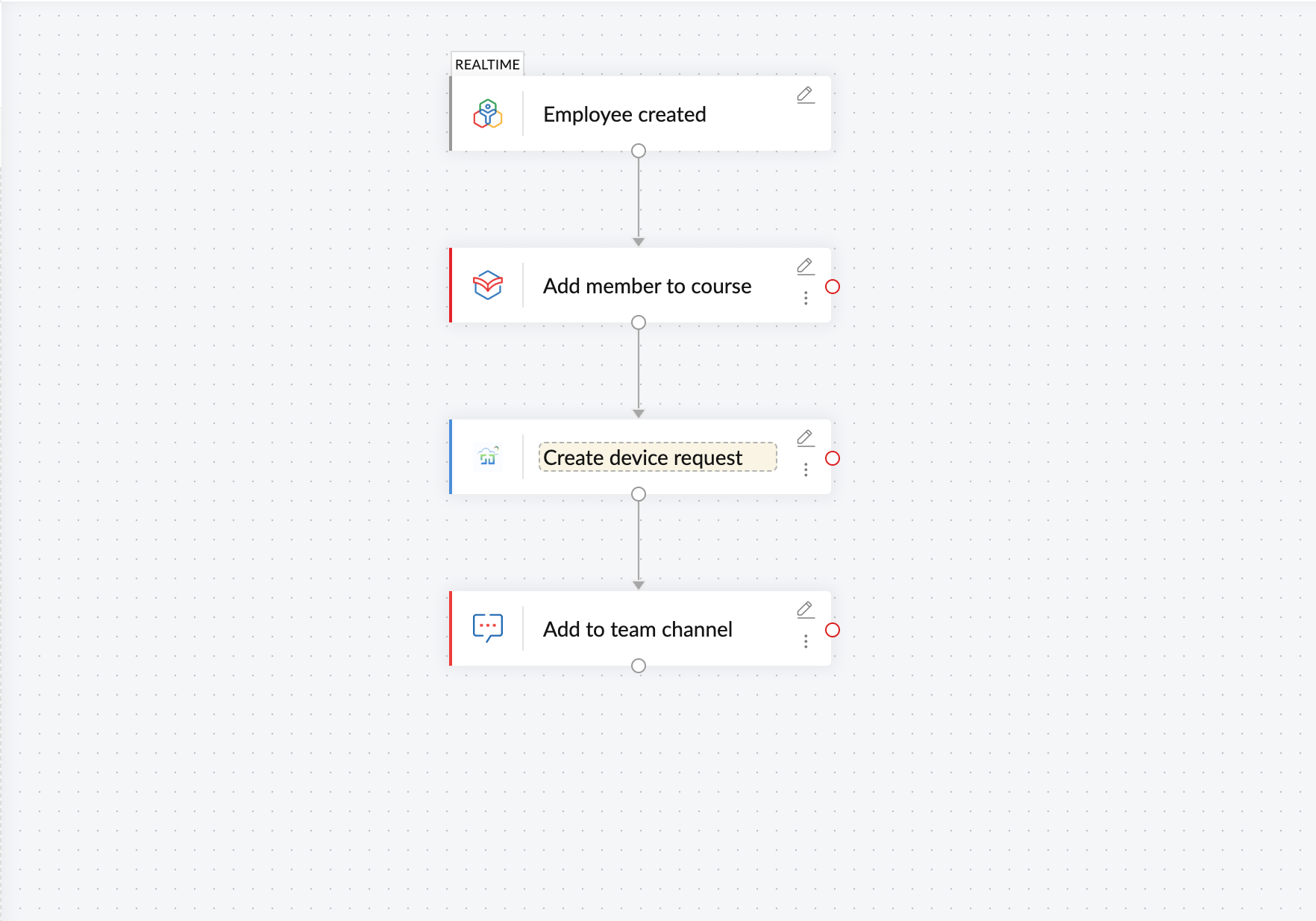
- Build an extensive workflow that connects Zoho People with apps like Service Desk Plus, Zoho Learn, and Zoho Cliq to submit asset requests, enroll users in onboarding courses, and add them to team channels automatically, as soon as they're onboarded.
How it helps
This workflow ensures that whenever a new employee joins your organization, all requests and tasks are initiated automatically.
6. Automatically route and manage support tickets
When you have support tickets flowing in consistently, you have to route them efficiently to your support team as well as to external teams.
Why automate this process?
Customer support requires immediate and consistent attention, as customers don't generally like waiting for responses or facing issues. If your apps aren't connected together, delays within the process are bound to happen, which affects your business's credibility.
Automation idea
Integrate your desk application with messaging apps to keep other support agents notified, and with project management apps to escalate issues instantly.
Example:
- Build multi-step workflows with Zoho Desk and use decision branches to notify teammates through Slack for priority tickets, create issues in GitHub for bugs, and schedule demos in Zoho Bookings upon requests.
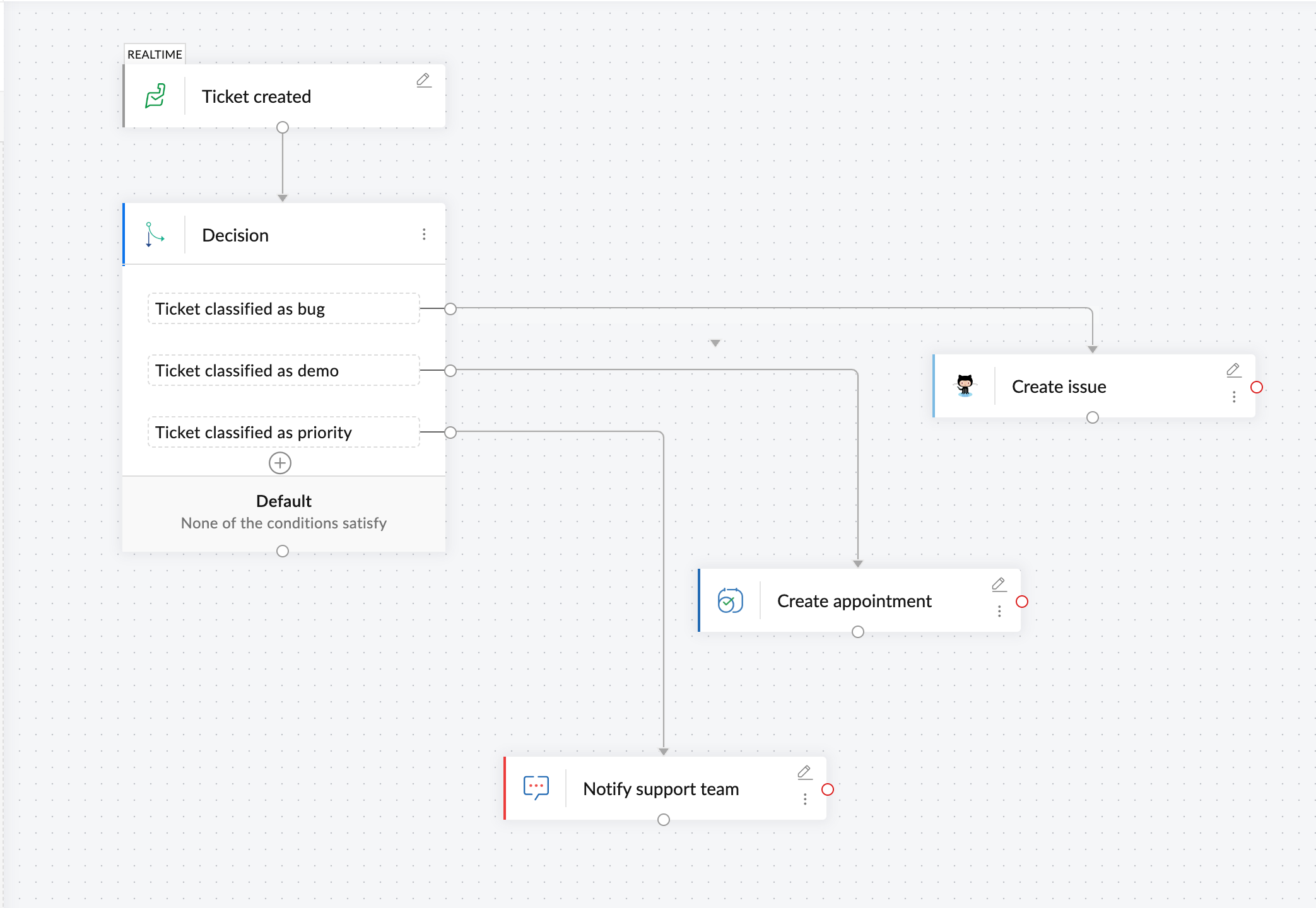
How it helps
With your support tickets routed smartly, you don't have to review all them individually and manually determine how to act on them; your workflow will automatically do that for you.
For mature teams - Efficient operations
7. Keep data consistent across core systems
Your core systems can handle all your data and act as a centralized platform for your organization. When you have such a system, ensuring all your data flows into it seamlessly is crucial to eliminating data loss and streamlining operations.
Why automate this process?
Ensuring data flows across different apps and into your core systems keeps your business running seamlessly. However, doing so using scattered native or custom integrations only leads to more complications and knowledge gaps.
Automation idea
Connect your core data systems and ERP systems with accounting applications, invoicing apps, and shipping request apps to streamline data transfer.
Example:
- Integrate SAP HANA with Zoho Books to move all accounting information to your ERP automatically.
Connect on-premise apps like MySQL with Shiprocket to move shipping requests offline in real-time.
How it helps
These workflows enable you to connect your apps across systems and networks and ensure that reporting, billing, and operations stay on track.
8. Automate project task creation and hand-offs
When you're working on a mature team, workflow automation doesn't just keep your apps connected; it helps automate and streamline critical processes in your organization, like project management.
Why automate this process?
Project management helps your organization keep critical projects in line by automating a plethora of tasks that range from managing employees to assigning work and collaborating. Workflow automation can help you delegate tasks easily, maintain a consistent data flow across the team, gain insights, and keep progress steady.
Automation idea
Integrate your project management apps with a variety of other apps to delegate work, send reminder deadlines, and create reports.
Example:
- Integrate Zoho Projects with Zoho Cliq, Zoho Sprints, Google Calendar, and GoTo Meeting to initiate sprints, reminders, and notifications and schedule meetings when new projects are created.
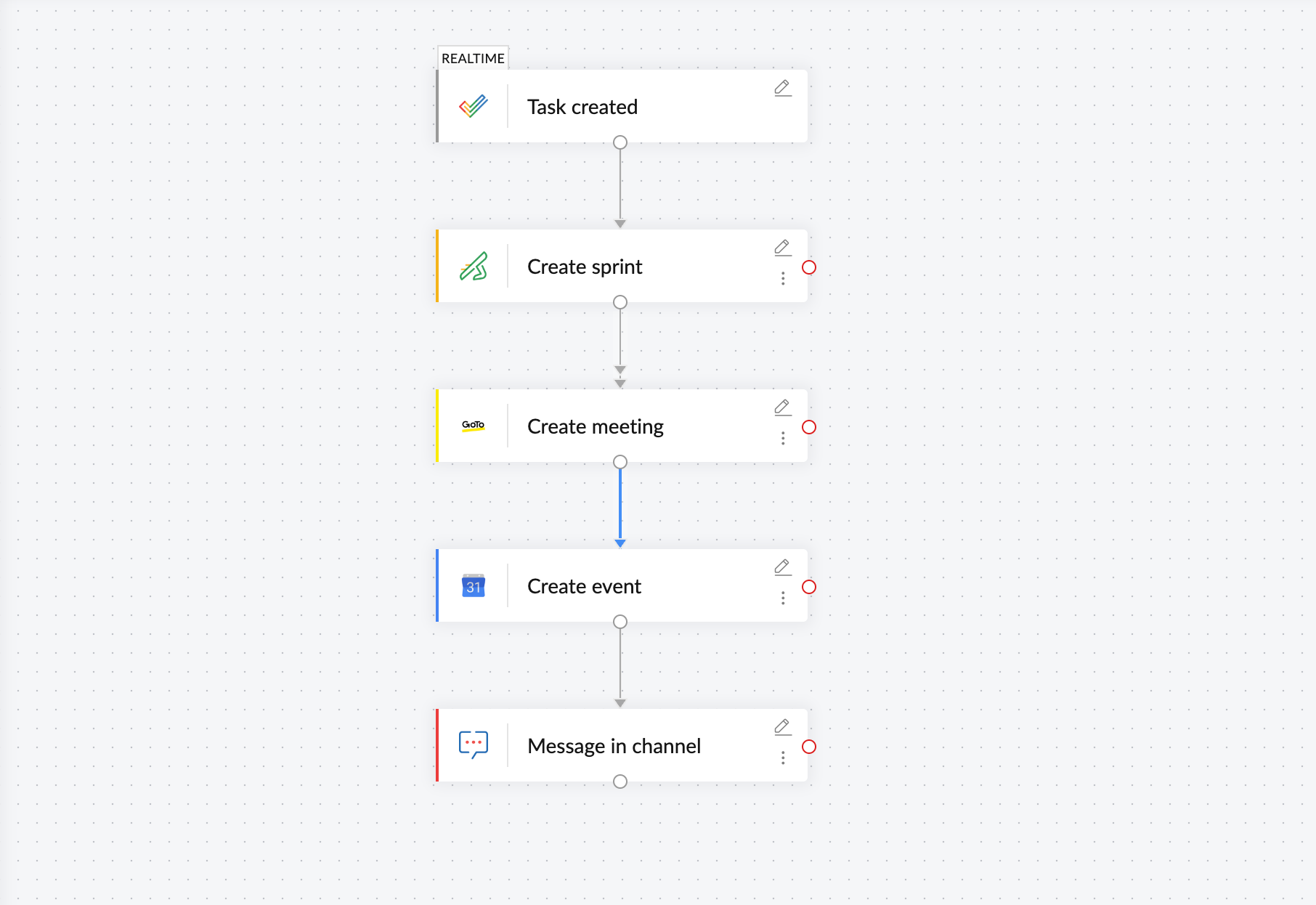
How it helps
Keeping your project management app connected with other crucial applications ensures every project update is communicated across your team and everyone is on the same page.
Workflow automation with Zoho Flow
Zoho Flow enables you to integrate with 1,000+ applications that can help you build workflows simple enough for small teams and complex workflows that serve bigger organizations. With a dynamic drag-and-drop builder and a no-code approach, Zoho Flow makes workflow building easy. It can also act as your central integration platform, where you build and manage all your integrations.
Explore Zoho Flow's free trial and start building your integrations today.
 Sooraj
Content writer for Zoho Flow. Ardent fan of sports and movies.