
How to build your first AI agent without writing code: A practical guide for businesses
- Last Updated : August 20, 2026
- 64 Views
- 7 Min Read

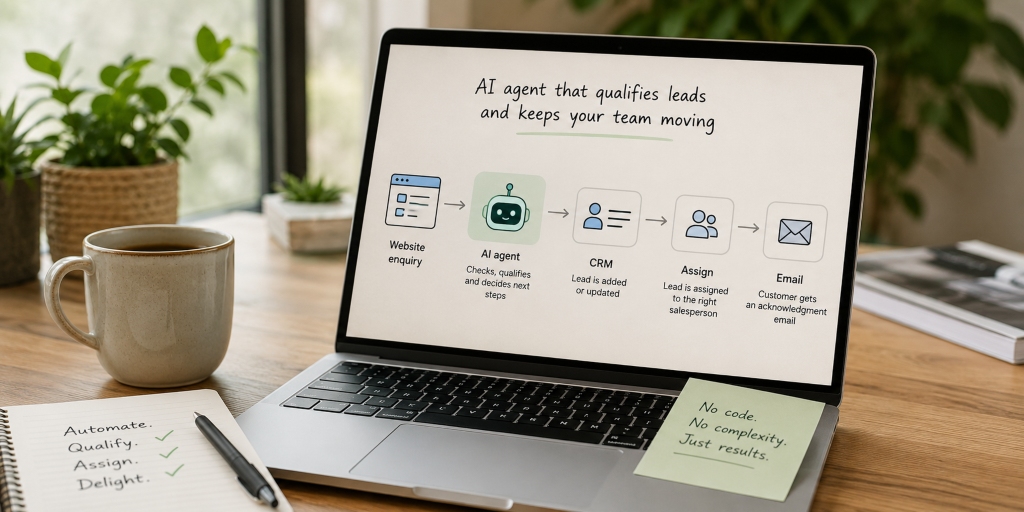
A customer submits an enquiry through your website.
Within seconds, it's checked against your sales criteria, added to your CRM, assigned to the right salesperson and acknowledged with an email. But no one manually reviewed the enquiry or copies information between systems—an AI agent handles the entire process.
This is one of the reasons AI agents have become one of the biggest business technology trends. They're moving beyond answering questions and starting to complete real work.
If you've already read our guides on What is Agentic AI? How AI agents are changing business and AI agents vs chatbots, the next question is obvious.
How do you actually build one?
Modern no-code platforms make building an AI agent much easier than it was even a year ago. But before you open an AI builder, there are a few decisions that will determine whether your agent becomes genuinely useful or simply creates more work.
This guide will walk you through those decisions, using a simple business example along the way.
1. Start with one business problem, not the technology
One of the biggest mistakes businesses make is deciding they need an AI agent before deciding what the agent should actually do.
Instead of asking:
"How can we use AI?"
"How can we use AI?"
Ask:
"Which repetitive task takes up too much of our team's time?"
"Which repetitive task takes up too much of our team's time?"
The best AI agents solve one specific problem well.
For many businesses, that first project could be:
- Qualifying sales enquiries
- Answering common HR questions
- Routing support requests
- Preparing weekly reports
- Collecting onboarding information
- Summarising customer meetings
Throughout this guide, let's imagine we're building an AI agent that qualifies new sales leads from a website.
The existing process requires a salesperson to read every enquiry, check whether it's a good fit, create or update the CRM record, and assign it to the right team member.
It's repetitive, follows a clear process and requires time every day. That makes it a great candidate for an AI agent.
If you're unsure whether a process is suitable, ask yourself:
- Does it happen frequently?
- Does it follow the same general steps each time?
- Are the decisions based on clear rules?
- Can a person review uncertain cases?
If the answer is yes, it's probably worth exploring.
2. Understand the process before you automate it
Once you've chosen a task, take a moment to plan before you start building the agent.
Instead, map out exactly how the work happens.
For the lead qualification example, the process might look something like this:
- A customer submits an enquiry.
- The salesperson checks whether the required information is present.
- They compare the enquiry against the company's qualification criteria.
- They update or create a CRM record.
- They assign the lead to the correct salesperson.
- If information is missing, they follow up before making a decision.
Writing down the process often reveals problems that existed long before AI entered the picture.
Perhaps different salespeople qualify leads differently. Maybe important information is missing from the enquiry form. Or perhaps the CRM contains duplicate records.
An AI agent will simply follow the process it's given. If the process is confusing or inconsistent, the agent will inherit those problems. Before you automate anything, make sure the process itself is worth automating.
3. Decide what your AI agent needs to know
Just like a new employee, an AI agent needs context before it can make good decisions.
Think about the information someone would need if they were performing this task for the first time.
For our lead qualification agent, that might include:
- The products and services your business offers
- The industries you work with
- Sales territories
- Lead qualification rules
- Frequently asked questions
- Escalation procedures
Some of this information comes from documents, such as sales playbooks or internal policies. Other information comes from live business systems like your CRM.
Before adding anything to your AI agent, take the opportunity to review it. Remove outdated documents, archive old versions and make sure there aren't conflicting policies. If your team struggles to find the correct information, your AI agent will struggle too. Clean, accurate information is one of the biggest factors in how well an AI agent performs.
4. Give your AI agent the right tools and instructions
Knowing something is only half the job. Your AI agent also needs permission to take action.
For our lead qualification example, the agent may need access to:
- The website enquiry form
- Your CRM
- Sales territory information
- An internal notification system
Notice what's missing.
It doesn't need permission to delete CRM records, export customer data or change account ownership.
A common mistake is giving an AI agent access to far more systems than it actually needs. Start with the minimum required to complete the task. You can always expand its capabilities later. Just as importantly, your agent needs clear instructions.
Imagine asking a new employee to "qualify new leads". Chances are they'd have several questions before they could begin. The same applies to AI.
Instead of writing:
Review new enquiries and decide whether they're good.
Review new enquiries and decide whether they're good.
Be specific. Tell the agent:
- what information to check
- how to make the decision
- what actions to take
- what actions to avoid
- when to involve a person
For example, you might instruct the agent to qualify only businesses located in Australia or New Zealand, assign leads based on sales territories and escalate any enquiry that doesn't contain enough information. The more clearly you explain the task, the more consistently your AI agent will perform.
5. Build and test your AI agent
Once you've planned the process, gathered the right information and written clear instructions, you're ready to start building.
Most no-code AI platforms follow a similar process. You'll create a new agent, define its role, connect the information it needs, give it access to business tools and test how it responds.
If you're using Zoho's Zia Agent Studio, you can either describe what you want your agent to do in plain language or build it from scratch with more control over its instructions, knowledge, tools and guardrails. Rather than repeating the setup steps here, we'd recommend following the official documentation once you've completed the planning stage.
At this point, our lead qualification agent should understand the qualification rules, have access to the CRM and know exactly when to assign a lead and when to escalate it for human review.
Building the agent is often the quickest part of the project. Testing it properly is where the real work begins.
Don't just test situations where everything goes according to plan.
Instead, think about the kinds of enquiries your team deals with every day.
What happens if someone submits an incomplete enquiry? What if they ask about a product you don't offer? What if they're already an existing customer? What if the CRM is temporarily unavailable?
Testing these scenarios helps you identify gaps in the agent's instructions before it becomes part of your day-to-day operations. A useful way to think about testing is to ask one question:
Would I trust this result if a member of my team had done it?
If the answer is no, keep refining the instructions, knowledge, or permissions until you're confident in the outcome.
6. Start small and improve over time
One of the biggest misconceptions about AI agents is that they need to automate an entire business process from day one.
They don't.
In fact, it's usually better to introduce them gradually. For our lead qualification example, the first version of the agent might simply review enquiries and recommend whether they should be qualified. A salesperson still reviews the recommendation before anything changes in the CRM. Once the team is confident the agent is making good decisions consistently, it could be given permission to update CRM records automatically.
Eventually, it may also assign leads, send acknowledgement emails or trigger follow-up workflows. By expanding its responsibilities over time, you reduce risk while building trust in the system. This approach also makes it much easier to identify what's working and what needs improving. Even after deployment, continue reviewing how the agent performs.
Ask questions like:
- Is it saving the team time?
- Is it making accurate decisions?
- Are people overriding its recommendations?
- Are customers getting faster responses?
- Has the process become simpler?
Like any business process, an AI agent should continue improving as your business changes.
7. Common mistakes to avoid
Building an AI agent without writing code is easier than ever, but that doesn't mean every project succeeds. Here are some of the most common mistakes businesses make.
Trying to automate everything
Your first AI agent doesn't need to manage an entire department. Start with one repetitive process that has a clear outcome. Success with one small project often leads to bigger opportunities later.
Automating a broken process
If your team already follows different methods for completing the same task, an AI agent won't solve the problem. Take the time to simplify and standardise the process before you automate it.
Giving the agent too much access
More permissions don't automatically make an agent more useful. Only connect the systems and actions it genuinely needs. You can always expand its capabilities later.
Using outdated information
AI agents rely on the information they're given. If your documentation is inconsistent or your business data isn't up to date, the quality of the agent's decisions will suffer.
Expecting perfection from day one
Your first version won't be perfect, and that's completely normal. Treat it like any other business improvement project. Test it, learn from it and keep refining it over time.
Your first AI agent doesn't need to be your biggest
Many businesses think their first AI agent has to be impressive. In reality, the most successful projects usually start with something surprisingly simple.
If an agent can save your sales team an hour every day, reduce manual data entry or ensure every customer enquiry is handled consistently, it's already delivering real value. Once you've seen those results, you'll have a much clearer understanding of where AI can help across the rest of the business.
The technology has made building AI agents much easier than it used to be. The challenge is no longer writing code. It's choosing the right problem, designing a clear process and giving the agent the information it needs to succeed. Start with one useful task. Test it thoroughly. Improve it over time. That's how most successful AI adoption begins.