
Configure the Cron Function
Next, we'll begin coding the news application by configuring the cron function component.
If you have initialized the Cron function in Java, its directory, functions/NewsFetch, contains:
- The FetchNews.java main function file
- The catalyst-config.json configuration file
- Java library files in the lib folder
- .classpath and .project dependency files
If you initialized the Cron function in Node.js, its directory, functions/NewsApp, contains:
- The index.js main function file
- The catalyst-config.json configuration file
- Node modules
- package.json and package-lock.json dependency files
We will be adding code in the FetchNews.java or index.js file, based on the stack you initialized.
You can use any IDE to configure the function.
As mentioned in the Introduction, the cron function performs two tasks: making the API calls to the NewsAPI to fetch news, populating the news in Catalyst Data Store. The API calls are made using an API key provided by NewsAPI.
Register with NewsAPI
Before you code the cron function, you must register for a free developer subscription with NewsAPI and obtain the API key in the following way:
- Visit https://newsapi.org/register.
- Provide the required details and click Submit.
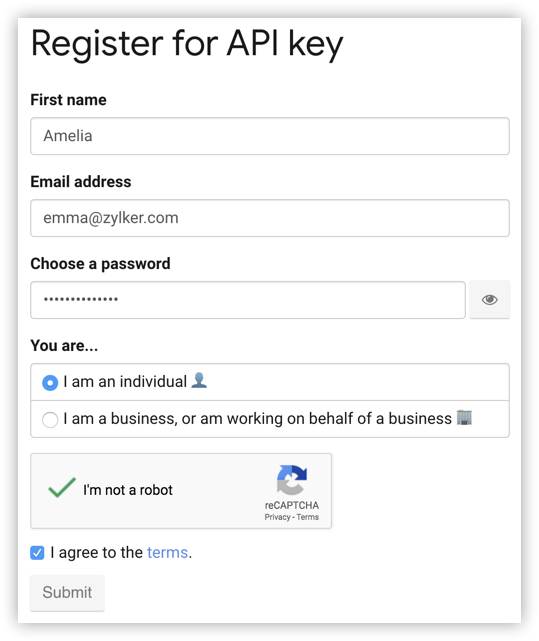
After your registration is complete, NewsAPI will provide you with an API key. You must use this in your cron function, as instructed after the code section.

Add Code
For the Java function, you can copy the code below and paste it in FetchNews.java located in the functions/NewsFetch directory of your project and save the file.
View code for FetchNews.java
Copied
import java.util.ArrayList;
import java.util.List;
import java.util.logging.Level;
import java.util.logging.Logger;

import com.catalyst.Context;
import com.catalyst.cron.CRON_STATUS;
import com.catalyst.cron.CronRequest;
import com.catalyst.cron.CatalystCronHandler;

import com.zc.common.ZCProject;
import com.zc.component.object.ZCObject;
import com.zc.component.object.ZCRowObject;
import com.zc.component.object.ZCTable;
import com.zc.component.zcql.ZCQL;

import org.json.JSONArray;
import org.json.JSONObject;

import okhttp3.HttpUrl;
import okhttp3.OkHttpClient;
import okhttp3.Request;
import okhttp3.Response;

public class FetchNews implements CatalystCronHandler {

	private static final Logger LOGGER = Logger.getLogger(FetchNews.class.getName());
	static String[] TABLENAME = { "HEADLINES", "BUSINESS", "ENTERTAINMENT", "HEALTH", "SCIENCE", "SPORTS",
			"TECHNOLOGY" }; // The names of the tables in the Data Store where the news items need to be stored
	static String COUNTRY = "IN"; // Fetches the news items from India
	static String APIKEY = "Your_API_Key"; // Provide the API key you obtained from NewsAPI inside the quotations

	@Override
	public CRON_STATUS handleCronExecute(CronRequest request, Context arg1) throws Exception {
		try {
			ZCProject.initProject();
			OkHttpClient client = new OkHttpClient();

			// Fetches the breaking news of different categories with their headlines
			for (int i = 0; i < TABLENAME.length; i++) {
				// Builds the URL required to make the API call
				HttpUrl.Builder urlBuilder = HttpUrl.parse("http://newsapi.org/v2/top-headlines").newBuilder();
				urlBuilder.addQueryParameter("country", COUNTRY);
				urlBuilder.addQueryParameter("apiKey", APIKEY);
				if (!TABLENAME[i].equals("HEADLINES")) {
					urlBuilder.addQueryParameter("category", TABLENAME[i]);
				}
				String url = urlBuilder.build().toString();
				Request requests = new Request.Builder().url(url).build();

				// Makes an API call to the News API to fetch the data
				Response response = client.newCall(requests).execute();

				// If the response is 200, the data is moved to the Data Store. If not, the error is logged.
				if (response.code() == 200) {
					JSONObject responseObject = new JSONObject(response.body().string());

					JSONArray responseArray = (JSONArray) responseObject.getJSONArray("articles");
					// This method inserts/updates the news in the Data Store
					pushNewstoDatastore(responseArray, i);
				} else {
					LOGGER.log(Level.SEVERE, "Error fetching data from News API");
				}
//The actions are logged. You can check the logs from Catalyst Logs.
				LOGGER.log(Level.SEVERE, " News Updated");

			}
		} catch (Exception e) {

			LOGGER.log(Level.SEVERE, "Exception in Cron Function", e);
			return CRON_STATUS.FAILURE;
		}
		return CRON_STATUS.SUCCESS;
	}

	private void pushNewstoDatastore(JSONArray responseArray, int length) throws Exception {
		String action = null;
//Defines the ZCQL query that will be used to find out the number of rows in a table
		String query = "select ROWID from " + TABLENAME[length];
		ArrayList<ZCRowObject> rowList = ZCQL.getInstance().executeQuery(query);

		ZCRowObject row = ZCRowObject.getInstance();
		List<ZCRowObject> rows = new ArrayList<>();

		ZCObject object = ZCObject.getInstance();
		ZCTable table = object.getTable(TABLENAME[length]);

		// Inserts the data obtained from the API call into a list
		for (int i = 0; i < 15; i++) {

			JSONObject response = responseArray.getJSONObject(i);

			Object title = response.get("title");
			Object url = response.get("url");
			row.set("title", title);
			row.set("url", url);

			// Obtains the number of rows in the table
			if (rowList.size() > 0) {
				Object RowID = rowList.get(i).get(TABLENAME[length], "ROWID");
				String rowid = RowID.toString();
				Long ID = Long.parseLong(rowid);
//If there are no rows, the data is inserted, else the existing rows are updated
				row.set("ROWID", ID);
				rows.add(row);
				action = "Update";
				table.updateRows(rows);
			} else {
				action = "Insert";
				table.insertRow(row);
			}
		}
//The actions are logged. You can check the logs from Catalyst Logs.
		if (action.equals("Update")) {
			LOGGER.log(Level.SEVERE, TABLENAME[length] + " Table updated with current News");
		} else if (action.equals("Insert")) {
			LOGGER.log(Level.SEVERE, TABLENAME[length] + " Table inserted with current News");
		}
	}
}
Install Packages for Node.js
The Node.js Cron function requires two packages to be installed: express and axios.
express
We will use the Express framework to manage the routing operations that enable us to fetch and delete files.
To install express, navigate to the function's directory (functions/NewsApp) in your terminal and execute the following command:
$ npm install express This will install the Express module and save the dependencies.

axios
axios is a promise-based HTTP client that we will use to fetch data by executing the NewsAPI.
To install axios, navigate to the Node function's directory (functions/NewsApp) and execute the following command:
$ npm install axiosThis will install the module.

Information about these packages will also be updated in the package.json file of the Cron function.
You can now add the code in the function file.
Copy the code below and paste it in index.js located in functions/NewsApp directory and save the file.
View code for index.js
Copied
"use strict";

const catalyst = require("zcatalyst-sdk-node");
const axios = require("axios").default;

const HOST = "https://newsapi.org";
const TABLENAME = [
  "HEADLINES",
  "BUSINESS",
  "ENTERTAINMENT",
  "HEALTH",
  "SCIENCE",
  "SPORTS",
  "TECHNOLOGY",
];
const COUNTRY = "IN";
const APIKEY = "Your_API_Key";
const DATASTORE_LOAD = 5;

const pushNewstoDatastore = async ({ table, rowIds, articles }) => {
  return Promise.all(
    articles.map(async (article, idx) => {
      const payload = {
        title: article.title,
        url: article.url,
      };
      if (rowIds.length === 0) {
        //insert the new row
        return table.insertRow(payload);
      }
      return table.updateRow({ ...payload, ROWID: rowIds[idx] });
    })
  );
};

module.exports = async (_cronDetails, context) => {
  try {
    const catalystApp = catalyst.initialize(context);
    const zcqlAPI = catalystApp.zcql();
    const datastoreAPI = catalystApp.datastore();
    //async fetch news and query table
    const metaArr = await Promise.all(
      TABLENAME.map(async (table) => {
        //construct request path to newsapi
        let url = `${HOST}/v2/top-headlines?country=${COUNTRY}&apiKey=${APIKEY}`;
        if (table !== TABLENAME[0]) {
 		url += "&category=" + table;
        }
        const response = await axios({
 		method: "GET",
 		url
 	  });
 	let data = response.data;

        //query using zcql to check if row exists
        const queryResult = await zcqlAPI.executeZCQLQuery(
          `SELECT ROWID FROM ${table}`
        );
        return {
          table_name: table,
          table: datastoreAPI.table(table),
          zcql_response: queryResult,
          articles: data.articles.splice(0, 15),
        };
      })
    );
    //sync insert/update to datastore
    for (const meta of metaArr) {
      let rowIds = [];
      while (meta.articles.length > 0) {
        const chunk = meta.articles.splice(0, DATASTORE_LOAD);
        if (meta.zcql_response.length > 0) {
          rowIds = meta.zcql_response
            .splice(0, DATASTORE_LOAD)
            .map((row) => row[meta.table_name].ROWID);
        }
        await pushNewstoDatastore({ ...meta, articles: chunk, rowIds });
      }
      console.log(
        `${meta.table} table ${
          rowIds.length === 0 ? "inserted" : "updated"
        } with current news'`
      );
    }
    context.closeWithSuccess();
  } catch (err) {
    console.log(err);
    context.closeWithFailure();
  }
};
The Cron function is now configured. We will discuss the application's architecture after you configure the client.