Zoho Sheet's offline support expands to iOS

If the phrase "offline support expands to iOS" in this blog title intrigued you, we'd like you to know that we've been working in full swing to bring offline functionality across platforms, and iOS is the latest addition to the list.
In response to the varied needs, constructive feedback, and continued trust we've received from users like you, we're transitioning from a pure cloud-based spreadsheet app to a cloud-based spreadsheet app that also works natively on platforms like Windows, macOS, Android, and iOS both online and offline.
This post covers the highlights of iOS offline support, the transition story, and more. Let's dive in.
First things first
Before we discuss the highlights of Zoho Sheet offline for iOS, here's our current offline-support matrix:
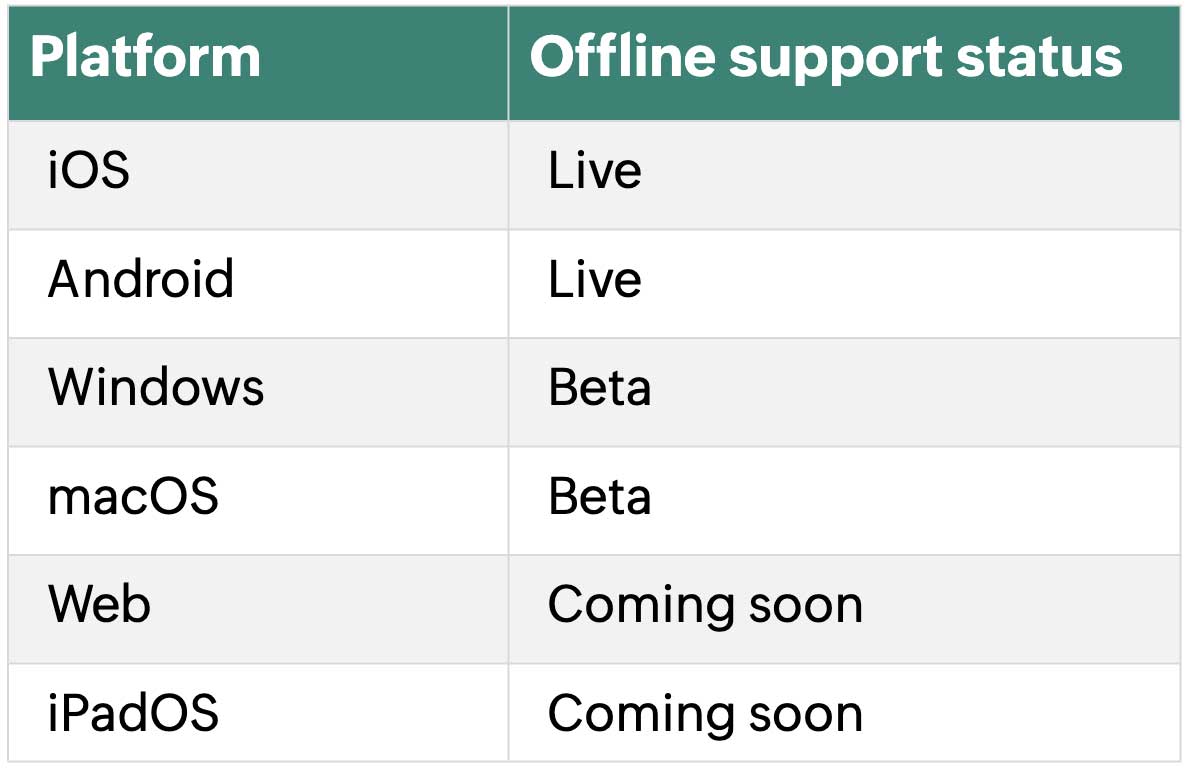
Note: iOS refers to iPhone; iPadOS refers to iPad
What does this iOS offline update offer?
1. Smooth offline experience—from creating and editing your spreadsheets to analyzing and crunching data.
2. Convenience to use the app offline without signing up.
3. Flexibility to import xlsx, .csv, .tsv, and txt files from your devices, edit, save them in Zoho Sheet, or save them back to your devices in the intended format.
4. Access to the key features you use online, ensuring a smoother balance between online and offline work.
Some of the key features include:
Data validation
Data from picture
Fill series
Sort and filter
400+ functions and formulas
Conditional formatting
Charts
Recommended charts
Download or update the app from the App Store.
The transition story
Zoho Sheet was born out of a simple yet powerful conviction: collaboration had to change.
The old way—attaching a spreadsheet to an email, sending it across, getting it back, and manually collating different versions—was broken. We wanted teams to have a single spreadsheet at a single URL, where everyone could work together in real time. That idea has been central to Zoho Sheet ever since we launched in 2006.
But as adoption grew, larger organizations started bringing Sheet into their workflows, and with that came a different kind of demand. Spreadsheets, by their nature, are deeply calculation-and-analysis-intensive applications. When a large number of users simultaneously run complex operations through a shared cloud server, the load has a predictable effect.
Think of it this way: the cloud is a large dining hall, and the server is the kitchen. When everyone orders a complex, five-course meal at the same time, the kitchen gets overwhelmed. Internet latency compounds the problem.
Shared infrastructure, no matter how well-managed, cannot deliver the instant responsiveness that power users—especially those in large organizations—have come to expect.
That realization pushed us toward a decision that would reshape what Zoho Sheet is: we started building fully native desktop applications.
Going native wasn't just a technical call. It was a commitment to a different quality of experience: one with a clean interface, local computation, and performance that doesn't depend on your connection. To make that work consistently across platforms, we adopted a shared codebase for the core engine, ensuring that behavior, rendering, and calculation accuracy stay uniform whether you're on Windows or macOS, online or off.
And once that foundation was in place, extending it further felt like the natural next step. Android came first. Now iOS is live. The same principle that drove the desktop decision—that you shouldn't have to be online to do your best spreadsheet work—is now in your pocket.
Final words
Give Zoho Sheet offline for iPhone a try and share your feedback with us at ios-support@zohosheet.com or as a review in the App Store. It'll help us improve the app for all users.
Feel free to try the offline functionality on other platforms as well. We'll meet you here next time with another update.

Comments